homelink HONDA CRV 2022 Owners Manual
[x] Cancel search | Manufacturer: HONDA, Model Year: 2022, Model line: CRV, Model: HONDA CRV 2022Pages: 692, PDF Size: 22.05 MB
Page 6 of 692
Contents
This owner’s manual should be considered a permanent part of the
vehicle and should remain with the vehicle when it is sold.
The Navigation Manual is available online at owners.honda.com. If
you are the first registered owner of your vehicle, you may
request a complimentary printed copy of the Navigation
Manual within the first six months of vehicle purchase. To
request a copy, visit owners.honda.com.
This owner’s manual covers all models of your vehicle. You may find
descriptions of equipment and features that are not on your
particular model.
Images throughout this owner’s ma nual (including the front cover)
represent features and equipment that are available on some, but
not all, models. Your particular mo del may not have some of these
features.
This owner’s manual is for vehicles sold in the United States.
The information and specifications in cluded in this publication were
in effect at the time of approval for printing. Honda Motor Co., Ltd.
reserves the right, however, to discontinue or change specifications
or design at any time without notice and without incurring any
obligation.2 Safe Driving P. 41
For Safe Driving P. 42 Seat Belts P. 47 Airbags P. 56
2Instrument Panel P. 89
Indicators P. 90 Gauges and Driver Information Interface P. 126
2Controls P. 149
Clock P. 150 Locking and Unlocking the Doors P. 152
Moonroof* P. 185
Seats P. 208 Interior Convenience Items P. 218
2 Features P. 243
Audio System P. 244 Audio System Basic Operation P. 251, 272
Customized Features P. 362, 369 HomeLink ® Universal Transceiver* P. 395
2 Driving P. 459
Before Driving P. 460 Towing a Trailer P. 465Parking Your Vehicle P. 559 Multi-View Rear Camera P. 570
2Maintenance P. 577
Before Performing Maintenance P. 578 Maintenance MinderTM P. 581
Checking and Maintaining Wiper Blades P. 601
Climate Control System Maintenance P. 618
2Handling the Unexpected P. 627
Tools P. 628 If a Tire Goes Flat P. 629
Overheating P. 649 Indicator, Coming On/Blinking P. 652
If You Cannot Open the Tailgate P. 664
2Information P. 667
Specifications P. 668 Identification Numbers P. 670
Emissions Testing P. 673 Warranty Coverages P. 675
22 CR-V HEV ELP-31TPG6200.book 4 ページ 2021年6月30日 水曜日 午前11時6分
Page 245 of 692
243
Features
This chapter describes how to operate technology features.
Audio SystemAbout Your Audio System ................ 244
USB Port(s) ....................................... 245
Audio System Theft Protection ......... 247
Audio Remote Controls .................... 248
Audio System Basic Operation Audio/Information Screen ................ 252
Adjusting the Sound ........................ 256
Display Setup ................................... 257
Playing AM/FM Radio ....................... 258
Playing an iPod ................................ 260
Playing Pandora ®.............................. 263
Playing a USB Flash Drive ................. 265
Models with color audio system
Playing Bluetooth ® Audio................. 268
Siri ® Eyes Free .................................. 271
Audio System Basic Operation Audio/Information Screen ................ 273
Adjusting the Sound ........................ 294
Display Setup ................................... 295
Voice Control Operation .................. 297
Playing AM/FM Radio ....................... 301
Playing SiriusXM ® Radio ................... 305
Playing an iPod ................................ 312
Song By Voice
TM (SBV) ...................... 315
Playing Pandora ®............................. 319
Playing a USB Flash Drive ................. 321
Models with Display Audio
Playing Bluetooth ® Audio ................ 324
HondaLink ®..................................... 326
Wi-Fi Connection ............................. 331
Siri ® Eyes Free .................................. 332
Apple CarPlay
TM............................... 333
Android AutoTM............................... 336
Audio Error Messages ...................... 340
General Information on the Audio System ............................................. 345
Customized Features ................ 362, 369
HomeLink ® Universal Transceiver
*.. 395
Bluetooth® HandsFreeLink® ..... 398, 422
Compass
*.......................................... 456
* Not available on all models
22 CR-V HEV ELP-31TPG6200.book 243 ページ 2021年6月30日 水曜日 午前11時6分
Page 397 of 692
395
Features
HomeLink® Universal Transceiver*
The HomeLink ® Universal Transceiver can be pr ogrammed to operate up to three
remote controlled devices around your hom e, such as garage doors, lighting, or
home security systems.
Refer to the safety information that came wi th your garage door opener to test that
the safety features are functioning prope rly. If you do not have the safety
information, contact the manufacturer.
Before programming HomeLink, make sure th at people and objects are out of the
way of the garage or gate to prevent potential injury or damage.
When programming a garage door opener, pa rk just outside the garage door’s path.
■Important Safety Precautions
1HomeLink ® Universal Transceiver*
Before programming HomeLi nk to operate a garage
door opener, confirm that the opener has an external
entrapment protection system , such as an “electronic
eye,” or other safety and reverse stop features. If it
does not, HomeLink may not be able to operate it.
NOTE:
Some LED lightbulbs instal led in the garage door
opener can interfere with th e training and consistent
operation of your HomeLink device. Please consider
use of Low RF interference bulbs in your garage door
opener.
* Not available on all models
22 CR-V HEV ELP-31TPG6200.book 395 ページ 2021年6月30日 水曜日 午前11時6分
Page 398 of 692
396
uuHomeLink ® Universal Transceiver*u Training HomeLink
Features
Training HomeLink
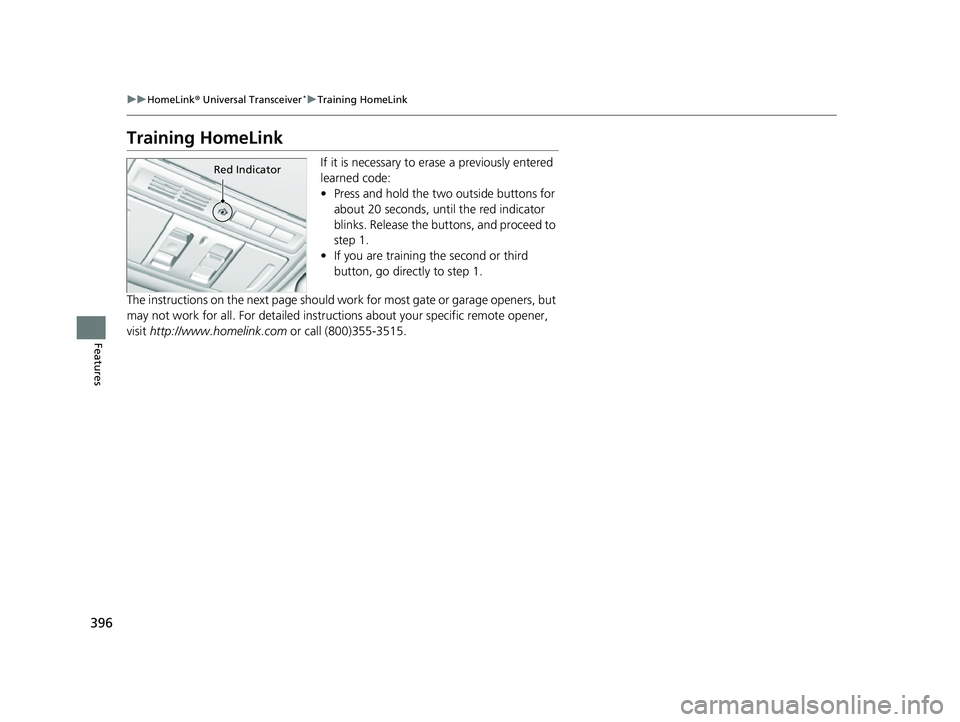
If it is necessary to erase a previously entered
learned code:
• Press and hold the two outside buttons for
about 20 seconds, until the red indicator
blinks. Release the bu ttons, and proceed to
step 1.
• If you are training the second or third
button, go directly to step 1.
The instructions on the next page should wo rk for most gate or garage openers, but
may not work for all. For detailed instruct ions about your specific remote opener,
visit http://www.homelink.com or call (800)355-3515.Red Indicator
22 CR-V HEV ELP-31TPG6200.book 396 ページ 2021年6月30日 水曜日 午前11時6分
Page 399 of 692
397
uuHomeLink ® Universal Transceiver*u Training HomeLink
Features
■Training a Button1Training HomeLink
Retraining a Button
If you want to retrain a programmed button for a
new device, you do not ha ve to erase all button
memory. You can replace the existing memory code
using this procedure:
1. Press and hold the de sired HomeLink button
until the HomeLink indi cator begins to blink.
2.
Quickly release the Home Link button and follow
steps 1 - 3 under “Training a Button.” You do not
need to press and rele ase the HomeLink button
again in step 2.
Indicator remains on for about 25 secs.
Erasing Codes
To erase all the codes, press and hold the two outside
buttons until the HomeLink i ndicator begins to blink
(about 10 to 20 secs). You should erase all codes
before selling the vehicle.
If you have any problems, see the device’s
instructions, visit www.homelink.com , or call
HomeLink at (800) 355-3515.
HomeLink® is a registered tra demark of Gentex
Corporation.
4.
3.
2.
5.A.
B.
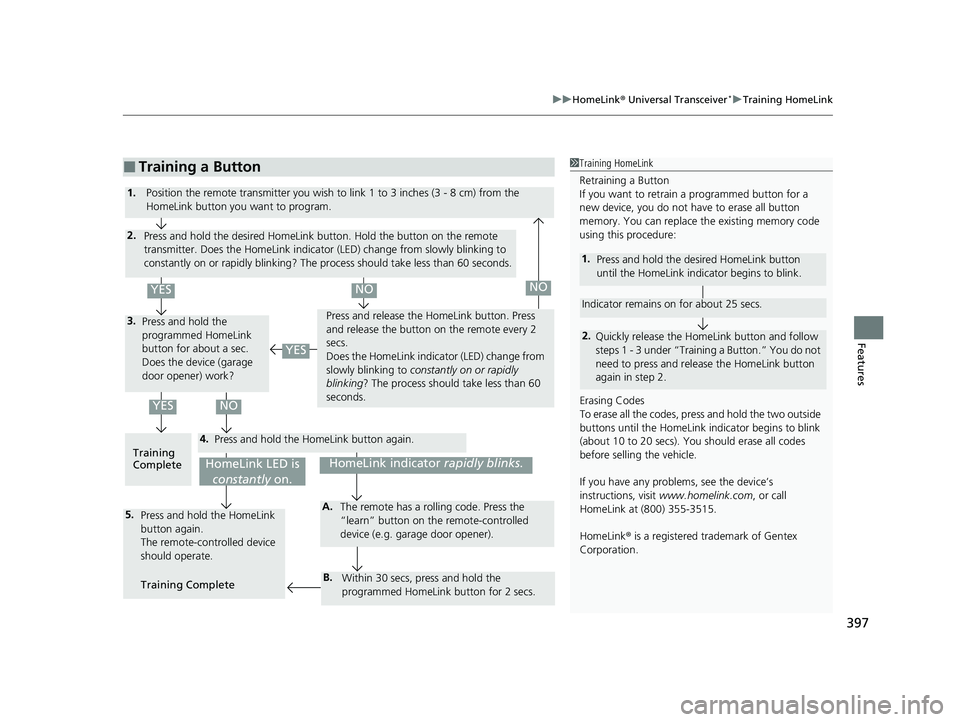
1. Position the remote transmitter you wish to link 1 to 3 inches (3 - 8 cm) from the
HomeLink button you want to program.
Press and hold the desired HomeLink button. Hold the button on the remote
transmitter. Does the HomeLink indicato r (LED) change from slowly blinking to
constantly on or rapidly blinking? The process should take less than 60 seconds.
Press and hold the
programmed HomeLink
button for about a sec.
Does the device (garage
door opener) work? Press and release the Ho
meLink button. Press
and release the button on the remote every 2
secs.
Does the HomeLink indica tor (LED) change from
slowly blinking to constantly on or rapidly
blinking ? The process should take less than 60
seconds.
Training
Complete Press and hold the HomeLink button again.
Press and hold the HomeLink
button again.
The remote-controlled device
should operate.
Training Complete The remote has a ro
lling code. Press the
“learn” button on the remote-controlled
device (e.g. garage door opener).
Within 30 secs, press and hold the
programmed HomeLink button for 2 secs.
HomeLink indicator rapidly blinks.HomeLink LED is
constantly on.
YESNO
YES
YESNONO
22 CR-V HEV ELP-31TPG6200.book 397 ページ 2021年6月30日 水曜日 午前11時6分
Page 686 of 692
684
Index
Exhaust Gas Hazard (Carbon Monoxide).. 86
Exterior Care (Cleaning) ........................... 621
Exterior Mirrors ......................................... 207
F
Features..................................................... 243
Filters Dust and Pollen ....................................... 618
Oil ........................................................... 591
Flat Tire ..................................................... 629
Floor Mats ................................................. 620
Fluids
Brake ....................................................... 596
Engine Coolant ........................................ 593
Windshield Washer .................................. 597
FM/AM Radio .................................... 258, 301
Fog Light Indicator ................................... 101
Folding Down the Rear Seats ................... 213
Foot Brake ................................................. 554
Front Airbags (SRS) ..................................... 59
Front Seats ................................................ 208
Adjusting ................................................. 208
Front Sensor Camera ................................ 548
Fuel ...................................................... 34, 572
Fuel Economy and CO
2 Emissions............. 575
Gauge ..................................................... 126
Instant Fuel Economy ............................... 130
Low Fuel Indicator ..................................... 96
Range ...................................................... 130
Recommendation .................................... 572 Refueling................................................. 572
Fuel Economy and CO
2 Emissions ............ 575
Fuel Fill Door ...................................... 34, 573
Fuses .......................................................... 659
Inspecting and Changing......................... 662
Locations................................. 659, 660, 661
G
Gasoline (Fuel)
Fuel Economy and CO
2 Emissions ............ 575
Information ............................................. 572
Refueling................................................. 572
Gauges ...................................................... 126
Glass (care) ........................................ 619, 622
Glove Box .................................................. 220
H
Handling of the Jack ................................ 643
Handling the Unexpected ........................ 627
HandsFreeLink ® (HFL) ....................... 398, 422
Automatic Import of Ce llular Phonebook and
Call History .................................... 412, 435
Caller’s ID Information............................. 409
Displaying Messages................................ 450
HFL Buttons..................................... 398, 422
HFL Menus ...................................... 400, 425
HFL Status Display ........................... 399, 424
In Case of Emergency .............................. 454
Limitations for Manual Operation .... 399, 424 Making a Call ................................. 416, 443
Options During a Call...................... 421, 447
Phone Setup ................................... 404, 430
Phonebook Phonetic M
odification........... 439
Receiving a Call............................... 420, 446
Receiving a Text/E-mail Message ............. 448
Ring Tone ....................................... 409, 434
Selecting a Text/E-mail Message
Account ................................................ 449
Speed Dial ...................................... 413, 436
To Clear the System ................................ 411
To Set Up Text/E-mail Message Options .. 433
Hazard Warning Button .............................. 6
HD Radio
TM............................................... 303
Head Restraints ........................................ 215
Headlights ................................................ 190
Aiming.................................................... 598
Auto High-Beam ..................................... 195
Automatic Operation .............................. 191
Dimming................................................. 190
Operating ............................................... 190
Heated Door Mirror Button .................... 201
Heated Steering Wheel ........................... 233
Heaters ..................................................... 234
HFL (HandsFreeLink ®) ...................... 398, 422
High Beam Indicator ................................ 100
High Voltage Battery ............................... 502
Hill Start Assist System ............................. 474
HomeLink ® Universal Transceiver ........... 395
Honda App License Agreement .............. 347
Honda Sensing ®................................ 35, 503
22 CR-V HEV ELP-31TPG6200.book 684 ページ 2021年6月30日 水曜日 午前11時6分