phone interface HONDA CRV 2022 Owners Manual
[x] Cancel search | Manufacturer: HONDA, Model Year: 2022, Model line: CRV, Model: HONDA CRV 2022Pages: 692, PDF Size: 22.05 MB
Page 130 of 692
128
uuGauges and Driver Information Interface uDriver Information Interface
Instrument Panel
Driver Information Interface
The driver information interface shows in formation such as the estimated travelable
distance and fuel economy of the vehicle. It also displays messages such as warnings
and other helpful information.
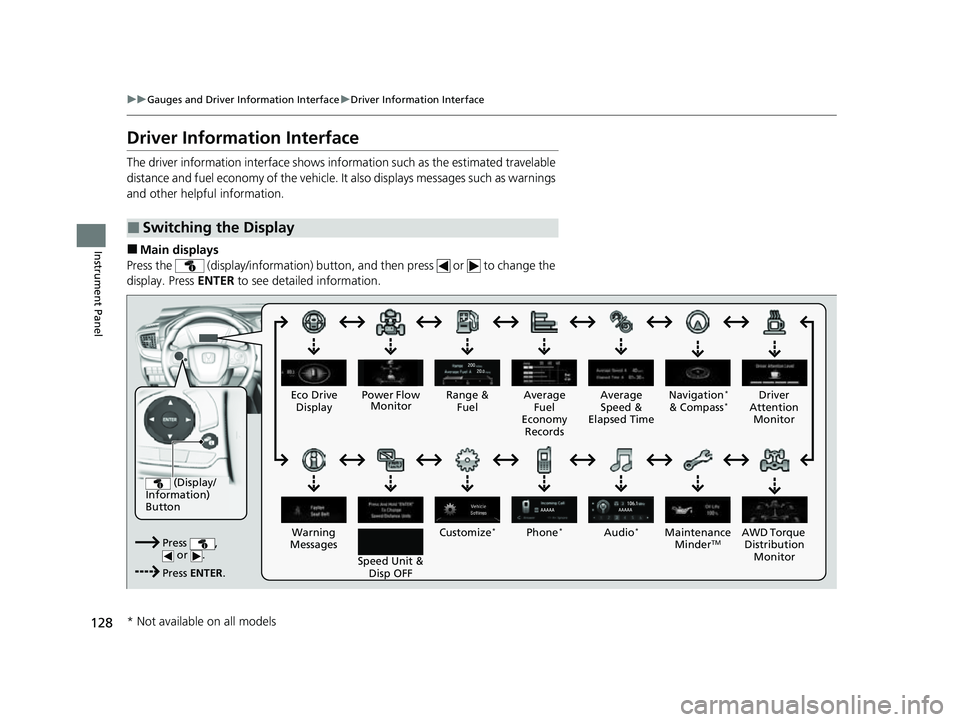
■Main displays
Press the (display/information) button, and then press or to change the
display. Press ENTER to see detailed information.
■Switching the Display
(Display/
Information)
Button
Press , or .
Press ENTER . Eco Drive
Display
Audio
*Phone*
Speed Unit & Disp OFF
Warning
Messages Average
Fuel
Economy Records
Driver
Attention Monitor
Range &
Fuel Average
Speed &
Elapsed Time Navigation*
& Compass*
Customize*
Power Flow Monitor
AWD Torque Distribution Monito r
Main
tenance
MinderTM
* Not available on all models
22 CR-V HEV ELP-31TPG6200.book 128 ページ 2021年6月30日 水曜日 午前11時6分
Page 141 of 692
Continued139
uuGauges and Driver Information Interface uDriver Information Interface
Instrument Panel
■Compass*
Shows the compass screen.
■Turn-by-Turn Directions
When driving guidance is provided by the navigation system* or Android Auto, turn-
by-turn directions to your destination appear.
2 Refer to the Navigation System Manual
2 Android AutoTM P. 336
Show the current audio information.
2Audio System Basic Operation P. 272
Show the current phone information.
2Bluetooth ® HandsFreeLink ® P. 422
■Navigation*
■Audio*
■Phone*
1 Navigation*
You can select whether to have the turn-by-turn
display come on or not dur ing the route guidance.
2 Customized Features P. 369
* Not available on all models
22 CR-V HEV ELP-31TPG6200.book 139 ページ 2021年6月30日 水曜日 午前11時6分
Page 205 of 692
203
uuOperating the Switches Around the Steering Wheel uDriving Position Memory System*
Continued
Controls
Driving Position Memory System*
You can store two driver’s seat positions (except for power lumbar) with the driving
position memory system.
When you unlock and open the driver’s door with a remote transmitter or the
keyless access system, the seat adjusts automatically to one of the two preset
positions.
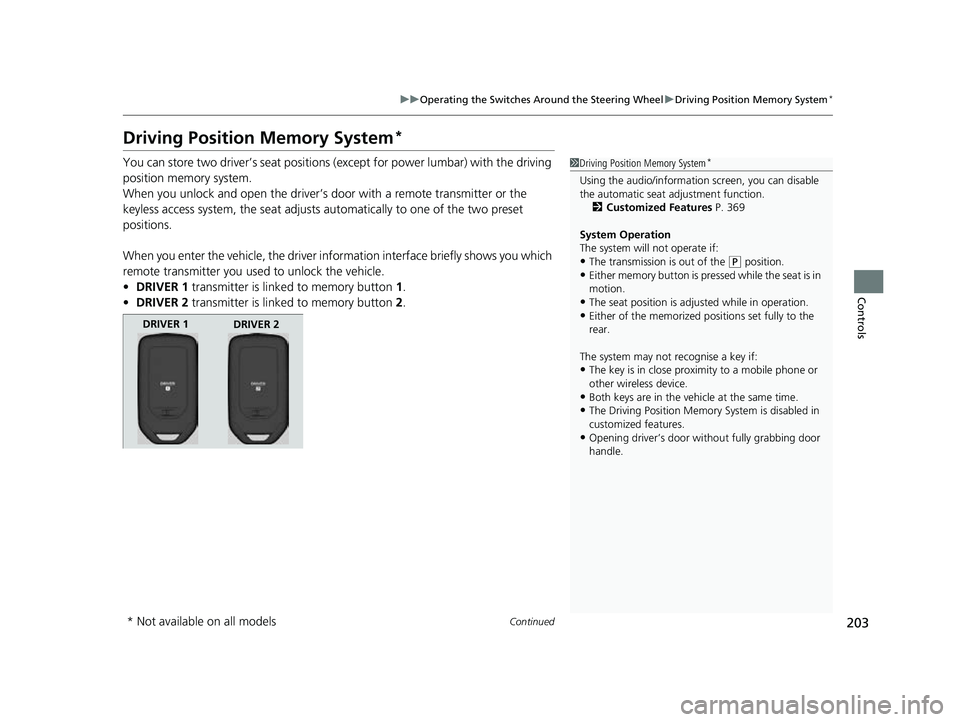
When you enter the vehicle, the driver in formation interface briefly shows you which
remote transmitter you used to unlock the vehicle.
• DRIVER 1 transmitter is linked to memory button 1.
• DRIVER 2 transmitter is linked to memory button 2.1 Driving Position Memory System*
Using the audio/informati on screen, you can disable
the automatic seat adjustment function.
2 Customized Features P. 369
System Operation
The system will not operate if:
•The transmission is out of the ( P position.•Either memory button is pressed while the seat is in
motion.
•The seat position is adju sted while in operation.•Either of the memorized pos itions set fully to the
rear.
The system may not recognise a key if:
•The key is in close proximity to a mobile phone or
other wireless device.
•Both keys are in the vehicle at the same time.
•The Driving Position Memory System is disabled in
customized features.
•Opening driver’s door wi thout fully grabbing door
handle.
DRIVER 1 DRIVER 2
* Not available on all models
22 CR-V HEV ELP-31TPG6200.book 203 ページ 2021年6月30日 水曜日 午前11時6分
Page 246 of 692
244
Features
Audio System
About Your Audio System
The audio system features AM/FM radio and SiriusXM® Radio service*. It can also
play USB flash drives, iPod, iPhone and Bluetooth® devices.
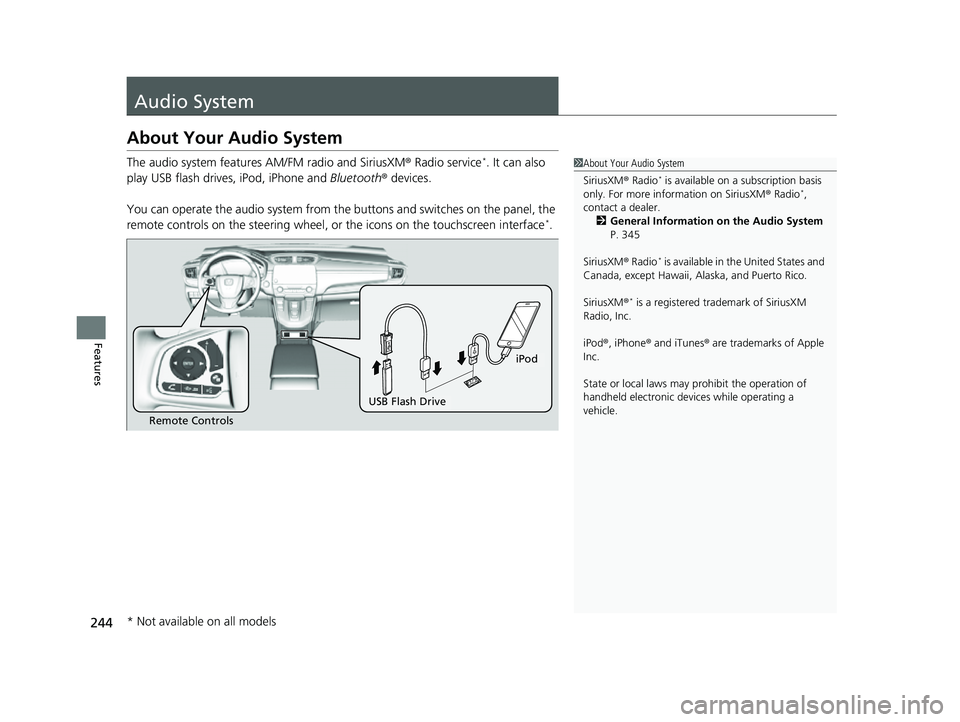
You can operate the audio system from the buttons and switches on the panel, the
remote controls on the steering wheel, or the icons on the touchscreen interface
*.
1 About Your Audio System
SiriusXM ® Radio
* is available on a subscription basis
only. For more information on SiriusXM ® Radio*,
contact a dealer. 2 General Information on the Audio System
P. 345
SiriusXM ® Radio
* is available in the United States and
Canada, except Ha waii, Alaska, and Puerto Rico.
SiriusXM ®
* is a registered tra demark of SiriusXM
Radio, Inc.
iPod ®, iPhone ® and iTunes ® are trademarks of Apple
Inc.
State or local laws may pr ohibit the operation of
handheld electronic devices while operating a
vehicle.
Remote Controls
iPod
USB Flash Drive
* Not available on all models
22 CR-V HEV ELP-31TPG6200.book 244 ページ 2021年6月30日 水曜日 午前11時6分
Page 278 of 692
276
uuAudio System Basic Operation uAudio/Information Screen
Features
■HondaLink
Displays the HondaLink ® screen.
2 HondaLink® P. 326
■Smartphone Connection
Displays the Apple CarPlayTM or Android AutoTM.
2 Apple CarPlayTM P. 333
2 Android AutoTM P. 336
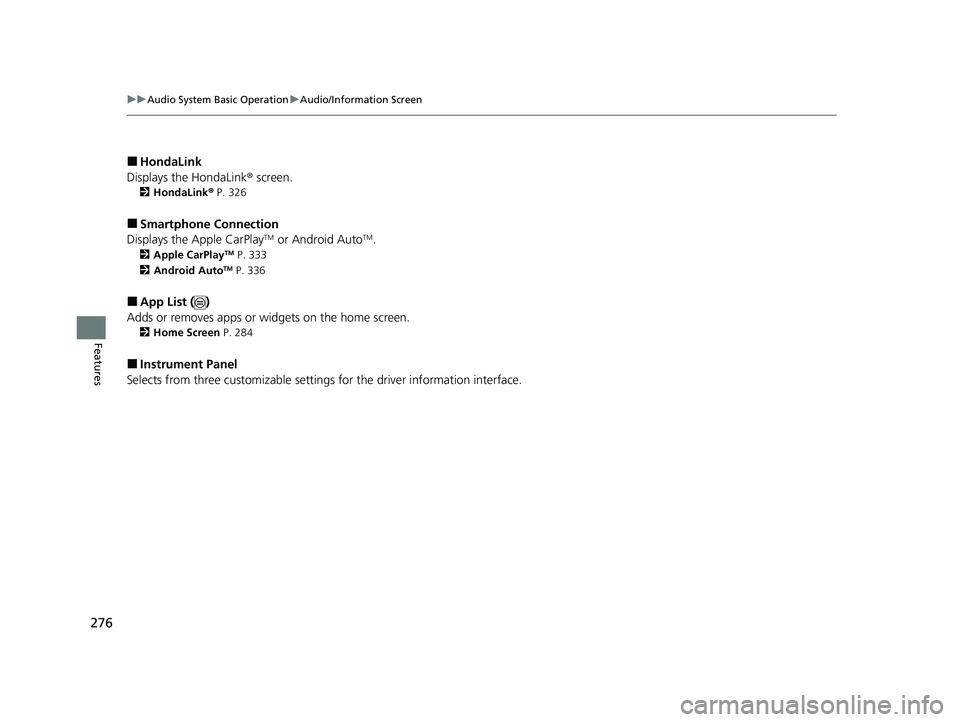
■App List ( )
Adds or removes apps or widgets on the home screen.
2 Home Screen P. 284
■Instrument Panel
Selects from three customizable setting s for the driver information interface.
22 CR-V HEV ELP-31TPG6200.book 276 ページ 2021年6月30日 水曜日 午前11時6分
Page 321 of 692
319
uuAudio System Basic Operation uPlaying Pandora ®
Continued
Features
Playing Pandora ®
Your audio system allows you to listen to music from the Pandora ® app on a
compatible smartphone.
This function is available when the phone is paired and connected to the vehicle’s
Bluetooth ® HandsFreeLink ® (HFL) system, or with an iPhone, you can connect using
your USB cable to the USB port.
2 Phone Setup P. 430
2 USB Port(s) P. 245
*1:Some or all of the lists may not be displayed.
1Playing Pandora ®
Pandora®, the Pandora logo, and the Pandora trade
dress are trademarks or registered trademarks of
Pandora Media, Inc., used with permission. Pandora is
only available in certain countries. Visit the Pandora
website for more information.
To find out if your phone is compatible with this
feature, visit automobiles.honda.com/handsfreelink/ ,
or call 1-888-528-7876.
To use this service in your vehicle, the Pandora ® app
must first be installed on your phone. Visit
www.pandora.com . for more information.
Pandora ® is free, personalized radio that plays music
and comedy you’ll love. Just start with the name of
one of your favorite arti sts, tracks, comedians or
composers and Pandora ® will create a custom station
that plays similar tracks. Pandora ® also features
hundreds of genre stations ranging from Dubstep to
Smooth Jazz to Power Workout.
If you cannot operate Pandora ® through the audio
system, it may be streaming through Bluetooth®
Audio. Make sure Pandora ® mode on your audio
system is selected.
If your phone is connected to Android Auto
TM,
Pandora ® is only available through the Android
Auto
TM interface. Visit the Android AutoTM website to
check compatibility.
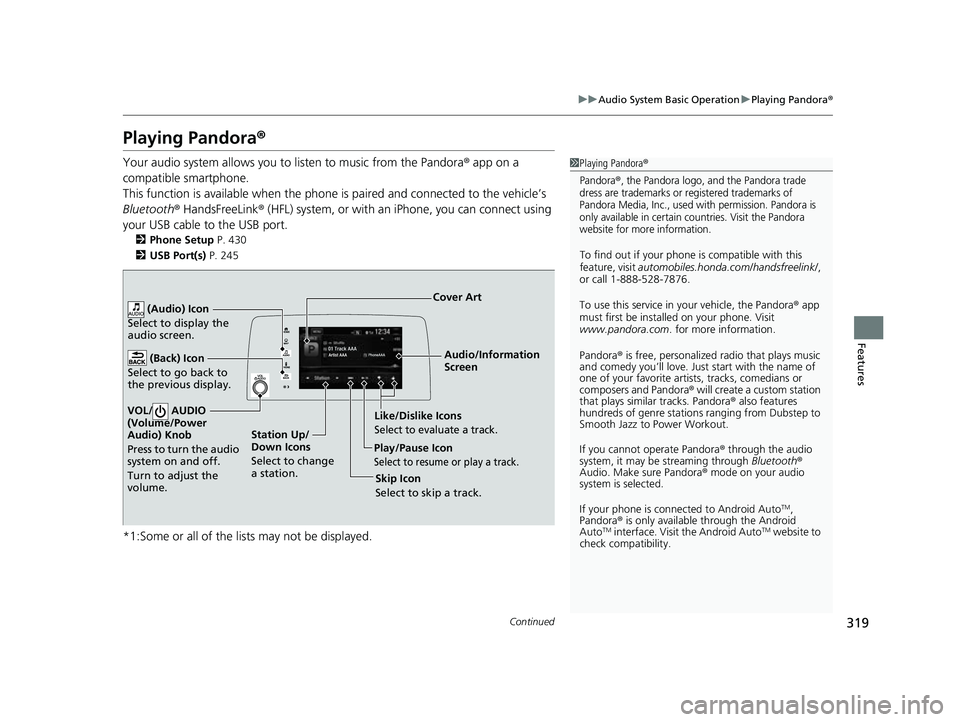
Audio/Information
Screen
Cover Art
VOL/ AUDIO
(Volume/Po wer
Aud
io) Knob
Press to turn the audio
system on and off.
Turn to adjust the
volume.
(Back) Icon
Select to go back to
the previous display.
(Audio) Icon
Select to display the
audio screen.
Play/Pause Icon
Select to resume or play a track.
Station Up/
Down Icons
Select to change
a station. Skip Icon
Select to skip a track.
Like/Dislike IconsSelect to evaluate a track.
22 CR-V HEV ELP-31TPG6200.book 319 ページ 2021年6月30日 水曜日 午前11時6分
Page 376 of 692
374
uuCustomized Features u
Features
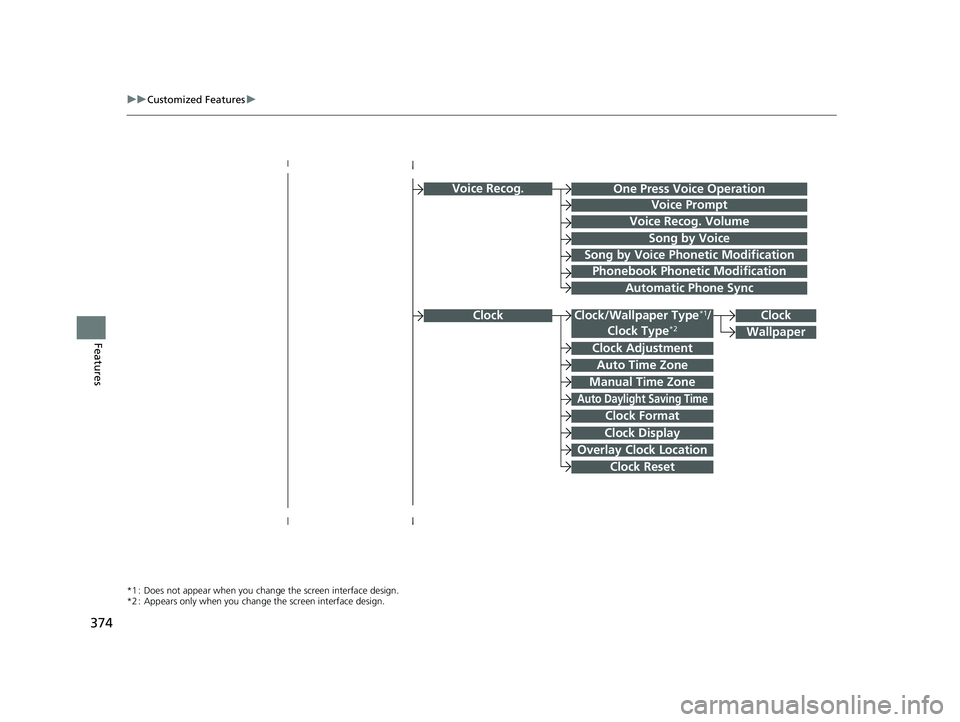
Voice Recog.
Voice Prompt
Voice Recog. Volume
Song by Voice
Song by Voice Phonetic Modification
Phonebook Phonetic Modification
Automatic Phone Sync
Clock Adjustment
Clock Format
Auto Time Zone
Manual Time Zone
Auto Daylight Saving Time
Clock Display
Overlay Clock Location
Clock Reset
Clock
Wallpaper
One Press Voice Operation
*1 : Does not appear when you chang e the screen interface design.
*2 : Appears only when you change the screen interface design.
Clock/Wallpaper Type*1/
Clock Type*2Clock
22 CR-V HEV ELP-31TPG6200.book 374 ページ 2021年6月30日 水曜日 午前11時6分
Page 386 of 692
384
uuCustomized Features u
Features
*1:Default Setting
*2:Appears only when you change the screen interface design.Setup
Group Customizable Features
DescriptionSelectable Settings
Audio
BluetoothBluetooth Device List
Pairs a new phone to HFL, edits or deletes a
paired phone.
2Phone Setup P. 430
—
Other
[Your selected media]
Cover ArtTurns the cover art display on and off.On*1/Off
Audio Source Pop-Up
Selects whether the list of selectable audio source
comes on when Audio is selected on the home
screen.
On /Off*1
SoundAdjusts the settings of the audio speakers’ sound.
2 Adjusting the Sound P. 294—
DefaultCancels/Resets all cust omized items in the Audio
settings group as default.Yes /No
SystemHome
Home Screen Edit OrderChanges the home screen icon layout.—
Menu Icon Position*2Changes the position of the menu icons on the
Audio , Phone , and Info screen.—
Configuration of
Instrument PanelChanges the Instrument Panel screen icon
layout. —
Tachometer SettingNot available on this model—
Bluetooth® mode
iPod or USB mode
22 CR-V HEV ELP-31TPG6200.book 384 ページ 2021年6月30日 水曜日 午前11時6分
Page 425 of 692
Continued423
uuBluetooth ® HandsFreeLink ®u Using HFL
Features
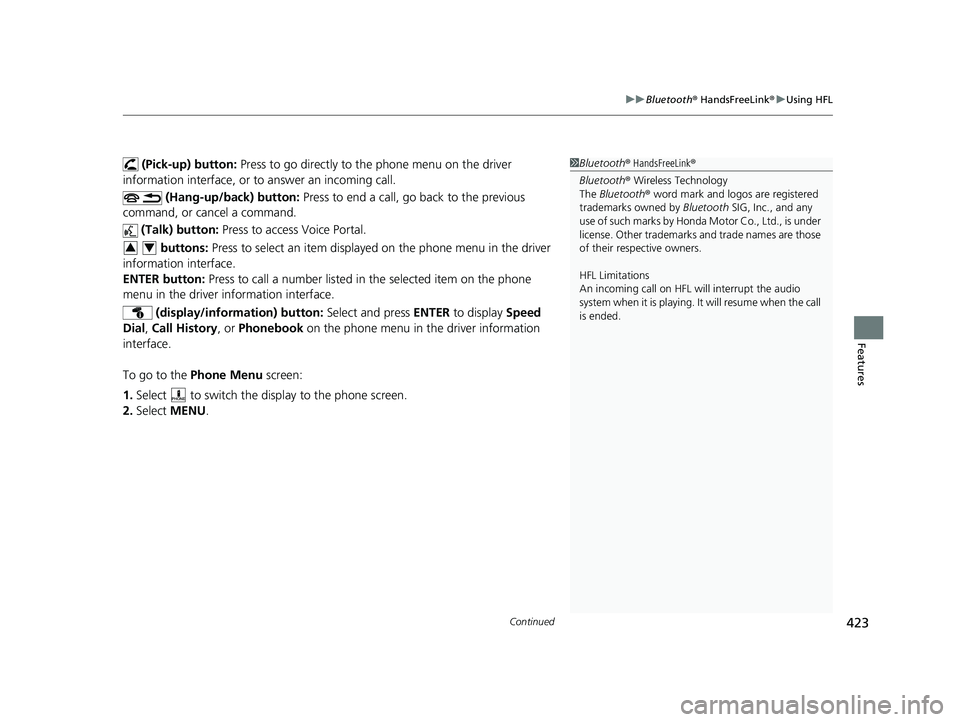
(Pick-up) button: Press to go directly to the phone menu on the driver
information interface, or to answer an incoming call.
(Hang-up/back) button: Press to end a call, go back to the previous
command, or cancel a command.
(Talk) button: Press to access Voice Portal.
buttons: Press to select an item displayed on the phone menu in the driver
information interface.
ENTER button: Press to call a number listed in the selected item on the phone
menu in the driver information interface.
(display/information) button: Select and press ENTER to display Speed
Dial , Call History , or Phonebook on the phone menu in the driver information
interface.
To go to the Phone Menu screen:
1. Select to switch the disp lay to the phone screen.
2. Select MENU .1Bluetooth ® HandsFreeLink ®
Bluetooth ® Wireless Technology
The Bluetooth ® word mark and logos are registered
trademarks owned by Bluetooth SIG, Inc., and any
use of such marks by Honda Motor Co., Ltd., is under
license. Other trademarks and trade names are those
of their respective owners.
HFL Limitations
An incoming call on HFL will interrupt the audio
system when it is playing. It will resume when the call
is ended.
34
22 CR-V HEV ELP-31TPG6200.book 423 ページ 2021年6月30日 水曜日 午前11時6分