Side mirror HONDA CRV 2023 User Guide
[x] Cancel search | Manufacturer: HONDA, Model Year: 2023, Model line: CRV, Model: HONDA CRV 2023Pages: 719, PDF Size: 13.43 MB
Page 460 of 719
Continued459
uuWhen Driving uTurning on the Power
Driving
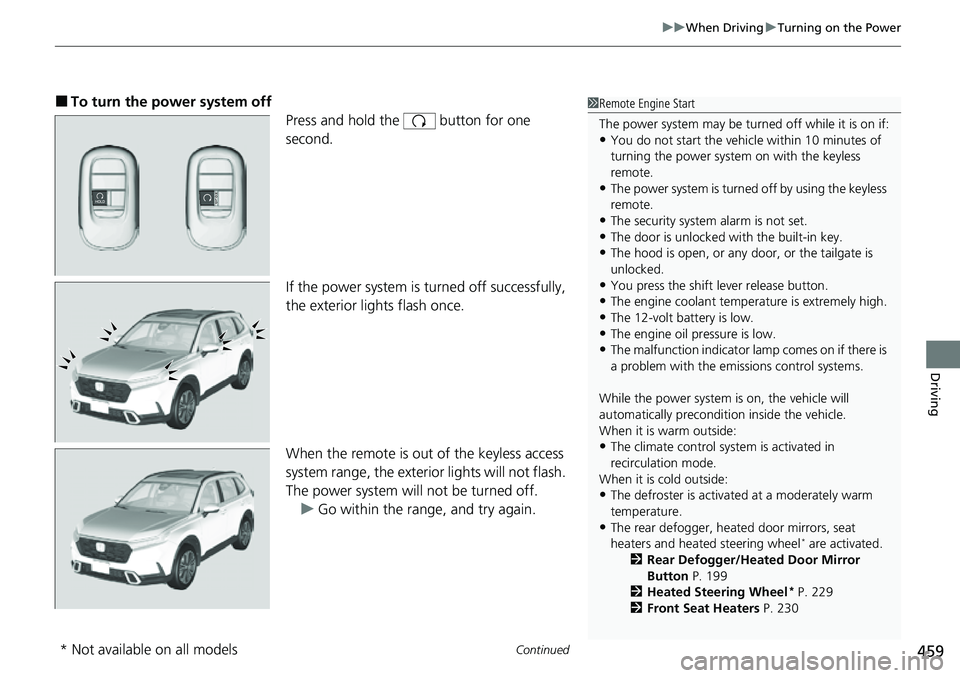
■To turn the power system off
Press and hold the button for one
second.
If the power system is turned off successfully,
the exterior lights flash once.
When the remote is out of the keyless access
system range, the exteri or lights will not flash.
The power system will not be turned off. u Go within the range, and try again.1Remote Engine Start
The power system may be turned off while it is on if:
•You do not start the vehicl e within 10 minutes of
turning the power system on with the keyless
remote.
•The power system is turned off by using the keyless
remote.
•The security system alarm is not set.•The door is unlocked with the built-in key.
•The hood is open, or any door, or the tailgate is
unlocked.
•You press the shift lever release button.
•The engine coolant temper ature is extremely high.
•The 12-volt battery is low.•The engine oil pressure is low.
•The malfunction indicator la mp comes on if there is
a problem with the emissions control systems.
While the power system is on, the vehicle will
automatically preconditi on inside the vehicle.
When it is warm outside:
•The climate control system is activated in
recirculation mode.
When it is cold outside:
•The defroster is activated at a moderately warm
temperature.
•The rear defogger, heated door mirrors, seat
heaters and heated steering wheel* are activated.
2 Rear Defogger/Heated Door Mirror
Button P. 199
2 Heated Steering Wheel
* P. 229
2 Front Seat Heaters P. 230
* Not available on all models
Page 488 of 719
487
uuWhen Driving uBlind Spot Information System
Continued
Driving
Blind Spot Information System
When the system detects vehicles approaching from behind in adjacent lanes, the
appropriate indicator comes on, providin g assistance when you change lanes.
The system activates when your vehicle is moving forward at about 20 mph (32 km/h)
or above.
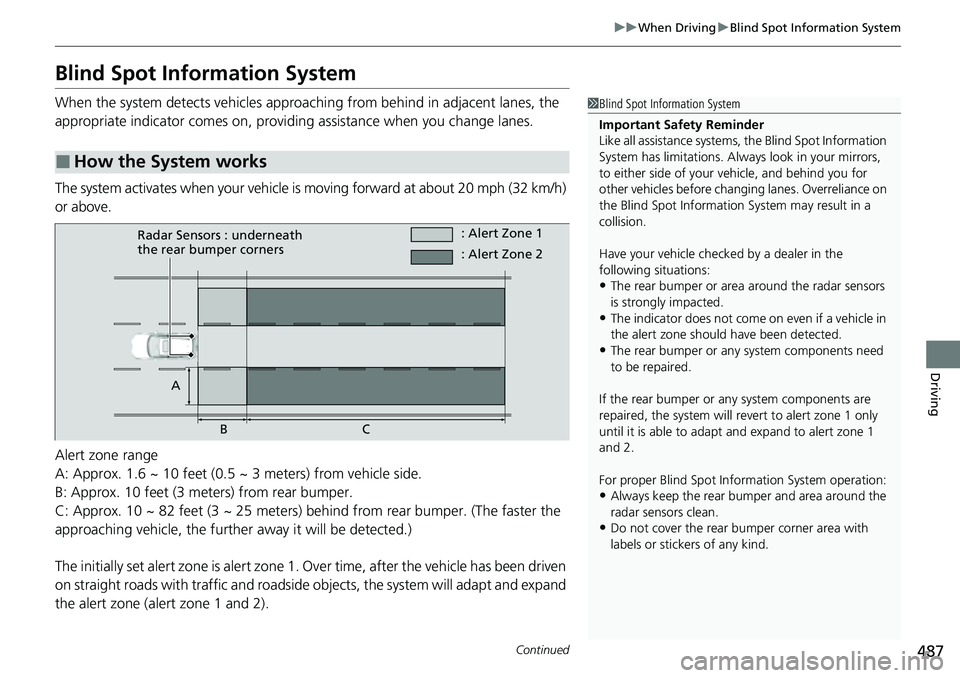
Alert zone range
A: Approx. 1.6 ~ 10 feet (0.5 ~ 3 meters) from vehicle side.
B: Approx. 10 feet (3 meters) from rear bumper.
C: Approx. 10 ~ 82 feet (3 ~ 25 meters) behind from rear bumper. (The faster the
approaching vehicle, the further away it will be detected.)
The initially set alert zone is alert zone 1. Over time, after the vehicle has been driven
on straight roads with traffic and roadside objects, the system will adapt and expand
the alert zone (alert zone 1 and 2).
■How the System works
1 Blind Spot Information System
Important Safety Reminder
Like all assistance systems, the Blind Spot Information
System has limitations. Always look in your mirrors,
to either side of your vehicle, and behind you for
other vehicles before changing lanes. Overreliance on
the Blind Spot Information System may result in a
collision.
Have your vehicle checked by a dealer in the
following situations:
•The rear bumper or area around the radar sensors
is strongly impacted.
•The indicator does not come on even if a vehicle in
the alert zone should have been detected.
•The rear bumper or any system components need
to be repaired.
If the rear bumper or any system components are
repaired, the system will re vert to alert zone 1 only
until it is able to adapt and expand to alert zone 1
and 2.
For proper Blind Spot Info rmation System operation:
•Always keep the rear bumper and area around the
radar sensors clean.
•Do not cover the rear bumper corner area with
labels or sticke rs of any kind.
Radar Sensors : underneath
the rear bumper corners : Alert Zone 1
A BC : Alert Zone 2
Page 489 of 719
uuWhen Driving uBlind Spot Information System
488
Driving
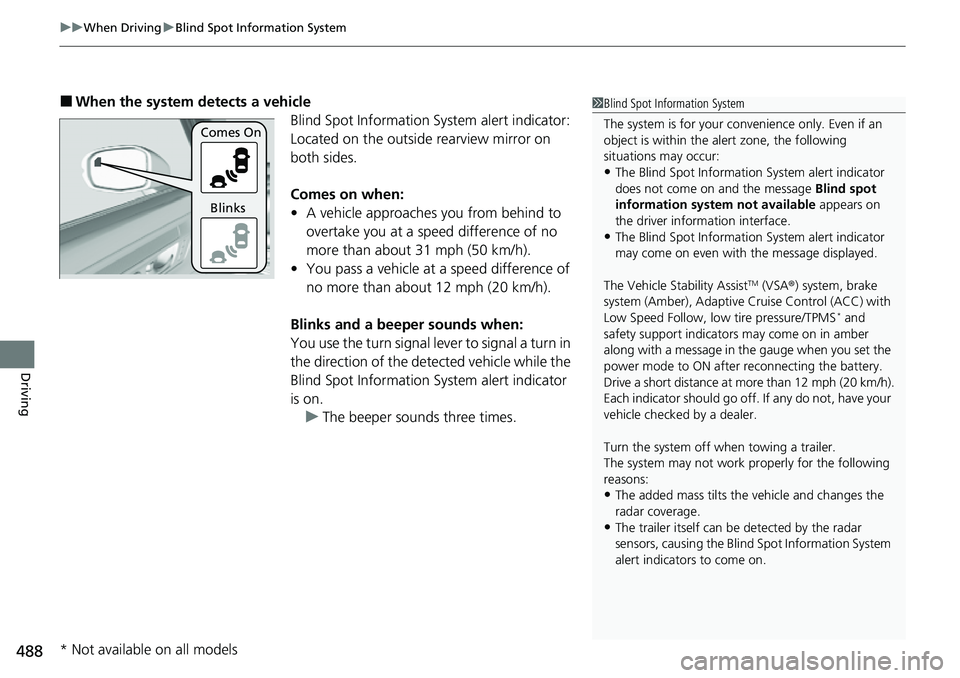
■When the system detects a vehicle
Blind Spot Information System alert indicator:
Located on the outside rearview mirror on
both sides.
Comes on when:
• A vehicle approaches you from behind to
overtake you at a speed difference of no
more than about 31 mph (50 km/h).
• You pass a vehicle at a speed difference of
no more than about 12 mph (20 km/h).
Blinks and a beeper sounds when:
You use the turn signal lever to signal a turn in
the direction of the detected vehicle while the
Blind Spot Information System alert indicator
is on. u The beeper sounds three times.1Blind Spot Information System
The system is for your convenience only. Even if an
object is within the alert zone, the following
situations may occur:
•The Blind Spot Informati on System alert indicator
does not come on and the message Blind spot
information system not available appears on
the driver information interface.
•The Blind Spot Informati on System alert indicator
may come on even with the message displayed.
The Vehicle Stability Assist
TM (VSA ®) system, brake
system (Amber), Adaptive Cruise Control (ACC) with
Low Speed Follow, low tire pressure/TPMS
* and
safety support indicators may come on in amber
along with a message in the gauge when you set the
power mode to ON after reconnecting the battery.
Drive a short distance at more than 12 mph (20 km/h).
Each indicator should go off. If any do not, have your
vehicle checked by a dealer.
Turn the system off when towing a trailer.
The system may not work properly for the following
reasons:
•The added mass tilts the vehicle and changes the
radar coverage.
•The trailer itself can be detected by the radar
sensors, causing the Blind Spot Information System
alert indicators to come on.
Comes On
Blinks
* Not available on all models
Page 493 of 719
492
Driving
Honda Sensing®
Honda Sensing® is a driver support system which employs the use of three distinctly
different kinds of sensors: a radar sensor located behind the Honda emblem on the
front grille, a front sensor camera mounted to the interior side of the windshield,
behind the rearview mirror, and the sonar sensors located in the front and rear
bumpers.
Honda Sensing® is a driver support system which employs the use of two distinctly
different kinds of sensors: a radar sensor located behind the Honda emblem on the
front grille and a front sensor camera mounted to the interior side of the windshield,
behind the rearview mirror.
Honda Sensing® has the following functions.
■The functions whic h do not require switch operations to activate
• Collision Mitigation Braking SystemTM (CMBSTM) 2 P. 495
• Low Speed Braking Control* 2 P. 507
• Road Departure Mitigation System 2 P. 554
• Traffic Sign Recognition System 2 P. 562
■The functions wh ich require switch op erations to activate
• Adaptive Cruise Control (ACC) with Low Speed Follow
2 P. 513
• Lane Keeping Assist System (LKAS) 2 P. 533
• Traffic Jam Assist 2 P. 545
Models with Low Speed Braking Control
Models without Low Speed Braking Control
* Not available on all models
Page 563 of 719
562
uuHonda Sensing ®u Traffic Sign Recognition System
Driving
Traffic Sign Recognition System
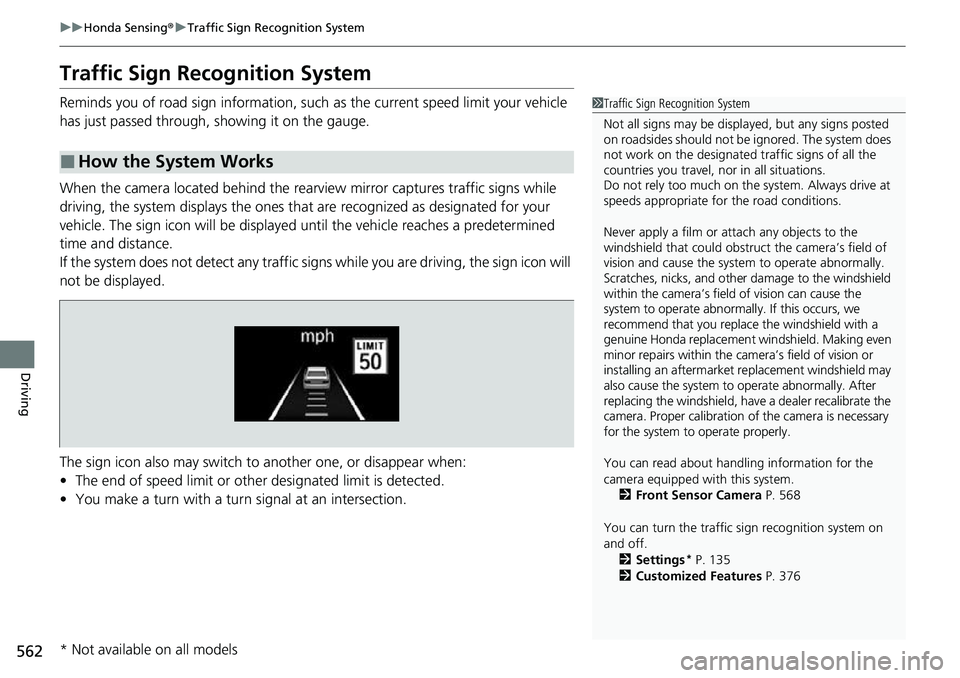
Reminds you of road sign information, such as the current speed limit your vehicle
has just passed through, showing it on the gauge.
When the camera located behind the rear view mirror captures traffic signs while
driving, the system displays the ones that are recognized as designated for your
vehicle. The sign icon will be displayed until the vehicle reaches a predetermined
time and distance.
If the system does not detect any traffic signs while you are driving, the sign icon will
not be displayed.
The sign icon also may switch to another one, or disappear when:
• The end of speed limit or other designated limit is detected.
• You make a turn with a turn signal at an intersection.
■How the System Works
1Traffic Sign Recognition System
Not all signs may be displa yed, but any signs posted
on roadsides should not be ignored. The system does
not work on the designated traffic signs of all the
countries you travel, nor in all situations.
Do not rely too much on the system. Always drive at
speeds appropriate fo r the road conditions.
Never apply a film or attach any objects to the
windshield that could obstruc t the camera’s field of
vision and cause the system to operate abnormally.
Scratches, nicks, and othe r damage to the windshield
within the camera’s field of vision can cause the
system to operate abnormally. If this occurs, we
recommend that you replace the windshield with a
genuine Honda replacement windshield. Making even
minor repairs within the ca mera’s field of vision or
installing an aftermarket replacement windshield may
also cause the system to operate abnormally. After
replacing the windshield, have a dealer recalibrate the
camera. Proper calibration of the camera is necessary
for the system to operate properly.
You can read about handling information for the
camera equipped with this system.
2 Front Sensor Camera P. 568
You can turn the traffic sign recognition system on
and off. 2 Settings
* P. 135
2 Customized Features P. 376
* Not available on all models
Page 590 of 719
589
uuParking Your Vehicle uCross Traffic Monitor
Continued
Driving
Cross Traffic Monitor
Monitors the rear corner areas using the radar sensors when reversing, and alerts
you if a vehicle approaching from a rear corner is detected.
The system is convenient when you are backing out of a parking space.1Cross Traffic Monitor
The parking sensor system’s alerting buzzer overrides
the Cross Traffic Monitor buzzer when the sensors
are detecting obstacles at the closest range.
3CAUTION
Cross Traffic Monitor cannot detect all
approaching vehicles and may not detect
an approaching vehicle at all.
Failure to visually confirm that it is safe to
back up the vehicle before doing so may
result in a collision.
Do not solely rely on the system when
reversing; always also use your mirrors, and
look behind and to the sides of your vehicle
before reversing.
Models with parking sensor system
Page 624 of 719
623
Maintenance
Replacing Light Bulbs
Headlights
Headlights are LED type. Have an authorized Honda dealer inspect and replace the
light assembly.
Front Turn Signal, Parkin g/Daytime Running Lights
Front turn signal, parking/daytime running lights are LED type. Have an authorized
Honda dealer inspect and replace the light assembly.
Front Side Marker Lights
Front side marker lights are LED type. Have an authorized Hond a dealer inspect and
replace the light assembly.
Side Turn Signal/Emer gency Indicator Lights
Door mirror side turn lights are LED type. Have an authorized Honda dealer inspect
and replace the light assembly.
1 Headlights
The headlight aim is set by the factory, and does not
need to be adjusted. Howeve r, if you regularly carry
heavy items in the cargo area or tow a trailer, have
the aiming readjusted at a dealer or by a qualified
technician.
Page 645 of 719
644
Maintenance
Cleaning
Interior Care
Use a damp cloth with a mixture of mild detergent and warm water to remove dirt.
Use a clean cloth to remove detergent residue.
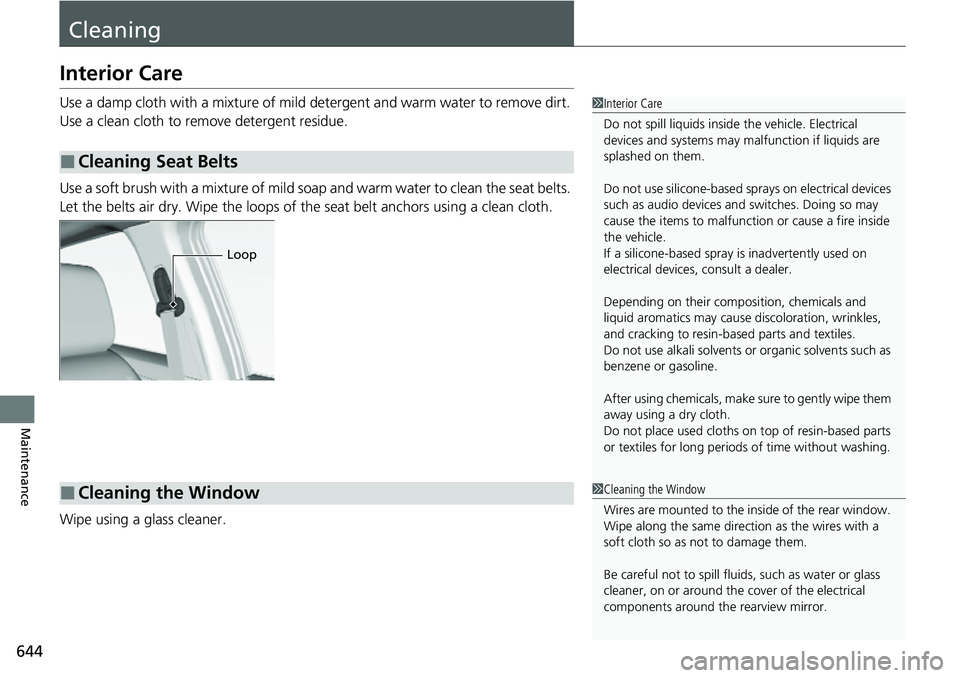
Use a soft brush with a mixture of mild soap and warm water to clean the seat belts.
Let the belts air dry. Wipe the loops of the seat belt anchors using a clean cloth.
Wipe using a glass cleaner.
■Cleaning Seat Belts
1 Interior Care
Do not spill liquids inside the vehicle. Electrical
devices and systems may ma lfunction if liquids are
splashed on them.
Do not use silicone-based sp rays on electrical devices
such as audio devices and switches. Doing so may
cause the items to malfunction or cause a fire inside
the vehicle.
If a silicone-based spray is inadvertently used on
electrical devices, consult a dealer.
Depending on their compos ition, chemicals and
liquid aromatics may cause discoloration, wrinkles,
and cracking to resin-ba sed parts and textiles.
Do not use alkali solvents or organic solvents such as
benzene or gasoline.
After using chemicals, make su re to gently wipe them
away using a dry cloth.
Do not place used cloths on top of resin-based parts
or textiles for long periods of time without washing.
Loop
■Cleaning the Window1Cleaning the Window
Wires are mounted to the in side of the rear window.
Wipe along the same direct ion as the wires with a
soft cloth so as not to damage them.
Be careful not to spill fluids, such as water or glass
cleaner, on or around the cover of the electrical
components around the rearview mirror.
Page 695 of 719
694
Information
Specifications
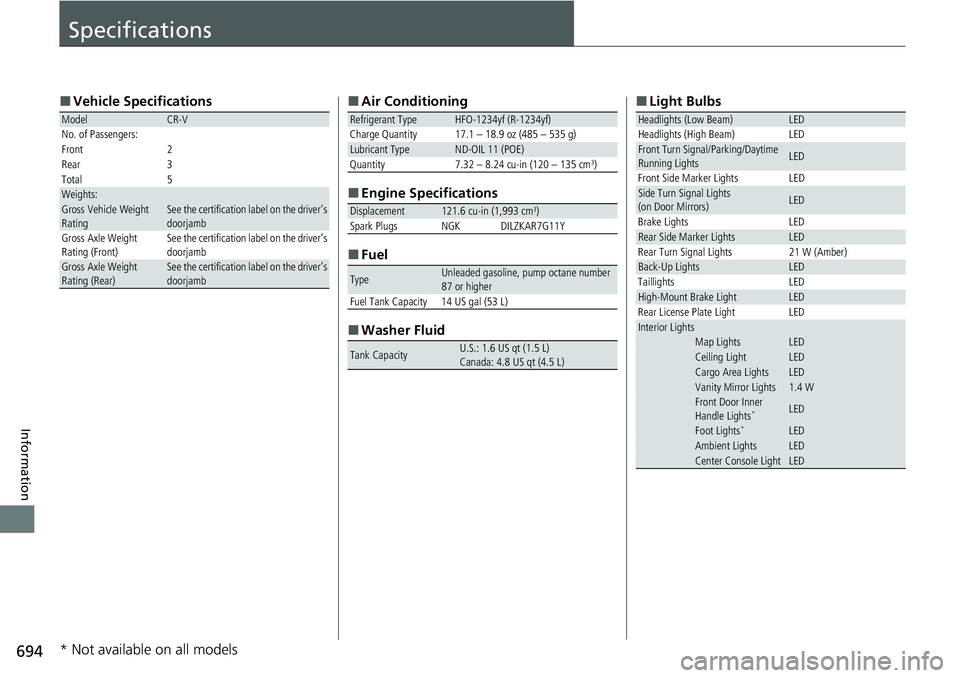
■Vehicle Specifications
ModelCR-V
No. of Passengers:
Front 2
Rear 3
Total 5
Weights:Gross Vehicle Weight
Rating See the certification label on the driver’s
doorjamb
Gross Axle Weight
Rating (Front)See the certification label on the driver’s
doorjamb
Gross Axle Weight
Rating (Rear)See the certification label on the driver’s
doorjamb
■ Air Conditioning
■ Engine Specifications
■ Fuel
■ Washer Fluid
Refrigerant Type HFO-1234yf (R-1234yf)
Charge Quantity 17.1 – 18.9 oz (485 – 535 g)
Lubricant TypeND-OIL 11 (POE)
Quantity 7.32 – 8.24 cu-in (120 – 135 cm3)
Displacement121.6 cu-in (1,993 cm3)Spark PlugsNGKDILZKAR7G11Y
TypeUnleaded gasoline, pump octane number
87 or higher
Fuel Tank Capacity 14 US gal (53 L)
Tank CapacityU.S.: 1.6 US qt (1.5 L)
Canada: 4.8 US qt (4.5 L)
■ Light Bulbs
Headlights (Low Beam)LEDHeadlights (High Beam)LEDFront Turn Signal/Parking/Daytime
Running LightsLED
Front Side Marker Lights LED
Side Turn Signal Lights
(on Door Mirrors)LED
Brake Lights LED
Rear Side Marker LightsLED
Rear Turn Signal Lights 21 W (Amber)
Back-Up LightsLED
Taillights LED
High-Mount Brake LightLED
Rear License Plate Light LED
Interior LightsMap LightsLEDCeiling LightLEDCargo Area LightsLEDVanity Mirror Lights1.4 WFront Door Inner
Handle Lights*LED
Foot Lights*LEDAmbient LightsLEDCenter Console LightLED
* Not available on all models
Page 709 of 719
Index
708
Index
Index
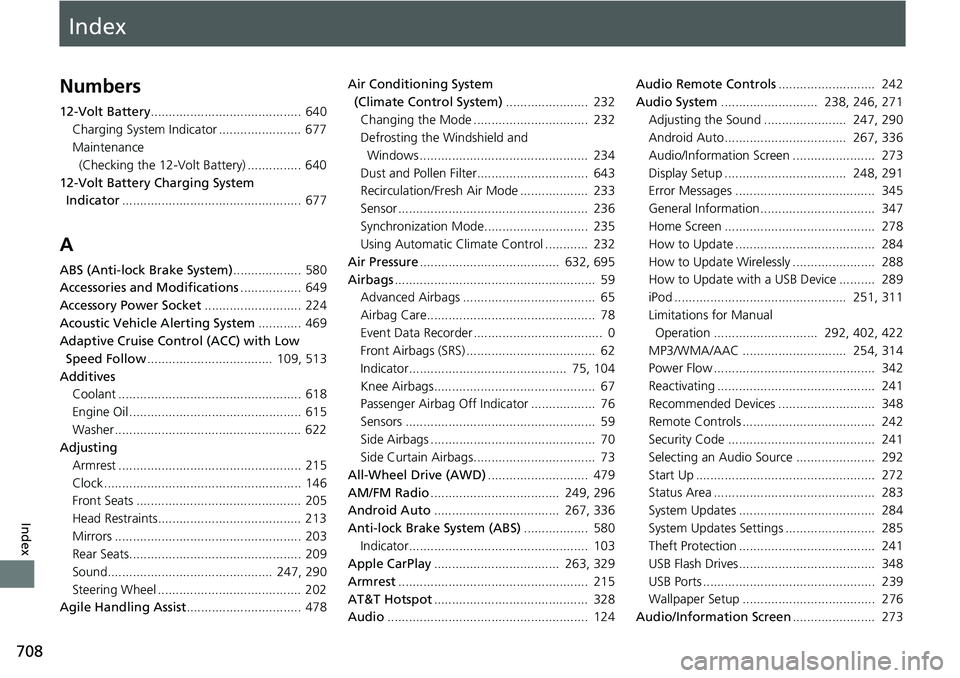
Numbers
12-Volt Battery.......................................... 640
Charging System Indicator ....................... 677
Maintenance (Checking the 12-Volt Battery) ............... 640
12-Volt Battery Charging System Indicator .................................................. 677
A
ABS (Anti-lock Brake System) ................... 580
Accessories and Modifications ................. 649
Accessory Power Socket ........................... 224
Acoustic Vehicle Alerting System ............ 469
Adaptive Cruise Control (ACC) with Low Speed Follow ................................... 109, 513
Additives Coolant ................................................... 618
Engine Oil ................................................ 615
Washer .................................................... 622
Adjusting
Armrest ................................................... 215
Clock ....................................................... 146
Front Seats .............................................. 205
Head Restraints........................................ 213
Mirrors .................................................... 203
Rear Seats................................................ 209
Sound.............................................. 247, 290
Steering Wheel ........................................ 202
Agile Handling Assist ................................ 478 Air Conditioning System
(Climate Control System) ....................... 232
Changing the Mode ................................ 232
Defrosting the Windshield and Windows ............................................... 234
Dust and Pollen Filter............................... 643
Recirculation/Fresh Air Mode ................... 233
Sensor ..................................................... 236
Synchronization Mode............................. 235
Using Automatic Climate Control ............ 232
Air Pressure ....................................... 632, 695
Airbags ........................................................ 59
Advanced Airbags ..................................... 65
Airbag Care............................................... 78
Event Data Recorder .................................... 0
Front Airbags (SRS) .................................... 62
Indicator............................................ 75, 104
Knee Airbags............................................. 67
Passenger Airbag Off Indicator .................. 76
Sensors ..................................................... 59
Side Airbags .............................................. 70
Side Curtain Airbags.................................. 73
All-Wheel Drive (AWD) ............................ 479
AM/FM Radio .................................... 249, 296
Android Auto ................................... 267, 336
Anti-lock Brake System (ABS) .................. 580
Indicator.................................................. 103
Apple CarPlay ................................... 263, 329
Armrest ..................................................... 215
AT&T Hotspot ........................................... 328
Audio ........................................................ 124 Audio Remote Controls
........................... 242
Audio System ........................... 238, 246, 271
Adjusting the Sound ....................... 247, 290
Android Auto.................................. 267, 336
Audio/Information Screen ....................... 273
Display Setup .................................. 248, 291
Error Messages ....................................... 345
General Information................................ 347
Home Screen .......................................... 278
How to Update ....................................... 284
How to Update Wirelessly ....................... 288
How to Update with a USB Device .......... 289
iPod ................................................ 251, 311
Limitations for Manual Operation ............................. 292, 402, 422
MP3/WMA/AAC ............................. 254, 314
Power Flow ............................................. 342
Reactivating ............................................ 241
Recommended Devices ........................... 348
Remote Controls ..................................... 242
Security Code ......................................... 241
Selecting an Audio Source ...................... 292
Start Up .................................................. 272
Status Area ............................................. 283
System Updates ...................................... 284
System Updates Settings ......................... 285
Theft Protection ...................................... 241
USB Flash Drives...................................... 348
USB Ports ................................................ 239
Wallpaper Setup ..................................... 276
Audio/Information Screen ....................... 273