warning lights HONDA CRV 2023 Owners Manual
[x] Cancel search | Manufacturer: HONDA, Model Year: 2023, Model line: CRV, Model: HONDA CRV 2023Pages: 719, PDF Size: 13.43 MB
Page 98 of 719
97
uuIndicators u
Continued
Instrument Panel
*1 : When you set the power mode to ON, these indicators come on to indicate that system checks are being performed. They go off a few seconds later or after the power
system has started. If an indicator does not come on or turn o ff, there may be a malfunction in the corresponding system. To re solve the issue, follow the instructions in
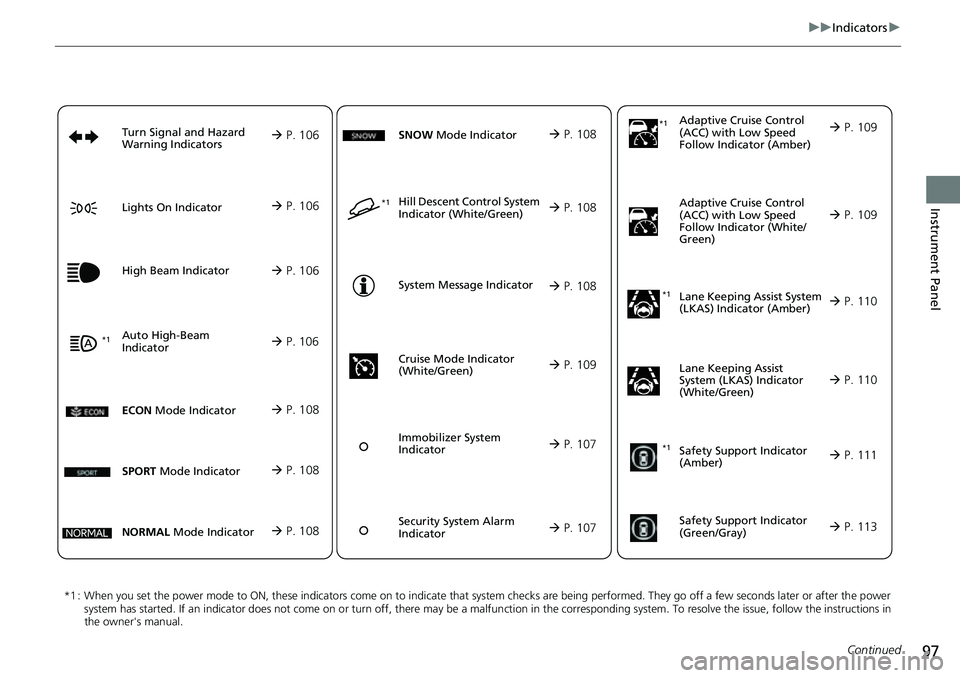
the owner's manual. Adaptive Cruise Control
(ACC) with Low S
p
eed
Follow Indicator (Amber)
Lane Keeping Assist System
(LKAS) Indicator (Amber)
Safety Support Indicator
(Green/Gray)
P. 109
P. 110
P. 113*1
Adaptive Cruise Control
(ACC) with Low Speed
Follow Indicator (White/
Green) P. 109
*1
Lane Keeping Assist
System (LKAS) Indicator
(White/Green) P. 110
*1Safety Support Indicator
(Amber) P. 111
System Message Indicator
Immobilizer System
Indicator
P. 107
P. 108
Cruise Mode Indicator
(White/Green) P. 109
P. 107
Hill Descent Control System
Indicator (White/Green) P. 108*1
Security System Alarm
Indicator
ECON Mode Indicator P. 108
NORMAL Mode Indicator P. 108
SNOW Mode Indicator P. 108
SPORT Mode Indicator P. 108
Auto High-Beam
Indicator
Lights On Indicator
High Beam Indicator
P. 106
P. 106
P. 106*1
Turn Signal and Hazard
Warning Indicators P. 106
Page 107 of 719
106
uuIndicators u
Instrument Panel
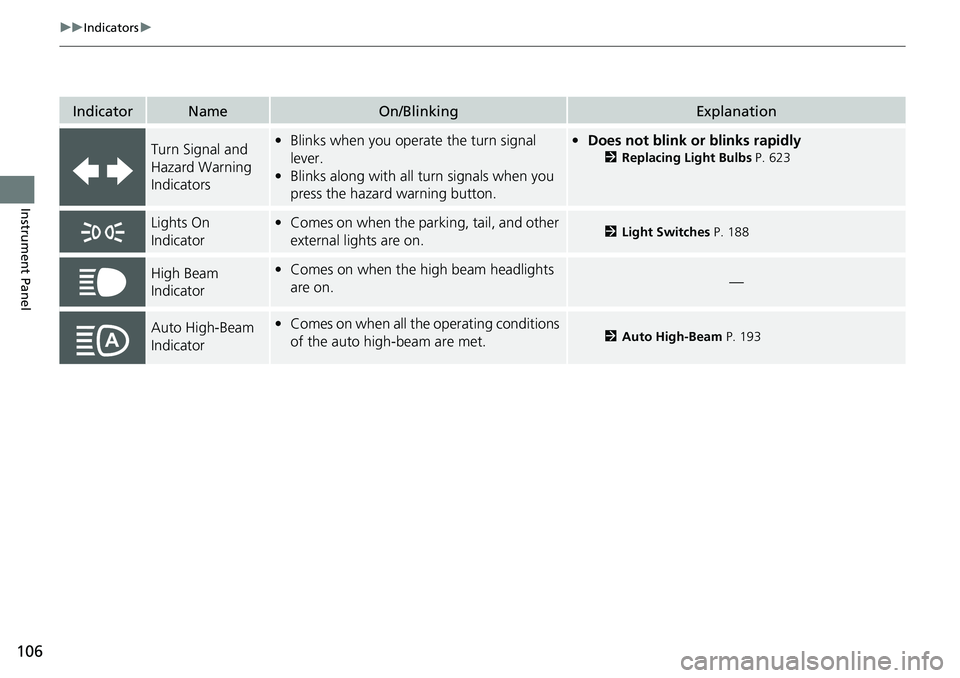
IndicatorNameOn/BlinkingExplanation
Turn Signal and
Hazard Warning
Indicators•Blinks when you oper ate the turn signal
lever.
• Blinks along with all turn signals when you
press the hazard warning button.•Does not blink or blinks rapidly
2 Replacing Light Bulbs P. 623
Lights On
Indicator•Comes on when the parking, tail, and other
external lights are on.2 Light Switches P. 188
High Beam
Indicator•Comes on when the high beam headlights
are on.—
Auto High-Beam
Indicator•Comes on when all the operating conditions
of the auto high-beam are met.2 Auto High-Beam P. 193
Page 109 of 719
108
uuIndicators u
Instrument Panel
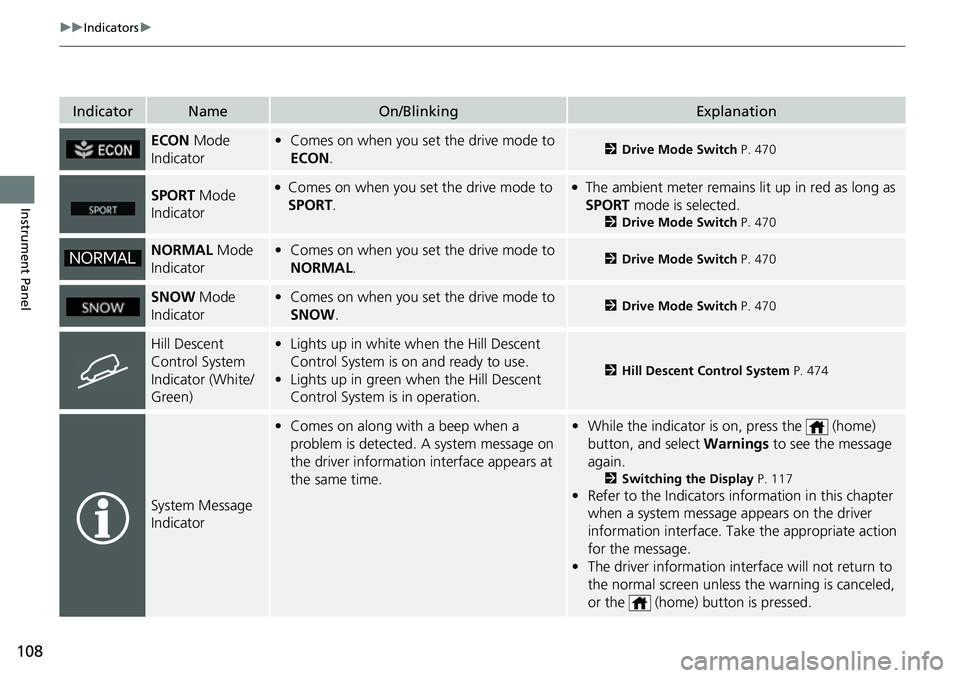
IndicatorNameOn/BlinkingExplanation
ECON Mode
Indicator• Comes on when you set the drive mode to
ECON .2Drive Mode Switch P. 470
SPORT Mode
Indicator●Comes on when you se t the drive mode to
SPORT.●The ambient meter remains lit up in red as long as
SPORT mode is selected.
2 Drive Mode Switch P. 470
NORMAL Mode
Indicator• Comes on when you set the drive mode to
NORMAL .2Drive Mode Switch P. 470
SNOW Mode
Indicator• Comes on when you set the drive mode to
SNOW .2Drive Mode Switch P. 470
Hill Descent
Control System
Indicator (White/
Green)•Lights up in white wh en the Hill Descent
Control System is on and ready to use.
• Lights up in green when the Hill Descent
Control System is in operation.
2 Hill Descent Control System P. 474
System Message
Indicator
•Comes on along with a beep when a
problem is detected. A system message on
the driver information interface appears at
the same time.•While the indicator is on, press the (home)
button, and select Warnings to see the message
again.
2 Switching the Display P. 117
•Refer to the Indicators in formation in this chapter
when a system message appears on the driver
information interface. Take the appropriate action
for the message.
• The driver information interface will not return to
the normal screen unless the warning is canceled,
or the (home) button is pressed.
Page 157 of 719
uuLocking and Unlocking the Doors uLocking/Unlocking the Doors from the Outside
156
Controls
The vehicle will automatically lock after you
lock the doors in advance then close the doors
and tailgate.
Activate lock presetting after closing the
driver’s door.
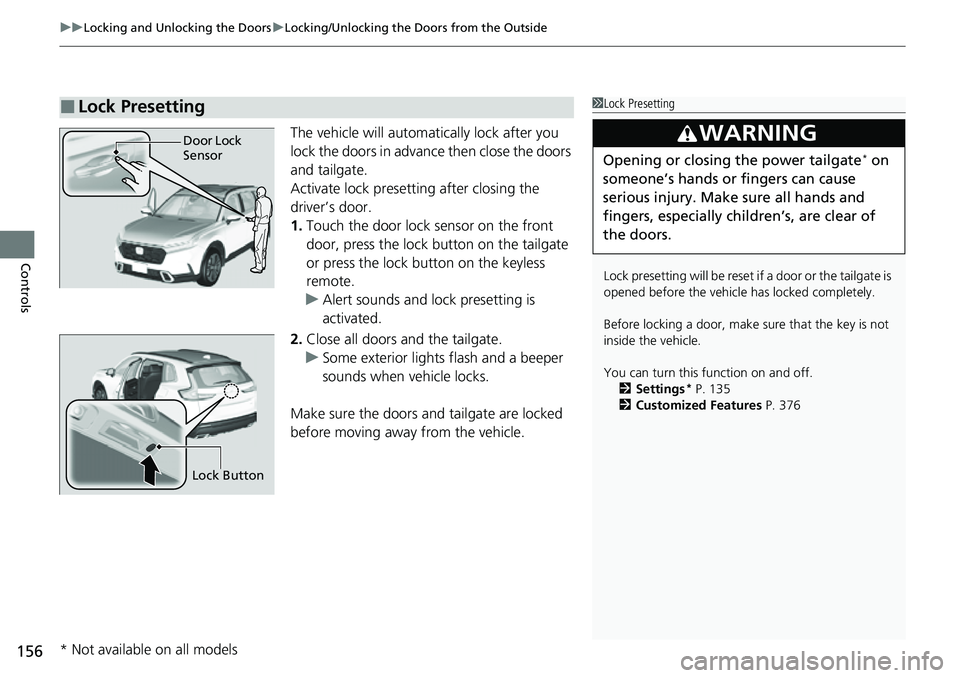
1. Touch the door lock sensor on the front
door, press the lock button on the tailgate
or press the lock button on the keyless
remote.
u Alert sounds and lock presetting is
activated.
2. Close all doors and the tailgate.
u Some exterior lights flash and a beeper
sounds when vehicle locks.
Make sure the doors and tailgate are locked
before moving away from the vehicle.
■Lock Presetting1 Lock Presetting
Lock presetting will be reset if a door or the tailgate is
opened before the vehicle has locked completely.
Before locking a door, make sure that the key is not
inside the vehicle.
You can turn this function on and off. 2 Settings
* P. 135
2 Customized Features P. 376
3WARNING
Opening or closing the power tailgate* on
someone’s hands or fingers can cause
serious injury. Make sure all hands and
fingers, especially children’s, are clear of
the doors.
Door Lock
Sensor
Lock Button
* Not available on all models
Page 458 of 719
Continued457
uuWhen Driving uTurning on the Power
Driving
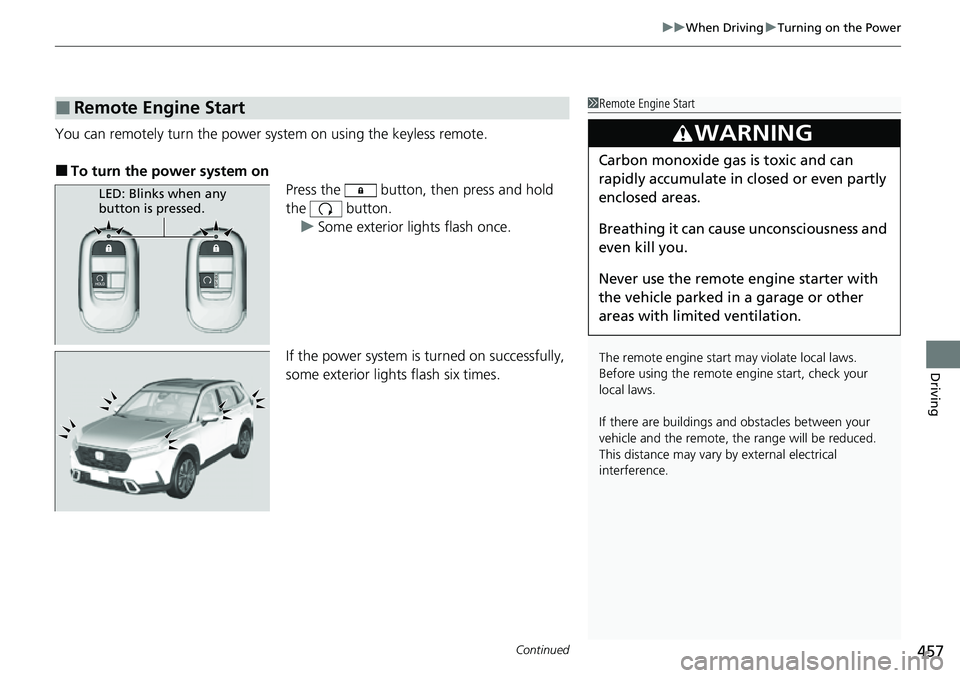
You can remotely turn the power system on using the keyless remote.
■To turn the power system on
Press the button, then press and hold
the button.
u Some exterior lights flash once.
If the power system is turned on successfully,
some exterior lights flash six times.
■Remote Engine Start1 Remote Engine Start
The remote engine start may violate local laws.
Before using the remote e ngine start, check your
local laws.
If there are buildings an d obstacles between your
vehicle and the remote, th e range will be reduced.
This distance may vary by external electrical
interference.
3WARNING
Carbon monoxide ga s is toxic and can
rapidly accumulate in closed or even partly
enclosed areas.
Breathing it can cause unconsciousness and
even kill you.
Never use the remote engine starter with
the vehicle parked in a garage or other
areas with limited ventilation.
LED: Blinks when any
button is pressed.
Page 475 of 719
474
uuWhen Driving uHill Descent Control System
Driving
Hill Descent Control System
When driving down hills where engine braking is not enough to decelerate the
vehicle, this system helps maintain a co nstant vehicle speed without needing to
depress the brake pedal.
The system operates under the following conditions.
• Driving at a speed between about 2-12 mph (3-20 km/h).
• Driving downhill.
• Accelerator pedal and brake pedal are not depressed.
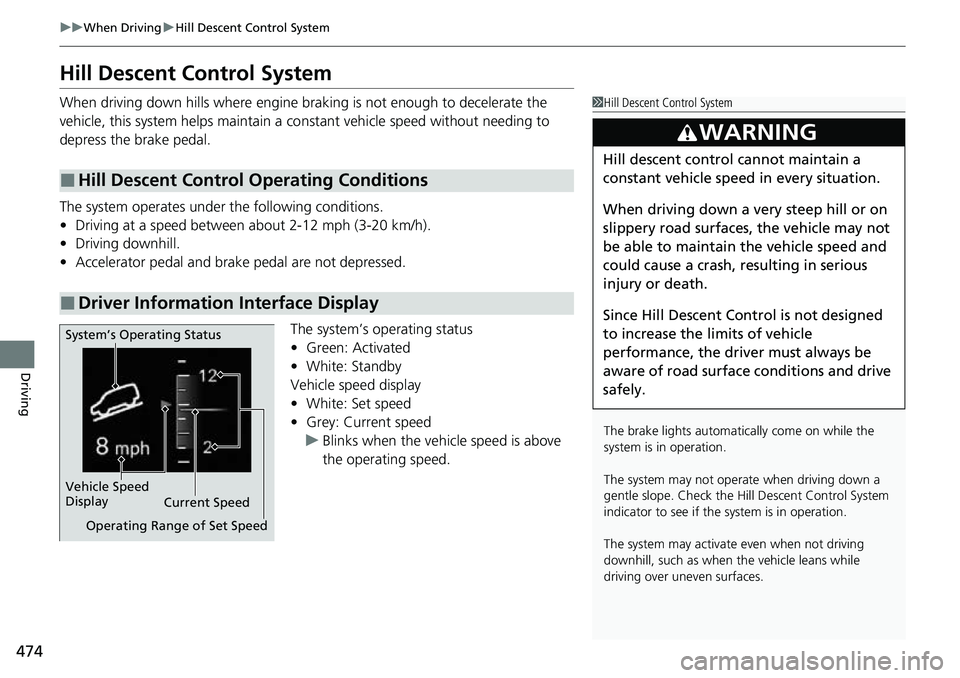
The system’s operating status
•Green: Activated
• White: Standby
Vehicle speed display
• White: Set speed
• Grey: Current speed
u Blinks when the vehicle speed is above
the operating speed.
■Hill Descent Control Operating Conditions
■Driver Information Interface Display
1Hill Descent Control System
The brake lights automati cally come on while the
system is in operation.
The system may not operate when driving down a
gentle slope. Check the Hill Descent Control System
indicator to see if the system is in operation.
The system may activate even when not driving
downhill, such as when the vehicle leans while
driving over uneven surfaces.
3WARNING
Hill descent control cannot maintain a
constant vehicle speed in every situation.
When driving down a very steep hill or on
slippery road surfaces, the vehicle may not
be able to maintain the vehicle speed and
could cause a crash, resulting in serious
injury or death.
Since Hill Descent Control is not designed
to increase the limits of vehicle
performance, the driver must always be
aware of road surface conditions and drive
safely.
System’s Operating Status
Vehicle Speed
Display Current Speed
Operating Range of Set Speed
Page 514 of 719
513
uuHonda Sensing ®u Adaptive Cruise Control (ACC) with Low Speed Follow
Continued
Driving
Adaptive Cruise Control (ACC) with Low Speed Follow
Helps maintain a constant vehicle speed and a set following-interval behind a vehicle
detected ahead of yours and, if the detect ed vehicle comes to a stop, can decelerate
and stop your ve hicle, without you having to keep your foot on the brake or the
accelerator.
When ACC with Low Speed Follo w slows your vehicle by applying the brakes, your
vehicle’s brake lights will illuminate.1 Adaptive Cruise Control (ACC) with Low Speed Follow
Important Reminder
As with any system, there are limits to ACC with Low
Speed Follow. Use the brake pedal whenever
necessary, and always keep a safe interval between
your vehicle and other vehicles.
For directions on the prop er handling of the radar
sensor, refer to the following page. 2 Radar Sensor P. 570
You can read about handling information for the
camera equipped with this system. 2 Front Sensor Camera P. 568
3WARNING
Improper use of ACC with Low Speed
Follow can lead to a crash.
Use ACC with Low Speed Follow only when
driving on expressways or freeways and in
good road and weather conditions.
3WARNING
ACC with Low Speed Follow has limited
braking capability and may not stop your
vehicle in time to avoid a collision with a
vehicle that quickly stops in front of you.
Always be prepared to apply the brake
pedal if the conditions require.
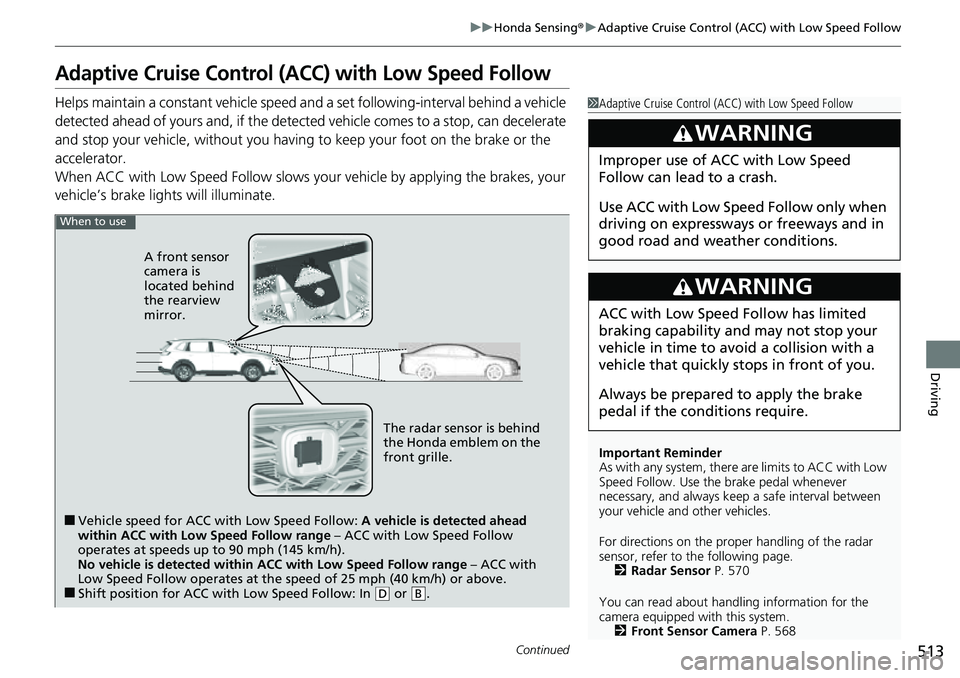
When to use
■Vehicle speed for ACC wi th Low Speed Follow: A vehicle is detected ahead
within ACC with Low Speed Follow range – ACC with Low Speed Follow
operates at speeds up to 90 mph (145 km/h).
No vehicle is detected within ACC with Low Speed Follow range – ACC with
Low Speed Follow operates at the speed of 25 mph (40 km/h) or above.
■Shift position for ACC with Low Speed Follow: In ( D or .B
The radar sensor is behind
the Honda emblem on the
front grille.
A front sensor
camera is
located behind
the rearview
mirror.
Page 522 of 719
Continued521
uuHonda Sensing ®u Adaptive Cruise Control (ACC) with Low Speed Follow
Driving
The system may automatically shut off u nder certain conditions. Some examples of
these conditions are listed below. Othe r conditions may reduce some of the ACC
with Low Speed Follow functions.
2 Front Sensor Camera P. 568
2 Radar Sensor P. 570
■Environmental conditions
• Driving in bad weather (rain, fog, snow, etc.).
■Roadway conditions
• Driving on a snowy or wet roadway (obs cured lane marking, vehicle tracks,
reflected lights, road spray, high contrast).
■Vehicle conditions
• The outside of the windshield is blocked by dirt, mud, leaves, wet snow, etc.
• An abnormal tire or wheel condition (inco rrect sizes, varied sizes or construction,
improperly inflated, etc.).
• The camera temperature gets too high.
• The parking brake is applied.
• The front grille is dirty.
• The vehicle is tilted due to a heavy load or suspension modifications.
• Tire chains are installed.
• The vehicle is towing a trailer.
■ACC with Low Speed Follow Conditions and Limitations1ACC with Low Speed Follow Conditions and Limitations
If you need the radar sensor to be repaired, or
removed, or the front grille is strongly impacted, turn
off the system by pre ssing the button and take
your vehicle to a dealer.
Have your vehicle checked by a dealer if you find any
unusual behavior of the system (e.g., the warning
message appears too frequently).
Page 578 of 719
Continued577
uuBraking uBrake System
Driving
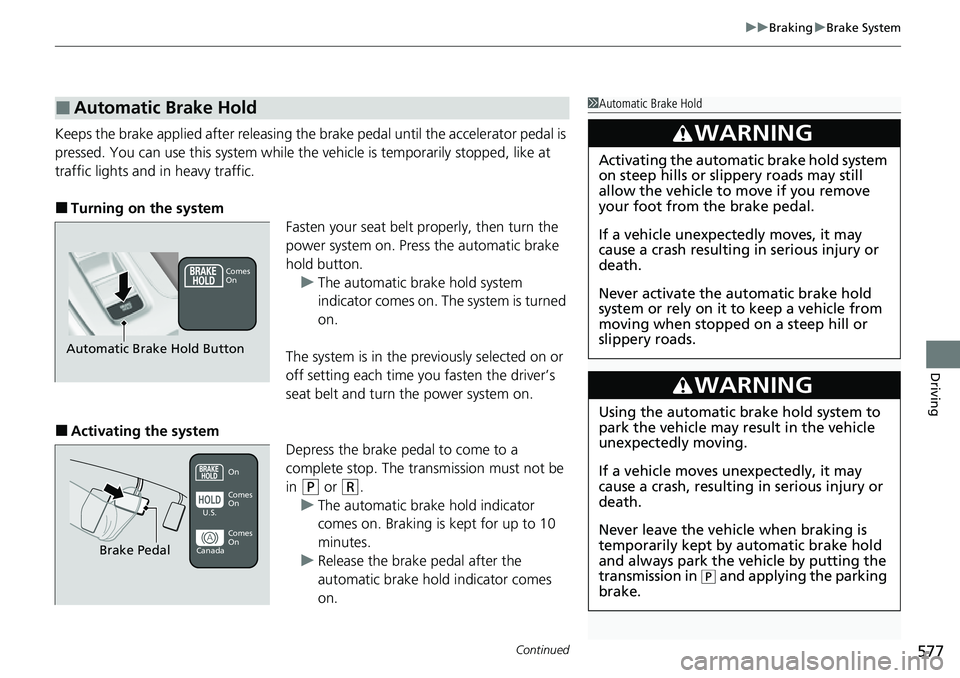
Keeps the brake applied after releasing the brake pedal until the accelerator pedal is
pressed. You can use this system while th e vehicle is temporarily stopped, like at
traffic lights and in heavy traffic.
■Turning on the system Fasten your seat belt properly, then turn the
power system on. Press the automatic brake
hold button.u The automatic brake hold system
indicator comes on. The system is turned
on.
The system is in the prev iously selected on or
off setting each time you fasten the driver’s
seat belt and turn the power system on.
■Activating the system Depress the brake pedal to come to a
complete stop. The transmission must not be
in
(P or (R.
u The automatic brake hold indicator
comes on. Braking is kept for up to 10
minutes.
u Release the brake pedal after the
automatic brake hold indicator comes
on.
■Automatic Brake Hold1Automatic Brake Hold
3WARNING
Activating the automatic brake hold system
on steep hills or slippery roads may still
allow the vehicle to move if you remove
your foot from the brake pedal.
If a vehicle unexpectedly moves, it may
cause a crash resulting in serious injury or
death.
Never activate the automatic brake hold
system or rely on it to keep a vehicle from
moving when stopped on a steep hill or
slippery roads.
3WARNING
Using the automatic brake hold system to
park the vehicle may result in the vehicle
unexpectedly moving.
If a vehicle moves unexpectedly, it may
cause a crash, resulting in serious injury or
death.
Never leave the vehicle when braking is
temporarily kept by automatic brake hold
and always park the vehicle by putting the
transmission in
( P and applying the parking
brake.
Comes
On
Automatic Brake Hold Button
On
Brake Pedal
Comes
On Comes
On
U.S.
Canada
Page 654 of 719
653Continued
Handling the Unexpected
If a Tire Goes Flat
Temporarily Repairing a Flat Tire
If the tire has a large cut or is otherwise severely damaged, you will need to have the
vehicle towed. If the tire only has a small puncture, from a nail for instance, you can
use the temporary tire repair kit so that you can drive to the nearest service station
for a more permanent repair.
If a tire goes flat while driving, grasp the steering wheel firmly, and brake gradually
to reduce speed. Then, stop in a safe place.
1. Park the vehicle on a firm, level, non-slippery surface and apply the parking brake.
2. Put the transmission into
(P.
3. Turn on the hazard warning lights an d set the power mode to VEHICLE OFF.
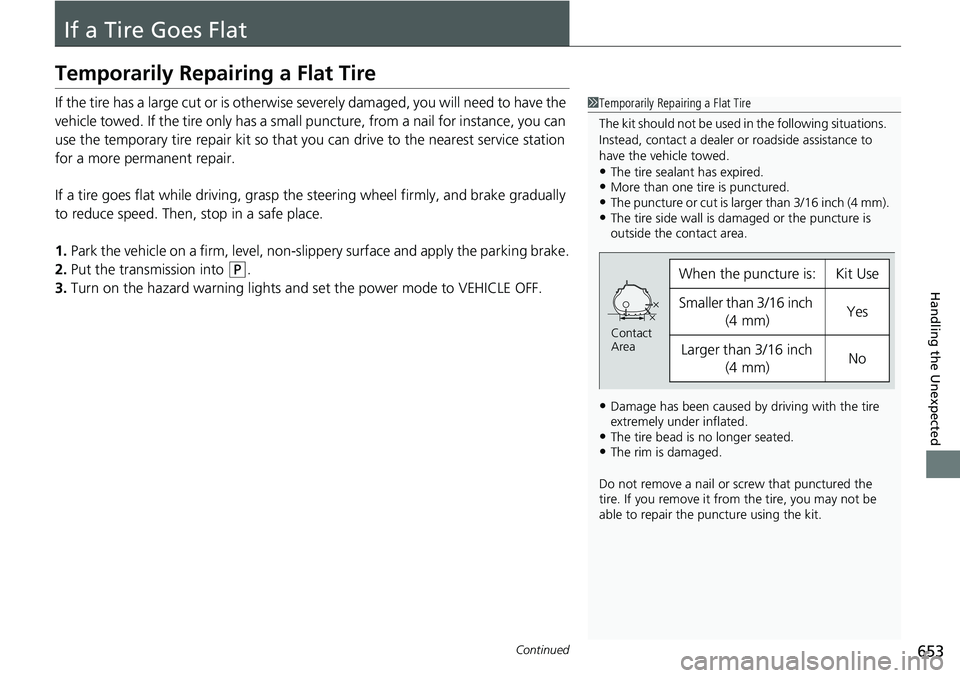
1Temporarily Repairing a Flat Tire
The kit should not be used in the following situations.
Instead, contact a dealer or roadside assistance to
have the vehicle towed.
•The tire sealant has expired.•More than one tire is punctured.•The puncture or cut is larger than 3/16 inch (4 mm).•The tire side wall is da maged or the puncture is
outside the contact area.
•Damage has been caused by driving with the tire
extremely under inflated.
•The tire bead is no longer seated.•The rim is damaged.
Do not remove a nail or screw that punctured the
tire. If you remove it from the tire, you may not be
able to repair the puncture using the kit.
When the puncture is:Kit Use
Smaller than 3/16 inch
(4 mm)Yes
Larger than 3/16 inch (4 mm)No
Contact
Area