charging HONDA CRV 2023 User Guide
[x] Cancel search | Manufacturer: HONDA, Model Year: 2023, Model line: CRV, Model: HONDA CRV 2023Pages: 719, PDF Size: 13.43 MB
Page 229 of 719
uuInterior Convenience Items uOther Interior Convenience Items
228
Controls
1Wireless Charger*
During the charging phase, it is normal for the
charging area and de vice to heat up.
Charging may be briefl y interrupted when:
•All the doors and the tailgate are closed
- to avoid interference with the proper functioning
of the keyless access system.
•The position of the device is altered.
Do not charge more than one device at a time on a
charging area.
If the device becomes too hot and its battery
protection function activa tes, it may charge
extremely slowly or no longer charge.
The temperature at which the battery protection
function activates de pends on the device.
* Not available on all models
Page 240 of 719
239
uuAudio System uUSB Ports
Continued
Features
USB Ports
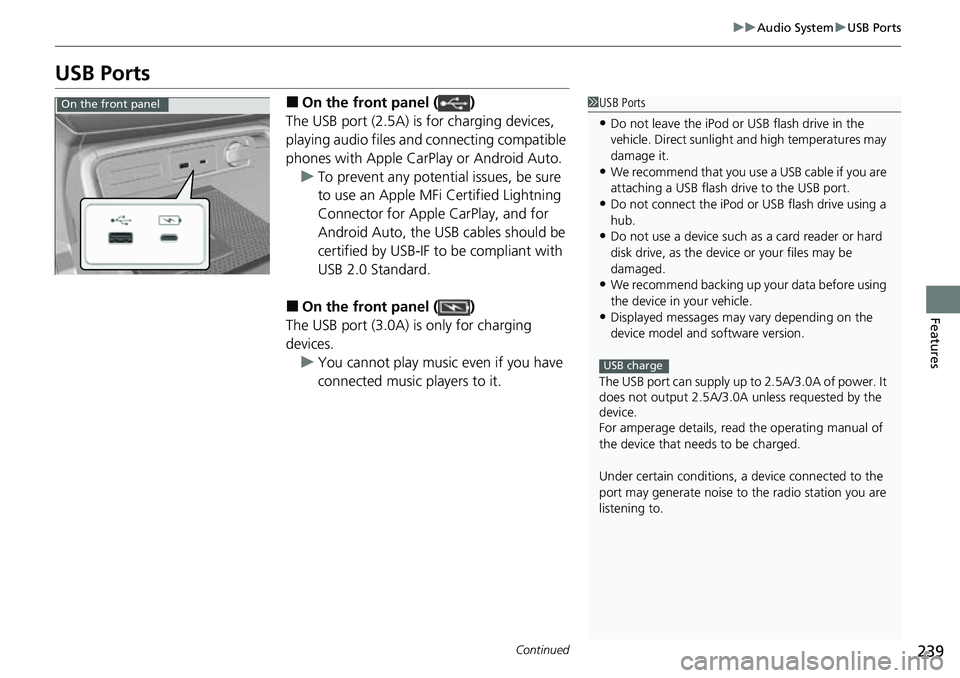
■On the front panel ( )
The USB port (2.5A) is for charging devices,
playing audio files and connecting compatible
phones with Apple CarPlay or Android Auto. u To prevent any potenti al issues, be sure
to use an Apple MFi Certified Lightning
Connector for Apple CarPlay, and for
Android Auto, the USB cables should be
certified by USB-IF to be compliant with
USB 2.0 Standard.
■On the front panel ( )
The USB port (3.0A) is only for charging
devices. u You cannot play music even if you have
connected music players to it.
1USB Ports
•Do not leave the iPod or USB flash drive in the
vehicle. Direct sunlight and high temperatures may
damage it.
•We recommend that you us e a USB cable if you are
attaching a USB flash drive to the USB port.
•Do not connect the iPod or USB flash drive using a
hub.
•Do not use a device such as a card reader or hard
disk drive, as the device or your files may be
damaged.
•We recommend backing up yo ur data before using
the device in your vehicle.
•Displayed messages may vary depending on the
device model and software version.
The USB port can supply up to 2.5A/3.0A of power. It
does not output 2.5A/3.0A unless requested by the
device.
For amperage details, read the operating manual of
the device that ne eds to be charged.
Under certain condi tions, a device connected to the
port may generate noise to the radio station you are
listening to.
USB charge
On the front panel
Page 241 of 719
240
uuAudio System uUSB Ports
Features
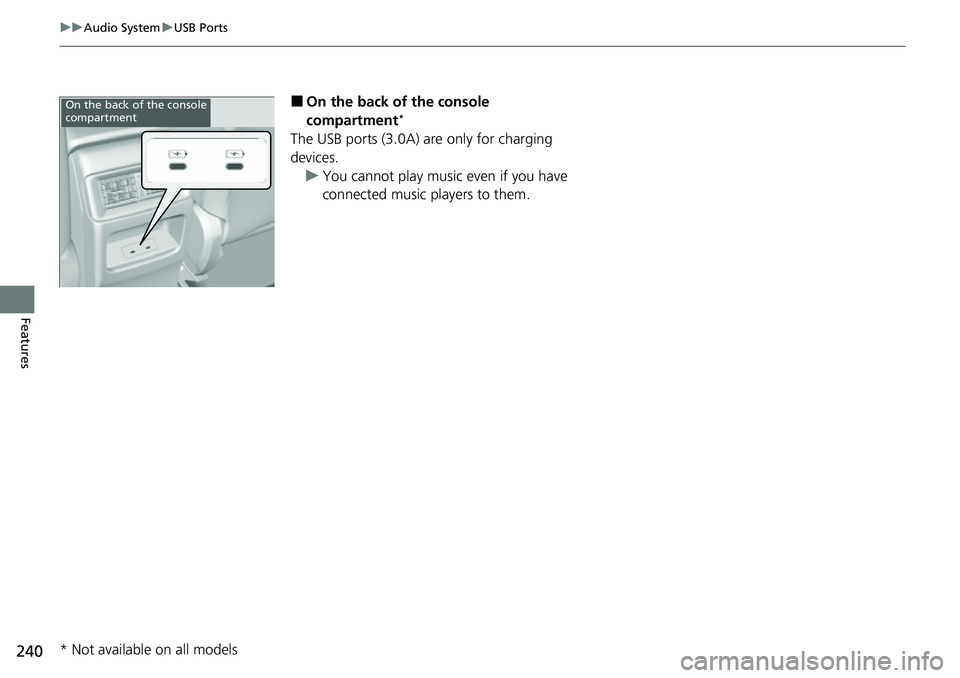
■On the back of the console
compartment*
The USB ports (3.0A) are only for charging
devices.
u You cannot play music even if you have
connected music players to them.
On the back of the console
compartment
* Not available on all models
Page 344 of 719
Continued343
uuAudio System Basic Operation uPower Flow
Features
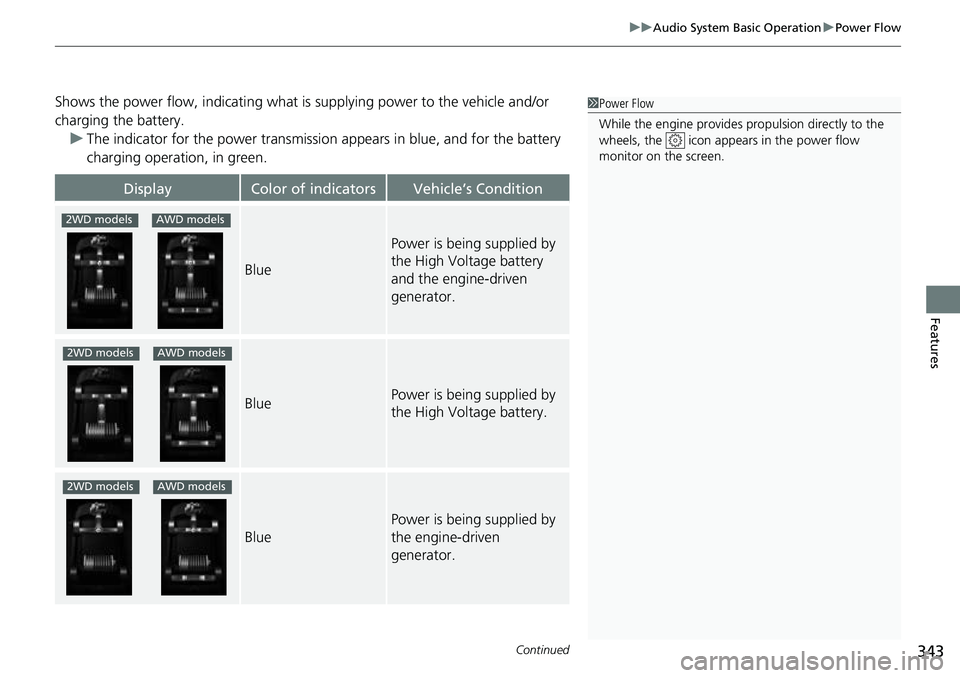
Shows the power flow, indicating what is supplying power to the vehicle and/or
charging the battery. u The indicator for the power transmission appears in blue, and for the battery
charging operation, in green.
DisplayColor of indicatorsVehicle’s Condition
Blue
Power is being supplied by
the High Voltage battery
and the engine-driven
generator.
BluePower is being supplied by
the High Voltage battery.
Blue
Power is being supplied by
the engine-driven
generator.
1 Power Flow
While the engine provides propulsion directly to the
wheels, the icon appears in the power flow
monitor on the screen.
2WD modelsAWD models
2WD modelsAWD models
2WD modelsAWD models
Page 347 of 719
346
uuAudio Error Messages uiPod/USB Flash Drive
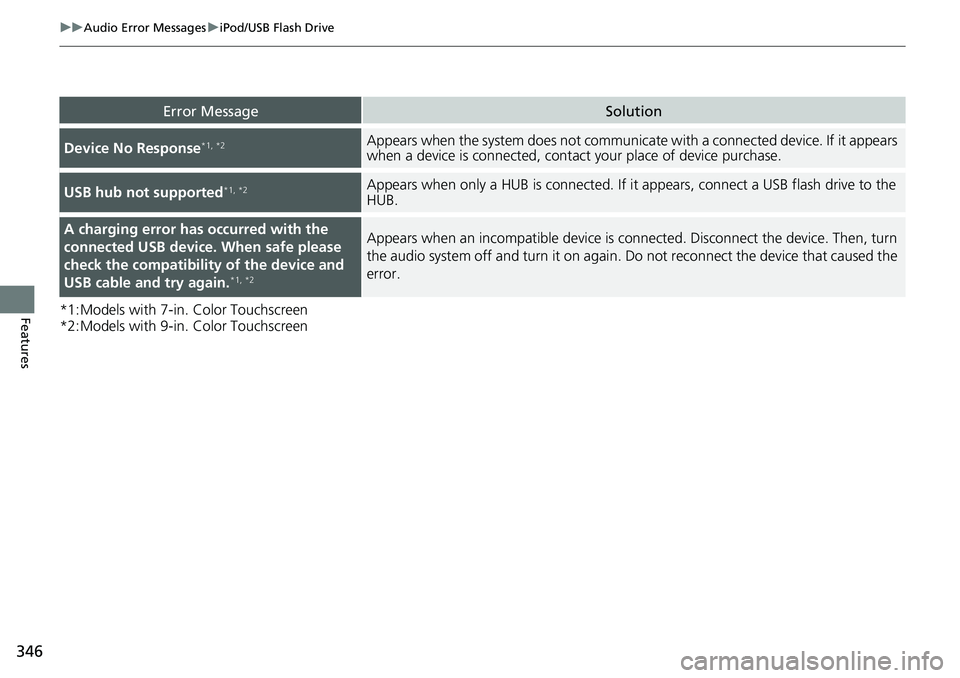
Features*1:Models with 7-in. Color Touchscreen
*2:Models with 9-in. Color Touchscreen
Error MessageSolution
Device No Response*1, *2Appears when the system does not communicate with a connected device. If it appears
when a device is connected, contact your place of device purchase.
USB hub not supported*1, *2Appears when only a HUB is co nnected. If it appears, connect a USB flash drive to the
HUB.
A charging error ha s occurred with the
connected USB device. When safe please
check the compatibility of the device and
USB cable and try again.
*1, *2
Appears when an incompatible device is co nnected. Disconnect the device. Then, turn
the audio system off and turn it on again. Do not reconnect the device that caused the
error.
Page 356 of 719
355
uuGeneral Information on the Audio System uHonda App License Agreement
Continued
Features
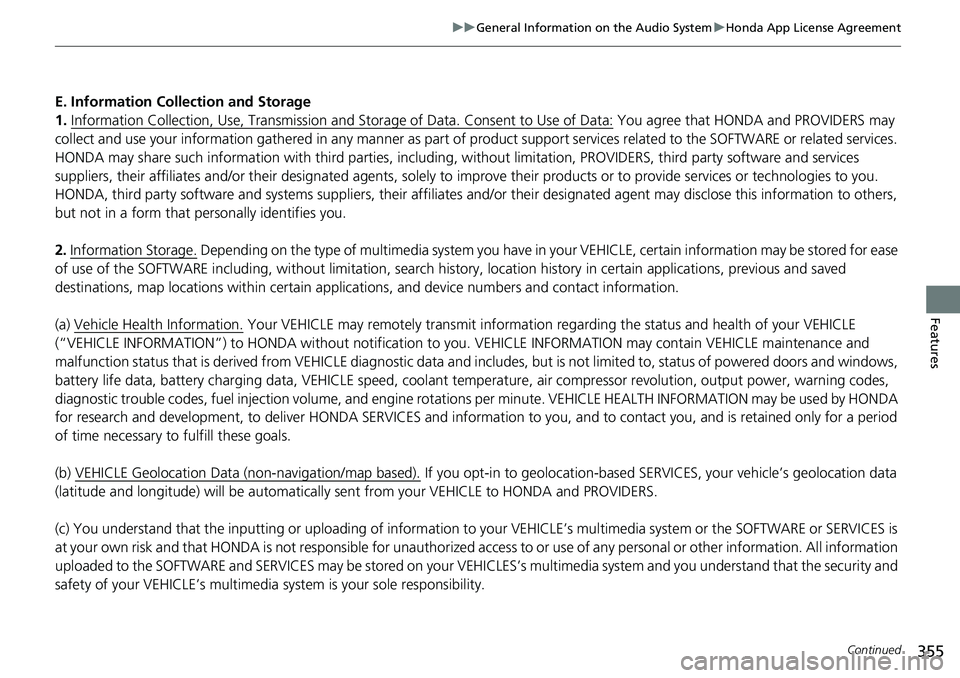
E. Information Collection and Storage
1. Information Collection, Use, Transmission a nd Storage of Data. Consent to Use of Data:
You agree that HONDA and PROVIDERS may
collect and use your information gathered in any manner as part of product support services related to the SOFTWARE or related services.
HONDA may share such information with third parties, including, without limitation, PR OVIDERS, third party software and service s
suppliers, their affiliates and/or their designated agents, solely to improve their products or to provide services or technolo gies to you.
HONDA, third party software and systems supplie rs, their affiliates and/or their designated agent may disclose this information to others,
but not in a form that pe rsonally identifies you.
2. Information Storage.
Depending on the type of mult imedia system you have in your VEHICLE, certain information may be stored for ease
of use of the SOFTWARE including, without limitation, search history, location history in certain applications, previous and sa ved
destinations, map locations within certain applications, and device numbers and contact information.
(a) Vehicle Health Information.
Your VEHICLE may remotely transmit information re garding the status and health of your VEHICLE
(“VEHICLE INFORMATION”) to HO NDA without notification to you. VEHICLE INFO RMATION may contain VEHICLE maintenance and
malfunction status that is derived from VEHICLE diagnostic data and includes, but is not limited to, status of powered doors and windows,
battery life data, battery charging data, VE HICLE speed, coolant temperature, air comp ressor revolution, output power, warning codes,
diagnostic trouble codes, fuel injection volume, and engine rotati ons per minute. VEHICLE HEALTH INFORMATION may be used by HON DA
for research and development, to deliver HONDA SERVICES and informat ion to you, and to contact you, and is retained only for a period
of time necessary to fulfill these goals.
(b) VEHICLE Geolocation Data (non-navigation/map based).
If you opt-in to geolocation-based SERVICES, your vehicle’s geolocation data
(latitude and longitude) will be automatically sent from your VEHICLE to HONDA and PROVIDERS.
(c) You understand that the inputting or uploading of information to your VEHICLE’s multimedia system or the SOFTWARE or SERVIC ES is
at your own risk and that HONDA is not responsible for unauthori zed access to or use of any personal or other information. All information
uploaded to the SOFTWARE and SERVICES may be stored on your VEHICLES’s multimedia system and you understand that the security and
safety of your VEHICLE’s multimedia system is your sole responsibility.
Page 642 of 719
641
uu12-Volt Battery uCharging the 12-Volt Battery
Maintenance
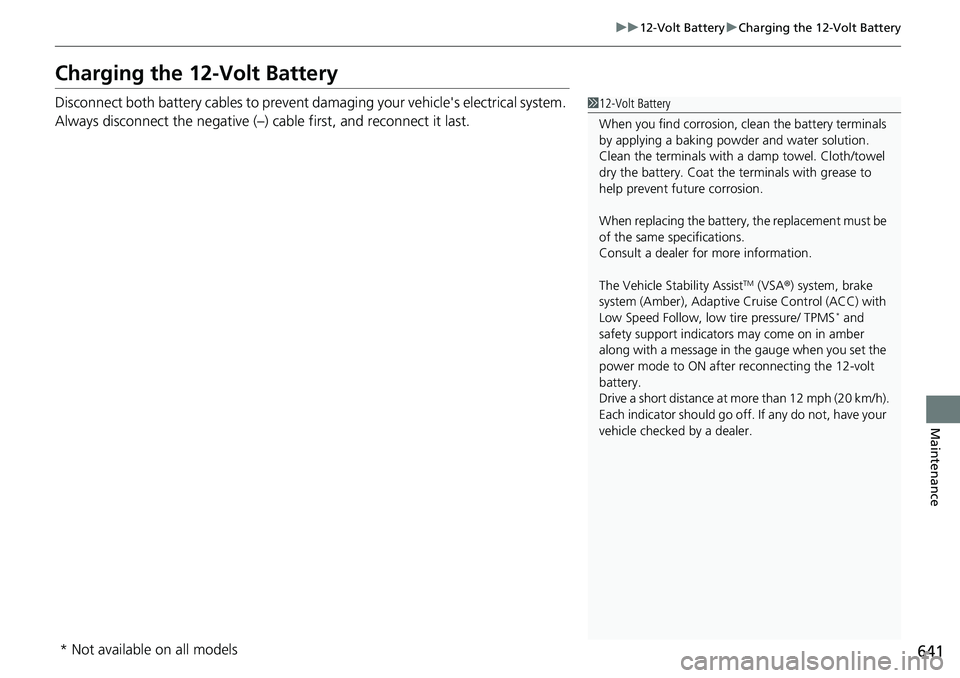
Charging the 12-Volt Battery
Disconnect both battery cables to prevent damaging your vehicle's electrical system.
Always disconnect the negative (–) cable first, and reconnect it last.112-Volt Battery
When you find corrosion, cl ean the battery terminals
by applying a baking powder and water solution.
Clean the terminals with a damp towel. Cloth/towel
dry the battery. Coat the terminals with grease to
help prevent future corrosion.
When replacing the battery, the replacement must be
of the same specifications.
Consult a dealer for more information.
The Vehicle Stability Assist
TM (VSA ®) system, brake
system (Amber), Adaptive Cruise Control (ACC) with
Low Speed Follow, low tire pressure/ TPMS
* and
safety support indicators may come on in amber
along with a message in the gauge when you set the
power mode to ON after reconnecting the 12-volt
battery.
Drive a short distance at mo re than 12 mph (20 km/h).
Each indicator should go off. If any do not, have your
vehicle checked by a dealer.
* Not available on all models
Page 651 of 719
650
uuAccessories and Modifications uModifications
Maintenance
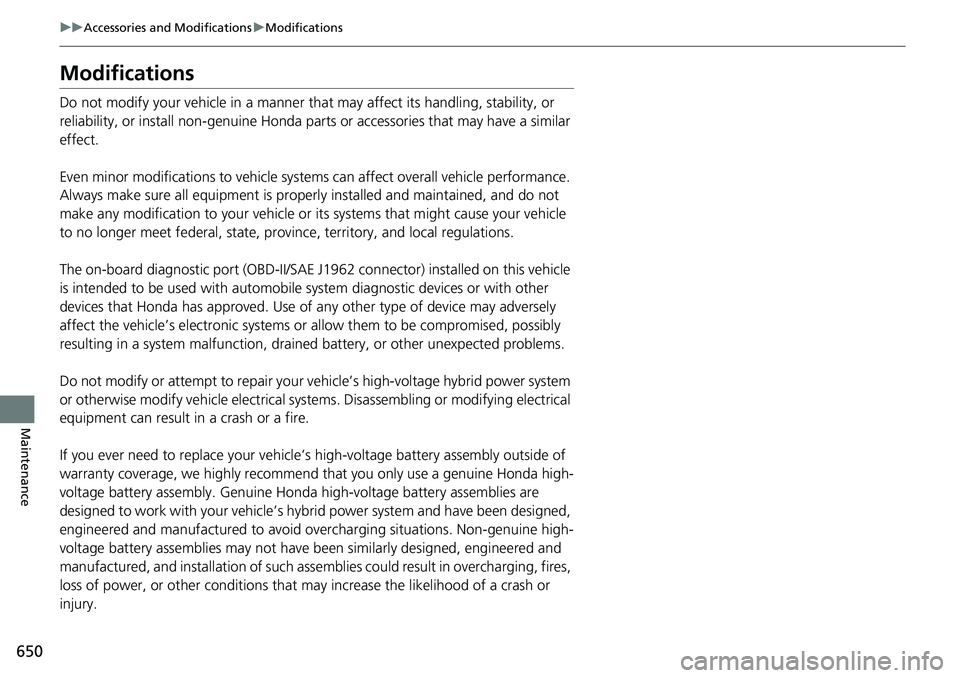
Modifications
Do not modify your vehicle in a manner that may affect its handling, stability, or
reliability, or install non-genuine Honda parts or accessories that may have a similar
effect.
Even minor modifications to vehicle system s can affect overall vehicle performance.
Always make sure all equipment is prop erly installed and maintained, and do not
make any modification to your vehicle or its systems that might cause your vehicle
to no longer meet federal, state, province, territory, and local regulations.
The on-board diagnostic port (OBD-II/SAE J1962 connector) installed on this vehicle
is intended to be used with automobile system diagnostic devices or with other
devices that Honda has approved. Use of any other type of device may adversely
affect the vehicle’s electronic systems or allow them to be compromised, possibly
resulting in a system malfunction, draine d battery, or other unexpected problems.
Do not modify or attempt to repair your vehicle’s high-voltage hybrid power system
or otherwise modify vehicle electrical systems. Disassemb ling or modifying electrical
equipment can result in a crash or a fire.
If you ever need to replace your vehicle’s high-voltage battery assembly outside of
warranty coverage, we highly recommend that you only use a genuine Honda high-
voltage battery assembly. Genuine Honda high-voltage battery assemblies are
designed to work with your vehicle’s hybr id power system and have been designed,
engineered and manufactured to avoid overcharging situations. Non-genuine high-
voltage battery assemblies may not have be en similarly designed, engineered and
manufactured, and installation of such assemblies could result in overcharging, fires,
loss of power, or other conditions that may increase the likelihood of a crash or
injury.
Page 652 of 719

651
Handling the Unexpected
This chapter explains how to handle unexpected troubles.
ToolsTypes of Tools .................................. 652
If a Tire Goes Flat
Temporarily Repairi ng a Flat Tire....... 653
Handling of the Jack ......................... 666
Power System Won’t Start Checking the Procedure ................... 667
If the Keyless Remote Battery is Weak ... 668Emergency Power System On ........... 669
Emergency Power System Off........... 670
If the 12-Volt Battery Is Dead .......... 671
Shift Lever Does Not Move .............. 673
Overheating How to Handle Overheating ............. 674 Indicator, Coming On/Blinking
If the Engine oil pressure low Warning Appears ......................................... 676
If the 12-Volt Battery Charging System Indicator Comes On ....................... 677
If the Limited stopping power Warning
Appears ......................................... 677
If the Malfunction Indicator Lamp Comes On or Blinks ................................... 678
If the Brake System Indicator (Red) Comes On or Blinks ................................... 679
If the Brake System Indicator (Red) Comes On
or Blinks at the Same Time When the Brake
System Indicator (Amber) Comes On.... 680
If the Electric Power Steering (EPS) System
Indicator Comes On ....................... 681
If the Low Tire Pressure/TPMS Indicator Comes On or Blinks ....................... 682
Fuses Fuse Locations ................................. 683
Inspecting and Changing Fuses ........ 687
Emergency Towing ........................... 689
If You Cannot Unlock the Fuel Fill Door... 690If You Cannot Open the Tailgate.......... 691Refueling................................................. 692
U.S. models
Page 672 of 719
671Continued
Handling the Unexpected
If the 12-Volt Battery Is Dead
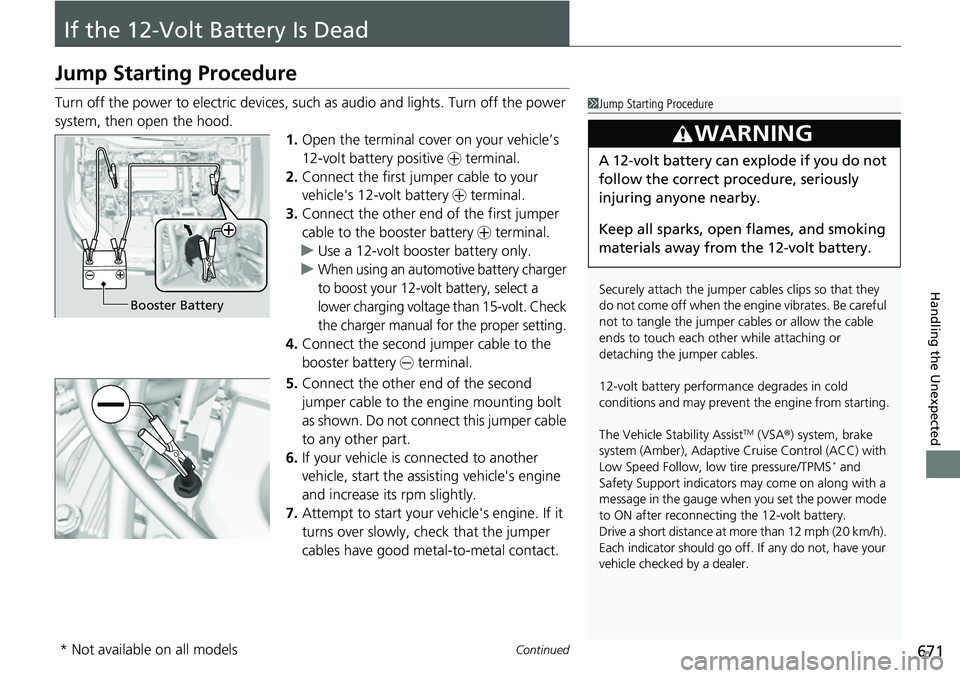
Jump Starting Procedure
Turn off the power to electric devices, such as audio and lights. Turn off the power
system, then open the hood. 1.Open the terminal cover on your vehicle’s
12-volt battery positive + terminal.
2. Connect the first jumper cable to your
vehicle's 12-volt battery + terminal.
3. Connect the other end of the first jumper
cable to the booster battery + terminal.
u Use a 12-volt booster battery only.
u
When using an automotive battery charger
to boost your 12-volt battery, select a
lower charging voltage than 15-volt. Check
the charger manual for the proper setting.
4. Connect the second jumper cable to the
booster battery - terminal.
5. Connect the other end of the second
jumper cable to the engine mounting bolt
as shown. Do not connect this jumper cable
to any other part.
6. If your vehicle is connected to another
vehicle, start the assisting vehicle's engine
and increase its rpm slightly.
7. Attempt to start your ve hicle's engine. If it
turns over slowly, check that the jumper
cables have good metal-to-metal contact.
1 Jump Starting Procedure
Securely attach the jumper cables clips so that they
do not come off when the e ngine vibrates. Be careful
not to tangle the jumper cables or allow the cable
ends to touch each other while attaching or
detaching the jumper cables.
12-volt battery performa nce degrades in cold
conditions and may prevent the engine from starting.
The Vehicle Stability Assist
TM (VSA ®) system, brake
system (Amber), Adaptive Cruise Control (ACC) with
Low Speed Follow, low tire pressure/TPMS
* and
Safety Support indicators may come on along with a
message in the gauge when you set the power mode
to ON after reconnecting the 12-volt battery.
Drive a short distance at more than 12 mph (20 km/h).
Each indicator should go off. If any do not, have your
vehicle checked by a dealer.
3WARNING
A 12-volt battery can explode if you do not
follow the correct procedure, seriously
injuring anyone nearby.
Keep all sparks, open flames, and smoking
materials away from the 12-volt battery.
Booster Battery
* Not available on all models