transmission HONDA CRV 2023 Owner's Manual
[x] Cancel search | Manufacturer: HONDA, Model Year: 2023, Model line: CRV, Model: HONDA CRV 2023Pages: 719, PDF Size: 13.43 MB
Page 359 of 719
358
uuGeneral Information on the Audio System uHonda App License Agreement
Features
I. Availability/Interruption. The SOFTWARE and certain SERVICES are made availa ble through your VEHICLE’s compatible multimedia
system when the VEHICLE is turned on. Certain SERVICES may be avai lable only through your compatible mobile device when it is within
the operating range of the VEHICLE and a wireless carrier. The availability of the SOFTWARE and SERVICES may be subject to tran smission
limitation or interruption, including but not limited to techni cal obsolesce or sunsetting of the hardware, software or firmwar e, inside of
or external to the Vehicle, required fo r data transmission or receipt. HONDA does not guarantee that the SOFTWARE, SERVICES, or any
portion thereof will be av ailable at all times or in all ar eas. You acknowledge and agree that HONDA is not responsible for performance
degradation, interruption or delays. You acknowledge that HONDA shall not be liable to you if the SOFTWARE or SERVICES in a given
location are not available. If the SOFTWARE or SERVICES are not available within your intended location, you agree that your sole remedy
shall be to cease using the SOFTWARE and SERVICES.
J. PRODUCT SUPPORT: Product support for the SOFTWARE is provided by HONDA. For product support, please refer to HONDA
instructions provided in the DOCUMENTATION. Should you have any que stions concerning this AGREEMENT, or if you desire to contact
HONDA for any other reason, please refer to the HONDA contact information provided in the DOCUMENTATION.
K. Termination and Transfer.
1. Termination. This AGREEMENT is effective until terminated by you or US . WE may terminate this AGREEMENT for any or no reason,
and with or without notice to you. Your rights under this AGRE EMENT will terminate automatically without notice from US if you fail to
comply with any term of this AGREEMENT. Up on termination of this AGREEMENT, you shall cease all use of the SOFTWARE and SERVICE S.
2. Transfer: You may permanently transfer your rights under this AGREEMENT only as part of a sale or transfer of the VEHICLE, provided
you retain no copies, you transfer all of the SOFTWARE and HO NDA SERVICES (including all component parts, the media and printed
materials, and any upgrades), and the recipi ent agrees to the terms of this AGREEMENT. You agree to notify HONDA upon the sale or
transfer of the VEHICLE. To contact HO NDA, please refer to the HONDA contact in formation provided in the DOCUMENTATION.
Page 442 of 719
441
Driving
This chapter discusses driving and refueling.
Before Driving................................... 442
Towing a Trailer ................................ 447
Off-Highway Driving Guidelines ..... 453
When Driving Turning on the Power ...................... 455
Precautions While Driving................. 462
Transmission........................................ 463Shifting ............................................ 464
Deceleration Paddle Selector ............ 466
Acoustic Vehicle Al erting System ...... 469
Drive Mode Switch ........................... 470
Hill Descent Control System ............. 474
Vehicle Stability AssistTM (VSA®), aka Electronic
Stability Control (ESC), System .............. 476
Agile Handling Assist ....................... 478
Real Time AWD with Intelligent Control System
TM*...................................... 479Tire Pressure Monitoring System (TPMS) .... 480Tire Pressure Monitoring System (TPMS) - Required Federal Explanation ......... 485
Blind Spot Information System ......... 487
High Voltage Battery ........................ 491
Honda Sensing ®................................ 492
Collision Mitigati on Braking System
TM
(CMBSTM) ....................................... 495 Low Speed Braking Control
*............ 507
Adaptive Cruise Control (ACC) with Low Speed Follow ................................. 513
Lane Keeping Assist System (LKAS).... 533
Traffic Jam Assist ............................. 545
Road Departure Miti gation System... 554
Traffic Sign Recognition System ....... 562
Front Sensor Camera ....................... 568
Radar Sensor ................................... 570
Sonar Sensors
*................................ 571
Braking .............................................. 572
Parking Your Vehicle ........................ 582
Multi-View Rear Camera .................. 593
Refueling ........................................... 595
Fuel Economy and CO
2 Emissions .... 598
* Not available on all models
Page 455 of 719
454
uuOff-Highway Driving Guidelines uAvoiding Trouble
Driving
Avoiding Trouble
• Check Out Your Vehicle before you leave the pavement and make sure that all
scheduled maintenance has been comple ted. Pay special attention to the
condition of the tires, an d check the tire pressures.
• Remember the route you choose presents limits (too steep or bumpy), you have
limits (driving skill and comfort), and your ve hicle has limits (traction, stability, and
power). Failing to recognize these limits will likely put you and your passengers in
a hazardous situation.
• Accelerating and Braking should be done slowly and gradually. Trying to start
or stop too fast can cause a loss of traction and you could lose control.
• Avoiding Obstacles and Debris in the road reduces the likelihood of a rollover
or damage to your suspension or other components.
• Driving on Slopes increases your risk of a rollover, particularly if you attempt to
drive across a slope that is too steep. Going straight up or down a slope is usually
the safest. If you can’t clearly see all cond itions or obstacles on a slope, walk it
before you drive it. If there is any doubt whether you can safely pass, don’t try it.
Find another route. If you get stuck when climbing, do not try to turn around.
Back down slowly following the same route you took up the hill.
• Crossing a Stream - Avoid driving through deep water. If you encounter water
in your route (a small stream or large pu ddle, for example), evaluate it carefully
before going ahead. Make sure it is shallow, flowing slowly, and has firm ground
underneath. If you are not sure of the depth or the ground, turn around and find
another route. Driving through deep water can also damage your vehicle. When
driving in water that reaches around half of the wheel height, the water can get
into the transmission and differential, diluting the lubricant and causing an
eventual failure. It can also wash th e grease out of the wheel bearings.
• If You Get Stuck, carefully go in the direction that you think will get you
unstuck. Do not spin the tires as this will only make things worse and could
damage the transmission. If you are unable to free yourself, your vehicle will need
to be towed. Front and rear tow hooks are provided for this purpose.
Page 456 of 719
455Continued
Driving
When Driving
Turning on the Power
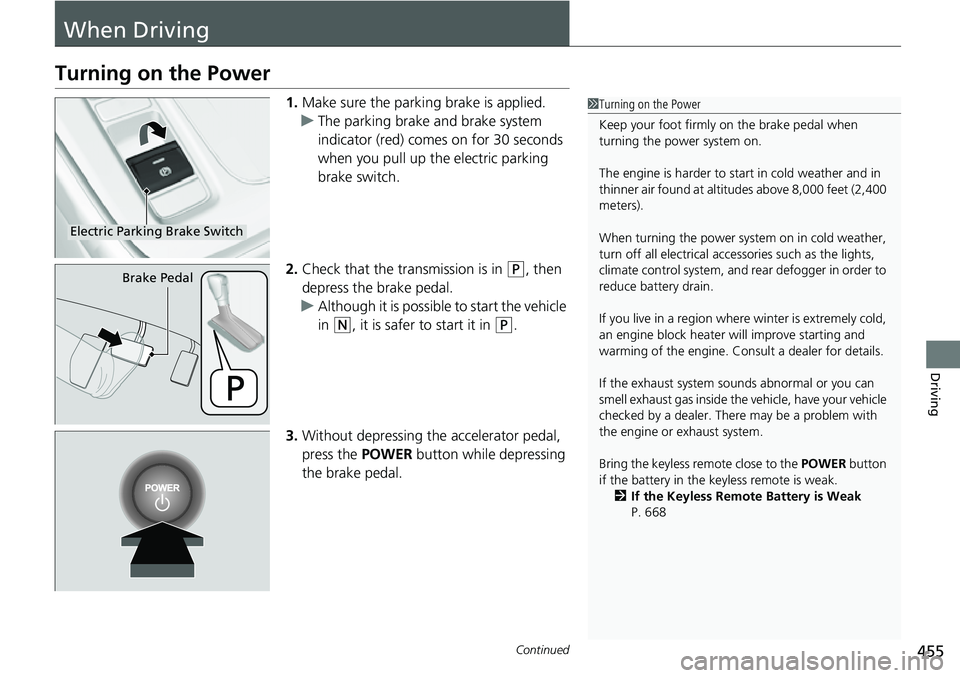
1.Make sure the parkin g brake is applied.
u The parking brake and brake system
indicator (red) comes on for 30 seconds
when you pull up the electric parking
brake switch.
2. Check that the transmission is in
(P, then
depress the brake pedal.
u Although it is possible to start the vehicle
in
(N, it is safer to start it in (P.
3. Without depressing the accelerator pedal,
press the POWER button while depressing
the brake pedal.
1 Turning on the Power
Keep your foot firmly on the brake pedal when
turning the power system on.
The engine is harder to st art in cold weather and in
thinner air found at altit udes above 8,000 feet (2,400
meters).
When turning the power system on in cold weather,
turn off all electrical accessories such as the lights,
climate control system, and rear defogger in order to
reduce battery drain.
If you live in a region where winter is extremely cold,
an engine block heater will improve starting and
warming of the engine. Consult a dealer for details.
If the exhaust system sounds abnormal or you can
smell exhaust gas inside the vehicle, have your vehicle
checked by a dealer. There may be a problem with
the engine or exhaust system.
Bring the keyless remote close to the POWER button
if the battery in the keyless remote is weak. 2 If the Keyless Remote Battery is Weak
P. 668
Electric Parking Brake Switch
Brake Pedal
Page 459 of 719
uuWhen Driving uTurning on the Power
458
Driving
If the power system is not turned on, exterior
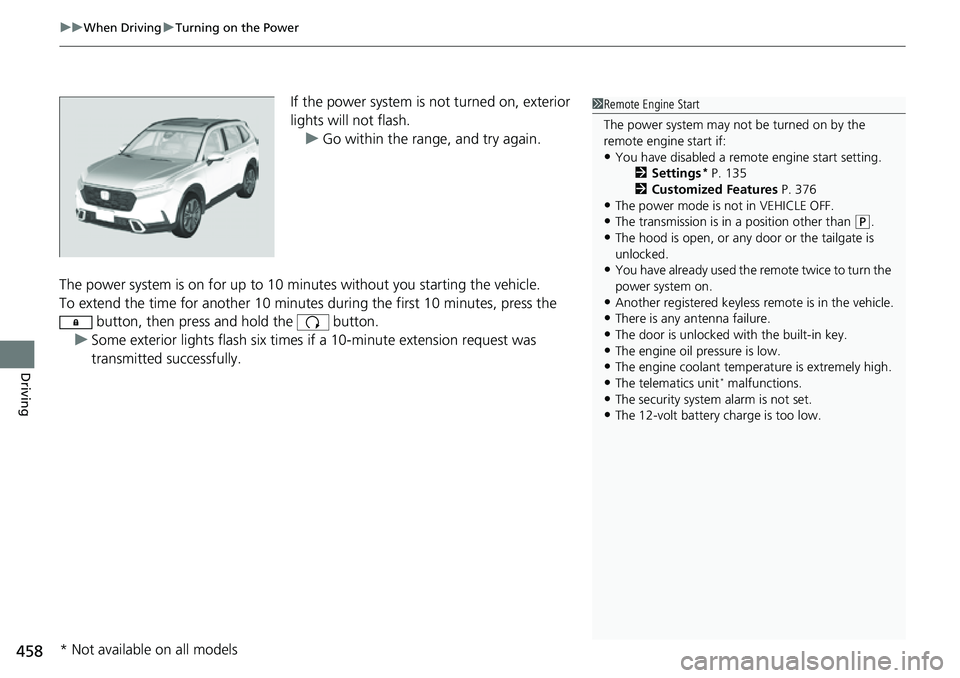
lights will not flash.
u Go within the rang e, and try again.
The power system is on for up to 10 minutes without you starting the vehicle.
To extend the time for another 10 minute s during the first 10 minutes, press the
button, then press and hold the button.
u Some exterior lights flash six times if a 10-minute extension request was
transmitted successfully.1Remote Engine Start
The power system may not be turned on by the
remote engine start if:
•You have disabled a remo te engine start setting.
2 Settings* P. 135
2 Customized Features P. 376
•The power mode is not in VEHICLE OFF.•The transmission is in a position other than (P.
•The hood is open, or any door or the tailgate is
unlocked.
•You have already used the remote twice to turn the
power system on.
•Another registered keyless remote is in the vehicle.•There is any antenna failure.
•The door is unlocked with the built-in key.
•The engine oil pressure is low.•The engine coolant temper ature is extremely high.
•The telematics unit* malfunctions.
•The security system alarm is not set.•The 12-volt battery charge is too low.
* Not available on all models
Page 461 of 719
uuWhen Driving uTurning on the Power
460
Driving
1. Depress and hold the brake pedal, then press the POWER button.
2. Keeping your right foot on the brake pedal, check that the READY indicator is on,
then put the tra nsmission into
(D. Select (R when reversing.
3. With the parking brake applied, release the brake pedal and gently depress the
accelerator pedal.
u Make sure the parking brake and brake system indicator (red) goes off.
2 Parking Brake P. 572
■Hill start assist system
Hill start assist keeps the brake engaged br iefly to help prevent the vehicle from
rolling on inclines as you move your fo ot from the brake pedal to the accelerator.
Put the transmission into
(D or when facing uphill, or (R when facing downhill,
then release the brake pedal.
■Starting to Drive1 Starting to Drive
The power system is turned off when the transmission
is taken out of
( P before the POWER button is
pressed. Follow step 1 when starting to drive.
You can also release the parking brake by pressing
the electric parking brake sw itch while depressing the
brake pedal.
When facing downhill, you can start your vehicle
more smoothly by manually releasing it with the
electric parking brake switch than by releasing it with
the accelerator pedal.
As a hybrid vehicle, the sounds and vibrations from
the engine may be absent even though the vehicle is
ready for driving. It also makes you fail to recognize
that you can start.
Make sure to check if the READY indicator is on
before you start to drive.
When the power system was turned on using the
button on the keyless remoteWhen the power system was turned on using the button on the keyless remote
When the power system was turned on in any case
1 Hill start assist system
Hill start assist may not prevent the vehicle from
rolling downhill on a very st eep or slippery slope, and
will not operate on small inclines.
Hill start assist is not a replacement for the parking
brake.
Hill start assist will operate even when VSA ® is
switched off.
B
Page 462 of 719
461
uuWhen Driving uTurning on the Power
Driving
You can turn the power system off when the vehicle is completely stopped.
1. Put the transmission into
(P.
2. Press the POWER button.
■Stopping the Power System1Stopping the Power System
The power mode will automatically turn to VEHICLE
OFF about 20 minutes afte r the following conditions
have been met:
•A door has been opened, such as when leaving the
vehicle.
•The transmission is in ( P.
•The driver’s seat belt is not fastened.
Page 463 of 719
462
uuWhen Driving uPrecautions While Driving
Driving
Precautions While Driving
Utility vehicles have a significantly higher rollover rate than other types of vehicles.
To prevent rollovers or loss of control:
• Take corners at slower speeds than yo u would with a passenger vehicle.
• Avoid sharp turns and abrupt maneuvers whenever possible.
• Do not modify your vehicle in any way that you would raise the center of gravity.
• Do not carry heavy cargo on the roof.
Never carry more than 165 lbs (75 kg) of cargo on the roof rack (Honda accessory).
Avoid driving in deep water and on flooded roads. This can damage the engine or
driveline, or cause electrical component failure.
If there is a strong impact with something under the vehicle, stop in a safe location.
Check the underside of the vehicle for damage or any fluid leaks.
■Driving Guidelines for Your Utility Vehicle
■In Rain
■Other Precautions
1 Precautions While Driving
NOTICE
Do not operate the shift lever while pressing the
accelerator pedal. You could damage the
transmission.
NOTICE
If you repeatedly turn the steering wheel at an
extremely low speed, or hold the steering wheel in
the full left or right position for a while, the electric
power steering (EPS) system heats up. The system
goes into a protective mode, and limits its
performance. The steering wheel becomes harder
and harder to operate. Once the system cools down,
the EPS system is restored.
Repeated operation under these conditions can
eventually damage the system.
If the power mode is set to ACCESSORY while
driving, the power system will shut down and all
steering and brake power a ssist functions will stop,
making it difficult to control the vehicle.
Do not select
( N while driving as you will lose
regenerative braking (and ac celeration) performance.
During the first 600 miles (1,000 km) of operation,
avoid sudden acceleration or full throttle operation so
as not to damage the engine or powertrain.
Avoid hard braking for the first 200 miles (300 km)
after purchasing your new vehicle or replacing the
brake pads or rotors, to allow for proper break-in.
Page 464 of 719
463
uuWhen Driving uTransmission
Driving
Transmission
As with a conventional gasoline-powered ve hicle with an automatic transmission,
this vehicle will creep.
Keep the brake pedal firmly depressed when stopped.
Quickly depressing the accelerator pedal while driving uphill may cause the vehicle
to react similar to an automatic transmi ssion vehicle, unexpectedly increasing vehicle
speed. Depress the accelerator pedal carefu lly, especially on slippery roads and
curves.
1 Driving Guidelines for Your Utility Vehicle
Failure to operate your vehi cle correctly might result
in a crash or a rollover.
2 Important Handling Information P. 46
■Creeping
■Kickdown
Page 465 of 719
464
uuWhen Driving uShifting
Driving
Shifting
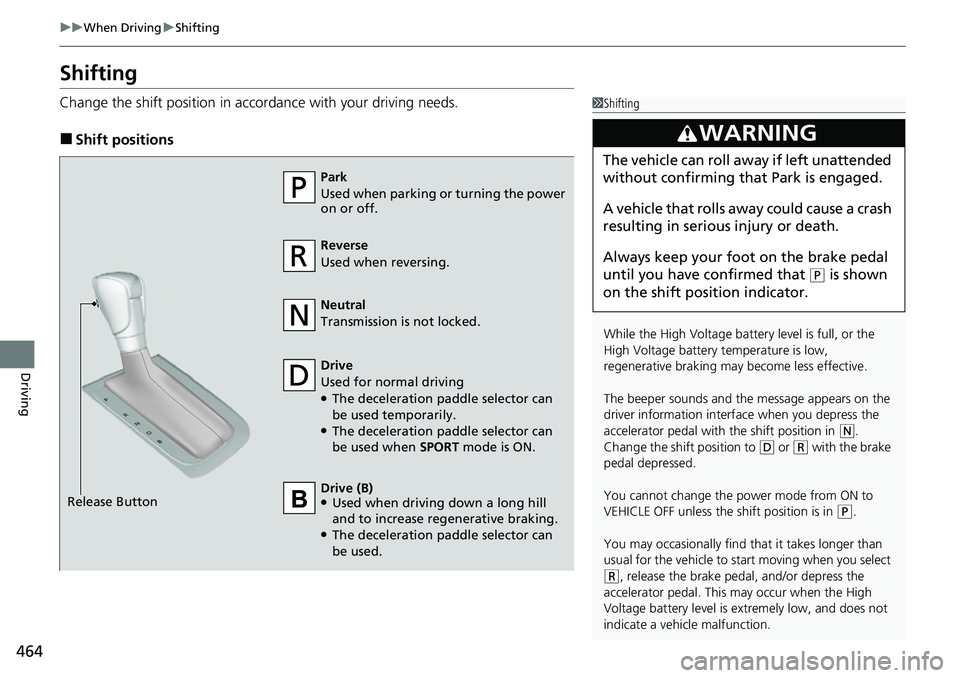
Change the shift positi on in accordance with your driving needs.
■Shift positions
1Shifting
While the High Voltage battery level is full, or the
High Voltage battery temperature is low,
regenerative braking ma y become less effective.
The beeper sounds and the message appears on the
driver information interf ace when you depress the
accelerator pedal with the shift position in
( N.
Change the shift position to
( D or (R with the brake
pedal depressed.
You cannot change the power mode from ON to
VEHICLE OFF unless the shift position is in
( P.
You may occasionally find th at it takes longer than
usual for the vehicle to st art moving when you select
(R, release the brake peda l, and/or depress the
accelerator pedal. This may occur when the High
Voltage battery level is extremely low, and does not
indicate a vehicle malfunction.
3WARNING
The vehicle can roll aw ay if left unattended
without confirming that Park is engaged.
A vehicle that rolls away could cause a crash
resulting in seriou s injury or death.
Always keep your foot on the brake pedal
until you have confirmed that
( P is shown
on the shift posi tion indicator.
Reverse
Used when reversing.
Drive
Used for normal driving
●The deceleration paddle selector can
be used temporarily.
●The deceleration paddle selector can
be used when SPORT mode is ON.
Park
Used when parking or turning the power
on or off.
Neutral
Transmission is not locked.
Release Button Drive (B)
●Used when driving down a long hill
and to increase regenerative braking.
●The deceleration paddle selector can
be used.