change time HONDA CRV 2023 Owner's Guide
[x] Cancel search | Manufacturer: HONDA, Model Year: 2023, Model line: CRV, Model: HONDA CRV 2023Pages: 719, PDF Size: 13.43 MB
Page 382 of 719
381
uuCustomized Features u
Continued
Features
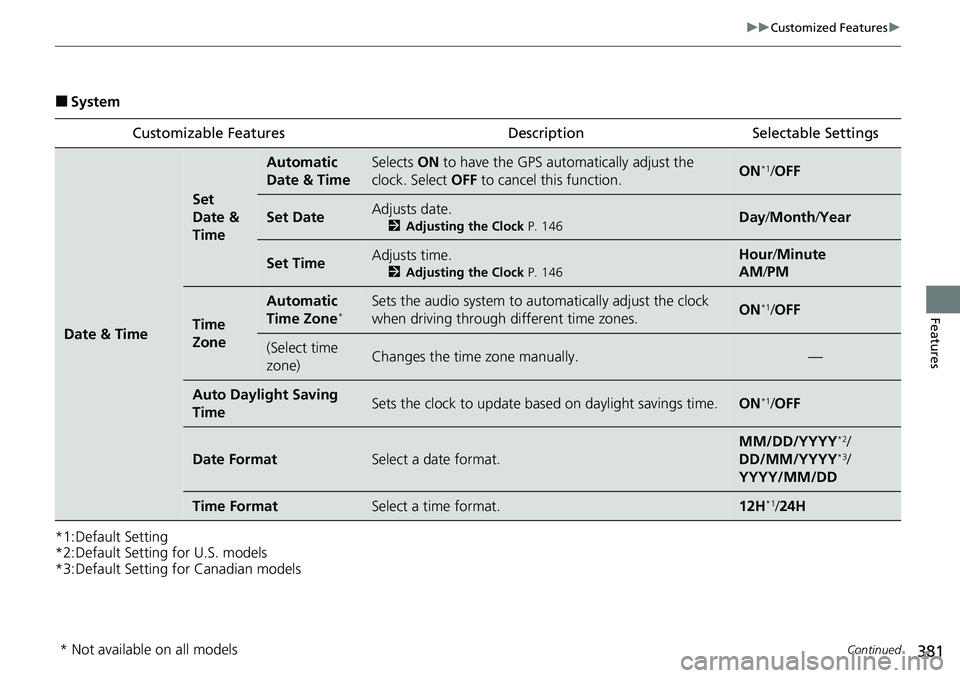
■System
*1:Default Setting
*2:Default Setting for U.S. models
*3:Default Setting for Canadian models Customizable Features Description Selectable Settings
Date & Time
Set
Date &
Time
Automatic
Date & TimeSelects
ON to have the GPS auto matically adjust the
clock. Select OFF to cancel this function.ON*1/OFF
Set DateAdjusts date.
2 Adjusting the Clock P. 146Day/Month/ Year
Set TimeAdjusts time.
2Adjusting the Clock P. 146
Hour/Minute
AM /PM
Time
Zone
Automatic
Time Zone*Sets the audio system to au tomatically adjust the clock
when driving through different time zones.ON*1/ OFF
(Select time
zone)Changes the time zone manually.—
Auto Daylig ht Saving
TimeSets the clock to update based on daylight savings time.ON*1/ OFF
Date FormatSelect a date format.
MM/DD/YYYY*2/
DD/MM/YYYY*3/
YYYY/MM/DD
Time FormatSelect a time format.12H*1/ 24H
* Not available on all models
Page 395 of 719
394
uuCustomized Features u
Features
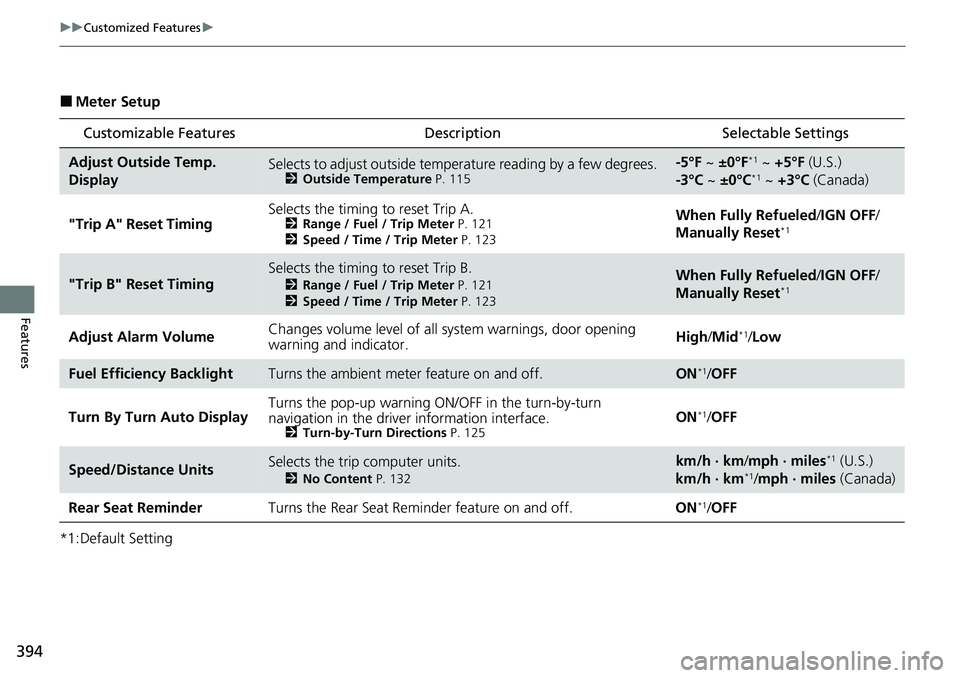
■Meter Setup
*1:Default Setting
Customizable Features Description Selectable Settings
Adjust Outside Temp.
DisplaySelects to adjust outside temperature reading by a few degrees.2Outside Temperature P. 115
-5°F ~ ±0°F*1 ~ +5°F (U.S.)
-3°C ~ ±0°C*1 ~ +3°C (Canada)
"Trip A" Reset Timing Selects the timing to reset Trip A.
2
Range / Fuel / Trip Meter P. 121
2 Speed / Time / Trip Meter P. 123When Fully Refueled /IGN OFF /
Manually Reset*1
"Trip B" Reset TimingSelects the timing to reset Trip B.
2 Range / Fuel / Trip Meter P. 121
2 Speed / Time / Trip Meter P. 123When Fully Refueled /IGN OFF /
Manually Reset*1
Adjust Alarm Volume Changes volume level of all system warnings, door opening
warning and indicator. High/
Mid*1/Low
Fuel Efficiency BacklightTurns the ambient meter feature on and off.ON*1/OFF
Turn By Turn Auto Display Turns the pop-up warning ON/OFF in the turn-by-turn
navigation in the driver
information interface.
2Turn-by-Turn Directions P. 125ON*1/OFF
Speed/Distance UnitsSelects the trip computer units.
2 No Content P. 132
km/h · km/mph · miles*1 (U.S.)
km/h · km*1/ mph · miles (Canada)
Rear Seat Reminder Turns the Rear Seat Reminder feature on and off. ON
*1/OFF
Page 397 of 719
396
uuCustomized Features u
Features
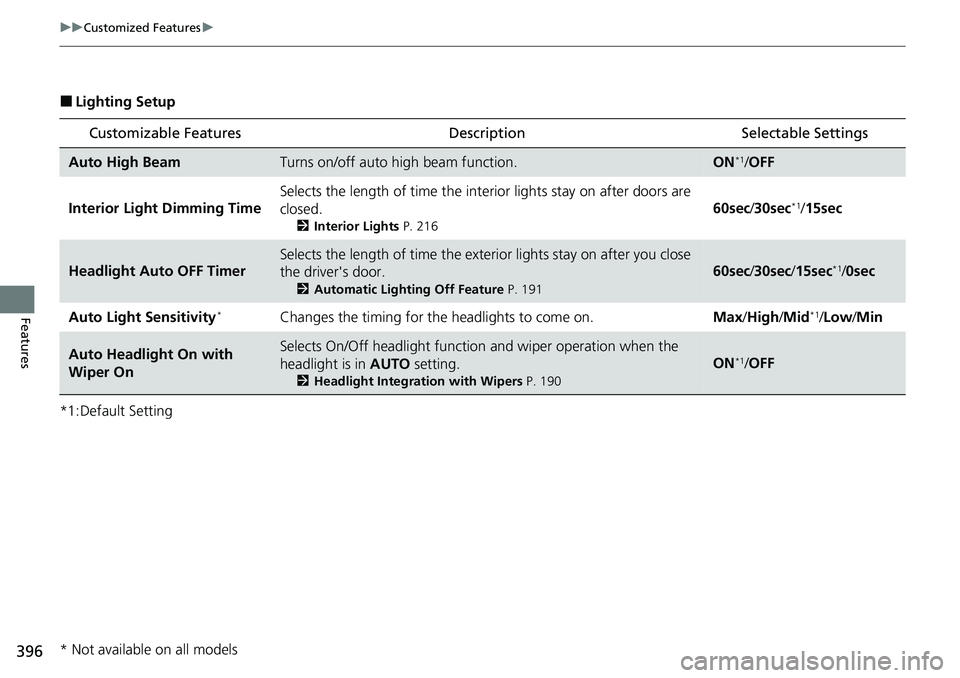
■Lighting Setup
*1:Default Setting
Customizable Features Description Selectable Settings
Auto High BeamTurns on/off auto high beam function.ON*1/OFF
Interior Light Dimming Time Selects the length of time the inte
rior lights stay on after doors are
closed.
2 Interior Lights P. 216
60sec/30sec*1/15sec
Headlight Auto OFF Timer
Selects the length of time the exterior lights stay on after you close
the driver's door.
2 Automatic Lighting Off Feature P. 191
60sec/30sec /15sec*1/0sec
Auto Light Sensitivity
*Changes the timing for the headlights to come on. Max/High/ Mid*1/Low /Min
Auto Headlight On with
Wiper OnSelects On/Off headlight function and wiper operation when the
headlight is in AUTO setting.
2Headlight Integration with Wipers P. 190
ON*1/OFF
* Not available on all models
Page 399 of 719
398
uuCustomized Features u
Features
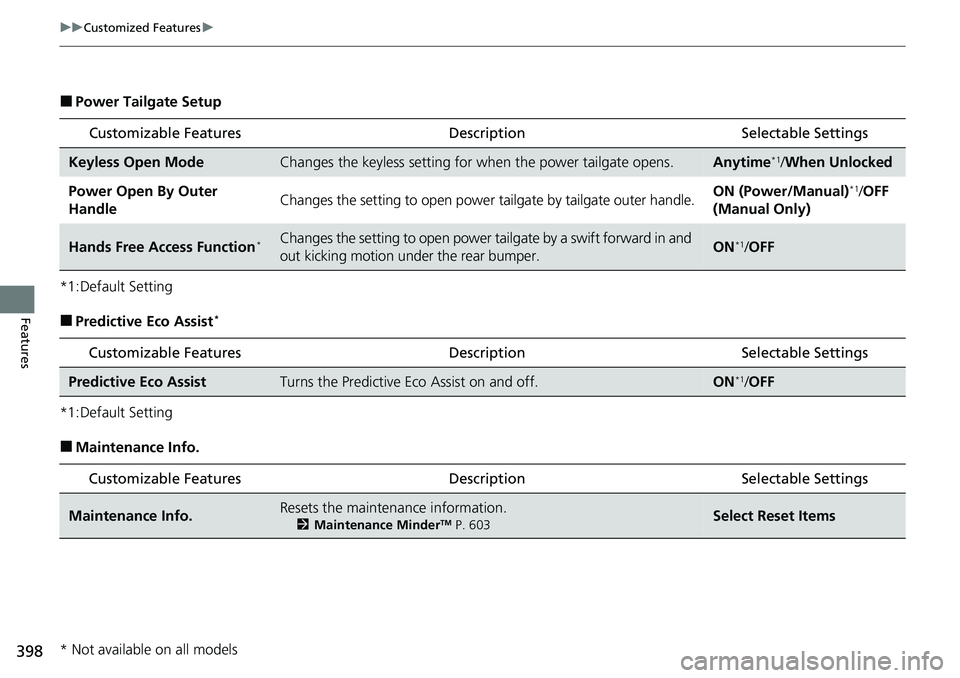
■Power Tailgate Setup
*1:Default Setting
■Predictive Eco Assist*
*1:Default Setting
■Maintenance Info.
Customizable Features Description Selectable Settings
Keyless Open ModeChanges the keyless setting for when the power tailgate opens.Anytime*1/When Unlocked
Power Open By Outer
HandleChanges the setting to open power tailgate by tailgate outer handle.ON (Power/Manual)*1/OFF
(Manual Only)
Hands Free Access Function*Changes the setting to open power tailgate by a swift forward in and
out kicking motion under the rear bumper.ON*1/ OFF
Customizable Features Desc ription Selectable Settings
Predictive Eco AssistTurns the Predictive Eco Assist on and off.ON*1/OFF
Customizable Features Desc ription Selectable Settings
Maintenance Info.Resets the maintenance information.
2Maintenance MinderTM P. 603Select Reset Items
* Not available on all models
Page 438 of 719
437
uuBluetooth® HandsFreeLink ®u HondaLink ® Assist
Continued
Features
HondaLink ® Assist
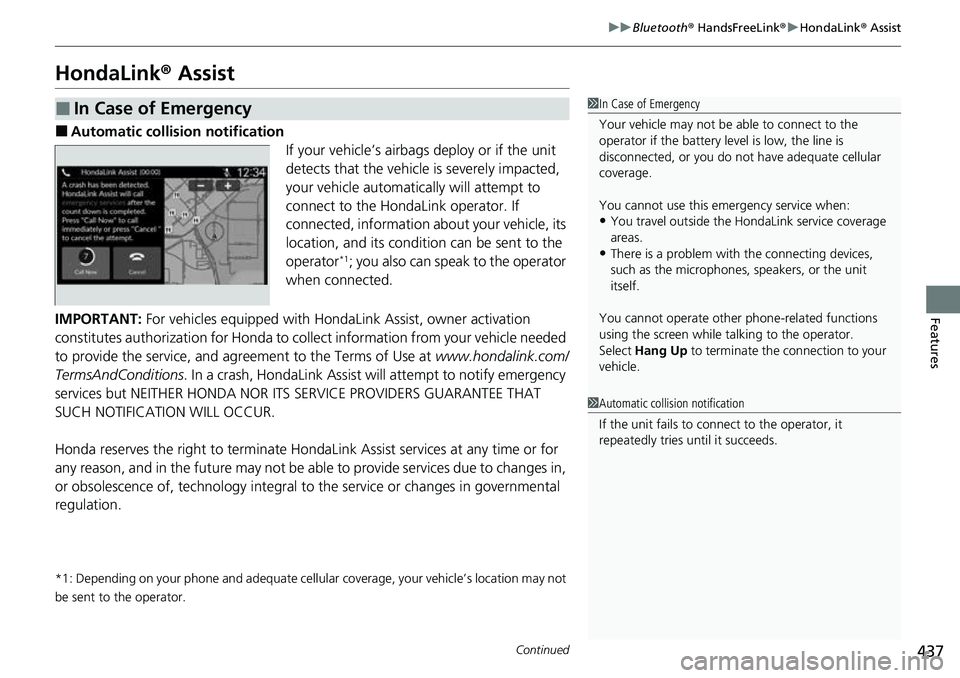
■Automatic collis ion notification
If your vehicle’s airbags deploy or if the unit
detects that the vehicle is severely impacted,
your vehicle automatically will attempt to
connect to the HondaLink operator. If
connected, information ab out your vehicle, its
location, and its condition can be sent to the
operator
*1; you also can speak to the operator
when connected.
IMPORTANT: For vehicles equipped with HondaLink Assist, owner activation
constitutes authorization for Honda to collect information from your vehicle needed
to provide the service, and agreement to the Terms of Use at www.hondalink.com/
TermsAndConditions . In a crash, HondaLink Assist will attempt to notify emergency
services but NEITHER HONDA NOR I TS SERVICE PROVIDERS GUARANTEE THAT
SUCH NOTIFICATION WILL OCCUR.
Honda reserves the right to terminate HondaLink Assist services at any time or for
any reason, and in the future may not be ab le to provide services due to changes in,
or obsolescence of, technology integral to the service or changes in governmental
regulation.
*1: Depending on your phone and adequate cellular coverage, your vehicle’s location may not
be sent to the operator.
■In Case of Emergency1 In Case of Emergency
Your vehicle may not be able to connect to the
operator if the battery level is low, the line is
disconnected, or you do not have adequate cellular
coverage.
You cannot use this emergency service when:
•You travel outside the HondaLink service coverage
areas.
•There is a problem with the connecting devices,
such as the microphones, speakers, or the unit
itself.
You cannot operate othe r phone-related functions
using the screen while talking to the operator.
Select Hang Up to terminate the connection to your
vehicle.
1 Automatic collision notification
If the unit fails to connect to the operator, it
repeatedly tries until it succeeds.
Page 468 of 719
Continued467
uuWhen Driving uDeceleration Paddle Selector
Driving
■When the shift po sition is in (D
If you pull back the paddle selector, th e rate of deceleration will increase
temporarily, and the stage will appear on the gauge.
The deceleration paddle selector will ca ncel automatically and the deceleration
paddle selector indicator on the gauge will disappear when you drive at a constant
speed or slow to a near stop.
■When the shift po sition is in (D and drive mode is SPORT
If you choose SPORT mode, the rate of deceleration will increase and the stage
along with M will appear.
When you want to cancel the deceleration paddle selector, change out of SPORT
mode. When canceled, the deceleration paddle selector indicator on the gauge
disappears.
■When the shift po sition is in
If you change the shift position to , the ra te of deceleration will increase and the
stage along with M will appear.
When you want to cancel the deceleration paddle selector, change the shift position
to
(D and change out of SPORT mode. When canceled, the deceleration paddle
selector indicator on the gauge disappears.
1 Deceleration Paddle Selector
In the following situations , the stage may not change
and the stage icon will blink ev en if you pull back the
selector. The dece leration stage may decrease or
cancel automatically when:
•The High Voltage battery is fully charged or its
temperature is too cold or too hot.
•The speed of the vehicle is beyond the deceleration
range with SPORT mode off.
•Hybrid system protection is needed.
You cannot use the dece leration paddle selector
when ACC with Low Speed Follow is in operation.
If either paddle selector is operated while driving,
ACC with Low Speed Follow will cancel
automatically.
If you pull back the right a nd left paddle selector at
the same time, the deceleration stage may not
change.
B
B
Page 488 of 719
487
uuWhen Driving uBlind Spot Information System
Continued
Driving
Blind Spot Information System
When the system detects vehicles approaching from behind in adjacent lanes, the
appropriate indicator comes on, providin g assistance when you change lanes.
The system activates when your vehicle is moving forward at about 20 mph (32 km/h)
or above.
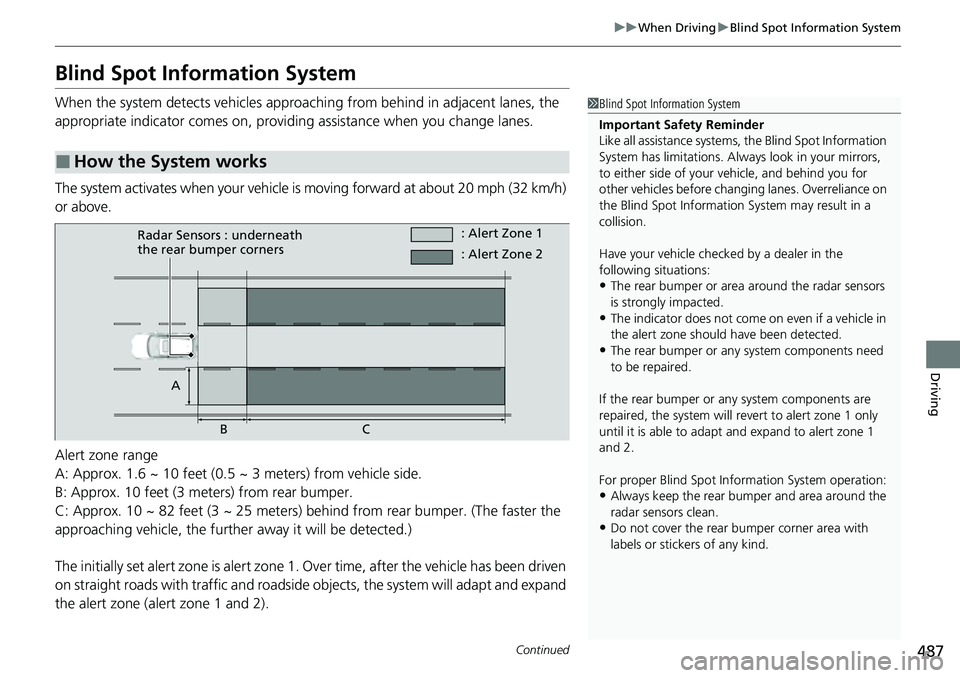
Alert zone range
A: Approx. 1.6 ~ 10 feet (0.5 ~ 3 meters) from vehicle side.
B: Approx. 10 feet (3 meters) from rear bumper.
C: Approx. 10 ~ 82 feet (3 ~ 25 meters) behind from rear bumper. (The faster the
approaching vehicle, the further away it will be detected.)
The initially set alert zone is alert zone 1. Over time, after the vehicle has been driven
on straight roads with traffic and roadside objects, the system will adapt and expand
the alert zone (alert zone 1 and 2).
■How the System works
1 Blind Spot Information System
Important Safety Reminder
Like all assistance systems, the Blind Spot Information
System has limitations. Always look in your mirrors,
to either side of your vehicle, and behind you for
other vehicles before changing lanes. Overreliance on
the Blind Spot Information System may result in a
collision.
Have your vehicle checked by a dealer in the
following situations:
•The rear bumper or area around the radar sensors
is strongly impacted.
•The indicator does not come on even if a vehicle in
the alert zone should have been detected.
•The rear bumper or any system components need
to be repaired.
If the rear bumper or any system components are
repaired, the system will re vert to alert zone 1 only
until it is able to adapt and expand to alert zone 1
and 2.
For proper Blind Spot Info rmation System operation:
•Always keep the rear bumper and area around the
radar sensors clean.
•Do not cover the rear bumper corner area with
labels or sticke rs of any kind.
Radar Sensors : underneath
the rear bumper corners : Alert Zone 1
A BC : Alert Zone 2
Page 489 of 719
uuWhen Driving uBlind Spot Information System
488
Driving
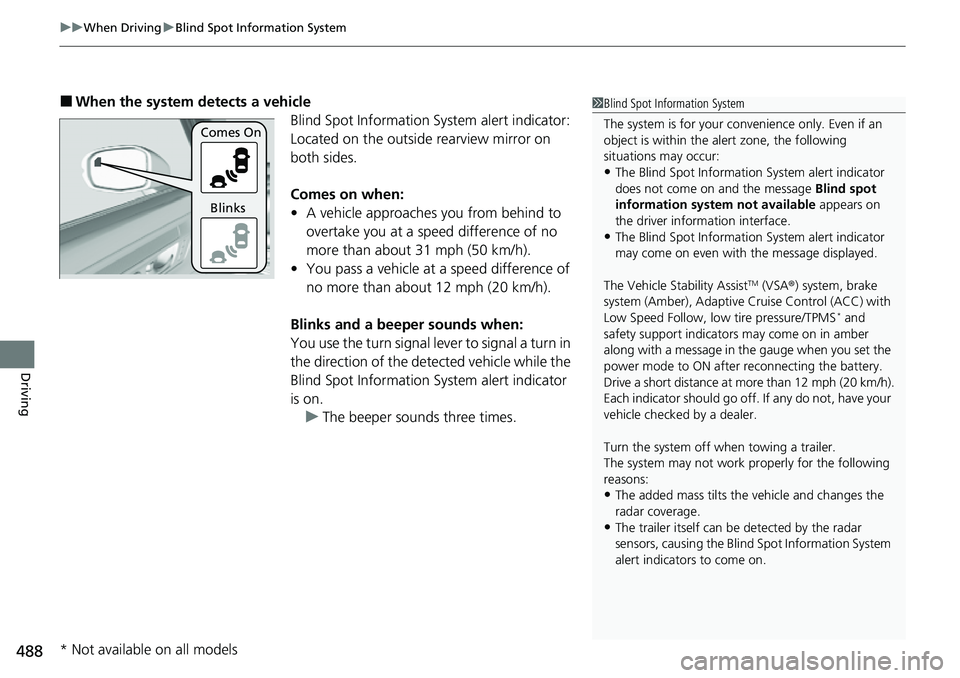
■When the system detects a vehicle
Blind Spot Information System alert indicator:
Located on the outside rearview mirror on
both sides.
Comes on when:
• A vehicle approaches you from behind to
overtake you at a speed difference of no
more than about 31 mph (50 km/h).
• You pass a vehicle at a speed difference of
no more than about 12 mph (20 km/h).
Blinks and a beeper sounds when:
You use the turn signal lever to signal a turn in
the direction of the detected vehicle while the
Blind Spot Information System alert indicator
is on. u The beeper sounds three times.1Blind Spot Information System
The system is for your convenience only. Even if an
object is within the alert zone, the following
situations may occur:
•The Blind Spot Informati on System alert indicator
does not come on and the message Blind spot
information system not available appears on
the driver information interface.
•The Blind Spot Informati on System alert indicator
may come on even with the message displayed.
The Vehicle Stability Assist
TM (VSA ®) system, brake
system (Amber), Adaptive Cruise Control (ACC) with
Low Speed Follow, low tire pressure/TPMS
* and
safety support indicators may come on in amber
along with a message in the gauge when you set the
power mode to ON after reconnecting the battery.
Drive a short distance at more than 12 mph (20 km/h).
Each indicator should go off. If any do not, have your
vehicle checked by a dealer.
Turn the system off when towing a trailer.
The system may not work properly for the following
reasons:
•The added mass tilts the vehicle and changes the
radar coverage.
•The trailer itself can be detected by the radar
sensors, causing the Blind Spot Information System
alert indicators to come on.
Comes On
Blinks
* Not available on all models
Page 490 of 719
Continued489
uuWhen Driving uBlind Spot Information System
Driving
You can turn the system on and off using the driver information interface.
2 Switching the Display P. 117
2 Safety Support P. 130
The Blind Spot Information Sy stem will stay on the previously selected on or off
setting each time you turn the power system on.
■Blind Spot Information System On and Off1 Blind Spot Information System
You can change the settings for the Blind Spot
Information System.
2 Settings
* P. 135
2 Customized Features P. 376
* Not available on all models
Page 520 of 719
Continued519
uuHonda Sensing ®u Adaptive Cruise Control (ACC) with Low Speed Follow
Driving
■There is no vehicle ahead
Your vehicle maintains the set speed without
having to keep your foot on the brake or
accelerator pedal.
If there previously was a vehicle detected
ahead that kept your ve hicle from traveling at
the set speed, ACC with Low Speed Follow
accelerates your vehicle to the set speed, and
then maintains it.
On steep downhill during ACC with Low
Speed Follow, it brakes to inhibit excessive
acceleration for maintaining the set speed.
However, the vehicle speed may become
faster than the set speed.
■When you depress the accelerator pedal
You can temporarily increase the vehicle speed . In this case, there is no audible or
visual alert even if a vehicle is in the ACC with Low Speed Follow range.
ACC with Low Speed Follow stays on unle ss you cancel it. Once you release the
accelerator pedal, the system resume s an appropriate speed for keeping the
following-interval while a vehicle ahead is within the ACC with Low Speed Follow
range.
1 When in Operation
•ACC with Low Speed Follow may temporarily
control the interval between your vehicle and the
vehicle in adjacent lane or surroundings of your
vehicle depending on the road conditions (e.g.,
curves) or vehicle condi tions (e.g., operating the
steering wheel or the vehicle location in the lane).
•When the vehicle ahead of you moves away, such
as when entering an interchange or rest area, ACC
with Low Speed Follow may continue to maintain
the set following-interval for a short time.
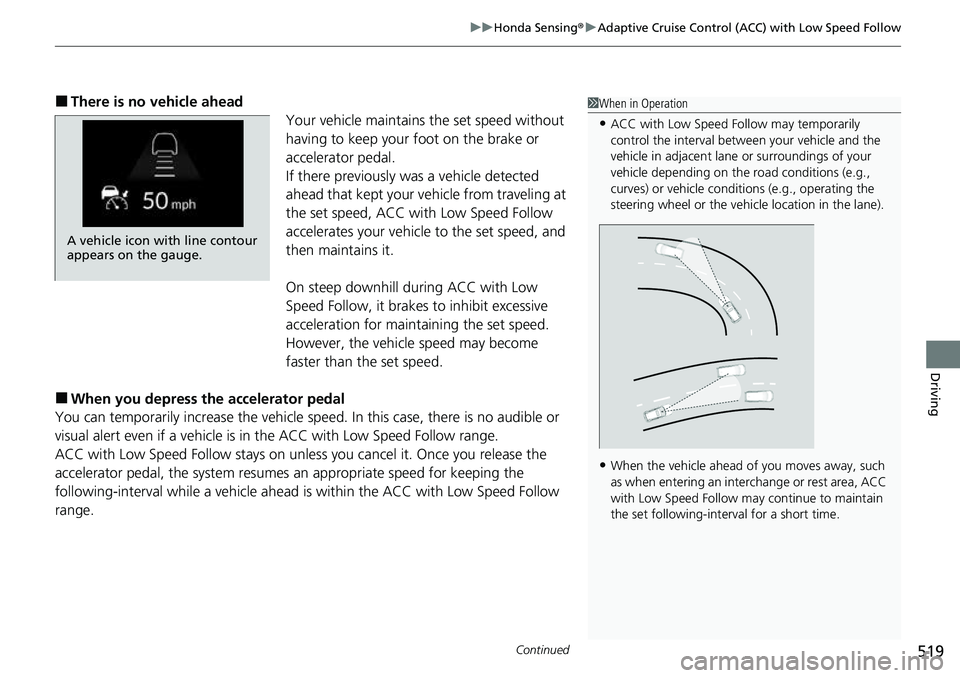
A vehicle icon with line contour
appears on the gauge.