reset HONDA CRV 2023 Service Manual
[x] Cancel search | Manufacturer: HONDA, Model Year: 2023, Model line: CRV, Model: HONDA CRV 2023Pages: 719, PDF Size: 13.43 MB
Page 395 of 719
394
uuCustomized Features u
Features
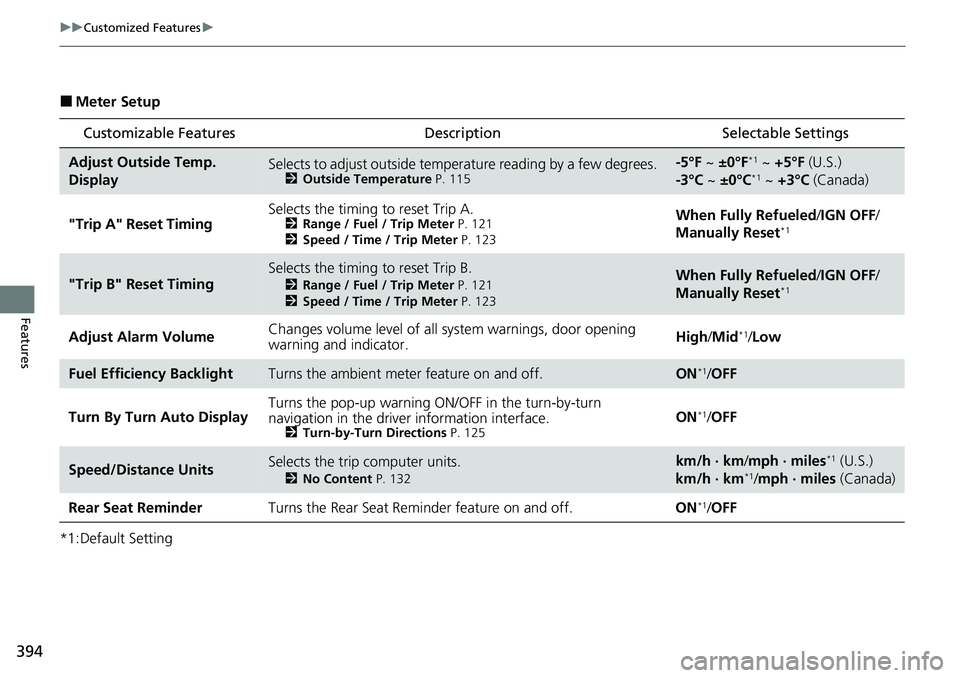
■Meter Setup
*1:Default Setting
Customizable Features Description Selectable Settings
Adjust Outside Temp.
DisplaySelects to adjust outside temperature reading by a few degrees.2Outside Temperature P. 115
-5°F ~ ±0°F*1 ~ +5°F (U.S.)
-3°C ~ ±0°C*1 ~ +3°C (Canada)
"Trip A" Reset Timing Selects the timing to reset Trip A.
2
Range / Fuel / Trip Meter P. 121
2 Speed / Time / Trip Meter P. 123When Fully Refueled /IGN OFF /
Manually Reset*1
"Trip B" Reset TimingSelects the timing to reset Trip B.
2 Range / Fuel / Trip Meter P. 121
2 Speed / Time / Trip Meter P. 123When Fully Refueled /IGN OFF /
Manually Reset*1
Adjust Alarm Volume Changes volume level of all system warnings, door opening
warning and indicator. High/
Mid*1/Low
Fuel Efficiency BacklightTurns the ambient meter feature on and off.ON*1/OFF
Turn By Turn Auto Display Turns the pop-up warning ON/OFF in the turn-by-turn
navigation in the driver
information interface.
2Turn-by-Turn Directions P. 125ON*1/OFF
Speed/Distance UnitsSelects the trip computer units.
2 No Content P. 132
km/h · km/mph · miles*1 (U.S.)
km/h · km*1/ mph · miles (Canada)
Rear Seat Reminder Turns the Rear Seat Reminder feature on and off. ON
*1/OFF
Page 398 of 719
397
uuCustomized Features u
Continued
Features
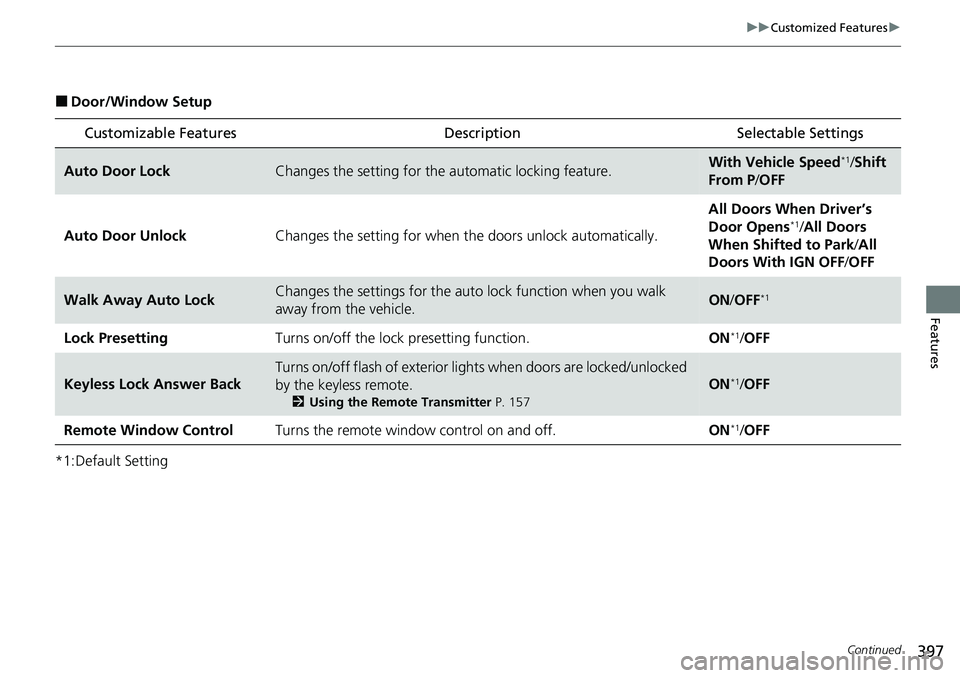
■Door/Window Setup
*1:Default Setting
Customizable Features Description Selectable Settings
Auto Door LockChanges the setting for the automatic locking feature.With Vehicle Speed*1/Shift
From P /OFF
Auto Door Unlock Changes the setting for when the doors unlock automatically. All Doors When Driver’s
Door Opens
*1/
All Doors
When Shifted to Park /All
Doors With IGN OFF /OFF
Walk Away Auto LockChanges the settings for the auto lock function when you walk
away from the vehicle.ON /OFF*1
Lock Presetting Turns on/off the lock presetting function. ON*1/OFF
Keyless Lock Answer Back
Turns on/off flash of exterior light s when doors are locked/unlocked
by the keyless remote.
2 Using the Remote Transmitter P. 157
ON*1/OFF
Remote Window Control Turns the remote window control on and off. ON
*1/OFF
Page 399 of 719
398
uuCustomized Features u
Features
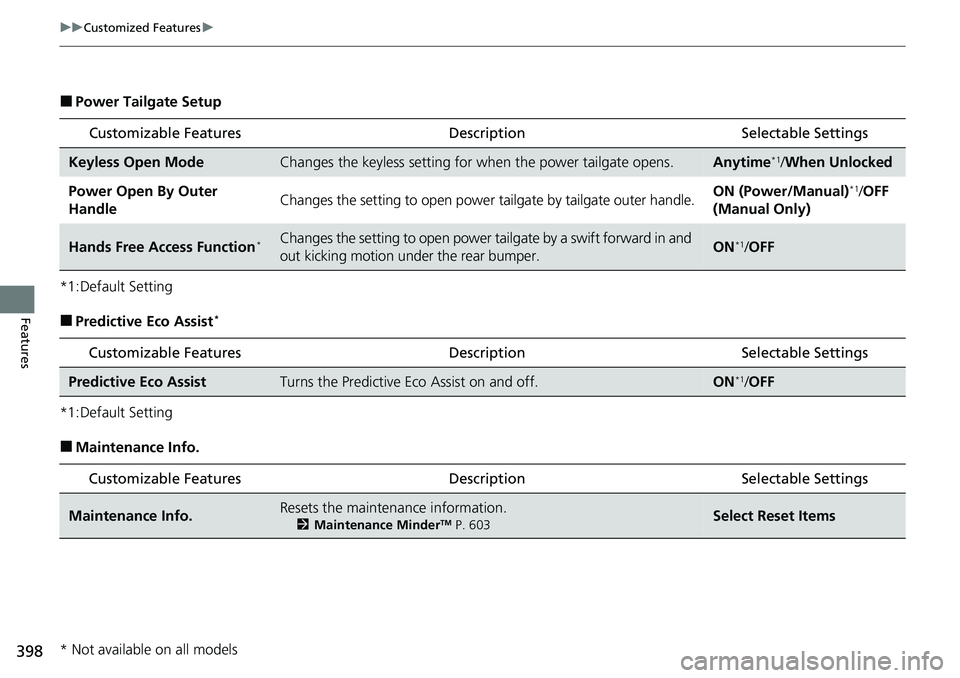
■Power Tailgate Setup
*1:Default Setting
■Predictive Eco Assist*
*1:Default Setting
■Maintenance Info.
Customizable Features Description Selectable Settings
Keyless Open ModeChanges the keyless setting for when the power tailgate opens.Anytime*1/When Unlocked
Power Open By Outer
HandleChanges the setting to open power tailgate by tailgate outer handle.ON (Power/Manual)*1/OFF
(Manual Only)
Hands Free Access Function*Changes the setting to open power tailgate by a swift forward in and
out kicking motion under the rear bumper.ON*1/ OFF
Customizable Features Desc ription Selectable Settings
Predictive Eco AssistTurns the Predictive Eco Assist on and off.ON*1/OFF
Customizable Features Desc ription Selectable Settings
Maintenance Info.Resets the maintenance information.
2Maintenance MinderTM P. 603Select Reset Items
* Not available on all models
Page 400 of 719
399
uuCustomized Features uDefaulting All the Settings
Features
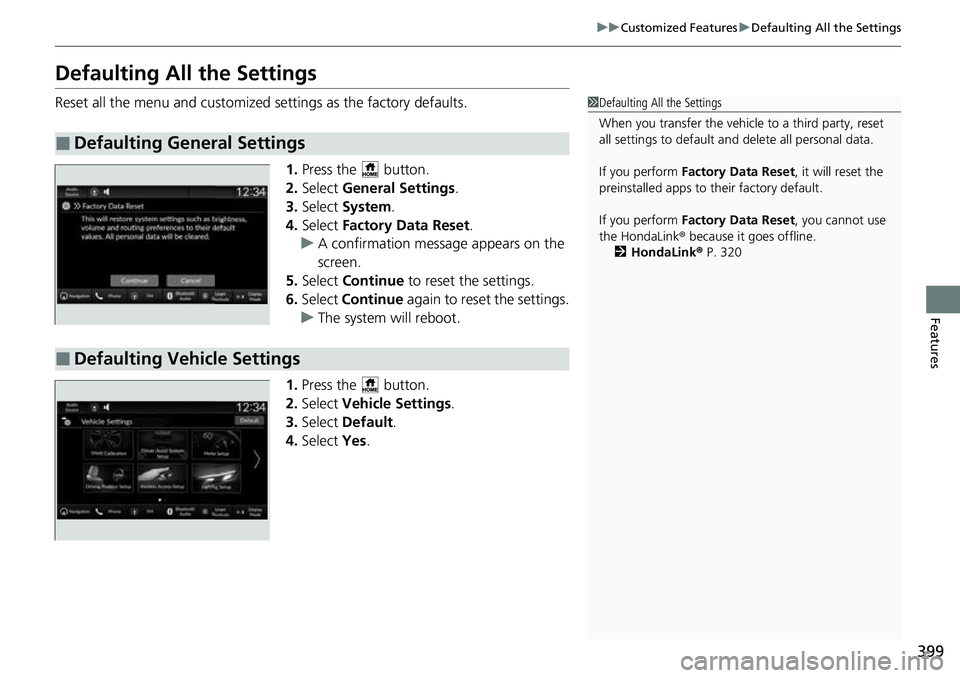
Defaulting All the Settings
Reset all the menu and customized settings as the factory defaults.
1.Press the button.
2. Select General Settings .
3. Select System.
4. Select Factory Data Reset .
u A confirmation message appears on the
screen.
5. Select Continue to reset the settings.
6. Select Continue again to reset the settings.
u The system w ill reboot.
1. Press the button.
2. Select Vehicle Settings.
3. Select Default.
4. Select Yes.
■Defaulting General Settings
1Defaulting All the Settings
When you transfer the vehicle to a third party, reset
all settings to default a nd delete all personal data.
If you perform Factory Data Reset , it will reset the
preinstalled apps to their factory default.
If you perform Factory Data Reset , you cannot use
the HondaLink ® because it goes offline.
2 HondaLink® P. 320
■Defaulting Vehicle Settings
Page 512 of 719
Continued511
uuHonda Sensing ®u Low Speed Braking Control*
Driving
Conditions for assistive driving power suppression.
• When the accelerator is no longer depressed.
• When the accelerator is depresse d for approximately four seconds.
• When the brake pedal is depressed.
Conditions for assistive braking cancellation.
• A certain amount of time has passed since activation.
The system may not operate correctly under the following conditions:
■Examples of obstacles the sonar sensors cannot detect
• Obstacles that do not reflect sound waves well, such as people, snow, cloth,
sponges, etc.
• Thin obstacles such as fenc es, bicycles, sign posts, etc.
• Short or small obstacles.
• Obstacles immediately in front of the bumper.
• Obstacles that are not perp endicular to the ground.
• Moving objects or obstacles that suddenly enter the road.
■Conditions for Cancellation
■Low Speed Braking Control System Conditions and Limitations
1Conditions for Cancellation
After Low Speed Braking Control has activated once,
it will not activate again for the same obstacle.
They can be activated again after driving for a certain
distance after last activation.
Low Speed Braking Control ac tivates separately when
moving forward and reversing. (For example, if it
activates when moving forwar d, it can be activated
again immediately if reversing.)
However, if assistive braking has been activated, in
order to activate assistiv e driving power suppression
again, it is necessary to drive for a certain distance to
reset the system.
Page 609 of 719
608
uuMaintenance MinderTMuTo Use Maintenance MinderTM
Maintenance
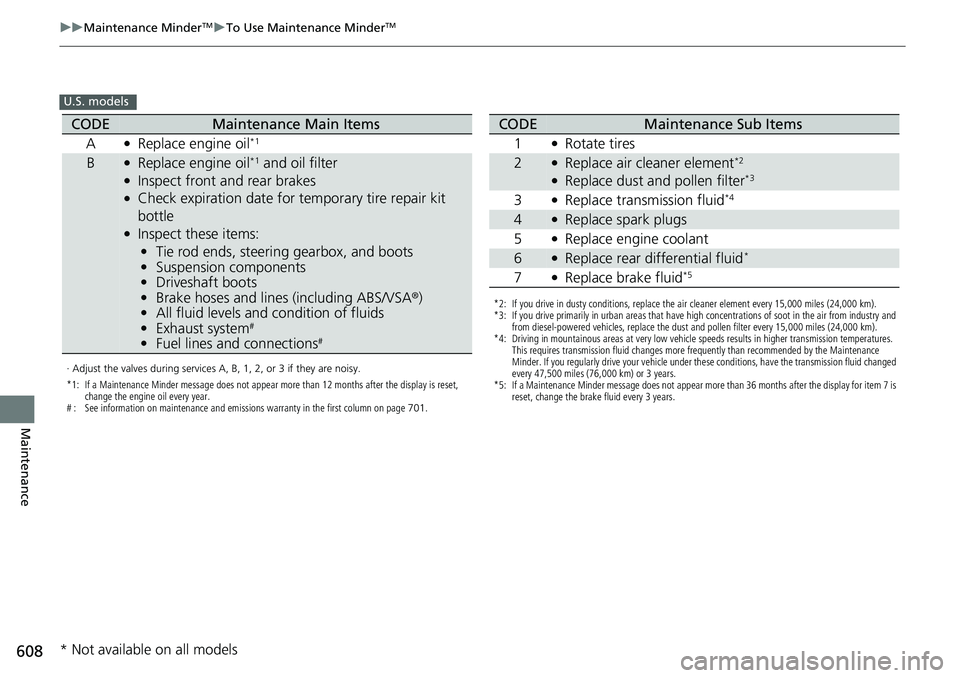
U.S. models
· Adjust the valves during services A, B, 1, 2, or 3 if they are noisy.
*1: If a Maintenance Minder message does not appear more than 12 months after the display is reset,
change the engine oil every year.
# : See information on maintenance and emissions warranty in the first column on page 701.
CODEMaintenance Main Items
A
●Replace engine oil*1
B●Replace engine oil*1 and oil filter●Inspect front and rear brakes●Check expiration date for temporary tire repair kit
bottle
●Inspect these items: • Tie rod ends, steering gearbox, and boots
• Suspension components
• Driveshaft boots
• Brake hoses and lines (including ABS/VSA®)
• All fluid levels and condition of fluids
• Exhaust system
#
•Fuel lines and connections#
*2: If you drive in dusty conditions, replace the air cleaner element every 15,000 miles (24,000 km).
*3: If you drive primarily in urban areas that have high concentrations of soot in the air from industry and
from diesel-powered vehicles, replace the dust and pollen filter every 15,000 miles (24,000 km).
*4: Driving in mountainous areas at very low vehicle speeds results in higher transmission temperatures. This requires transmission fluid changes more frequently than recommended by the Maintenance
Minder. If you regularly drive your vehicle under these conditions, have the transmission fluid changed
every 47,500 miles (76,000 km) or 3 years.
*5: If a Maintenance Minder message does not appear more than 36 months after the display for item 7 is reset, change the brake fluid every 3 years.
CODEMaintenance Sub Items
1
●Rotate tires
2●Replace air cleaner element*2
●Replace dust and pollen filter*3
3●Replace transmission fluid*4
4●Replace spark plugs
5
●Replace engine coolant
6●Replace rear differential fluid*
7●Replace brake fluid*5
* Not available on all models
Page 610 of 719
609
uuMaintenance MinderTMuTo Use Maintenance MinderTM
Continued
Maintenance
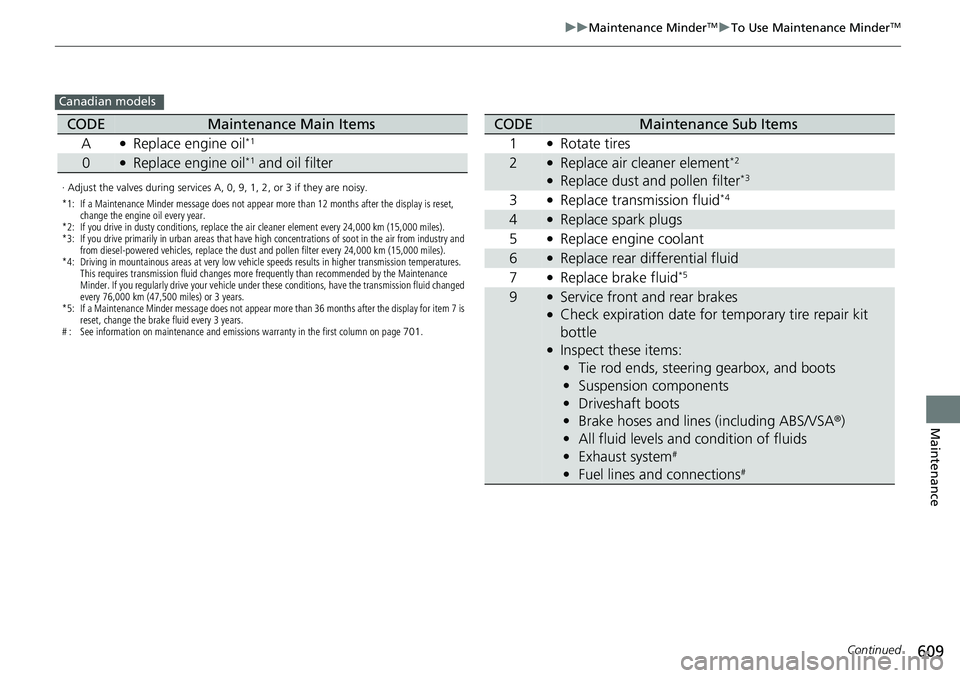
Canadian models
· Adjust the valves during services A, 0, 9, 1, 2, or 3 if they are noisy.
*1: If a Maintenance Minder message does not appear more than 12 months after the display is reset,
change the engine oil every year.
*2: If you drive in dusty conditions, replace the air cleaner element every 24,000 km (15,000 miles).
*3: If you drive primarily in urban areas that have high concentrations of soot in the air from industry and from diesel-powered vehicles, replace the dust and pollen filter every 24,000 km (15,000 miles).
*4: Driving in mountainous areas at very low vehicle speeds results in higher transmission temperatures. This requires transmission fluid changes more frequently than recommended by the Maintenance
Minder. If you regularly drive your vehicle under these conditions, have the transmission fluid changed
every 76,000 km (47,500 miles) or 3 years.
*5: If a Maintenance Minder message does not appear more than 36 months after the display for item 7 is reset, change the brake fluid every 3 years.
# : See information on maintenance and emissions warranty in the first column on page 701.
CODEMaintenance Main Items
A
●Replace engine oil*1
0●Replace engine oil*1 and oil filter
CODEMaintenance Sub Items
1
●Rotate tires
2●Replace air cleaner element*2
●Replace dust and pollen filter*3
3●Replace transmission fluid*4
4●Replace spark plugs
5
●Replace engine coolant
6●Replace rear differential fluid
7
●Replace brake fluid*5
9●Service front and rear brakes●Check expiration date for temporary tire repair kit
bottle
●Inspect these items: • Tie rod ends, steering gearbox, and boots
• Suspension components
• Driveshaft boots
• Brake hoses and lines (including ABS/VSA ®)
• All fluid levels and condition of fluids
• Exhaust system
#
•Fuel lines and connections#
Page 611 of 719
uuMaintenance MinderTMuTo Use Maintenance MinderTM
610
Maintenance
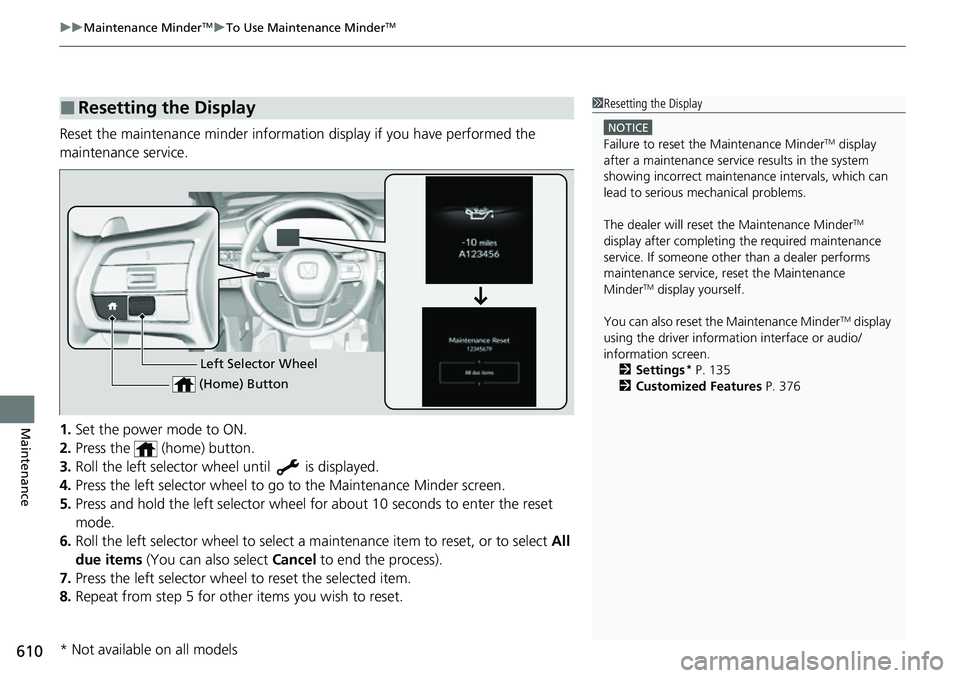
Reset the maintenance minder informat ion display if you have performed the
maintenance service.
1. Set the power mode to ON.
2. Press the (home) button.
3. Roll the left selector wheel until is displayed.
4. Press the left selector wheel to go to the Maintenance Minder screen.
5. Press and hold the left selector wheel fo r about 10 seconds to enter the reset
mode.
6. Roll the left selector wheel to select a ma intenance item to reset, or to select All
due items (You can also select Cancel to end the process).
7. Press the left selector wheel to reset the selected item.
8. Repeat from step 5 for other items you wish to reset.
■Resetting the Display1Resetting the Display
NOTICE
Failure to reset the Maintenance MinderTM display
after a maintenance servic e results in the system
showing incorrect maintenance intervals, which can
lead to serious mechanical problems.
The dealer will reset the Maintenance Minder
TM
display after completing th e required maintenance
service. If someone other than a dealer performs
maintenance service, reset the Maintenance
Minder
TM display yourself.
You can also reset the Maintenance Minder
TM display
using the driver information interface or audio/
information screen. 2 Settings
* P. 135
2 Customized Features P. 376Left Selector Wheel
(Home) Button
* Not available on all models
Page 641 of 719
640
Maintenance
12-Volt Battery
Checking the 12-Volt Battery
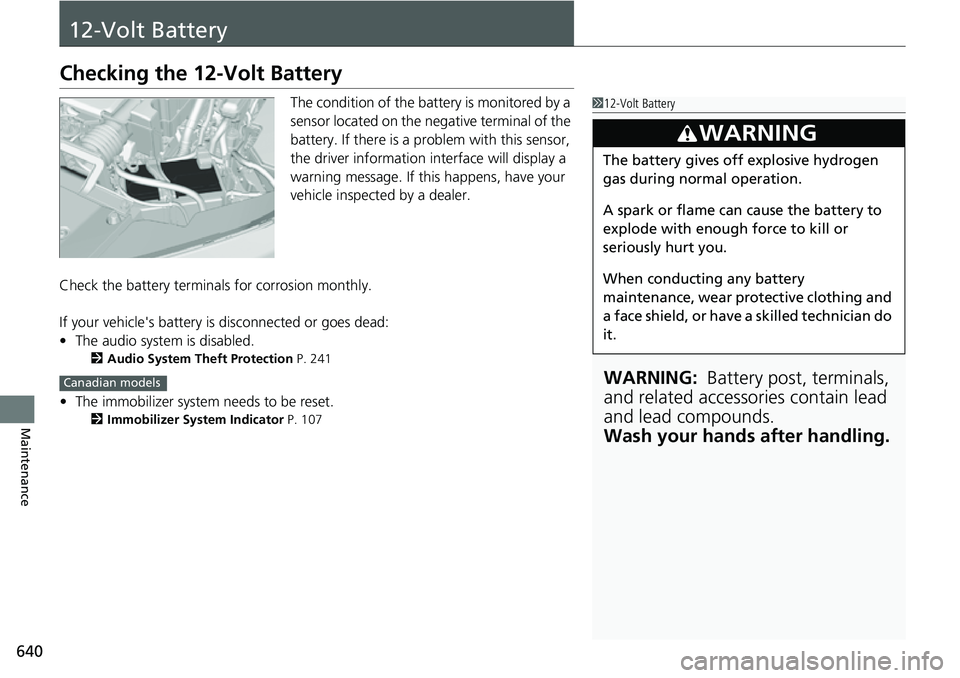
The condition of the battery is monitored by a
sensor located on the negative terminal of the
battery. If there is a problem with this sensor,
the driver information interface will display a
warning message. If this happens, have your
vehicle inspected by a dealer.
Check the battery termina ls for corrosion monthly.
If your vehicle's battery is disconnected or goes dead:
• The audio system is disabled.
2 Audio System Theft Protection P. 241
•The immobilizer system needs to be reset.
2 Immobilizer System Indicator P. 107
112-Volt Battery
WARNING: Battery post, terminals,
and related accessories contain lead
and lead compounds.
Wash your hands after handling.
3WARNING
The battery gives off explosive hydrogen
gas during normal operation.
A spark or flame can cause the battery to
explode with enough force to kill or
seriously hurt you.
When conducting any battery
maintenance, wear prot ective clothing and
a face shield, or have a skilled technician do
it.
Canadian models
Page 715 of 719
714
Index
O
Odometer.................................................. 114
Off-Highway Driving Guidelines .............. 453
Oil (Engine) ............................................... 613
Adding .................................................... 615
Checking ................................................. 614
Displaying Oil Life .................................... 604
Low Oil Pressure Indicator ........................ 676
Recommended Engine Oil ........................ 613
Viscosity .......................................... 613, 695
Open Source Licenses ....................... 363, 706
Opening/Closing Hood ....................................................... 612
Moonroof ................................................ 183
Power Windows ...................................... 179
Tailgate ................................................... 165
Outside Temperature Display .................. 115
Overheating .............................................. 674
P
Paddle Selectors ........................................ 466
Panic Mode ............................................... 178
Parking ...................................................... 582
Parking Brake ............................................ 572
Parking Brake and Brake System Indicator (Amber) ........................................... 100, 680
Parking Brake and Brake System Indicator (Red) .................................... 98, 99, 679, 680
Parking Sensor System .............................. 584
Passenger Airbag Off Indicator ................. 76Passing Indicators
..................................... 188
Petrol
Gauge ..................................................... 114
Phone ........................................................ 124
Playing Bluetooth ® Audio ................ 257, 317
POWER Button ......................................... 184
Power Flow ............................................... 342
Power Flow/Engine Status Display/High
Voltage Battery Charge Level Gauge .... 119
POWER Gauge .......................................... 114
Power System
Won’t Start ............................................. 667
POWER SYSTEM Indicator ........................ 100
Power System Won’t Start ....................... 667
Power Tailgate ......................................... 168
Power Windows ....................................... 179
Precautions While Driving
Rain ........................................................ 462
Pregnant Women ....................................... 57
Puncture (Tire) .......................................... 653R
Radiator.................................................... 619
Radio (FM/AM) ................................. 249, 296
Radio (SiriusXM ®) ..................................... 300
Radio Data System (RDS) ................. 250, 298
Range ........................................................ 122
RDS (Radio Data System) ................. 250, 298
Readiness Codes (Emissions Testing) ....... 699
READY Indicator ....................................... 100 Real Time AWD with Intelligent Control
System
TM.................................................. 479
Rear Defogger/Heated Door Mirror Button ..................................................... 199
Rear Seat Heaters ..................................... 231
Rear Seats (Folding Down) ...................... 210
Rearview Mirror ....................................... 203
Refueling .......................................... 439, 595
Fuel Gauge ............................................. 114
Gasoline ......................................... 595, 694
Low Fuel Indicator (Amber) ..................... 103
Regulations .............................. 485, 634, 697
Remote Transmitter ................................. 157
Replacement
Battery .................................................... 642
Bulbs ...................................................... 623
Fuses .............................................. 683, 685
Rear Wiper Blade Rubber ........................ 629
Tires........................................................ 637
Wiper Blade Rubber ................................ 627
Reporting Safety Defects ......................... 698
Resetting a Trip Meter ............................. 122
Road Departure Mitigation ..................... 554
On and Off ............................................. 557