HONDA CRV 2023 Workshop Manual
CRV 2023
HONDA
HONDA
https://www.carmanualsonline.info/img/13/58867/w960_58867-0.png
HONDA CRV 2023 Workshop Manual
Page 369 of 719
368
Features
Customized Features
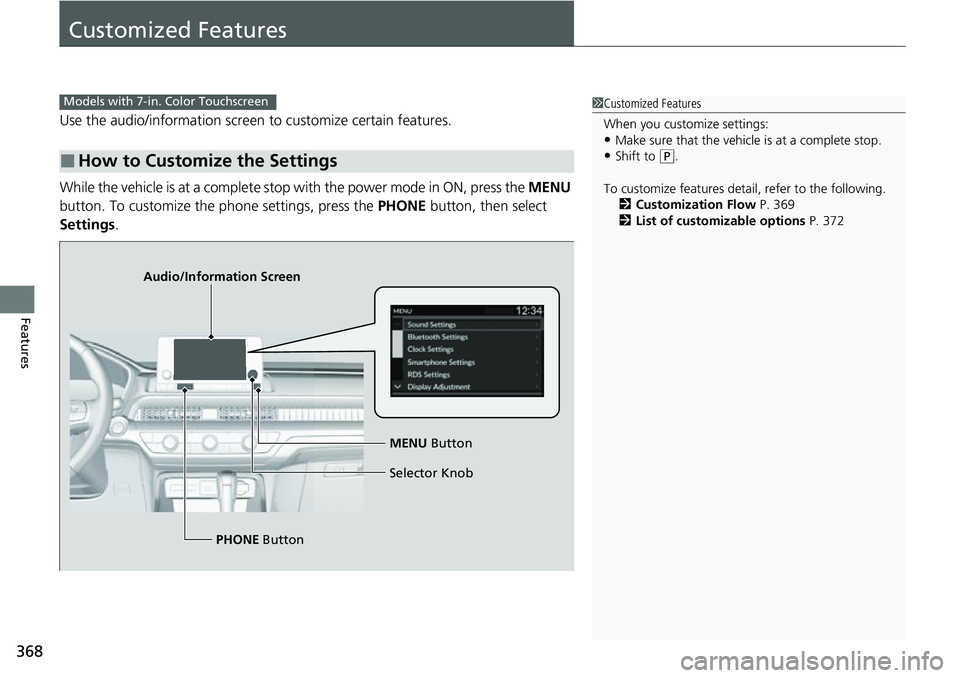
Use the audio/information screen to customize certain features.
While the vehicle is at a complete stop with the power mode in ON, press the MENU
button. To customize the phone settings, press the PHONE button, then select
Settings .
■How to Customize the Settings
1Customized Features
When you customize settings:
•Make sure that the vehicle is at a complete stop.
•Shift to (P.
To customize features detail, refer to the following. 2 Customization Flow P. 369
2 List of customizable options P. 372
Models with 7-in. Color Touchscreen
Audio/Information Screen
MENU Button
Selector Knob
PHONE Button
Page 370 of 719
369
uuCustomized Features u
Continued
Features
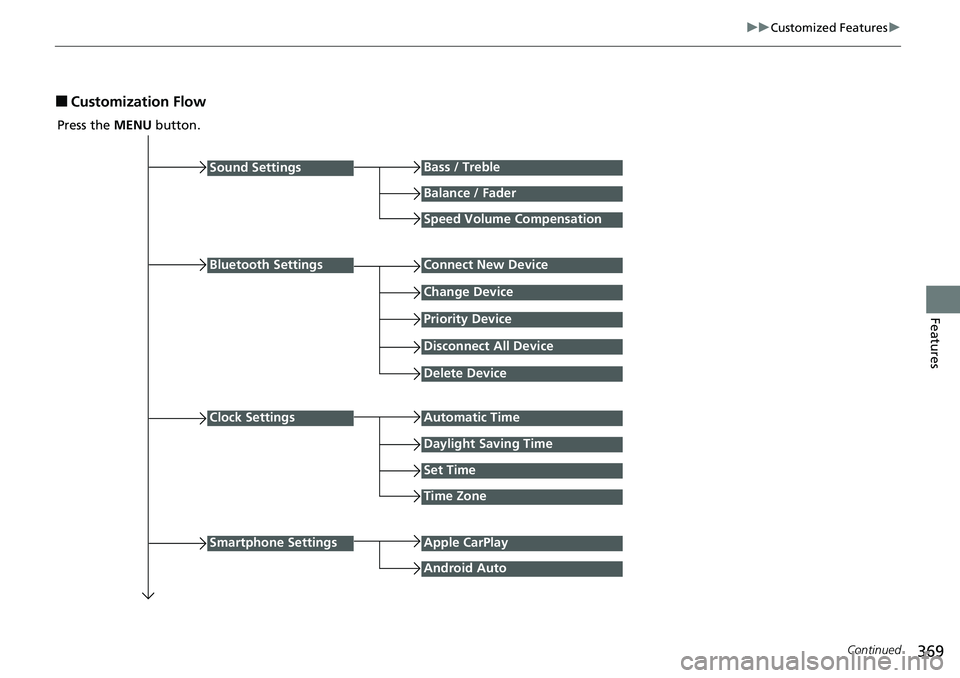
■Customization Flow
Press the MENU button.
Sound Settings
Bluetooth Settings
Bass / Treble
Balance / Fader
Speed Volume Compensation
Connect New Device
Change Device
Priority Device
Clock Settings
Smartphone Settings
Disconnect All Device
Delete Device
Automatic Time
Set Time
Time Zone
Apple CarPlay
Android Auto
Daylight Saving Time
Page 372 of 719
371
uuCustomized Features u
Continued
Features
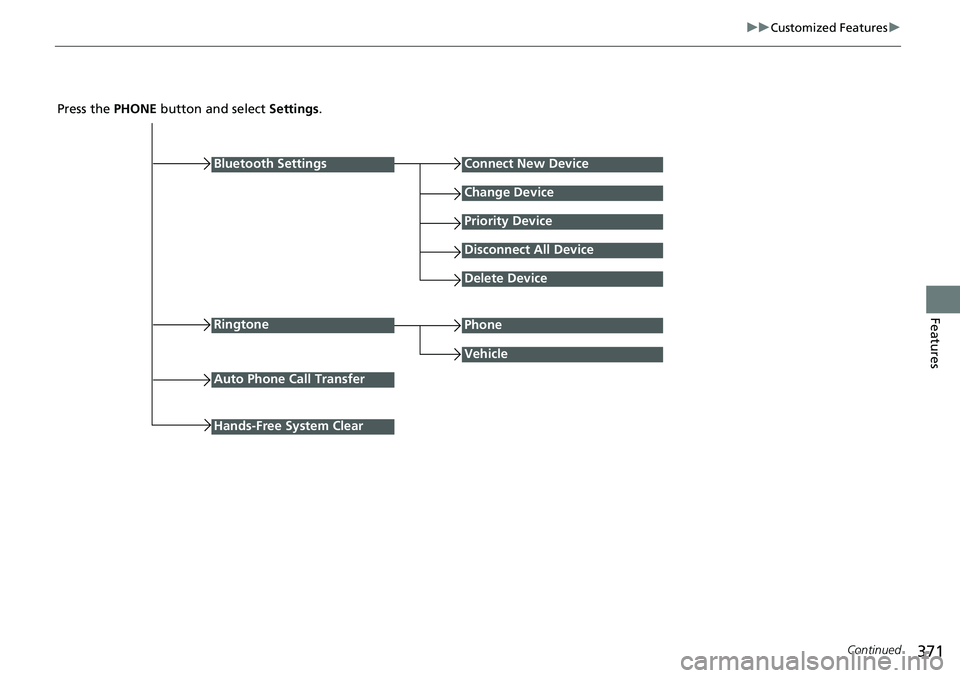
Press the PHONE button and select Settings .
Bluetooth Settings
Ringtone
Connect New Device
Change Device
Priority Device
Disconnect All Device
Delete Device
Vehicle
Auto Phone Call Transfer
Phone
Hands-Free System Clear
Page 373 of 719
372
uuCustomized Features u
Features
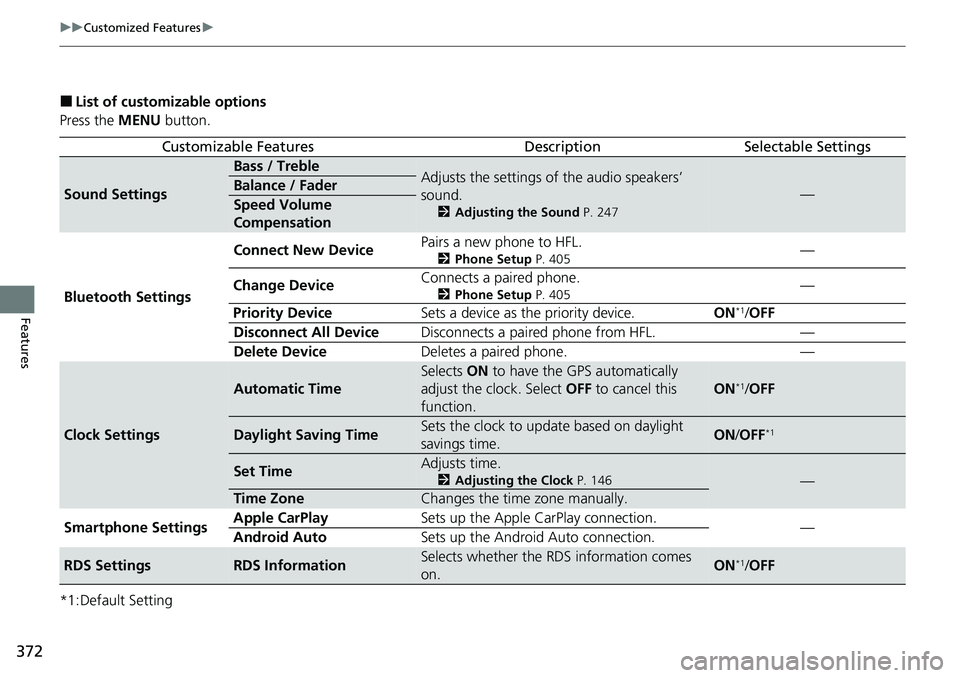
■List of customizable options
Press the MENU button.
*1:Default Setting
Customizable FeaturesDescriptionSelectable Settings
Sound Settings
Bass / TrebleAdjusts the settings of the audio speakers’
sound.
2 Adjusting the Sound P. 247
—Balance / Fader
Speed Volume
Compensation
Bluetooth Settings Connect New Device
Pairs a new phone to HFL.
2
Phone Setup P. 405—
Change Device Connects a paired phone.
2
Phone Setup P. 405—
Priority Device Sets a device as the priority device. ON
*1/OFF
Disconnect All Device Disconnects a paired phone from HFL. —
Delete Device Deletes a paired phone. —
Clock Settings
Automatic Time
Selects ON to have the GPS automatically
adjust the clock. Select OFF to cancel this
function.
ON*1/ OFF
Daylight Saving TimeSets the clock to update based on daylight
savings time.ON /OFF*1
Set TimeAdjusts time.
2 Adjusting the Clock P. 146—
Time ZoneChanges the time zone manually.
Smartphone Settings Apple CarPlay
Sets up the Apple CarPlay connection.
—
Android Auto Sets up the Android Auto connection.
RDS SettingsRDS InformationSelects whether the RDS information comes
on.ON*1/OFF
Page 375 of 719
374
uuCustomized Features u
Features
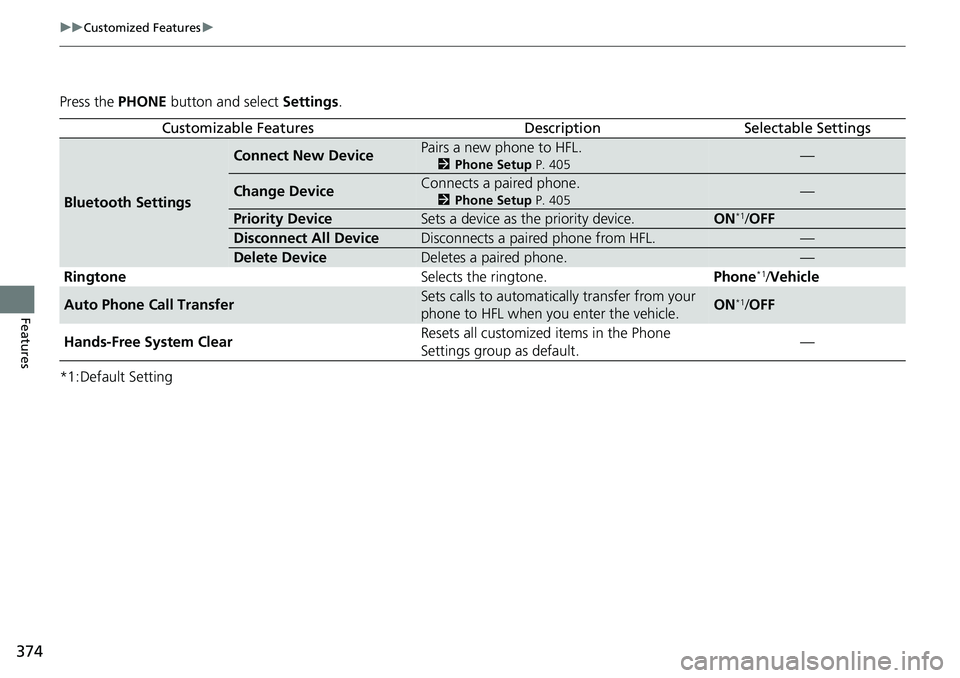
Press the PHONE button and select Settings.
*1:Default Setting
Customizable FeaturesDescriptionSelectable Settings
Bluetooth Settings
Connect New DevicePairs a new phone to HFL.
2 Phone Setup P. 405—
Change DeviceConnects a paired phone.
2Phone Setup P. 405—
Priority DeviceSets a device as the priority device.ON*1/OFF
Disconnect All DeviceDisconnects a paired phone from HFL.—
Delete DeviceDeletes a paired phone.—
Ringtone Selects the ringtone.Phone*1/Vehicle
Auto Phone Call TransferSets calls to automatically transfer from your
phone to HFL when you enter the vehicle.ON*1/ OFF
Hands-Free System Clear Resets all customized
items in the Phone
Settings group as default. —
Page 377 of 719
376
Features
Customized Features
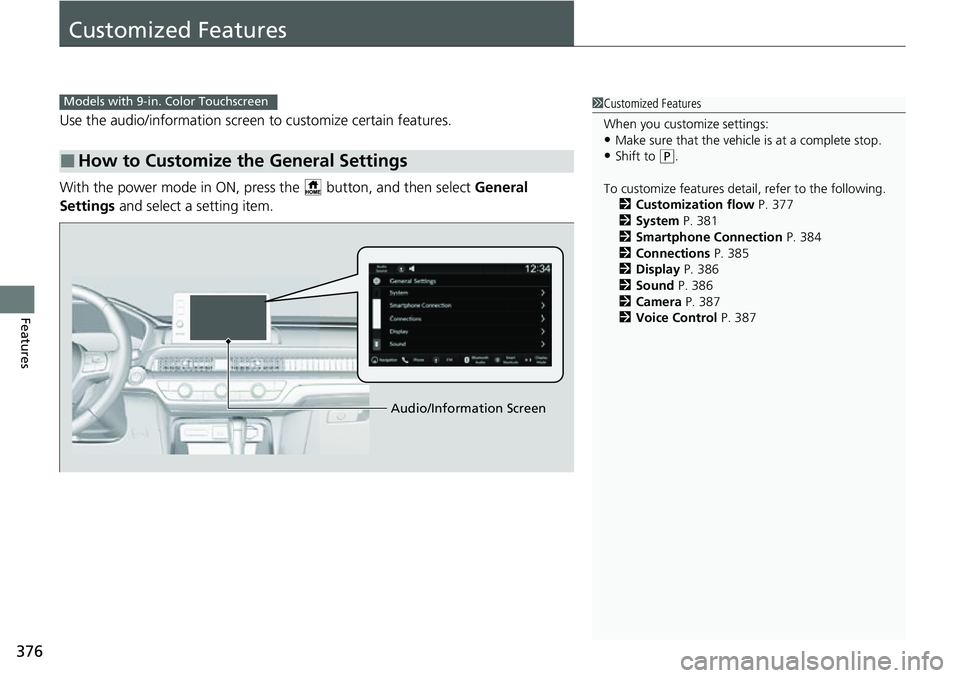
Use the audio/information screen to customize certain features.
With the power mode in ON, pres s the button, and then select General
Settings and select a setting item.
■How to Customize the General Settings
1Customized Features
When you customize settings:
•Make sure that the vehicle is at a complete stop.
•Shift to (P.
To customize features detail, refer to the following. 2 Customization flow P. 377
2 System P. 381
2 Smartphone Connection P. 384
2 Connections P. 385
2 Display P. 386
2 Sound P. 386
2 Camera P. 387
2 Voice Control P. 387
Models with 9-in. Color Touchscreen
Audio/Information Screen
Page 378 of 719
377
uuCustomized Features u
Continued
Features
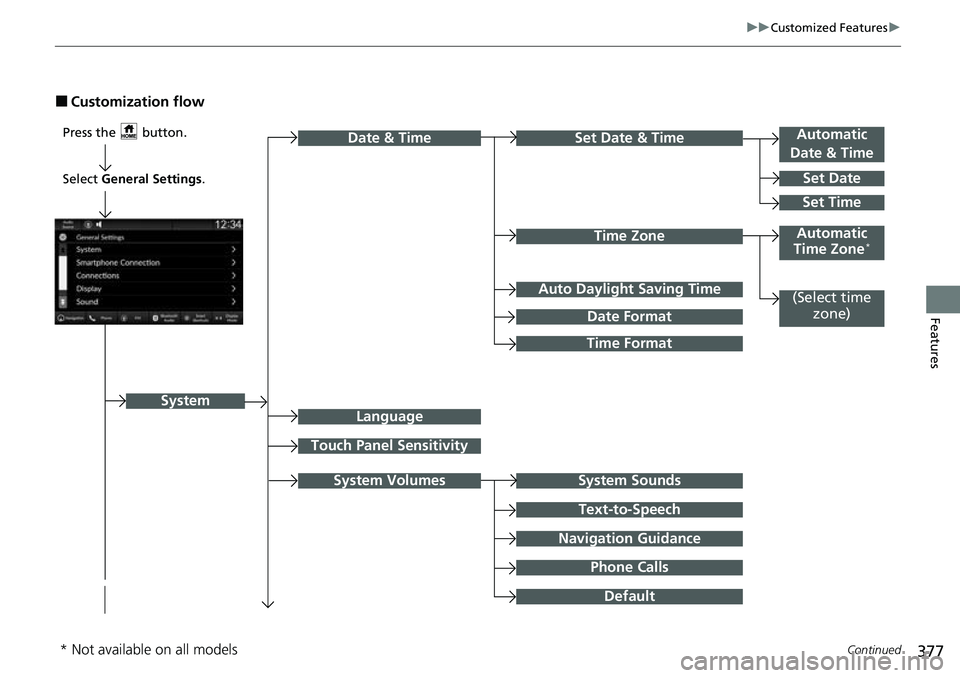
■Customization flow
Press the button.Automatic
Date & Time
Set Date
Touch Panel Sensitivity
Set Date & Time
System Sounds
Date & Time
System
Auto Daylight Saving Time
Date Format
Time Format
Text-to-Speech
Navigation Guidance
Phone Calls
Set Time
Automatic
Time Zone*
System Volumes
Language
Default
Select General Settings.
Time Zone
(Select time
zone)
* Not available on all models
Page 379 of 719
378
uuCustomized Features u
Features
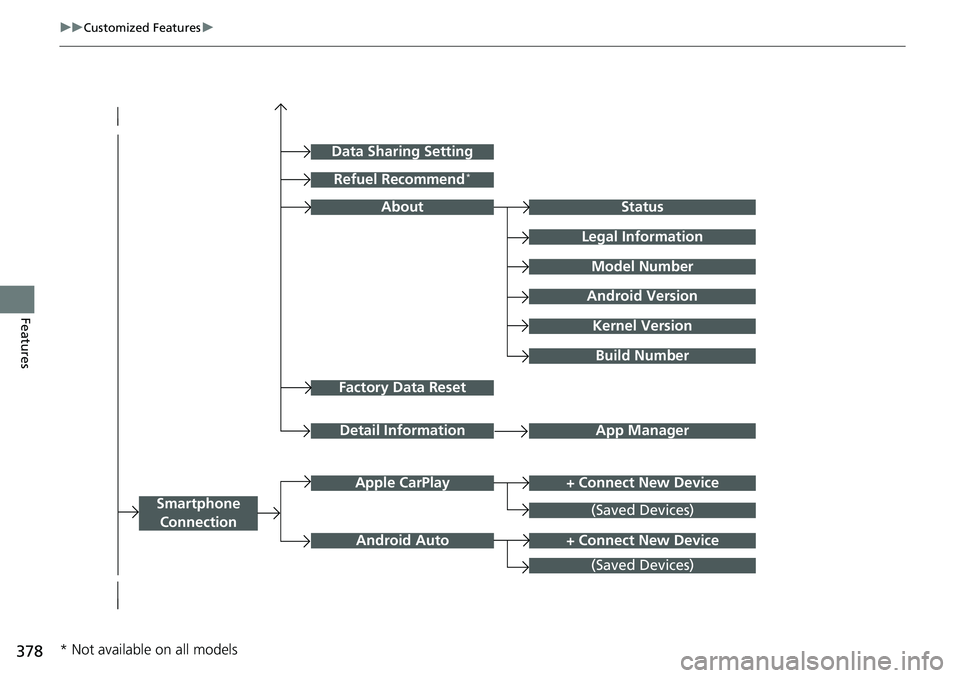
Factory Data Reset
Status
Legal Information
Build Number
Data Sharing Setting
Model Number
Android Version
Kernel Version
App ManagerDetail Information
About
+ Connect New DeviceApple CarPlay
Smartphone
Connection
Android Auto
(Saved Devices)
+ Connect New Device
(Saved Devices)
Refuel Recommend*
* Not available on all models
Page 383 of 719
382
uuCustomized Features u
Features
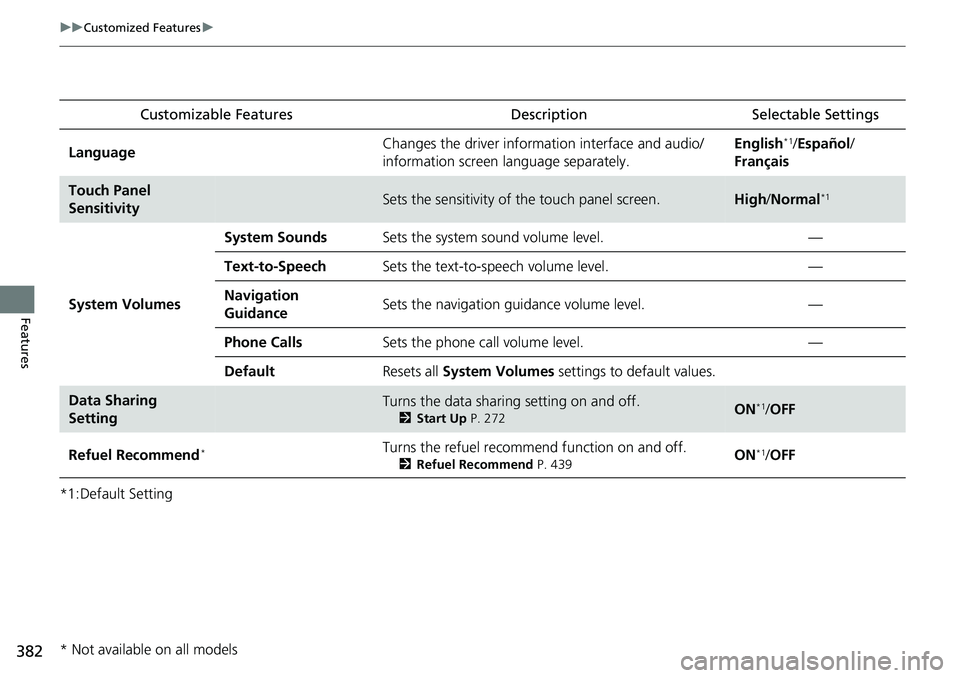
*1:Default SettingCustomizable Features
Description Selectable Settings
LanguageChanges the driver information interface and audio/
information screen language separately.English*1/Español /
Français
Touch Panel
SensitivitySets the sensitivity of the touch panel screen.High /Normal*1
System Volumes
System SoundsSets the system sound volume level.—
Text-to-SpeechSets the text-to-speech volume level.—
Navigation
GuidanceSets the navigation guidance volume level.—
Phone CallsSets the phone call volume level.—
DefaultResets all System Volumes settings to default values.
Data Sharing
SettingTurns the data sharing setting on and off.
2Start Up P. 272ON*1/OFF
Refuel Recommend*Turns the refuel recommend function on and off.
2 Refuel Recommend P. 439ON*1/OFF
* Not available on all models
Page 385 of 719
384
uuCustomized Features u
Features
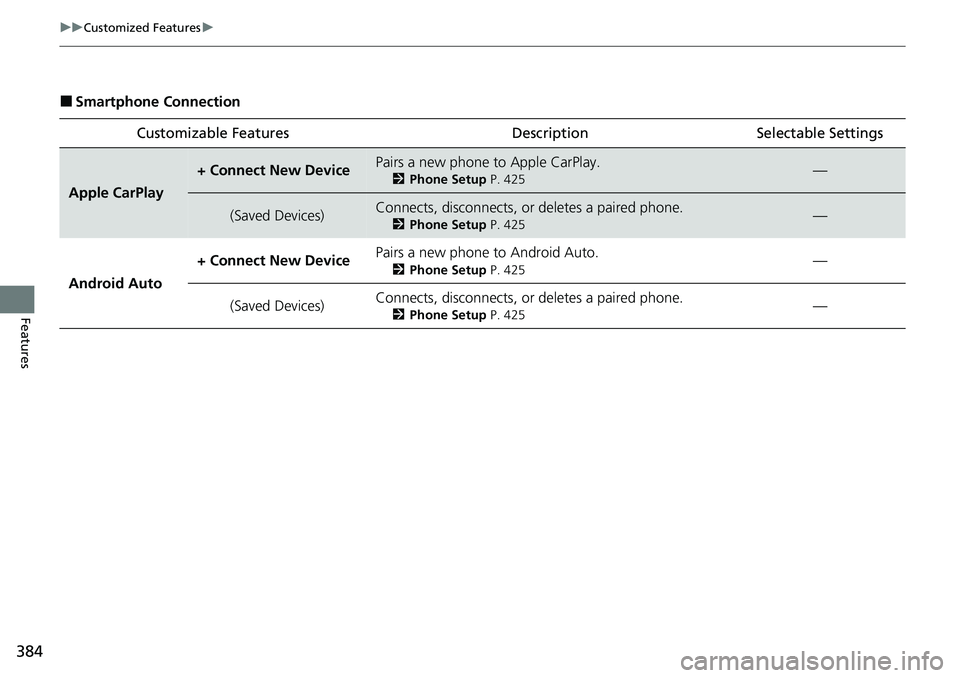
■Smartphone Connection
Customizable Features Desc ription Selectable Settings
Apple CarPlay
+ Connect New DevicePairs a new phone to Apple CarPlay.
2Phone Setup P. 425—
(Saved Devices)Connects, disconnects, or deletes a paired phone.
2Phone Setup P. 425—
Android Auto + Connect New Device
Pairs a new phone to Android Auto.
2
Phone Setup P. 425—
(Saved Devices) Connects, disconnects, or deletes a paired phone.
2
Phone Setup P. 425—