phone HONDA CRV 2023 Repair Manual
[x] Cancel search | Manufacturer: HONDA, Model Year: 2023, Model line: CRV, Model: HONDA CRV 2023Pages: 719, PDF Size: 13.43 MB
Page 386 of 719
385
uuCustomized Features u
Continued
Features
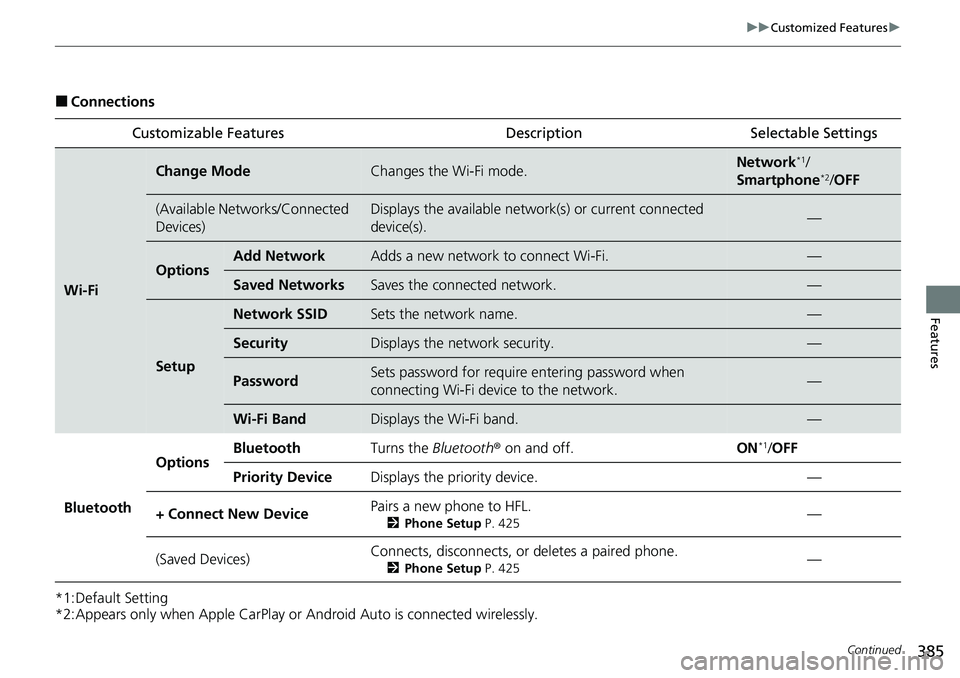
■Connections
*1:Default Setting
*2:Appears only when Apple CarPlay or Android Auto is connected wirelessly. Customizable Features Description Selectable Settings
Wi-Fi
Change ModeChanges the Wi-Fi mode.Network*1/
Smartphone*2/ OFF
(Available Networks/Connected
Devices)Displays the available networ k(s) or current connected
device(s).—
OptionsAdd NetworkAdds a new network to connect Wi-Fi.—
Saved NetworksSaves the connected network.—
Setup
Network SSIDSets the network name.—
SecurityDisplays the network security.—
PasswordSets password for require entering password when
connecting Wi-Fi device to the network.—
Wi-Fi BandDisplays the Wi-Fi band.—
Bluetooth
OptionsBluetoothTurns the Bluetooth ® on and off.ON*1/OFF
Priority DeviceDisplays the priority device.—
+ Connect New DevicePairs a new phone to HFL.
2 Phone Setup P. 425—
(Saved Devices)Connects, disconnects, or deletes a paired phone.
2Phone Setup P. 425—
Page 401 of 719
400
Features
Bluetooth® HandsFreeLink ®
Bluetooth® HandsFreeLink ® (HFL) allows you to place and receive phone calls using
your vehicle’s audio system, without handling your cell phone.
Using HFL
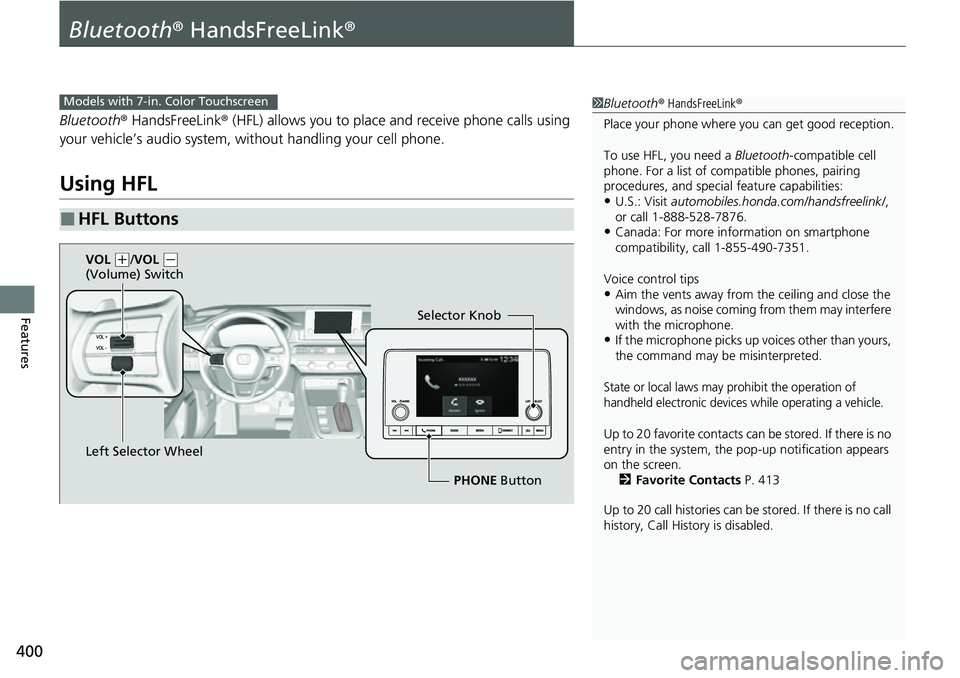
■HFL Buttons
1 Bluetooth ® HandsFreeLink ®
Place your phone where y ou can get good reception.
To use HFL, you need a Bluetooth-compatible cell
phone. For a list of compatible phones, pairing
procedures, and special feature capabilities:
•U.S.: Visit automobiles.honda.com/handsfreelink/ ,
or call 1-888-528-7876.
•Canada: For more info rmation on smartphone
compatibility, call 1-855-490-7351.
Voice control tips
•Aim the vents away from the ceiling and close the
windows, as noise coming from them may interfere
with the microphone.
•If the microphone picks up vo ices other than yours,
the command may be misinterpreted.
State or local laws may prohibit the operation of
handheld electronic devices while operating a vehicle.
Up to 20 favorite contacts ca n be stored. If there is no
entry in the system, the pop-up notification appears
on the screen. 2 Favorite Contacts P. 413
Up to 20 call histories can be stored. If there is no call
history, Call History is disabled.
Models with 7-in. Color Touchscreen
Selector Knob
Left Selector Wheel PHONE Button
VOL
(
+/VOL (-
(Volume) Switch
Page 402 of 719
Continued401
uuBluetooth ® HandsFreeLink ®u Using HFL
Features
Left Selector Wheel: While receiving a call, the incoming call screen is displayed on
the driver information interface. You can pick up the call using the left selector
wheel.
2 Receiving a Call P. 418
PHONE button: Press to go directly to the Phone screen.
Selector knob: Rotate to select an item on the screen, then press .
1Bluetooth ® HandsFreeLink ®
Bluetooth ® Wireless Technology
The Bluetooth ® word mark and logos are registered
trademarks owned by Bluetooth SIG, Inc., and any
use of such marks by Honda Motor Co., Ltd., is under
license. Other trademarks and trade names are those
of their respective owners.
HFL Limitations
An incoming call on HFL will interrupt the audio
system when it is playing. It will resume when the call
is ended.
Page 403 of 719
uuBluetooth ® HandsFreeLink ®u Using HFL
402
Features
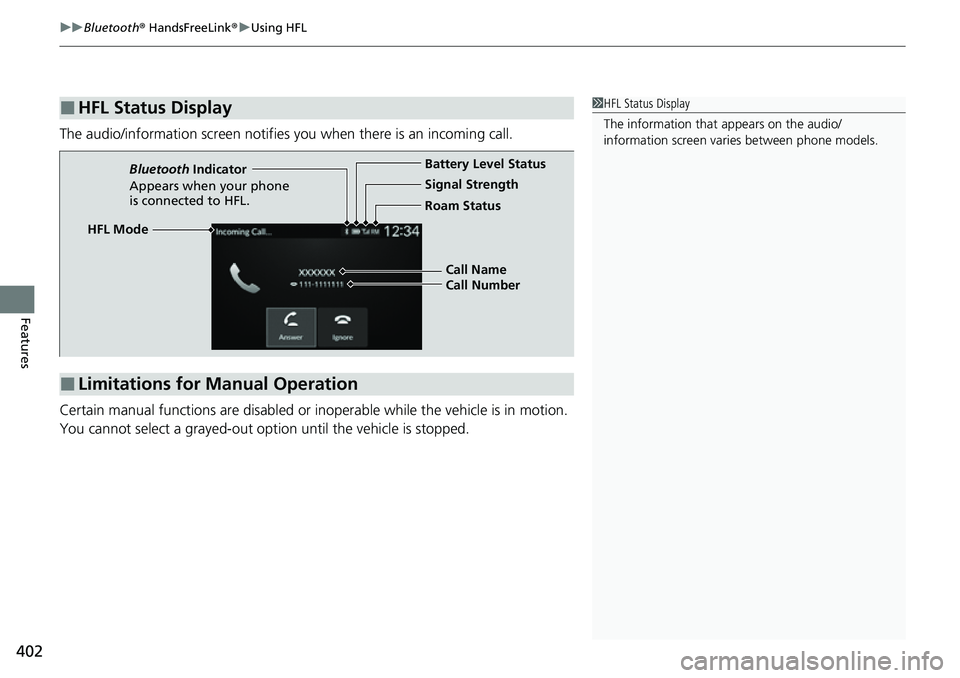
The audio/information screen notifies you when there is an incoming call.
Certain manual functions are disabled or i noperable while the vehicle is in motion.
You cannot select a grayed-out option until the vehicle is stopped.
■HFL Status Display1 HFL Status Display
The information that appears on the audio/
information screen vari es between phone models.
■Limitations for Manual Operation
HFL Mode Battery Level Status
Signal Strength
Bluetooth
Indicator
Appears when your phone
is connected to HFL. Roam Status
Call Name
Call Number
Page 404 of 719
403
uuBluetooth ® HandsFreeLink ®u HFL Menus
Continued
Features
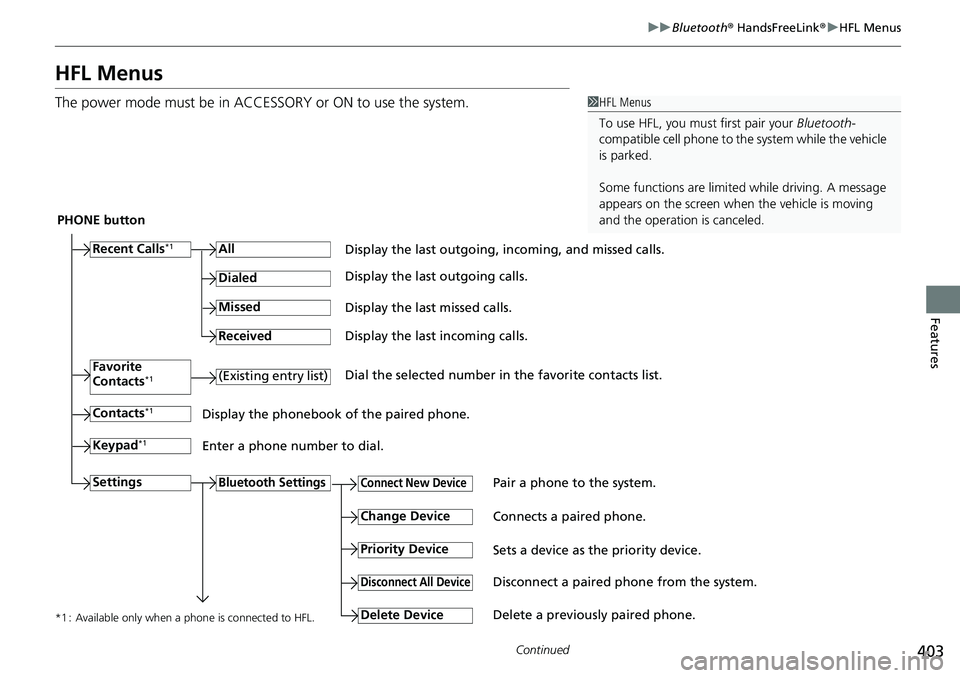
HFL Menus
The power mode must be in ACCESSO RY or ON to use the system.1HFL Menus
To use HFL, you must first pair your Bluetooth-
compatible cell phone to th e system while the vehicle
is parked.
Some functions are limited while driving. A message
appears on the screen when the vehicle is moving
and the operation is canceled.
PHONE button
Recent Calls
*1All
Pair a phone to the system.Connect New Device
Change DeviceConnects a paired phone.
Priority Device
Sets a device as the priority device.
Bluetooth Settings
Keypad*1
Settings
Favorite
Contacts*1(Existing entry list)
Contacts*1
Dialed
Missed
Received
Display the last outgoing, incoming, and missed calls.
Display the last outgoing calls.
Display the last missed calls.
Display the last incoming calls.
Dial the selected number in the favorite contacts list.
Display the phonebook of the paired phone.
Enter a phone number to dial.
Disconnect All DeviceDisconnect a paired phone from the system.
Delete Device
Delete a previously paired phone.*1 : Available only when a phone is connected to HFL.
Page 405 of 719
404
uuBluetooth ® HandsFreeLink ®u HFL Menus
Features
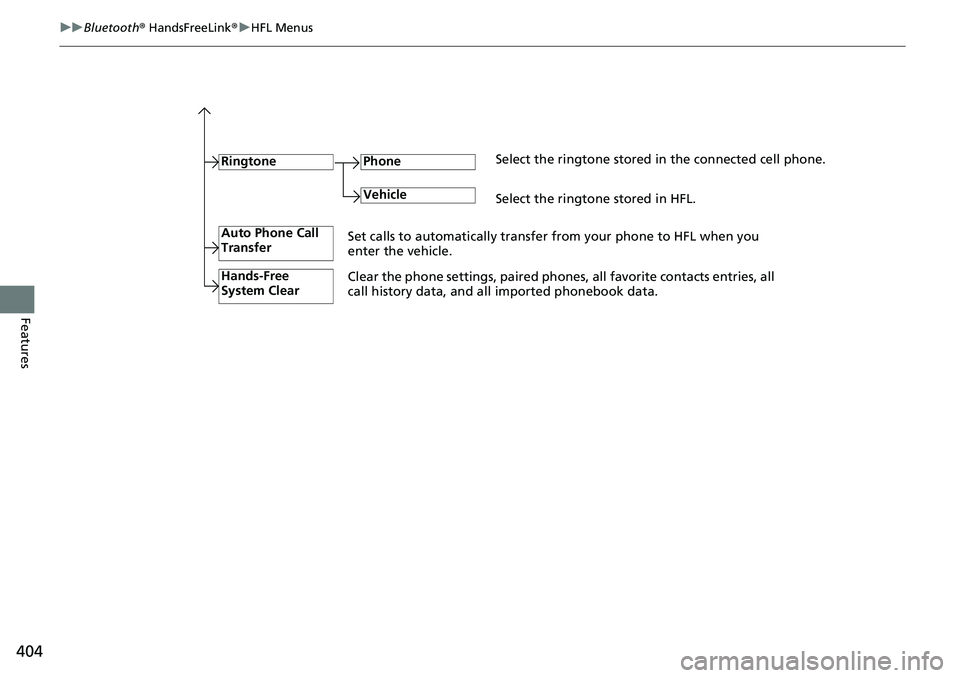
RingtoneSelect the ringtone stored in the connected cell phone.
Phone
VehicleSelect the ringtone stored in HFL.
Auto Phone Call
Transfer
Hands-Free
System Clear
Set calls to automatically transfer from your phone to HFL when you
enter the vehicle.
Clear the phone settings, paired phone s, all favorite contacts entries, all
call history data, and all imported phonebook data.
Page 406 of 719
Continued405
uuBluetooth ® HandsFreeLink ®u HFL Menus
Features
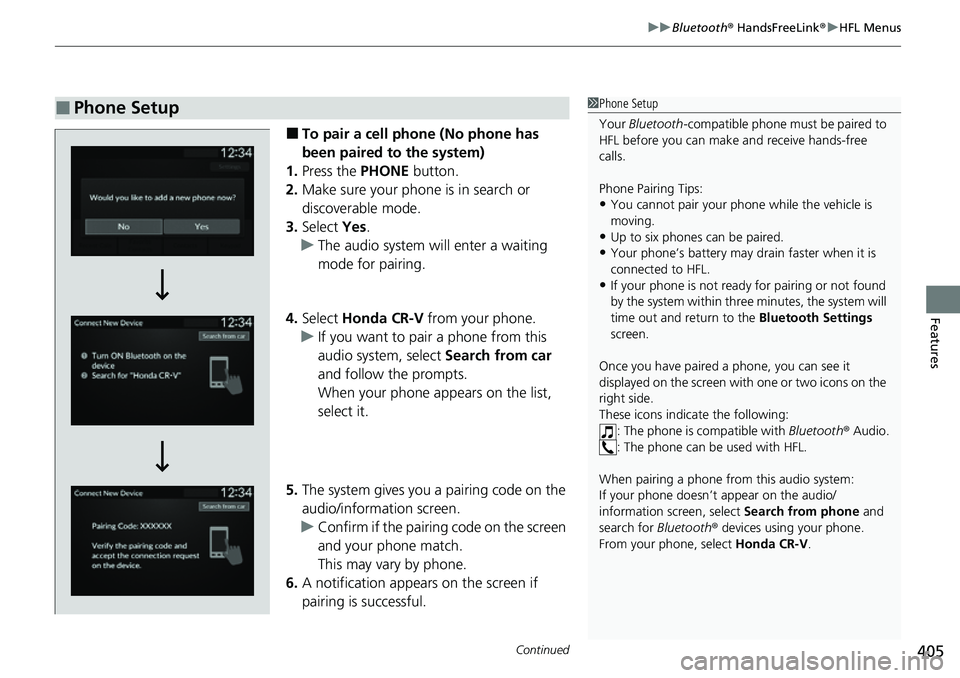
■To pair a cell phone (No phone has
been paired to the system)
1. Press the PHONE button.
2. Make sure your phone is in search or
discoverable mode.
3. Select Yes.
u The audio system will enter a waiting
mode for pairing.
4. Select Honda CR-V from your phone.
u If you want to pair a phone from this
audio system, select Search from car
and follow the prompts.
When your phone appears on the list,
select it.
5. The system gives you a pairing code on the
audio/information screen.
u Confirm if the pairing code on the screen
and your phone match.
This may vary by phone.
6. A notification appears on the screen if
pairing is successful.
■Phone Setup1Phone Setup
Your Bluetooth -compatible phone must be paired to
HFL before you can make and receive hands-free
calls.
Phone Pairing Tips:
•You cannot pair your phone while the vehicle is
moving.
•Up to six phones can be paired.
•Your phone’s battery may dr ain faster when it is
connected to HFL.
•If your phone is not ready for pairing or not found
by the system within three minutes, the system will
time out and return to the Bluetooth Settings
screen.
Once you have paired a phone, you can see it
displayed on the screen with one or two icons on the
right side.
These icons indicate the following: : The phone is compatible with Bluetooth® Audio.
: The phone can be used with HFL.
When pairing a phone from this audio system:
If your phone doesn’t appear on the audio/
information screen, select Search from phone and
search for Bluetooth® devices using your phone.
From your phone, select Honda CR-V .
Page 407 of 719
406
uuBluetooth ® HandsFreeLink ®u HFL Menus
Features
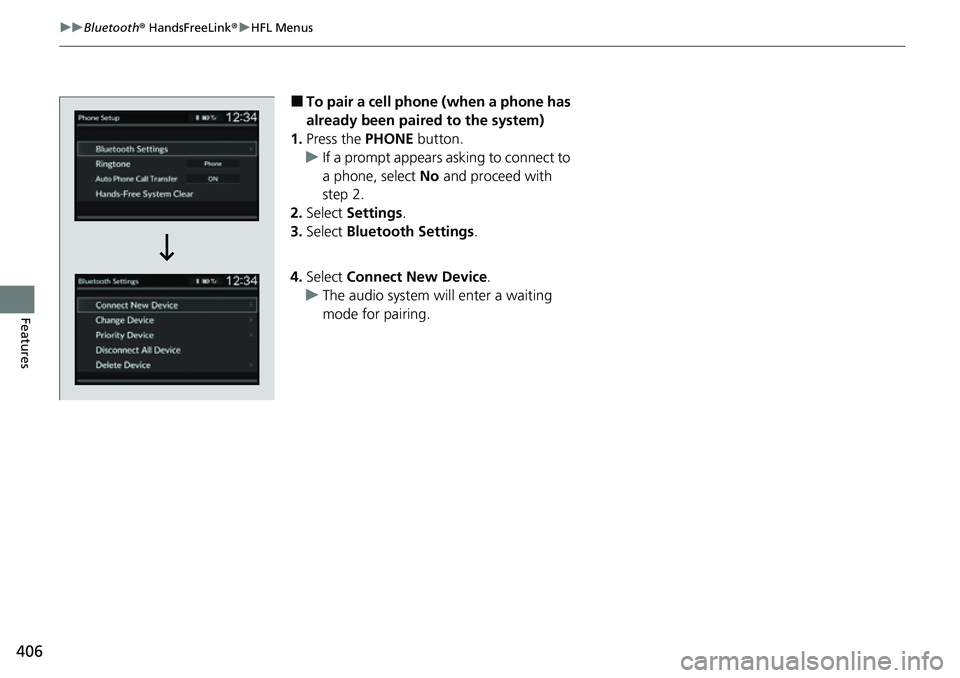
■To pair a cell phone (when a phone has
already been paired to the system)
1. Press the PHONE button.
u If a prompt appears asking to connect to
a phone, select No and proceed with
step 2.
2. Select Settings .
3. Select Bluetooth Settings .
4. Select Connect New Device .
u The audio system will enter a waiting
mode for pairing.
Page 408 of 719
407
uuBluetooth ® HandsFreeLink ®u HFL Menus
Continued
Features
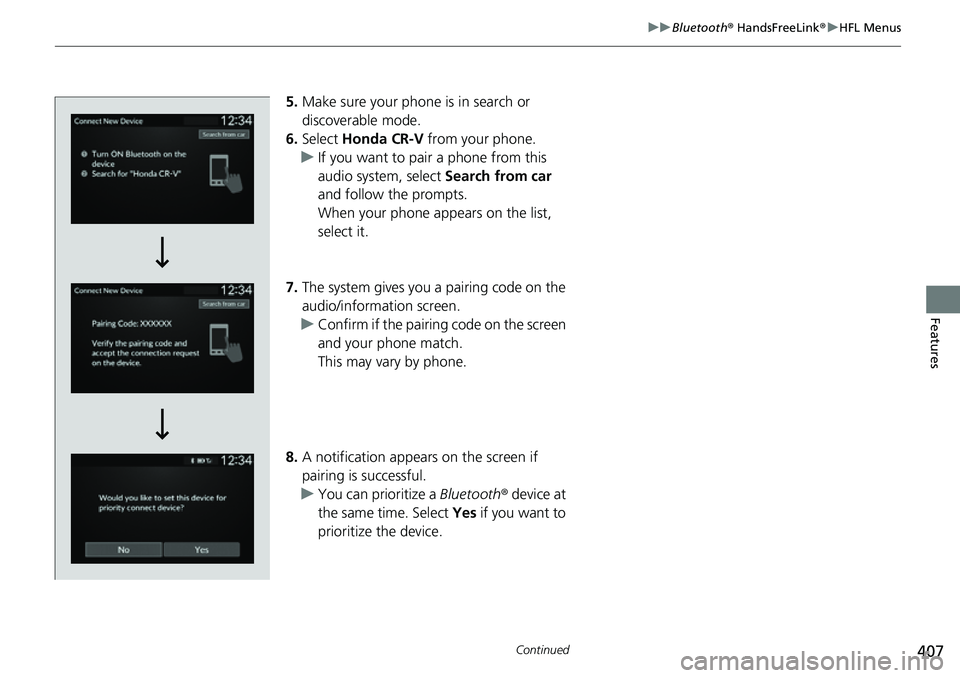
5. Make sure your phone is in search or
discoverable mode.
6. Select Honda CR-V from your phone.
u If you want to pair a phone from this
audio system, select Search from car
and follow the prompts.
When your phone appears on the list,
select it.
7. The system gives you a pairing code on the
audio/information screen.
u Confirm if the pairing code on the screen
and your phone match.
This may vary by phone.
8. A notification appears on the screen if
pairing is successful.
u You can prioritize a Bluetooth® device at
the same time. Select Yes if you want to
prioritize the device.
Page 409 of 719
408
uuBluetooth ® HandsFreeLink ®u HFL Menus
Features
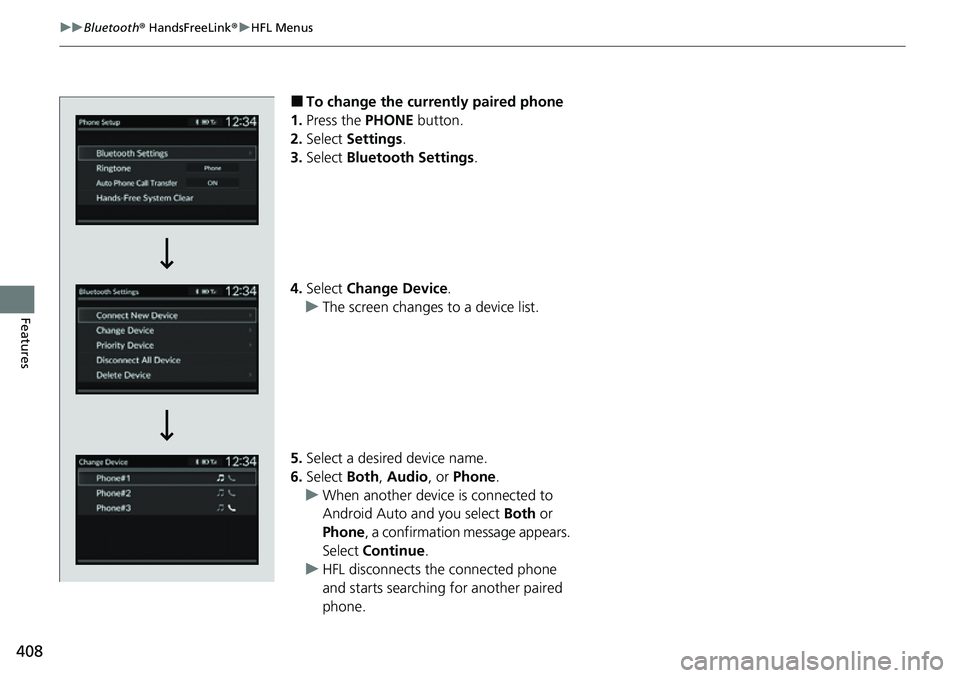
■To change the currently paired phone
1. Press the PHONE button.
2. Select Settings .
3. Select Bluetooth Settings .
4. Select Change Device .
u The screen changes to a device list.
5. Select a desired device name.
6. Select Both, Audio , or Phone .
u When another device is connected to
Android Auto and you select Both or
Phone , a confirmation message appears.
Select Continue .
u HFL disconnects the connected phone
and starts searching for another paired
phone.