battery HONDA CRV 2023 Repair Manual
[x] Cancel search | Manufacturer: HONDA, Model Year: 2023, Model line: CRV, Model: HONDA CRV 2023Pages: 719, PDF Size: 13.43 MB
Page 573 of 719
572
Driving
Braking
Brake System
Use the parking brake to keep the vehicle stationary when parked. When the
parking brake is applied, you can ma nually or automatically release it.
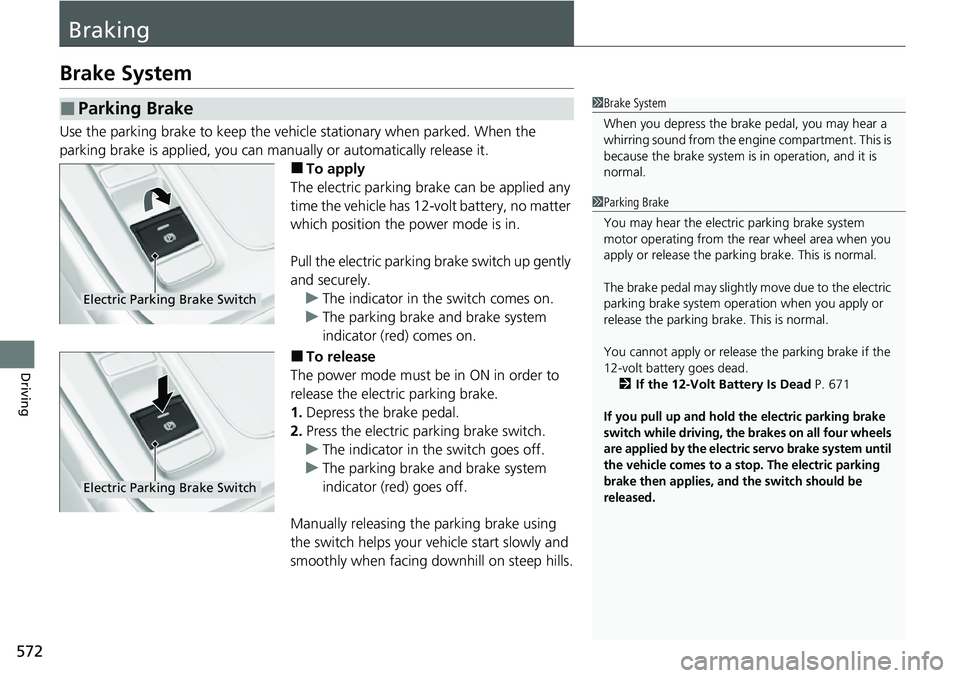
■To apply
The electric parking brake can be applied any
time the vehicle has 12-volt battery, no matter
which position the power mode is in.
Pull the electric parking brake switch up gently
and securely. u The indicator in the switch comes on.
u The parking brake and brake system
indicator (red) comes on.
■To release
The power mode must be in ON in order to
release the electric parking brake.
1. Depress the brake pedal.
2. Press the electric parking brake switch.
u The indicator in the switch goes off.
u The parking brake and brake system
indicator (red) goes off.
Manually releasing the parking brake using
the switch helps your ve hicle start slowly and
smoothly when facing downhill on steep hills.
■Parking Brake1 Brake System
When you depress the brak e pedal, you may hear a
whirring sound from the engine compartment. This is
because the brake system is in operation, and it is
normal.
1 Parking Brake
You may hear the electric parking brake system
motor operating from the re ar wheel area when you
apply or release the parking brake. This is normal.
The brake pedal may slightly move due to the electric
parking brake system opera tion when you apply or
release the parking br ake. This is normal.
You cannot apply or release the parking brake if the
12-volt battery goes dead.
2 If the 12-Volt Battery Is Dead P. 671
If you pull up and hold the electric parking brake
switch while driving, the brakes on all four wheels
are applied by the electric servo brake system until
the vehicle comes to a stop. The electric parking
brake then applies, and the switch should be
released.
Electric Parking Brake Switch
Electric Parking Brake Switch
Page 577 of 719
uuBraking uBrake System
576
Driving
Your vehicle is equipped with disc brakes at all four wh eels. The brake assist system
increases the stopping force when you depress the brake pedal hard in an
emergency situation. The anti-lock brake system (ABS) helps you retain steering
control when braking very hard.
2 Brake Assist System P. 581
2 Anti-lock Brake System (ABS) P. 580
■Foot Brake1Foot Brake
Check the brakes after driving through deep water,
or if there is a buildup of road surface water. If
necessary, dry the brakes by lightly depressing the
pedal several times.
If you hear a continuous me tallic friction sound when
applying the brakes, this is caused by the brake wear
indicator rubbing on the brake rotor and indicates
that the brake pads need to be replaced. Have the
vehicle checked by a deal er. If you hear only an
occasional squeak or squeal when you initially apply
the brake pedal, this may be normal and caused by
high frequency vibr ation of the brake pads against
the rotating brake disc.
Applying constant pressure to the brakes while going
down a long hill can cause the brakes to heat up,
resulting in a loss of stopping power.
Therefore, when descendi ng a long hill, release the
accelerator pedal and allow regenerative braking to
slow the vehicle down.
To adjust the rate of deceleration, use the
deceleration pa ddle selector.
When the high voltage battery has fully recharged,
regenerative braking may not be possible.
2 POWER Gauge P. 114
2 CHARGE/DECEL Gauge P. 114
2 Deceleration Paddle Selector P. 466
Do not rest your foot on the brake pedal while
driving, as it will lightly apply the brakes and cause
them to lose effectiveness over time and reduce pad
life. It will also conf use drivers behind you.
Page 600 of 719
599
Maintenance
This chapter discusses basic maintenance.
Before Performing MaintenanceInspection and Maintenance ............ 600
Safety When Performing Maintenance ....601Parts and Fluids Used in Maintenance Service ........................................... 602
Maintenance Minder
TM..................... 603
Maintenance Under the Hood Maintenance Items Under the Hood .... 611
Opening the Hood ........................... 612
Recommended Engine Oil ................ 613
Oil Check ......................................... 614
Adding Engine Oil ............................ 615
Changing the Engine Oil and Oil Filter ...616
Cooling System ................................ 618
Transmission Fluid ............................ 620
Brake Fluid ....................................... 621
Refilling Window Wa sher Fluid......... 622
Replacing Light Bulbs ....................... 623
Checking and Maintaining Wiper
Blades .......................................... 627
Checking and Maintaining Tires
Checking Tires ................................. 631
Tire and Loading Information Label ... 632
Tire Labeling .................................... 632
DOT Tire Quality Grading (U.S. Vehicles) .... 634Wear Indicators................................ 636 Tire Service Life ................................ 636
Tire and Wheel Replacement ........... 637
Tire Rotation .................................... 638
Winter Tires ..................................... 639
12-Volt Battery ................................. 640
Remote Transmitter Care
Replacing the Remote Battery .......... 642
Climate Control System Maintenance .... 643Cleaning
Interior Care .................................... 644
Exterior Care.................................... 646
Accessories and Modifications .......... 649
Page 602 of 719
601
uuBefore Performing Maintenance uSafety When Performing Maintenance
Continued
Maintenance
Safety When Performing Maintenance
Some of the most important safety pr ecautions are given here. However, we
cannot warn you of every conceivable hazard that can arise in performing
maintenance. Only you can decide whether you should perform a given task.
• To reduce the possibility of fire or explos ion, keep cigarettes, sparks, and flames
away from the 12-volt battery, all High Volt age system, and all fuel related parts.
• Never leave rags, towels, or other flammable objects under the hood.
u Heat from the engine and exhaust can ignite them, causing a fire.
• To clean parts, use a co mmercially available degreas er or parts cleaner, not
gasoline.
• Wear eye protection and protective clothing when working with the 12-volt
battery or compressed air.
• Engine exhaust contains carbon monoxide, which is poisonous and can kill you.
u Only operate the engine if th ere is sufficient ventilation.
■Maintenance Safety
1Safety When Performing Maintenance
3WARNING
Improperly maintaining this vehicle or
failing to correct a pr oblem before driving
can cause a crash in which you can be
seriously hurt or killed.
Always follow the inspection and
maintenance recommendations according
to the schedules in this owner's manual.
3WARNING
Failure to properly follow maintenance
instructions and precautions can cause you
to be seriously hurt or killed.
Always follow the procedures and
precautions in this owner's manual.
Page 603 of 719
uuBefore Performing Maintenance uParts and Fluids Used in Maintenance Service
602
Maintenance
• The vehicle must be in a stationary condition.
u Make sure your vehicle is parked on leve l ground, the parking brake is set, and
the power system is turned off.
• Be aware that hot parts can burn you.
u Make sure to let the power system incl uding the engine and exhaust system
cool thoroughly before touching vehicle parts.
• Be aware that moving parts can injure you.
u Do not activate the power system unle ss instructed, and keep your hands and
limbs away from moving parts. When the power mode is on, the engine can
automatically start, or the radiator fan may start operating without the engine
running.
• Do not touch the high -voltage battery and wiring (orange).
Parts and Fluids Used in Maintenance Service
The use of Honda genuine parts and fluids is recommended when maintaining and
servicing your vehicle. Honda genuine parts are manufactured according to the
same high quality standards used in Honda vehicles.
■Vehicle Safety
1Parts and Fluids Used in Maintenance Service
NOTICE
Do not press the engine cover forcibly. This may
damage the engine cover and component parts.
Page 612 of 719
611
Maintenance
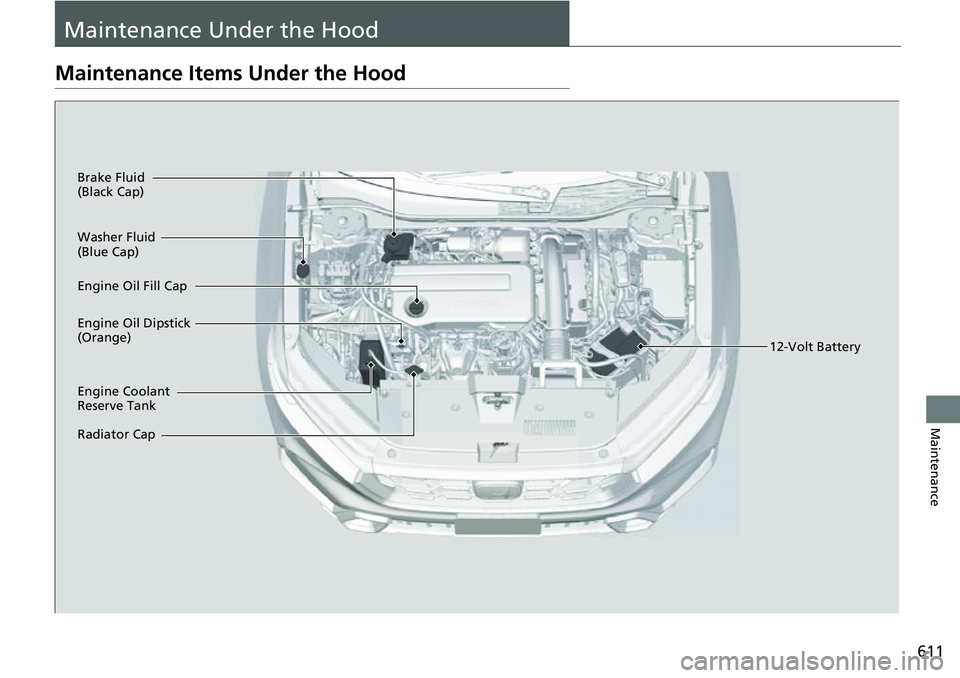
Maintenance Under the Hood
Maintenance Items Under the Hood
Brake Fluid
(Black Cap)
Engine Coolant
Reserve Tank
Radiator Cap Washer Fluid
(Blue Cap)
Engine Oil Dipstick
(Orange) Engine Oil Fill Cap12-Volt Battery
Page 641 of 719
640
Maintenance
12-Volt Battery
Checking the 12-Volt Battery
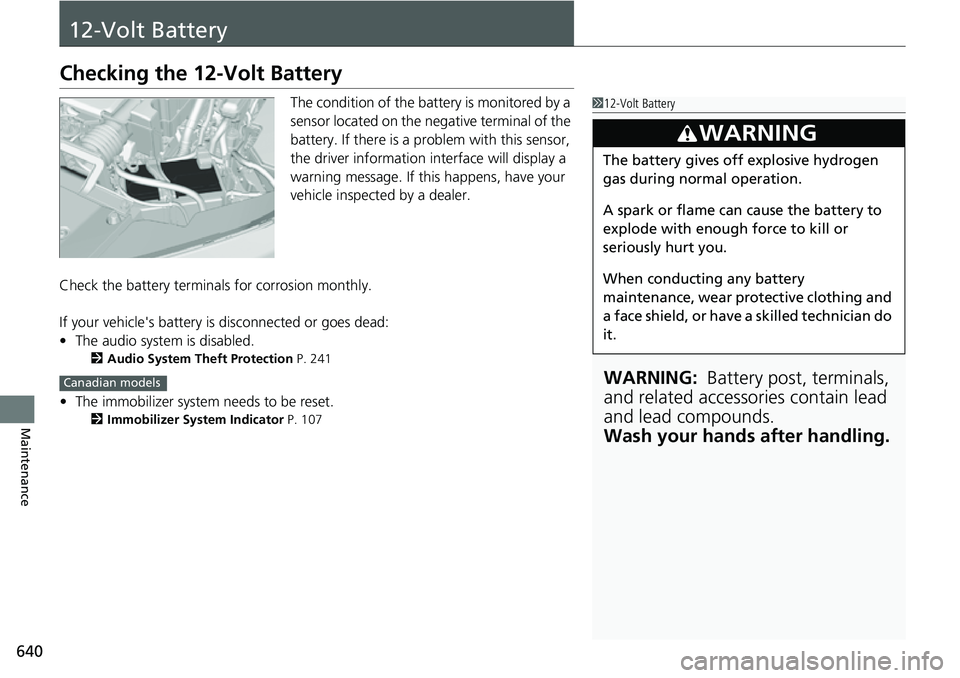
The condition of the battery is monitored by a
sensor located on the negative terminal of the
battery. If there is a problem with this sensor,
the driver information interface will display a
warning message. If this happens, have your
vehicle inspected by a dealer.
Check the battery termina ls for corrosion monthly.
If your vehicle's battery is disconnected or goes dead:
• The audio system is disabled.
2 Audio System Theft Protection P. 241
•The immobilizer system needs to be reset.
2 Immobilizer System Indicator P. 107
112-Volt Battery
WARNING: Battery post, terminals,
and related accessories contain lead
and lead compounds.
Wash your hands after handling.
3WARNING
The battery gives off explosive hydrogen
gas during normal operation.
A spark or flame can cause the battery to
explode with enough force to kill or
seriously hurt you.
When conducting any battery
maintenance, wear prot ective clothing and
a face shield, or have a skilled technician do
it.
Canadian models
Page 642 of 719
641
uu12-Volt Battery uCharging the 12-Volt Battery
Maintenance
Charging the 12-Volt Battery
Disconnect both battery cables to prevent damaging your vehicle's electrical system.
Always disconnect the negative (–) cable first, and reconnect it last.112-Volt Battery
When you find corrosion, cl ean the battery terminals
by applying a baking powder and water solution.
Clean the terminals with a damp towel. Cloth/towel
dry the battery. Coat the terminals with grease to
help prevent future corrosion.
When replacing the battery, the replacement must be
of the same specifications.
Consult a dealer for more information.
The Vehicle Stability Assist
TM (VSA ®) system, brake
system (Amber), Adaptive Cruise Control (ACC) with
Low Speed Follow, low tire pressure/ TPMS
* and
safety support indicators may come on in amber
along with a message in the gauge when you set the
power mode to ON after reconnecting the 12-volt
battery.
Drive a short distance at mo re than 12 mph (20 km/h).
Each indicator should go off. If any do not, have your
vehicle checked by a dealer.
* Not available on all models
Page 643 of 719
642
Maintenance
Remote Transmitter Care
Replacing the Remote Battery
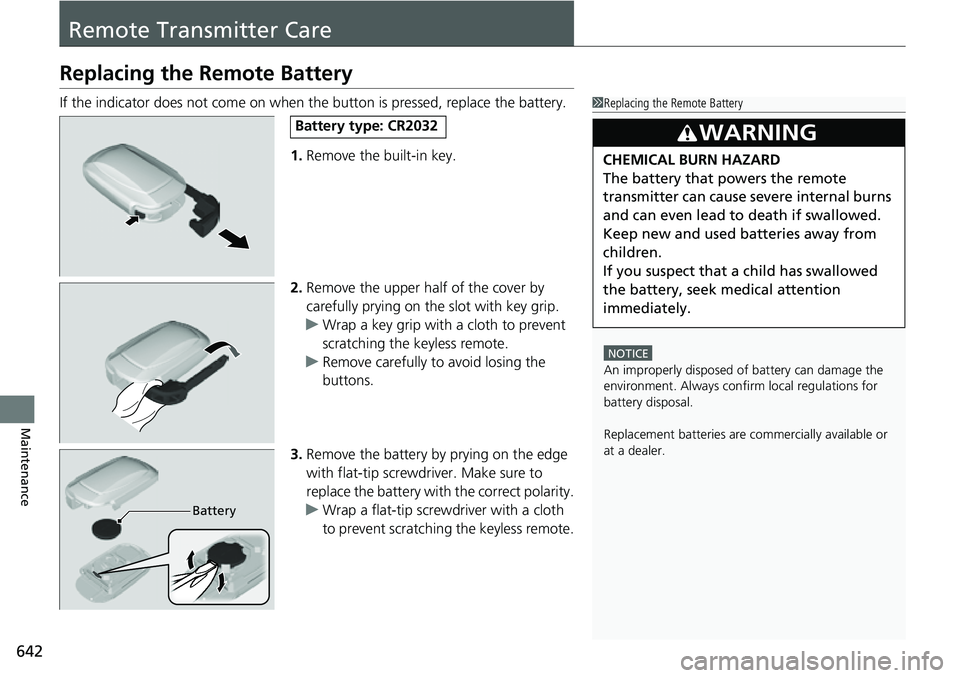
If the indicator does not come on when the button is pressed, replace the battery.1.Remove the built-in key.
2. Remove the upper half of the cover by
carefully prying on the slot with key grip.
u Wrap a key grip with a cloth to prevent
scratching the keyless remote.
u Remove carefully to avoid losing the
buttons.
3. Remove the battery by prying on the edge
with flat-tip screwdri ver. Make sure to
replace the battery with the correct polarity.
u Wrap a flat-tip screwdriver with a cloth
to prevent scratching the keyless remote.1Replacing the Remote Battery
NOTICE
An improperly disposed of battery can damage the
environment. Always conf irm local regulations for
battery disposal.
Replacement batteries are commercially available or
at a dealer.
3WARNING
CHEMICAL BURN HAZARD
The battery that powers the remote
transmitter can cause severe internal burns
and can even lead to death if swallowed.
Keep new and used batteries away from
children.
If you suspect that a child has swallowed
the battery, seek medical attention
immediately.
Battery type: CR2032
Battery
Page 648 of 719
Continued647
uuCleaning uExterior Care
Maintenance
A good coat of automotive body wax helps protect your vehicle’s paint from the
elements. Wax will wear off over time and expose your vehicle’s paint to the
elements, so reapply as necessary.
If you get gasoline, oil, engine coolant, or battery fluid on resi n-coated parts, they
may stain or the coating may peel. Prompt ly wipe it away using a soft cloth and
clean water.
Wipe using a glass cleaner.
Aluminum is susceptible to deterioration caused by salt and other road
contaminants. When necessary, as early as possible use a sponge and mild detergent
to wipe away these contaminants. Do no t use a stiff brush or harsh chemicals
(including some commercial wheel cleaners). These can damage the protective finish
on aluminum alloy wheels, resulting in corrosion. Depending on the type of finish,
the wheels also may lo se their luster or appear burn ished. To avoid water stains,
wipe the wheels dry with a cloth while they are still wet.
■Applying Wax
■Maintaining the Bumpers and Other Resin-Coated Parts
■Cleaning the Window
■Maintaining Aluminum Wheels
1 Applying Wax
NOTICE
Chemical solvents and st rong cleaners can damage
the paint, metal, and plasti c on your vehicle. Wipe
away spills immediately.
1 Maintaining the Bumpers and Other Resin-Coated Parts
Ask a dealer about the corr ect coating material when
you want to repair the painted surface of the parts
made of resin.