start HONDA CRV 2023 Manual Online
[x] Cancel search | Manufacturer: HONDA, Model Year: 2023, Model line: CRV, Model: HONDA CRV 2023Pages: 719, PDF Size: 13.43 MB
Page 603 of 719
uuBefore Performing Maintenance uParts and Fluids Used in Maintenance Service
602
Maintenance
• The vehicle must be in a stationary condition.
u Make sure your vehicle is parked on leve l ground, the parking brake is set, and
the power system is turned off.
• Be aware that hot parts can burn you.
u Make sure to let the power system incl uding the engine and exhaust system
cool thoroughly before touching vehicle parts.
• Be aware that moving parts can injure you.
u Do not activate the power system unle ss instructed, and keep your hands and
limbs away from moving parts. When the power mode is on, the engine can
automatically start, or the radiator fan may start operating without the engine
running.
• Do not touch the high -voltage battery and wiring (orange).
Parts and Fluids Used in Maintenance Service
The use of Honda genuine parts and fluids is recommended when maintaining and
servicing your vehicle. Honda genuine parts are manufactured according to the
same high quality standards used in Honda vehicles.
■Vehicle Safety
1Parts and Fluids Used in Maintenance Service
NOTICE
Do not press the engine cover forcibly. This may
damage the engine cover and component parts.
Page 618 of 719
617
uuMaintenance Under the Hood uChanging the Engine Oil and Oil Filter
Maintenance
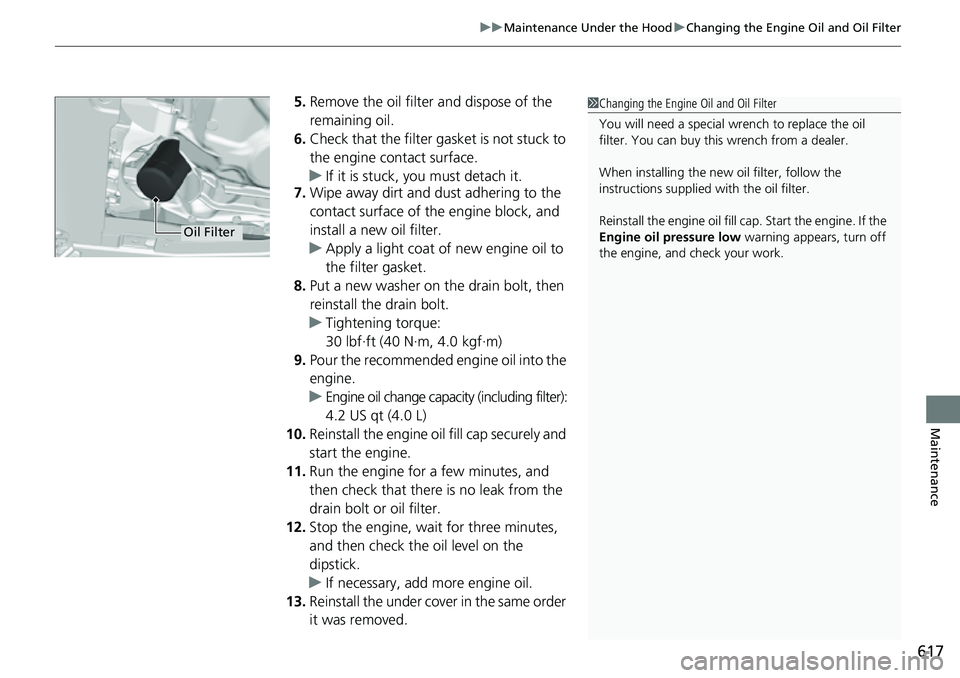
5. Remove the oil filter and dispose of the
remaining oil.
6. Check that the filter gasket is not stuck to
the engine contact surface.
u If it is stuck, you must detach it.
7. Wipe away dirt and dust adhering to the
contact surface of the engine block, and
install a new oil filter.
u Apply a light coat of new engine oil to
the filter gasket.
8. Put a new washer on the drain bolt, then
reinstall the drain bolt.
u Tightening torque:
30 lbf∙ft (40 N∙m, 4.0 kgf∙m)
9. Pour the recommended engine oil into the
engine.
u Engine oil change capacity (including filter):
4.2 US qt (4.0 L)
10. Reinstall the engine oil fill cap securely and
start the engine.
11. Run the engine for a few minutes, and
then check that there is no leak from the
drain bolt or oil filter.
12. Stop the engine, wait for three minutes,
and then check the oil level on the
dipstick.
u If necessary, add more engine oil.
13. Reinstall the under cover in the same order
it was removed.1Changing the Engine Oil and Oil Filter
You will need a special wrench to replace the oil
filter. You can buy this wrench from a dealer.
When installing the new oil filter, follow the
instructions supplied with the oil filter.
Reinstall the engine oil fill cap. Start the engine. If the
Engine oil pressure low warning appears, turn off
the engine, and check your work.
Oil Filter
Page 652 of 719
651
Handling the Unexpected
This chapter explains how to handle unexpected troubles.
ToolsTypes of Tools .................................. 652
If a Tire Goes Flat
Temporarily Repairi ng a Flat Tire....... 653
Handling of the Jack ......................... 666
Power System Won’t Start Checking the Procedure ................... 667
If the Keyless Remote Battery is Weak ... 668Emergency Power System On ........... 669
Emergency Power System Off........... 670
If the 12-Volt Battery Is Dead .......... 671
Shift Lever Does Not Move .............. 673
Overheating How to Handle Overheating ............. 674 Indicator, Coming On/Blinking
If the Engine oil pressure low Warning Appears ......................................... 676
If the 12-Volt Battery Charging System Indicator Comes On ....................... 677
If the Limited stopping power Warning
Appears ......................................... 677
If the Malfunction Indicator Lamp Comes On or Blinks ................................... 678
If the Brake System Indicator (Red) Comes On or Blinks ................................... 679
If the Brake System Indicator (Red) Comes On
or Blinks at the Same Time When the Brake
System Indicator (Amber) Comes On.... 680
If the Electric Power Steering (EPS) System
Indicator Comes On ....................... 681
If the Low Tire Pressure/TPMS Indicator Comes On or Blinks ....................... 682
Fuses Fuse Locations ................................. 683
Inspecting and Changing Fuses ........ 687
Emergency Towing ........................... 689
If You Cannot Unlock the Fuel Fill Door... 690If You Cannot Open the Tailgate.......... 691Refueling................................................. 692
U.S. models
Page 658 of 719
Continued657
uuIf a Tire Goes Flat uTemporarily Repairing a Flat Tire
Handling the Unexpected
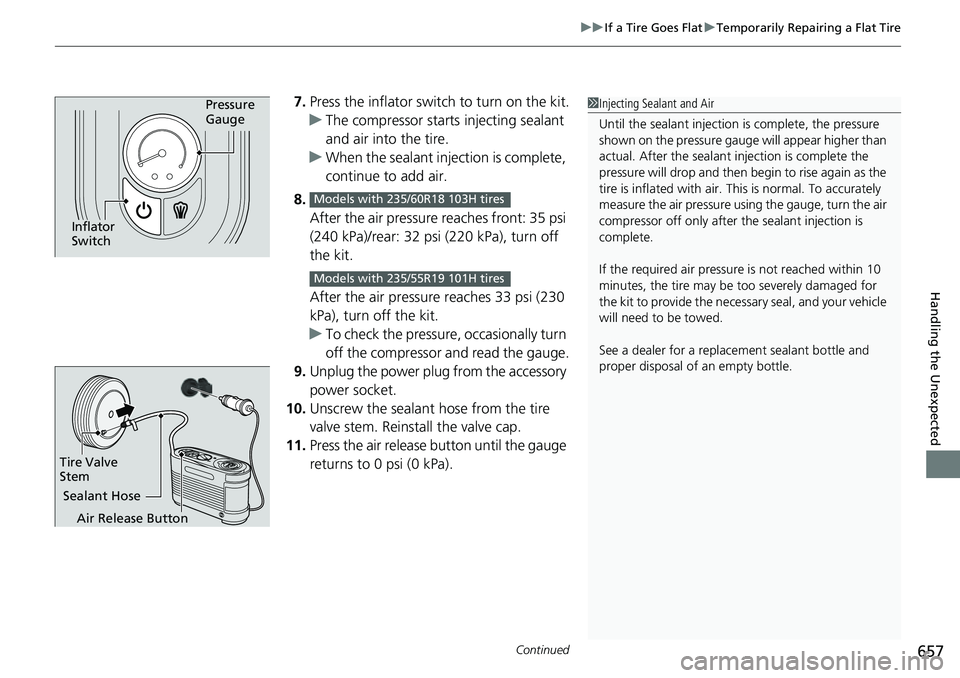
7. Press the inflator swit ch to turn on the kit.
u The compressor starts injecting sealant
and air into the tire.
u When the sealant injection is complete,
continue to add air.
8. After the air pressure reaches front: 35 psi
(240 kPa)/rear: 32 psi (220 kPa), turn off
the kit.
After the air pressure reaches 33 psi (230
kPa), turn off the kit.
u To check the pressure, occasionally turn
off the compressor and read the gauge.
9. Unplug the power plug from the accessory
power socket.
10. Unscrew the sealant hose from the tire
valve stem. Reinstall the valve cap.
11. Press the air release button until the gauge
returns to 0 psi (0 kPa).Pressure
Gauge
Inflator
Switch
Models with 235/60R18 103H tires
Models with 235/55R19 101H tires
1Injecting Sealant and Air
Until the sealant injection is complete, the pressure
shown on the pressure gauge will appear higher than
actual. After the sealant injection is complete the
pressure will drop and then begin to rise again as the
tire is inflated with air. This is normal. To accurately
measure the air pressure usin g the gauge, turn the air
compressor off only after the sealant injection is
complete.
If the required air pressure is not reached within 10
minutes, the tire may be too severely damaged for
the kit to provide the necessa ry seal, and your vehicle
will need to be towed.
See a dealer for a replacement sealant bottle and
proper disposal of an empty bottle.
Sealant Hose
Tire Valve
Stem
Air Release Button
Page 665 of 719
uuIf a Tire Goes Flat uTemporarily Repairing a Flat Tire
664
Handling the Unexpected
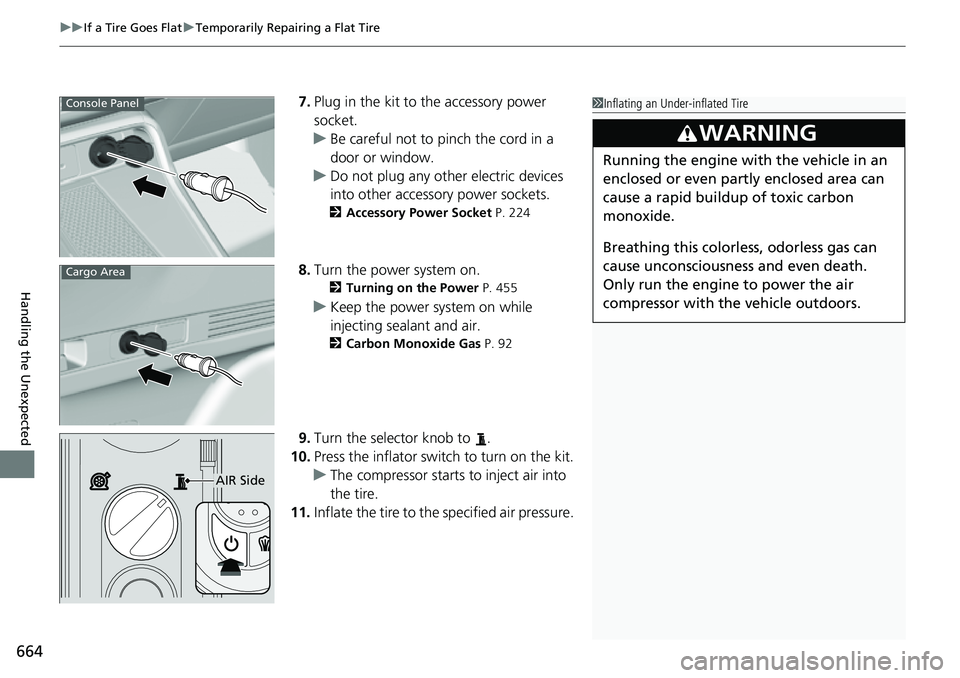
7. Plug in the kit to the accessory power
socket.
u Be careful not to pinch the cord in a
door or window.
u Do not plug any other electric devices
into other accessory power sockets.
2 Accessory Power Socket P. 224
8.Turn the power system on.
2 Turning on the Power P. 455
uKeep the power system on while
injecting sealant and air.
2 Carbon Monoxide Gas P. 92
9.Turn the selector knob to .
10. Press the inflator swit ch to turn on the kit.
u The compressor starts to inject air into
the tire.
11. Inflate the tire to the specified air pressure.
1Inflating an Under-inflated Tire
3WARNING
Running the engine with the vehicle in an
enclosed or even partly enclosed area can
cause a rapid buildup of toxic carbon
monoxide.
Breathing this colorless, odorless gas can
cause unconsciousness and even death.
Only run the engine to power the air
compressor with th e vehicle outdoors.
Console Panel
Cargo Area
AIR Side
Page 668 of 719
667
Handling the Unexpected
Power System Won’t Start
Checking the Procedure
If the power system won't start, check the following items and take appropriate action.
If you cannot turn on the power system after checking all the it ems in the list above, have your vehicle checked by a dealer.
If you must start the vehicle immediately, use an as sisting vehicle or booster battery to jump start it.
2If the 12-Volt Battery Is Dead P. 671
Depending on the situation, you may be able to temporarily turn the power system on using the emergency starting procedure.
2Emergency Power System On P. 669
ChecklistConditionWhat to Do
Check if the related
indicator or driver
information interface
messages come on.The Temperature is too cold for vehicle to operate message
appears.●You must wait for an increase in the
ambient temperature or move the
vehicle to a warmer location.
●Contact dealer if necessary.
The To start, touch start butto n with emblem side of
remote message appears.
u Make sure the keyless remote is in its operating range.
2 POWER Button Operating Range P. 184
2If the Keyless Remote Battery is Weak
P. 668
Check the fuses.
Check all fuses, or have your vehicle checked by a dealer.2Inspecting and Changing Fuses P. 687
Check the power system starting procedure.
Follow the instructions, and try to start the power system again.2Turning on the Power P. 455
Check the shift position. The transmission is not in (P. Change the shift position to (P.
Check the immobilizer
system indicator.When the immobilizer system indicator is blinking, the power
system cannot be turned on.2Immobilizer System P. 176
2 Immobilizer System Indicator P. 107
Page 669 of 719
668
uuPower System Won’t Start uIf the Keyless Remote Battery is Weak
Handling the Unexpected
If the Keyless Remote Battery is Weak
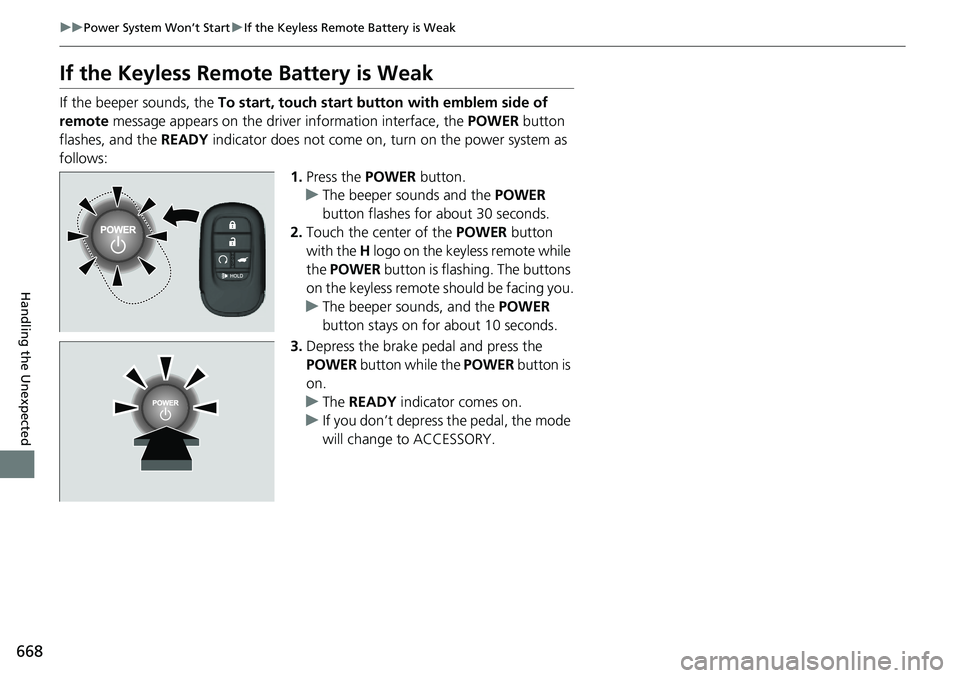
If the beeper sounds, the To start, touch start butto n with emblem side of
remote message appears on the driver information interface, the POWER button
flashes, and the READY indicator does not come on, tu rn on the power system as
follows: 1.Press the POWER button.
u The beeper sounds and the POWER
button flashes for about 30 seconds.
2. Touch the center of the POWER button
with the H logo on the keyless remote while
the POWER button is flashing. The buttons
on the keyless remote should be facing you.
u The beeper sounds, and the POWER
button stays on for about 10 seconds.
3. Depress the brake pedal and press the
POWER button while the POWER button is
on.
u The READY indicator comes on.
u If you don’t depress the pedal, the mode
will change to ACCESSORY.
Page 670 of 719
669
uuPower System Won’t Start uEmergency Power System On
Handling the Unexpected
Emergency Power System On
If the power system cannot be turned on using the normal starting procedure, you
may be able to turn it on using the emergency starting procedure below.
Do not use this procedure if it is not an emergency.
1. Make sure the parking brake is applied.
2. Check that the transmission is in
(P, then set the power mode to ACCESSORY.
3. Firmly depress the brake peda l, then press and hold the POWER button for at
least 15 seconds.
This should be considered a system malfun ction even if you are able to turn the
power system on using the above procedure.
Have your vehicle checked by a dealer immediately.
1Emergency Power System On
Refer to the following if you cannot move the shift
lever out of the
( P position.
2 Shift Lever Does Not Move P. 673
Page 671 of 719
670
uuPower System Won’t StartuEmergency Power System Off
Handling the Unexpected
Emergency Power System Off
The POWER button may be used to turn the pow er system off due to an emergency
situation even while driving. If you must turn the power system off, do either of the
following operations:
• Press and hold the POWER button for about two seconds.
• Firmly press the POWER button three times.
The steering wheel will not lock. However, because turning off the power system
disables the power assist the power syst em provides to the steering and braking
systems, it will require significantly more physical effort and time to steer and slow
the vehicle. Use both feet on the brake pe dal to slow down the vehicle and stop
immediately in a safe place.
The power mode is in ACCESSORY wh en the power system is stopped.
To change the mode to VEHICLE OFF, put the transmission into
(P after the vehicle
comes to a complete stop.
1 Emergency Power System Off
Do not press the POWER button while driving unless
it is absolutely necessary for the power system to be
turned off.
If you press the POWER button while driving, the
beeper sounds.
Page 672 of 719
671Continued
Handling the Unexpected
If the 12-Volt Battery Is Dead
Jump Starting Procedure
Turn off the power to electric devices, such as audio and lights. Turn off the power
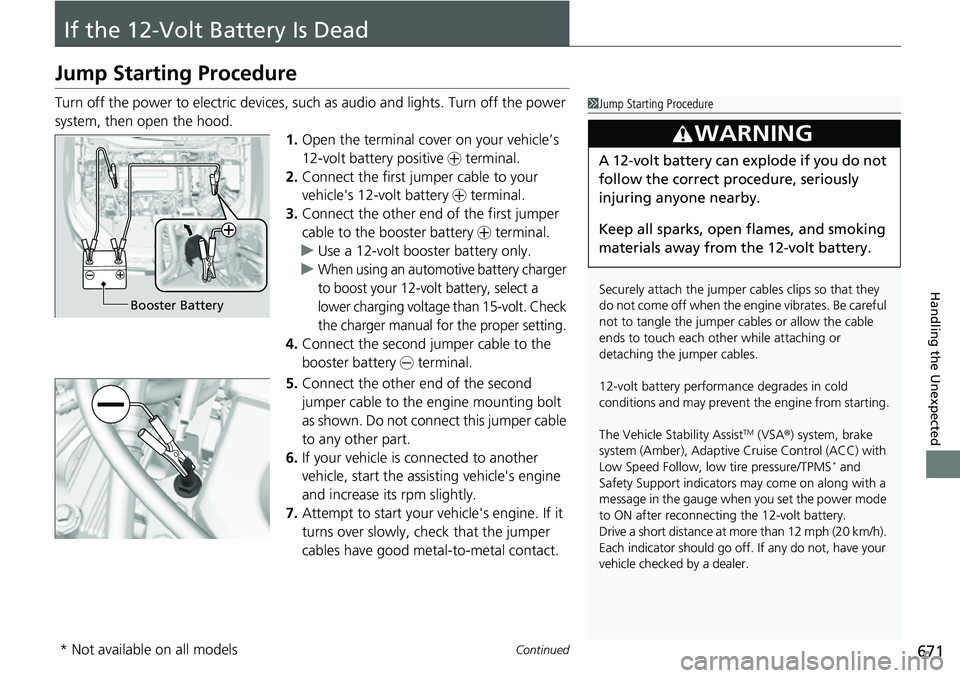
system, then open the hood. 1.Open the terminal cover on your vehicle’s
12-volt battery positive + terminal.
2. Connect the first jumper cable to your
vehicle's 12-volt battery + terminal.
3. Connect the other end of the first jumper
cable to the booster battery + terminal.
u Use a 12-volt booster battery only.
u
When using an automotive battery charger
to boost your 12-volt battery, select a
lower charging voltage than 15-volt. Check
the charger manual for the proper setting.
4. Connect the second jumper cable to the
booster battery - terminal.
5. Connect the other end of the second
jumper cable to the engine mounting bolt
as shown. Do not connect this jumper cable
to any other part.
6. If your vehicle is connected to another
vehicle, start the assisting vehicle's engine
and increase its rpm slightly.
7. Attempt to start your ve hicle's engine. If it
turns over slowly, check that the jumper
cables have good metal-to-metal contact.
1 Jump Starting Procedure
Securely attach the jumper cables clips so that they
do not come off when the e ngine vibrates. Be careful
not to tangle the jumper cables or allow the cable
ends to touch each other while attaching or
detaching the jumper cables.
12-volt battery performa nce degrades in cold
conditions and may prevent the engine from starting.
The Vehicle Stability Assist
TM (VSA ®) system, brake
system (Amber), Adaptive Cruise Control (ACC) with
Low Speed Follow, low tire pressure/TPMS
* and
Safety Support indicators may come on along with a
message in the gauge when you set the power mode
to ON after reconnecting the 12-volt battery.
Drive a short distance at more than 12 mph (20 km/h).
Each indicator should go off. If any do not, have your
vehicle checked by a dealer.
3WARNING
A 12-volt battery can explode if you do not
follow the correct procedure, seriously
injuring anyone nearby.
Keep all sparks, open flames, and smoking
materials away from the 12-volt battery.
Booster Battery
* Not available on all models