Settings HONDA CRV 2023 Owners Manual
[x] Cancel search | Manufacturer: HONDA, Model Year: 2023, Model line: CRV, Model: HONDA CRV 2023Pages: 719, PDF Size: 13.43 MB
Page 4 of 719
System Updates Terms and Conditions*
General
Your vehicle has an application that allows your 9-in. Color
Touchscreen to automatically search for Honda software updates
that are specific to your 9-in. Color Touchscreen and its connected
devices (initially every one (1) week via Wi-Fi or every four (4) weeks
via Telematics Control Unit (TCU)
*, queries may occur more or less
frequently due to internet outages, retries, direct user action, WAP
push from the server or a chan ge in query policy on the Honda
servers). This application periodi cally transmits to our servers a
limited amount of vehicle and device information (Vehicle
Identification Number (VIN), th e Model Type (MT) Identification
Number, Hardware and Software Part Number, Serial Number,
Software Version, preferred lang uage, Internet Protocol (IP)
address, Transaction Log (alert or update viewing, update
download and installation, softw are status), etc.). When the
application finds an update from the server, the application initially
asks permission to download and install the update. Where
available, in your settings menu you may elect to automatically
download and install these updates or you may elect to manually
update the system.
When your 9-in. Color Touchscr een searches our servers for
updates or alerts, we will auto matically provide you with the
opportunity to update your devices or transmit the update or alert
directly to your 9-in. Color Touchscreen. We will also maintain on
our servers a log of the updates or alerts that are installed.
Your Personal Data
Should the aforementioned info rmation transmitted to Honda
constitute personal information in y our region, please note that this
information will be treated in stri ct accordance with the rules and
regulations outlined in this notice as well as applicable data
protection law. The terms of our privacy policy are
incorporated into these terms by
reference and your use of system updates will be subject to the
privacy policy. Our privacy policy se ts out information about how we
and any named third parties will pr ocess any personal data we collect
from you or that you provide to us, via the application.
For further details, see Honda's co nnected product privacy policy at:
U.S.: www.honda.com
Canada: www.honda.ca/privacy/vehicledata
Honda collects, uses and stores your personal data for the reasons
set out below:
●to deliver the system updates and related services to you;●to allow us to improve and optimize the system updates
products and services;
●to respond to user questions an d complaints; and for internal
record keeping.
●where necessary for Honda's legitimate interests, as listed
below, and where our interests are not overridden by your data
protection rights.
Protecting our legitimate business interests and legal rights
includes, but is not limited to, use in connection with compliance,
regulatory, auditing, legal claims (including disclosure of such
information in connection with legal process or litigation) and other
ethics and compliance reporting requirements.
Honda will also convert personal data into anonymous data and
use it (normally on an aggregated st atistical basis) for uses such as
market research and analysis, to improve the system updates, to
analyze trends, and to assess the success of software update
releases. Aggregated personal in formation does not personally
identify you or any other user of the system updates.
Honda may share this data with Honda's worldwide support
organization or affiliated Honda companies or other third parties
engaged by Honda for the purposes of rendering support services
in connection with system support.
* Not available on all models
Page 18 of 719
17
Quick Reference Guide
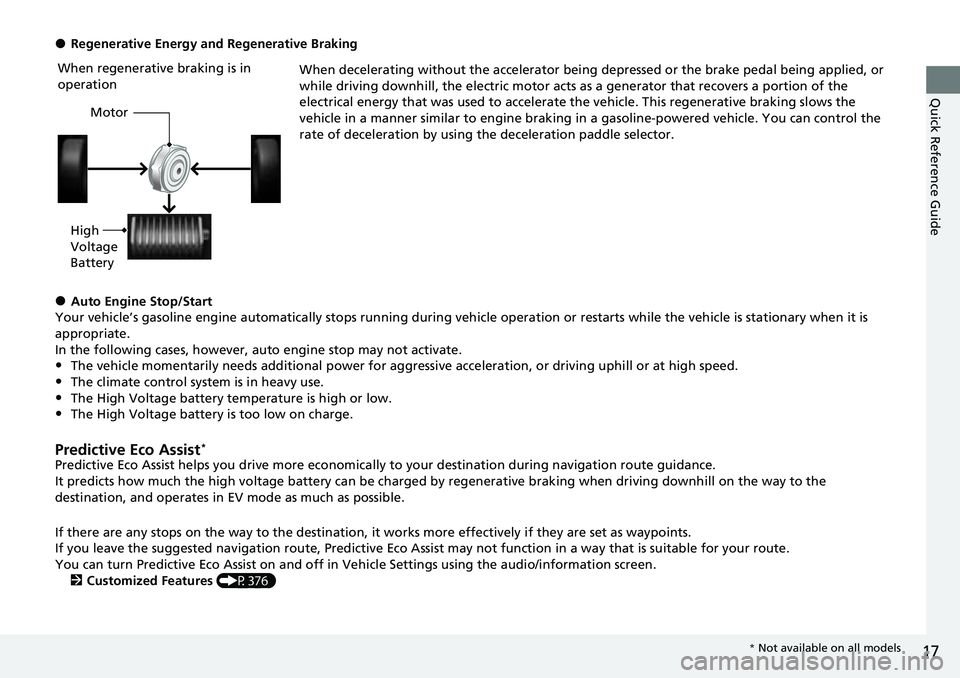
●Regenerative Energy and Regenerative BrakingWhen decelerating without the accelerator being depressed or the brake pedal being applied, or
while driving downhill, the electric motor acts as a generator that recovers a portion of the
electrical energy that was used to accelerate the vehicle. This regenerative braking slows the
vehicle in a manner similar to engine braking in a gasoline-powered vehicle. You can control the
rate of deceleration by using the deceleration paddle selector.
●Auto Engine Stop/Start
Your vehicle’s gasoline engine automatically stops running during vehicle operation or restarts while the vehicle is stationary when it is
appropriate.
In the following cases, however, auto engine stop may not activate.
•The vehicle momentarily needs additional power for aggressive acceleration, or driving uphill or at high speed.
•The climate control system is in heavy use.
•The High Voltage battery temperature is high or low.•The High Voltage battery is too low on charge.
Predictive Eco Assist*
Predictive Eco Assist helps you drive more economically to your destination during navigation route guidance.
It predicts how much the high voltage battery can be charged by regenerative braking when driving downhill on the way to the
destination, and operates in EV mode as much as possible.
If there are any stops on the way to the destination, it works more effectively if they are set as waypoints.
If you leave the suggested navigation route, Predictive Eco Assi st may not function in a way that is suitable for your route.
You can turn Predictive Eco Assist on and off in Ve hicle Settings using the audio/information screen.
2 Customized Features (P376)
When regenerative braking is in
operation
Motor
High
Voltage
Battery
* Not available on all models
Page 24 of 719
23
Quick Reference Guide
Controls (P 145)
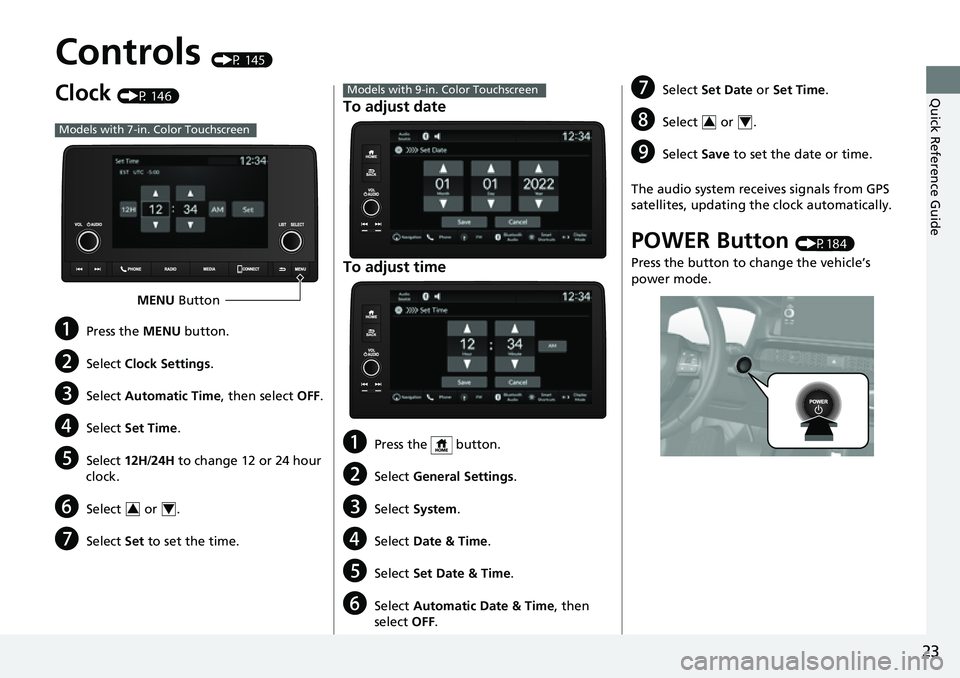
Clock (P 146)
aPress the MENU button.
bSelect Clock Settings .
cSelect Automatic Time , then select OFF.
dSelect Set Time .
eSelect 12H/24H to change 12 or 24 hour
clock.
fSelect or .
gSelect Set to set the time.
Models with 7-in. Color Touchscreen
MENU Button
34
To adjust date
To adjust time
aPress the button.
bSelect General Settings .
cSelect System .
dSelect Date & Time .
eSelect Set Date & Time .
fSelect Automatic Date & Time , then
select OFF.
Models with 9-in. Color TouchscreengSelect Set Date or Set Time.
hSelect or .
iSelect Save to set the date or time.
The audio system receives signals from GPS
satellites, updating the clock automatically.
POWER Button (P184)
Press the button to change the vehicle’s
power mode.
34
Page 115 of 719
114
Instrument Panel
Gauges and Driver Information Interface
Gauges
Gauges include the speedometer, fuel gauge, and other related indicators.
They are displayed when the power mode is in ON.
Displays your driving speed in mph or km/h.
Displays the amount of fuel left in the fuel tank.
Shows the total number of miles or kilome ters that your vehicle has accumulated.
Shows the output of the electric motor.
Shows the degree to which the High Voltage battery is being charged.
When the deceleration paddle selector is being used, it shows the strength of
deceleration.
■Speedometer
■Fuel Gauge
■Odometer
■POWER Gauge
■CHARGE/DECEL Gauge
1 Speedometer
You can change the Speed/Distance units.
2 No Content P. 132
2 Settings
* P. 135
2 Customized Features P. 376
1Fuel Gauge
NOTICE
You should refuel when the reading approaches .
Running out of fuel can cause the engine to misfire,
damaging the cata lytic converter.
The actual amount of remain ing fuel may differ from
the fuel gauge reading.E
* Not available on all models
Page 116 of 719
Continued115
uuGauges and Driver Information Interface uGauges
Instrument Panel
Shows the outside temperature in Fahr enheit (U.S.) or Celsius (Canada).
■Adjusting the outside temperature display
Adjust the temperature reading by up to ±5°F or ±3°C if the temperature reading
seems incorrect.
Shows certain detected traffic signs while driving.
The indicator blinks when th e maximum speed of the traffic sign detected by the
Traffic Sign Recognition System is exceeded.
2 Traffic Sign Recognition System P. 562
■Outside Temperature
■Traffic Sign Recognition System
1Outside Temperature
The temperature sensor is in the front bumper.
Road heat and exhaust from another vehicle can
affect the temperature reading when your vehicle
speed is less than 19 mph (30 km/h).
It may take several minutes for the display to be
updated after the temperature reading has stabilized.
You can adjust the temperature reading.
2 Settings
* P. 135
2 Customized Features P. 376
* Not available on all models
Page 118 of 719
117
uuGauges and Driver Information Interface uDriver Information Interface
Continued
Instrument Panel
Driver Information Interface
The driver information interface shows information such as the estimated travelable
distance and fuel economy of the vehicle. It also displays messages such as warnings
and other helpful information.
When a warning message displays, please check the message and contact a dealer
to have the vehicle inspected if necessary. Please refer to the pages below if the
Engine oil pressure low, Engine temperature too hot or Limited stopping
power! message is displayed.
2If the Engine oil pressure low Warning Appears P. 676
2 Overheating P. 674
2 If the Limited stopping power Warning Appears P. 677
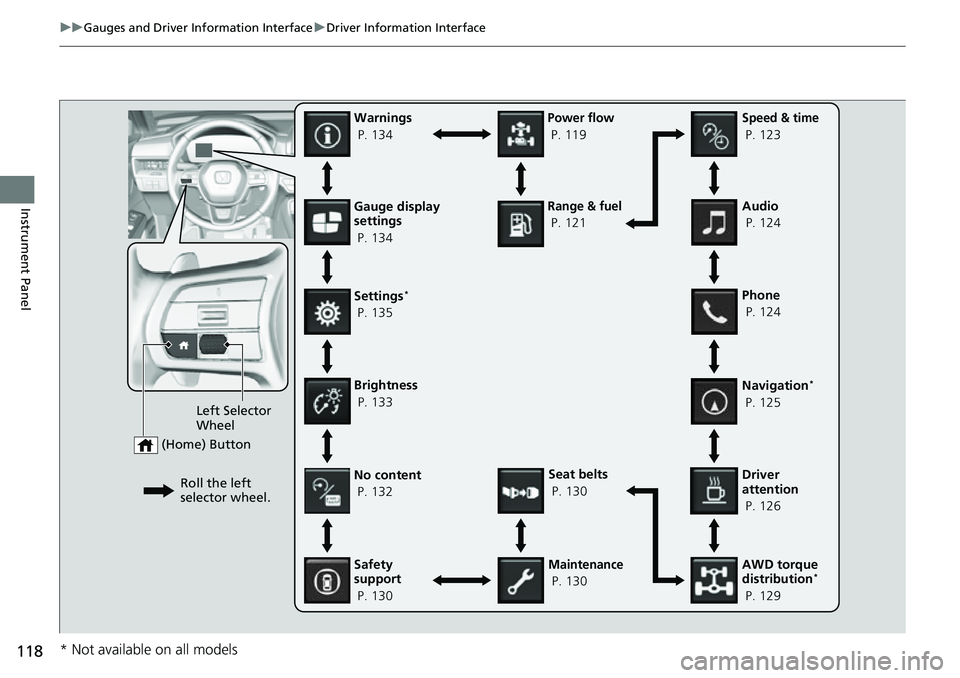
Press the (home) button, then roll the left selector wheel to scroll to the content
you want to see. Press the left sele ctor wheel to see detailed information.
■Switching the Display1Switching the Display
You can add or delete the meter contents.
2 Gauge Display Settings P. 134
Page 119 of 719
118
uuGauges and Driver Information Interface uDriver Information Interface
Instrument PanelGauge display
settings
P. 134
Left Selector
Wheel
(Home) Button
Roll the left
selector wheel.No content
P. 132
Speed & time
P. 123
Warnings
P. 134
Power flow
P. 119
Settings
*
P. 135
Driver
attention
P. 126
Seat belts
P. 130
Safety
support
P. 130
Maintenance
P. 130 Phone
P. 124 Audio
P. 124
Navigation
*
P. 125
AWD torque
distribution
*
P. 129
Brightness
P. 133
Range & fuel
P. 121
* Not available on all models
Page 123 of 719
uuGauges and Driver Information Interface uDriver Information Interface
122
Instrument Panel
■Trip meter
Shows the total number of miles or kilomete rs driven since the last reset. Meters A
and B can be used to measure two separate trips.
Resetting a trip meter
To reset the trip meter, display it, press the left selector wheel and then select Reset.
u The trip meter is reset to 0.0.
■Average Fuel Economy
Shows the estimated average fuel economy of each trip meter in mpg or l/100 km.
The display is updated at set intervals. When a trip meter is reset, the average fuel
economy is also reset.
■Instant Fuel Economy
Shows the instant fuel economy as a bar graph in mpg or l/100 km.
■Range
Shows the estimated distance you can trave l on the remaining power and fuel. This
estimated distance is based on the vehicle’s current fuel economy.
1 Average Fuel Economy
You can change when to reset the average fuel
economy.
2 Settings
* P. 135
2 Customized Features P. 376
1Range
The driving range displayed is only an estimate and
may differ to the actual distance the vehicle can
travel.
* Not available on all models
Page 125 of 719
uuGauges and Driver Information Interface uDriver Information Interface
124
Instrument Panel
■Trip meter
2 Trip meter P. 122
■Elapsed time
Shows the time elapsed since Trip A or Trip B was reset.
■Average speed
Shows the average speed in mph or km/h since Trip A or Trip B was reset.
Shows the current audio information.
2 Audio System Basic Operation P. 246, 271
Shows the current phone information.
2Bluetooth ® HandsFreeLink ® P. 400, 420
■Audio
■Phone
1 Elapsed time
You can change when to reset the elapsed time.
2 Settings
* P. 135
2 Customized Features P. 376
1Average speed
You can change when to reset the average speed.
2 Settings
* P. 135
2 Customized Features P. 376
* Not available on all models
Page 129 of 719
uuGauges and Driver Information Interface uDriver Information Interface
128
Instrument Panel
■The Driver Attention Monitor resets when:
• The power system is turned off.
• The driver unfastens the seat belt and op ens the door while the vehicle is stopped.
■For the Driver Attention Monitor to function:
• The vehicle must be traveling above 25 mph (40 km/h).
• The electric power steering (EPS) system indicator must be off.
■Depending on driving conditions or other factors, the Driver Attention
Monitor may not function in the following circumstances:
• The steering assist function of the Lane Keeping Assist System (LKAS) is active.
2Lane Keeping Assist System (LKAS) P. 533
•The condition of the road is poor; e.g., the surface is unpaved or bumpy.
• It is windy.
• The driver is frequently op erating the vehicle in an assertive manner, such as
changing lanes or accelerating.
■Customizing
You can change the Driver Attention Monitor settings. Select Tactile and audible
alert
*1/ Tactile And Audible Alert*2, Tactile alert*1/Tactile Alert*2, or OFF .
2Settings* P. 135
2 Customized Features P. 376
*1 : Models with 7-in. Color Touchscreen
*2 : Models with 9-in. Color Touchscreen
1For the Driver Attention Monitor to function:
The bars on the driver information interface remain
grayed out unless the Driv er Attention Monitor is
functioning.
* Not available on all models