fuel HONDA CRV 2023 Owners Manual
[x] Cancel search | Manufacturer: HONDA, Model Year: 2023, Model line: CRV, Model: HONDA CRV 2023Pages: 719, PDF Size: 13.43 MB
Page 7 of 719
Contents
This owner’s manual should be considered a permanent part of the
vehicle and should remain with the vehicle when it is sold.
The Navigation Manual is available online at owners.honda.com
(U.S.) or honda.ca (Canada). If you are the first registered owner
of your vehicle, you may request a complimentary printed
copy of the Navigation Manual within the first six months of
vehicle purchase. To request a copy, visit owners.honda.com. In
Canada, please request a copy from your Honda dealer.
This owner’s manual covers all models of your vehicle. You may find
descriptions of equipment and features that are not on your
particular model.
Images throughout this owner’s ma nual (including the front cover)
represent features and equipment that are available on some, but
not all, models. Your particular mo del may not have some of these
features.
This owner’s manual is for vehicles sold in the United States and
Canada.
The information and specifications in cluded in this publication were
in effect at the time of approval for printing. Honda Motor Co., Ltd.
reserves the right, however, to discontinue or change specifications
or design at any time without notice and without incurring any
obligation.2 Safe Driving P. 43
For Safe Driving P. 44 Seat Belts P. 49 Airbags P. 59
2Instrument Panel P. 95
Indicators P. 96 Gauges and Driver Information Interface P. 114
2Controls P. 145
Clock P. 146 Locking and Unlocking the Doors P. 148
Moonroof P. 183
Seats P. 205 Interior Convenience Items P. 216
2Features P. 237
Audio System P. 238 Audio System Basic Operation P. 246, 271
Customized Features P. 368, 376
2 Driving P. 441
Before Driving P. 442 Towing a Trailer P. 447Parking Your Vehicle P. 582 Multi-View Rear Camera P. 593
2Maintenance P. 599
Before Performing Maintenance P. 600 Maintenance MinderTM P. 603
Checking and Maintaining Wiper Blades P. 627
Climate Control System Maintenance P. 643
2Handling the Unexpected P. 651
Tools P. 652 If a Tire Goes Flat P. 653
Shift Lever Does Not Move P. 673 Overheating P. 674
If You Cannot Unlock the Fuel Fill Door P. 690
2 Information P. 693
Specifications P. 694 Identification Numbers P. 696
Emissions Testing P. 699 Warranty Coverages P. 701
Page 8 of 719
Contents
Child Safety P. 79Exhaust Gas Hazard P. 92Safety Labels P. 93
Tailgate P. 165 Security System P. 176 Windows P. 179
Operating the Switches Around the Steering Wheel P. 184 Mirrors P. 203
Climate Control System P. 232
Audio Error Messages P. 345 General Information on the Audio System P. 347
Bluetooth ® HandsFreeLink ® P. 400, 420 Refuel Recommend P. 439
Off-Highway Driving Guidelines P. 453 When Driving P. 455 Honda Sensing ® P. 492 Braking P. 572
Refueling P. 595 Fuel Economy and CO
2 Emissions P. 598
Maintenance Under the Hood P. 611 Replacing Light Bulbs P. 623
Checking and Maintaining Tires P. 631 12-Volt Battery P. 640 Remote Transmitter Care P. 642
Cleaning P. 644 Accessories and Modifications P. 649
Handling of the Jack P. 666 Power System Won’t Start P. 667 If the 12-Volt Battery Is Dead P. 671
Indicator, Coming On/Blinking P. 676 Fuses P. 683 Emergency Towing P. 689
If You Cannot Open the Tailgate P. 691 Refueling P. 692
Devices that Emit Radio Waves P. 697 Reporting Safety Defects P. 698
Authorized Manuals P. 704 Customer Service Information P. 705 Open Source Licenses P. 706
Quick Reference GuideP. 8
Safe DrivingP. 43
Instrument PanelP. 95
ControlsP. 145
FeaturesP. 237
DrivingP. 441
MaintenanceP. 599
Handling the UnexpectedP. 651
InformationP. 693
IndexP. 708
Page 13 of 719
Visual Index
12
Quick Reference Guide
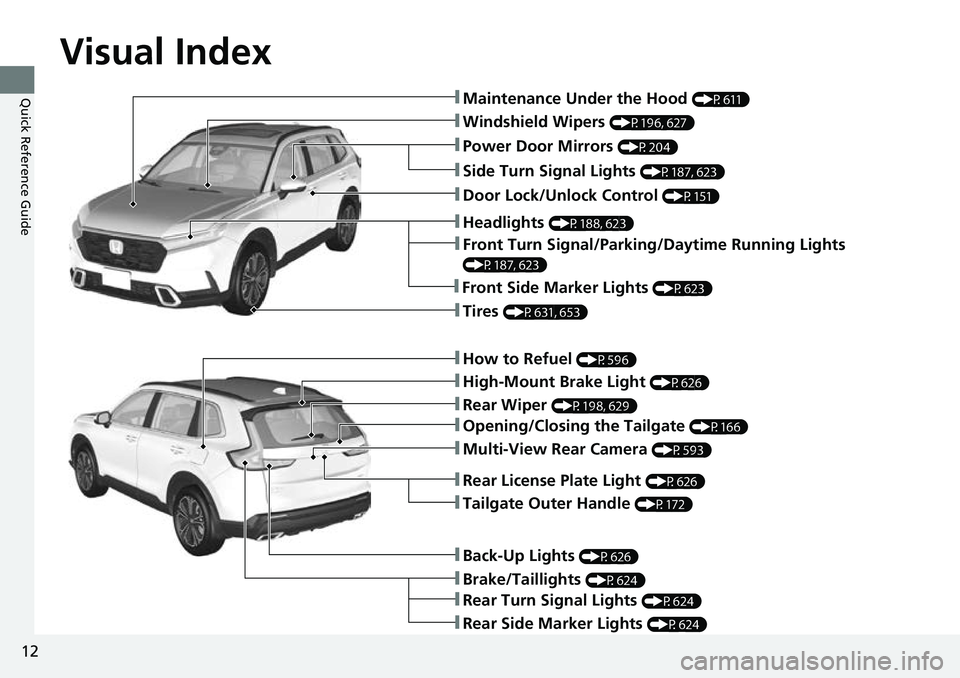
❚Windshield Wipers (P196, 627)
❚How to Refuel (P596)
❚High-Mount Brake Light (P626)
❚Rear Wiper (P198, 629)
❚Brake/Taillights (P624)
❚Power Door Mirrors (P204)
❚Maintenance Under the Hood (P611)
❚Multi-View Rear Camera (P593)
❚Front Turn Signal/Parking/Daytime Running Lights
(P187, 623)
❚Tires (P631, 653)
❚Opening/Closing the Tailgate (P166)
❚Side Turn Signal Lights (P187, 623)
❚Headlights (P188, 623)
❚Rear Turn Signal Lights (P624)
❚Rear Side Marker Lights (P624)
❚Back-Up Lights (P626)
❚Front Side Marker Lights (P623)
❚Tailgate Outer Handle (P172)
❚Rear License Plate Light (P626)
❚Door Lock/Unlock Control (P151)
Page 14 of 719
13
Quick Reference Guide
SPORT HYBRID i-MMD (intelligent Multi-Mode
Drive)
Your SPORT HYBRID i-MMD vehicle uses both an electric motor and a gasoline engine as propulsion sources, with the electric motor
receiving electricity from an internal High Voltage battery and/or internal generator. The High Voltage battery is charged from the
generator driven by the engine or regenerative braking.
When driving, your vehicle is propelled exclusively by the electric motor, exclusively by the gasoline engine, or by a combination of the two.
The system selects which propulsion source is most appropriate and automatically switches to it.
●Energy efficiency
As with a gasoline-powered vehicle, hybrid vehicle fuel efficien cy and driving range is most impacted by your driving style. Aggressive
acceleration and high-speed driving can easily trigger the system to switch the propulsion source to the gasoline-powered engin e.
In addition, heavy climate control system use negatively affects vehicle range and efficiency. Either of these use patterns will more quickly
reduce the High Voltage battery's state of charge.
●Battery types
There are two types of batteries used in this vehicle; a standard 12-volt battery that powers the airbags, the interior and exterior lights, and
other standard 12-volt systems; and a high voltage battery that is used to power the propulsion motor and recharge the 12-volt battery.
Page 15 of 719
14
Quick Reference Guide
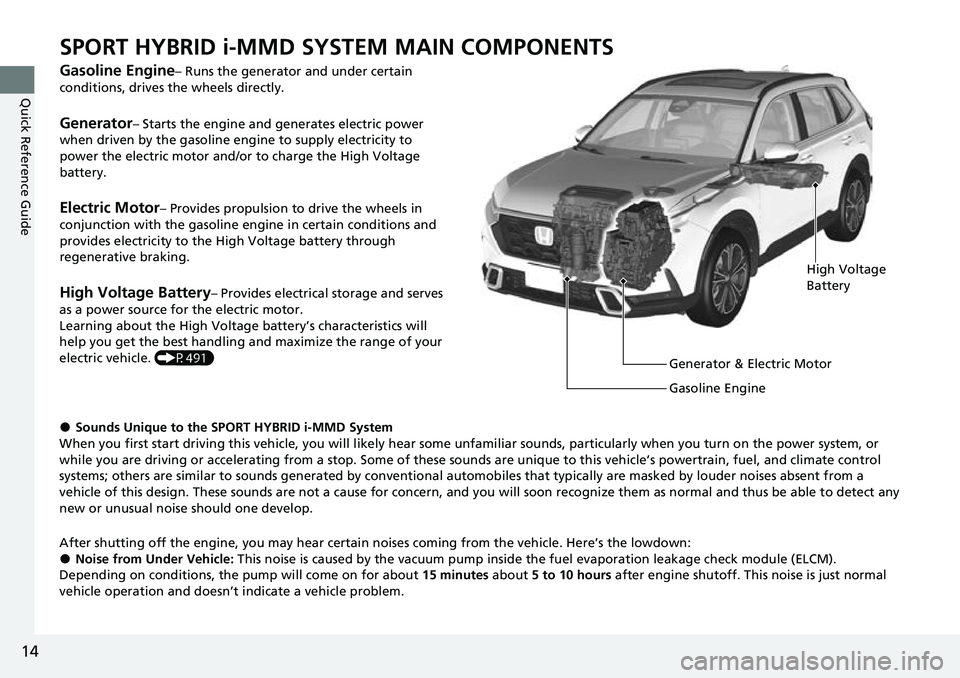
SPORT HYBRID i-MMD SYSTEM MAIN COMPONENTS
Gasoline Engine– Runs the generator and under certain
conditions, drives the wheels directly.
Generator– Starts the engine and generates electric power
when driven by the gasoline engine to supply electricity to
power the electric motor and/or to charge the High Voltage
battery.
Electric Motor– Provides propulsion to drive the wheels in
conjunction with the gasoline engine in certain conditions and
provides electricity to the High Voltage battery through
regenerative braking.
High Voltage Battery– Provides electrical storage and serves
as a power source for the electric motor.
Learning about the High Voltage battery’s characteristics will
help you get the best handling and maximize the range of your
electric vehicle. (P491)
●Sounds Unique to the SPORT HYBRID i-MMD System
When you first start driving this vehicle, you will likely hear some unfamiliar sounds, particularly when you turn on the power system, or
while you are driving or accelerating from a stop. Some of these sounds are unique to this vehicle‘s powertrain, fuel, and clim ate control
systems; others are similar to sounds generate d by conventional automobiles that typically are masked by louder noises absent f rom a
vehicle of this design. These sounds are not a cause for concern, and you will soon recognize them as normal and thus be able t o detect any
new or unusual noise should one develop.
After shutting off the engi ne, you may hear certain noises coming from the vehicle. Here’s the lowdown:
●Noise from Under Vehicle: This noise is caused by the vacuum pump inside the fuel evaporation leakage check module (ELCM).
Depending on conditions, the pump will come on for about 15 minutes about 5 to 10 hours after engine shutoff. This noise is just normal
vehicle operation and doesn’t indicate a vehicle problem.
High Voltage
Battery
Generator & Electric Motor
Gasoline Engine
Page 21 of 719
20
Quick Reference Guide
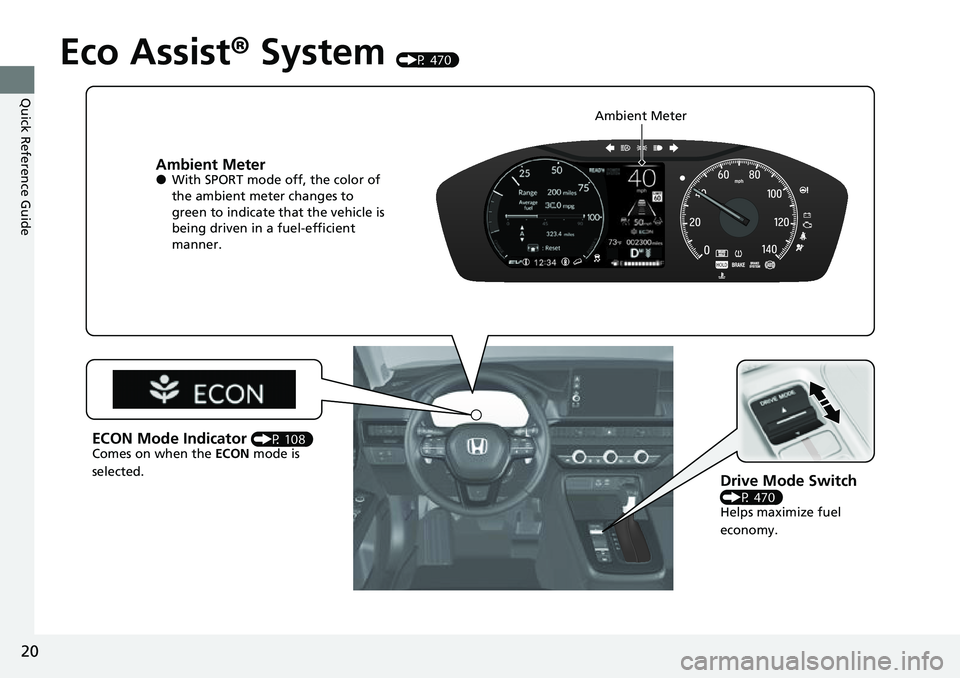
Eco Assist® System (P 470)
Ambient Meter●With SPORT mode off, the color of
the ambient meter changes to
green to indicate that the vehicle is
being driven in a fuel-efficient
manner.
Drive Mode Switch
(P 470)
Helps maximize fuel
economy.
ECON Mode Indicator (P 108)
Comes on when the ECON mode is
selected. Ambient Meter
Page 23 of 719
22
Quick Reference Guide
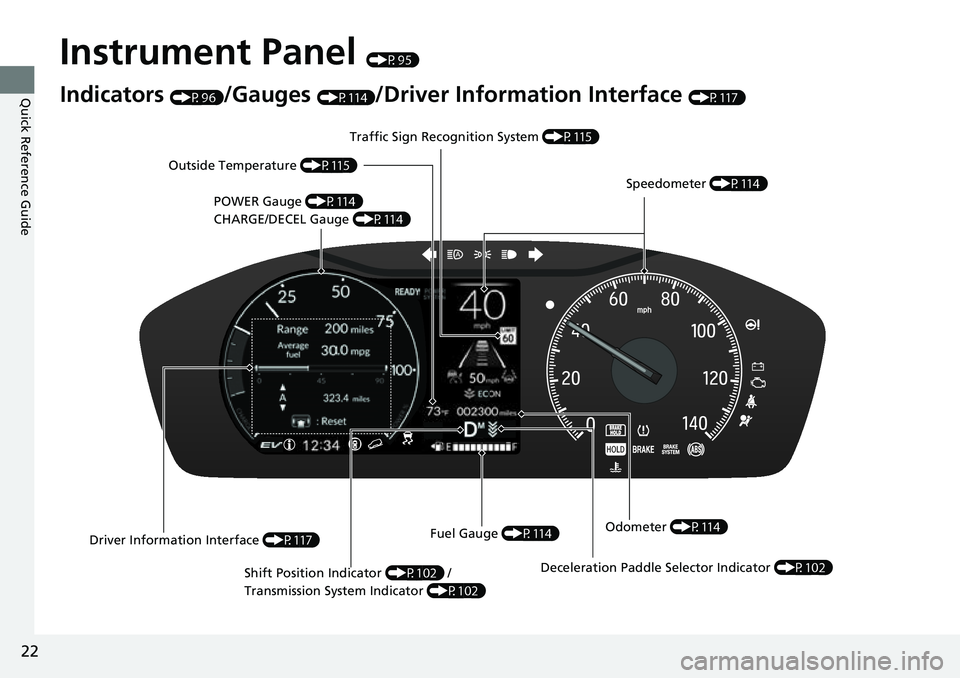
Instrument Panel (P95)
Indicators (P96)/Gauges (P114)/Driver Information Interface (P117)
POWER Gauge (P114)
CHARGE/DECEL Gauge (P114) Speedometer
(P114)
Traffic Sign Recognition System
(P115)
Driver Information Interface (P117)Fuel Gauge
(P114)
Outside Temperature
(P115)
Odometer (P114)
Shift Position Indicator (P102) /
Transmission System Indicator (P102)
Deceleration Paddle Selector Indicator (P102)
Page 35 of 719
34
Quick Reference Guide
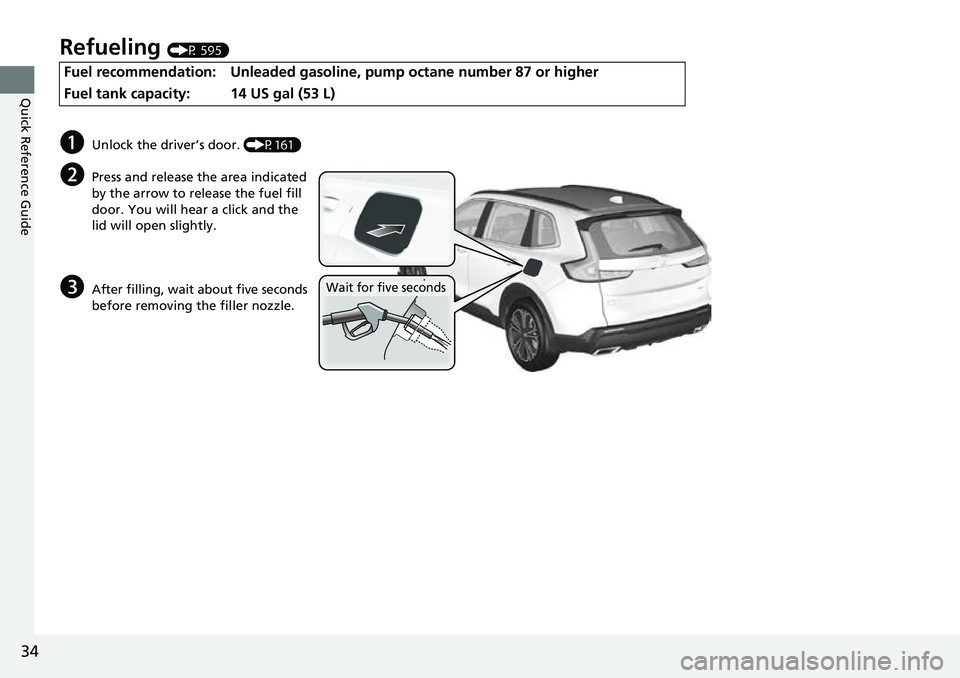
Refueling (P 595)
Fuel recommendation: Unleaded gasoline, pump octane number 87 or higher
Fuel tank capacity:
14 US gal (53 L)
aUnlock the driver’s door. (P161)
bPress and release the area indicated
by the arrow to release the fuel fill
door. You will hear a click and the
lid will open slightly.
cAfter filling, wait about five seconds
before removing the filler nozzle.Wait for five seconds
Page 97 of 719
96
Instrument Panel
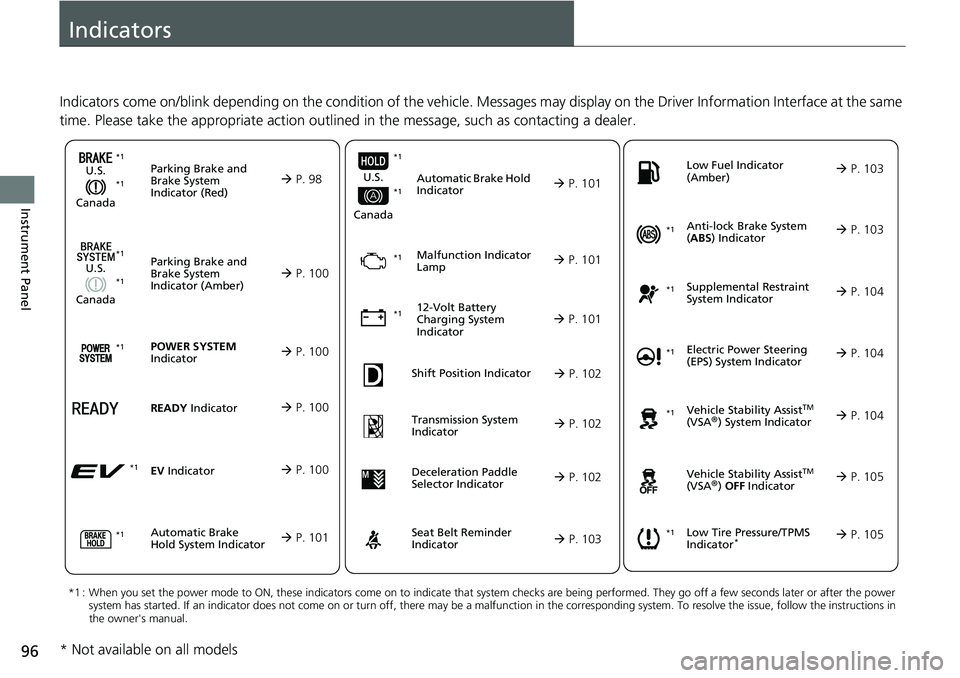
Indicators
Indicators come on/blink depending on the condition of the vehicle. Messages may display on the Driver Information Interface at the same
time. Please take the appropriate action outlined in the message, such as contacting a dealer.
Parking Brake and
Brake System
Indicator (Red)
U.S.
Canada P. 98*1 *1
Parking Brake and
Brake System
Indicator (Amber)
U.S.
Canada
Automatic Brake
Hold System Indicator
Automatic Brake Hold
Indicator
U.S.
Canada
*1 : When you set the power mode to ON, these indicators come on to indicate that system checks are being performed. They go off a few seconds later or after the power
system has started. If an indicator does not come on or turn o ff, there may be a malfunction in the corresponding system. To re solve the issue, follow the instructions in
the owner's manual.
Malfunction Indicator
Lamp
12-Volt Battery
Charging System
Indicator
Anti-lock Brake System
( ABS ) Indicator
Seat Belt Reminder
Indicator Low Fuel Indicator
(Amber)
Vehicle Stability AssistTM
(VSA®) System Indicator
Vehicle Stability Assist
TM
(VSA®) OFF Indicator
Supplemental Restraint
System Indicator
Low Tire Pressure/TPMS
Indicator*
Electric Power Steering
(EPS) System Indicator
P. 100
P. 101
P. 101
P. 101
P. 101*1
*1
P. 105
*1
Shift Position Indicator P. 102
Transmission System
Indicator P. 102
P. 103
P. 103
P. 103
P. 104
P. 104
*1
*1
P. 105
*1 P. 104
*1
*1*1 *1
*1
*1
Deceleration Paddle
Selector Indicator
P. 102
POWER SYSTEM
Indicator P. 100*1
READY Indicator P. 100
EV Indicator P. 100*1
* Not available on all models
Page 104 of 719
103
uuIndicators u
Continued
Instrument Panel
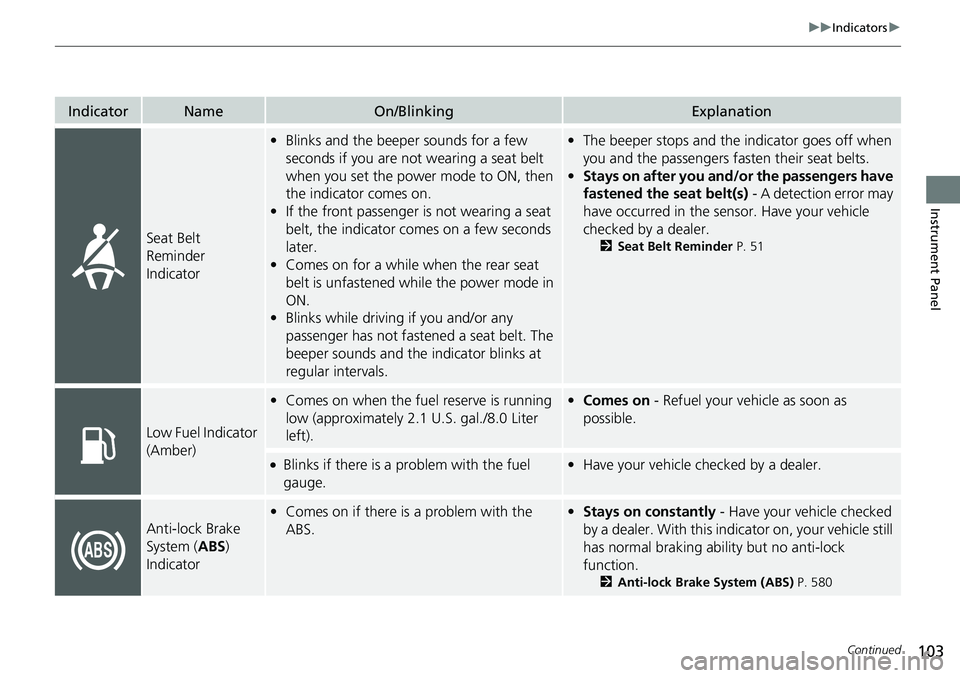
IndicatorNameOn/BlinkingExplanation
Seat Belt
Reminder
Indicator
•Blinks and the beeper sounds for a few
seconds if you are not wearing a seat belt
when you set the power mode to ON, then
the indicator comes on.
• If the front passenger is not wearing a seat
belt, the indicator comes on a few seconds
later.
• Comes on for a while when the rear seat
belt is unfastened while the power mode in
ON.
• Blinks while driving if you and/or any
passenger has not fastened a seat belt. The
beeper sounds and the indicator blinks at
regular intervals.•The beeper stops and the indicator goes off when
you and the passengers fa sten their seat belts.
• Stays on after you and/or the passengers have
fastened the seat belt(s) - A detection error may
have occurred in the sensor. Have your vehicle
checked by a dealer.
2 Seat Belt Reminder P. 51
Low Fuel Indicator
(Amber)
•Comes on when the fuel reserve is running
low (approximately 2.1 U.S. gal./8.0 Liter
left).• Comes on - Refuel your vehicle as soon as
possible.
●Blinks if there is a problem with the fuel
gauge.•Have your vehicle checked by a dealer.
Anti-lock Brake
System ( ABS)
Indicator
• Comes on if there is a problem with the
ABS.•Stays on constantly - Have your vehicle checked
by a dealer. With this indi cator on, your vehicle still
has normal braking ability but no anti-lock
function.
2 Anti-lock Brake System (ABS) P. 580