accessory mode HONDA CRV 2023 Owners Manual
[x] Cancel search | Manufacturer: HONDA, Model Year: 2023, Model line: CRV, Model: HONDA CRV 2023Pages: 719, PDF Size: 13.43 MB
Page 11 of 719
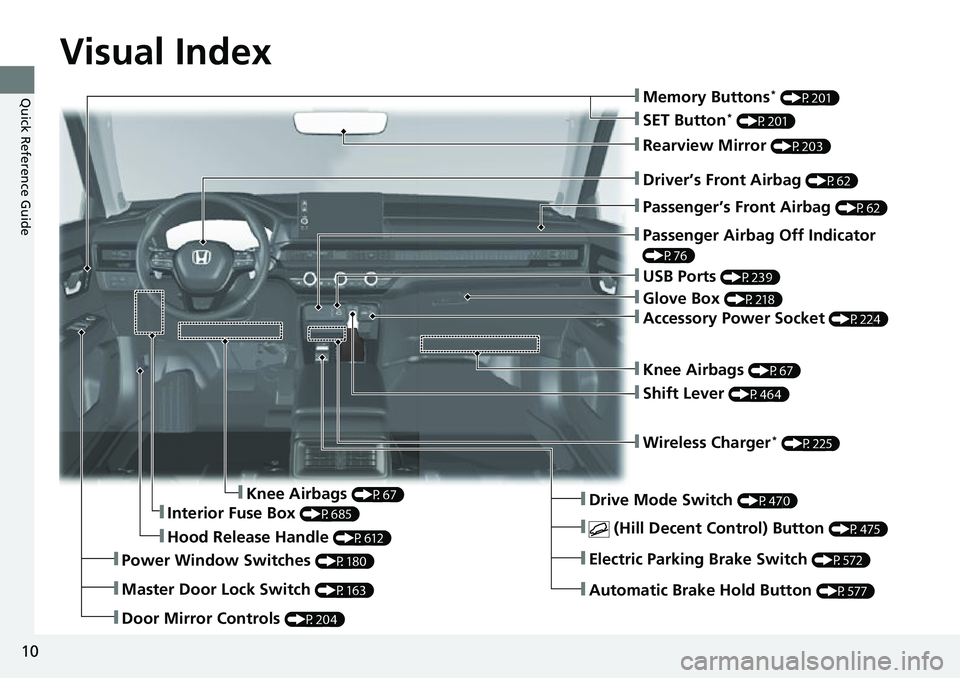
Visual Index
10
Quick Reference Guide
❚Door Mirror Controls (P204)
❚Hood Release Handle (P612)
❚Driver’s Front Airbag (P62)
❚Rearview Mirror (P203)
❚Knee Airbags (P67)
❚Passenger Airbag Off Indicator
(P76)
❚Interior Fuse Box (P685)
❚Passenger’s Front Airbag (P62)
❚Knee Airbags (P67)
❚Wireless Charger* (P225)
❚USB Ports (P239)
❚Drive Mode Switch (P470)
❚Automatic Brake Hold Button (P577)
❚Electric Parking Brake Switch (P572)
❚ (Hill Decent Control) Button (P475)
❚Power Window Switches (P180)
❚Master Door Lock Switch (P163)
❚Glove Box (P218)
❚Accessory Power Socket (P224)
❚Shift Lever (P464)
❚SET Button* (P201)
❚Memory Buttons* (P201)
Page 12 of 719
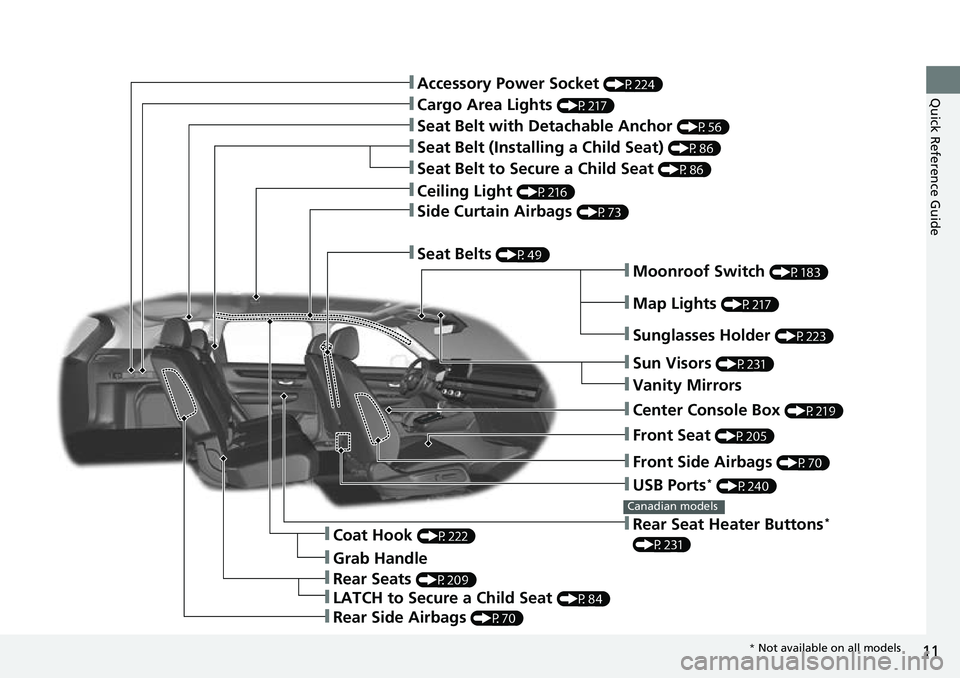
11
Quick Reference Guide
❚Moonroof Switch (P183)
❚Front Side Airbags (P70)
❚Map Lights (P217)
❚USB Ports* (P240)
❚Front Seat (P205)
❚Sun Visors (P231)
❚Vanity Mirrors
❚Rear Seat Heater Buttons*
(P231)
Canadian models
❚Sunglasses Holder (P223)
❚Center Console Box (P219)
❚Rear Seats (P209)
❚LATCH to Secure a Child Seat (P84)
❚Grab Handle
❚Coat Hook (P222)
❚Rear Side Airbags (P70)
❚Seat Belts (P49)
❚Side Curtain Airbags (P73)
❚Seat Belt with Detachable Anchor (P56)
❚Cargo Area Lights (P217)
❚Seat Belt to Secure a Child Seat (P86)
❚Seat Belt (Installing a Child Seat) (P86)
❚Accessory Power Socket (P224)
❚Ceiling Light (P216)
* Not available on all models
Page 40 of 719
39
Quick Reference Guide
What to Do If
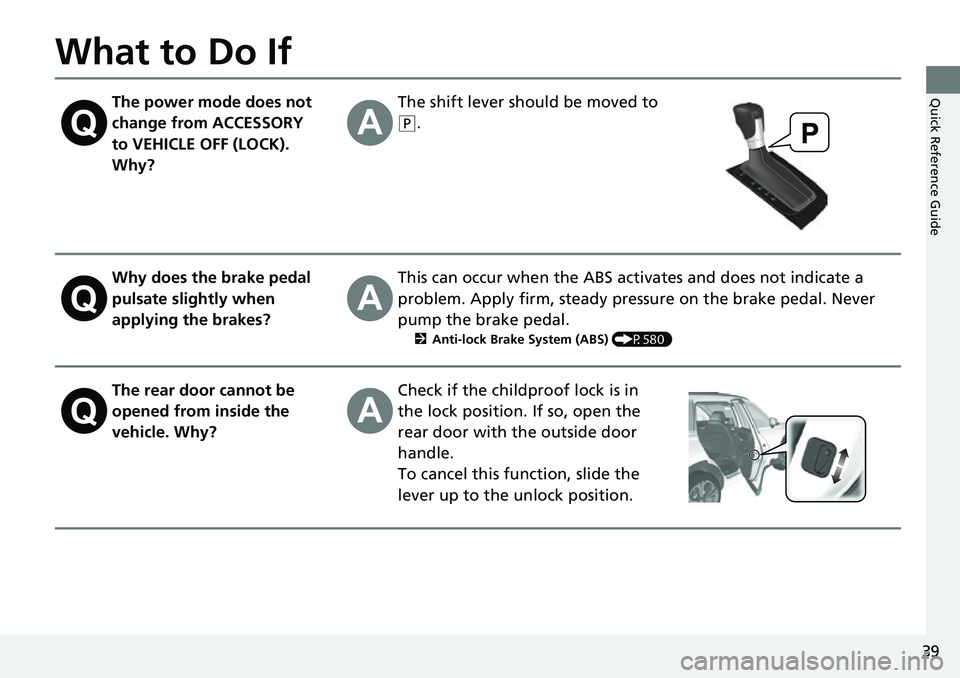
The power mode does not
change from ACCESSORY
to VEHICLE OFF (LOCK).
Why?The shift lever should be moved to
(P.
Why does the brake pedal
pulsate slightly when
applying the brakes?This can occur when the ABS activates and does not indicate a
problem. Apply firm, steady pressure on the brake pedal. Never
pump the brake pedal.
2Anti-lock Brake System (ABS) (P580)
The rear door cannot be
opened from inside the
vehicle. Why?Check if the childproof lock is in
the lock position. If so, open the
rear door with the outside door
handle.
To cancel this function, slide the
lever up to the unlock position.
Page 41 of 719
40
Quick Reference Guide
Why do the doors lock
after I unlocked the doors?If you do not open the doors within 30 seconds, the doors are
relocked automatically for security.
Why does the beeper
sound when I open the
driver’s door?The beeper sounds when:
●The exterior lights are left on.
●The power mode is in ACCESSORY.
Why does a beeper sound
when I walk away from the
vehicle after I close the
door?The beeper sounds if you move outside the walk away auto lock
operating range before the door completely closes.
2Locking the doors and tailgate (Walk away auto lock ®) (P154)
Why does the beeper
sound when I start driving?The beeper sounds when the driver and/or front passenger are
not wearing their seat belts.
Pressing the electric
parking brake switch does
not release the parking
brake. Why?Press the electric parking brake switch with the brake pedal
depressed.
Page 99 of 719
98
uuIndicators u
Instrument Panel
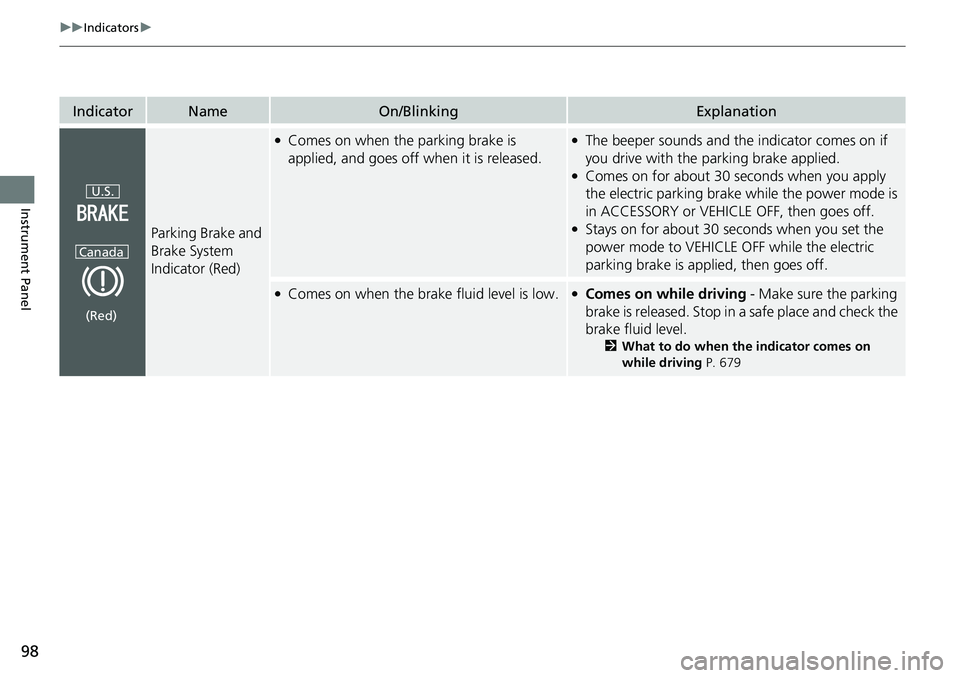
IndicatorNameOn/BlinkingExplanation
Parking Brake and
Brake System
Indicator (Red)
●Comes on when the parking brake is
applied, and goes off when it is released.●The beeper sounds and th e indicator comes on if
you drive with the parking brake applied.
●Comes on for about 30 seconds when you apply
the electric parking brake while the power mode is
in ACCESSORY or VEHICLE OFF, then goes off.
●Stays on for about 30 seconds when you set the
power mode to VEHICLE OFF while the electric
parking brake is applied, then goes off.
●Comes on when the brake fluid level is low.●Comes on while driving - Make sure the parking
brake is released. Stop in a safe place and check the
brake fluid level.
2 What to do when th e indicator comes on
while driving P. 679
U.S.
Canada
(Red)
Page 185 of 719
184
Controls
Operating the Switches Around the Steering Wheel
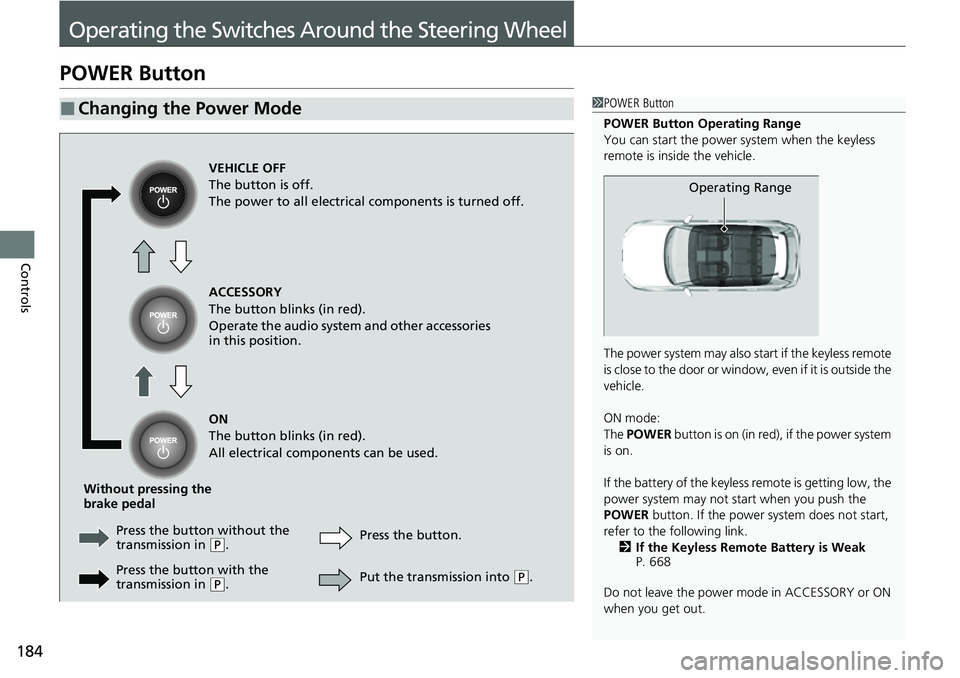
POWER Button
■Changing the Power Mode1POWER Button
POWER Button Operating Range
You can start the power system when the keyless
remote is inside the vehicle.
The power system may also start if the keyless remote
i s c l o s e t o t h e d o o r o r w i n d o w , e v e n i f i t i s o u t s i d e t h e
vehicle.
ON mode:
The POWER button is on (in red), if the power system
is on.
If the battery of the keyless remote is getting low, the
power system may not start when you push the
POWER button. If the power system does not start,
refer to the following link. 2 If the Keyless Remote Battery is Weak
P. 668
Do not leave the power mode in ACCESSORY or ON
when you get out.
Operating Range
VEHICLE OFF
The button is off.
The power to all electrical components is turned off.
ACCESSORY
The button blinks (in red).
Operate the audio system and other accessories
in this position.
ON
The button blinks (in red).
All electrical components can be used.
Without pressing the
brake pedal Press the butto n without the
transmission in
( P. Press the button.
Press the button with the
transmission in
( P. Put the transmission into (
P.
Page 186 of 719
185
uuOperating the Switches Around the Steering Wheel uPOWER Button
Continued
Controls
If you leave the vehicle for 30 to 60 minutes with the transmission in (P and the
power mode in ACCESSORY, the vehicle automa tically goes into the mode similar to
VEHICLE OFF to avoid draining the 12-volt battery.
If you open the driver’s door when the pow er mode is set to ACCESSORY, a warning
buzzer sounds.
■Automatic Power Off
■Power Mode Reminder
Page 187 of 719
uuOperating the Switches Around the Steering Wheel uPOWER Button
186
Controls
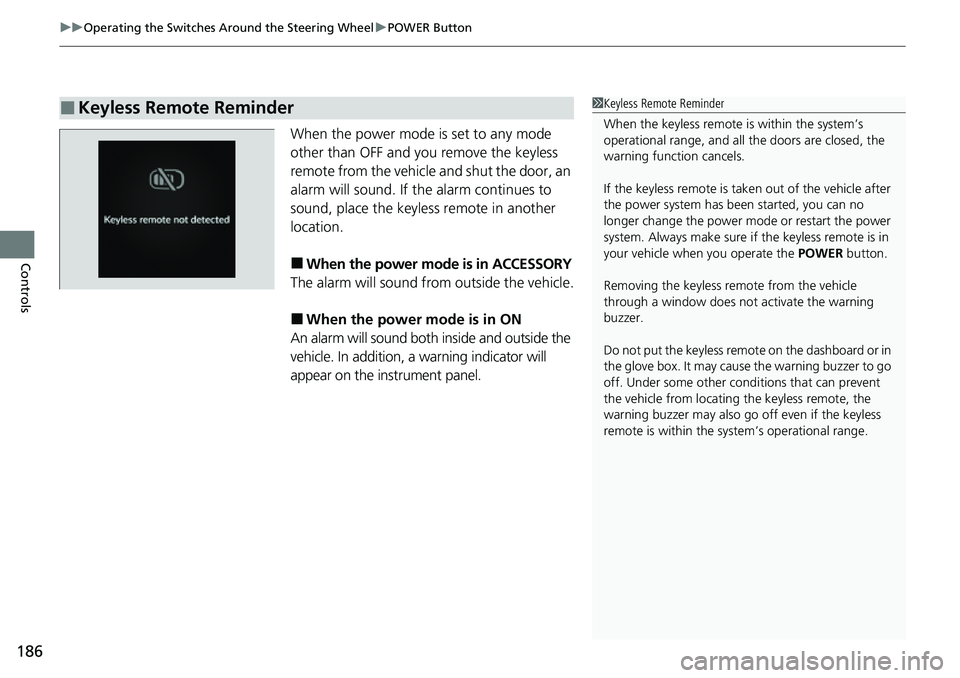
When the power mode is set to any mode
other than OFF and you remove the keyless
remote from the vehicle and shut the door, an
alarm will sound. If th e alarm continues to
sound, place the keyless remote in another
location.
■When the power mode is in ACCESSORY
The alarm will sound from outside the vehicle.
■When the power mode is in ON
An alarm will sound both inside and outside the
vehicle. In addition, a warning indicator will
appear on the instrument panel.
■Keyless Remote Reminder1 Keyless Remote Reminder
When the keyless remote is within the system’s
operational range, and all the doors are closed, the
warning function cancels.
If the keyless remote is taken out of the vehicle after
the power system has be en started, you can no
longer change the power m ode or restart the power
system. Always make sure if the keyless remote is in
your vehicle when you operate the POWER button.
Removing the keyless remote from the vehicle
through a window does not activate the warning
buzzer.
Do not put the keyless remo te on the dashboard or in
the glove box. It may cause the warning buzzer to go
off. Under some other cond itions that can prevent
the vehicle from locating the keyless remote, the
warning buzzer may also go off even if the keyless
remote is within the system’s operational range.
Page 197 of 719
196
uuOperating the Switches Around the Steering Wheel uWipers and Washers
Controls
Wipers and Washers
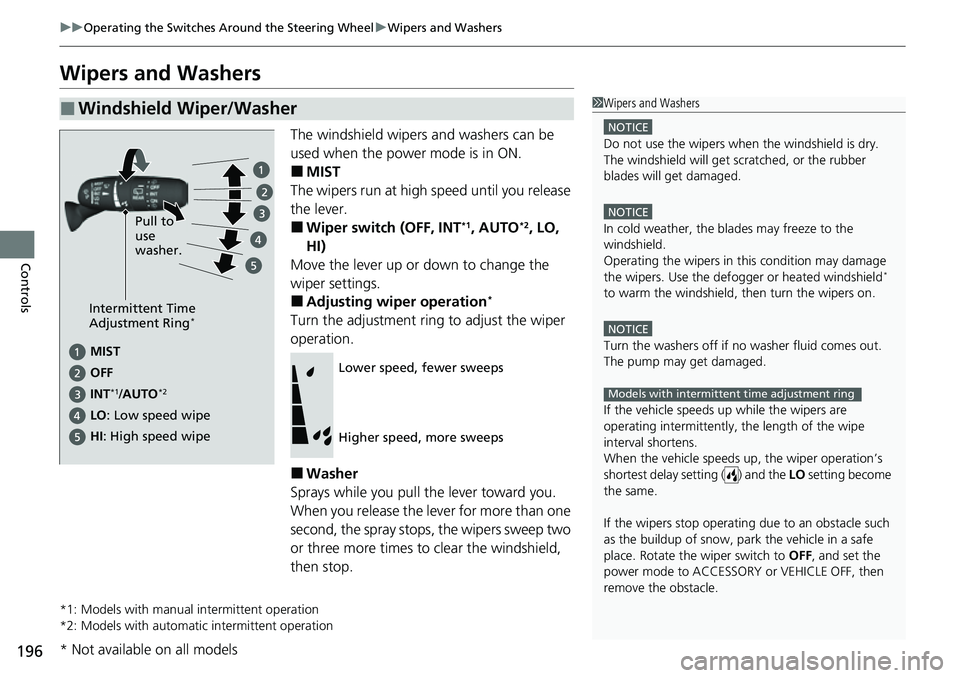
The windshield wipers and washers can be
used when the power mode is in ON.
■MIST
The wipers run at high speed until you release
the lever.
■Wiper switch (OFF, INT*1, AUTO*2, LO,
HI)
Move the lever up or down to change the
wiper settings.
■Adjusting wiper operation*
Turn the adjustment ring to adjust the wiper
operation.
■Washer
Sprays while you pull the lever toward you.
When you release the lever for more than one
second, the spray stops, the wipers sweep two
or three more times to clear the windshield,
then stop.
*1: Models with manual intermittent operation
*2: Models with automati c intermittent operation
■Windshield Wiper/Washer1Wipers and Washers
NOTICE
Do not use the wipers when the windshield is dry.
The windshield will get sc ratched, or the rubber
blades will get damaged.
NOTICE
In cold weather, the blades may freeze to the
windshield.
Operating the wipers in th is condition may damage
the wipers. Use the defogge r or heated windshield
*
to warm the windshield, then turn the wipers on.
NOTICE
Turn the washers off if no washer fluid comes out.
The pump may get damaged.
If the vehicle speeds up while the wipers are
operating intermittently, the length of the wipe
interval shortens.
When the vehicle speeds up, the wiper operation’s
shortest delay setting ( ) and the LO setting become
the same.
If the wipers st op operating due to an obstacle such
as the buildup of snow, park the vehicle in a safe
place. Rotate the wiper switch to OFF, and set the
power mode to ACCESSORY or VEHICLE OFF, then
remove the obstacle.
Models with intermittent time adjustment ring
Intermittent Time
Adjustment Ring*
MIST
INT
*1/AUTO*2
OFF
LO : Low speed wipe Pull to
use
washer.
HI: High speed wipe
Lower speed, fewer sweeps
Higher speed, more sweeps
* Not available on all models
Page 201 of 719
200
uuOperating the Switches Around the Steering Wheel uDriving Position Memory System*
Controls
Driving Position Memory System*
You can store two driver’s seat positions (except for power lumbar) with the driving
position memory system.
When you unlock and open the driver’s door with a keyless remote, the seat adjusts
automatically to one of the two preset positions.
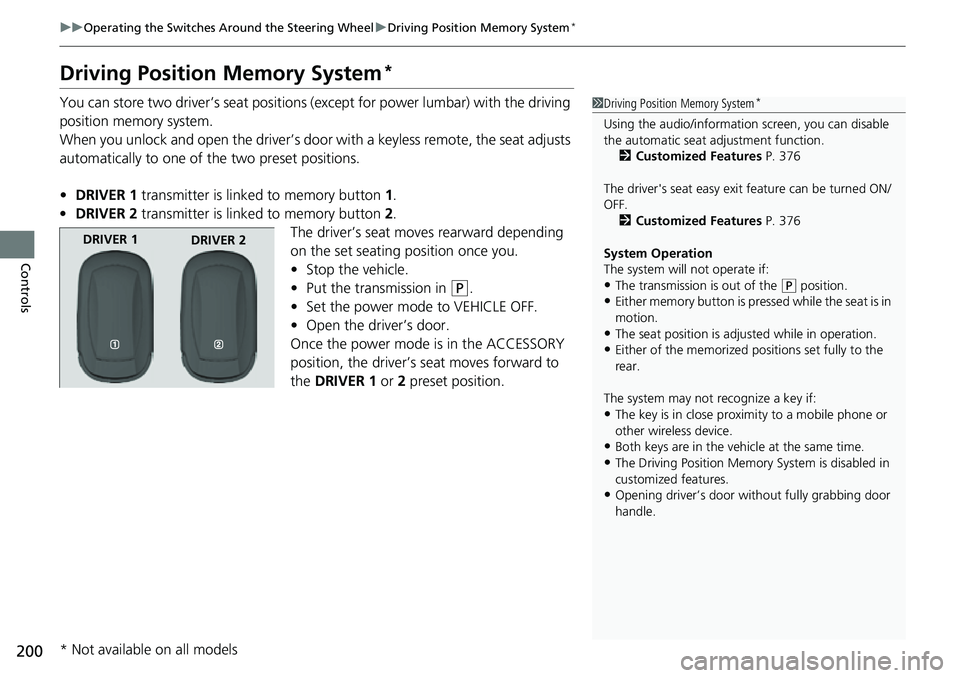
• DRIVER 1 transmitter is linked to memory button 1.
• DRIVER 2 transmitter is linked to memory button 2.
The driver’s seat moves rearward depending
on the set seating position once you.
• Stop the vehicle.
• Put the transmission in
(P.
• Set the power mode to VEHICLE OFF.
• Open the driver’s door.
Once the power mode is in the ACCESSORY
position, the driver’s seat moves forward to
the DRIVER 1 or 2 preset position.
1 Driving Position Memory System*
Using the audio/informati on screen, you can disable
the automatic seat adjustment function.
2 Customized Features P. 376
The driver's seat easy exit feature can be turned ON/
OFF. 2 Customized Features P. 376
System Operation
The system will not operate if:
•The transmission is out of the ( P position.
•Either memory button is pressed while the seat is in
motion.
•The seat position is adju sted while in operation.
•Either of the memorized pos itions set fully to the
rear.
The system may not recognize a key if:
•The key is in close proximity to a mobile phone or
other wireless device.
•Both keys are in the vehicle at the same time.
•The Driving Position Memory System is disabled in
customized features.
•Opening driver’s door wi thout fully grabbing door
handle.
DRIVER 1 DRIVER 2
* Not available on all models