maintenance minder HONDA CRV 2023 Owners Manual
[x] Cancel search | Manufacturer: HONDA, Model Year: 2023, Model line: CRV, Model: HONDA CRV 2023Pages: 719, PDF Size: 13.43 MB
Page 7 of 719
Contents
This owner’s manual should be considered a permanent part of the
vehicle and should remain with the vehicle when it is sold.
The Navigation Manual is available online at owners.honda.com
(U.S.) or honda.ca (Canada). If you are the first registered owner
of your vehicle, you may request a complimentary printed
copy of the Navigation Manual within the first six months of
vehicle purchase. To request a copy, visit owners.honda.com. In
Canada, please request a copy from your Honda dealer.
This owner’s manual covers all models of your vehicle. You may find
descriptions of equipment and features that are not on your
particular model.
Images throughout this owner’s ma nual (including the front cover)
represent features and equipment that are available on some, but
not all, models. Your particular mo del may not have some of these
features.
This owner’s manual is for vehicles sold in the United States and
Canada.
The information and specifications in cluded in this publication were
in effect at the time of approval for printing. Honda Motor Co., Ltd.
reserves the right, however, to discontinue or change specifications
or design at any time without notice and without incurring any
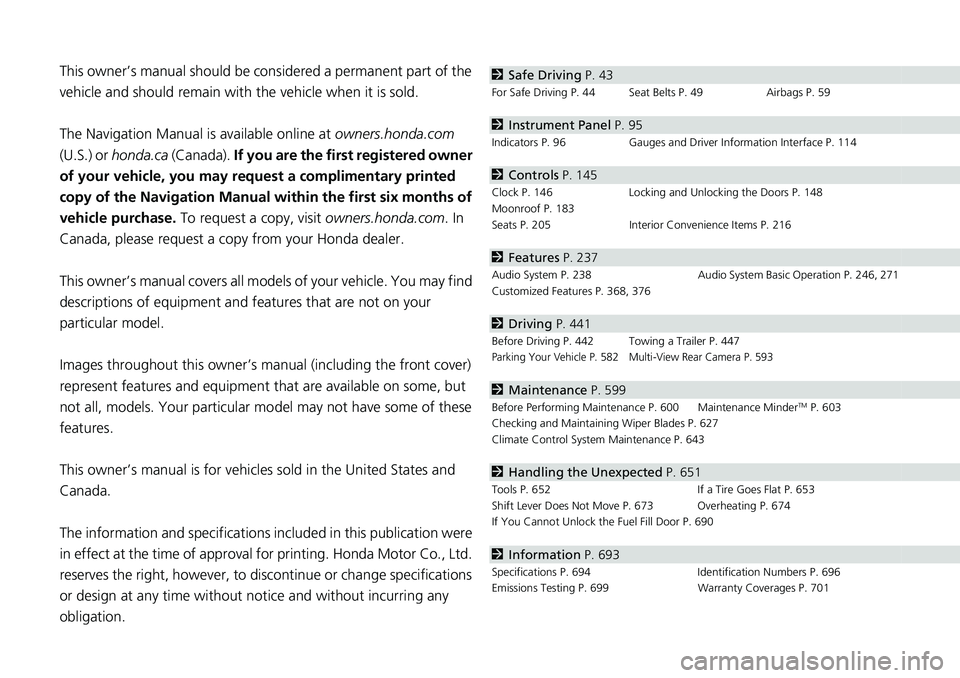
obligation.2 Safe Driving P. 43
For Safe Driving P. 44 Seat Belts P. 49 Airbags P. 59
2Instrument Panel P. 95
Indicators P. 96 Gauges and Driver Information Interface P. 114
2Controls P. 145
Clock P. 146 Locking and Unlocking the Doors P. 148
Moonroof P. 183
Seats P. 205 Interior Convenience Items P. 216
2Features P. 237
Audio System P. 238 Audio System Basic Operation P. 246, 271
Customized Features P. 368, 376
2 Driving P. 441
Before Driving P. 442 Towing a Trailer P. 447Parking Your Vehicle P. 582 Multi-View Rear Camera P. 593
2Maintenance P. 599
Before Performing Maintenance P. 600 Maintenance MinderTM P. 603
Checking and Maintaining Wiper Blades P. 627
Climate Control System Maintenance P. 643
2Handling the Unexpected P. 651
Tools P. 652 If a Tire Goes Flat P. 653
Shift Lever Does Not Move P. 673 Overheating P. 674
If You Cannot Unlock the Fuel Fill Door P. 690
2 Information P. 693
Specifications P. 694 Identification Numbers P. 696
Emissions Testing P. 699 Warranty Coverages P. 701
Page 131 of 719
uuGauges and Driver Information Interface uDriver Information Interface
130
Instrument Panel
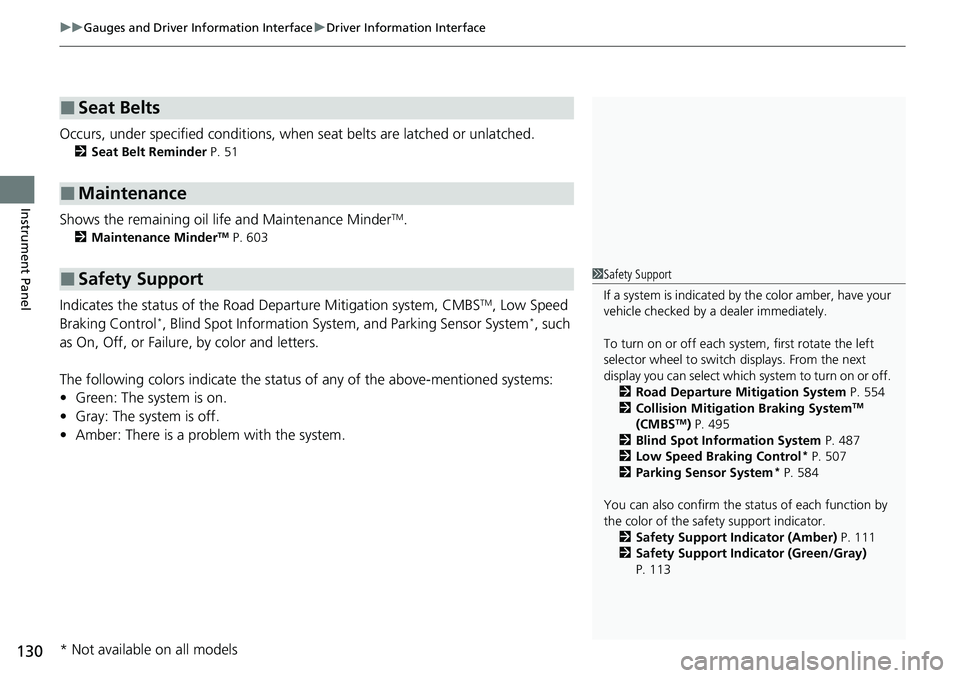
Occurs, under specified conditions, when seat belts are latched or unlatched.
2 Seat Belt Reminder P. 51
Shows the remaining oil life and Maintenance MinderTM.
2Maintenance MinderTM P. 603
Indicates the status of the Road Departure Mitigation system, CMBSTM, Low Speed
Braking Control*, Blind Spot Information Syst em, and Parking Sensor System*, such
as On, Off, or Failure, by color and letters.
The following colors indica te the status of any of the above-mentioned systems:
• Green: The system is on.
• Gray: The system is off.
• Amber: There is a probl em with the system.
■Seat Belts
■Maintenance
■Safety Support1Safety Support
If a system is indicated by the color amber, have your
vehicle checked by a dealer immediately.
To turn on or off each system, first rotate the left
selector wheel to switch displays. From the next
display you can select which system to turn on or off. 2 Road Departure Mitigation System P. 554
2 Collision Mitigation Braking System
TM
(CMBSTM) P. 495
2 Blind Spot Information System P. 487
2 Low Speed Braking Control
* P. 507
2 Parking Sensor System* P. 584
You can also confirm the st atus of each function by
the color of the safe ty support indicator.
2 Safety Support Indicator (Amber) P. 111
2 Safety Support Indicator (Green/Gray)
P. 113
* Not available on all models
Page 142 of 719
141
uuGauges and Driver Information Interface uDriver Information Interface
Continued
Instrument Panel
*1:Default Setting Setup Group Customizable Features
Description Selectable Settings
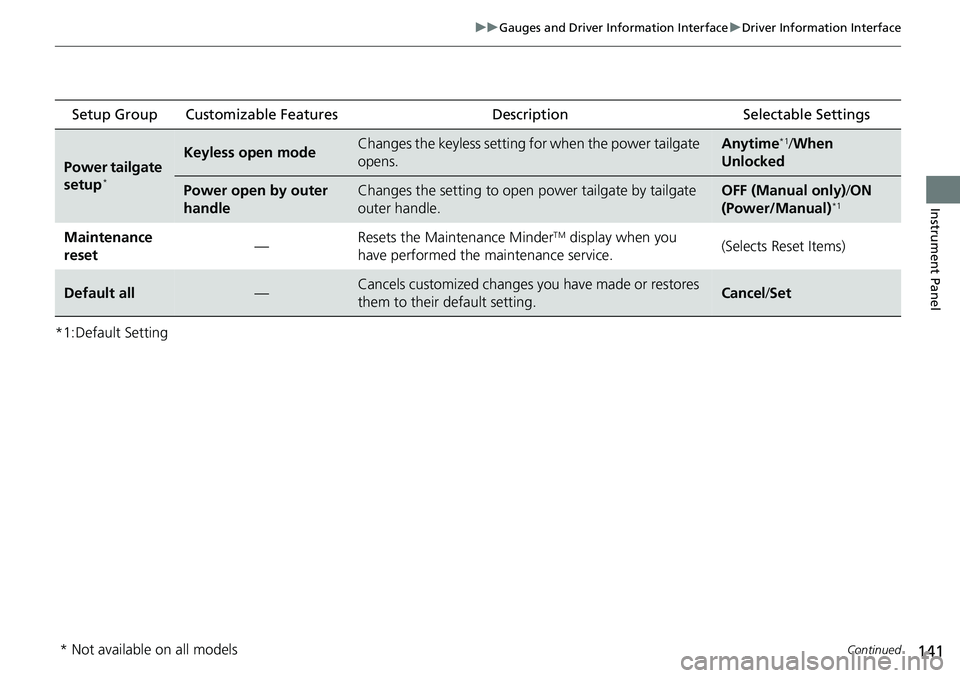
Power tailgate
setup*
Keyless open modeChanges the keyless setting for when the power tailgate
opens.Anytime*1/When
Unlocked
Power open by outer
handleChanges the setting to open power tailgate by tailgate
outer handle.OFF (Manual only) /ON
(Power/Manual)*1
Maintenance
reset —Resets the Maintenance MinderTM display when you
have performed the maintenance service. (Selects Reset Items)
Default all—Cancels customized changes you have made or restores
them to their default setting.Cancel
/Set
* Not available on all models
Page 399 of 719
398
uuCustomized Features u
Features
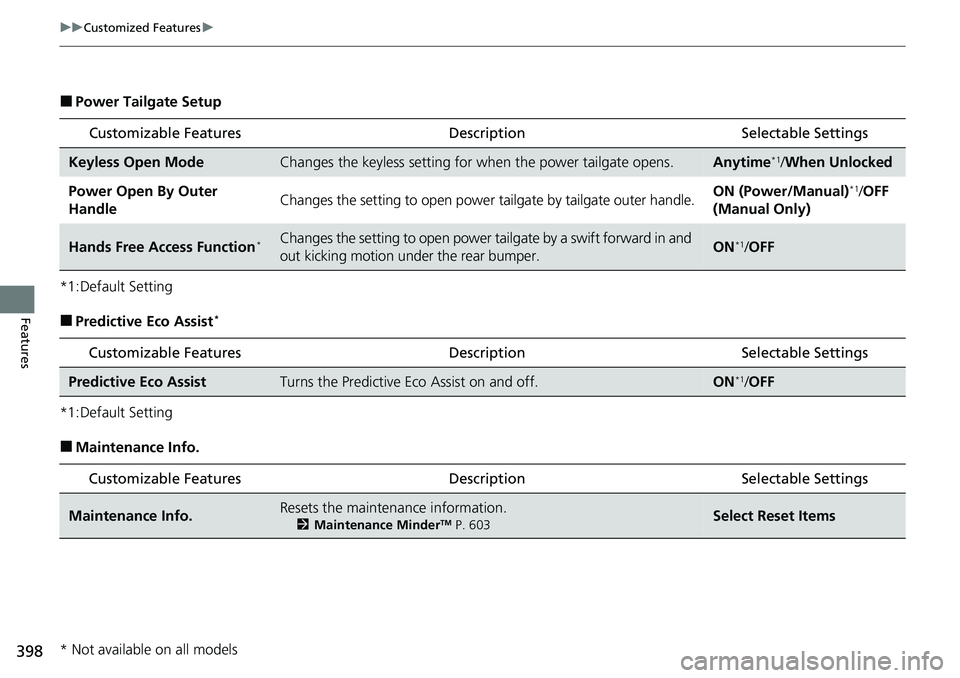
■Power Tailgate Setup
*1:Default Setting
■Predictive Eco Assist*
*1:Default Setting
■Maintenance Info.
Customizable Features Description Selectable Settings
Keyless Open ModeChanges the keyless setting for when the power tailgate opens.Anytime*1/When Unlocked
Power Open By Outer
HandleChanges the setting to open power tailgate by tailgate outer handle.ON (Power/Manual)*1/OFF
(Manual Only)
Hands Free Access Function*Changes the setting to open power tailgate by a swift forward in and
out kicking motion under the rear bumper.ON*1/ OFF
Customizable Features Desc ription Selectable Settings
Predictive Eco AssistTurns the Predictive Eco Assist on and off.ON*1/OFF
Customizable Features Desc ription Selectable Settings
Maintenance Info.Resets the maintenance information.
2Maintenance MinderTM P. 603Select Reset Items
* Not available on all models
Page 600 of 719
599
Maintenance
This chapter discusses basic maintenance.
Before Performing MaintenanceInspection and Maintenance ............ 600
Safety When Performing Maintenance ....601Parts and Fluids Used in Maintenance Service ........................................... 602
Maintenance Minder
TM..................... 603
Maintenance Under the Hood Maintenance Items Under the Hood .... 611
Opening the Hood ........................... 612
Recommended Engine Oil ................ 613
Oil Check ......................................... 614
Adding Engine Oil ............................ 615
Changing the Engine Oil and Oil Filter ...616
Cooling System ................................ 618
Transmission Fluid ............................ 620
Brake Fluid ....................................... 621
Refilling Window Wa sher Fluid......... 622
Replacing Light Bulbs ....................... 623
Checking and Maintaining Wiper
Blades .......................................... 627
Checking and Maintaining Tires
Checking Tires ................................. 631
Tire and Loading Information Label ... 632
Tire Labeling .................................... 632
DOT Tire Quality Grading (U.S. Vehicles) .... 634Wear Indicators................................ 636 Tire Service Life ................................ 636
Tire and Wheel Replacement ........... 637
Tire Rotation .................................... 638
Winter Tires ..................................... 639
12-Volt Battery ................................. 640
Remote Transmitter Care
Replacing the Remote Battery .......... 642
Climate Control System Maintenance .... 643Cleaning
Interior Care .................................... 644
Exterior Care.................................... 646
Accessories and Modifications .......... 649
Page 604 of 719
603
Maintenance
Maintenance MinderTM
If the engine oil life is less than 15%, you will see the Maintenance Minder messages
appear on the driver information interfac e every time you set the power mode to
ON. The messages notify you when to change the engine oil, or when to bring your
vehicle to a dealer for indicated maintenance services.
Page 605 of 719
604
uuMaintenance MinderTMuTo Use Maintenance MinderTM
Maintenance
To Use Maintenance MinderTM
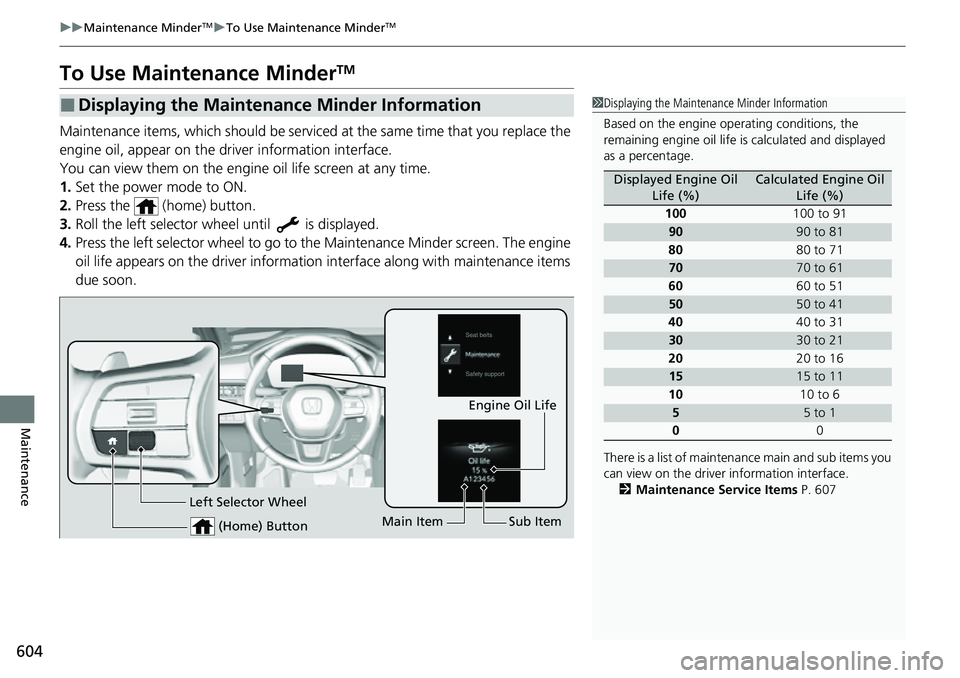
Maintenance items, which should be serviced at the same time that you replace the
engine oil, appear on the driver information interface.
You can view them on the engine oil life screen at any time.
1. Set the power mode to ON.
2. Press the (home) button.
3. Roll the left selector wheel until is displayed.
4. Press the left selector wheel to go to the Maintenance Minder screen. The engine
oil life appears on the driver information interface along with maintenance items
due soon.
■Displaying the Maintenance Minder Information1 Displaying the Maintena nce Minder Information
Based on the engine ope rating conditions, the
remaining engine oi l life is calculated and displayed
as a percentage.
There is a list of maintena nce main and sub items you
can view on the driver information interface.
2 Maintenance Service Items P. 607
Displayed Engine Oil
Life (%)Calculated Engine Oil Life (%)
100 100 to 91
9090 to 81
80 80 to 71
7070 to 61
60 60 to 51
5050 to 41
40 40 to 31
3030 to 21
20 20 to 16
1515 to 11
10 10 to 6
55 to 1
0 0
(Home) Button
Engine Oil Life
Main Item Sub Item
Left Selector Wheel
Page 606 of 719
605
uuMaintenance MinderTMuTo Use Maintenance MinderTM
Continued
Maintenance
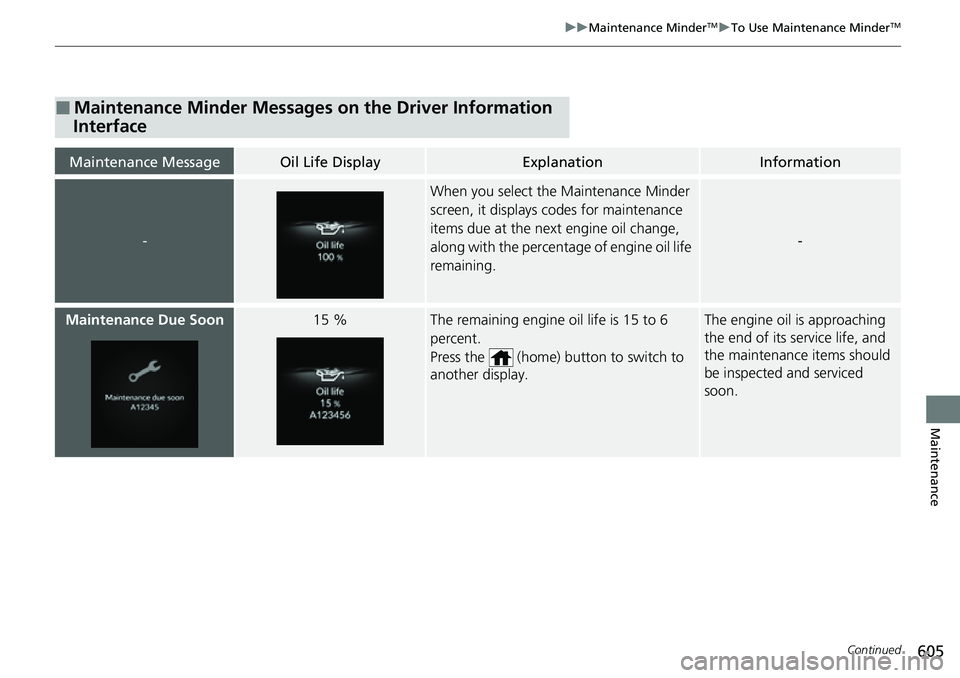
■Maintenance Minder Messages on the Driver Information
Interface
Maintenance MessageOil Life DisplayExplanationInformation
-
When you select the Maintenance Minder
screen, it displays codes for maintenance
items due at the next engine oil change,
along with the percentage of engine oil life
remaining.
-
Maintenance Due Soon15 %The remaining engine oil life is 15 to 6
percent.
Press the (home) button to switch to
another display.The engine oil is approaching
the end of its service life, and
the maintenance items should
be inspected and serviced
soon.
Page 607 of 719
606
uuMaintenance MinderTMuTo Use Maintenance MinderTM
Maintenance
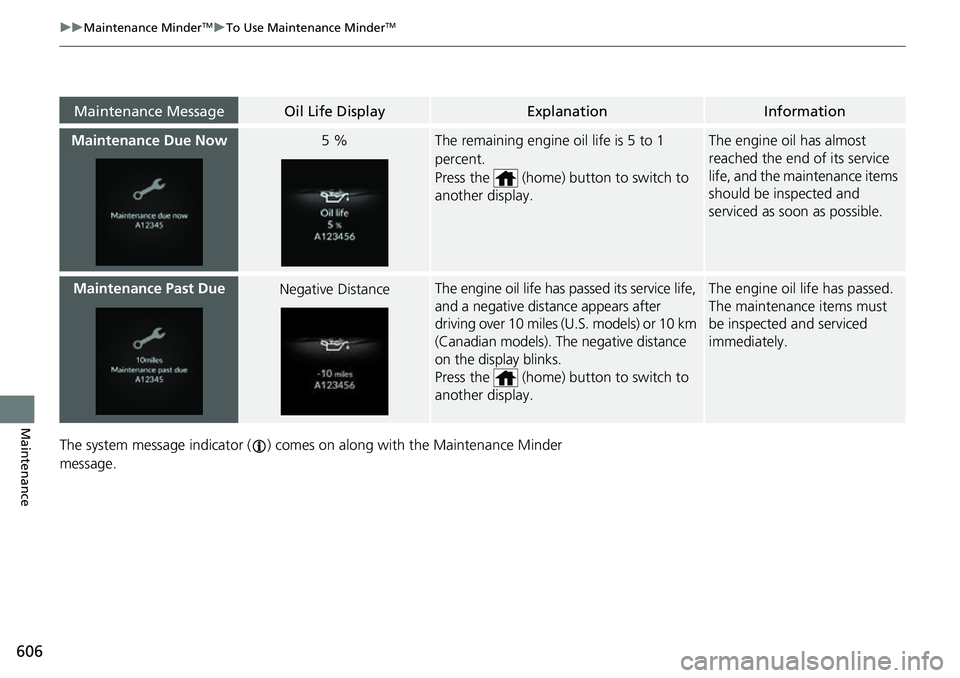
The system message indicator ( ) comes on along with the Maintenance Minder
message.
Maintenance MessageOil Life DisplayExplanationInformation
Maintenance Due Now5 %The remaining engine oil life is 5 to 1
percent.
Press the (home) button to switch to
another display.The engine oil has almost
reached the end of its service
life, and the maintenance items
should be inspected and
serviced as soon as possible.
Maintenance Past DueNegative DistanceThe engine oil life has passed its service life,
and a negative distance appears after
driving over 10 miles (U.S. models) or 10 km
(Canadian models). The negative distance
on the display blinks.
Press the (home) button to switch to
another display.The engine oil life has passed.
The maintenance items must
be inspected and serviced
immediately.
Page 608 of 719
607
uuMaintenance MinderTMuTo Use Maintenance MinderTM
Continued
Maintenance
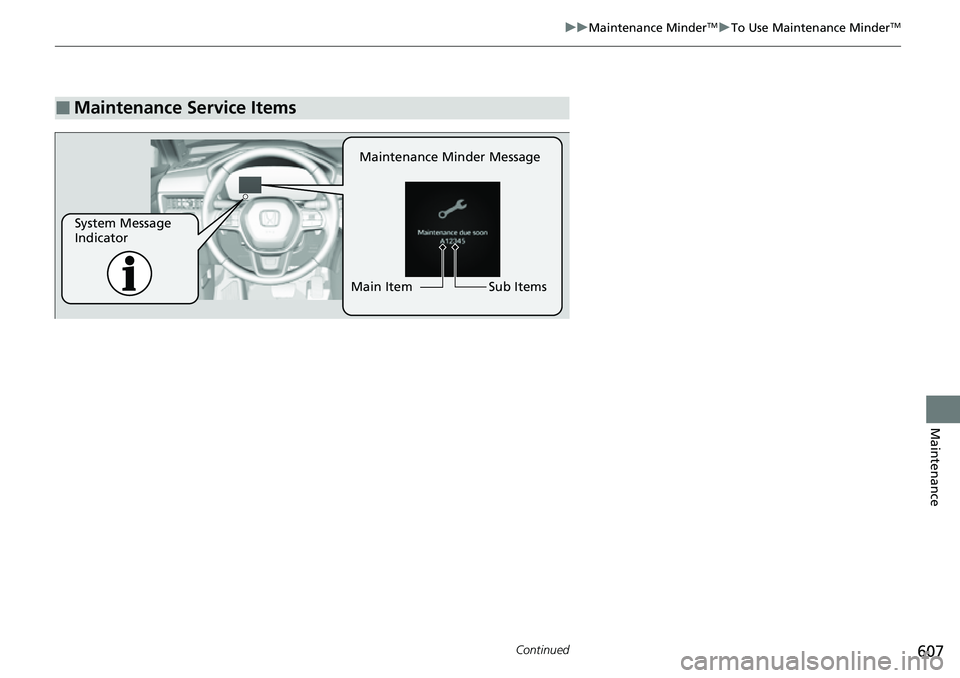
■Maintenance Service Items
Maintenance Minder Message
System Message
Indicator Sub Items
Main Item