wiper HONDA CRV 2023 Owners Manual
[x] Cancel search | Manufacturer: HONDA, Model Year: 2023, Model line: CRV, Model: HONDA CRV 2023Pages: 719, PDF Size: 13.43 MB
Page 7 of 719
Contents
This owner’s manual should be considered a permanent part of the
vehicle and should remain with the vehicle when it is sold.
The Navigation Manual is available online at owners.honda.com
(U.S.) or honda.ca (Canada). If you are the first registered owner
of your vehicle, you may request a complimentary printed
copy of the Navigation Manual within the first six months of
vehicle purchase. To request a copy, visit owners.honda.com. In
Canada, please request a copy from your Honda dealer.
This owner’s manual covers all models of your vehicle. You may find
descriptions of equipment and features that are not on your
particular model.
Images throughout this owner’s ma nual (including the front cover)
represent features and equipment that are available on some, but
not all, models. Your particular mo del may not have some of these
features.
This owner’s manual is for vehicles sold in the United States and
Canada.
The information and specifications in cluded in this publication were
in effect at the time of approval for printing. Honda Motor Co., Ltd.
reserves the right, however, to discontinue or change specifications
or design at any time without notice and without incurring any
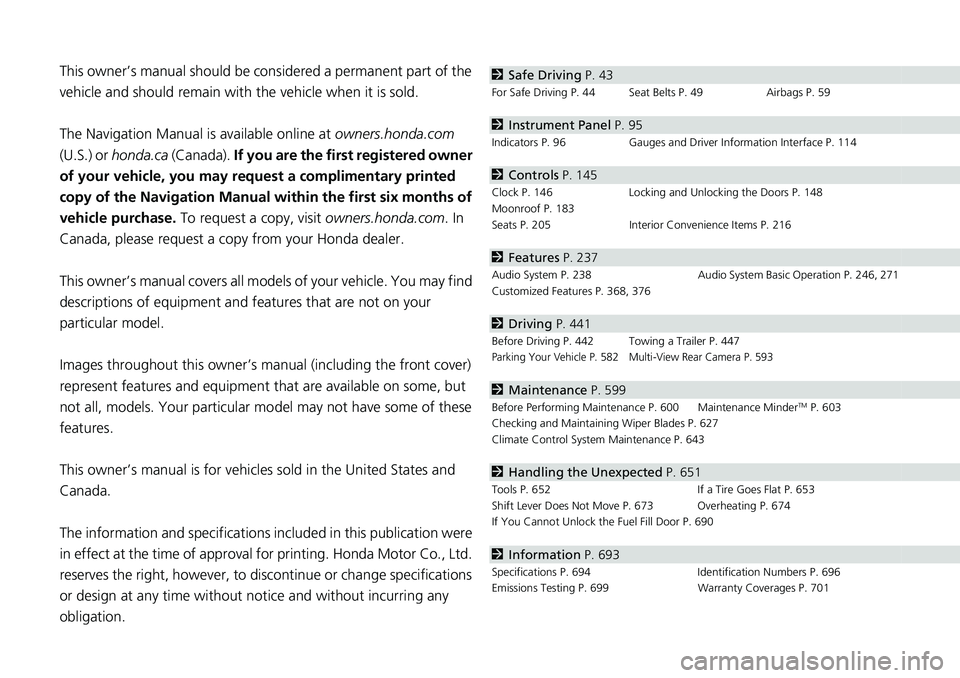
obligation.2 Safe Driving P. 43
For Safe Driving P. 44 Seat Belts P. 49 Airbags P. 59
2Instrument Panel P. 95
Indicators P. 96 Gauges and Driver Information Interface P. 114
2Controls P. 145
Clock P. 146 Locking and Unlocking the Doors P. 148
Moonroof P. 183
Seats P. 205 Interior Convenience Items P. 216
2Features P. 237
Audio System P. 238 Audio System Basic Operation P. 246, 271
Customized Features P. 368, 376
2 Driving P. 441
Before Driving P. 442 Towing a Trailer P. 447Parking Your Vehicle P. 582 Multi-View Rear Camera P. 593
2Maintenance P. 599
Before Performing Maintenance P. 600 Maintenance MinderTM P. 603
Checking and Maintaining Wiper Blades P. 627
Climate Control System Maintenance P. 643
2Handling the Unexpected P. 651
Tools P. 652 If a Tire Goes Flat P. 653
Shift Lever Does Not Move P. 673 Overheating P. 674
If You Cannot Unlock the Fuel Fill Door P. 690
2 Information P. 693
Specifications P. 694 Identification Numbers P. 696
Emissions Testing P. 699 Warranty Coverages P. 701
Page 10 of 719
9
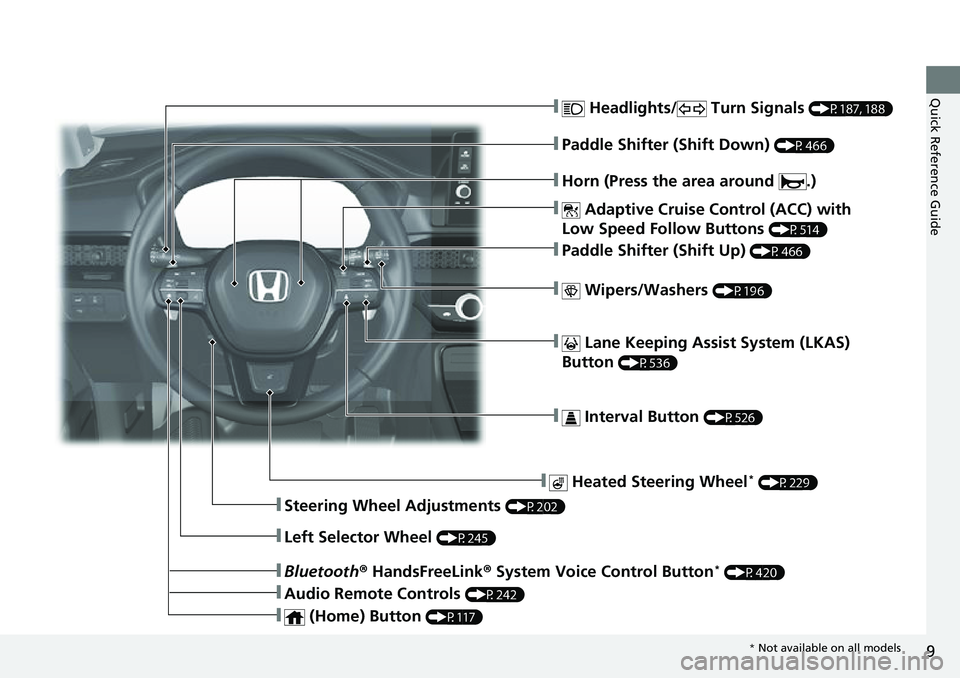
Quick Reference Guide❚ Headlights/ Turn Signals (P187, 188)
❚ Adaptive Cruise Control (ACC) with
Low Speed Follow Buttons
(P514)
❚ Lane Keeping Assist System (LKAS)
Button
(P536)
❚ Interval Button (P526)
❚Steering Wheel Adjustments (P202)
❚ Heated Steering Wheel* (P229)
❚Bluetooth ® HandsFreeLink ® System Voice Control Button* (P420)
❚Audio Remote Controls (P242)
❚ (Home) Button (P117)
❚Horn (Press the area around .)
❚Left Selector Wheel (P245)
❚ Wipers/Washers (P196)
❚Paddle Shifter (Shift Up) (P466)
❚Paddle Shifter (Shift Down) (P466)
* Not available on all models
Page 13 of 719
Visual Index
12
Quick Reference Guide
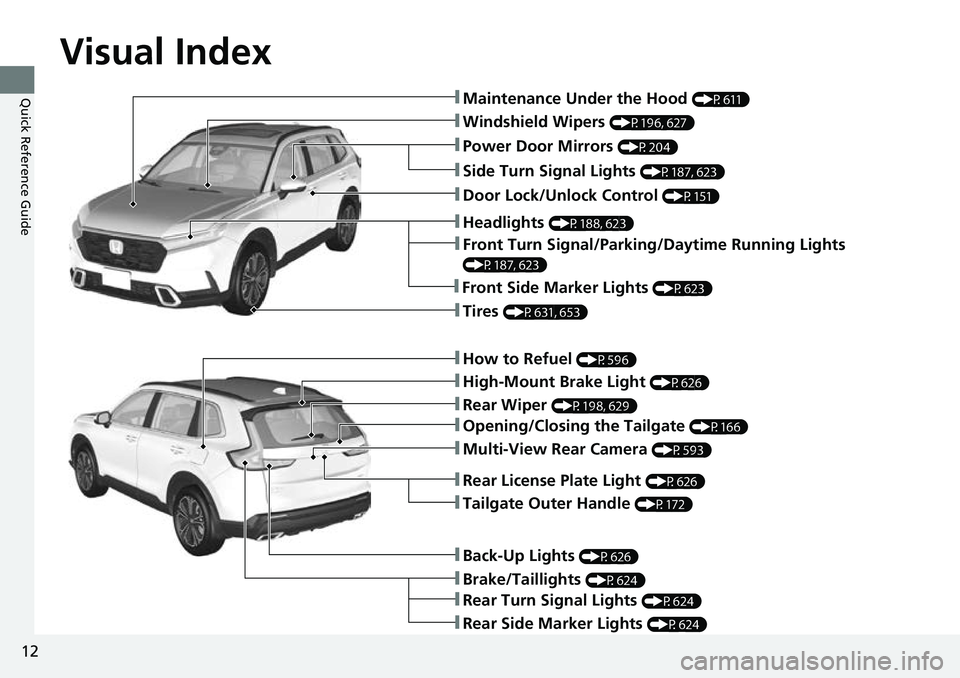
❚Windshield Wipers (P196, 627)
❚How to Refuel (P596)
❚High-Mount Brake Light (P626)
❚Rear Wiper (P198, 629)
❚Brake/Taillights (P624)
❚Power Door Mirrors (P204)
❚Maintenance Under the Hood (P611)
❚Multi-View Rear Camera (P593)
❚Front Turn Signal/Parking/Daytime Running Lights
(P187, 623)
❚Tires (P631, 653)
❚Opening/Closing the Tailgate (P166)
❚Side Turn Signal Lights (P187, 623)
❚Headlights (P188, 623)
❚Rear Turn Signal Lights (P624)
❚Rear Side Marker Lights (P624)
❚Back-Up Lights (P626)
❚Front Side Marker Lights (P623)
❚Tailgate Outer Handle (P172)
❚Rear License Plate Light (P626)
❚Door Lock/Unlock Control (P151)
Page 25 of 719
24
Quick Reference Guide
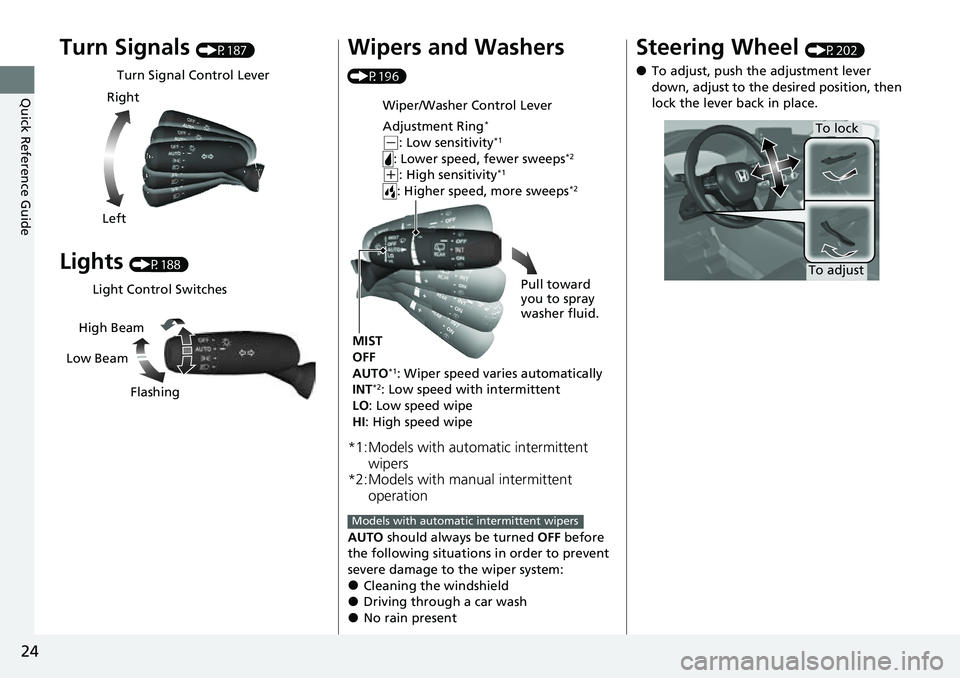
Turn Signals (P187)
Lights (P188)
Turn Signal Control Lever
Right
Left
Light Control Switches
Low Beam High Beam
Flashing
Wipers and Washers
(P196)
*1:Models with automatic intermittent wipers
*2:Models with manual intermittent operation
AUTO should always be turned OFF before
the following situations in order to prevent
severe damage to the wiper system:
●Cleaning the windshield●Driving through a car wash●No rain present
Wiper/Washer Control Lever
Adjustment Ring
*
( -: Low sensitivity*1
: Lower speed, fewer sweeps*2
(+: High sensitivity*1
: Higher speed, more sweeps*2
MIST
OFF
AUTO
*1: Wiper speed varies automatically
INT*2: Low speed with intermittent
LO : Low speed wipe
HI : High speed wipe Pull toward
you to spray
washer fluid.
Models with automatic intermittent wipers
Steering Wheel (P202)
●To adjust, push the adjustment lever
down, adjust to the desired position, then
lock the lever back in place.
To adjust
To lock
Page 38 of 719
37
Quick Reference Guide
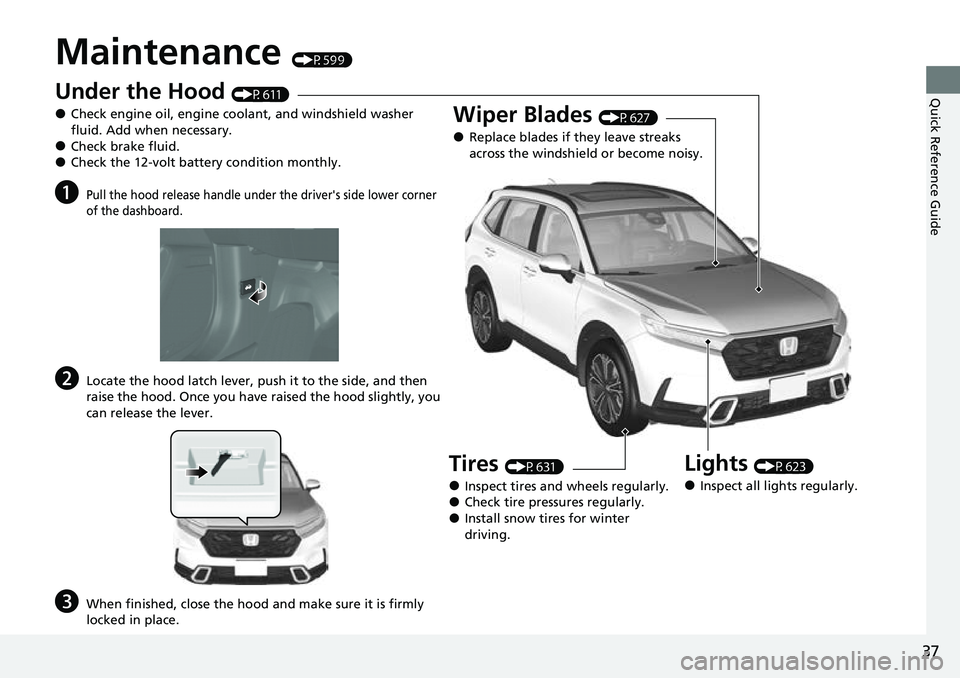
Maintenance (P599)
Under the Hood (P611)
●Check engine oil, engine coolant, and windshield washer
fluid. Add when necessary.
●Check brake fluid.●Check the 12-volt battery condition monthly.
aPull the hood release handle under the driver's side lower corner
of the dashboard.
bLocate the hood latch lever, push it to the side, and then
raise the hood. Once you have raised the hood slightly, you
can release the lever.
cWhen finished, close the hood and make sure it is firmly
locked in place.
Lights (P623)
●Inspect all lights regularly.
Wiper Blades (P627)
●Replace blades if they leave streaks
across the windshield or become noisy.
Tires (P631)
●Inspect tires and wheels regularly.●Check tire pressures regularly.●Install snow tires for winter
driving.
Page 140 of 719
139
uuGauges and Driver Information Interface uDriver Information Interface
Continued
Instrument Panel
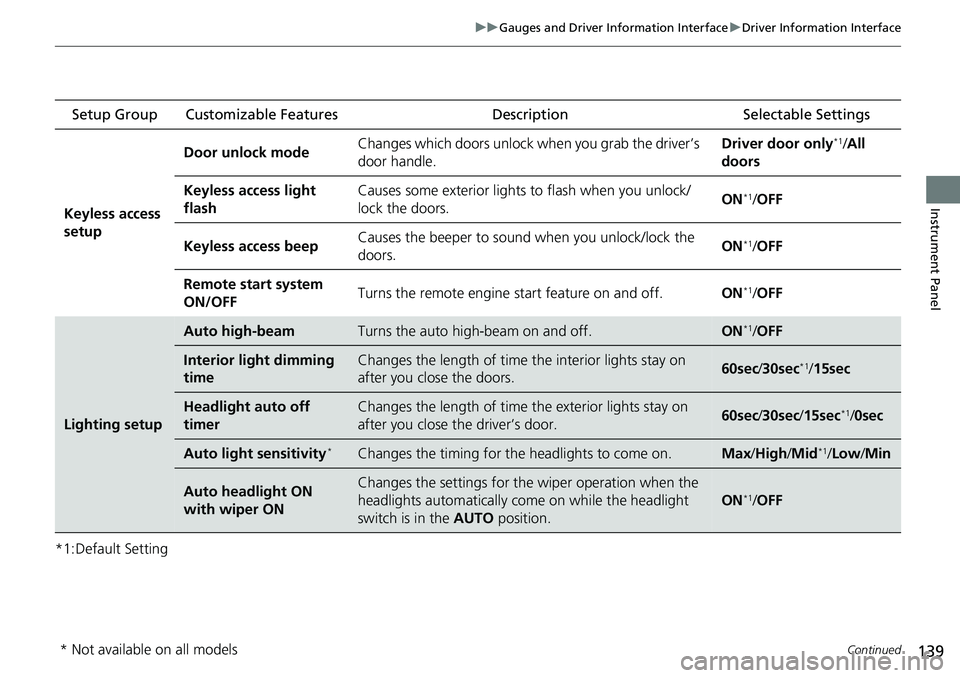
*1:Default Setting Setup Group Customizable Features
Description Selectable Settings
Keyless access
setup Door unlock mode
Changes which doors unlock when you grab the driver’s
door handle. Driver door only
*1/
All
doors
Keyless access light
flash Causes some exterior lights
to flash when you unlock/
lock the doors. ON
*1/
OFF
Keyless access beep Causes the beeper to sound when you unlock/lock the
doors.
ON
*1/
OFF
Remote start system
ON/OFF Turns the remote engine start feature on and off.
ON
*1/OFF
Lighting setup
Auto high-beamTurns the auto high -beam on and off.ON*1/OFF
Interior light dimming
timeChanges the length of time the interior lights stay on
after you close the doors.60sec /30sec*1/ 15sec
Headlight auto off
timerChanges the length of time the exterior lights stay on
after you close the driver’s door.60sec /30sec /15sec*1/0sec
Auto light sensitivity*Changes the timing for th e headlights to come on.Max/High /Mid*1/Low /Min
Auto headlight ON
with wiper ONChanges the settings for the wiper operation when the
headlights automatically come on while the headlight
switch is in the AUTO position.
ON*1/OFF
* Not available on all models
Page 146 of 719
145
Controls
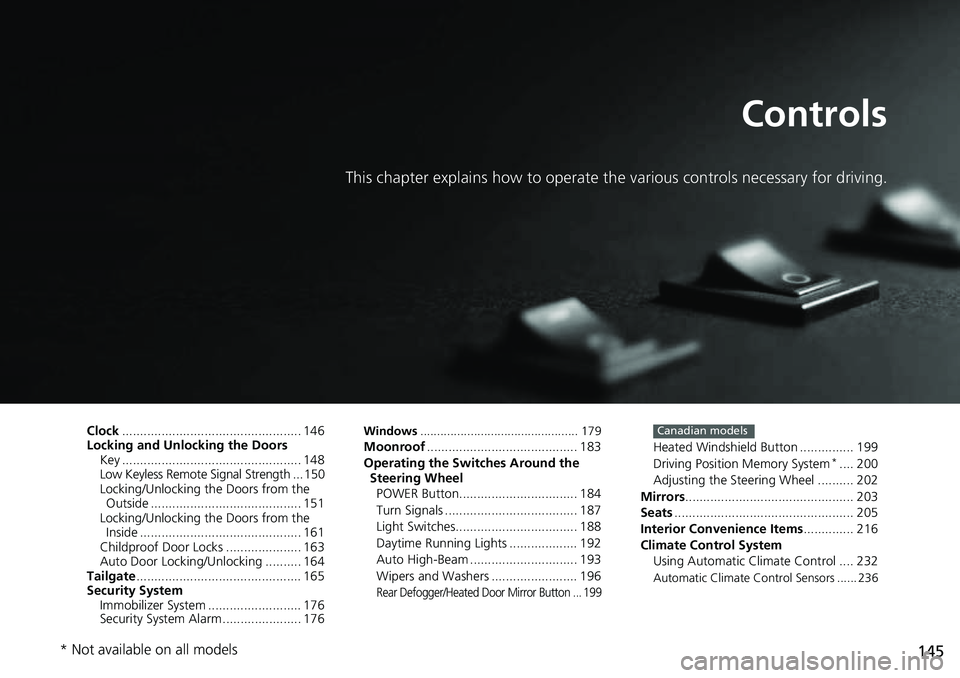
This chapter explains how to operate the various controls necessary for driving.
Clock.................................................. 146
Locking and Unlocking the Doors Key .................................................. 148
Low Keyless Remote Signal Strength ... 150
Locking/Unlocking the Doors from the Outside .......................................... 151
Locking/Unlocking the Doors from the Inside ............................................. 161
Childproof Door Locks ..................... 163
Auto Door Locking/Unlocking .......... 164
Tailgate .............................................. 165
Security System Immobilizer System .......................... 176
Security System Alarm ...................... 176Windows ............................................... 179Moonroof .......................................... 183
Operating the Switches Around the Steering Wheel
POWER Button................................. 184
Turn Signals ..................................... 187
Light Switches.................................. 188
Daytime Running Lights ................... 192
Auto High-Beam .............................. 193
Wipers and Washers ........................ 196
Rear Defogger/Heated Door Mirror Button ... 199
Heated Windshield Button ............... 199
Driving Position Memory System*.... 200
Adjusting the Steering Wheel .......... 202
Mirrors ............................................... 203
Seats .................................................. 205
Interior Convenience Items .............. 216
Climate Control System Using Automatic Climate Control .... 232
Automatic Climate Control Sensors ...... 236
Canadian models
* Not available on all models
Page 190 of 719
Continued189
uuOperating the Switches Around the Steering Wheel uLight Switches
Controls
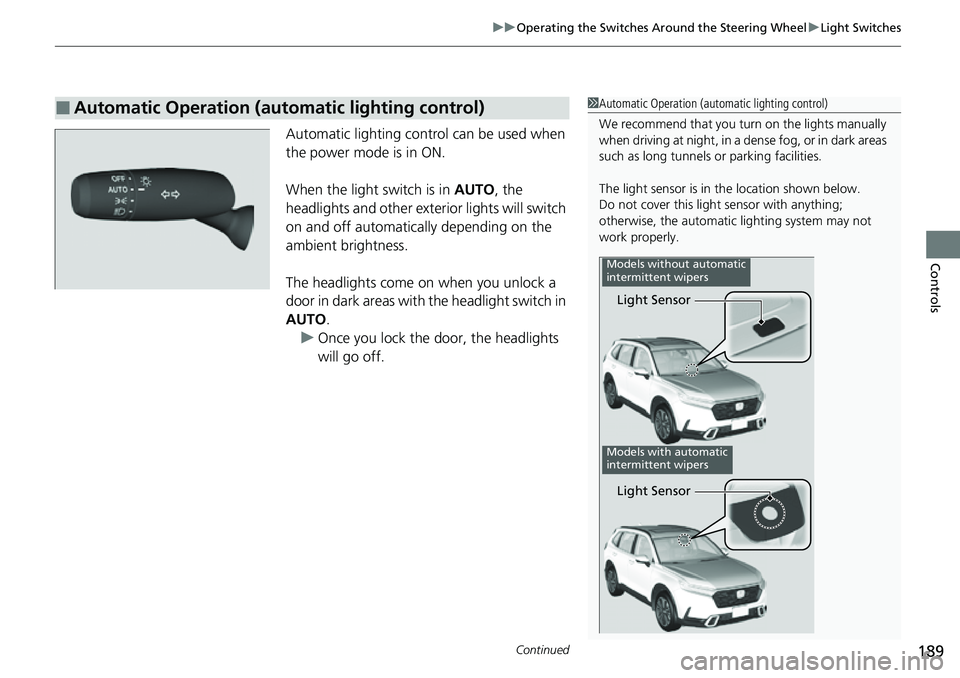
Automatic lighting control can be used when
the power mode is in ON.
When the light switch is in AUTO, the
headlights and other exterior lights will switch
on and off automatically depending on the
ambient brightness.
The headlights come on when you unlock a
door in dark areas with the headlight switch in
AUTO .
u Once you lock the door, the headlights
will go off.
■Automatic Operation (automatic lighting control)1Automatic Operation (aut omatic lighting control)
We recommend that you tu rn on the lights manually
when driving at night, in a de nse fog, or in dark areas
such as long tunnels or parking facilities.
The light sensor is in the location shown below.
Do not cover this light sensor with anything;
otherwise, the automatic lighting system may not
work properly.
Light Sensor
Models without automatic
intermittent wipers
Models with automatic
intermittent wipers
Light Sensor
Page 191 of 719
uuOperating the Switches Around the Steering Wheel uLight Switches
190
Controls
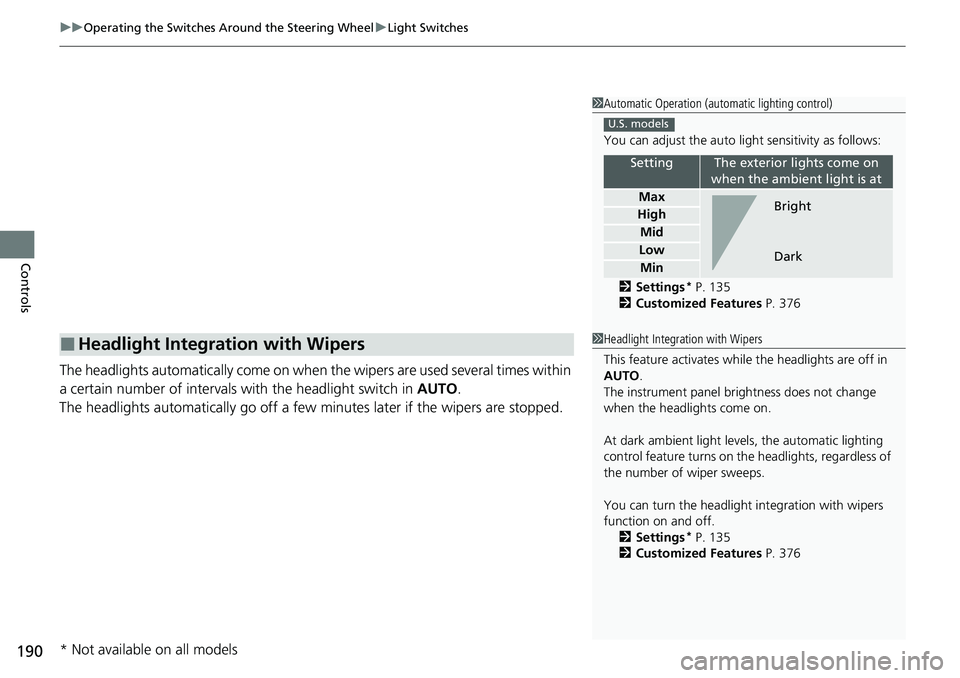
The headlights automatically come on when the wipers are used several times within
a certain number of intervals wi th the headlight switch in AUTO.
The headlights automatically go off a few minutes later if the wipers are stopped.
■Headlight Integration with Wipers
1Automatic Operation (aut omatic lighting control)
You can adjust the auto li ght sensitivity as follows:
2 Settings
* P. 135
2 Customized Features P. 376
SettingThe exterior lights come on
when the ambient light is at
Max
High
Mid
Low
Min
U.S. models
Bright
Dark
1 Headlight Integration with Wipers
This feature activates while the headlights are off in
AUTO .
The instrument panel br ightness does not change
when the headlights come on.
At dark ambient light leve ls, the automatic lighting
control feature turns on the headlights, regardless of
the number of wiper sweeps.
You can turn the headlight integration with wipers
function on and off. 2 Settings
* P. 135
2 Customized Features P. 376
* Not available on all models
Page 195 of 719
uuOperating the Switches Around the Steering Wheel uAuto High-Beam
194
Controls
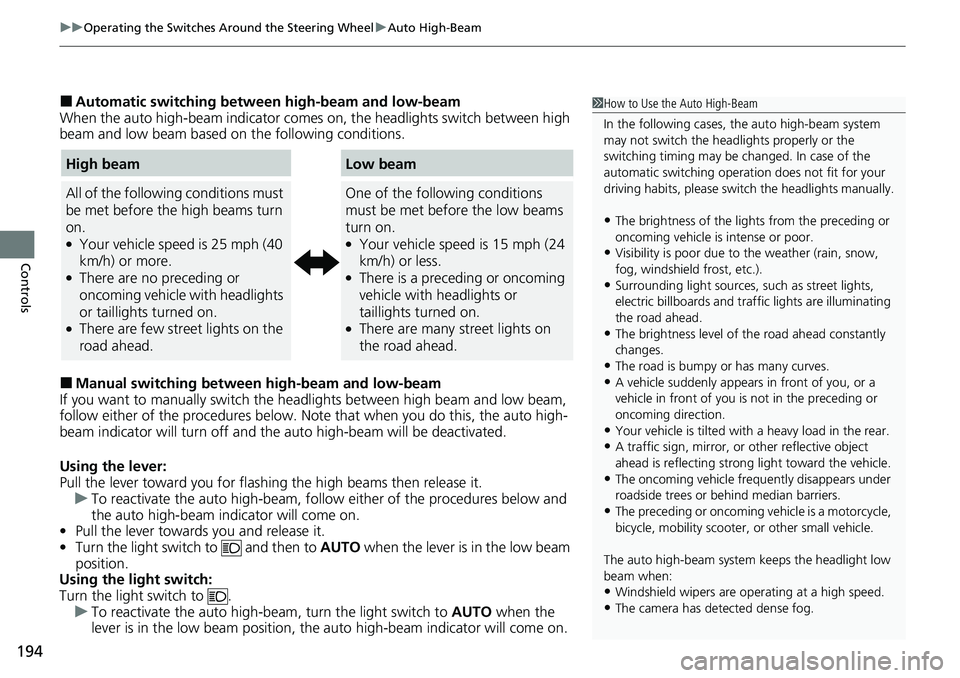
■Automatic switching between high-beam and low-beam
When the auto high-beam indicator comes on, the headlights switch between high
beam and low beam based on the following conditions.
■Manual switching between high-beam and low-beam
If you want to manually switch the headlights between high beam and low beam,
follow either of the proced ures below. Note that when you do this, the auto high-
beam indicator will turn off and the auto high-beam will be deactivated.
Using the lever:
Pull the lever toward you for flashi ng the high beams then release it.
u To reactivate the auto high-beam, follo w either of the procedures below and
the auto high-beam indicator will come on.
• Pull the lever towards you and release it.
• Turn the light switch to and then to AUTO when the lever is in the low beam
position.
Using the light switch:
Turn the light switch to .
u To reactivate the auto high-be am, turn the light switch to AUTO when the
lever is in the low beam position, the auto high-beam indicator will come on.
1 How to Use the Auto High-Beam
In the following cases, th e auto high-beam system
may not switch the head lights properly or the
switching timing may be ch anged. In case of the
automatic switching operati on does not fit for your
driving habits, please swit ch the headlights manually.
•The brightness of the lights from the preceding or
oncoming vehicle is intense or poor.
•Visibility is poor due to the weather (rain, snow,
fog, windshield frost, etc.).
•Surrounding light sources, such as street lights,
electric billboards and traf fic lights are illuminating
the road ahead.
•The brightness level of th e road ahead constantly
changes.
•The road is bumpy or has many curves.•A vehicle suddenly appears in front of you, or a
vehicle in front of you is not in the preceding or
oncoming direction.
•Your vehicle is tilted with a heavy load in the rear.•A traffic sign, mirror, or other reflective object
ahead is reflecting strong light toward the vehicle.
•The oncoming vehicle freq uently disappears under
roadside trees or be hind median barriers.
•The preceding or oncoming vehicle is a motorcycle,
bicycle, mobility scooter, or other small vehicle.
The auto high-beam system keeps the headlight low
beam when:
•Windshield wipers are op erating at a high speed.
•The camera has detected dense fog.
High beam
All of the following conditions must
be met before the high beams turn
on.
●Your vehicle speed is 25 mph (40
km/h) or more.
●There are no preceding or
oncoming vehicle with headlights
or taillights turned on.
●There are few street lights on the
road ahead.
Low beam
One of the following conditions
must be met before the low beams
turn on.
●Your vehicle speed is 15 mph (24
km/h) or less.
●There is a preceding or oncoming
vehicle with headlights or
taillights turned on.
●There are many street lights on
the road ahead.