wiper HONDA CRV 2023 User Guide
[x] Cancel search | Manufacturer: HONDA, Model Year: 2023, Model line: CRV, Model: HONDA CRV 2023Pages: 719, PDF Size: 13.43 MB
Page 197 of 719
196
uuOperating the Switches Around the Steering Wheel uWipers and Washers
Controls
Wipers and Washers
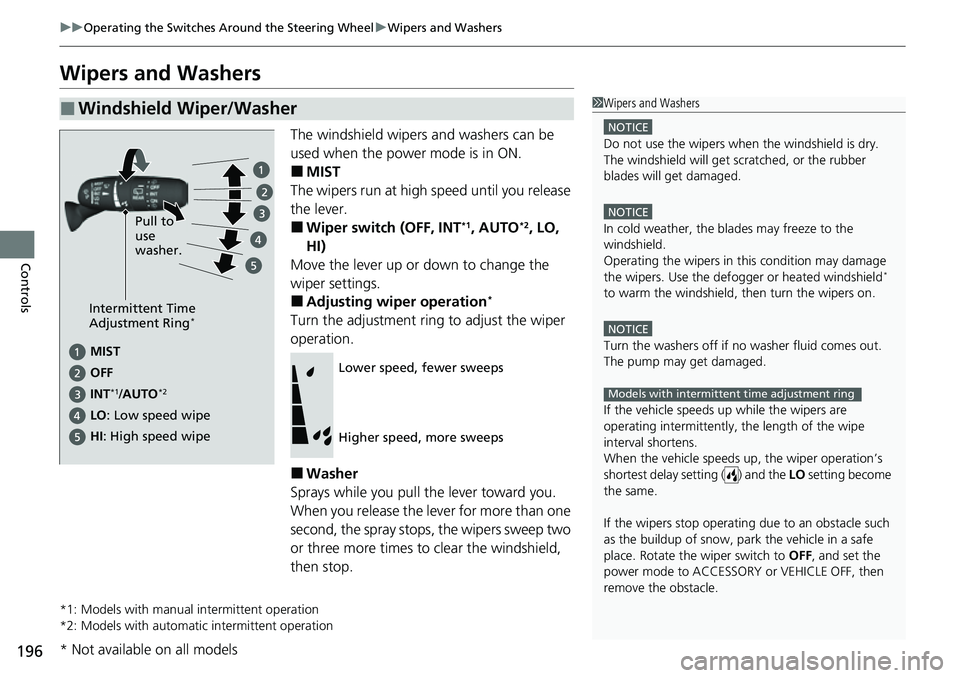
The windshield wipers and washers can be
used when the power mode is in ON.
■MIST
The wipers run at high speed until you release
the lever.
■Wiper switch (OFF, INT*1, AUTO*2, LO,
HI)
Move the lever up or down to change the
wiper settings.
■Adjusting wiper operation*
Turn the adjustment ring to adjust the wiper
operation.
■Washer
Sprays while you pull the lever toward you.
When you release the lever for more than one
second, the spray stops, the wipers sweep two
or three more times to clear the windshield,
then stop.
*1: Models with manual intermittent operation
*2: Models with automati c intermittent operation
■Windshield Wiper/Washer1Wipers and Washers
NOTICE
Do not use the wipers when the windshield is dry.
The windshield will get sc ratched, or the rubber
blades will get damaged.
NOTICE
In cold weather, the blades may freeze to the
windshield.
Operating the wipers in th is condition may damage
the wipers. Use the defogge r or heated windshield
*
to warm the windshield, then turn the wipers on.
NOTICE
Turn the washers off if no washer fluid comes out.
The pump may get damaged.
If the vehicle speeds up while the wipers are
operating intermittently, the length of the wipe
interval shortens.
When the vehicle speeds up, the wiper operation’s
shortest delay setting ( ) and the LO setting become
the same.
If the wipers st op operating due to an obstacle such
as the buildup of snow, park the vehicle in a safe
place. Rotate the wiper switch to OFF, and set the
power mode to ACCESSORY or VEHICLE OFF, then
remove the obstacle.
Models with intermittent time adjustment ring
Intermittent Time
Adjustment Ring*
MIST
INT
*1/AUTO*2
OFF
LO : Low speed wipe Pull to
use
washer.
HI: High speed wipe
Lower speed, fewer sweeps
Higher speed, more sweeps
* Not available on all models
Page 198 of 719
Continued197
uuOperating the Switches Around the Steering Wheel uWipers and Washers
Controls
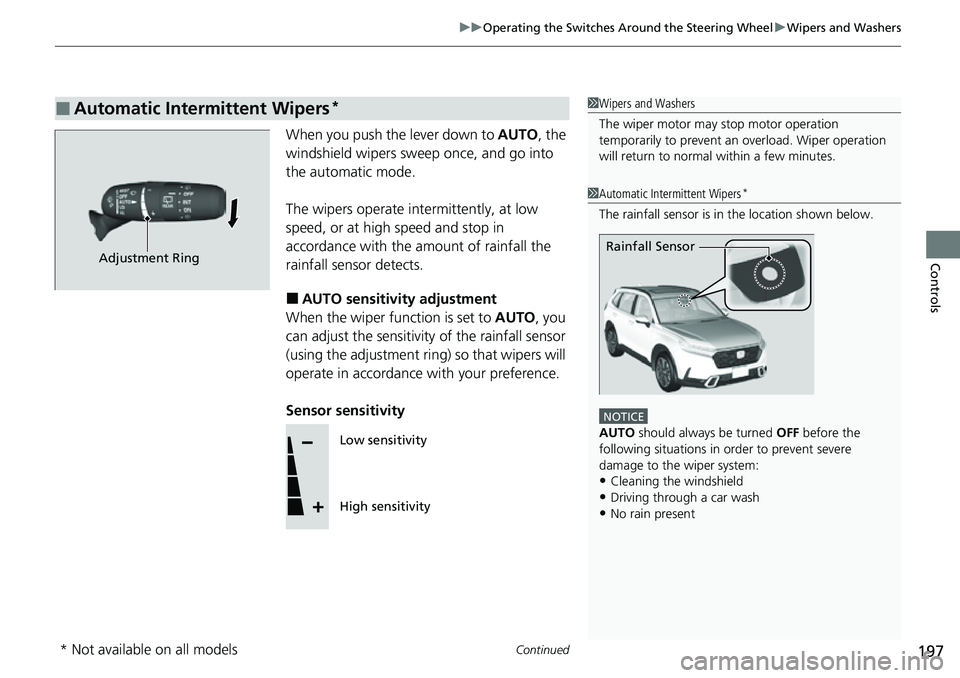
When you push the lever down to AUTO, the
windshield wipers sweep once, and go into
the automatic mode.
The wipers operate intermittently, at low
speed, or at high speed and stop in
accordance with the amount of rainfall the
rainfall sensor detects.
■AUTO sensitivity adjustment
When the wiper function is set to AUTO, you
can adjust the sensitivity of the rainfall sensor
(using the adjustment ring) so that wipers will
operate in accordance with your preference.
Sensor sensitivity
■Automatic Intermittent Wipers*1 Wipers and Washers
The wiper motor may stop motor operation
temporarily to prevent an overload. Wiper operation
will return to normal within a few minutes.
Adjustment Ring
1 Automatic Intermittent Wipers*
The rainfall sensor is in the location shown below.
NOTICE
AUTO should always be turned OFF before the
following situations in order to prevent severe
damage to the wiper system:
•Cleaning the windshield
•Driving through a car wash
•No rain present
Rainfall Sensor
Low sensitivity
High sensitivity
* Not available on all models
Page 199 of 719
198
uuOperating the Switches Around the Steering Wheel uWipers and Washers
Controls
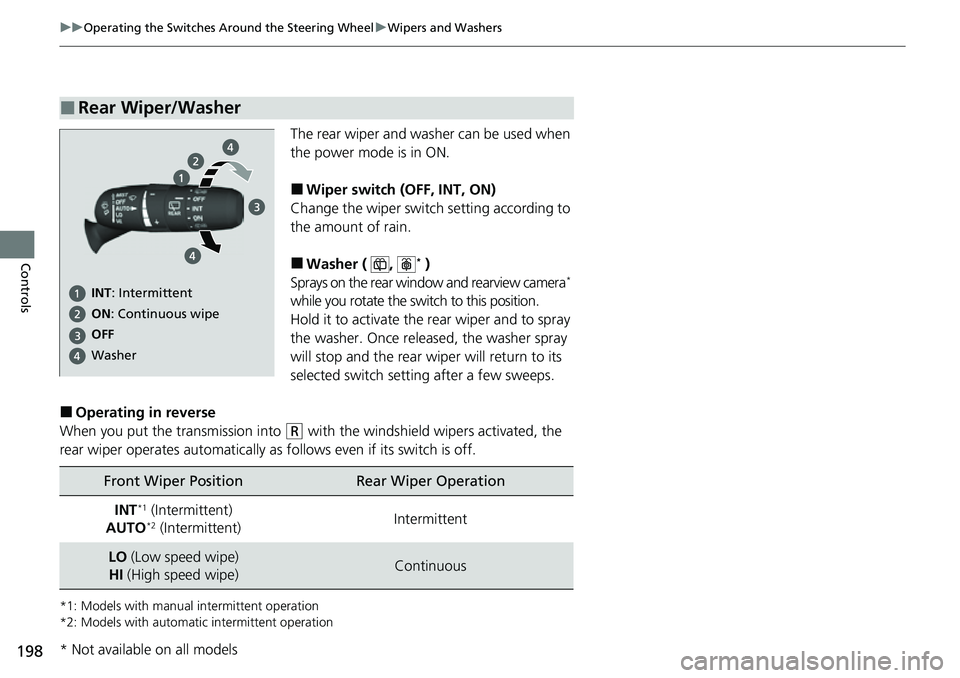
The rear wiper and washer can be used when
the power mode is in ON.
■Wiper switch (OFF, INT, ON)
Change the wiper switch setting according to
the amount of rain.
■Washer ( , * )
Sprays on the rear window and rearview camera*
while you rotate the switch to this position.
Hold it to activate the rear wiper and to spray
the washer. Once released, the washer spray
will stop and the rear wi per will return to its
selected switch setting after a few sweeps.
■Operating in reverse
When you put the transmission into
(R with the windshield wipers activated, the
rear wiper operates automatically as follows even if its switch is off.
*1: Models with manual intermittent operation
*2: Models with automati c intermittent operation
■Rear Wiper/Washer
INT: Intermittent
OFF ON : Continuous wipe
Washer
Front Wiper PositionRear Wiper Operation
INT*1 (Intermittent)
AUTO*2 (Intermittent)Intermittent
LO (Low speed wipe)
HI (High speed wipe)Continuous
* Not available on all models
Page 200 of 719
199
uuOperating the Switches Around the Steering Wheel uRear Defogger/Heated Door Mirror Button
Controls
Rear Defogger/Heated Door Mirror Button
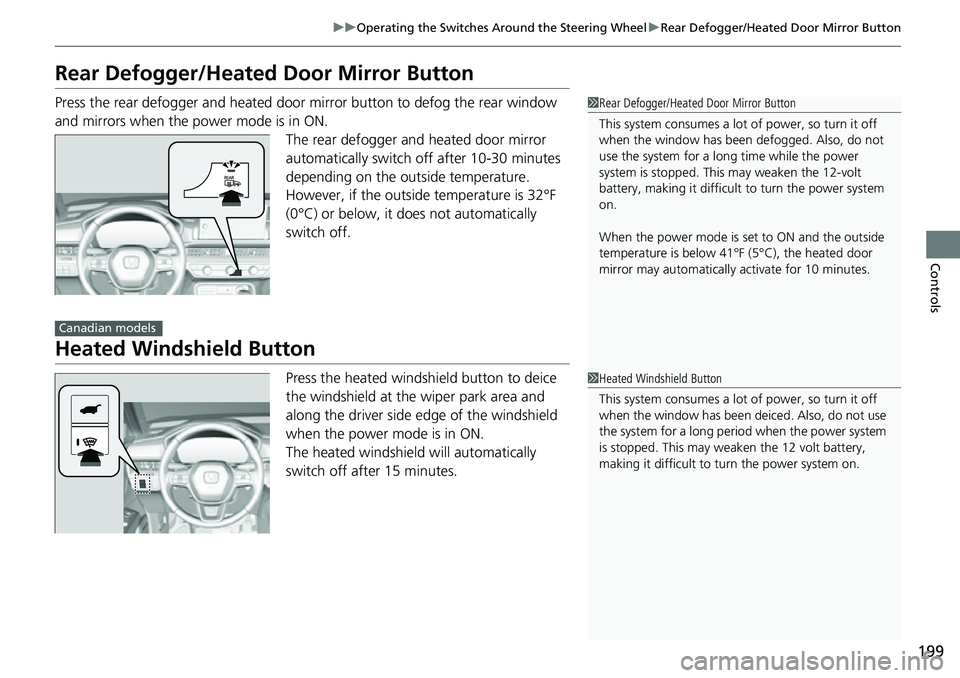
Press the rear defogger and heated door mirror button to defog the rear window
and mirrors when the power mode is in ON.
The rear defogger and heated door mirror
automatically switch off after 10-30 minutes
depending on the outside temperature.
However, if the outsid e temperature is 32°F
(0°C) or below, it does not automatically
switch off.
Heated Windshield Button
Press the heated windshield button to deice
the windshield at the wiper park area and
along the driver side edge of the windshield
when the power mode is in ON.
The heated windshield will automatically
switch off after 15 minutes.
1 Rear Defogger/Heated Door Mirror Button
This system consumes a lot of power, so turn it off
when the window has been defogged. Also, do not
use the system for a long time while the power
system is stopped. This may weaken the 12-volt
battery, making it difficult to turn the power system
on.
When the power mode is se t to ON and the outside
temperature is below 41°F (5°C), the heated door
mirror may automatically activate for 10 minutes.
Canadian models
1 Heated Windshield Button
This system consumes a lot of power, so turn it off
when the window has been deiced. Also, do not use
the system for a long period when the power system
is stopped. This may weaken the 12 volt battery,
making it difficult to turn the power system on.
Page 392 of 719
391
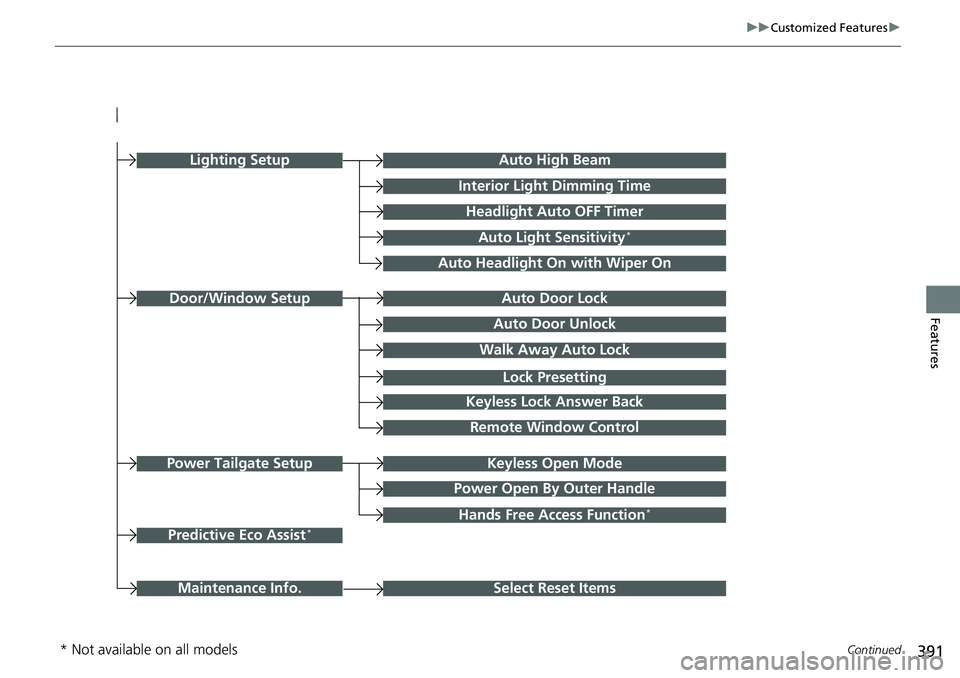
uuCustomized Features u
Continued
FeaturesAuto Door Unlock
Auto Door Lock
Walk Away Auto Lock
Keyless Lock Answer Back
Door/Window Setup
Lighting SetupAuto High Beam
Interior Light Dimming Time
Headlight Auto OFF Timer
Auto Light Sensitivity*
Auto Headlight On with Wiper On
Select Reset ItemsMaintenance Info.
Remote Window Control
Keyless Open Mode
Power Open By Outer Handle
Power Tailgate Setup
Lock Presetting
Hands Free Access Function*
Predictive Eco Assist*
* Not available on all models
Page 397 of 719
396
uuCustomized Features u
Features
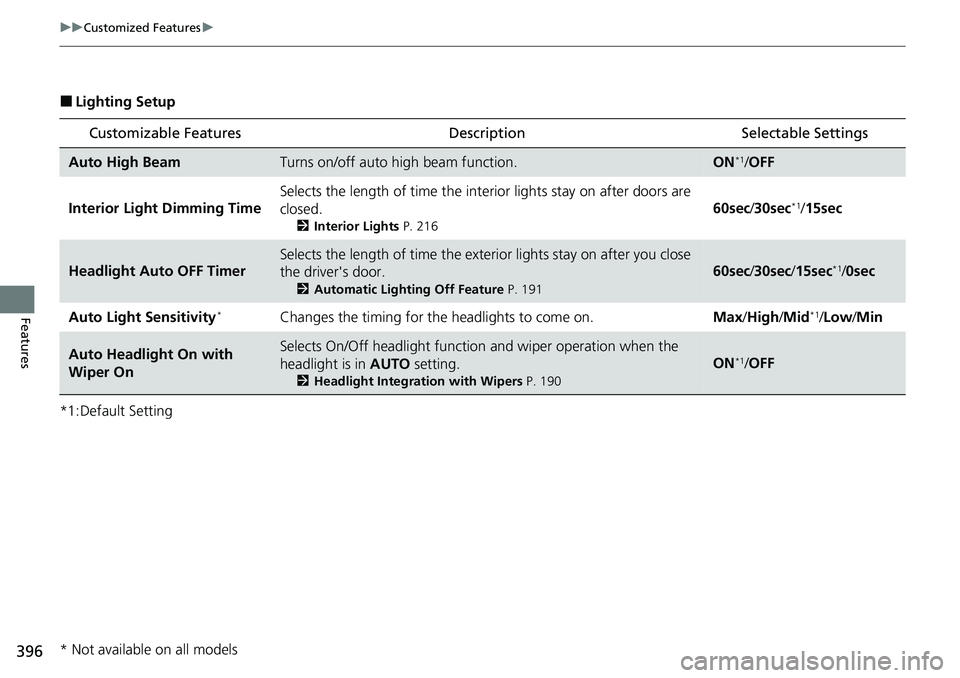
■Lighting Setup
*1:Default Setting
Customizable Features Description Selectable Settings
Auto High BeamTurns on/off auto high beam function.ON*1/OFF
Interior Light Dimming Time Selects the length of time the inte
rior lights stay on after doors are
closed.
2 Interior Lights P. 216
60sec/30sec*1/15sec
Headlight Auto OFF Timer
Selects the length of time the exterior lights stay on after you close
the driver's door.
2 Automatic Lighting Off Feature P. 191
60sec/30sec /15sec*1/0sec
Auto Light Sensitivity
*Changes the timing for the headlights to come on. Max/High/ Mid*1/Low /Min
Auto Headlight On with
Wiper OnSelects On/Off headlight function and wiper operation when the
headlight is in AUTO setting.
2Headlight Integration with Wipers P. 190
ON*1/OFF
* Not available on all models
Page 502 of 719
501
uuHonda Sensing ®u Collision Mitigation Braking SystemTM (CMBSTM)
Continued
Driving
■Vehicle conditions
• Headlight lenses are dirty or the h eadlights are not properly adjusted.
• The outside of the windshield is blocked by dirt, mud, leaves, wet snow, etc.
• The inside of the windshield is fogged.
• An abnormal tire or wheel condition (inco rrect sizes, varied sizes or construction,
improperly inflated, etc.).
• When tire chains are installed.
• The vehicle is tilted due to a heavy load or suspension modifications.
• The camera temperature gets too high.
• Driving with the parking brake applied.
• When the radar sensor behind the Hond a emblem on the front grille gets dirty.
• The vehicle is towing a trailer.
• Driving at night or in a dark place (e.g., a tunnel) with the headlights off.
• There is residue on the windshi eld from the windshield wipers.
Page 545 of 719
544
uuHonda Sensing ®u Lane Keeping Assist System (LKAS)
Driving
■Vehicle conditions
• When lighting is weak due to dirt covering the headlight lenses, or there is poor
visibility in a dark place due to th e headlights being improperly adjusted.
• The front of the camera is covered by dirt, fog, rain, mud, wet snow, seals,
accessories, stickers, or film on the windshield.
• Driving at night or in a dark place (e .g., a tunnel) with the headlights off.
• There is residue on the windshie ld from the windshield wipers.
• An abnormal tire or wheel condition (incorre ct sizes, varied sizes or construction,
improperly inflated, etc.).
• The vehicle is tilted due to a heavy load in the cargo area or rear seats.
• The suspension has been modified.
• Tire chains are installed.
• The vehicle is towing a trailer.
Page 554 of 719
553
uuHonda Sensing ®u Traffic Jam Assist
Driving
■Vehicle conditions
• When lighting is weak due to dirt covering the headlight lenses, or there is poor
visibility in a dark place due to the headlights being improperly adjusted.
• The front of the camera is covered by dirt, fog, rain, mud, wet snow, seals,
accessories, stickers, or film on the windshield.
• Driving at night or in a dark place (e.g., a tunnel) with the headlights off.
• There is residue on the windshi eld from the windshield wipers.
• An abnormal tire or wheel condition (inco rrect sizes, varied sizes or construction,
improperly inflated, etc.).
• The vehicle is tilted due to a heavy load in the cargo area or rear seats.
• The suspension has been modified.
• Tire chains are installed.
• The vehicle is towing a trailer.
Page 561 of 719
560
uuHonda Sensing ®u Road Departure Mitigation System
Driving
■Vehicle conditions
• When lighting is weak due to dirt covering the headlight lenses, or there is poor
visibility in a dark place due to th e headlights being improperly adjusted.
• The front of the camera is covered by dirt, fog, rain, mud, wet snow, seals,
accessories, stickers, or film on the windshield.
• Driving at night or in a dark place (e .g., a tunnel) with the headlights off.
• When the driver operates the brake pedal and steering wheel.
• There is residue on the windshie ld from the windshield wipers.
• An abnormal tire or wheel condition (incorre ct sizes, varied sizes or construction,
improperly inflated, etc.).
• The vehicle is tilted due to heavy lo ad in the cargo area or rear seats.
• Tire chains are installed.
• The suspension has been modified.
• The vehicle is towing a trailer.
■Examples of limitations on detectio n due to the condition of oncoming
vehicles
• The oncoming vehicle or vehicle ahead of you is sideways.
• The oncoming vehicle jumps out in front of you.
• When the oncoming vehicle blends in with the background, preventing the
system from recognizing it.
• The headlights of an oncoming vehicle are lit on one side or not lit on either side
in a dark place.
• The distance between your vehicle and the oncoming vehicle is too short.
• Part of the oncoming vehicle is not vi sible due to the vehicle ahead of you.
• There are multiple oncoming lanes or turning lanes.
• The vehicle in the adjacent lane is parked or moving at an extremely slow speed.