battery HONDA ELEMENT 2009 1.G User Guide
[x] Cancel search | Manufacturer: HONDA, Model Year: 2009, Model line: ELEMENT, Model: HONDA ELEMENT 2009 1.GPages: 345, PDF Size: 18.9 MB
Page 281 of 345
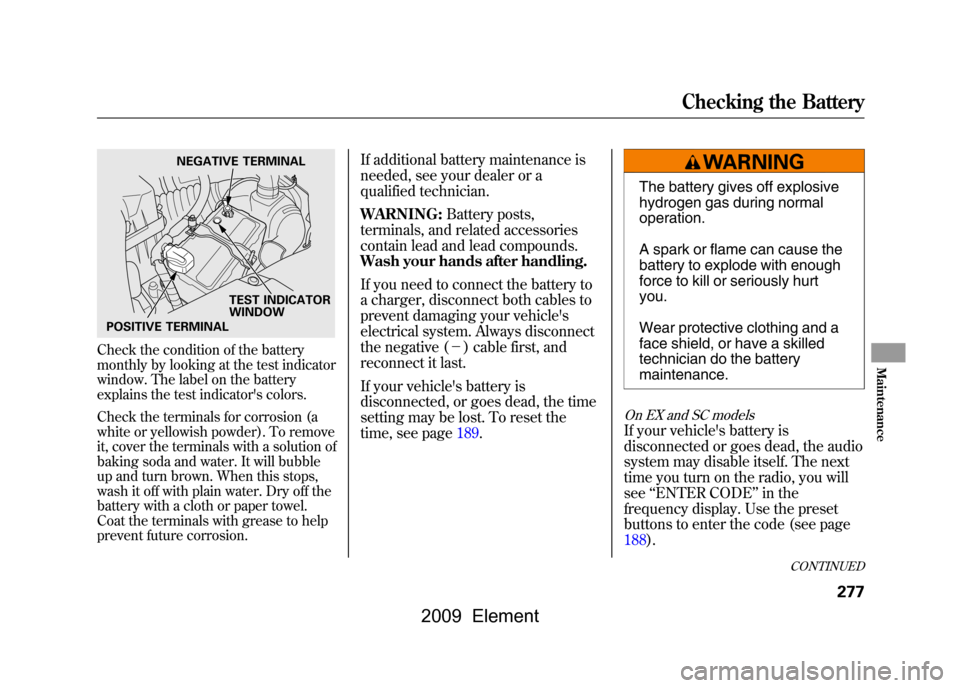
Check the condition of the battery
monthly by looking at the test indicator
window. The label on the battery
explains the test indicator's colors.
Check the terminals for corrosion (a
white or yellowish powder). To remove
it, cover the terminals with a solution of
baking soda and water. It will bubble
up and turn brown. When this stops,
wash it off with plain water. Dry off the
battery with a cloth or paper towel.
Coat the terminals with grease to help
prevent future corrosion.
If additional battery maintenance is
needed, see your dealer or a
qualified technician.
WARNING:Battery posts,
terminals, and related accessories
contain lead and lead compounds.
Wash your hands after handling.
If you need to connect the battery to
a charger, disconnect both cables to
prevent damaging your vehicle's
electrical system. Always disconnect
the negative (- ) cable first, and
reconnect it last.
If your vehicle's battery is
disconnected, or goes dead, the time
setting may be lost. To reset the
time, see page189.
The battery gives off explosive
hydrogen gas during normal
operation.
A spark or flame can cause the
battery to explode with enough
force to kill or seriously hurt
you.
Wear protective clothing and a
face shield, or have a skilled
technician do the battery
maintenance.
On EX and SC modelsIf your vehicle's battery is
disconnected or goes dead, the audio
system may disable itself. The next
time you turn on the radio, you will
see ‘‘ENTER CODE ’’in the
frequency display. Use the preset
buttons to enter the code (see page
188).
NEGATIVE TERMINAL
TEST INDICATOR
WINDOW
POSITIVE TERMINAL
CONTINUED
Checking the Battery
277
Maintenance
2009 Element
Page 282 of 345

On vehicles with navigation systemThe navigation system will also
disable itself. The next time you turn
on the ignition switch, the system
will require you to enter a PIN before
it can be used. Refer to the
navigation system manual.Vehicle Storage
If you need to park your vehicle for
an extended period (more than 1
month), there are several things you
should do to prepare it for storage.
Proper preparation helps prevent
deterioration and makes it easier to
get your vehicle back on the road. If
possible, store your vehicle indoors.
●Fill the fuel tank.●Wash and dry the exterior
completely.●Clean the interior. Make sure the
carpeting, floor mats, etc., are
completely dry.●Leave the parking brake off. Put
the transmission in reverse
(manual) or Park (automatic).
●Block the rear wheels.●If the vehicle is to be stored for a
longer period, it should be
supported on jackstands so the
tires are off the ground.●Leave one window open slightly (if
the vehicle is being stored
indoors).●Disconnect the battery.●Support the front and rear wiper
blade arms with a folded towel or
rag so they do not touch the
windshield.●To minimize sticking, apply a
silicone spray lubricant to all door
and tailgate seals. Also, apply a
vehicle body wax to the painted
surfaces that mate with the door
and tailgate seals.
Checking the Battery, Vehicle Storage278
2009 Element
Page 293 of 345
Diagnosing why the engine won't
start falls into two areas, depending
on what you hear when you turn the
ignition switch to the START (III)
position:●You hear nothing, or almost
nothing. The engine's starter
motor does not operate at all, or
operates very slowly.●You can hear the starter motor
operating normally, or the starter
motor sounds like it is spinning
faster than normal, but the engine
does not start up and run.Nothing Happens or the Starter
Motor Operates Very Slowly
When you turn the ignition switch to
the START (III) position, you do not
hear the normal noise of the engine
trying to start. You may hear a
clicking sound, a series of clicks, or
nothing at all.
Check these things:
●Check the transmission interlock.
If you have a manual transmission,
the clutch pedal must be pushed
all the way to the floor or the
starter will not operate. With an
automatic transmission, the shift
lever must be in Park or neutral.●Turn the ignition switch to the ON
(II) position. Turn on the
headlights, and check their
brightness. If the headlights are
very dim or do not come on at all,
the battery is discharged (see
Jump Starting
on page291).
●Turn the ignition switch to the
START (III) position. If the
headlights do not dim, check the
condition of the fuses. If the fuses
are OK, there is probably
something wrong with the
electrical circuit for the ignition
switch or starter motor. You will
need a qualified technician to
determine the problem. See
Emergency Towing on page303.
If the headlights dim noticeably or go
out when you try to start the engine,
either the battery is discharged or
the connections are corroded. Check
the condition of the battery and
terminal connections (see page277).
You can then try jump starting the
vehicle from a booster battery (see
page291).
CONTINUED
If the Engine Won't Start
289
Taking Care of the Unexpected
2009 Element
Page 295 of 345
Although this seems like a simple
procedure, you should take several
precautions.
A battery can explode if you do
not follow the correct
procedure, seriously injuring
anyone nearby.
Keep all sparks, open flames,
and smoking materials away
from the battery.
You cannot start your vehicle with an
automatic transmission by pushing
or pulling it.
To Jump Start Your Vehicle:1. Open the hood, and check the physical condition of the battery.
In very cold weather, check the
condition of the electrolyte. If it
seems slushy or frozen, do not try
jump starting until it thaws.If a battery sits in extreme cold, the
electrolyte inside can freeze. Attempting
to jump start with a frozen battery can
cause it to rupture.
2. Turn off all the electricalaccessories: heater, A/C, audio
system, lights, etc. Put the
transmission in neutral (manual)
or Park (automatic), and set the
parking brake.
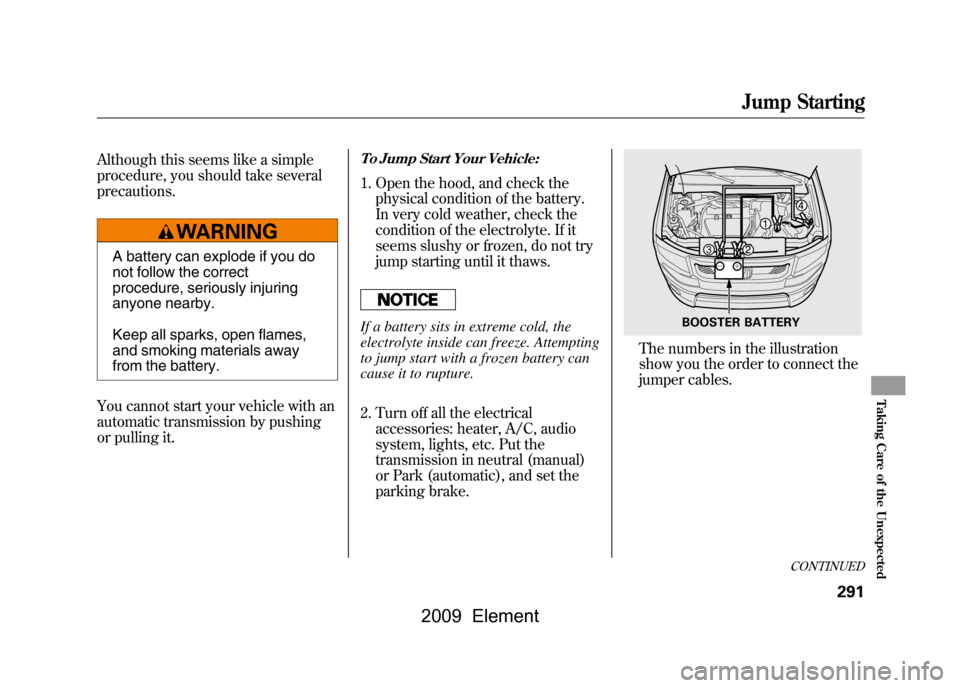
The numbers in the illustration
show you the order to connect the
jumper cables.
BOOSTER BATTERY
CONTINUED
Jump Starting
291
Taking Care of the Unexpected
2009 Element
Page 296 of 345
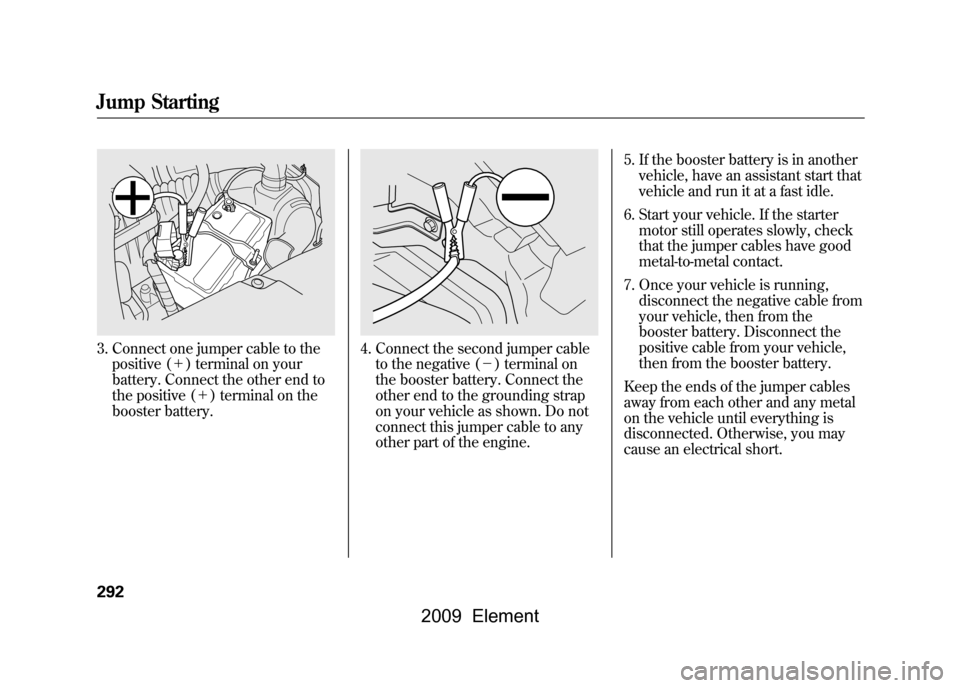
3. Connect one jumper cable to thepositive (+ ) terminal on your
battery. Connect the other end to
the positive (+ ) terminal on the
booster battery.
4. Connect the second jumper cable to the negative (- ) terminal on
the booster battery. Connect the
other end to the grounding strap
on your vehicle as shown. Do not
connect this jumper cable to any
other part of the engine. 5. If the booster battery is in another
vehicle, have an assistant start that
vehicle and run it at a fast idle.
6. Start your vehicle. If the starter motor still operates slowly, check
that the jumper cables have good
metal-to-metal contact.
7. Once your vehicle is running, disconnect the negative cable from
your vehicle, then from the
booster battery. Disconnect the
positive cable from your vehicle,
then from the booster battery.
Keep the ends of the jumper cables
away from each other and any metal
on the vehicle until everything is
disconnected. Otherwise, you may
cause an electrical short.
Jump Starting292
2009 Element
Page 299 of 345
Low Oil Pressure Indicator
This indicator should never
come on when the engine is
running. If it starts flashing or stays
on, the oil pressure has dropped very
low or lost pressure. Serious engine
damage is possible, and you should
take immediate action.
Running the engine with low oil
pressure can cause serious mechanical
damage almost immediately. Turn off
the engine as soon as you can safely get
the vehicle stopped. 1. Safely pull off the road, and shut
off the engine. Turn on the hazard
warning lights.
2. Let the vehicle sit for a minute. Open the hood, and check the oil
level (see page201).An engine
very low on oil can lose pressure
during cornering and other driving
maneuvers.
3. If necessary, add oil to bring the level back to the full mark on the
dipstick (see page251).
4. Start the engine, and watch the oil pressure indicator. If it does not go
out within 10 seconds, turn off the
engine. There is a mechanical
problem that needs to be repaired
before you can continue driving
(see Emergency Towing on page
303). Charging System Indicator
If the charging system
indicator comes on brightly
when the engine is running, the
battery is not being charged.
Immediately turn off all electrical
accessories. Try not to use other
electrically operated controls such as
the power windows. Keep the engine
running; starting the engine will
discharge the battery rapidly.
Go to a service station or garage
where you can get technical
assistance.
Low Oil Pressure Indicator, Charging System Indicator
295
Taking Care of the Unexpected
2009 Element
Page 300 of 345
If this indicator comes on
while driving, it means one
of the engine's emissions control
systems may have a problem. Even
though you may feel no difference in
your vehicle's performance, it can
reduce your fuel economy and cause
increased emissions. Continued
operation may cause serious damage.
If you have recently refueled your
vehicle, the indicator coming on
could be due to a loose or missing
fuel fill cap. You will also see a
‘‘ CHECK FUEL CAP ’’message on
the information display. Tighten the
cap until it clicks at least once.
Tightening the cap will not turn the
indicator off immediately; it can take
several days of normal driving. If the indicator comes on repeatedly,
even though it may turn off as you
continue driving, have your vehicle
checked by your dealer as soon as
possible.
If you keep driving with the malfunction
indicator lamp on, you can damage
your vehicle's emissions controls and
engine. Those repairs may not be
covered by your vehicle's warranties.
If your vehicle has an automatic
transmission, the malfunction
indicator lamp may also come on
with the
‘‘D ’’indicator.
Readiness CodesYour vehicle has certain ‘‘readiness
codes ’’that are part of the on-board
diagnostics for the emissions
systems. In some states, part of the
emissions testing is to make sure
these codes are set. If they are not
set, the test cannot be completed.
If the battery in your vehicle has been
disconnected or gone dead, these
codes may be erased. It can take
several days of driving under various
conditions to set the codes again.
To check if they are set, turn the
ignition switch to the ON (II)
position, without starting the engine.
The malfunction indicator lamp will
come on for 20 seconds. If it then
goes off, the readiness codes are set.
If it blinks five times, the readiness
codes are not set. If possible, do not
take your vehicle for an emissions
test until the readiness codes are set.
Refer to Emissions Testing for more
information (see page319).
Malfunction Indicator Lamp296
2009 Element
Page 306 of 345
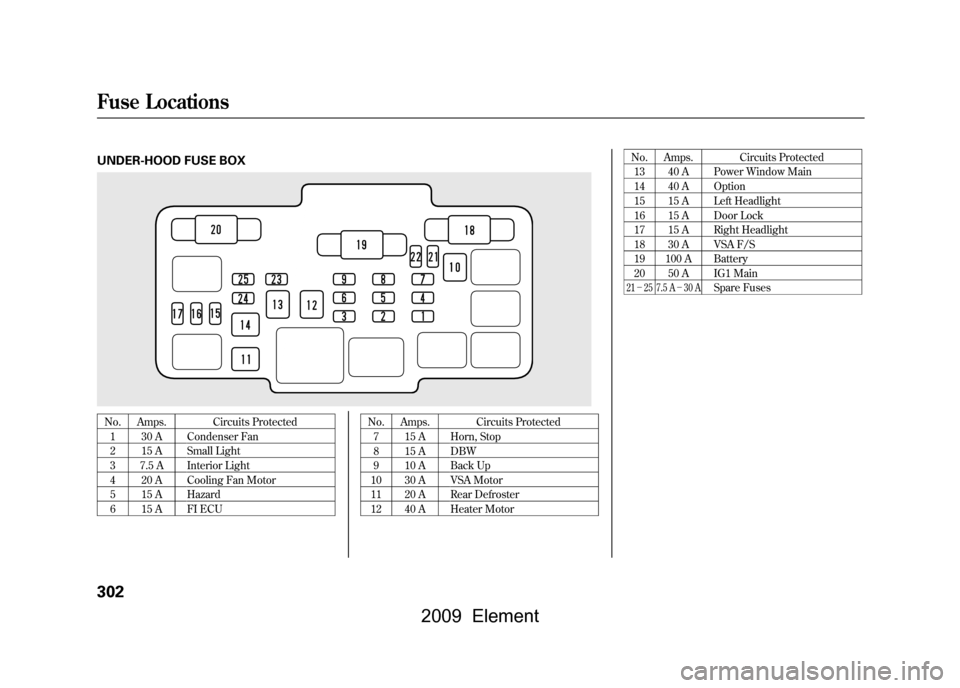
UNDER-HOOD FUSE BOXNo. Amps. Circuits Protected1 30 A Condenser Fan
2 15 A Small Light
3 7.5 A Interior Light
4 20 A Cooling Fan Motor
5 15 A Hazard
6 15 A FI ECU No. Amps. Circuits Protected
7 15 A Horn, Stop
8 15 A DBW
9 10 A Back Up
10 30 A VSA Motor
11 20 A Rear Defroster
12 40 A Heater Motor No. Amps. Circuits Protected
13 40 A Power Window Main
14 40 A Option
15 15 A Left Headlight
16 15 A Door Lock
17 15 A Right Headlight
18 30 A VSA F/S
19 100 A Battery
20 50 A IG1 Main
21 - 25 7.5 A -30 A
Spare Fuses
Fuse Locations302
2009 Element
Page 314 of 345

Air ConditioningRefrigerant type HFC-134a (R-134a)
Charge quantity 17.6-19.4 oz (500 -550 g)
Lubricant type ND-OIL8
Lights Headlights 12 V-60/55 W (H4/HB2)
Daytime running lights 12 V-60 W (HB3)
Front turn signal/parking lights 12 V -27/8 W (Amber)
Front side marker lights 12 V-3CP
Side turn signal lights 12 V-3CP
Rear turn signal lights 12 V-21 W (Amber)
Rear side marker lights 12 V-3CP
Brake/Taillights 12 V-21/5 W
Back-up lights 12 V-21CP
License plate lights 12 V-5W
Ceiling light 12 V-8W
ꭧ1
12 V -5W
ꭧ2, ꭧ3
Spotlights 12 V-8W
ꭧ2, ꭧ3
Cargo area light 12 V-8W
High-mount brake light 12 V-21 W
Battery Capacity 12 V-47 AH/20 HR
12 V -38 AH/5 HR Fuses
Interior See page301or the fuse label
attached to the inside of the fuse
box door under the steering
column.
Under-hood See page302or the fuse box cover.
Alignment Toe-in Front 0.0 in (0 mm)
Rear 0.08 in (2.0 mm)
Camber Front -0°13 ’
ꭧ1, ꭧ2
- 0°24 ’
ꭧ3
Rear -1°00 ’
ꭧ1, ꭧ2
- 1°06 ’
ꭧ3
Caster Front 1°50’
Tires Size Front/Rear P215/70R16 99S
ꭧ1, ꭧ2
P225/55R18 97H
ꭧ3
Pressure Front 33 psi (230 kPa, 2.3 kgf/cm
2)ꭧ1, ꭧ2
32 psi (220 kPa, 2.2 kgf/cm
2)ꭧ3
Rear 35 psi (240 kPa, 2.4 kgf/cm
2)ꭧ1, ꭧ2
32 psi (220 kPa, 2.2 kgf/cm
2)ꭧ3
Spare 60 psi (420 kPa, 4.2 kgf/cm
2)
ꭧ 1: LX model
ꭧ 2: EX model
ꭧ 3: SC model
Specifications310
2009 Element
Page 323 of 345

Testing of Readiness Codes
If you take your vehicle for an
emissions test shortly after the
battery has been disconnected or
gone dead, it may not pass the test.
This is because of certain‘‘readiness
codes ’’that must be set in the on-
board diagnostics for the emissions
systems. These codes are erased
when the battery is disconnected,
and set again only after several days
of driving under a variety of
conditions. If the testing facility determines that
the readiness codes are not set, you
will be requested to return at a later
date to complete the test. If you must
get the vehicle retested within the
next two or three days, you can
condition the vehicle for retesting by
doing the following.
1. Make sure the fuel tank is nearly,
but not completely full (around
3/4).
2. Make sure the vehicle has been parked with the engine off for 6
hours or more.
3. Make sure the ambient temperature is between 40° and
95°F (4° and 35°C). 4. Without touching the accelerator
pedal, start the engine, and let it
idle for 20 seconds.
5. Keep the vehicle in Park (automatic transmission) or
neutral (manual transmission).
Increase the engine speed to 2,000
rpm, and hold it there until the
temperature gauge rises to at least
1/4 of the scale (about 3 minutes).
6. Without touching the accelerator pedal, let the engine idle for 20
seconds.
CONTINUED
Emissions Testing
319
Technical Information
2009 Element