battery HONDA ELEMENT 2009 1.G Owners Manual
[x] Cancel search | Manufacturer: HONDA, Model Year: 2009, Model line: ELEMENT, Model: HONDA ELEMENT 2009 1.GPages: 345, PDF Size: 18.9 MB
Page 5 of 345

2009 Element Online Reference Owner's Manual
Contents
Owner's Identification Form
Introduction .......................................................................................................................................................... i A Few Words About Safety .............................................................................................................................. iii Important Handling Information .................................................................................................................... iv
Your Vehicle at a Glance (main controls) .................................................................................................... 3
Driver and Passenger Safety (seat belts, SRS, and child protection) .................................................... 5
Instruments and Controls
(indicators, gauges, dashboard, and steering column)
............................................ 55
Features (
heating and cooling, audio, steering wheel, cruise control and other convenience items
)
................... 103
Before Driving (fuel, vehicle break- in, and cargo loading) ..................................................................... 197
Driving (engine and transmission operation) ................................................................................................ 213
Maintenance (minder, fluid checking, minor services, and vehicle storage)........................................... 241
Taking Care of the Unexpected (flat tire, dead battery, overheating, and fuses) ............................. 281
Technical Information (vehicle specifications, tires, and emissions controls) ....................................... 305
Warranty and Customer Relations (U. S. and Canada only) (warranty and contact information) ... 321
Index ........................................................................................................................................................................ I
Service Information Summary ( fluid capacities and tire pressures)
1 00X31-SCV-6600
Page 62 of 345
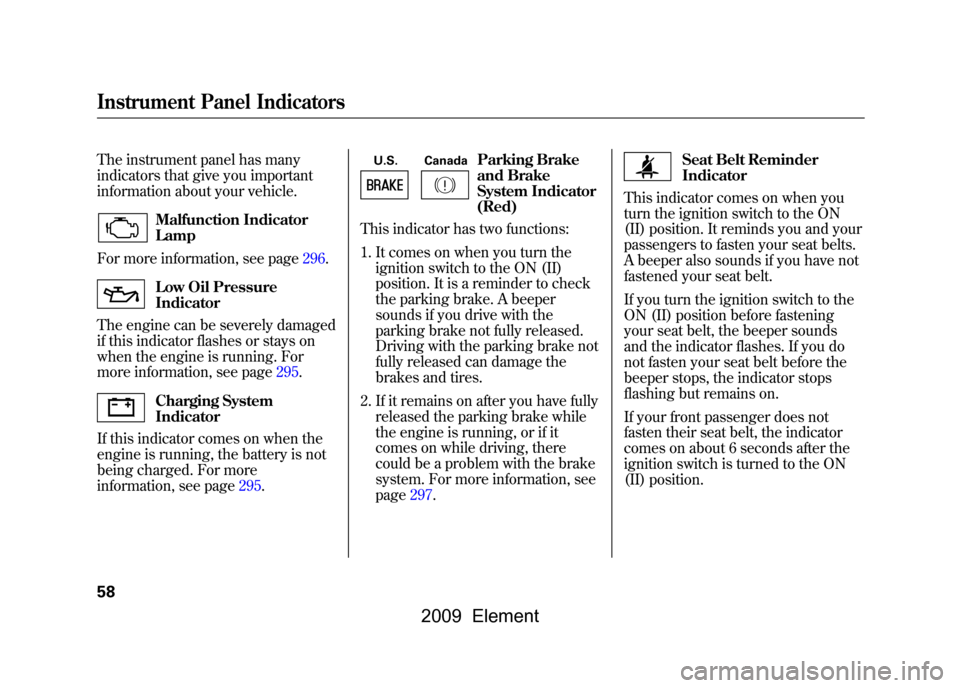
The instrument panel has many
indicators that give you important
information about your vehicle.
Malfunction Indicator
Lamp
For more information, see page296.Low Oil Pressure
Indicator
The engine can be severely damaged
if this indicator flashes or stays on
when the engine is running. For
more information, see page295.Charging System
Indicator
If this indicator comes on when the
engine is running, the battery is not
being charged. For more
information, see page295.
U.S. Canada
Parking Brake
and Brake
System Indicator
(Red)
This indicator has two functions:
1. It comes on when you turn the ignition switch to the ON (II)
position. It is a reminder to check
the parking brake. A beeper
sounds if you drive with the
parking brake not fully released.
Driving with the parking brake not
fully released can damage the
brakes and tires.
2. If it remains on after you have fully released the parking brake while
the engine is running, or if it
comes on while driving, there
could be a problem with the brake
system. For more information, see
page297.
Seat Belt Reminder
Indicator
This indicator comes on when you
turn the ignition switch to the ON
(II) position. It reminds you and your
passengers to fasten your seat belts.
A beeper also sounds if you have not
fastened your seat belt.
If you turn the ignition switch to the
ON (II) position before fastening
your seat belt, the beeper sounds
and the indicator flashes. If you do
not fasten your seat belt before the
beeper stops, the indicator stops
flashing but remains on.
If your front passenger does not
fasten their seat belt, the indicator
comes on about 6 seconds after the
ignition switch is turned to the ON
(II) position.
Instrument Panel Indicators58
2009 Element
Page 82 of 345
UNLOCK-Press this button once
to unlock the driver's door. Push it
twice to unlock the passenger's door
and the hatch. Some exterior lights
will flash twice each time you press
the button. If you do not open either
door or the hatch within 30 seconds,
they will automatically relock.
PANIC -Press this button for
about 1 second to attract attention;
the horn will sound and the exterior
lights will flash for about 30 seconds.
To cancel panic mode, press any
other button on the remote
transmitter, or turn the ignition
switch to the ON (II) position.
Remote Transmitter Care●Avoid dropping or throwing the
transmitter.●Protect the transmitter from
extreme temperature.●Do not immerse the transmitter in
any liquid.●If you lose a transmitter, the
replacement needs to be
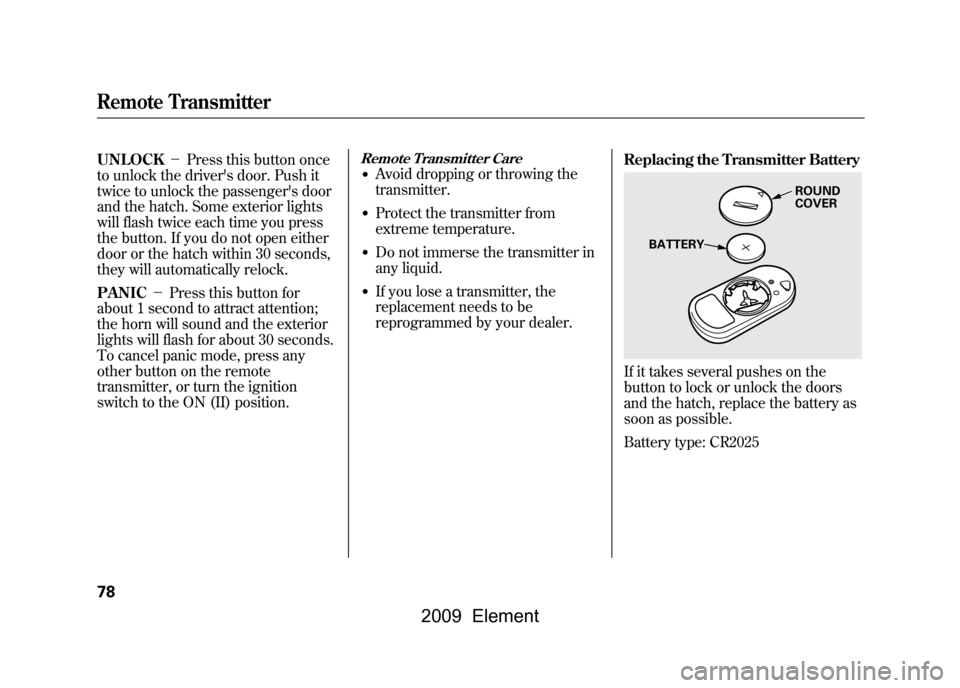
reprogrammed by your dealer. Replacing the Transmitter Battery
If it takes several pushes on the
button to lock or unlock the doors
and the hatch, replace the battery as
soon as possible.
Battery type: CR2025
ROUND
COVER
BATTERY
Remote Transmitter78
2009 Element
Page 83 of 345
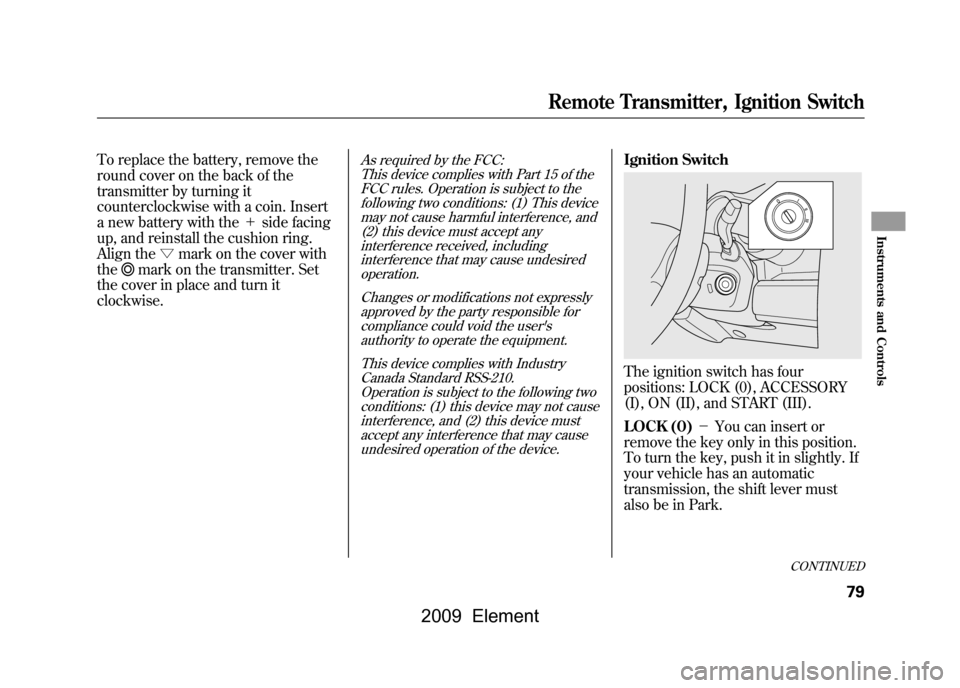
To replace the battery, remove the
round cover on the back of the
transmitter by turning it
counterclockwise with a coin. Insert
a new battery with the+side facing
up, and reinstall the cushion ring.
Align the ▽mark on the cover with
the
mark on the transmitter. Set
the cover in place and turn it
clockwise.
As required by the FCC:
This device complies with Part 15 of theFCC rules. Operation is subject to the
following two conditions: (1) This devicemay not cause harmful interference, and(2) this device must accept any
interference received, includinginterference that may cause undesiredoperation.
Changes or modifications not expresslyapproved by the party responsible for
compliance could void the user'sauthority to operate the equipment.
This device complies with IndustryCanada Standard RSS-210.
Operation is subject to the following twoconditions: (1) this device may not causeinterference, and (2) this device must
accept any interference that may causeundesired operation of the device.
Ignition SwitchThe ignition switch has four
positions: LOCK (0), ACCESSORY
(I), ON (II), and START (III).
LOCK (0) -You can insert or
remove the key only in this position.
To turn the key, push it in slightly. If
your vehicle has an automatic
transmission, the shift lever must
also be in Park.
CONTINUED
Remote Transmitter, Ignition Switch
79
Instruments and Controls
2009 Element
Page 96 of 345
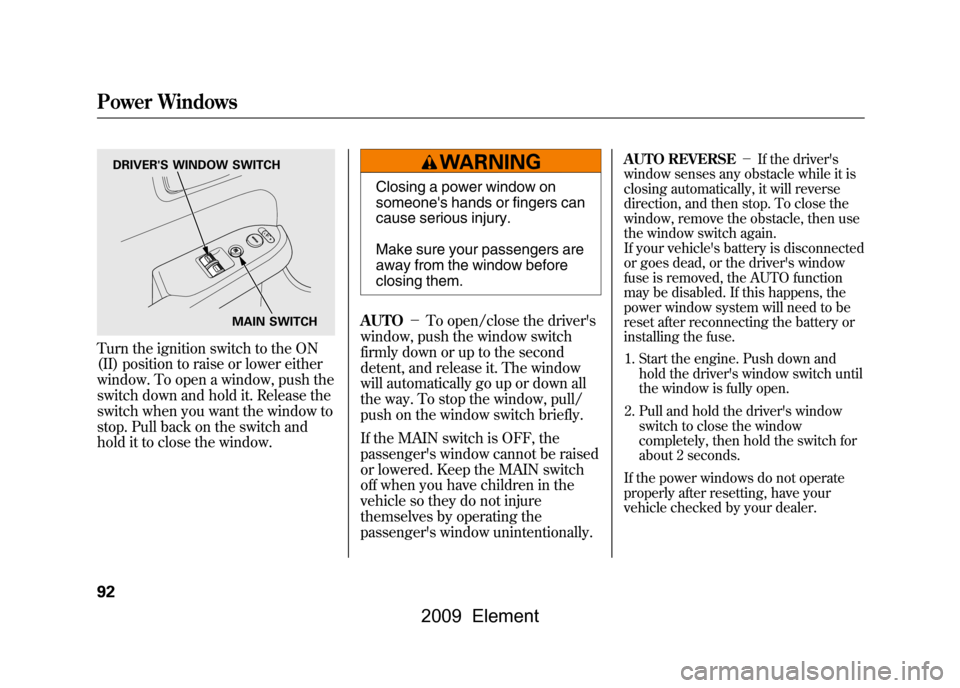
Turn the ignition switch to the ON
(II) position to raise or lower either
window. To open a window, push the
switch down and hold it. Release the
switch when you want the window to
stop. Pull back on the switch and
hold it to close the window.
Closing a power window on
someone's hands or fingers can
cause serious injury.
Make sure your passengers are
away from the window before
closing them.
AUTO -To open/close the driver's
window, push the window switch
firmly down or up to the second
detent, and release it. The window
will automatically go up or down all
the way. To stop the window, pull/
push on the window switch briefly.
If the MAIN switch is OFF, the
passenger's window cannot be raised
or lowered. Keep the MAIN switch
off when you have children in the
vehicle so they do not injure
themselves by operating the
passenger's window unintentionally.
AUTO REVERSE -If the driver's
window senses any obstacle while it is
closing automatically, it will reverse
direction, and then stop. To close the
window, remove the obstacle, then use
the window switch again.
If your vehicle's battery is disconnected
or goes dead, or the driver's window
fuse is removed, the AUTO function
may be disabled. If this happens, the
power window system will need to be
reset after reconnecting the battery or
installing the fuse.
1. Start the engine. Push down and hold the driver's window switch until
the window is fully open.
2. Pull and hold the driver's window switch to close the window
completely, then hold the switch for
about 2 seconds.
If the power windows do not operate
properly after resetting, have your
vehicle checked by your dealer.
DRIVER'S WINDOW SWITCH
MAIN SWITCH
Power Windows92
2009 Element
Page 192 of 345

On EX and SC modelsYour vehicle's audio system will
disable itself if it is disconnected
from electrical power for any reason.
To make it work again, you must
enter a specific code in the preset
buttons (icon on vehicle's with
navigation system). Because there
are hundreds of number
combinations possible from specific
digits, making the system work
without knowing the exact code is
nearly impossible.
You should have received a radio
code card that lists your audio
system's code and serial numbers. It
is best to store this card in a safe
place at home. In addition, you
should write the audio system's
serial number in this owner's
manual.
If you lose the card, you must obtain
the code number from a dealer. To
do this, you will need the system's
serial number.If your vehicle's battery is
disconnected or goes dead, or the
radio fuse is removed, the audio
system will disable itself. If this
happens, you will see
‘‘ENTER
CODE ’’in the frequency display the
next time you turn on the system.
Use the preset buttons (icons on
vehicles with navigation system) to
enter the code. The code is on the
radio code card included in your
owner's manual kit. When it is
entered correctly, the radio will start
playing.
If you make a mistake entering the
code, do not start over; complete the
sequence, then enter the correct
code. You have 10 tries to enter the
correct code. If you are unsuccessful
in 10 attempts, you must then leave
the system on for 1 hour before
trying again.Radio Theft Protection188
2009 Element
Page 193 of 345
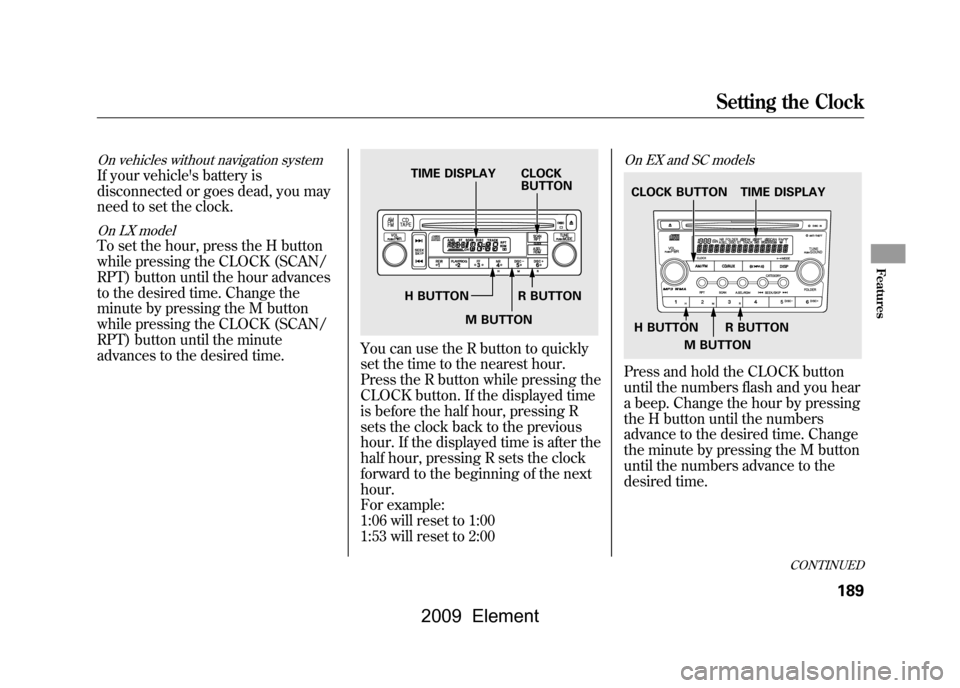
On vehicles without navigation systemIf your vehicle's battery is
disconnected or goes dead, you may
need to set the clock.On LX modelTo set the hour, press the H button
while pressing the CLOCK (SCAN/
RPT) button until the hour advances
to the desired time. Change the
minute by pressing the M button
while pressing the CLOCK (SCAN/
RPT) button until the minute
advances to the desired time.
You can use the R button to quickly
set the time to the nearest hour.
Press the R button while pressing the
CLOCK button. If the displayed time
is before the half hour, pressing R
sets the clock back to the previous
hour. If the displayed time is after the
half hour, pressing R sets the clock
forward to the beginning of the next
hour.
For example:
1:06 will reset to 1:00
1:53 will reset to 2:00
On EX and SC modelsPress and hold the CLOCK button
until the numbers flash and you hear
a beep. Change the hour by pressing
the H button until the numbers
advance to the desired time. Change
the minute by pressing the M button
until the numbers advance to the
desired time.
TIME DISPLAY CLOCKBUTTON
H BUTTON R BUTTON M BUTTON
TIME DISPLAY
CLOCK BUTTON
H BUTTON R BUTTON
M BUTTON
CONTINUED
Setting the Clock
189
Features
2009 Element
Page 220 of 345
1. Apply the parking brake.
2. In cold weather, turn off allelectrical accessories to reduce the
drain on the battery.
3.Manual transmission:Press the clutch pedal down all the
way. The START (III) position
does not function unless the clutch
pedal is pressed.Automatic transmission:Make sure the shift lever is in
Park. Press on the brake pedal. 4. Without touching the accelerator
pedal, turn the ignition key to the
START (III) position. Do not hold
the key in the START (III) position
for more than 15 seconds at a time.
If the engine does not start right
away, pause for at least 10 seconds
before trying again.
The immobilizer system protects your
vehicle from theft. If an improperly
coded key (or other device) is used, the
engine's fuel system is disabled. For
more information, see page76.
5. If the engine does not start within15 seconds, or starts but stalls
right away, repeat step 4 with the
accelerator pedal pressed halfway
down. If the engine starts, release
pressure on the accelerator pedal
so the engine does not race. 6. If the engine fails to start, press
the accelerator pedal all the way
down, and hold it there while
starting to clear flooding. If the
engine still does not start, return to
step 5.
The engine is harder to start in cold
weather. Also, the thinner air found at
altitudes above 8,000 feet (2,400
meters) adds to this problem.
Starting the Engine216
2009 Element
Page 245 of 345
This section explains why it is
important to keep your vehicle well
maintained and how to follow basic
maintenance safety precautions.
This section also includes
instructions on how to read the
maintenance minder messages on
the information display, and
instructions for simple maintenance
tasks you may want to take care of
yourself.
If you have the skills and tools to
perform more complex maintenance
tasks on your vehicle, you may want
to purchase the service manual. See
page325for information on how to
obtain a copy, or see your dealer.Maintenance Safety
.....................
242
Maintenance Minder
..................
243
Fluid Locations
...........................
250
Adding Engine Oil
......................
251
Changing the Engine Oil and Filter
.......................................
252
Engine Coolant
...........................
254
Windshield Washers
...................
255
Transmission Fluid
.....................
256
Automatic Transmission Fluid
...................................
256
Manual Transmission Fluid
....
257
Rear Differential Fluid
.................
258
Brake and Clutch Fluid
...............
258
Power Steering Fluid
..................
260
Cleaning the Body Panels
...........
260
Lights
..........................................
261
Cleaning the Seat Belts
...............
268
Floor Mats
..................................
268
Dust and Pollen Filter
.................
269
Wiper Blades
..............................
269
Wheels
........................................
271
Tires
...........................................
271
Checking the Battery
..................
277 Vehicle Storage
...........................
278
Maintenance
241
Maintenance
2009 Element
Page 246 of 345
All service items not detailed in this
section should be performed by a
certified technician or other qualified
mechanic.
Important Safety Precautions
To eliminate potential hazards, read
the instructions before you begin,
and make sure you have the tools
and skills required.●Make sure your vehicle is parked
on level ground, the parking brake
is set, and the engine is off.●To clean parts, use a commercially
available degreaser or parts
cleaner, not gasoline.●To reduce the possibility of fire or
explosion, keep cigarettes, sparks,
and flames away from the battery
and all fuel-related parts.
●Wear eye protection and protective
clothing when working with the
battery or compressed air.Improperly maintaining this
vehicle, or failing to correct a
problem before driving can
cause a crash in which you can
be seriously hurt or killed.
Always follow the inspection
and maintenance
recommendations and
schedules in this owner's
manual.
Potential Vehicle Hazards●Carbon Monoxide poison from
engine exhaust.Be sure there is
adequate ventilation whenever you
operate the engine.
●Burns from hot parts. Let the
engine and exhaust system cool
down before touching any parts.●Injury from moving parts. Do not
run the engine unless instructed to
do so.Failure to properly follow
maintenance instructions and
precautions can cause you to be
seriously hurt or killed.
Always follow the procedures
and precautions in this owner's
manual.
Some of the most important safety
precautions are given here. However,
we cannot warn you of every
conceivable hazard that can arise in
performing maintenance. Only you
can decide whether or not you should
perform a given task.
Maintenance Safety242
2009 Element