window HONDA ELEMENT 2009 1.G User Guide
[x] Cancel search | Manufacturer: HONDA, Model Year: 2009, Model line: ELEMENT, Model: HONDA ELEMENT 2009 1.GPages: 345, PDF Size: 18.9 MB
Page 98 of 345
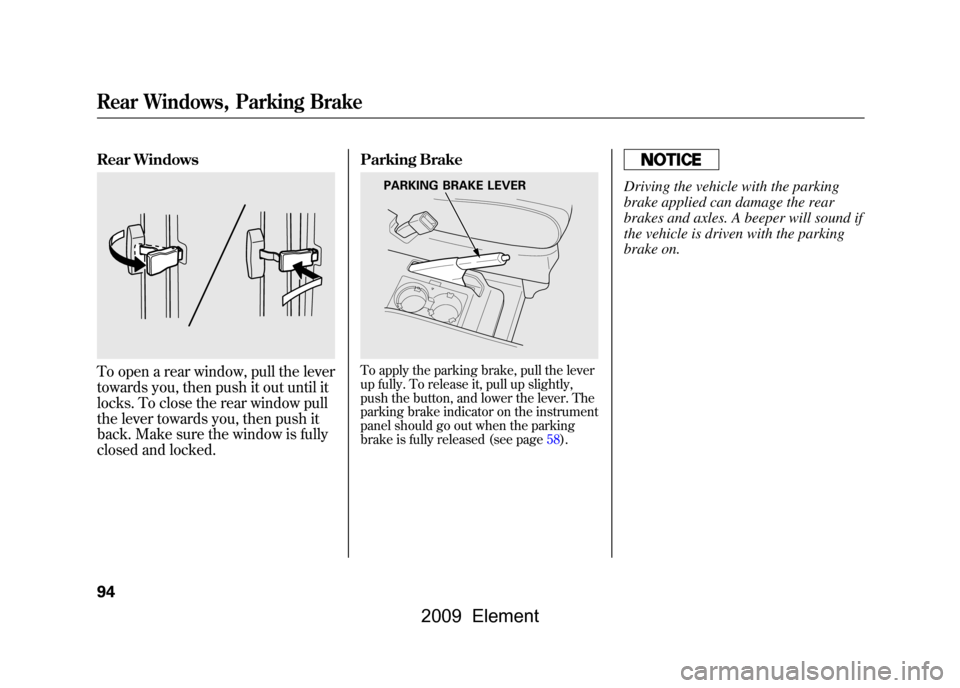
Rear WindowsTo open a rear window, pull the lever
towards you, then push it out until it
locks. To close the rear window pull
the lever towards you, then push it
back. Make sure the window is fully
closed and locked.Parking Brake
To apply the parking brake, pull the lever
up fully. To release it, pull up slightly,
push the button, and lower the lever. The
parking brake indicator on the instrument
panel should go out when the parking
brake is fully released (see page58).
Driving the vehicle with the parking
brake applied can damage the rear
brakes and axles. A beeper will sound if
the vehicle is driven with the parking
brake on.
PARKING BRAKE LEVER
Rear Windows, Parking Brake94
2009 Element
Page 104 of 345
Accessory Power Sockets
Your vehicle has one, two, or three
accessory power sockets, depending
on the model. All models have a front
accessory power socket on the
dashboard above the glove box.
EX and SC models have an accessory
power socket in the cargo area on
the passenger's side.
The SC model has one additional
socket in the center console.
These sockets are intended to supply
power for 12 volt DC accessories that
are rated 120 watts or less (10 amps).
None of the sockets will power an
automotive type cigarette lighter
element. When more than one
socket is being used, the combined
power rating of the accessories
should be 120 watts or less (10
amps).Glove Box
Open the glove box by pulling the
bottom of the handle. Close it with a
firm push. Lock or unlock the glove
box with the master key.
An open glove box can cause
serious injury to your passenger
in a crash, even if the
passenger is wearing the seat
belt.
Always keep the glove box
closed while driving.
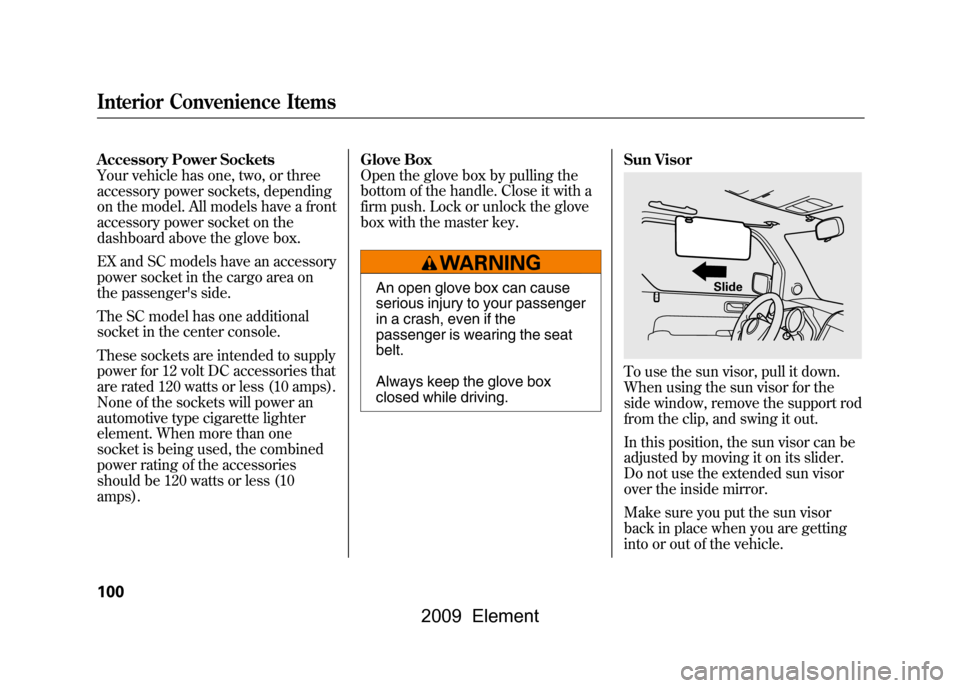
Sun Visor
To use the sun visor, pull it down.
When using the sun visor for the
side window, remove the support rod
from the clip, and swing it out.
In this position, the sun visor can be
adjusted by moving it on its slider.
Do not use the extended sun visor
over the inside mirror.
Make sure you put the sun visor
back in place when you are getting
into or out of the vehicle.
Slide
Interior Convenience Items100
2009 Element
Page 107 of 345
The heating and air conditioning
system in your vehicle provides a
comfortable driving environment in all
weather conditions.
The standard audio system has many
features. This section describes those
features and how to use them. (If you
have an optional audio system, refer to
the operating instructions that came
with it.)On EX and SC modelsYour vehicle has an anti-theft audio
system that requires a code number to
enable it.
Vents, Heating, and A/C
..............
104
Air Flow Controls
.....................
105
Ventilation
...............................
106
Using the Heater
.....................
106
Using the A/C
.........................
106
Dehumidify the Interior
...........
107 To Defog and Defrost
..............
107
To Remove Exterior Frost or Ice From the Windows
..............
108
To Turn Everything Off
............
108
Audio System
..............................
109
Playing the FM/AM Radio (Models without navigation
system)
................................
110
Playing the XM
®Radio (Models
without navigation system)
......
113
Playing a Disc (Models without navigation system)
...................
119
Disc Player Error Messages
(Models without navigationsystem)
................................
125
Disc Changer Error Messages
(Models without navigationsystem)
................................
126
Playing the FM/AM Radio
(Models with navigationsystem)
................................
127
Playing the XM
®Radio (Models
with navigation system)
...........
132
Playing a Disc (Models with navigation system)
...................
140 Disc Player Error Messages
(Models with navigationsystem)
................................
148
Playing a PC Card (Models with
navigation system)
...................
149
PC Card Error Messages (Models with navigation system)
...........
161
Playing an iPod
®(Models with
navigation system)
...................
162
iPod
®Error Messages (Models
with navigation system)
...........
172
Playing a USB Flash Memory Device (Models with navigation
system)
................................
173
USB Flash Memory Device Error Messages (Models with
navigation system)
...............
182
Protecting Your Discs
..................
183
FM/AM Radio Reception
.............
186
Radio Theft Protection
.................
188
Setting the Clock
.........................
189
Remote Audio Controls
................
191
Auxiliary Input Jack
.....................
192
Cruise Control
.............................
193
Rearview Camera and Monitor
.....
196
Features
103
Features
2009 Element
Page 108 of 345
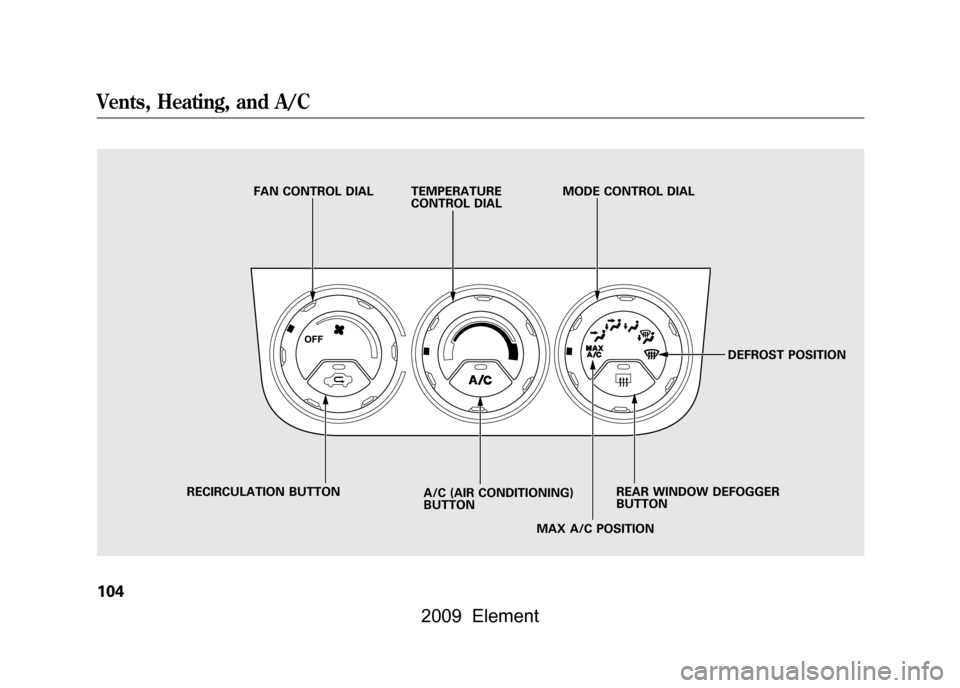
FAN CONTROL DIAL TEMPERATURECONTROL DIALMODE CONTROL DIAL
DEFROST POSITION
REAR WINDOW DEFOGGER
BUTTON
MAX A/C POSITION
A/C (AIR CONDITIONING)
BUTTON
RECIRCULATION BUTTON
Vents, Heating, and A/C104
2009 Element
Page 109 of 345

Air Flow Controls
Fan Control Dial
Turn this dial clockwise to increase
the fan speed and airflow.
Temperature Control Dial
Turning this dial clockwise increases
the temperature of the airflow.
Air Conditioning (A/C) Button
This button turns the air
conditioning on and off. The
indicator in the button is on when the
A/C is on.
Recirculation ButtonWhen the recirculation indicator is
on, air from the vehicle's interior is
sent throughout the system again.
When the indicator is off, air is
brought in from the outside of the
vehicle (fresh air mode).The outside air intakes for the
heating and cooling system are at the
base of the windshield. Keep this
area clear of leaves and other debris.
The system should be left in fresh air
mode under almost all conditions.
Keeping the system in recirculation
mode, particularly with the A/C off,
can cause the windows to fog up.
Switch to recirculation mode when
driving through dusty or smoky
conditions, then return to fresh air
mode.
Rear Window Defogger Button
This button turns the rear window
defogger on and off (see page74).
Mode Control Dial
Use the mode control dial to select
the vents the air flows from. Some air
will flow from the dashboard vents in
all modes.
The system automatically turns
on the A/C and switches to
recirculation mode. Air flows from
the center and side vents in the
dashboard (see page106).
Air flows from the center and
corner vents in the dashboard.Airflow is divided between the
vents in the dashboard and the floor
vents.Air flows from the floor vents.
When you select
, the system
automatically switches to fresh air
mode.
Airflow is divided between the
floor vents and the defroster vents at
the base of the windshield.
CONTINUED
Vents, Heating, and A/C
105
Features
2009 Element
Page 110 of 345

Air flows from the defroster
vents at the base of the windshield.
When you select
or
, the
system automatically switches to
fresh air mode and turns on the A/C.
The A/C indicator does not come on.
Ventilation
The flow-through ventilation system
draws in outside air, circulates it
through the interior, then discharges
it through vents near the tailgate.
1. Set the temperature to the lower limit.
2. Make sure the A/C is off.
3. Select
and fresh air mode.
4. Set the fan to the desired speed. Using the Heater
The heater uses engine coolant to
warm the air. If the engine is cold, it
will be several minutes before you
feel warm air coming from the
system.
1. Select
and fresh air mode.
2. Set the fan to the desired speed.
3. Adjust the warmth of the air with the temperature control dial.
Using the A/C
Air conditioning places an extra load
on the engine. Watch the engine
coolant temperature gauge (see page
67).If it moves near the red zone,
turn off the A/C until the gauge
reading returns to normal.
1. Turn on the A/C by pressing the button. The indicator in the button
comes on when a fan speed is
selected.
2. Set the temperature to the lower limit. 3. Select
.
4. If the outside air is humid, select recirculation mode. If the outside
air is dry, select fresh air mode.
5. Set the fan to the desired speed.
If the interior is very warm,
you can
cool it down more rapidly by partially
opening the windows, turning on the
A/C, and setting the fan to maximum
speed in fresh air mode.
To cool the interior with MAX A/C:1. Set the mode control dial to MAX A/C.
The system automatically turns on
the A/C, selects
and switches
to recirculation mode.
2. Set the temperature to the lower limit.
3. Set the fan to the desired speed.
Vents, Heating, and A/C106
2009 Element
Page 111 of 345
Dehumidify the Interior
Air conditioning, as it cools, removes
moisture from the air. When used in
combination with the heater, it
makes the interior warm and dry and
can prevent the windows from
fogging up.1. Turn the fan on.
2. Turn on the air conditioning.
3. Select
and fresh air mode.
4. Adjust the temperature to your preference.
This setting is suitable for all driving
conditions whenever the outside
temperature is above 32°F (0°C). To Defog and Defrost
To remove fog from the inside of the
windows:
1. Set the fan to the desired speed, or
high for faster defrosting.
2. Select
. The system
automatically switches to fresh air
mode and turns on the A/C. The
A/C indicator will not come on if it
was off to start with.
3. Adjust the temperature control dial so the airflow feels warm.
4. Selectto help clear the rear
window.
5. To increase airflow to the windshield, close the corner vents. When you select
or
, the
system automatically turns on the
A/C. This helps to dehumidify the air
and to defog the windshield. In either
mode, you cannot turn off the A/C.
When you switch to another mode,
the A/C returns to its original
setting, either on or off.
Vents, Heating, and A/C
107
Features
2009 Element
Page 112 of 345

To Remove Exterior Frost or Ice
From the Windows1. Select
. The system
automatically switches to fresh air
mode and turns on the A/C. The
A/C indicator does not come on if
the A/C was off to start with.
2. Select.
3. Set the fan and temperature controls to maximum level.
4. Selectto help clear the rear
window.
To clear the windows faster, you can
close the dashboard corner vents by
rotating the tab below each vent.
This sends more warm air to the
windshield defroster vents. Once the
windshield is clear, select fresh air
mode to avoid fogging the windows.
For your safety, make sure you have
a clear view through all the windows
before driving. To Turn Everything Off
Turning the fan speed control dial all
the way to the left shuts the system
off.
●Keep the system off for short
periods only.●To keep stale air and mustiness
from collecting, you should have
the fan running at all times.
Vents, Heating, and A/C108
2009 Element
Page 209 of 345

Modifying your vehicle, or installing
some non-Honda accessories, can
make it unsafe. Before you make any
modifications or add any accessories,
be sure to read the following
information.
Accessories
Your dealer has Honda accessories
that allow you to personalize your
vehicle. These accessories have been
designed and approved for your
vehicle, and are covered by warranty.
Although non-Honda accessories
may fit on your vehicle, they may not
meet factory specifications, and could
adversely affect your vehicle's
handling and stability.
Improper accessories or
modifications can affect your
vehicle's handling, stability, and
performance, and cause a
crash in which you can be hurt
or killed.
Follow all instructions in this
owner's manual regarding
accessories and modifications.
When properly installed, cellular
phones, alarms, two-way radios, and
low-powered audio systems should
not interfere with your vehicle's
computer controlled systems, such
as your airbags, anti-lock brakes, and
tire pressure monitoring system. Before installing any accessory:
●Make sure the accessory does not
obscure any lights, or interfere
with proper vehicle operation or
performance.●Be sure electronic accessories do
not overload electrical circuits (see
page298)or interfere with the
proper operation of your vehicle.●Before installing any electronic
accessory, have the installer
contact your dealer for assistance.
If possible, have your dealer
inspect the final installation.●Do not install accessories on the
side pillars or across the rear
windows. Accessories installed in
these areas may interfere with
proper operation of the side
curtain airbags.
CONTINUED
Accessories and Modifications
205
Before Driving
2009 Element
Page 214 of 345

Carrying Items in the Passenger
Compartment●Store or secure all items that could
be thrown around and hurt
someone during a crash.●Be sure items placed on the floor
behind the front seats cannot roll
under the seats and interfere with
the pedals, the seat operation, or
the proper operation of the sensors
under the seats.●Keep the glove box closed while
driving. If it is open, a passenger
could injure their knees during a
crash or sudden stop.
●If you fold the rear seats down or
up, or remove them, tie down
items that could be thrown about
the vehicle during a crash or
sudden stop. Also, keep all cargo
below the bottom of the windows.
If it is higher, it could interfere
with the proper operation of the
side curtain airbags.
Carrying Cargo in the Cargo Area
or on a Roof Rack●Distribute cargo evenly on the
floor of the cargo area, placing the
heaviest items on the bottom and
as far forward as possible. Tie
down items that could be thrown
about the vehicle during a crash or
sudden stop.
●If you carry large items that
prevent you from closing the
tailgate or the hatch, exhaust gas
can enter the passenger area. To
avoid the possibility of carbon
monoxide poisoning, follow the
instructions on page52.●If you carry any items on a roof
rack, be sure the total weight of
the rack and the items does not
exceed 165 lbs (75 kg).
If you use an accessory roof rack,
the roof rack weight limit may be
lower. Refer to the information that
came with your roof rack.
Carrying Cargo210
2009 Element