service HONDA ELEMENT 2009 1.G Owner's Manual
[x] Cancel search | Manufacturer: HONDA, Model Year: 2009, Model line: ELEMENT, Model: HONDA ELEMENT 2009 1.GPages: 345, PDF Size: 18.9 MB
Page 243 of 345

Check Out Your Vehicle
Before you leave the pavement, be
sure to do all scheduled maintenance
and service, and inspect your vehicle
for any problems. Pay special
attention to the condition of the tires,
and check the tire pressures.
After you return to the pavement,
carefully inspect your vehicle to
make sure there is no damage that
could make driving it unsafe.
Recheck the condition of the tires
and the tire pressures.
Remember
The route presents limits (too steep
or bumpy roads). You have limits
(driving skill and comfort). And your
vehicle has limits (traction, stability,
and power).
Driving off-highway can be
hazardous if you fail to recognize
limits and take the proper
precautions.Accelerating and Braking
For better traction on all surfaces,
accelerate slowly and gradually build
up speed. If you try to start too fast
on wet soil, mud, snow, or ice, you
might not have enough traction to
get underway, and you may dig
yourself a hole. Starting with the shift
lever in second (2) gear will help you
have a smoother start on snow or ice.
Keep in mind that you will usually
need more time and distance to
brake to a stop on unpaved surfaces.
Avoid hard braking. Do not
‘‘pump ’’
the brakes; let the anti-lock braking
system pump them for you. Avoiding Obstacles
Debris on the road can damage your
suspension or other components.
Because your vehicle has a high
center of gravity, driving over a large
obstacle, or allowing a wheel to drop
into a deep hole can cause your
vehicle to tip or roll over.
Driving on Slopes
If you can't clearly see all conditions
or obstacles on a slope, walk the
slope before you drive on it. If you
have any doubt whether or not you
can safely drive on the slope, don't
do it. Find another route.
If you are driving up a hill and find
that you cannot continue,
do not try to
turn around.
Your vehicle could roll
over. Slowly back down the hill,
following the same route you took up
the hill.
CONTINUED
Off-Highway Driving Guidelines
239
Driving
2009 Element
Page 245 of 345
This section explains why it is
important to keep your vehicle well
maintained and how to follow basic
maintenance safety precautions.
This section also includes
instructions on how to read the
maintenance minder messages on
the information display, and
instructions for simple maintenance
tasks you may want to take care of
yourself.
If you have the skills and tools to
perform more complex maintenance
tasks on your vehicle, you may want
to purchase the service manual. See
page325for information on how to
obtain a copy, or see your dealer.Maintenance Safety
.....................
242
Maintenance Minder
..................
243
Fluid Locations
...........................
250
Adding Engine Oil
......................
251
Changing the Engine Oil and Filter
.......................................
252
Engine Coolant
...........................
254
Windshield Washers
...................
255
Transmission Fluid
.....................
256
Automatic Transmission Fluid
...................................
256
Manual Transmission Fluid
....
257
Rear Differential Fluid
.................
258
Brake and Clutch Fluid
...............
258
Power Steering Fluid
..................
260
Cleaning the Body Panels
...........
260
Lights
..........................................
261
Cleaning the Seat Belts
...............
268
Floor Mats
..................................
268
Dust and Pollen Filter
.................
269
Wiper Blades
..............................
269
Wheels
........................................
271
Tires
...........................................
271
Checking the Battery
..................
277 Vehicle Storage
...........................
278
Maintenance
241
Maintenance
2009 Element
Page 246 of 345
All service items not detailed in this
section should be performed by a
certified technician or other qualified
mechanic.
Important Safety Precautions
To eliminate potential hazards, read
the instructions before you begin,
and make sure you have the tools
and skills required.●Make sure your vehicle is parked
on level ground, the parking brake
is set, and the engine is off.●To clean parts, use a commercially
available degreaser or parts
cleaner, not gasoline.●To reduce the possibility of fire or
explosion, keep cigarettes, sparks,
and flames away from the battery
and all fuel-related parts.
●Wear eye protection and protective
clothing when working with the
battery or compressed air.Improperly maintaining this
vehicle, or failing to correct a
problem before driving can
cause a crash in which you can
be seriously hurt or killed.
Always follow the inspection
and maintenance
recommendations and
schedules in this owner's
manual.
Potential Vehicle Hazards●Carbon Monoxide poison from
engine exhaust.Be sure there is
adequate ventilation whenever you
operate the engine.
●Burns from hot parts. Let the
engine and exhaust system cool
down before touching any parts.●Injury from moving parts. Do not
run the engine unless instructed to
do so.Failure to properly follow
maintenance instructions and
precautions can cause you to be
seriously hurt or killed.
Always follow the procedures
and precautions in this owner's
manual.
Some of the most important safety
precautions are given here. However,
we cannot warn you of every
conceivable hazard that can arise in
performing maintenance. Only you
can decide whether or not you should
perform a given task.
Maintenance Safety242
2009 Element
Page 247 of 345
Your vehicle displays engine oil life
and maintenance service items on
the information display to show you
when you should have your dealer
do engine oil replacement and
indicated maintenance service.
Based on the engine operating
conditions and accumulated engine
revolutions, the onboard computer in
your vehicle calculates the remaining
engine oil life and displays it as a
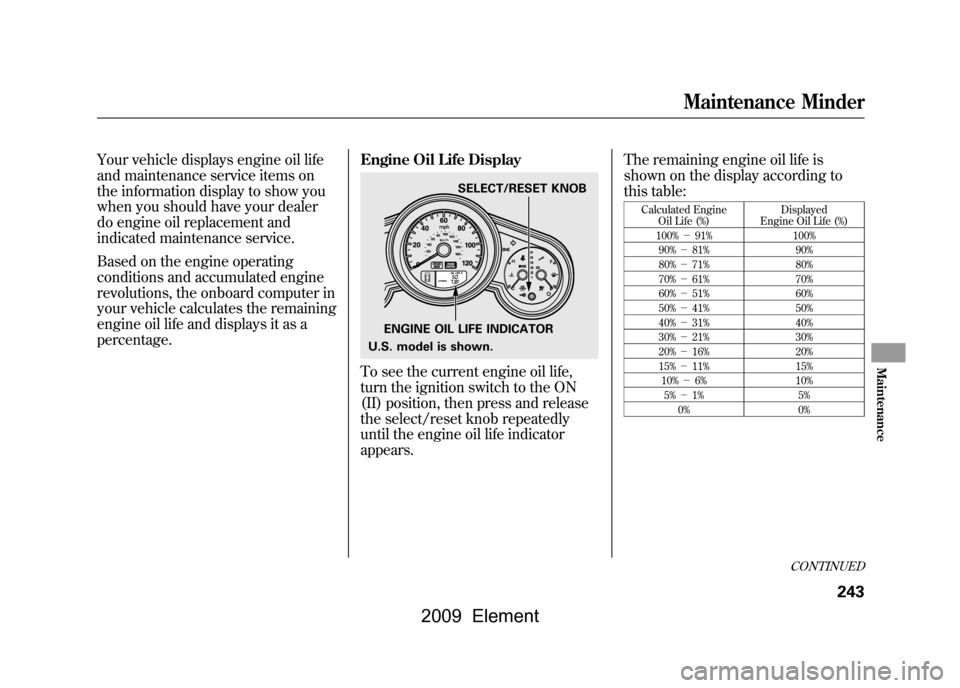
percentage.Engine Oil Life Display
To see the current engine oil life,
turn the ignition switch to the ON
(II) position, then press and release
the select/reset knob repeatedly
until the engine oil life indicator
appears.The remaining engine oil life is
shown on the display according to
this table:
Calculated Engine
Oil Life (%) Displayed
Engine Oil Life (%)
100% -91% 100%
90% -81% 90%
80% -71% 80%
70% -61% 70%
60% -51% 60%
50% -41% 50%
40% -31% 40%
30% -21% 30%
20% -16% 20%
15% -11% 15%
10% -6% 10%
5% -1% 5%
0% 0%
ENGINE OIL LIFE INDICATORSELECT/RESET KNOB
U.S. model is shown.
CONTINUED
Maintenance Minder
243
Maintenance
2009 Element
Page 248 of 345
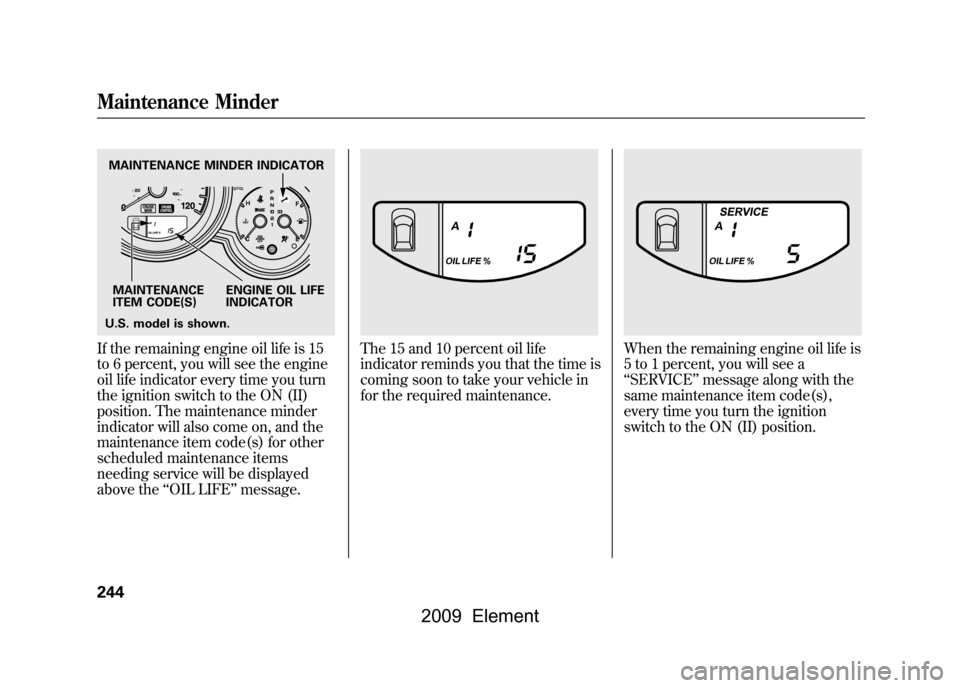
If the remaining engine oil life is 15
to 6 percent, you will see the engine
oil life indicator every time you turn
the ignition switch to the ON (II)
position. The maintenance minder
indicator will also come on, and the
maintenance item code(s) for other
scheduled maintenance items
needing service will be displayed
above the‘‘OIL LIFE’’ message.
The 15 and 10 percent oil life
indicator reminds you that the time is
coming soon to take your vehicle in
for the required maintenance.
When the remaining engine oil life is
5 to 1 percent, you will see a
‘‘SERVICE ’’message along with the
same maintenance item code(s),
every time you turn the ignition
switch to the ON (II) position.
MAINTENANCE MINDER INDICATOR
MAINTENANCE
ITEM CODE(S) ENGINE OIL LIFE
INDICATOR
U.S. model is shown.Maintenance Minder244
2009 Element
Page 250 of 345
To change the information display
from the engine oil life display to the
odometer or the trip meter, press and
release the select/reset knob.
When the engine oil life is 0 percent
or negative distance traveled, the
maintenance minder indicator (
)
remains on even if you change the
information display.
Immediately have the service
performed, and make sure to reset
the display as described as follows. Maintenance Main Items and Sub
Items
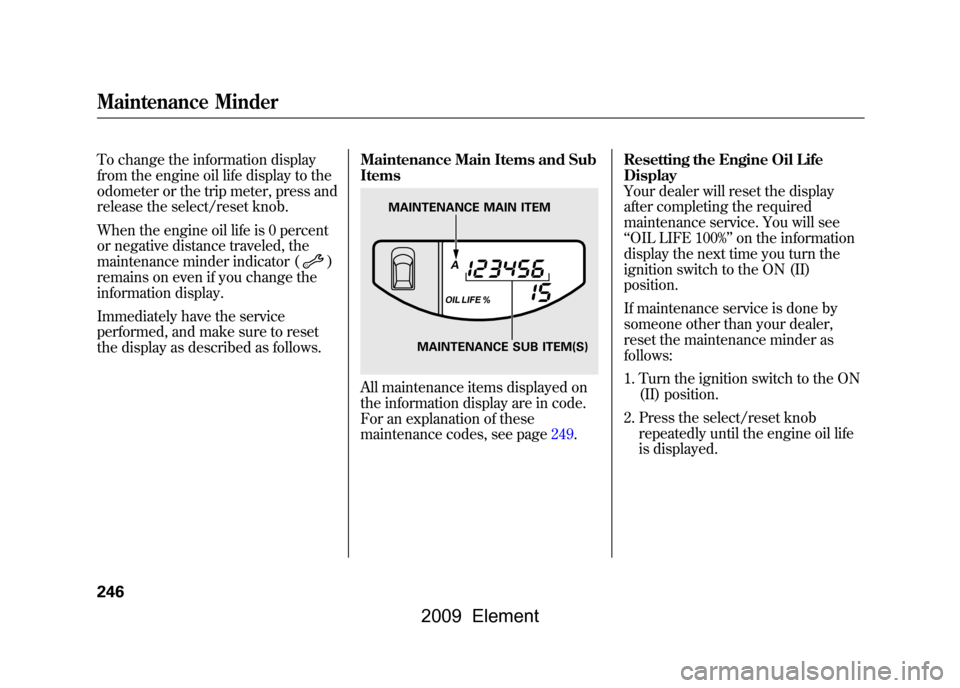
All maintenance items displayed on
the information display are in code.
For an explanation of these
maintenance codes, see page249.Resetting the Engine Oil Life
Display
Your dealer will reset the display
after completing the required
maintenance service. You will see
‘‘
OIL LIFE 100% ’’on the information
display the next time you turn the
ignition switch to the ON (II)
position.
If maintenance service is done by
someone other than your dealer,
reset the maintenance minder as
follows:
1. Turn the ignition switch to the ON (II) position.
2. Press the select/reset knob repeatedly until the engine oil life
is displayed.
MAINTENANCE MAIN ITEM
MAINTENANCE SUB ITEM(S)
Maintenance Minder246
2009 Element
Page 251 of 345
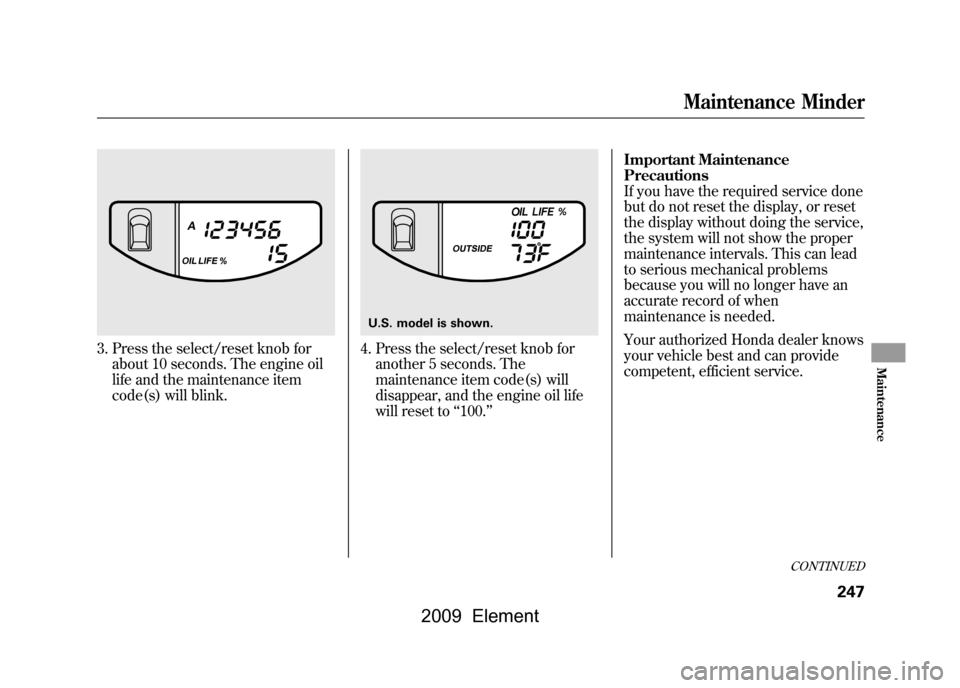
3. Press the select/reset knob forabout 10 seconds. The engine oil
life and the maintenance item
code(s) will blink.
4. Press the select/reset knob foranother 5 seconds. The
maintenance item code(s) will
disappear, and the engine oil life
will reset to ‘‘100. ’’ Important Maintenance
Precautions
If you have the required service done
but do not reset the display, or reset
the display without doing the service,
the system will not show the proper
maintenance intervals. This can lead
to serious mechanical problems
because you will no longer have an
accurate record of when
maintenance is needed.
Your authorized Honda dealer knows
your vehicle best and can provide
competent, efficient service.U.S. model is shown.
CONTINUED
Maintenance Minder
247
Maintenance
2009 Element
Page 252 of 345

However, service at a dealer is not
mandatory to keep your warranties in
effect. Maintenance may be done by
any qualified service facility or
person who is skilled in this type of
automotive service. Make sure to
have the service facility or person
reset the display as previously
described. Keep all receipts as proof
of completion, and have the person
who does the work fill out your
Honda Service History or Canadian
Maintenance Log. Check your
warranty booklet for more
information.
We recommend using Honda parts
and fluids whenever you have
maintenance done. These are
manufactured to the same high
quality standards as the original
components, so you can be confident
of their performance and durability.U.S. Vehicles:
Maintenance, replacement, or
repair of emissions control
devices and systems may be done
by any automotive repair
establishment or individual using
parts that are
‘‘certified’’to EPA
standards.
According to state and federal
regulations, failure to perform
maintenance on the items marked
with #will not void your emissions
warranties. However, all
maintenance services should be
performed in accordance with the
intervals indicated by the information
display.
Owner's Maintenance Checks
You should check the following
items at the specified intervals. If you
are unsure of how to perform any
check, turn to the appropriate page
listed.
●Engine oil level -Check every
time you fill the fuel tank. See page
201.●Engine coolant level -Check the
radiator reserve tank every time
you fill the fuel tank. See page201.●Automatic transmission -Check
the fluid level monthly. See page
256.●Brakes -Check the fluid level
monthly. See page258.●Tires -Check the tire pressure
monthly. Examine the tread for
wear and foreign objects. See page
271.●Lights -Check the operation of
the headlights, parking lights,
taillights, high-mount brake light,
and license plate lights monthly.
See page261.
Maintenance Minder248
2009 Element
Page 253 of 345

SymbolMaintenance Main Items
A
●Replace engine oil
ꭧ 1
B
●Replace engine oil
ꭧ1and oil filter
●Inspect front and rear brakes●Check parking brake adjustment●Inspect these items:●Tie rod ends, steering gear box, and boots●Suspension components●Driveshaft boots●Brake hoses and lines (including ABS/VSA)●All fluid levels and condition of fluids●Exhaust system
#
●Fuel lines and connections
#
ꭧ 1: If the message ‘‘SERVICE ’’does not appear more than 12 months after the
display is reset, change the engine oil every year.
# : See information on maintenance and emissions warranty on page248.
NOTE:
●Independent of the maintenance message in the information display,
replace the brake fluid every 3 years.●Inspect idle speed every 160,000 miles (2 56,000 km).●Adjust the valves during services A, B, 1, 2, or 3 if they are noisy.
SymbolMaintenance Sub Items
1
●Rotate tires
2●Replace air cleaner element
If you drive in dusty conditions, replace
every 15,000 miles (24,000 km).●Replace dust and pollen filterIf you drive primarily in urban areas that have high
concentrations of soot in the air from industry and
from diesel-powered vehicles, replace every
15,000 miles (24,000 km).●Inspect drive belt
3●Replace transmission fluid Driving in mountainous areas at very low vehicle
speeds or trailer towing results in higher transmiss ion
and transfer temperatures. This requires transmission
and transfer fluid changes more frequently than
recommended by the maintenance minder. If you
regularly drive your vehicle under these conditions,
have the transmission and transfer fluid changed at
60,000 miles (100,000 km), then every 30,000 miles
(48,000 km) (For A/T only).
4●Replace spark plugs●Inspect valve clearance
5●Replace engine coolant
6●Replace rear differential fluid (4WD model only)
Maintenance Minder
Maintenance Minder
249
2009 Element
Page 256 of 345
Synthetic Oil
You may use a synthetic motor oil if
it meets the same requirements
given for a conventional motor oil, it
displays the API certification seal,
and it is the proper weight. You must
follow the oil and filter change
intervals shown on the maintenance
minder display.
Engine Oil Additives
Your vehicle does not require any oil
additives. Additives may adversely
affect the engine or transmission
performance and durability.Changing the Engine Oil and
Filter
Always change the oil and filter
according to the maintenance
messages shown on the information
display. The oil and filter collect
contaminants that can damage your
engine if they are not removed
regularly.
Changing the oil and filter requires
special tools and access from
underneath the vehicle. The vehicle
should be raised on a service station-
type hydraulic lift for this service.
Unless you have the knowledge and
proper equipment, you should have
this maintenance done by a skilled
technician.
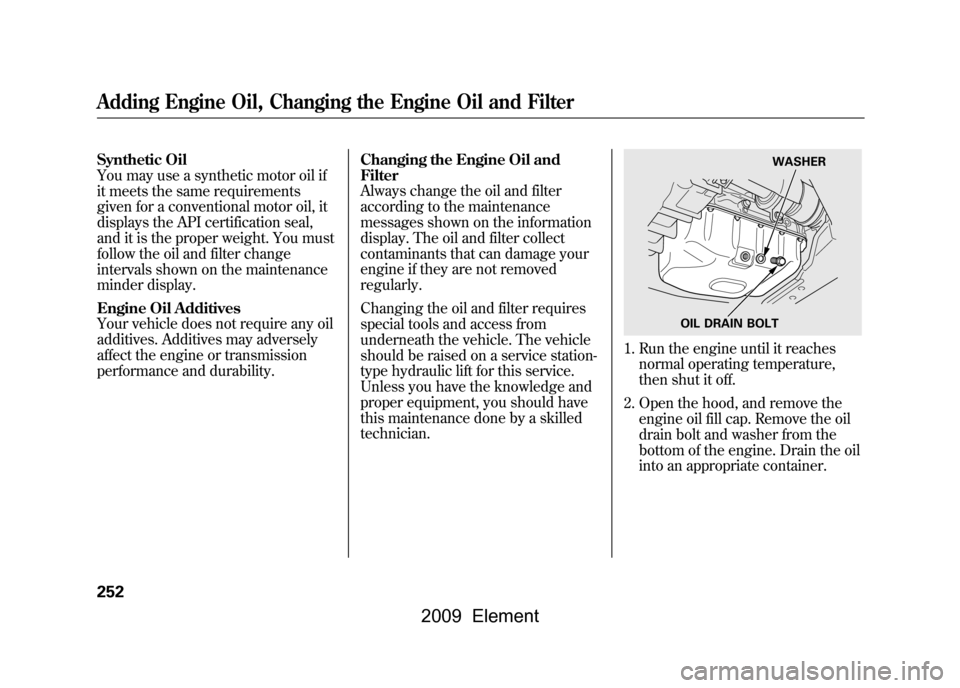
1. Run the engine until it reaches
normal operating temperature,
then shut it off.
2. Open the hood, and remove the engine oil fill cap. Remove the oil
drain bolt and washer from the
bottom of the engine. Drain the oil
into an appropriate container.
OIL DRAIN BOLT WASHER
Adding Engine Oil, Changing the Engine Oil and Filter252
2009 Element