audio HONDA ELEMENT 2009 1.G Repair Manual
[x] Cancel search | Manufacturer: HONDA, Model Year: 2009, Model line: ELEMENT, Model: HONDA ELEMENT 2009 1.GPages: 345, PDF Size: 18.9 MB
Page 192 of 345

On EX and SC modelsYour vehicle's audio system will
disable itself if it is disconnected
from electrical power for any reason.
To make it work again, you must
enter a specific code in the preset
buttons (icon on vehicle's with
navigation system). Because there
are hundreds of number
combinations possible from specific
digits, making the system work
without knowing the exact code is
nearly impossible.
You should have received a radio
code card that lists your audio
system's code and serial numbers. It
is best to store this card in a safe
place at home. In addition, you
should write the audio system's
serial number in this owner's
manual.
If you lose the card, you must obtain
the code number from a dealer. To
do this, you will need the system's
serial number.If your vehicle's battery is
disconnected or goes dead, or the
radio fuse is removed, the audio
system will disable itself. If this
happens, you will see
‘‘ENTER
CODE ’’in the frequency display the
next time you turn on the system.
Use the preset buttons (icons on
vehicles with navigation system) to
enter the code. The code is on the
radio code card included in your
owner's manual kit. When it is
entered correctly, the radio will start
playing.
If you make a mistake entering the
code, do not start over; complete the
sequence, then enter the correct
code. You have 10 tries to enter the
correct code. If you are unsuccessful
in 10 attempts, you must then leave
the system on for 1 hour before
trying again.Radio Theft Protection188
2009 Element
Page 195 of 345
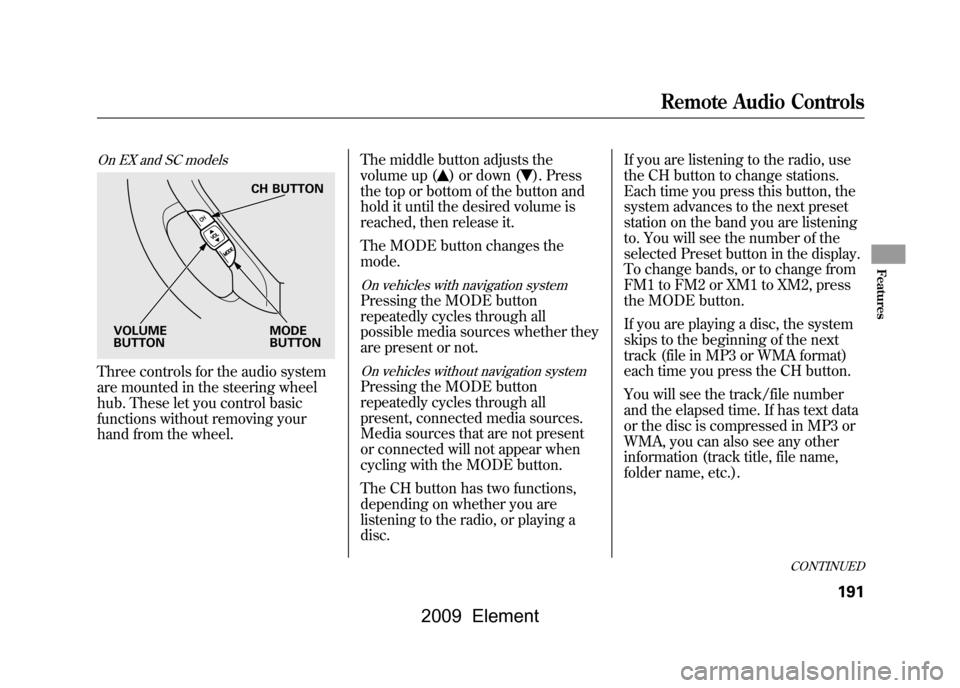
On EX and SC modelsThree controls for the audio system
are mounted in the steering wheel
hub. These let you control basic
functions without removing your
hand from the wheel.The middle button adjusts the
volume up (
) or down (
). Press
the top or bottom of the button and
hold it until the desired volume is
reached, then release it.
The MODE button changes the
mode.
On vehicles with navigation systemPressing the MODE button
repeatedly cycles through all
possible media sources whether they
are present or not.On vehicles without navigation systemPressing the MODE button
repeatedly cycles through all
present, connected media sources.
Media sources that are not present
or connected will not appear when
cycling with the MODE button.
The CH button has two functions,
depending on whether you are
listening to the radio, or playing a
disc. If you are listening to the radio, use
the CH button to change stations.
Each time you press this button, the
system advances to the next preset
station on the band you are listening
to. You will see the number of the
selected Preset button in the display.
To change bands, or to change from
FM1 to FM2 or XM1 to XM2, press
the MODE button.
If you are playing a disc, the system
skips to the beginning of the next
track (file in MP3 or WMA format)
each time you press the CH button.
You will see the track/file number
and the elapsed time. If has text data
or the disc is compressed in MP3 or
WMA, you can also see any other
information (track title, file name,
folder name, etc.).
CH BUTTON
MODE
BUTTON
VOLUME
BUTTON
CONTINUED
Remote Audio Controls
191
Features
2009 Element
Page 196 of 345
In MP3 or WMA mode, you can use
the seek function to select folders.
Press and hold the CH button until
you hear a beep, to skip forward to
the first file of the next folder.On vehicles with navigation systemIf you are playing a PC card, press
the CH button to advance to the next
file.
If you are playing a USB flash
memory device or iPod with the USB
adapter cable (if equipped), press
and release the CH button to skip
forward to the beginning of the next
file.Auxiliary Input Jack
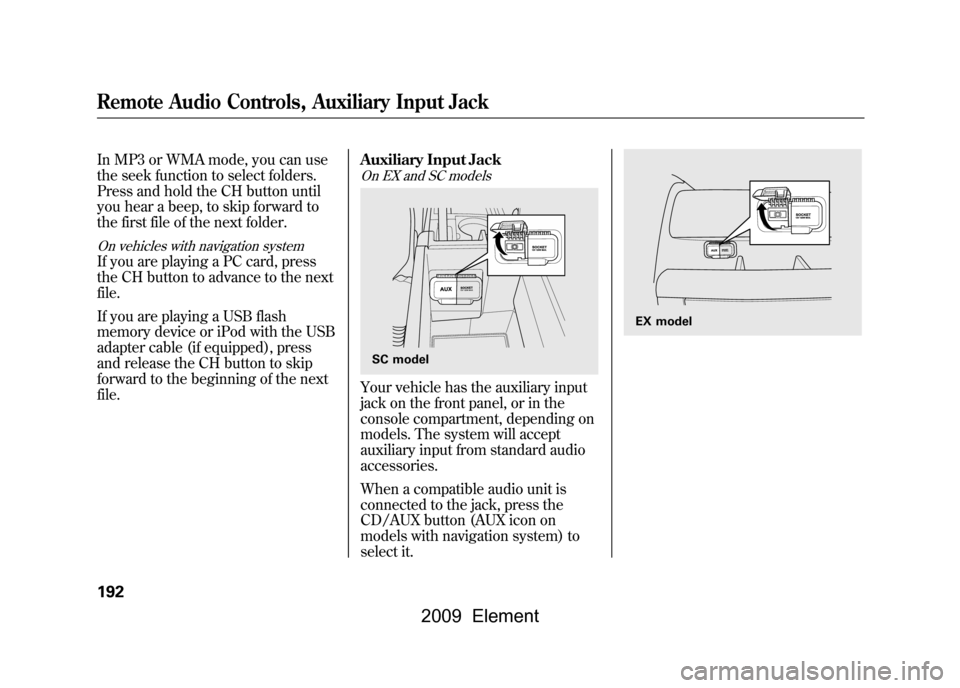
On EX and SC modelsYour vehicle has the auxiliary input
jack on the front panel, or in the
console compartment, depending on
models. The system will accept
auxiliary input from standard audio
accessories.
When a compatible audio unit is
connected to the jack, press the
CD/AUX button (AUX icon on
models with navigation system) to
select it.SC model
EX model
Remote Audio Controls, Auxiliary Input Jack192
2009 Element
Page 209 of 345
Modifying your vehicle, or installing
some non-Honda accessories, can
make it unsafe. Before you make any
modifications or add any accessories,
be sure to read the following
information.
Accessories
Your dealer has Honda accessories
that allow you to personalize your
vehicle. These accessories have been
designed and approved for your
vehicle, and are covered by warranty.
Although non-Honda accessories
may fit on your vehicle, they may not
meet factory specifications, and could
adversely affect your vehicle's
handling and stability.
Improper accessories or
modifications can affect your
vehicle's handling, stability, and
performance, and cause a
crash in which you can be hurt
or killed.
Follow all instructions in this
owner's manual regarding
accessories and modifications.
When properly installed, cellular
phones, alarms, two-way radios, and
low-powered audio systems should
not interfere with your vehicle's
computer controlled systems, such
as your airbags, anti-lock brakes, and
tire pressure monitoring system. Before installing any accessory:
●Make sure the accessory does not
obscure any lights, or interfere
with proper vehicle operation or
performance.●Be sure electronic accessories do
not overload electrical circuits (see
page298)or interfere with the
proper operation of your vehicle.●Before installing any electronic
accessory, have the installer
contact your dealer for assistance.
If possible, have your dealer
inspect the final installation.●Do not install accessories on the
side pillars or across the rear
windows. Accessories installed in
these areas may interfere with
proper operation of the side
curtain airbags.
CONTINUED
Accessories and Modifications
205
Before Driving
2009 Element
Page 281 of 345
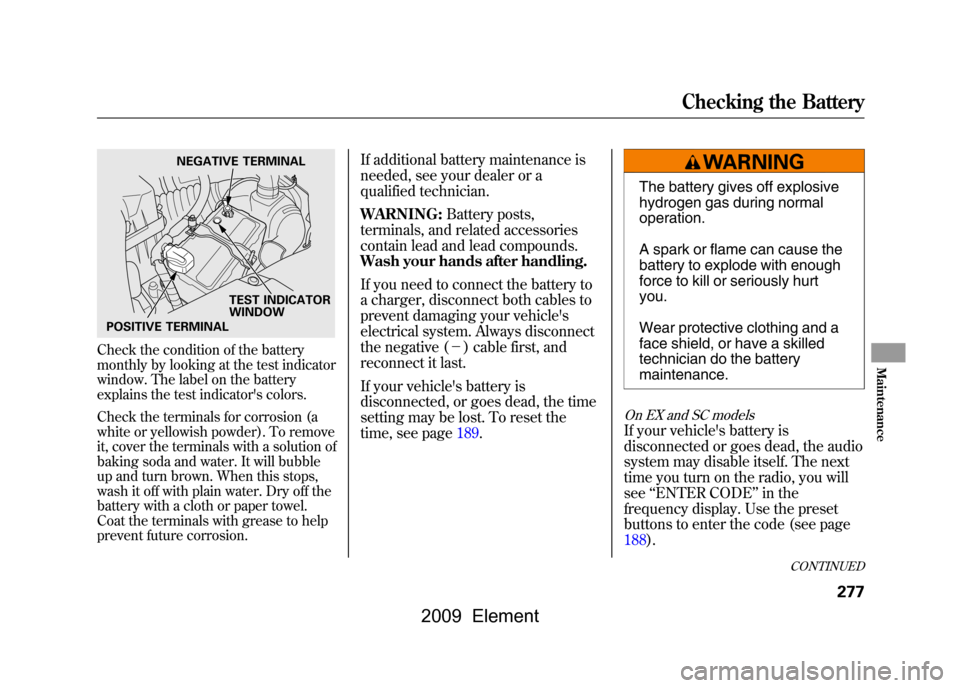
Check the condition of the battery
monthly by looking at the test indicator
window. The label on the battery
explains the test indicator's colors.
Check the terminals for corrosion (a
white or yellowish powder). To remove
it, cover the terminals with a solution of
baking soda and water. It will bubble
up and turn brown. When this stops,
wash it off with plain water. Dry off the
battery with a cloth or paper towel.
Coat the terminals with grease to help
prevent future corrosion.
If additional battery maintenance is
needed, see your dealer or a
qualified technician.
WARNING:Battery posts,
terminals, and related accessories
contain lead and lead compounds.
Wash your hands after handling.
If you need to connect the battery to
a charger, disconnect both cables to
prevent damaging your vehicle's
electrical system. Always disconnect
the negative (- ) cable first, and
reconnect it last.
If your vehicle's battery is
disconnected, or goes dead, the time
setting may be lost. To reset the
time, see page189.
The battery gives off explosive
hydrogen gas during normal
operation.
A spark or flame can cause the
battery to explode with enough
force to kill or seriously hurt
you.
Wear protective clothing and a
face shield, or have a skilled
technician do the battery
maintenance.
On EX and SC modelsIf your vehicle's battery is
disconnected or goes dead, the audio
system may disable itself. The next
time you turn on the radio, you will
see ‘‘ENTER CODE ’’in the
frequency display. Use the preset
buttons to enter the code (see page
188).
NEGATIVE TERMINAL
TEST INDICATOR
WINDOW
POSITIVE TERMINAL
CONTINUED
Checking the Battery
277
Maintenance
2009 Element
Page 295 of 345
Although this seems like a simple
procedure, you should take several
precautions.
A battery can explode if you do
not follow the correct
procedure, seriously injuring
anyone nearby.
Keep all sparks, open flames,
and smoking materials away
from the battery.
You cannot start your vehicle with an
automatic transmission by pushing
or pulling it.
To Jump Start Your Vehicle:1. Open the hood, and check the physical condition of the battery.
In very cold weather, check the
condition of the electrolyte. If it
seems slushy or frozen, do not try
jump starting until it thaws.If a battery sits in extreme cold, the
electrolyte inside can freeze. Attempting
to jump start with a frozen battery can
cause it to rupture.
2. Turn off all the electricalaccessories: heater, A/C, audio
system, lights, etc. Put the
transmission in neutral (manual)
or Park (automatic), and set the
parking brake.
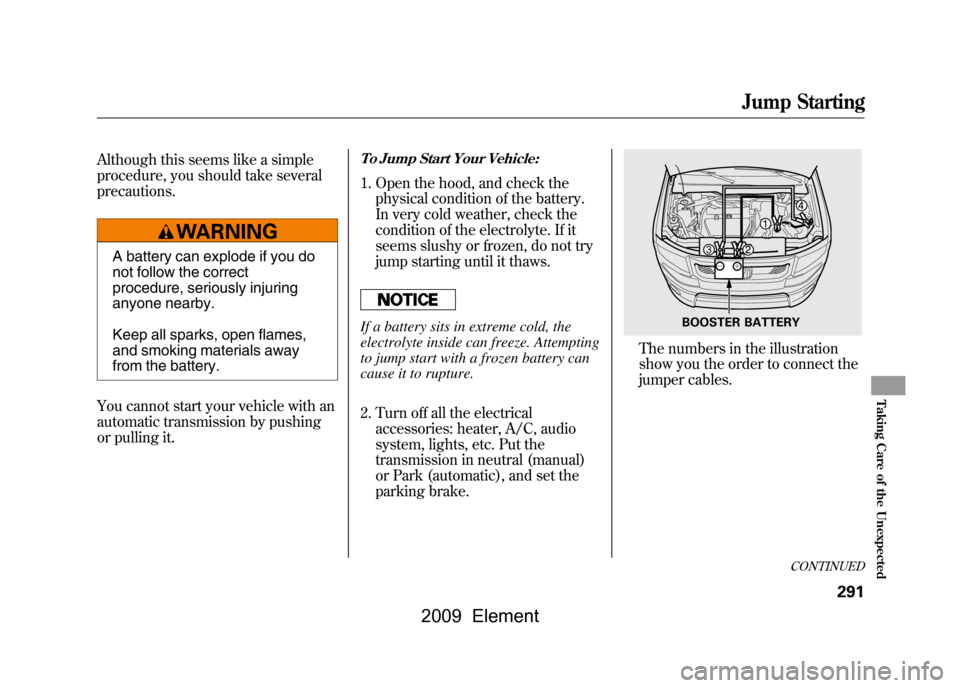
The numbers in the illustration
show you the order to connect the
jumper cables.
BOOSTER BATTERY
CONTINUED
Jump Starting
291
Taking Care of the Unexpected
2009 Element
Page 304 of 345
If you cannot drive the vehicle
without fixing the problem, and you
do not have a spare fuse, take a fuse
of the same rating or a lower rating
from one of the other circuits. Make
sure you can do without that circuit
temporarily (such as the accessory
power socket or radio).
If you replace the blown fuse with a
spare fuse that has a lower rating, it
might blow out again. This does not
indicate anything wrong. Replace the
fuse with one of the correct rating as
soon as you can.
Replacing a fuse with one that has a
higher rating greatly increases the
chances of damaging the electrical
system. If you do not have a
replacement fuse with the proper rating
for the circuit, install one with a lower
rating.6. If the replacement fuse of the same
rating blows in a short time, there
is probably a serious electrical
problem in your vehicle. Leave the
blown fuse in that circuit and have
your vehicle checked by a
qualified technician.
On EX and SC modelsIf the radio fuse is removed, the
audio system will disable itself. The
next time you turn on the radio you
will see ‘‘ENTER CODE ’’in the
frequency display. Use the preset
buttons to enter the specific digit
code (see page188).On vehicles with navigation systemIf the navigation system fuse is
removed, the navigation system will
disable itself. The next time you turn
on the ignition switch, the system
will require you to enter a PIN before
it can be used. Refer to the
navigation system manual.
Fuses300
2009 Element
Page 331 of 345
A
Accessories andModifications
..........................
205
ACCESSORY (Ignition Key Position)
...................................
79
Accessory Power Sockets
..........
100
Additives, Engine Oil
.................
252
Adjusting the Steering Wheel
......
74
Advanced Airbags
........................
27
Airbag (SRS)
............................
9,22
Air Conditioning System
............
104
Air Pressure, Tires
..............
271,272
Alcohol in Gasoline
....................
198
Antifreeze
...................................
254
Anti-lock Brakes (ABS) Indicator Light
..................
59,225
Operation
................................
225
Anti-theft, Audio System
.............
188
Anti-theft Steering Column Lock
.........................................
79
Audio System
.............................
109
Automatic Seat Belt Tensioners...
20
Automatic Speed Control
...........
193 Automatic Transmission
............
219
Capacity, Fluid
........................
309
Checking Fluid Level
..............
256
Shifting
...................................
219
Shift Lever Position Indicators
............................
219
Shift Lock Release
...................
221
Automatic Transmission Fluid
...
256
Auxiliary Input Jack
...................
192
B
Battery Charging System
Indicator
........................
58,295
Jump Starting
..........................
291
Maintenance
...........................
277
Specifications
..........................
310
Before Driving
...........................
197
Belts, Seat
................................
8,18
Beverage Holders
........................
99
Booster Seats
...............................
50
Brakes
Anti-lock Brakes (ABS)
...........
225
Break-in, New Linings
.............
198 Bulb Replacement
...................
266
Fluid
.......................................
258
Parking
....................................
94
System Design
........................
224
System Indicator
...............
58,297
Wear Indicators
.......................
225
Braking System
..........................
224
Break-in, New Vehicle
................
198
Brightness Control, Instruments
..............................
72
Bulb Replacement Back-up Lights
........................
266
Brake Lights
...........................
266
Daytime Running Lights
.........
262
Front Parking/Turn Signal Lights
..................................
263
Front Side Marker Lights
........
265
Headlights
..............................
261
High-mount Brake Lights
........
267
Rear Bulbs
..............................
266
Rear License Plate Lights
........
267
Side Turn Signal Lights
...........
264
Specifications
..........................
310
Taillights
.................................
266
Turn Signal Lights
..................
266
CONTINUED
Index
I
INDEX
2009 Element
Page 332 of 345
Bulbs, Halogen
..........................
261
Bungee Cords
............................
211
C
Capacities Chart
.........................
309
Carbon Monoxide Hazard
............
52
Cargo
.........................................
207
Cargo Area Light
..........................
96
Cargo Hook
................................
212
Cargo, How to Carry
..................
207
Carrying Cargo
..........................
207
CAUTION, Explanation of
............
iii
CD Care
.....................................
183
CD Error Messages
............
125,148
CD Player
...........................
119,140
Certification Label
......................
306
Chains, Tires
..............................
276
Changing a Flat Tire
..................
283
Changing Oil How to
....................................
252
When to
..................................
243
Charging System
Indicator
...........................
58,295
Check Fuel Cap Message
............
66 Checklist, Before Driving
...........
215
Child Safety
..................................
35
Booster Seats
...........................
50
Child Seats
....................
40,41, 42
Important Safety Reminders
.....
39
Infants
......................................
40
Large Children
.........................
49
LATCH
.....................................
44
Risks with Airbags
...................
36
Small Children
.........................
41
Tethers
....................................
48
Warning Labels
........................
37
Where Should a Child Sit?
........
36
Child Seats
.............................
35,42
LATCH Anchorage Points
........
44
Tether Anchorage Points
.........
48
Cleaning the Seat Belts
..............
268
Clock
..........................................
189
Clutch Fluid
...............................
258
Code, Audio System
...................
188
CO in the Exhaust
................
52,316
Cold Weather, Starting in
...........
216
Compact Spare Tire
....................
282
Controls, Instruments and
............
55
Coolant Adding
....................................
254 Checking
................................
201
Proper Solution
.......................
254
Temperature Gauge
.................
67
Cooler Box
...................................
98
Courtesy Light
.............................
96
Crankcase Emissions Control System
...................................
316
Cruise Control Indicator
...............
60
Cruise Control Operation
...........
193
Cruise Main Indicator
..................
60
Cup Holders
.................................
99
Customer Service
.......................
322
D
DANGER, Explanation of
.............
iii
Dashboard
...............................
3,56
Daytime Running Lights
..............
72
Daytime Running Lights Indicator
...................................
60
Dead Battery
..............................
291
Defects, Reporting Safety
...........
324
Defogger, Rear Window
...............
74
Dimensions
................................
308
Dimming the Headlights
..............
71
IndexII
2009 Element
Page 337 of 345
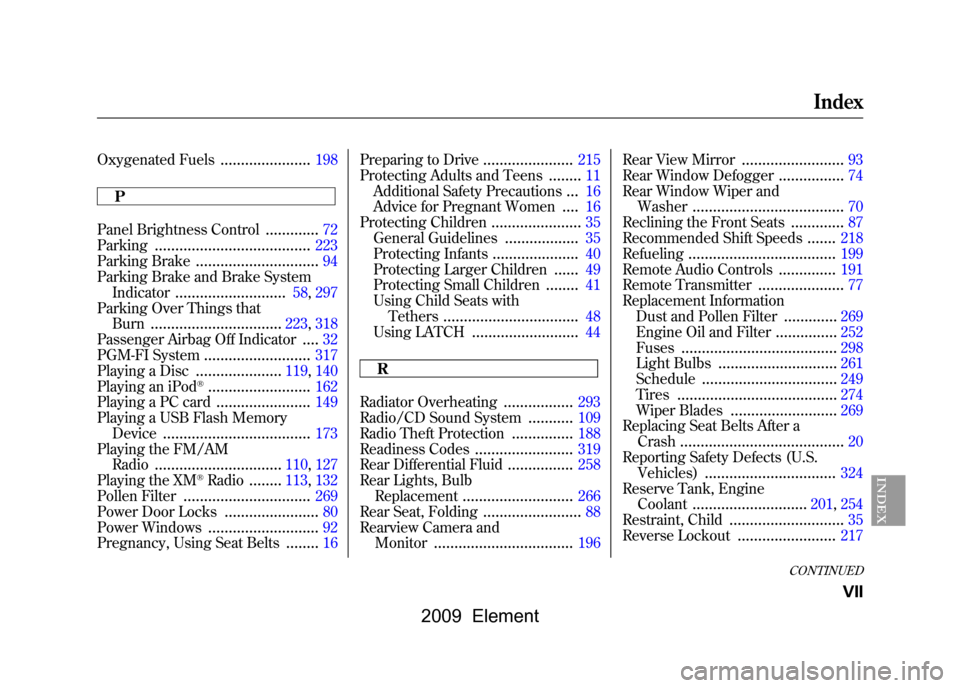
Oxygenated Fuels
......................
198
P
Panel Brightness Control
.............
72
Parking
......................................
223
Parking Brake
..............................
94
Parking Brake and Brake System Indicator
...........................
58,297
Parking Over Things that Burn
................................
223,318
Passenger Airbag Off Indicator
....
32
PGM-FI System
..........................
317
Playing a Disc
.....................
119,140
Playing an iPod
®.........................
162
Playing a PC card
.......................
149
Playing a USB Flash Memory Device
....................................
173
Playing the FM/AM Radio
...............................
110,127
Playing the XM
®Radio
........
113,132
Pollen Filter
...............................
269
Power Door Locks
.......................
80
Power Windows
...........................
92
Pregnancy, Using Seat Belts
........
16 Preparing to Drive
......................
215
Protecting Adults and Teens
........
11
Additional Safety Precautions
...
16
Advice for Pregnant Women
....
16
Protecting Children
......................
35
General Guidelines
..................
35
Protecting Infants
.....................
40
Protecting Larger Children
......
49
Protecting Small Children
........
41
Using Child Seats with Tethers
.................................
48
Using LATCH
..........................
44
R
Radiator Overheating
.................
293
Radio/CD Sound System
...........
109
Radio Theft Protection
...............
188
Readiness Codes
........................
319
Rear Differential Fluid
................
258
Rear Lights, Bulb Replacement
...........................
266
Rear Seat, Folding
........................
88
Rearview Camera and Monitor
..................................
196 Rear View Mirror
.........................
93
Rear Window Defogger
................
74
Rear Window Wiper and Washer
.....................................
70
Reclining the Front Seats
.............
87
Recommended Shift Speeds
.......
218
Refueling
....................................
199
Remote Audio Controls
..............
191
Remote Transmitter
.....................
77
Replacement Information Dust and Pollen Filter
.............
269
Engine Oil and Filter
...............
252
Fuses
......................................
298
Light Bulbs
.............................
261
Schedule
.................................
249
Tires
.......................................
274
Wiper Blades
..........................
269
Replacing Seat Belts After a Crash
........................................
20
Reporting Safety Defects (U.S. Vehicles)
................................
324
Reserve Tank, Engine Coolant
............................
201,254
Restraint, Child
............................
35
Reverse Lockout
........................
217
CONTINUED
Index
VII
INDEX
2009 Element