fuel HONDA ELEMENT 2009 1.G Owners Manual
[x] Cancel search | Manufacturer: HONDA, Model Year: 2009, Model line: ELEMENT, Model: HONDA ELEMENT 2009 1.GPages: 345, PDF Size: 18.9 MB
Page 5 of 345

2009 Element Online Reference Owner's Manual
Contents
Owner's Identification Form
Introduction .......................................................................................................................................................... i A Few Words About Safety .............................................................................................................................. iii Important Handling Information .................................................................................................................... iv
Your Vehicle at a Glance (main controls) .................................................................................................... 3
Driver and Passenger Safety (seat belts, SRS, and child protection) .................................................... 5
Instruments and Controls
(indicators, gauges, dashboard, and steering column)
............................................ 55
Features (
heating and cooling, audio, steering wheel, cruise control and other convenience items
)
................... 103
Before Driving (fuel, vehicle break- in, and cargo loading) ..................................................................... 197
Driving (engine and transmission operation) ................................................................................................ 213
Maintenance (minder, fluid checking, minor services, and vehicle storage)........................................... 241
Taking Care of the Unexpected (flat tire, dead battery, overheating, and fuses) ............................. 281
Technical Information (vehicle specifications, tires, and emissions controls) ....................................... 305
Warranty and Customer Relations (U. S. and Canada only) (warranty and contact information) ... 321
Index ........................................................................................................................................................................ I
Service Information Summary ( fluid capacities and tire pressures)
1 00X31-SCV-6600
Page 6 of 345

Contents
A convenient reference to the
sections in this manual.
Your Vehicle at a Glance
A quick reference to the main
controls in your vehicle.
Driver and Passenger Safety
Important information about the
proper use and care of your vehicle's
seat belts, an overview of the
supplemental restraint system, and
valuable information on how to
protect children with child restraints.
Instruments and Controls
Explains the purpose of each
instrument panel indicator and
gauge, and how to use the controls
on the dashboard and steering
column.
Features
How to operate the heating and air
conditioning system, the audio
system, and other convenience
features.Before Driving
What gasoline to use, how to break-
in your new vehicle, and how to load
luggage and other cargo.
Driving
The proper way to start the engine,
shift the transmission, and park; plus
what you need to know if you're
planning to tow a trailer.
Maintenance
The maintenance minder shows you
when you need to take your vehicle
to the dealer for maintenance
service. There is also a list of things
to check and instructions on how to
check them.
Taking Care of the Unexpected
This section covers several problems
motorists sometimes experience, and
details how to handle them.
Technical Information
ID numbers, dimensions, capacities,
and technical information.
Warranty and Customer Relations
(U.S. and Canada only)
A summary of the warranties
covering your new vehicle, and how
to contact us for any reason. Refer to
your warranty manual for detailed
information.
Index
Service Information Summary
A summary of the information you
need when you pull up to the fuel
pump.Overview of Contents2
2009 Element
Page 59 of 345
This section gives information about
the controls and displays that
contribute to the daily operation of
your vehicle. All the essential
controls are within easy reach.
Control Locations
..........................
56
Instrument Panel
..........................
57
Instrument Panel Indicators
..........
58
Gauges
..........................................
64
Information Display
..................
65
Odometer
..................................
65
Trip Meter
................................
66
Fuel Gauge
...............................
66
Check Fuel Cap Message
.........
66
Temperature Gauge
..................
67
Maintenance Minder
................
67
Outside Temperature Indicator
...............................
68 Controls Near the Steering
Wheel
.......................................
69
Windshield Wipers and Washers
....................................
70
Turn Signals and Headlights
.........
71
Instrument Panel Brightness
........
72
Hazard Warning Button
................
73
Rear Window Defogger
.................
74
Steering Wheel Adjustment
..........
74
Keys and Locks
.............................
75
Immobilizer System
......................
76
Remote Transmitter
......................
77
Ignition Switch
..............................
79
Door Locks
...................................
80
Power Door Locks
....................
80
Rear Doors
................................
81
Hatch
........................................
81
Tailgate
.....................................
82
Seats
.............................................
83
Seat Adjustments
......................
83
Driver's Seat Height Adjustment
...........................
84
Front Seat Armrests
..................
85
Head Restraints
.........................
85 Reclining the Front Seats
..........
87
Folding the Rear Seats
..............
88
Removing the Rear Seats
..........
90
Power Windows
............................
92
Mirrors
.........................................
93
Adjusting the Power Mirrors
.....
93
Rear Windows
...............................
94
Parking Brake
...............................
94
Interior Lights
...............................
95
Light Control Switch
.................
95
Individual Map Lights
...............
95
Courtesy Light
..........................
96
Ceiling Light
.............................
96
Cargo Area Light
.......................
96
Ignition Switch Light
.................
96
Interior Convenience Items
...........
97
Cooler Box
................................
98
Beverage Holders
.....................
99
Accessory Power Sockets
.......
100
Glove Box
...............................
100
Sun Visor
................................
100
Vanity Mirror
..........................
101
Overhead Console
..................
101
Instruments and Controls
55
Instruments and Controls
2009 Element
Page 61 of 345
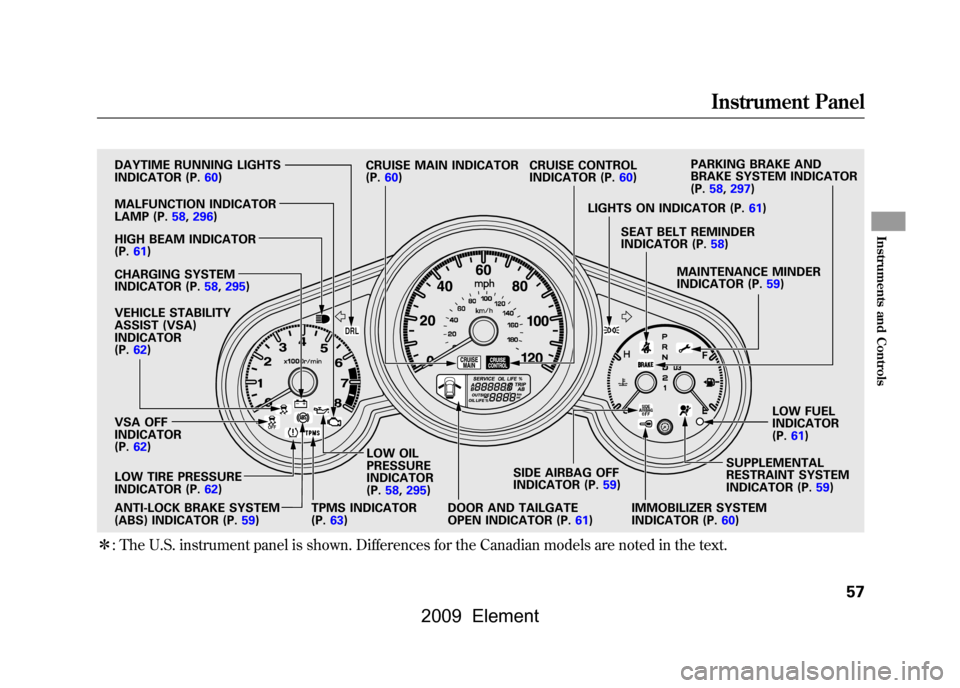
ꭧ: The U.S. instrument panel is shown. Differences for the Canadian models are noted in the text.
DRL
DAYTIME RUNNING LIGHTS
INDICATOR (P.
60)
HIGH BEAM INDICATOR
(P.
61)
CHARGING SYSTEM
INDICATOR (P.
58,295)
VEHICLE STABILITY
ASSIST (VSA)
INDICATOR
(P.
62)
VSA OFF
INDICATOR
(P.
62)
ANTI-LOCK BRAKE SYSTEM
(ABS) INDICATOR (P.
59) LOW OIL
PRESSURE
INDICATOR
(P.
58,295)
DOOR AND TAILGATE
OPEN INDICATOR (P.
61)SIDE AIRBAG OFF
INDICATOR (P.
59)
IMMOBILIZER SYSTEM
INDICATOR (P.
60) SUPPLEMENTAL
RESTRAINT SYSTEM
INDICATOR (P.
59)LOW FUEL
INDICATOR
(P.
61)MAINTENANCE MINDER
INDICATOR (P.
59)SEAT BELT REMINDER
INDICATOR (P.
58)LIGHTS ON INDICATOR (P. 61)PARKING BRAKE AND
BRAKE SYSTEM INDICATOR
(P.
58,297)
CRUISE CONTROL
INDICATOR (P.60)
TPMS INDICATOR
(P.
63) CRUISE MAIN INDICATOR
(P.
60)
MALFUNCTION INDICATOR
LAMP (P.
58,296)
LOW TIRE PRESSURE
INDICATOR (P.
62)
Instrument Panel
57
Instruments and Controls
2009 Element
Page 65 of 345
Lights On Indicator
This indicator reminds you that the
exterior lights are on. It comes on
when the light switch is in either the
or
position. If you turn the
ignition switch to the ACCESSORY
(I) or LOCK (0) position without
turning off the light switch, this
indicator will stay on. A reminder
chime will also sound when you open
the driver's door.High Beam Indicator
This indicator comes on with the
high beam headlights. For more
information, see page71.
Washer Level Indicator
Canadian models onlyThis indicator comes on when the
washer fluid level is low. Add washer
fluid when you see this indicator
come on (see page255).
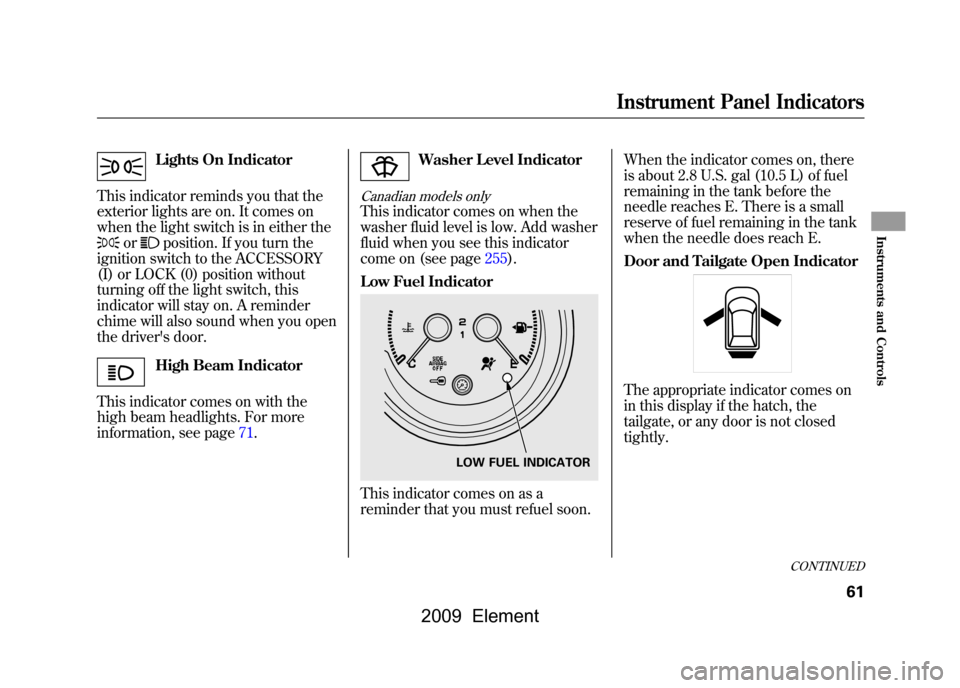
Low Fuel IndicatorThis indicator comes on as a
reminder that you must refuel soon. When the indicator comes on, there
is about 2.8 U.S. gal (10.5 L) of fuel
remaining in the tank before the
needle reaches E. There is a small
reserve of fuel remaining in the tank
when the needle does reach E.
Door and Tailgate Open Indicator
The appropriate indicator comes on
in this display if the hatch, the
tailgate, or any door is not closed
tightly.
LOW FUEL INDICATOR
CONTINUED
Instrument Panel Indicators
61
Instruments and Controls
2009 Element
Page 68 of 345
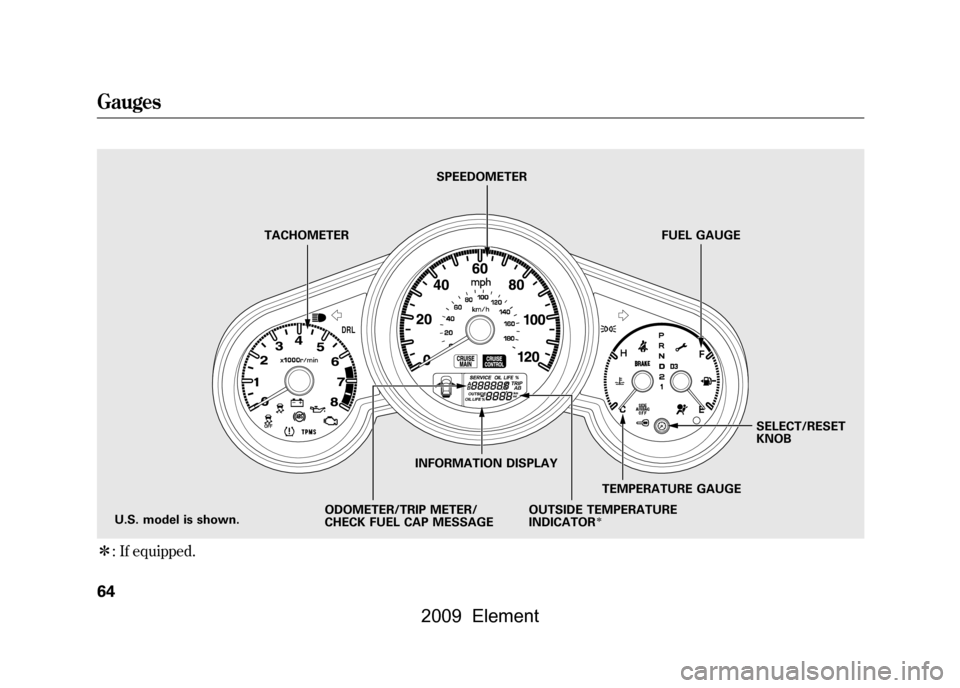
ꭧ: If equipped.
DRL
TACHOMETER SPEEDOMETER
FUEL GAUGE
U.S. model is shown. INFORMATION DISPLAY
ODOMETER/TRIP METER/
CHECK FUEL CAP MESSAGE TEMPERATURE GAUGESELECT/RESET
KNOB
OUTSIDE TEMPERATURE
INDICATOR
ꭧ
Gauges64
2009 Element
Page 70 of 345
Trip Meter
This shows the number of miles
(U.S.) or kilometers (Canada) driven
since you last reset it.
There are two trip meters: Trip A and
Trip B. Switch between these
displays by pressing the select/reset
knob repeatedly.
Each trip meter works
independently, so you can keep track
of two different distances.
When you turn the ignition switch to
the ON (II) position, the last
selection is displayed.
To reset a trip meter, display it, and
then press and hold the select/reset
knob until the number resets to
‘‘0.0 ’’. Fuel Gauge
This shows how much fuel you have.
It may show slightly more or less
than the actual amount. The needle
returns to the bottom after you turn
off the ignition.
Avoid driving with an extremely low
fuel level. Running out of fuel could
cause the engine to misfire, damaging
the catalytic converter.
Check Fuel Cap Message
Your vehicle's onboard diagnostic
system will detect a loose or missing
fuel fill cap as an evaporative system
leak. The first time a leak is detected
a
‘‘CHECK FUEL CAP ’’message
appears on the information display.
Turn the engine off, and confirm the
fuel fill cap is installed. If it is, loosen
it, then retighten it until it clicks at
least once. The message should go
off after several days of normal
driving once you tighten or replace
the fuel fill cap. To scroll to another
display, press the select/reset knob.
The ‘‘CHECK FUEL CAP ’’message
will appear each time you restart the
engine until the system turns the
message off.
Gauges66
2009 Element
Page 71 of 345

If the system still detects a leak in
your vehicle's evaporative emissions
system, the malfunction indicator
lamp (MIL) comes on. If the fuel fill
cap was not already tightened, turn
the engine off, and check or
retighten the fuel fill cap until it
clicks at least once. The MIL should
go off after several days of normal
driving once the cap is tightened or
replaced. If the MIL does not go off,
have your vehicle inspected by a
dealer. For more information, see
page296.Temperature Gauge
This shows the temperature of the
engine's coolant. During normal
operation, the pointer should rise to
about the middle of the gauge. In
severe driving conditions, the pointer
may rise to the upper zone. If it
reaches the red (hot) mark, pull
safely to the side of the road. Turn to
page293for instructions and
precautions on checking the engine's
cooling system.
Maintenance Minder
The information display in the
instrument panel shows you the
engine oil life and maintenance
service items when the ignition
switch is in the ON (II) position. This
information helps to keep you aware
of the periodic maintenance your
vehicle needs for continued trouble-
free driving. Refer to page243for
more information.
Gauges
67
Instruments and Controls
2009 Element
Page 80 of 345

You should have received a key
number tag with your set of keys.
You will need this key number if you
ever have to get a key replaced. Use
only Honda-approved key blanks.These keys contain electronic
circuits that are activated by the
immobilizer system. They will not
work to start the engine if the circuits
are damaged.
●Protect the keys from direct
sunlight, high temperature, and
high humidity.●Do not drop the keys or set heavy
objects on them.●Keep the keys away from liquids.
If they get wet, dry them
immediately with a soft cloth.
The keys do not contain batteries.
Do not try to take them apart.
See page77for an explanation of the
remote transmitter's operation. Immobilizer System
The immobilizer system protects
your vehicle from theft. If an
improperly coded key (or other
device) is used, the engine's fuel
system is disabled.
When you turn the ignition switch to
the ON (II) position, the immobilizer
system indicator should come on for
a few seconds, then go off. If the
indicator starts to blink, it means the
system does not recognize the
coding of the key. Turn the ignition
switch to the LOCK (0) position,
remove the key, reinsert it, and turn
the ignition switch to the ON (II)
position again.
The system may not recognize your
key's coding if another immobilizer
key or other metal object (i.e. key
fob) is near the ignition switch when
you insert the key.
Keys and Locks, Immobilizer System76
2009 Element
Page 201 of 345

Before you begin driving your
vehicle, you should know what
gasoline to use and how to check the
levels of important fluids. You also
need to know how to properly store
luggage or packages. The
information in this section will help
you. If you plan to add any
accessories to your vehicle, please
read the information in this section
first.Break-in Period
...........................
198
Fuel Recommendation
................
198
Service Station Procedures
.........
199
Refueling
.................................
199
Opening and Closing the Hood
...................................
200
Oil Check
................................
201
Engine Coolant Check
............
201
Fuel Economy
.............................
202
Accessories and Modifications
..........................
205
Carrying Cargo
...........................
207
Before Driving
197
Before Driving
2009 Element