transmission HONDA ELEMENT 2009 1.G Owners Manual
[x] Cancel search | Manufacturer: HONDA, Model Year: 2009, Model line: ELEMENT, Model: HONDA ELEMENT 2009 1.GPages: 345, PDF Size: 18.9 MB
Page 5 of 345
2009 Element Online Reference Owner's Manual
Contents
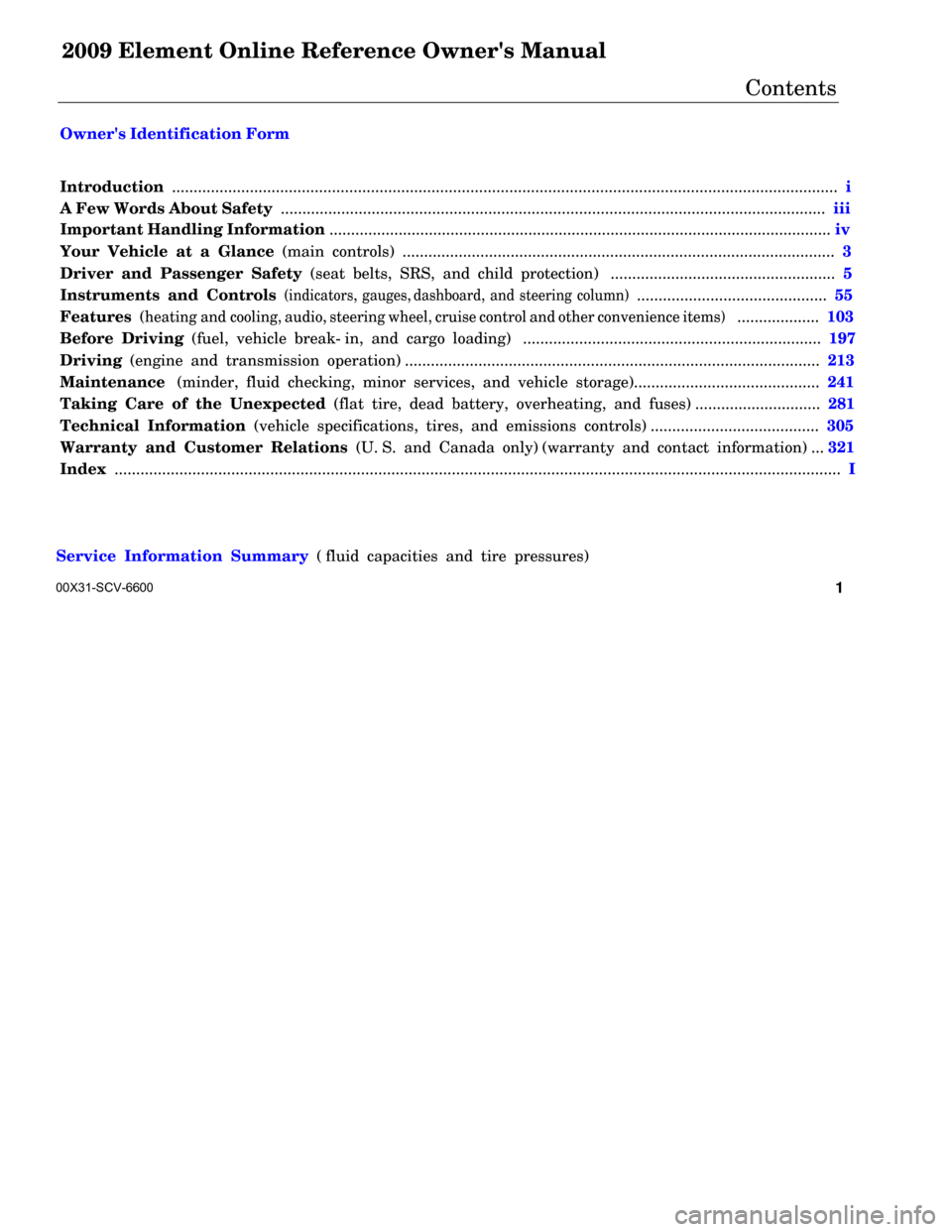
Owner's Identification Form
Introduction .......................................................................................................................................................... i A Few Words About Safety .............................................................................................................................. iii Important Handling Information .................................................................................................................... iv
Your Vehicle at a Glance (main controls) .................................................................................................... 3
Driver and Passenger Safety (seat belts, SRS, and child protection) .................................................... 5
Instruments and Controls
(indicators, gauges, dashboard, and steering column)
............................................ 55
Features (
heating and cooling, audio, steering wheel, cruise control and other convenience items
)
................... 103
Before Driving (fuel, vehicle break- in, and cargo loading) ..................................................................... 197
Driving (engine and transmission operation) ................................................................................................ 213
Maintenance (minder, fluid checking, minor services, and vehicle storage)........................................... 241
Taking Care of the Unexpected (flat tire, dead battery, overheating, and fuses) ............................. 281
Technical Information (vehicle specifications, tires, and emissions controls) ....................................... 305
Warranty and Customer Relations (U. S. and Canada only) (warranty and contact information) ... 321
Index ........................................................................................................................................................................ I
Service Information Summary ( fluid capacities and tire pressures)
1 00X31-SCV-6600
Page 6 of 345

Contents
A convenient reference to the
sections in this manual.
Your Vehicle at a Glance
A quick reference to the main
controls in your vehicle.
Driver and Passenger Safety
Important information about the
proper use and care of your vehicle's
seat belts, an overview of the
supplemental restraint system, and
valuable information on how to
protect children with child restraints.
Instruments and Controls
Explains the purpose of each
instrument panel indicator and
gauge, and how to use the controls
on the dashboard and steering
column.
Features
How to operate the heating and air
conditioning system, the audio
system, and other convenience
features.Before Driving
What gasoline to use, how to break-
in your new vehicle, and how to load
luggage and other cargo.
Driving
The proper way to start the engine,
shift the transmission, and park; plus
what you need to know if you're
planning to tow a trailer.
Maintenance
The maintenance minder shows you
when you need to take your vehicle
to the dealer for maintenance
service. There is also a list of things
to check and instructions on how to
check them.
Taking Care of the Unexpected
This section covers several problems
motorists sometimes experience, and
details how to handle them.
Technical Information
ID numbers, dimensions, capacities,
and technical information.
Warranty and Customer Relations
(U.S. and Canada only)
A summary of the warranties
covering your new vehicle, and how
to contact us for any reason. Refer to
your warranty manual for detailed
information.
Index
Service Information Summary
A summary of the information you
need when you pull up to the fuel
pump.Overview of Contents2
2009 Element
Page 7 of 345
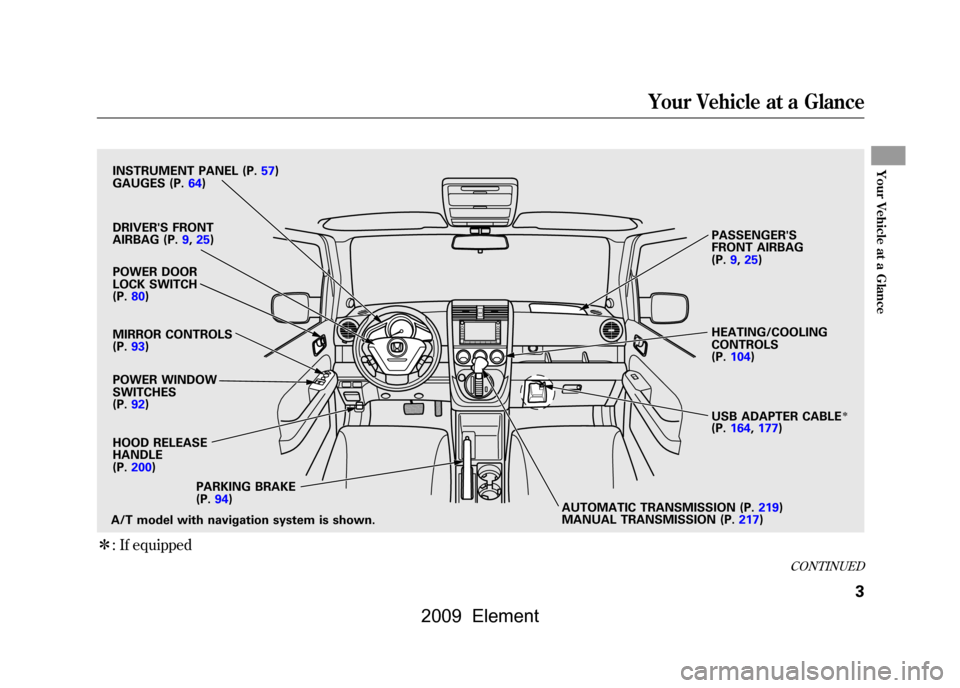
ꭧ: If equipped
POWER DOOR
LOCK SWITCH
(P.80)
POWER WINDOW
SWITCHES
(P.92)
HOOD RELEASE
HANDLE
(P.200)
A/T model with navigation system is shown. AUTOMATIC TRANSMISSION (P.219)
MANUAL TRANSMISSION (P.217)
PARKING BRAKE
(P.94) HEATING/COOLING
CONTROLS
(P.104)
PASSENGER'S
FRONT AIRBAG
(P.9,25)
DRIVER'S FRONT
AIRBAG (P.9,25)
INSTRUMENT PANEL (P.57)
GAUGES (P.64)
MIRROR CONTROLS
(P.93)
USB ADAPTER CABLE
ꭧ
(P.164,177)
CONTINUED
Your Vehicle at a Glance
3
Your Vehicle at a Glance
2009 Element
Page 60 of 345
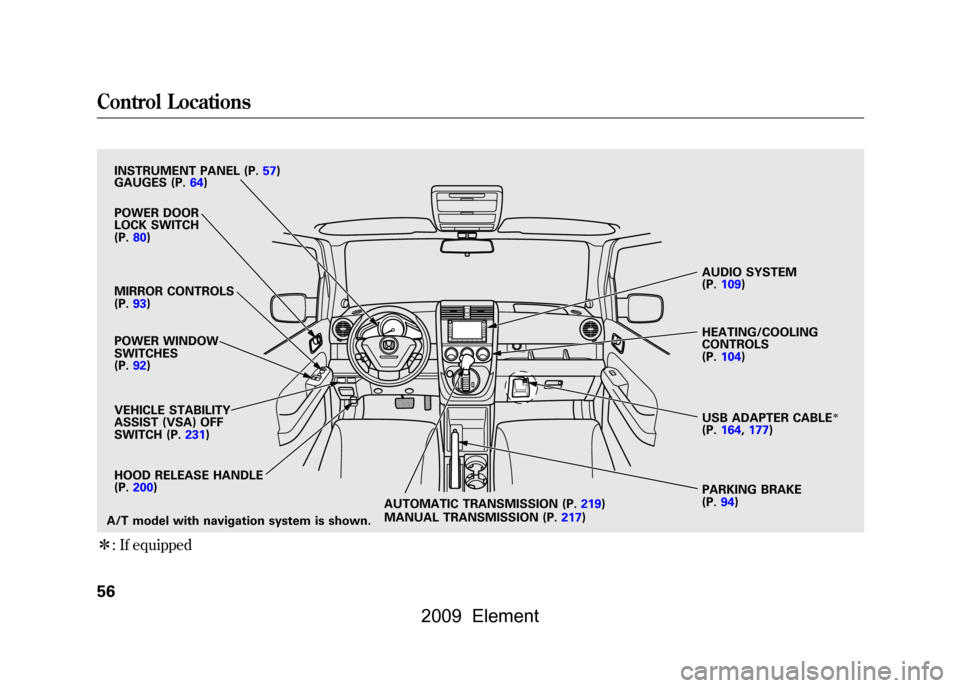
ꭧ: If equipped
VEHICLE STABILITY
ASSIST (VSA) OFF
SWITCH (P.231)
PARKING BRAKE
(P.94)
AUDIO SYSTEM
(P.109)
HEATING/COOLING
CONTROLS
(P.104)
A/T model with navigation system is shown. POWER DOOR
LOCK SWITCH
(P.80)
MIRROR CONTROLS
(P.93)
POWER WINDOW
SWITCHES
(P.92)
INSTRUMENT PANEL (P.57)
HOOD RELEASE HANDLE
(P.200)
GAUGES (P.64)
USB ADAPTER CABLE
ꭧ
(P.164,177)
AUTOMATIC TRANSMISSION (P.219)
MANUAL TRANSMISSION (P.217)
Control Locations56
2009 Element
Page 73 of 345
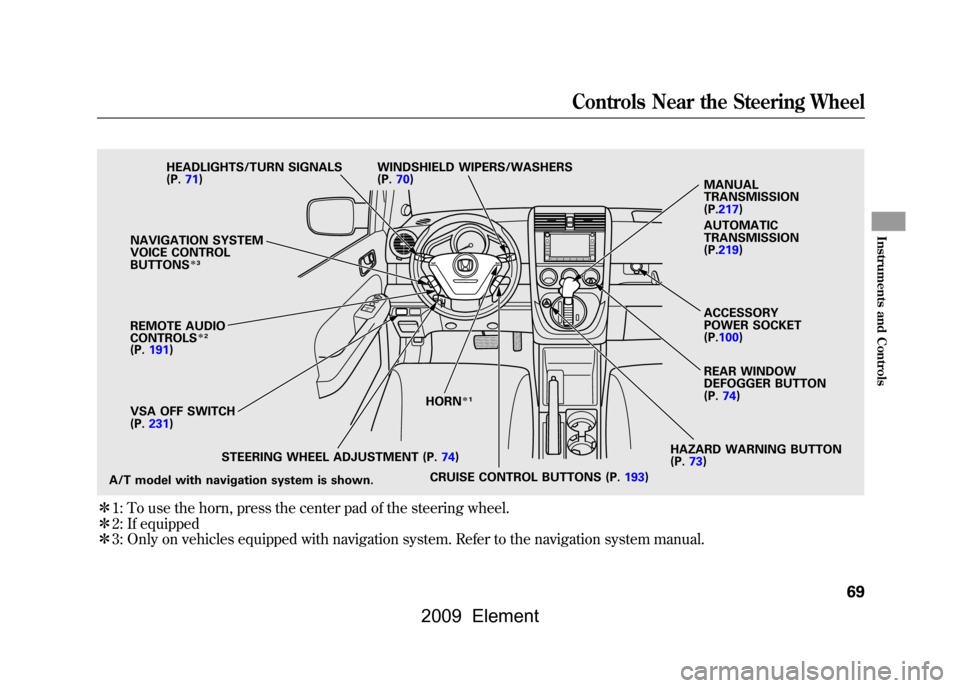
ꭧ1: To use the horn, press the center pad of the steering wheel.
ꭧ 2: If equipped
ꭧ 3: Only on vehicles equipped with navigation system. Refer to the navigation system manual.
HAZARD WARNING BUTTON
(P.73)
CRUISE CONTROL BUTTONS (P.193)
STEERING WHEEL ADJUSTMENT (P.74) HORN
ꭧ
1
A/T model with navigation system is shown. VSA OFF SWITCH
(P.231)
NAVIGATION SYSTEM
VOICE CONTROL
BUTTONS
ꭧ
3
REMOTE AUDIO
CONTROLS
ꭧ2
(P.191) HEADLIGHTS/TURN SIGNALS
(P.71)
WINDSHIELD WIPERS/WASHERS
(P.70)
REAR WINDOW
DEFOGGER BUTTON
(P.74)
MANUAL
TRANSMISSION
(P.217)
AUTOMATIC
TRANSMISSION
(P.219)
ACCESSORY
POWER SOCKET
(P.100)
Controls Near the Steering Wheel
69
Instruments and Controls
2009 Element
Page 83 of 345
To replace the battery, remove the
round cover on the back of the
transmitter by turning it
counterclockwise with a coin. Insert
a new battery with the+side facing
up, and reinstall the cushion ring.
Align the ▽mark on the cover with
the
mark on the transmitter. Set
the cover in place and turn it
clockwise.
As required by the FCC:
This device complies with Part 15 of theFCC rules. Operation is subject to the
following two conditions: (1) This devicemay not cause harmful interference, and(2) this device must accept any
interference received, includinginterference that may cause undesiredoperation.
Changes or modifications not expresslyapproved by the party responsible for
compliance could void the user'sauthority to operate the equipment.
This device complies with IndustryCanada Standard RSS-210.
Operation is subject to the following twoconditions: (1) this device may not causeinterference, and (2) this device must
accept any interference that may causeundesired operation of the device.
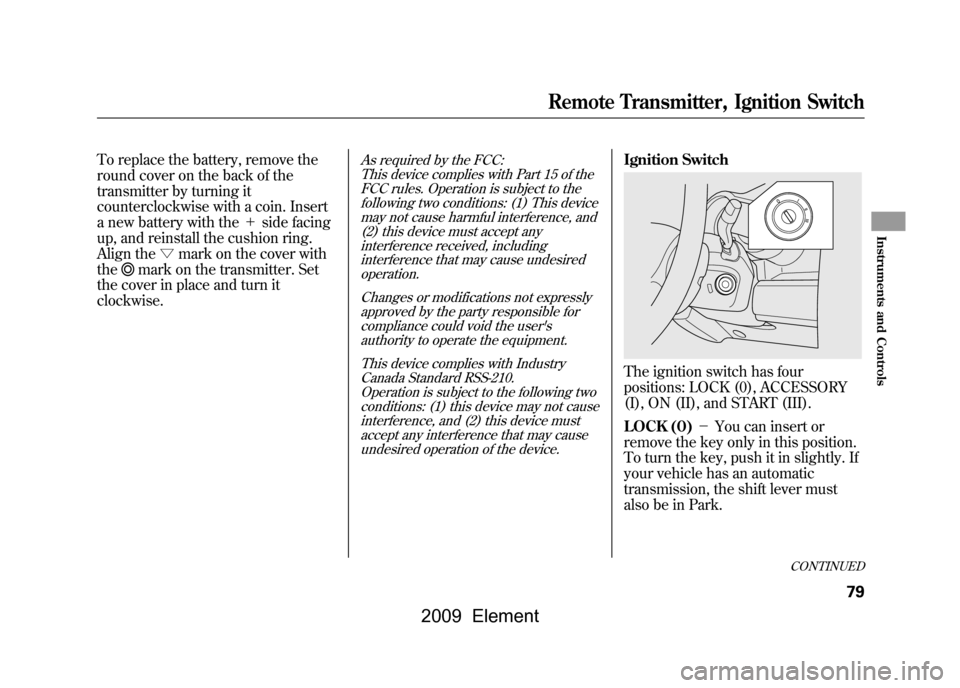
Ignition SwitchThe ignition switch has four
positions: LOCK (0), ACCESSORY
(I), ON (II), and START (III).
LOCK (0) -You can insert or
remove the key only in this position.
To turn the key, push it in slightly. If
your vehicle has an automatic
transmission, the shift lever must
also be in Park.
CONTINUED
Remote Transmitter, Ignition Switch
79
Instruments and Controls
2009 Element
Page 84 of 345
If the front wheels are turned, the
anti-theft lock may make it difficult to
turn the key. Firmly turn the steering
wheel to the left or right as you turn
the key.
ACCESSORY (I)-You can operate
the audio system and the accessory
power sockets in this position.
ON (II) -This is the normal key
position when driving. Several of the
indicators on the instrument panel
come on as a test when you turn the
ignition switch from the
ACCESSORY (I) to the ON (II)
position.
START (III) -Use this position
only to start the engine. The switch
returns to the ON (II) position when
you let go of the key. You will hear a reminder beeper if
you leave the key in the LOCK (0) or
the ACCESSORY (I) position and
open the driver's door. Remove the
key to turn off the beeper.
If your vehicle has an automatic
transmission, the shift lever must be
in Park before you can remove the
key from the ignition switch.
Removing the key from the
ignition switch while driving
locks the steering. This can
cause you to lose control of the
vehicle.
Remove the key from the
ignition switch only when
parked.Power Door Locks
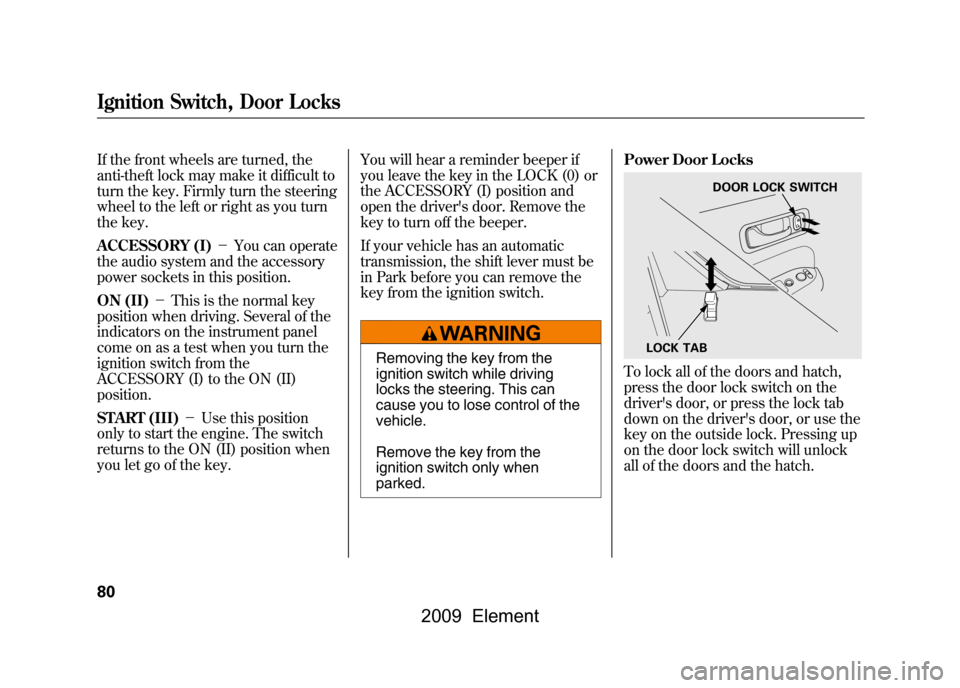
To lock all of the doors and hatch,
press the door lock switch on the
driver's door, or press the lock tab
down on the driver's door, or use the
key on the outside lock. Pressing up
on the door lock switch will unlock
all of the doors and the hatch.
LOCK TAB
DOOR LOCK SWITCH
Ignition Switch, Door Locks80
2009 Element
Page 198 of 345
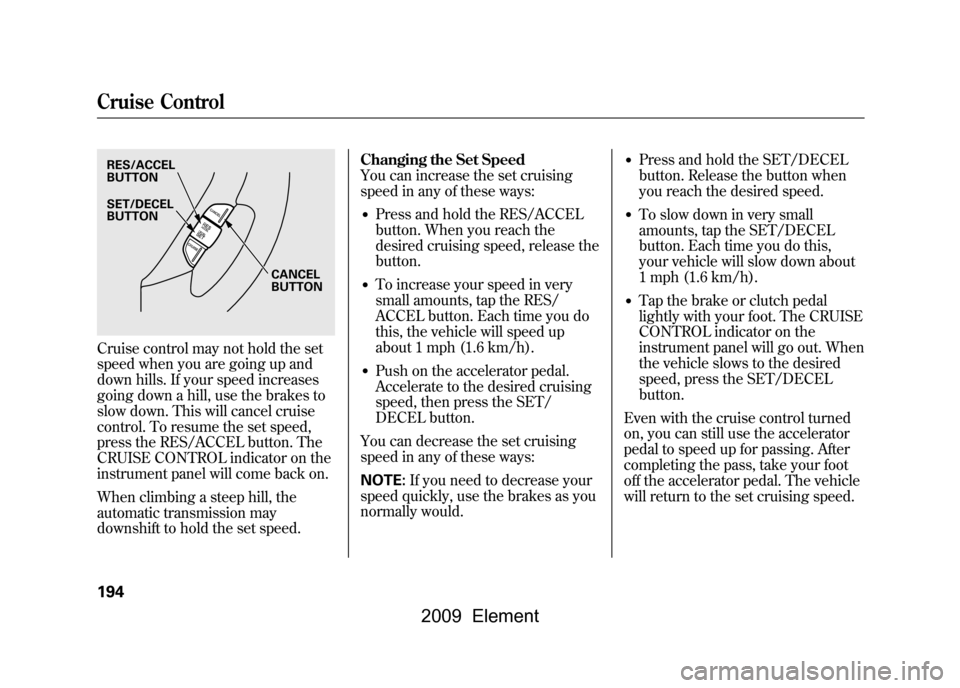
Cruise control may not hold the set
speed when you are going up and
down hills. If your speed increases
going down a hill, use the brakes to
slow down. This will cancel cruise
control. To resume the set speed,
press the RES/ACCEL button. The
CRUISE CONTROL indicator on the
instrument panel will come back on.
When climbing a steep hill, the
automatic transmission may
downshift to hold the set speed.Changing the Set Speed
You can increase the set cruising
speed in any of these ways:
●Press and hold the RES/ACCEL
button. When you reach the
desired cruising speed, release the
button.●To increase your speed in very
small amounts, tap the RES/
ACCEL button. Each time you do
this, the vehicle will speed up
about 1 mph (1.6 km/h).●Push on the accelerator pedal.
Accelerate to the desired cruising
speed, then press the SET/
DECEL button.
You can decrease the set cruising
speed in any of these ways:
NOTE: If you need to decrease your
speed quickly, use the brakes as you
normally would.
●Press and hold the SET/DECEL
button. Release the button when
you reach the desired speed.●To slow down in very small
amounts, tap the SET/DECEL
button. Each time you do this,
your vehicle will slow down about
1 mph (1.6 km/h).●Tap the brake or clutch pedal
lightly with your foot. The CRUISE
CONTROL indicator on the
instrument panel will go out. When
the vehicle slows to the desired
speed, press the SET/DECEL
button.
Even with the cruise control turned
on, you can still use the accelerator
pedal to speed up for passing. After
completing the pass, take your foot
off the accelerator pedal. The vehicle
will return to the set cruising speed.
RES/ACCEL
BUTTON
CANCEL
BUTTON
SET/DECEL
BUTTONCruise Control194
2009 Element
Page 202 of 345

Break-in Period
Help assure your vehicle's future
reliability and performance by paying
extra attention to how you drive
during the first 600 miles (1,000 km).
During this period:●Avoid full-throttle starts and rapid
acceleration.●Do not change the oil until the
scheduled maintenance time.●Avoid hard braking for the first 200
miles (300 km).●Do not tow a trailer.
You should also follow these
recommendations with an
overhauled or exchanged engine, or
when the brakes are replaced. Fuel Recommendation
Your vehicle is designed to operate
on unleaded gasoline with a pump
octane number of 87 or higher. Use
of a lower octane gasoline can cause
a persistent, heavy metallic rapping
noise that can lead to engine
damage.
On vehicles with manual transmissionYou may hear a knocking noise from
the engine if you drive the vehicle at
low engine speed (below about 1,000
rpm) in a higher gear. To stop this,
raise the engine speed by shifting to
a lower gear.
We recommend using quality
gasoline containing detergent
additives that help prevent fuel
system and engine deposits.In addition, in order to maintain good
performance, fuel economy, and
emissions control, we strongly
recommend, in areas where it is
available, the use of gasoline that
does NOT contain manganese-based
fuel additives such as MMT.
Use of gasoline with these additives
may adversely affect performance,
and cause the malfunction indicator
lamp on your instrument panel to
come on. If this happens, contact
your authorized dealer for service.
Some gasoline today is blended with
oxygenates such as ethanol or
MTBE. Your vehicle is designed to
operate on oxygenated gasoline
containing up to 10% ethanol by
volume and up to 15% MTBE by
volume. Do not use gasoline
containing methanol.
Break-in Period, Fuel Recommendation198
2009 Element
Page 207 of 345

Fuel Economy FactorsThe following factors can lower your
vehicle's fuel economy:●Aggressive driving (hard
acceleration and braking)●Excessive idling, accelerating and
braking in stop-and-go traffic●Cold engine operation (engines are
more efficient when warmed up)●Driving with a heavy load or the air
conditioner running●Improperly inflated tiresImproving Fuel EconomyVehicle MaintenanceA properly maintained vehicle
maximizes fuel economy. Poor
maintenance can significantly reduce
fuel economy. Always maintain your
vehicle according to the maintenance
messages displayed on the
information display (seeOwner's
Maintenance Checks on page248).
For example:
●Use the recommended viscosity
motor oil, displaying the API
Certification Seal (see page251).●Maintain proper tire inflation -
An underinflated tire increases
‘‘ rolling resistance, ’’which reduces
fuel economy.●Avoid carrying excess weight in
your vehicle -It puts a heavier
load on the engine, increasing fuel
consumption.●Keep your vehicle clean -In
particular, a build-up of snow or
mud on your vehicle's underside
adds weight and rolling resistance.
Frequent cleaning helps your fuel
economy.
Drive Efficiently●Drive moderately -Rapid
acceleration, abrupt cornering, and
hard braking increase fuel
consumption.●Observe the speed limit -
Aerodynamic drag has a big effect
on fuel economy at speeds above
45 mph (75 km/h). Reduce your
speed and you reduce the drag.
Trailers, car top carriers, roof
racks and bike racks are also big
contributors to increased drag.●Always drive in the highest gear
possible -If your vehicle has a
manual transmission, you can
boost your fuel economy by up
shifting as early as possible.●Avoid excessive idling -Idling
results in 0 miles per gallon (0 kms
per liter).
CONTINUED
Fuel Economy
203
Before Driving
2009 Element