change HONDA ELEMENT 2010 1.G Navigation Manual
[x] Cancel search | Manufacturer: HONDA, Model Year: 2010, Model line: ELEMENT, Model: HONDA ELEMENT 2010 1.GPages: 153, PDF Size: 3.12 MB
Page 91 of 153
90Navigation System
System Setup
Guidance Mode
Allows you to select the guidance
display mode: Single Screen or Split
Screen .
To get to Guidance Mode from the
Setup screen, select in sequence,
“More,” “Routing & Guidance,” and
“Guidance Mode.”
The factory default is Single Screen.
NOTE:
The Guidance Mode can also be
selected on the Icon Selection screen.
See Showing Icons on the Map on
page 58.
Vehicle
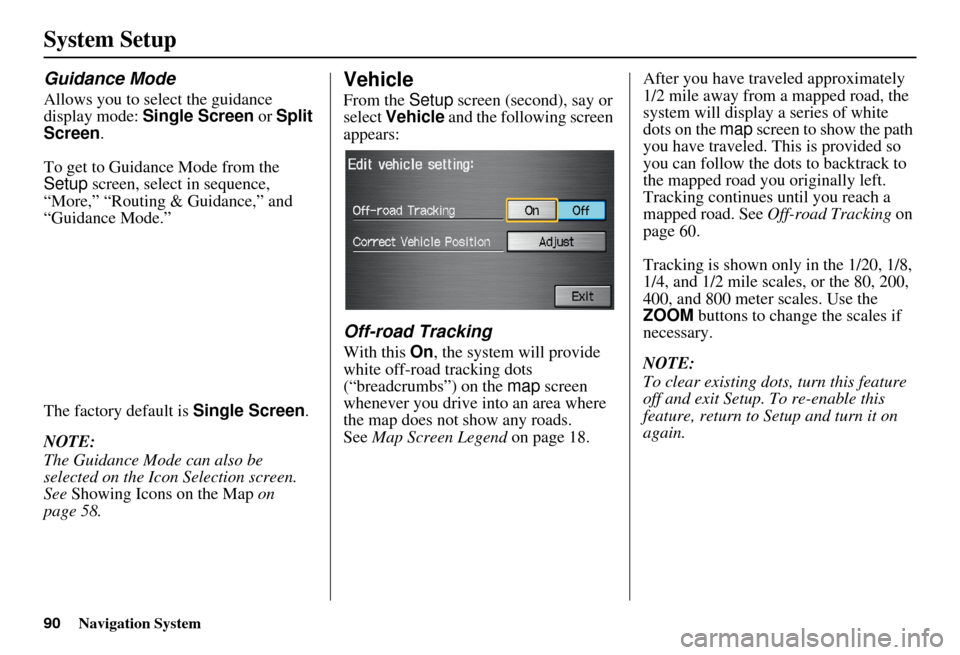
From the Setup screen (second), say or
select Vehicle and the following screen
appears:
Off-road Tracking
With this On, the system will provide
white off-road tracking dots
(“breadcrumbs”) on the map screen
whenever you drive into an area where
the map does not show any roads.
See Map Screen Legend on page 18. After you have traveled approximately
1/2 mile away from a mapped road, the
system will display a series of white
dots on the
map screen to show the path
you have traveled. This is provided so
you can follow the dots to backtrack to
the mapped road you originally left.
Tracking continues until you reach a
mapped road. See Off-road Tracking on
page 60.
Tracking is shown only in the 1/20, 1/8,
1/4, and 1/2 mile scales, or the 80, 200,
400, and 800 meter scales. Use the
ZOOM buttons to change the scales if
necessary.
NOTE:
To clear existing dots, turn this feature
off and exit Setup. To re-enable this
feature, return to Setup and turn it on
again.
Page 94 of 153
Navigation System93
System Setup
Clock Settings
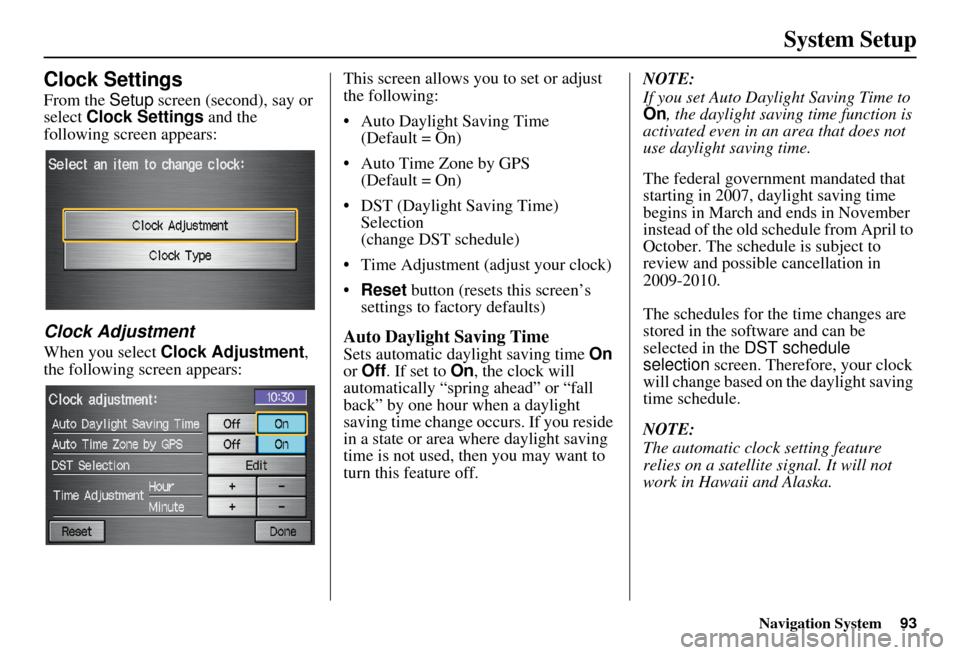
From the Setup screen (second), say or
select Clock Settings and the
following screen appears:
Clock Adjustment
When you select Clock Adjustment ,
the following screen appears: This screen allows you to set or adjust
the following:
• Auto Daylight Saving Time
(Default = On)
• Auto Time Zone by GPS (Default = On)
• DST (Daylight Saving Time) Selection
(change DST schedule)
• Time Adjustment (adjust your clock)
• Reset button (resets this screen’s
settings to factory defaults)Auto Daylight Saving Time
Sets automatic daylight saving time On
or Off . If set to On, the clock will
automatically “spring ahead” or “fall
back” by one hour when a daylight
saving time change occurs. If you reside
in a state or area where daylight saving
time is not used, then you may want to
turn this feature off. NOTE:
If you set Auto Daylig
ht Saving Time to
On , the daylight savi ng time function is
activated even in an area that does not
use daylight saving time.
The federal government mandated that
starting in 2007, daylight saving time
begins in March and ends in November
instead of the old schedule from April to
October. The schedule is subject to
review and possible cancellation in
2009-2010.
The schedules for the time changes are
stored in the software and can be
selected in the DST schedule
selection screen. Therefore, your clock
will change based on the daylight saving
time schedule.
NOTE:
The automatic clock setting feature
relies on a satellite signal. It will not
work in Hawaii and Alaska.
Page 95 of 153
94Navigation System
System Setup
Auto Time Zone by GPS
Sets automatic time zone selection by
GPS to On or Off . If you are driving
across the country and passing through
time zones, then this feature will
automatically set the time to the time
zone you are traveling through.
However, if you live and work in two
different time zones, you may want to
turn this feature off.
NOTE:
When driving near a time zone
boundary, the displayed time zone may
fluctuate between the two zone times.
Daylight Saving Time (DST)
Selection (Change DST Schedule)
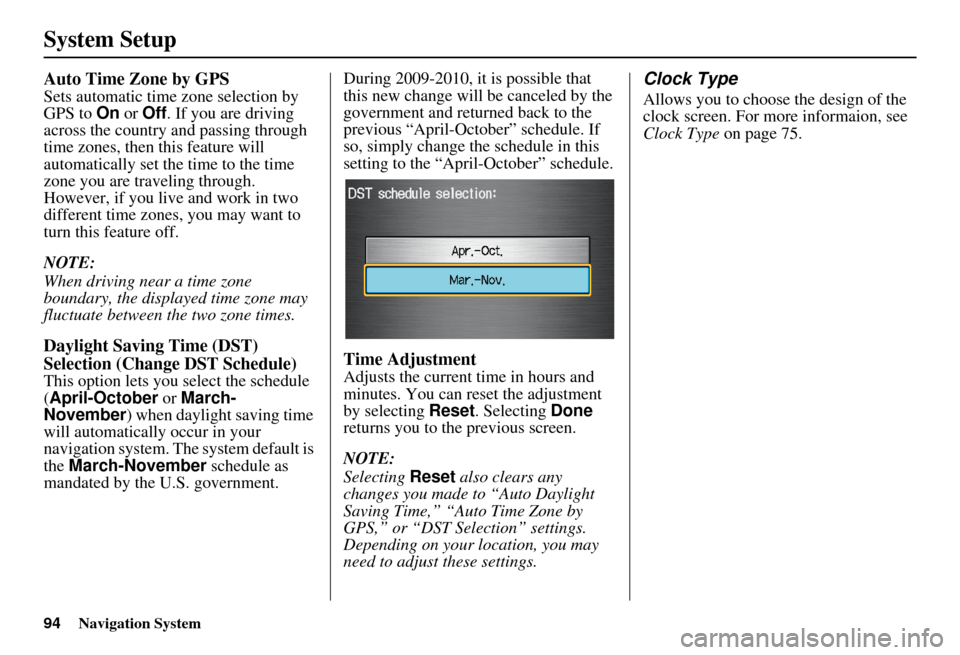
This option lets you select the schedule
(April-October or March-
November ) when daylight saving time
will automatically occur in your
navigation system. The system default is
the March-November schedule as
mandated by the U.S. government. During 2009-2010, it is possible that
this new change will
be canceled by the
government and return ed back to the
previous “April-October” schedule. If
so, simply change the schedule in this
setting to the “April-October” schedule.
Time Adjustment
Adjusts the current time in hours and
minutes. You can reset the adjustment
by selecting Reset. Selecting Done
returns you to the previous screen.
NOTE:
Selecting Reset also clears any
changes you made to “Auto Daylight
Saving Time,” “Auto Time Zone by
GPS,” or “DST Selection” settings.
Depending on your location, you may
need to adjust these settings.
Clock Type
Allows you to choose the design of the
clock screen. For more informaion, see
Clock Type on page 75.
Page 98 of 153
Navigation System97
System Initialization
System Initialization
If for any reason you lose power to the
navigation system (e.g., the battery was
disconnected), the navigation system
will require initialization. Once
completed, your system will be ready to
use.
This initialization requires the
following:
• Entry of the 4-digit anti-theft security code.
• GPS initialization (may not be needed depending on the le ngth of time the
system was without power).
• Map matching to align the GPS coordinates to a place on the map
(displays current street at the bottom
of the map).
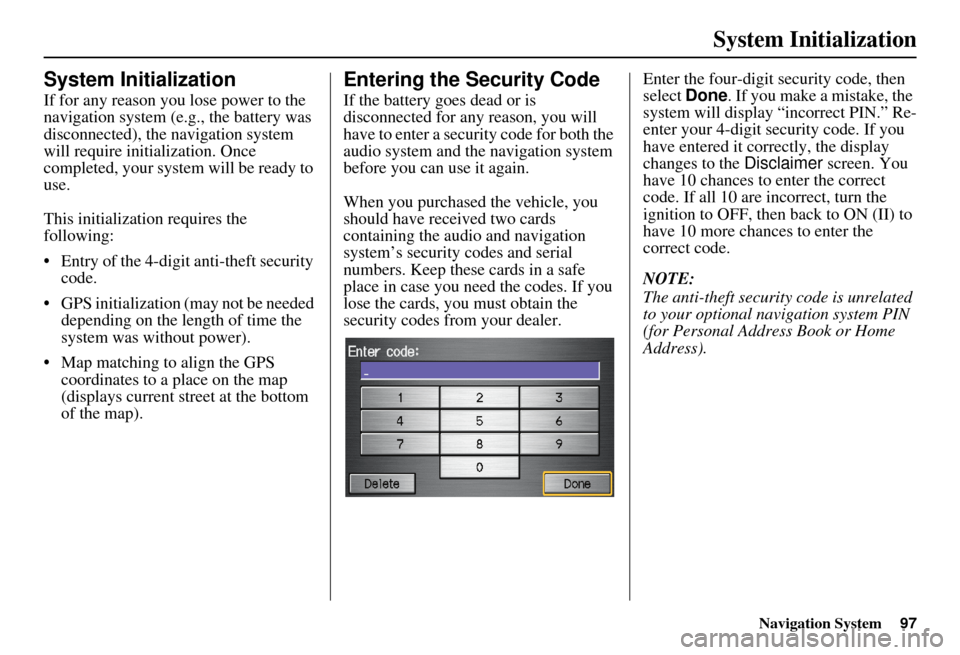
Entering the Security Code
If the battery goes dead or is
disconnected for any reason, you will
have to enter a secur ity code for both the
audio system and the navigation system
before you can use it again.
When you purchased the vehicle, you
should have received two cards
containing the audio and navigation
system’s security codes and serial
numbers. Keep these cards in a safe
place in case you need the codes. If you
lose the cards, you must obtain the
security codes from your dealer. Enter the four-digit security code, then
select
Done. If you make a mistake, the
system will display “incorrect PIN.” Re-
enter your 4-digit security code. If you
have entered it corr ectly, the display
changes to the Disclaimer screen. You
have 10 chances to enter the correct
code. If all 10 are incorrect, turn the
ignition to OFF, then back to ON (II) to
have 10 more chances to enter the
correct code.
NOTE:
The anti-theft security code is unrelated
to your optional navigation system PIN
(for Personal Address Book or Home
Address).
Page 102 of 153
Navigation System101
Database Limitations
You will find that some points of
interest (POI) may be missing when you
search the database. This can be caused
if at the time the database was gathered,
the name was misspelled, the place was
improperly categorized, or the POI
change is not yet in the database. This
means you may not find places listed
that you know exist. This is also true for
police agencies and hospitals. In
outlying areas, facilities listed may not
be the closest. Always check with local
information sources if you need law
enforcement or hospital services.
Every effort has been made to verify
that the system’s database was accurate
at the time it was created. However,
businesses do close or relocate, and new
businesses start in the old locations. For
this reason, you may occasionally find
inaccurate information when you select
and drive to a point of interest (for
example, a restaurant is now a jewelry
store). The number of these inaccuracies
increases the longer you go without an
update. The digitized map database reflects
conditions as they existed at various
points in time before production.
Accordingly, your
DVD may contain
inaccurate or incomplete data or
information due to the passage of time,
road construction, changing conditions,
or other causes.
Due to ongoing software and database
improvements, navigation disc versions
may change in the middle of a
production year. The version shipped
with your vehicle was the most recent
available at the time of production and
is considered standard equipment for
that vehicle. There is no free program to
retrofit early production vehicles with
the latest disc. For DVD ordering
information, see page 104. In addition, this database does not
include, analyze, proc
ess, consider, or
reflect any of the following categories
of information:
• Neighborhood quality or safety
• Population density
• Availability or proximity of law enforcement
• Emergency, rescue, medical, or other assistance
• Construction work, zones, or hazards
• Road and lane closures
• Legal restrictions (such as vehicular type, weight, load, height, and speed
restrictions)
• Road slope or grade
• Bridge height, width, weight, or other limits
• Road traffic, safety, or conditions
• Weather conditions
• Special events
• Pavement characteristics or conditions
Page 103 of 153
102Navigation System
Database Limitations
• Traffic congestion
• Travel time
We assume no liability for any incident
that may result from an error in the
program, or from changed conditions
not noted above.Copyrights
• infoUSA-Data: Certain business data provided by infoUSA, Inc., Omaha,
Nebraska, Copyright © 2008, All
Rights Reserved.
• EXIT-Data: © ZENRIN CO., LTD. 2008. All Rights Reserved.
Page 104 of 153
Navigation System103
Customer Assistance
Reporting Errors
Occasionally, you may encounter
database errors.
• If the error pertains to freeways and
main “verified” roads shown in black
on the map, then report it either
online at
http://update.navteq.com/ , or to
Honda Customer Service.
• If the error involves a light brown “unverified” road, then do not report
it. These areas have not been verified,
and are provided for reference only
(see Map Overview on page 6).
• For errors in points of interest (POI), like a business that has changed its
name, do not report them. Keep in
mind that depending on when the data
was collected and when your DVD
was purchased, the database can be
out of date. The business may have
not reported the change(s), or not be
in the database at all. Update
Navigation DVDs are available for
purchase, usually in the fall of each
year. • If the error does not involve the
database, such as vehicle position
icon errors, screen error messages, or
other GPS-related errors, see
Frequently Asked Questions on
page 124, System Limitations on
page 99, or Troubleshooting on
page 134.
Honda Automobile
Customer Service
Telephone: (800) 999-1009
Fax: (310) 783-3273
Mail:
Honda Navi
America Honda Motor Co., Inc.
Honda Customer Service
MS 500-2N-7A
1919 Torrance Blvd.
Torrance, CA 90501-2746
Page 126 of 153
Navigation System125
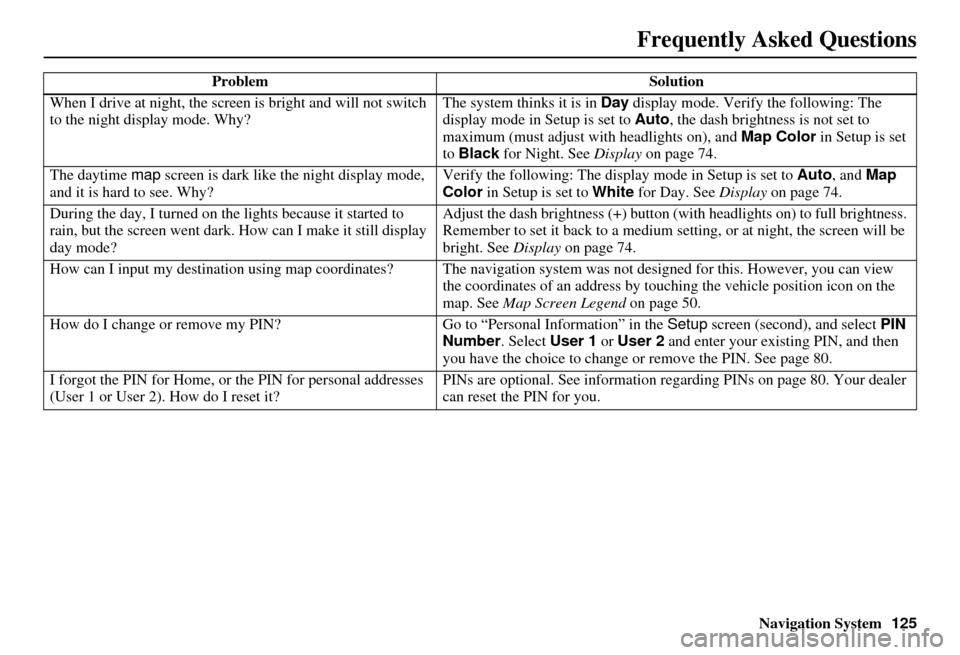
When I drive at night, the screen
is bright and will not switch
to the night display mode. Why? The system thinks it is in Day
display mode. Verify the following: The
display mode in Setup is set to Auto , the dash brightness is not set to
maximum (must adjust with headlights on), and Map Color in Setup is set
to Black for Night. See Display on page 74.
The daytime map screen is dark like the night display mode,
and it is hard to see. Why? Verify the following: The disp
lay mode in Setup is set to Auto, and Map
Color in Setup is set to White for Day. See Display on page 74.
During the day, I turned on the lights because it started to
rain, but the screen went dark. How can I make it still display
day mode? Adjust the dash brightness (+) button
(with headlights on) to full brightness.
Remember to set it back to a medium set ting, or at night, the screen will be
bright. See Display on page 74.
How can I input my destination using map coordinates? The navigation system was not designed for th is. However, you can view
the coordinates of an address by touching the vehicle position icon on the
map. See Map Screen Legend on page 50.
How do I change or remove my PIN? Go to “Personal Information” in the Setup screen (second), and select PIN
Number . Select User 1 or User 2 and enter your existing PIN, and then
you have the choice to change or remove the PIN. See page 80.
I forgot the PIN for Home, or the PIN for personal addresses
(User 1 or User 2). How do I reset it? PINs are optional. See information regarding PINs on page 80. Your dealer
can reset the PIN for you.
Problem
Solution
Frequently Asked Questions
Page 128 of 153
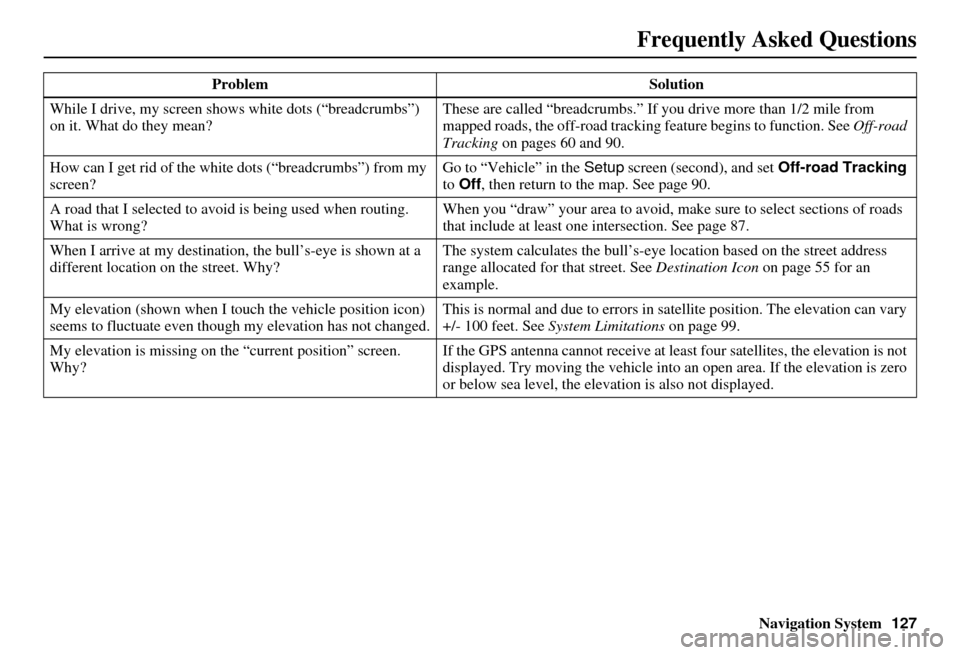
Navigation System127
While I drive, my screen s
hows white dots (“breadcrumbs”)
on it. What do they mean? These are called “breadcrumbs.”
If you drive more than 1/2 mile from
mapped roads, the off-road tracking feature begins to function. See Off-road
Tracking on pages 60 and 90.
How can I get rid of the white dots (“breadcrumbs”) from my
screen? Go to “Vehicle” in the
Setup screen (second), and set Off-road Tracking
to Off , then return to the map. See page 90.
A road that I selected to avoi d is being used when routing.
What is wrong? When you “draw” your area to avoid, make
sure to select sections of roads
that include at least one intersection. See page 87.
When I arrive at my destination, the bull’s-eye is shown at a
different location on the street. Why? The system calculates the bull’s-eye
location based on the street address
range allocated for that street. See Destination Icon on page 55 for an
example.
My elevation (shown when I t ouch the vehicle position icon)
seems to fluctuate even though my elevation has not changed. This is normal and due to errors in sa
tellite position. The elevation can vary
+/- 100 feet. See System Limitations on page 99.
My elevation is missing on the “current pos ition” screen.
Why? If the GPS antenna cannot receive at least four satellites, the elevation is not
displayed. Try moving the vehicle into an open area. If the elevation is zero
or below sea level, the elev
ation is also not displayed.
Problem
Solution
Frequently Asked Questions
Page 133 of 153
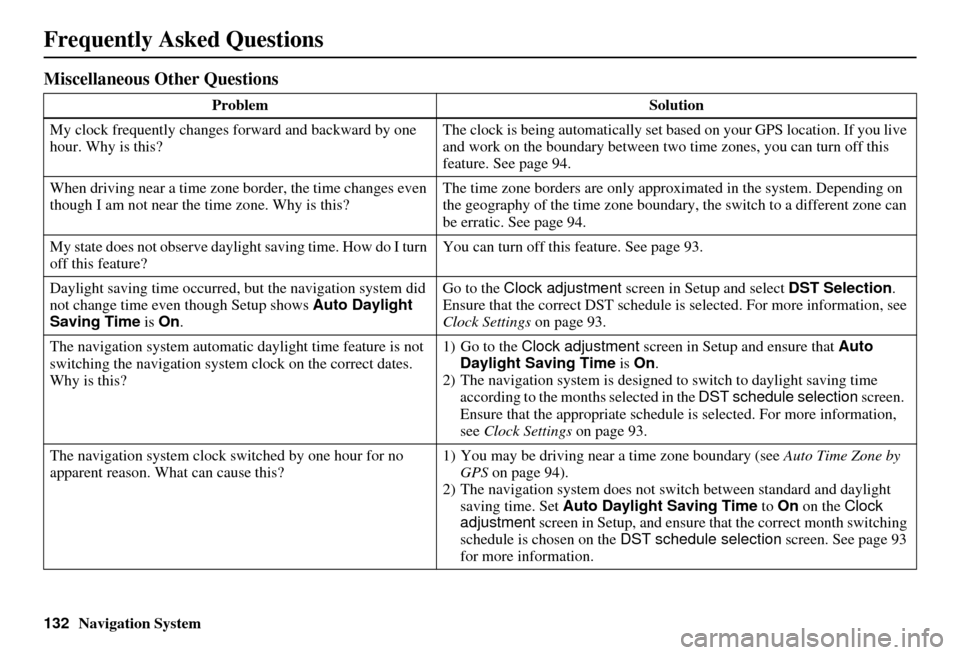
132Navigation System
Miscellaneous Other Questions
ProblemSolution
My clock frequently changes forward and backward by one
hour. Why is this? The clock is being automatically set ba
sed on your GPS location. If you live
and work on the boundary between two time zones, you can turn off this
feature. See page 94.
When driving near a time zone border, the time changes even
though I am not near the time zone. Why is this? The time zone borders are only appr
oximated in the system. Depending on
the geography of the time zone boundary, the switch to a different zone can
be erratic. See page 94.
My state does not observe dayli ght saving time. How do I turn
off this feature? You can turn off this feature. See page 93.
Daylight saving time occurred, but the navigation system did
not change time even though Setup shows Auto Daylight
Saving Time is On . Go to the
Clock adjustment screen in Setup and select DST Selection.
Ensure that the correct DST schedule is selected. For more information, see
Clock Settings on page 93.
The navigation system automatic daylight time feature is not
switching the navigation system clock on the correct dates.
Why is this? 1) Go to the
Clock adjustment screen in Setup and ensure that Auto
Daylight Saving Time is On .
2) The navigation system is designed to switch to daylight saving time
according to the months selected in the DST schedule selection screen.
Ensure that the appropriate schedule is selected. For more information,
see Clock Settings on page 93.
The navigation system clock switched by one hour for no
apparent reason. Wh at can cause this? 1) You may be driving near
a time zone boundary (see Auto Time Zone by
GPS on page 94).
2) The navigation system does not switch between standard and daylight
saving time. Set Auto Daylight Saving Time to On on the Clock
adjustment screen in Setup, and ensure that the correct month switching
schedule is chosen on the DST schedule selection screen. See page 93
for more information.
Frequently Asked Questions