radio HONDA ELEMENT 2011 1.G User Guide
[x] Cancel search | Manufacturer: HONDA, Model Year: 2011, Model line: ELEMENT, Model: HONDA ELEMENT 2011 1.GPages: 286, PDF Size: 14.07 MB
Page 126 of 286
To Play a Disc
To load or play discs, the ignition
switch must be in the ACCESSORY
(I) or ON (II) position.Do not use discs with adhesive labels.
The label can curl up and cause the
disc to jam in the unit.
You operate the disc player with the
same controls used for the radio. To
select the disc player, press the CD/
TAPE or the CD/AUX button. You
will see‘‘CD ’’in the display. The
number of the track playing is shown
in the display. The system will
continuously play a disc until you
change modes.
Video CDs and DVDs do not work in
this unit.
On EX modelThe disc player can also play CD-Rs
and CD-RWs compressed in MP3 or
WMA formats.
When playing a disc in MP3, you will
see ‘‘MP3 ’’in the display. The folder
and track numbers are displayed.
Each disc can hold up to 400 playable
files within 8 folder layers. A disc can
support a maximum number of 100
folders, and each folder can hold 255
playable files.
When playing a disc in WMA, you
will see ‘‘WMA’’ in the display. The
folder and track numbers are
displayed. Each disc can hold up to
200 files within 16 subdirectories, 8
folder layers. A disc can support a
maximum number of 100 folders, and
each folder can hold 255 playable
files. NOTE:
If a file on an MP3 or WMA
disc is protected by digital rights
management (DRM), the audio unit
displays FORMAT, and then skips to
the next file.
Depending on the software the files
were made with, it may not be
possible to play some files, or display
some text data.
Insert the disc about halfway into the
disc slot. The drive will pull the disc
in the rest of the way and begin to
play it. When the system reaches the
end of the disc, it will return to the
beginning and play the disc again.
To play the radio when a disc is
playing, press the AM/FM button.
Press the CD/TAPE or CD/AUX
button again to switch back to the
CD player.
Playing a Disc12010/08/06 08:34:41 11 ELEMENT MMC North America Owner's Man 50 31SCV680 enu
Page 129 of 286

On EX modelIn MP3/WMA modeFOLDER SCAN -This feature,
when activated, samples all files on
the selected folder in order. To
activate folder scan, press and hold
the SCAN button until you hear a
beep. You will see
SCAN in the
display. The system will then play
the first file for about 10 seconds. If
you do nothing, the system will then
play the first file in each folder for 10
seconds. When it plays a file you
want to continue listening to, press
the SCAN button again.
Pressing either side of the SEEK/
SKIP button or selecting a different
folder with the FOLDER knob also
turns off folder scan. To Stop Playing a Disc
Press the eject button (
)to
remove the disc. If you eject the disc,
but do not remove it from the slot,
the system will automatically reload
the disc after 10 seconds (EX model)
or 15 seconds (LX model) and put it
in pause mode. To begin playing,
press the CD/TAPE or CD/AUX
button.
Press the AM/FM button to switch
to the radio while a disc is playing.
To play the disc, press the CD/TAPE
or CD/AUX button.
If you turn the system off while a disc
is playing, either with the VOL/PWR
knob or by turning off the ignition
switch, the disc will stay in the drive.
When you turn the system back on,
the disc will begin playing where it
left off. Audio System Malfunction
See pages 125 and 126 for
information on error messages.
Protecting Discs
For information on how to handle
and protect discs, see page 127.
CONTINUED
Playing a Disc
123
Features
10/08/06 08:34:41 11 ELEMENT MMC North America Owner's Man 50 31SCV680 enu
Page 130 of 286

Operating the Optional Disc
ChangerOn LX modelAn optional six disc changer is
available for your vehicle. This disc
changer uses the same controls used
for the in-dash disc player or the
radio.
Load the desired discs in the
magazine, and load the magazine in
the changer according to the
instructions that came with the unit.
To select the disc changer, press the
CD/TAPE button. The disc and track
numbers will be displayed. To select
a different disc, use the preset 5
button (DISC-) or the preset 6
button (DISC +). To select the
previous disc, press the preset 5
button (DISC -), or the preset 6
button (DISC +) to select the next
disc in sequence. If you select an empty slot in the
magazine, the changer will search for
the next available disc to load and
play.Playing a Disc12410/08/06 08:34:41 11 ELEMENT MMC North America Owner's Man 50 31SCV680 enu
Page 136 of 286
Radio Frequencies
The radio can receive the complete
AM and FM bands.
Those bands cover these
frequencies:
AM band: 530 to 1,710 kHz
FM band: 87.7 to 107.9 MHz
Radio stations on the AM band are
assigned frequencies at least 10 kHz
apart (530, 540, 550). Stations on the
FM band are assigned frequencies at
least 0.2 MHz apart (87.9, 88.1, 88.3).
Stations must use these exact
frequencies. It is fairly common for
stations to round-off the frequency in
their advertising, so your radio could
display a frequency of 100.9 even
though the announcer may identify
the station as‘‘FM101. ’’ FM/AM Radio Reception
How well the radio receives stations
is dependent on many factors, such
as the distance from the station's
transmitter, nearby large objects, and
atmospheric conditions.
A radio station's signal gets weaker
as you get farther away from its
transmitter. If you are listening to an
AM station, you will notice the sound
volume becoming weaker, and the
station drifting in and out. If you are
listening to an FM station, you will
see the stereo indicator flickering off
and on as the signal weakens.
Eventually, the stereo indicator will
go off and the sound will fade
completely as you get out of range of
the station's signal.
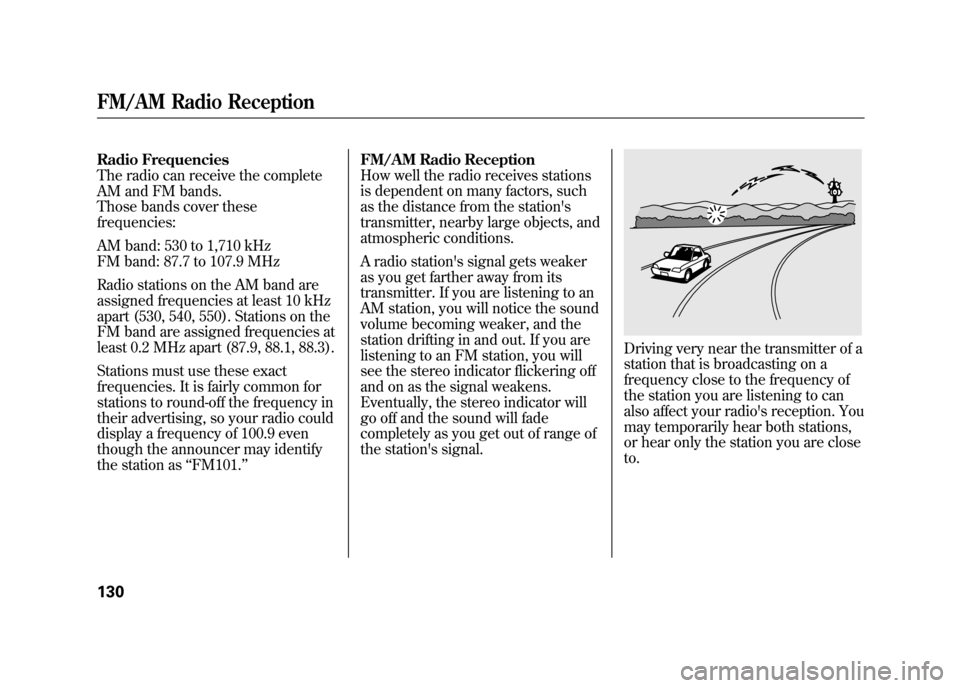
Driving very near the transmitter of a
station that is broadcasting on a
frequency close to the frequency of
the station you are listening to can
also affect your radio's reception. You
may temporarily hear both stations,
or hear only the station you are close
to.
FM/AM Radio Reception13010/08/06 08:34:41 11 ELEMENT MMC North America Owner's Man 50 31SCV680 enu
Page 137 of 286
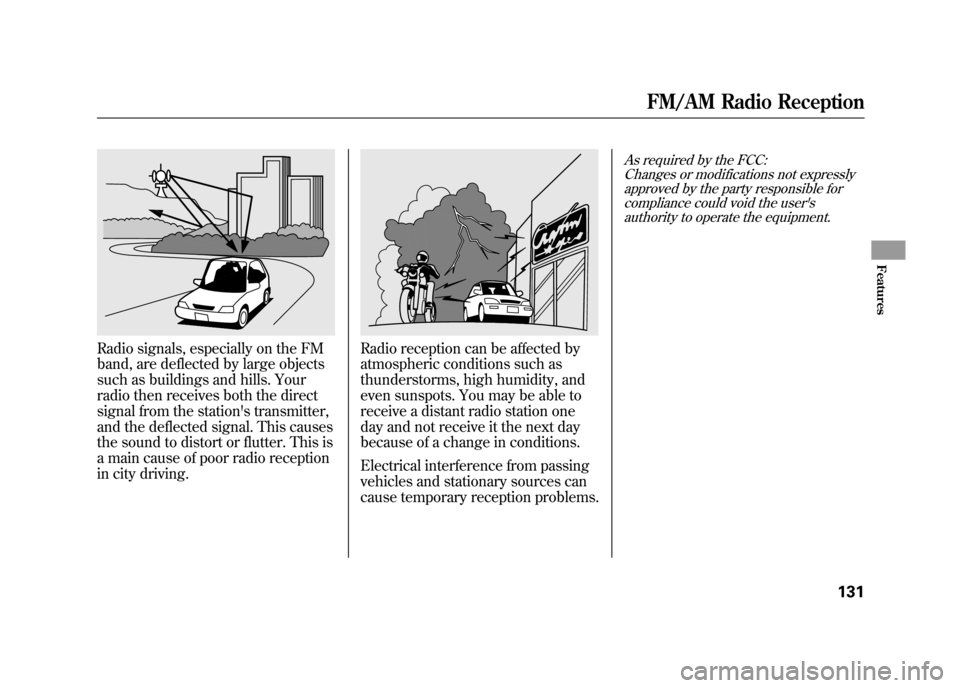
Radio signals, especially on the FM
band, are deflected by large objects
such as buildings and hills. Your
radio then receives both the direct
signal from the station's transmitter,
and the deflected signal. This causes
the sound to distort or flutter. This is
a main cause of poor radio reception
in city driving.
Radio reception can be affected by
atmospheric conditions such as
thunderstorms, high humidity, and
even sunspots. You may be able to
receive a distant radio station one
day and not receive it the next day
because of a change in conditions.
Electrical interference from passing
vehicles and stationary sources can
cause temporary reception problems.
As required by the FCC:Changes or modifications not expresslyapproved by the party responsible for
compliance could void the user'sauthority to operate the equipment.
FM/AM Radio Reception
131
Features
10/08/06 08:34:41 11 ELEMENT MMC North America Owner's Man 50 31SCV680 enu
Page 138 of 286

On EX modelYour vehicle's audio system will
disable itself if it is disconnected
from electrical power for any reason.
To make it work again, you must
enter a specific code in the preset
buttons. Because there are hundreds
of number combinations possible
from specific digits, making the
system work without knowing the
exact code is nearly impossible.
You should have received a radio
code card that lists your audio
system's code and serial numbers. It
is best to store this card in a safe
place at home. In addition, you
should write the audio system's
serial number in this owner's
manual.
If you lose the card, you must obtain
the code number from a dealer. To
do this, you will need the system's
serial number.If your vehicle's battery is
disconnected or goes dead, the audio
system will disable itself. If this
happens, you will see
‘‘ENTER
CODE ’’in the frequency display the
next time you turn on the system.
Use the preset buttons to enter the
code. The code is on the radio code
card included in your owner's
manual kit. When it is entered
correctly, the radio will start playing.
If you make a mistake entering the
code, do not start over; complete the
sequence, then enter the correct
code. You have 10 tries to enter the
correct code. If you are unsuccessful
in 10 attempts, you must then leave
the system on for 1 hour before
trying again.Radio Theft Protection13210/08/06 08:34:41 11 ELEMENT MMC North America Owner's Man 50 31SCV680 enu
Page 141 of 286
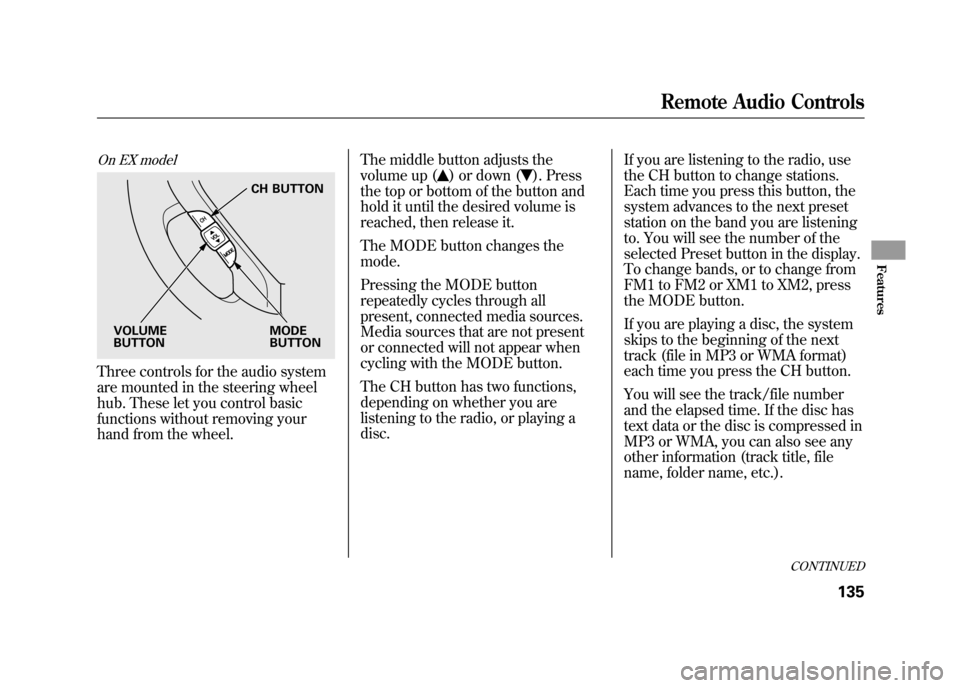
On EX modelThree controls for the audio system
are mounted in the steering wheel
hub. These let you control basic
functions without removing your
hand from the wheel.The middle button adjusts the
volume up (
) or down (
). Press
the top or bottom of the button and
hold it until the desired volume is
reached, then release it.
The MODE button changes the
mode.
Pressing the MODE button
repeatedly cycles through all
present, connected media sources.
Media sources that are not present
or connected will not appear when
cycling with the MODE button.
The CH button has two functions,
depending on whether you are
listening to the radio, or playing a
disc. If you are listening to the radio, use
the CH button to change stations.
Each time you press this button, the
system advances to the next preset
station on the band you are listening
to. You will see the number of the
selected Preset button in the display.
To change bands, or to change from
FM1 to FM2 or XM1 to XM2, press
the MODE button.
If you are playing a disc, the system
skips to the beginning of the next
track (file in MP3 or WMA format)
each time you press the CH button.
You will see the track/file number
and the elapsed time. If the disc has
text data or the disc is compressed in
MP3 or WMA, you can also see any
other information (track title, file
name, folder name, etc.).
CH BUTTON
MODE
BUTTON
VOLUME
BUTTON
CONTINUED
Remote Audio Controls
135
Features
10/08/06 08:34:41 11 ELEMENT MMC North America Owner's Man 50 31SCV680 enu
Page 155 of 286
Modifying your vehicle, or installing
some non-Honda accessories, can
make it unsafe. Before you make any
modifications or add any accessories,
be sure to read the following
information.
Accessories
Your dealer has Honda accessories
that allow you to personalize your
vehicle. These accessories have been
designed and approved for your
vehicle, and are covered by warranty.
Although non-Honda accessories
may fit on your vehicle, they may not
meet factory specifications, and could
adversely affect your vehicle's
handling, stability, and reliability.
Improper accessories or
modifications can affect your
vehicle's handling, stability, and
performance, and cause a
crash in which you can be hurt
or killed.
Follow all instructions in this
owner's manual regarding
accessories and modifications.
When properly installed, cellular
phones, alarms, two-way radios, and
low-powered audio systems should
not interfere with your vehicle's
computer controlled systems, such
as your airbags, anti-lock brakes, and
tire pressure monitoring system. Before installing any accessory:
●Make sure the accessory does not
obscure any lights, or interfere
with proper vehicle operation or
performance.●Be sure electronic accessories do
not overload electrical circuits (see
page 239) or interfere with the
proper operation of your vehicle.●Before installing any electronic
accessory, have the installer
contact your dealer for assistance.
If possible, have your dealer
inspect the final installation.●Do not install accessories on the
side pillars or across the rear
windows. Accessories installed in
these areas may interfere with
proper operation of the side
curtain airbags.
CONTINUED
Accessories and Modifications
149
Before Driving
10/08/06 08:34:41 11 ELEMENT MMC North America Owner's Man 50 31SCV680 enu
Page 224 of 286
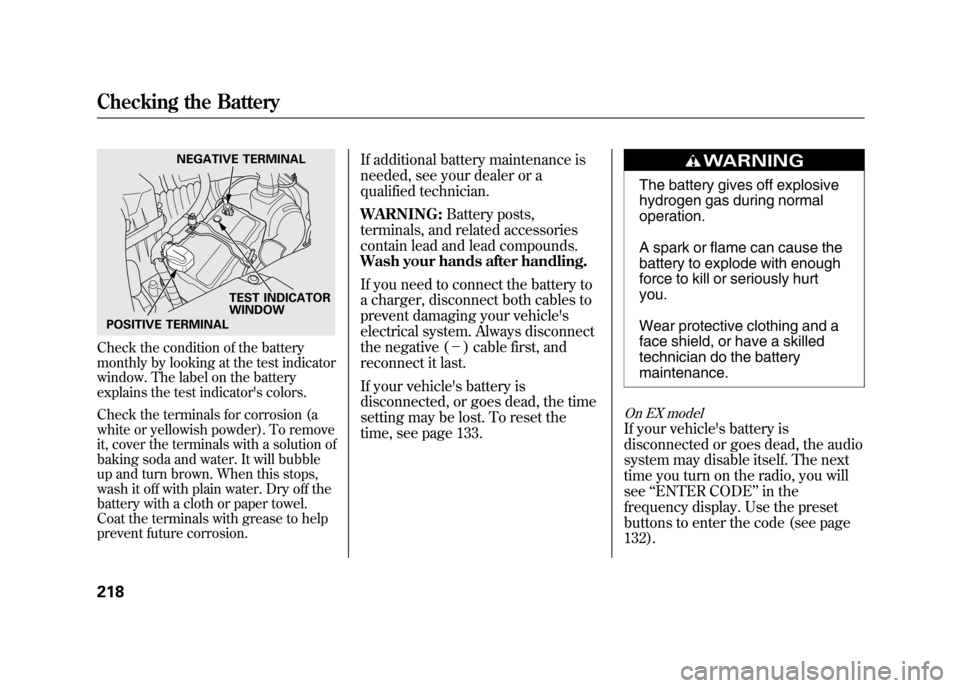
Check the condition of the battery
monthly by looking at the test indicator
window. The label on the battery
explains the test indicator's colors.
Check the terminals for corrosion (a
white or yellowish powder). To remove
it, cover the terminals with a solution of
baking soda and water. It will bubble
up and turn brown. When this stops,
wash it off with plain water. Dry off the
battery with a cloth or paper towel.
Coat the terminals with grease to help
prevent future corrosion.
If additional battery maintenance is
needed, see your dealer or a
qualified technician.
WARNING:Battery posts,
terminals, and related accessories
contain lead and lead compounds.
Wash your hands after handling.
If you need to connect the battery to
a charger, disconnect both cables to
prevent damaging your vehicle's
electrical system. Always disconnect
the negative (- ) cable first, and
reconnect it last.
If your vehicle's battery is
disconnected, or goes dead, the time
setting may be lost. To reset the
time, see page 133.
The battery gives off explosive
hydrogen gas during normal
operation.
A spark or flame can cause the
battery to explode with enough
force to kill or seriously hurt
you.
Wear protective clothing and a
face shield, or have a skilled
technician do the battery
maintenance.
On EX modelIf your vehicle's battery is
disconnected or goes dead, the audio
system may disable itself. The next
time you turn on the radio, you will
see ‘‘ENTER CODE ’’in the
frequency display. Use the preset
buttons to enter the code (see page
132).
NEGATIVE TERMINAL
TEST INDICATOR
WINDOW
POSITIVE TERMINAL
Checking the Battery21810/08/06 08:34:41 11 ELEMENT MMC North America Owner's Man 50 31SCV680 enu
Page 247 of 286
If you cannot drive the vehicle
without fixing the problem, and you
do not have a spare fuse, take a fuse
of the same rating or a lower rating
from one of the other circuits. Make
sure you can do without that circuit
temporarily (such as the accessory
power socket or radio).
If you replace the blown fuse with a
spare fuse that has a lower rating, it
might blow out again. This does not
indicate anything wrong. Replace the
fuse with one of the correct rating as
soon as you can.
Replacing a fuse with one that has a
higher rating greatly increases the
chances of damaging the electrical
system. If you do not have a
replacement fuse with the proper rating
for the circuit, install one with a lower
rating.6. If the replacement fuse of the same
rating blows in a short time, there
is probably a serious electrical
problem in your vehicle. Leave the
blown fuse in that circuit and have
your vehicle checked by a
qualified technician.
Fuses
241
Taking Care of the Unexpected
10/08/06 08:34:41 11 ELEMENT MMC North America Owner's Man 50 31SCV680 enu