maintenance HONDA FIT 2009 2.G User Guide
[x] Cancel search | Manufacturer: HONDA, Model Year: 2009, Model line: FIT, Model: HONDA FIT 2009 2.GPages: 352, PDF Size: 17.67 MB
Page 72 of 352
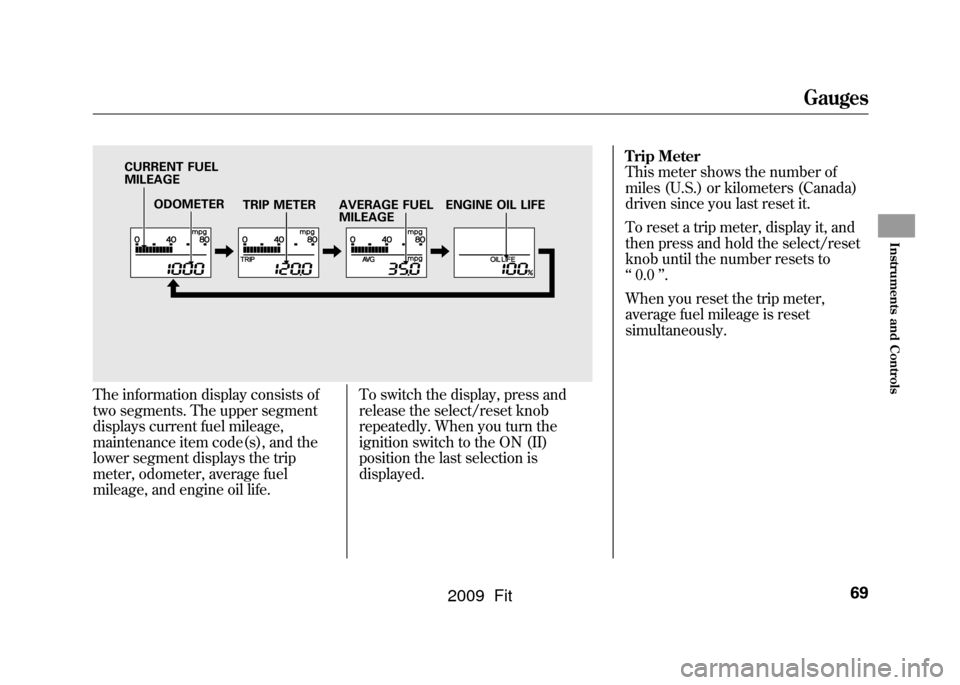
The information display consists of
two segments. The upper segment
displays current fuel mileage,
maintenance item code(s), and the
lower segment displays the trip
meter, odometer, average fuel
mileage, and engine oil life.To switch the display, press and
release the select/reset knob
repeatedly. When you turn the
ignition switch to the ON (II)
position the last selection is
displayed.Trip Meter
This meter shows the number of
miles (U.S.) or kilometers (Canada)
driven since you last reset it.
To reset a trip meter, display it, and
then press and hold the select/reset
knob until the number resets to
‘‘
0.0 ’’.
When you reset the trip meter,
average fuel mileage is reset
simultaneously.
ODOMETER TRIP METER
CURRENT FUEL
MILEAGE
AVERAGE FUEL
MILEAGEENGINE OIL LIFE
Gauges
69
Instruments and Controls
2009 Fit
Page 74 of 352

If the system still detects a loose or
missing fuel fill cap, the malfunction
indicator lamp (MIL) comes on. Turn
the engine off, and check or
retighten the fuel fill cap until it
clicks at least once. The MIL goes
out after several days of normal
driving once the cap is tightened or
replaced. If it does not go out, have
your dealer inspect the vehicle. For
more information, see page304.Maintenance Minder
The information display in the
instrument panel shows you the
engine oil life and maintenance
service items when the ignition
switch is in the ON (II) position. This
information helps to keep you aware
of the periodic maintenance your
vehicle needs for continued trouble-
free driving. Refer to page245for
more information.
Gauges
71
Instruments and Controls
2009 Fit
Page 201 of 352

Break-in Period
Help assure your vehicle's future
reliability and performance by paying
extra attention to how you drive
during the first 600 miles (1,000 km).
During this period:●Avoid full-throttle starts and rapid
acceleration.●Avoid hard braking for the first 200
miles (300 km).●Do not change the oil until the
scheduled maintenance time.
You should also follow these
recommendations with an
overhauled or exchanged engine, or
when the brakes are replaced. Fuel Recommendation
Your vehicle is designed to operate
on unleaded gasoline with a pump
octane number of 87 or higher. Use of
a lower octane gasoline can cause a
persistent, heavy metallic rapping
noise that can lead to engine damage.
We recommend using quality
gasolines containing detergent
additives that help prevent fuel
system and engine deposits.
In addition, in order to maintain good
performance, fuel economy, and
emissions control, we strongly
recommend, in areas where it is
available, the use of gasoline that
does NOT contain manganese-based
fuel additives such as MMT.
Use of gasoline with these additives
may adversely affect performance,
and cause the malfunction indicator
lamp on your instrument panel to
come on. If this happens, contact your
authorized dealer for service.
Some gasoline today is blended with
oxygenates such as ethanol or
MTBE. Your vehicle is designed to
operate on oxygenated gasoline
containing up to 10% ethanol by
volume and up to 15% MTBE by
volume. Do not use gasoline
containing methanol.
If you notice any undesirable
operating symptoms, try another
service station or switch to another
brand of gasoline.
For further important fuel-related
information, please refer to your
Quick Start Guide.
Break-in Period, Fuel Recommendation198
2009 Fit
Page 205 of 352
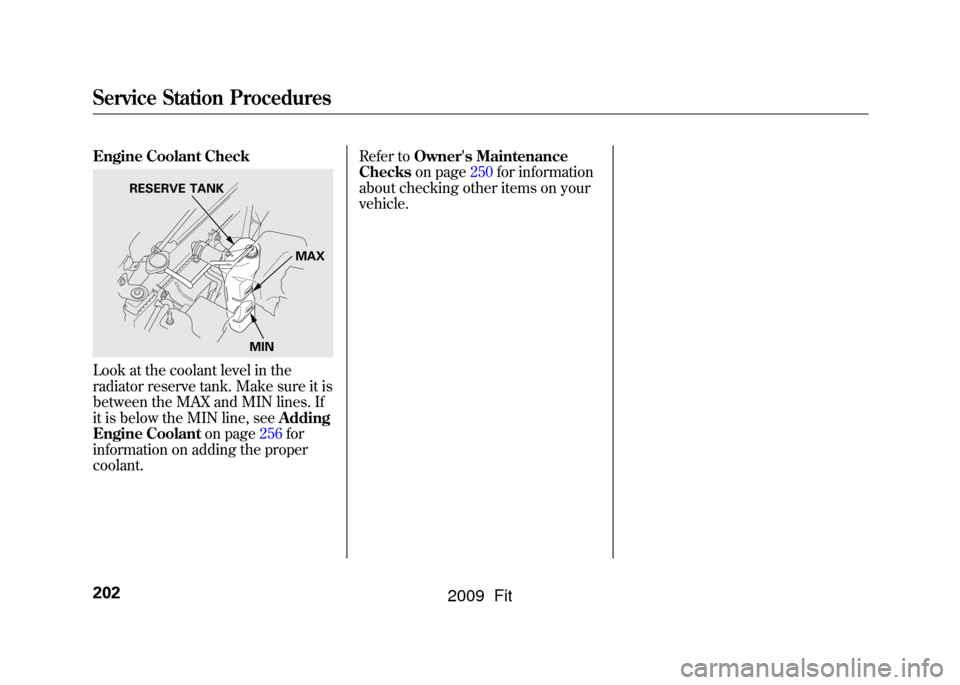
Engine Coolant CheckLook at the coolant level in the
radiator reserve tank. Make sure it is
between the MAX and MIN lines. If
it is below the MIN line, seeAdding
Engine Coolant on page256for
information on adding the proper
coolant. Refer to
Owner's Maintenance
Checks on page250for information
about checking other items on your
vehicle.
RESERVE TANK
MAX
MIN
Service Station Procedures202
2009 Fit
Page 207 of 352

Fuel Economy Factors
The following factors can lower your
vehicle's fuel economy:●Aggressive driving (hard
acceleration and braking)●Excessive idling, accelerating and
braking in stop-and-go traffic●Cold engine operation (engines
are more efficient when warmed
up)●Driving with a heavy load or the air
conditioner running●Improperly inflated tiresImproving Fuel Economy
Vehicle MaintenanceA properly maintained vehicle
maximizes fuel economy. Poor
maintenance can significantly reduce
fuel economy. Always maintain your
vehicle according to the maintenance
messages displayed on the
information display (see
Owner's
Maintenance Checks on page250).
For example:●Use the recommended viscosity
motor oil, displaying the API
Certification Seal (see page
253).●Maintain proper tire inflation -
An under-inflated tire increases
‘‘ rolling resistance, ’’which
reduces fuel economy.●Avoid carrying excess weight in
your vehicle -It puts a heavier
load on the engine, increasing fuel
consumption.
●Keep your vehicle clean -In
particular, a build-up of snow or
mud on your vehicle's underside
adds weight and rolling resistance.
Frequent cleaning helps your fuel
economy.
Drive Efficiently●Drive moderately -Rapid
acceleration, abrupt cornering, and
hard braking increase fuel
consumption.●Observe the speed limit -
Aerodynamic drag has a big effect
on fuel mileage at speeds above 45
mph (75 km/h). Reduce your
speed and you reduce the drag.
Trailers, car top carriers, roof
racks and bike racks are also big
contributors to increased drag.●Always drive in the highest gear
possible -If your vehicle has a
manual transmission, you can
boost your fuel economy by up
shifting as early as possible.
Fuel Economy204
2009 Fit
Page 246 of 352

This section explains why it is
important to keep your vehicle well
maintained and how to follow basic
maintenance safety precautions.
This section also includes
instructions on how to read the
maintenance minder messages on
the information display, and
instructions for simple maintenance
tasks you may want to take care of
yourself.
If you have the skills and tools to
perform more complex maintenance
tasks on your vehicle, you may want
to purchase the service manual. See
page335for information on how to
obtain a copy, or see your dealer.Maintenance Safety
.....................
244
Maintenance Minder
..................
245
Fluid Locations
...........................
252
Adding Engine Oil
......................
253
Changing the Engine Oil and Filter
.......................................
254
Engine Coolant
...........................
256
Windshield Washers
...................
258
Transmission Fluid
.....................
259
Automatic Transmission Fluid
...................................
259
Manual Transmission Fluid
....
260
Brake and Clutch Fluid
...............
261
Lights
..........................................
262
Cleaning the Seat Belts
...............
267
Floor Mats
..................................
267
Audio Antenna
............................
268
Dust and Pollen Filter
.................
268
Wiper Blades
..............................
269
Tires
...........................................
273
Checking the Battery
..................
279
Vehicle Storage
...........................
281
Maintenance
243
Maintenance
2009 Fit
Page 247 of 352
All service items not detailed in this
section should be performed by a
certified technician or other qualified
mechanic.
Important Safety Precautions
To eliminate potential hazards, read
the instructions before you begin,
and make sure you have the tools
and skills required.●Make sure your vehicle is parked
on level ground, the parking brake
is set, and the engine is off.●To clean parts, use a commercially
available degreaser or parts
cleaner, not gasoline.●To reduce the possibility of fire or
explosion, keep cigarettes, sparks,
and flames away from the battery
and all fuel-related parts.●Wear eye protection and protective
clothing when working with the
battery or compressed air.
Improperly maintaining this
vehicle, or failing to correct a
problem before driving can
cause a crash in which you can
be seriously hurt or killed.
Always follow the inspection
and maintenance
recommendations and
schedules in this owner's
manual.
Potential Vehicle Hazards●Carbon Monoxide poison from
engine exhaust. Be sure there is
adequate ventilation whenever you
operate the engine.●Burns from hot parts. Let the
engine and exhaust system cool
down before touching any parts.
●Injury from moving parts. Do
not run the engine unless
instructed to do so.Failure to properly follow
maintenance instructions and
precautions can cause you to
be seriously hurt or killed.
Always follow the procedures
and precautions in this owner's
manual.
Some of the most important safety
precautions are given here. However,
we cannot warn you of every
conceivable hazard that can arise in
performing maintenance. Only you
can decide whether or not you
should perform a given task.
Maintenance Safety244
2009 Fit
Page 248 of 352
Your vehicle displays engine oil life
and maintenance service items on
the information display to show you
when you should have your dealer
perform engine oil replacement and
indicated maintenance service.
Based on the engine operating
conditions and accumulated engine
revolutions, the onboard computer in
your vehicle calculates the remaining
engine oil life and displays it as a
percentage.Engine Oil Life Display
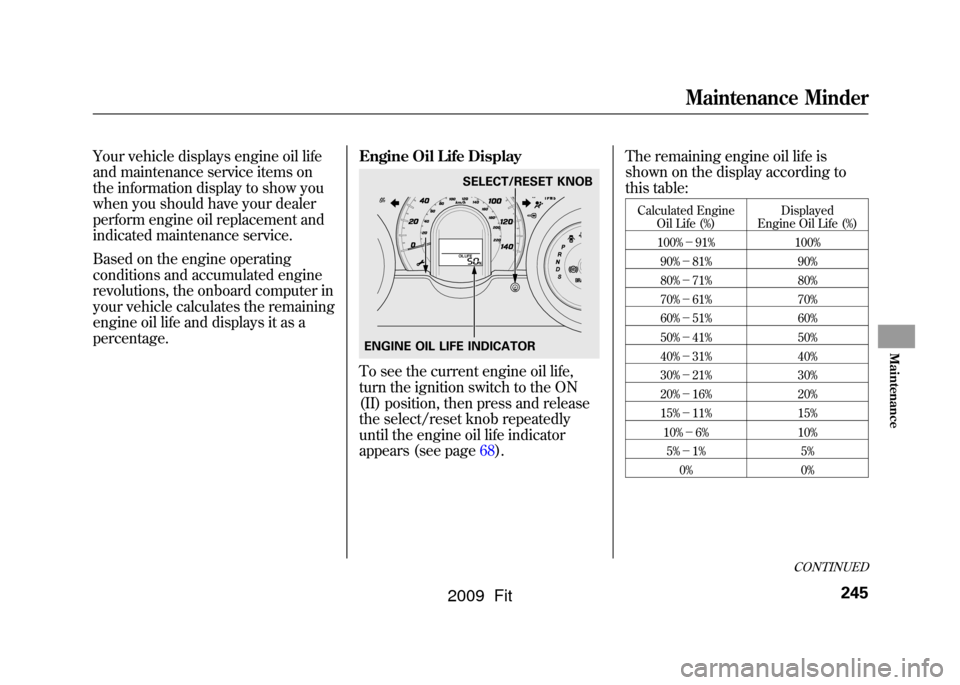
To see the current engine oil life,
turn the ignition switch to the ON
(II) position, then press and release
the select/reset knob repeatedly
until the engine oil life indicator
appears (see page68).The remaining engine oil life is
shown on the display according to
this table:
Calculated Engine
Oil Life (%) Displayed
Engine Oil Life (%)
100% -91% 100%
90% -81% 90%
80% -71% 80%
70% -61% 70%
60% -51% 60%
50% -41% 50%
40% -31% 40%
30% -21% 30%
20% -16% 20%
15% -11% 15%
10% -6% 10%
5% -1% 5%
0% 0%
SELECT/RESET KNOB
ENGINE OIL LIFE INDICATOR
CONTINUED
Maintenance Minder
245
Maintenance
2009 Fit
Page 249 of 352
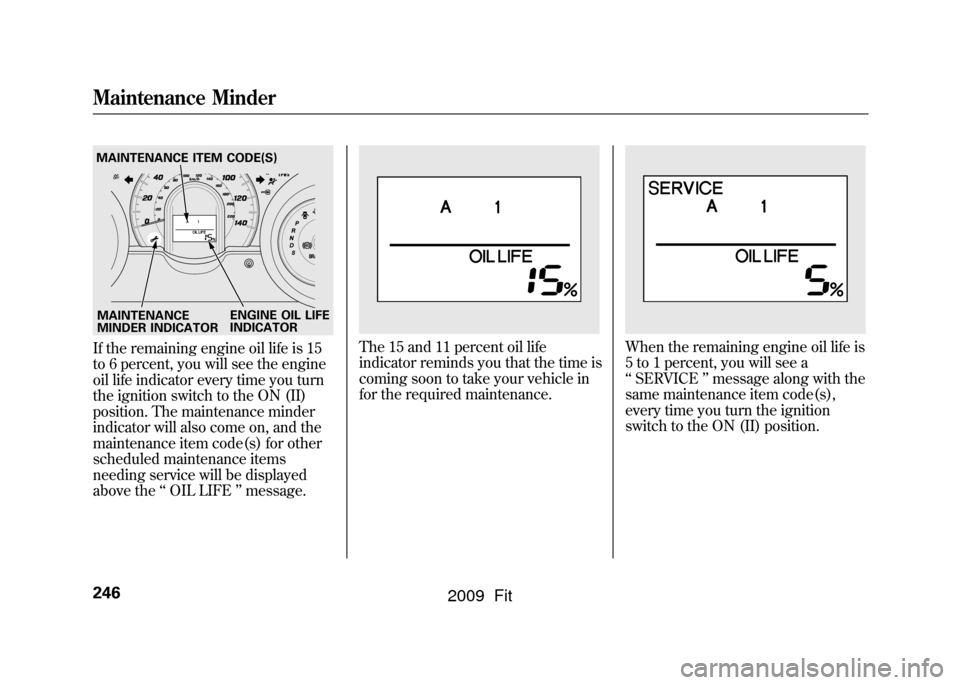
If the remaining engine oil life is 15
to 6 percent, you will see the engine
oil life indicator every time you turn
the ignition switch to the ON (II)
position. The maintenance minder
indicator will also come on, and the
maintenance item code(s) for other
scheduled maintenance items
needing service will be displayed
above the‘‘OIL LIFE ’’message.
The 15 and 11 percent oil life
indicator reminds you that the time is
coming soon to take your vehicle in
for the required maintenance.
When the remaining engine oil life is
5 to 1 percent, you will see a
‘‘SERVICE ’’message along with the
same maintenance item code(s),
every time you turn the ignition
switch to the ON (II) position.
MAINTENANCE
MINDER INDICATOR
MAINTENANCE ITEM CODE(S)
ENGINE OIL LIFE
INDICATORMaintenance Minder246
2009 Fit
Page 250 of 352
The maintenance item code or codes
indicate the main and sub items
required at the time of the oil change
(see page248).
You can switch the information
display from the engine oil life
display to the odometer or the trip
meter. Press and release the select/
reset knob on the instrument panel.
When the engine oil life is 15 to 1
percent, the maintenance minder
indicator (
) comes on every time
you turn the ignition switch to the
ON (II) position, then it goes out if
you switch the information display.
When you see this message, have
the indicated maintenance performed
by your dealer as soon as possible.
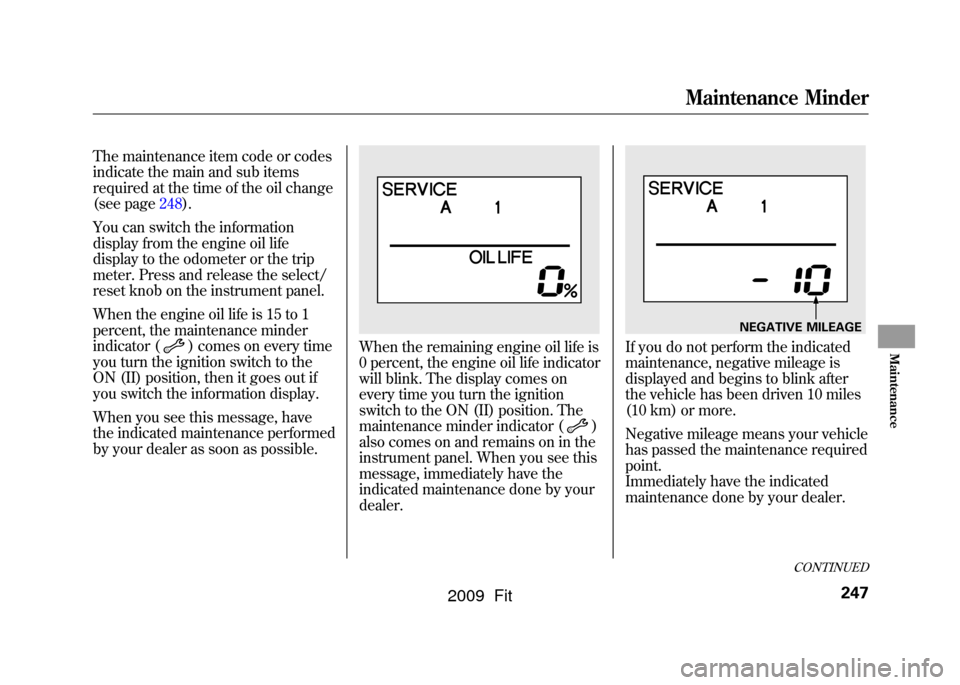
When the remaining engine oil life is
0 percent, the engine oil life indicator
will blink. The display comes on
every time you turn the ignition
switch to the ON (II) position. The
maintenance minder indicator (
)
also comes on and remains on in the
instrument panel. When you see this
message, immediately have the
indicated maintenance done by your
dealer.
If you do not perform the indicated
maintenance, negative mileage is
displayed and begins to blink after
the vehicle has been driven 10 miles
(10 km) or more.
Negative mileage means your vehicle
has passed the maintenance required
point.
Immediately have the indicated
maintenance done by your dealer.
NEGATIVE MILEAGE
CONTINUED
Maintenance Minder
247
Maintenance
2009 Fit