AUX HONDA FIT 2009 2.G Owner's Manual
[x] Cancel search | Manufacturer: HONDA, Model Year: 2009, Model line: FIT, Model: HONDA FIT 2009 2.GPages: 352, PDF Size: 17.67 MB
Page 192 of 352
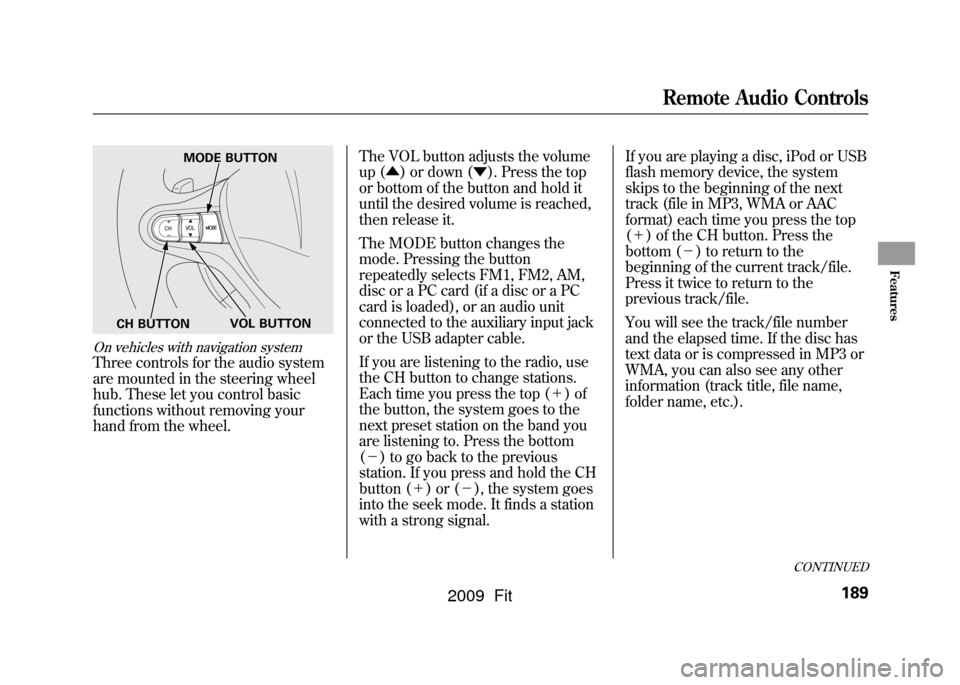
On vehicles with navigation systemThree controls for the audio system
are mounted in the steering wheel
hub. These let you control basic
functions without removing your
hand from the wheel.The VOL button adjusts the volume
up (
▲) or down ( ▼). Press the top
or bottom of the button and hold it
until the desired volume is reached,
then release it.
The MODE button changes the
mode. Pressing the button
repeatedly selects FM1, FM2, AM,
disc or a PC card (if a disc or a PC
card is loaded), or an audio unit
connected to the auxiliary input jack
or the USB adapter cable.
If you are listening to the radio, use
the CH button to change stations.
Each time you press the top ( +)of
the button, the system goes to the
next preset station on the band you
are listening to. Press the bottom
( - ) to go back to the previous
station. If you press and hold the CH
button ( +)or( -), the system goes
into the seek mode. It finds a station
with a strong signal. If you are playing a disc, iPod or USB
flash memory device, the system
skips to the beginning of the next
track (file in MP3, WMA or AAC
format) each time you press the top
(
+ ) of the CH button. Press the
bottom ( -) to return to the
beginning of the current track/file.
Press it twice to return to the
previous track/file.
You will see the track/file number
and the elapsed time. If the disc has
text data or is compressed in MP3 or
WMA, you can also see any other
information (track title, file name,
folder name, etc.).
MODE BUTTON
VOL BUTTON
CH BUTTON
CONTINUED
Remote Audio Controls
189
Features
2009 Fit
Page 193 of 352
In MP3 or WMA mode, you can use
the skip function to select folders.
Press and hold the top (+) of the CH
button until you hear a beep, to skip
forward to the first file of the next
folder. Press the bottom ( -) to skip
backward to the previous folder.
If you are playing a PC card, press
the top ( +) of the CH button to
advance to the next file. Press the
bottom ( -) to go back to the
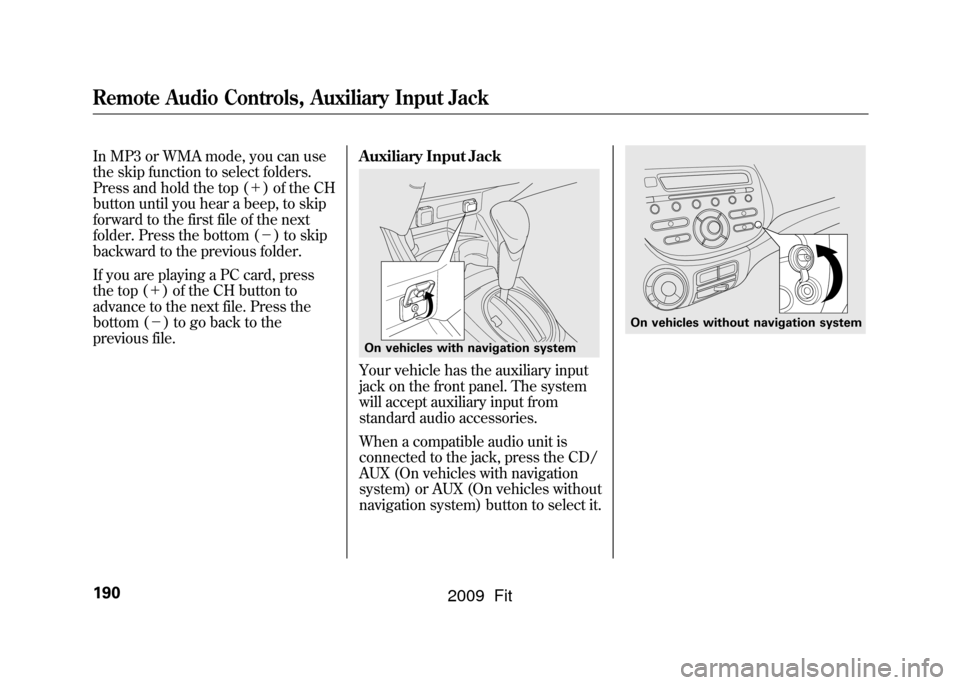
previous file. Auxiliary Input Jack
Your vehicle has the auxiliary input
jack on the front panel. The system
will accept auxiliary input from
standard audio accessories.
When a compatible audio unit is
connected to the jack, press the CD/
AUX (On vehicles with navigation
system) or AUX (On vehicles without
navigation system) button to select it.On vehicles with navigation system
On vehicles without navigation system
Remote Audio Controls, Auxiliary Input Jack190
2009 Fit
Page 340 of 352
A
AAABBB ~CCC
.................................
3
Accessories and Modifications
..........................
206
ACCESSORY (Ignition Key Position)
...................................
80
Accessory Power Socket
............
106
Additives, Engine Oil
.................
254
Adjusting the Steering Wheel
......
77
Advanced Airbags
........................
27
Airbag (SRS)
............................
9, 22
Air Conditioning System
............
110
Usage
......................................
111
Air Pressure, Tires
..............
273, 274
Alcohol in Gasoline
....................
198
Antifreeze
...................................
256
Anti-lock Brakes (ABS) Indicator Light
..................
62, 231
Operation
................................
231
Anti-theft, Audio System
.............
191
Anti-theft Steering Column Lock
.........................................
80
Audio System
.............................
115 Auto Control Mode, Starting
Engine
....................................
216
Auto Door Locking
.......................
83
Auto Door Locking/Unlocking
....
83
Auto Door Unlocking
...................
85
Automatic Seat Belt Tensioners
...
20
Automatic Speed Control
...........
194
Automatic Transmission
............
219
Capacity, Fluid
........................
319
Checking Fluid Level
..............
259
Paddle Shifters
........................
224
Shifting
...................................
219
Shift Lever Position Indicators
............................
219
Shift Lever Positions
...............
220
Shift Lock Release
...................
223
Automatic Transmission Fluid
...
259
Auxiliary Input Jack
...................
190
Average Fuel Mileage
..................
70
B
Battery Charging System Indicator
........................
60, 303 Jump Starting
..........................
299
Maintenance
...........................
279
Specifications
..........................
320
Before Driving
...........................
197
Belts, Seat
................................
8, 18
Beverage Holders
......................
106
Booster Seats
...............................
50
Brakes Anti-lock Brakes (ABS)
...........
231
Break-in, New Linings
.............
198
Bulb Replacement
...................
266
Fluid
.......................................
261
Parking
...................................
102
System Design
........................
230
System Indicator
...............
60, 305
Wear Indicators
.......................
230
Braking System
..........................
230
Break-in, New Vehicle
................
198
Brightness Control, Instruments
..............................
76
CONTINUED
Index
I
INDEX
2009 Fit