display HONDA FIT 2009 2.G Repair Manual
[x] Cancel search | Manufacturer: HONDA, Model Year: 2009, Model line: FIT, Model: HONDA FIT 2009 2.GPages: 352, PDF Size: 17.67 MB
Page 185 of 352

FOLDER SCAN-This feature
samples the first file in each folder in
the order they are stored. To activate
the folder scan feature, press and
hold the SCAN button. You will see
‘‘ FOLDER SCAN ’’in the display.
You will also see the folder number
blinking. You will get a 10 second
sampling of each first file in the
folder(s). Press the SCAN button to
get out of the scan mode. The system
plays the last file sampled. To Stop Playing a USB Flash
Memory Device
To play the radio when a USB flash
memory device is playing, press the
FM/AM button or touch the FM1,
FM2, or AM icon. If a disc is in the
audio unit, press the CD/AUX button
or touch the CD icon to play the disc.
If a PC card is in the audio unit, press
the CD/AUX button or touch the
CARD icon to play a PC card.
Press the CD/AUX button again or
touch the AUX icon to switch back to
the USB flash memory device.
Disconnecting a USB Flash Memory
DeviceYou can disconnect the USB flash
memory device in any time even if
the USB mode is selected on the
audio system. Always follow the USB
flash memory device ’s instructions
when you remove it.
When you disconnect the USB flash
memory device while it is playing,
the navigation screen shows ‘‘NO
DATA. ’’
If you reconnect the same USB flash
memory device, the system will
begin playing where it left off.
USB Flash Memory Device Error
Messages
If you see an error message on the
screen, see page 183.
Playing a USB Flash Memory Device (Models with navigation system)182
2009 Fit
Page 187 of 352
Radio Frequencies
The radio can receive the complete
AM and FM bands.
Those bands cover these
frequencies:
AM band: 530 to 1,710 kHz
FM band: 87.7 to 107.9 MHz
Radio stations on the AM band are
assigned frequencies at least 10 kHz
apart (530, 540, 550). Stations on the
FM band are assigned frequencies at
least 0.2 MHz apart (87.9, 88.1, 88.3).
Stations must use these exact
frequencies. It is fairly common for
stations to round-off the frequency in
their advertising, so your radio could
display a frequency of 100.9 even
though the announcer may identify
the station as‘‘FM101. ’’ Radio Reception
How well the radio receives stations
is dependent on many factors, such
as the distance from the station's
transmitter, nearby large objects, and
atmospheric conditions.
A radio station's signal gets weaker
as you get farther away from its
transmitter. If you are listening to an
AM station, you will notice the sound
volume becoming weaker, and the
station drifting in and out. If you are
listening to an FM station, you will
see the stereo indicator flickering off
and on as the signal weakens.
Eventually, the stereo indicator will
go off and the sound will fade
completely as you get out of range of
the station's signal.
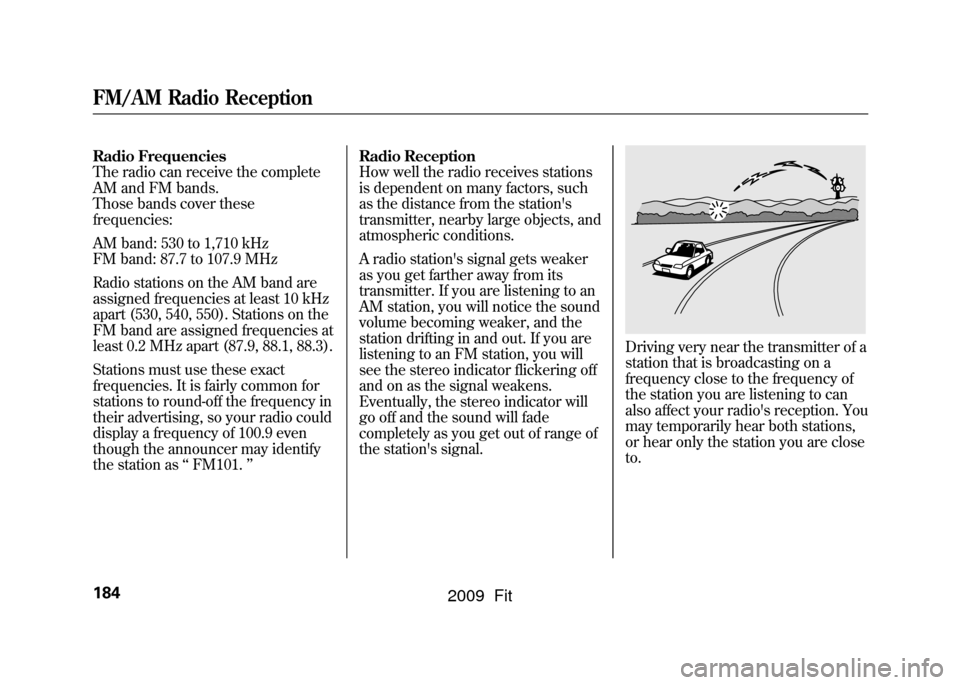
Driving very near the transmitter of a
station that is broadcasting on a
frequency close to the frequency of
the station you are listening to can
also affect your radio's reception. You
may temporarily hear both stations,
or hear only the station you are close
to.
FM/AM Radio Reception184
2009 Fit
Page 194 of 352

Your vehicle's audio system will
disable itself if it is disconnected
from electrical power for any reason.
To make it work again, you must
enter a specific digit code using the
preset buttons. Because there are
hundreds of number combinations
possible from specific digits, making
the system work without knowing
the exact code is nearly impossible.
You should have received a card that
lists your audio system's code and
serial numbers. It is best to store this
card in a safe place at home. In
addition, you should write the audio
system's serial number in this
owner's manual.
If you lose the card, you must obtain
the code number from a dealer. To
do this, you will need the system's
serial number.If your vehicle's battery is
disconnected or goes dead, or the
radio fuse is removed, the audio
system will disable itself. If this
happens, you will see
‘‘ENTER
CODE ’’in the frequency display the
next time you turn on the system.
Use the preset buttons to enter the
code. On vehicles with navigation
system, touch the Done icon to set
the code. The code is on the radio
code card included in your owner's
manual kit. When it is entered
correctly, the radio will start playing.
If you make a mistake entering the
code, do not start over; complete the
sequence, then enter the correct
code. You have 10 tries to enter the
correct code. If you are unsuccessful
in 10 attempts, you must then leave
the system on for 1 hour before
trying again.
Radio Theft Protection
191
Features
2009 Fit
Page 195 of 352
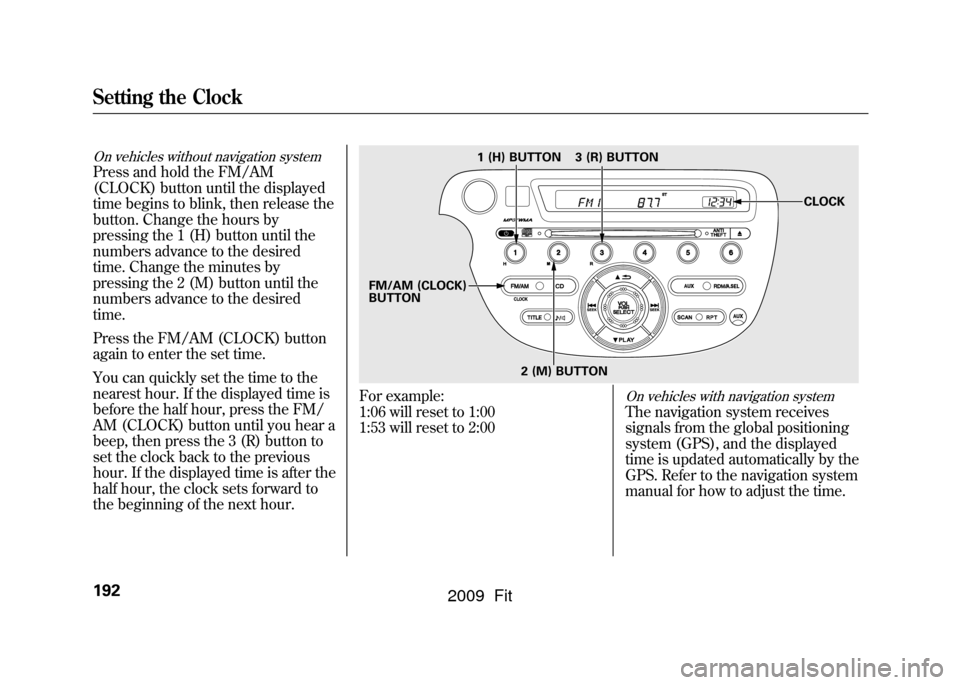
On vehicles without navigation systemPress and hold the FM/AM
(CLOCK) button until the displayed
time begins to blink, then release the
button. Change the hours by
pressing the 1 (H) button until the
numbers advance to the desired
time. Change the minutes by
pressing the 2 (M) button until the
numbers advance to the desired
time.
Press the FM/AM (CLOCK) button
again to enter the set time.
You can quickly set the time to the
nearest hour. If the displayed time is
before the half hour, press the FM/
AM (CLOCK) button until you hear a
beep, then press the 3 (R) button to
set the clock back to the previous
hour. If the displayed time is after the
half hour, the clock sets forward to
the beginning of the next hour.
For example:
1:06 will reset to 1:00
1:53 will reset to 2:00
On vehicles with navigation systemThe navigation system receives
signals from the global positioning
system (GPS), and the displayed
time is updated automatically by the
GPS. Refer to the navigation system
manual for how to adjust the time.
1 (H) BUTTON
FM/AM (CLOCK)
BUTTON 3 (R) BUTTON
CLOCK
2 (M) BUTTON
Setting the Clock192
2009 Fit
Page 196 of 352
On Sport modelThe security system helps to protect
your vehicle and valuables from
theft. The horn sounds and a
combination of headlights, parking/
side marker lights and taillights
flashes if someone attempts to break
into your vehicle or remove the audio
unit. This alarm continues for 2
minutes, then the system resets. To
reset an activated system before the
2 minutes have elapsed, unlock the
driver's door with the key or the
remote transmitter.
The security system automatically
sets 15 seconds after you lock the
doors, hood, and the tailgate. For the
system to activate, you must lock the
doors and the tailgate from the
outside with the key, driver's lock
tab, door lock master switch, or
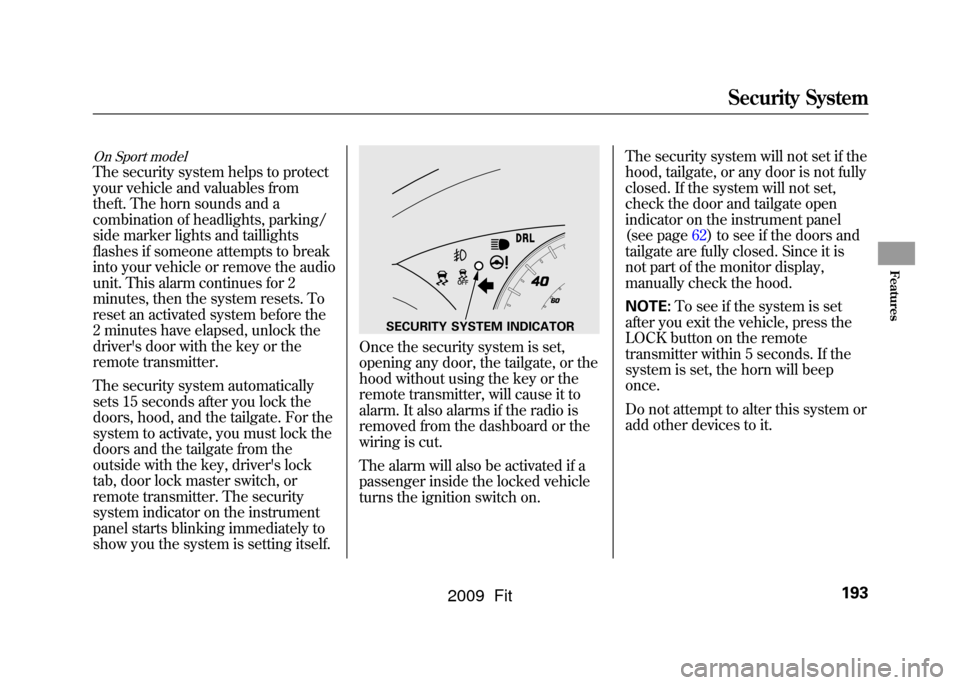
remote transmitter. The security
system indicator on the instrument
panel starts blinking immediately to
show you the system is setting itself.
Once the security system is set,
opening any door, the tailgate, or the
hood without using the key or the
remote transmitter, will cause it to
alarm. It also alarms if the radio is
removed from the dashboard or the
wiring is cut.
The alarm will also be activated if a
passenger inside the locked vehicle
turns the ignition switch on.The security system will not set if the
hood, tailgate, or any door is not fully
closed. If the system will not set,
check the door and tailgate open
indicator on the instrument panel
(see page
62)to see if the doors and
tailgate are fully closed. Since it is
not part of the monitor display,
manually check the hood.
NOTE: To see if the system is set
after you exit the vehicle, press the
LOCK button on the remote
transmitter within 5 seconds. If the
system is set, the horn will beep
once.
Do not attempt to alter this system or
add other devices to it.
SECURITY SYSTEM INDICATOR
Security System
193
Features
2009 Fit
Page 203 of 352
Gasoline is highly flammable
and explosive. You can be
burned or seriously injured
when handling fuel.●Stop the engine, and keep
heat, sparks, and flame
away.●Handle fuel only outdoors.●Wipe up spills immediately.
5. Screw the fuel fill cap back on until it clicks at least once. If you do not
properly tighten the cap, the
malfunction indicator lamp may
come on (see page304).You will
also see a ‘‘CHECK FUEL CAP ’’
message on the information
display.
6. Push the fuel fill door closed until it latches. Opening and Closing the Hood
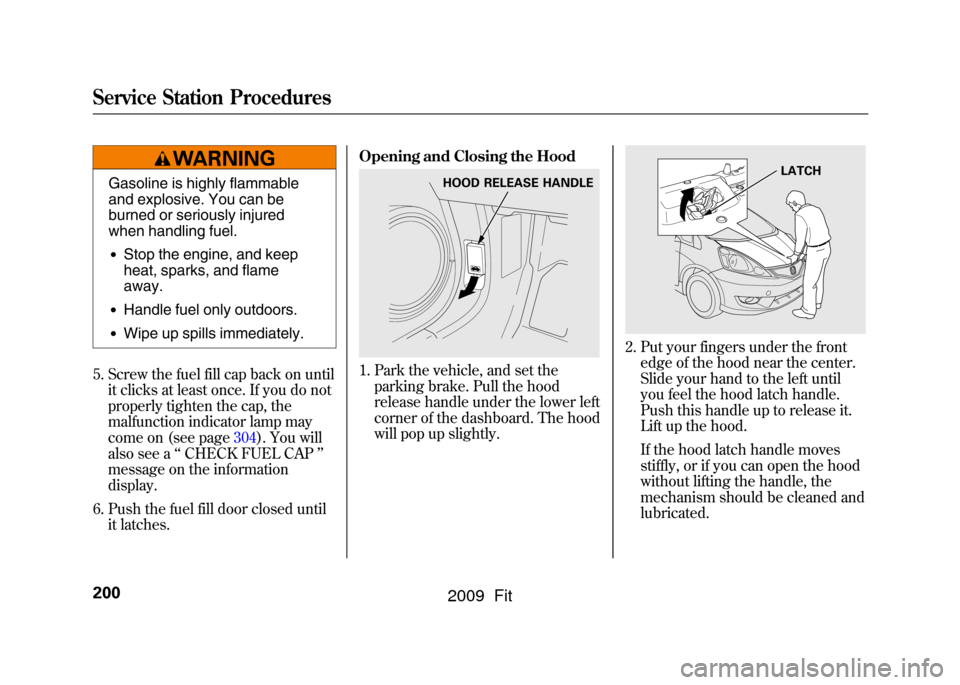
1. Park the vehicle, and set the
parking brake. Pull the hood
release handle under the lower left
corner of the dashboard. The hood
will pop up slightly.
2. Put your fingers under the frontedge of the hood near the center.
Slide your hand to the left until
you feel the hood latch handle.
Push this handle up to release it.
Lift up the hood.
If the hood latch handle moves
stiffly, or if you can open the hood
without lifting the handle, the
mechanism should be cleaned and
lubricated.
HOOD RELEASE HANDLE
LATCH
Service Station Procedures200
2009 Fit
Page 207 of 352
Fuel Economy Factors
The following factors can lower your
vehicle's fuel economy:●Aggressive driving (hard
acceleration and braking)●Excessive idling, accelerating and
braking in stop-and-go traffic●Cold engine operation (engines
are more efficient when warmed
up)●Driving with a heavy load or the air
conditioner running●Improperly inflated tiresImproving Fuel Economy
Vehicle MaintenanceA properly maintained vehicle
maximizes fuel economy. Poor
maintenance can significantly reduce
fuel economy. Always maintain your
vehicle according to the maintenance
messages displayed on the
information display (see
Owner's
Maintenance Checks on page250).
For example:●Use the recommended viscosity
motor oil, displaying the API
Certification Seal (see page
253).●Maintain proper tire inflation -
An under-inflated tire increases
‘‘ rolling resistance, ’’which
reduces fuel economy.●Avoid carrying excess weight in
your vehicle -It puts a heavier
load on the engine, increasing fuel
consumption.
●Keep your vehicle clean -In
particular, a build-up of snow or
mud on your vehicle's underside
adds weight and rolling resistance.
Frequent cleaning helps your fuel
economy.
Drive Efficiently●Drive moderately -Rapid
acceleration, abrupt cornering, and
hard braking increase fuel
consumption.●Observe the speed limit -
Aerodynamic drag has a big effect
on fuel mileage at speeds above 45
mph (75 km/h). Reduce your
speed and you reduce the drag.
Trailers, car top carriers, roof
racks and bike racks are also big
contributors to increased drag.●Always drive in the highest gear
possible -If your vehicle has a
manual transmission, you can
boost your fuel economy by up
shifting as early as possible.
Fuel Economy204
2009 Fit
Page 227 of 352
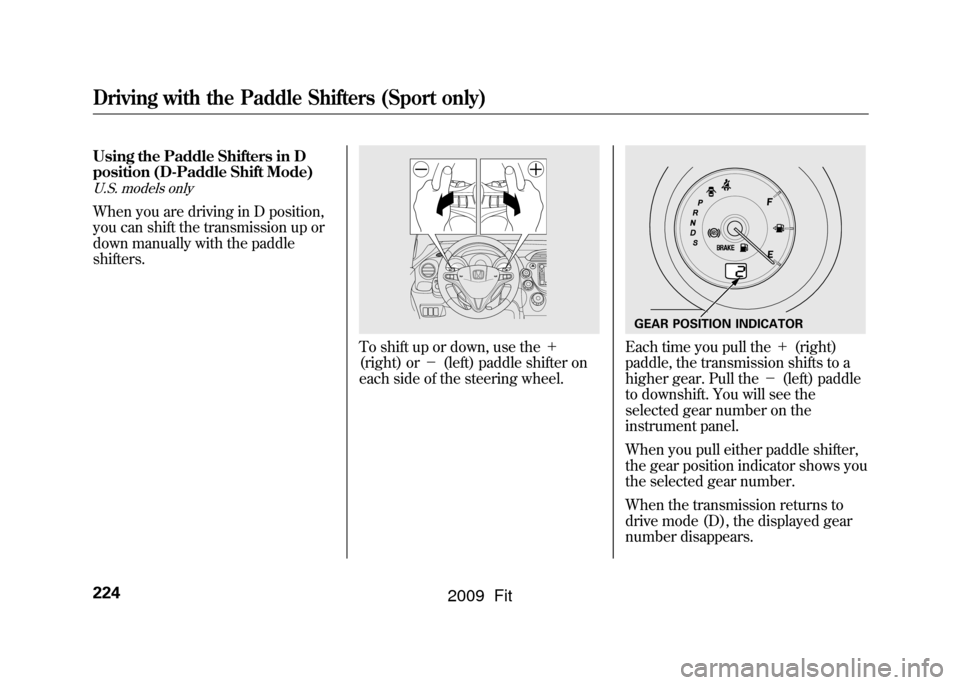
Using the Paddle Shifters in D
position (D-Paddle Shift Mode)U.S. models onlyWhen you are driving in D position,
you can shift the transmission up or
down manually with the paddle
shifters.
To shift up or down, use the+
(right) or -(left) paddle shifter on
each side of the steering wheel.
Each time you pull the +(right)
paddle, the transmission shifts to a
higher gear. Pull the -(left) paddle
to downshift. You will see the
selected gear number on the
instrument panel.
When you pull either paddle shifter,
the gear position indicator shows you
the selected gear number.
When the transmission returns to
drive mode (D), the displayed gear
number disappears.GEAR POSITION INDICATOR
Driving with the Paddle Shifters (Sport only)224
2009 Fit
Page 229 of 352
When you pull and hold the+
(right) paddle shifter, the
transmission automatically returns to
drive mode (D).
If there is a problem in the
transmission while you are driving
with the paddle shifters, the D
indicator flashes, the D-paddle shift
mode is canceled, and the
transmission returns to drive mode
(D). Using the Paddle Shift in S
position (Sequential Shift Mode)
U.S. models onlyWith the shift lever in the S position,
you can manually shift up or down
with the paddle shifters. The
transmission goes into the sequential
shift mode and holds the selected
gear.
To enter the sequential shift mode,
press the release button on the front
of the shift lever, move the lever to
the S position, then pull either paddle
shifter. To return to drive mode (D),
move the shift lever to the D
position. While you are driving in the
sequential shift mode, the
transmission will not automatically
return to drive mode (D).
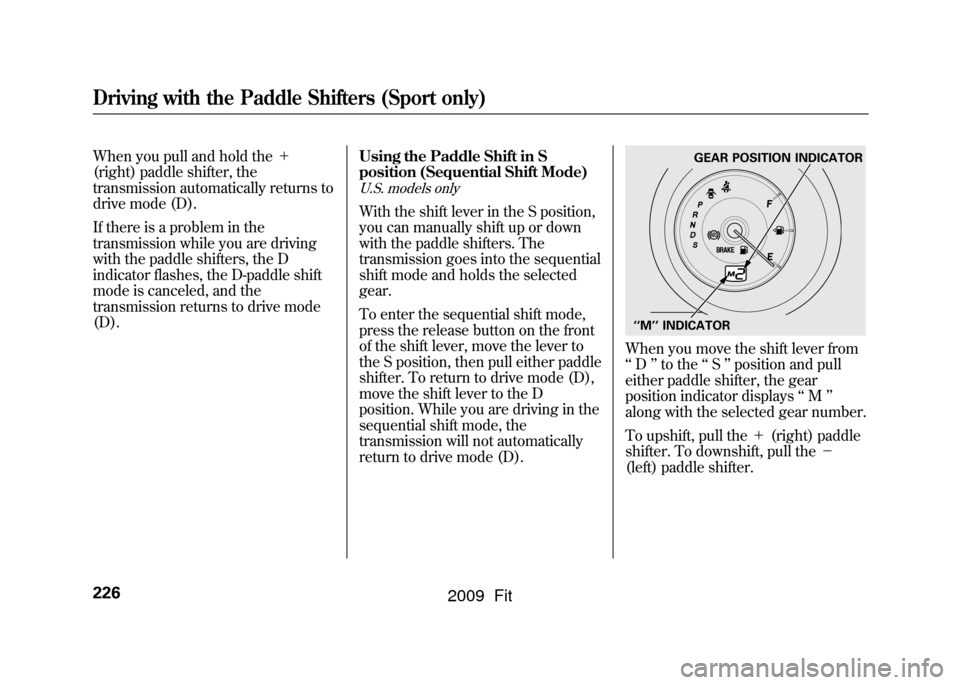
When you move the shift lever from
‘‘
D ’’to the ‘‘S ’’position and pull
either paddle shifter, the gear
position indicator displays ‘‘M ’’
along with the selected gear number.
To upshift, pull the +(right) paddle
shifter. To downshift, pull the -
(left) paddle shifter.
GEAR POSITION INDICATOR
‘‘M ’’INDICATOR
Driving with the Paddle Shifters (Sport only)226
2009 Fit
Page 230 of 352

When you accelerate from a stop, the
transmission starts in first gear, and
you must manually upshift between
first and fifth gears. Make sure you
upshift before the engine speed
reaches the tachometer's red zone.
The transmission remains in the
selected gear (5, 4, 3, 2, or 1). There
is no automatic downshift when you
push the accelerator pedal to the
floor.
When you are driving in 4th or 5th
gear, the transmission downshifts to
the lower gear under the following
conditions:●The vehicle slows down to a
certain speed.●You press the brake pedal.Downshifting with the paddle shifter
allows you to increase the engine
braking when going down steep or
long hills, and provides more power
when climbing uphills. You can
upshift the transmission manually to
reduce the rpm. Driving in the
higher gear helps fuel economy.
The transmission also shifts
automatically as the vehicle comes to
a complete stop. It downshifts to first
gear when the vehicle speed reaches
6 mph (10 km/h) or less.
The automatic transmission will not
allow you to shift up or down if:
●You downshift before the engine
speed falls below the upper limit of
the lower gear.
If you try to do this, the gear position
indicator will flash the number of the
lower gear several times, then return
to a higher gear. If the vehicle speed decreases below
the redline of the selected lower gear
while the indicator is flashing, the
transmission downshifts, and the
indicator displays the selected gear.
●You upshift before the engine
speed rises above the lower limit
of the higher gear.●You pull both paddle shifters at the
same time.
CONTINUED
Driving with the Paddle Shifters (Sport only)
227
Driving
2009 Fit