heating HONDA FIT 2010 2.G User Guide
[x] Cancel search | Manufacturer: HONDA, Model Year: 2010, Model line: FIT, Model: HONDA FIT 2010 2.GPages: 351, PDF Size: 5.67 MB
Page 79 of 351

High Temperature Indicator
This indicator monitors the
temperature of the engine coolant. It
normally comes on when you turn the
ignition switch to the ON (II) position
and goes off after a few seconds. In
normal driving conditions, this
indicator should not blink or stay on. In
severe driving conditions, such as very
hot weather or a long period of uphill
driving, this indicator may blink. This
means the engine coolant temperature
is high. If the indicator begins to blink
while you are driving, be sure to slow
down to prevent overheating. If the
indicator stays on, pull safely to the
side of the road and turn off the engine.
See page 301 for instructions and
precautions on checking the engine's
cooling system.
Do not drive the vehicle while the
indicator is on or the engine may bedamaged.Low Temperature Indicator
This indicator monitors the
temperature of the engine coolant. If
there is no problem, this indicator
comes on when the engine is cold. If
it comes on when the engine is warm
(normal operating temperature),
have the vehicle inspected by your
dealer as soon as possible.Turn Signal and
Hazard WarningIndicators
The left or right turn signal indicator
blinks when you signal a lane change
or turn. If an indicator does not blink
or blinks rapidly, it usually means
one of the turn signal bulbs is burned
out (see page 264). Replace the bulb
as soon as possible, since other
drivers cannot see that you aresignaling.
When you press the hazard warning
button, both turn signal indicators
and all turn signals on the outside of
the vehicle flash.
CONTINUED
Instrument Panel Indicators
63
Instruments and Controls
Table of Contents
Page 124 of 351
The heating and air conditioning
system in your vehicle provides a
comfortable driving environment in
all weather conditions.
The standard audio system has many
features. This section describes
those features and how to use them.
Your vehicle has an anti-theft audio
system that requires a code number
to enable it.
The security system helps to
discourage vandalism and theft of
your vehicle.Vents, Heating, and A/C.............
110
Playing the FM/AM Radio (Models without navigationsystem) ...............................
115
Playing a Disc (Models without navigation system) ..................
122
Disc Player Error Messages (Models without navigationsystem) ...............................
128
Playing an iPod
®(Models without
navigation system) ..................
129
iPod
®Error Messages (Models
without navigation system) .....
135
Playing a USB Flash Memory Device (Models without
navigation system) ..............
136
USB Flash Memory Device Error
Messages (Models withoutnavigation system) ..............
142
Playing the AM/FM Radio
(Models with navigation
system) ...............................
143
Playing a Disc (Models with
navigation system) ..................
149Disc Player Error Messages
(Models with navigation
system) ...............................
157
Playing a PC card (Models with
navigation system) ..................
158
Playing an iPod
®(Models with
navigation system) ..................
170
iPod
®Error Messages (Models
with navigation system) ..........
176
Playing a USB Flash Memory
Device (Models withnavigation system) ..............
177
USB Flash Memory Device Error Messages (Models withnavigation system) ..............
183
FM/AM Radio Reception ............
184
Protecting Your Discs .................
186
Remote Audio Controls ...............
189
Auxiliary Input Jack ....................
190
Radio Theft Protection ................
191
Setting the Clock .........................
192
Security System ..........................
193
Cruise Control ............................
194
Features
109
Features
Page 125 of 351
ꭧ: If equipped
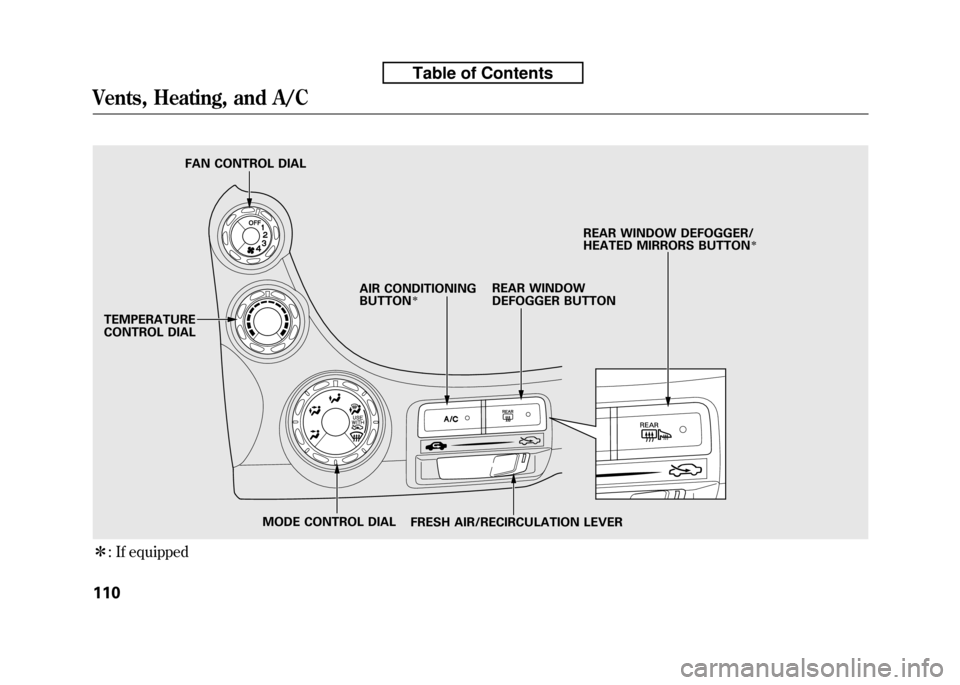
TEMPERATURE
CONTROL DIAL FAN CONTROL DIAL
REAR WINDOW
DEFOGGER BUTTON
AIR CONDITIONINGBUTTON
ꭧ
FRESH AIR/RECIRCULATION LEVER REAR WINDOW DEFOGGER/
HEATED MIRRORS BUTTON
ꭧ
MODE CONTROL DIAL
Vents, Heating, and A/C
110
Table of Contents
Page 126 of 351

Airflow Controls
Fan Control Dial
Turn this dial to increase or decrease
the fan speed and airflow.
Temperature Control Dial
Turning this dial clockwise increases
the temperature of the airflow.
Air Conditioning (A/C) Button
If equipped
This button turns the air
conditioning on and off. The
indicator in the button is on when the
A/C is on.
Fresh Air/Recirculation Lever
This lever controls the source of the
air going into the system. When you
slide the lever to the
side, air is
brought in from outside the vehicle
(fresh air mode). When you selectthe
side, air from the vehicle's
interior is sent through the system
again (recirculation mode). The outside air intakes for the
heating and cooling system are at the
base of the windshield. Keep this
area clear of leaves and other debris.
The system should be left in fresh air
mode under almost all conditions.
Keeping the system in recirculation
mode, particularly with the A/C off,
can cause the windows to fog up.
Switch to recirculation mode when
driving through dusty or smoky
conditions, then return to fresh airmode.
Rear Window Defogger Button
/
This button turns the rear window
defogger on and off (see page 76).
On some models, this button also
operates the heated outside mirrors
(see page 102).
Mode Control Dial
Use the mode control dial to select
the vents the air flows from. Some air
will flow from the dashboard corner
vents in all modes.
Air flows from the center and
corner vents in the dashboard.
Airflow is divided between the
vents in the dashboard and the floor vents.
Air flows from the floor vents.
Airflow is divided between the
floor vents and defroster vents at the
base of the windshield.
Air flows from the defroster
vents at the base of the windshield.
CONTINUED
Vents, Heating, and A/C
111
Features
Table of Contents
Page 127 of 351

When you selector, the
system automatically turns on the
A/C (if equipped). You cannot turn
the A/C off in this mode. Ventilation
The flow-through ventilation system
draws in outside air, circulates it
through the interior, then discharges
it through vents near the tailgate.
1. Set the temperature to the lower limit.
2. Make sure the A/C is off.
3. Select
and.
4. Set the fan to the desired speed. Using the Heater
The heater uses engine coolant to
warm the air. If the engine is cold, it
will be several minutes before you
feel warm air coming from thesystem.
1. Select
and.
2. Set the fan to the desired speed.
3. Adjust the warmth of the air with the temperature control dial. Using the A/C
If equipped
Air conditioning places an extra load
on the engine. Check the high
temperature indicator (see page 63).
If the indicator begins to blink, turn
off the A/C until the indicator goesoff.
1. Turn on the A/C by pressing the
button. The indicator in the button
comes on when a fan speed isselected.
2. Make sure the temperature is set to maximum cool.
3. Select
.
4. If the outside air is humid, select recirculation mode. If the outside
air is dry, select
.
5. Set the fan to the desired speed.
Vents, Heating, and A/C
112
Table of Contents
Page 128 of 351
If the interior is very warm,you can
cool it down more rapidly by partially
opening the windows, turning on the
A/C, and setting the fan to maximum
speed in
.
Dehumidify the Interior
Air conditioning, as it cools, removes
moisture from the air. When used in
combination with the heater, it
makes the interior warm and dry and
can prevent the windows from
fogging up.
1. Turn the fan on.
2. If the A/C is off, turn it on (if equipped).
3. Select
and.
Adjust the temperature to your preference.
This setting is suitable for all driving
conditions whenever the outside
temperature is above 32°F (0°C). To Defog and Defrost
To remove fog from the inside of thewindows:
1. Set the fan to the desired speed or
high for faster defrosting.
2. Select
by sliding the lever.
3. Select
. The system
automatically turns on the A/C (if
equipped). The A/C indicator will
not come on if it was previously off.
4. Adjust the temperature so the airflow feels warm.
5. Select
/to help clear the
rear window.
6. To increase airflow to the windshield, close the corner vents. When you select
or, the
system automatically turns on the
A/C. This helps to dehumidify the air
and to defog the windshield. In either
mode, you cannot turn off the A/C.
When you switch to another mode,
the A/C returns to its original
setting, either on or off, as indicated
by the A/C indicator.
CONTINUED
Vents, Heating, and A/C
113
Features
Table of Contents
Page 129 of 351

To Remove Exterior Frost or Ice
From the Windows
1. Set the fan and temperaturecontrols to maximum level.
2. Select
. The system
automatically turns on the A/C (if
equipped). The A/C indicator does
not come on if it was previously off.
3. Select
.
To clear the windows faster, you can
close the dashboard corner vents by
rotating each vent. This sends more
warm air to the windshield defroster
vents. Once the windshield is clear,
select fresh air mode to avoid
fogging the windows.
For your safety, make sure you have
a clear view through all the windows
before driving. To Turn Everything Off
Turning the fan speed control dial all
the way to the left shuts the systemoff.
● Keep the system off for short
periods only.
● To keep stale air and mustiness
from collecting, you should have
the fan running at all times.
Vents, Heating, and A/C
114
Table of Contents
Page 232 of 351
The manual transmission is
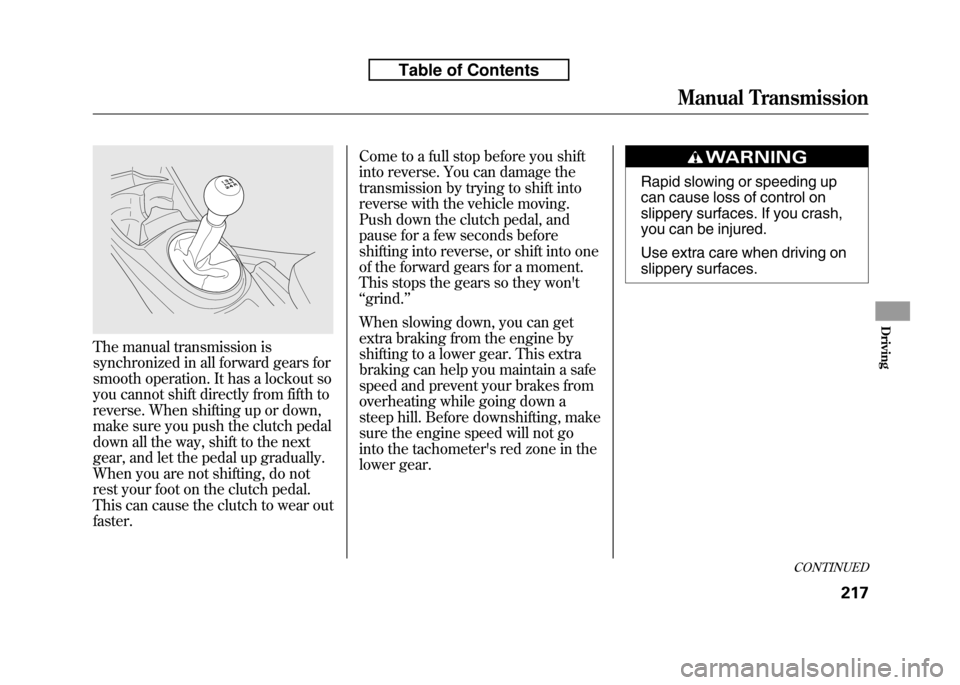
synchronized in all forward gears for
smooth operation. It has a lockout so
you cannot shift directly from fifth to
reverse. When shifting up or down,
make sure you push the clutch pedal
down all the way, shift to the next
gear, and let the pedal up gradually.
When you are not shifting, do not
rest your foot on the clutch pedal.
This can cause the clutch to wear outfaster.Come to a full stop before you shift
into reverse. You can damage the
transmission by trying to shift into
reverse with the vehicle moving.
Push down the clutch pedal, and
pause for a few seconds before
shifting into reverse, or shift into one
of the forward gears for a moment.
This stops the gears so they won't‘‘
grind. ’’
When slowing down, you can get
extra braking from the engine by
shifting to a lower gear. This extra
braking can help you maintain a safe
speed and prevent your brakes from
overheating while going down a
steep hill. Before downshifting, make
sure the engine speed will not go
into the tachometer's red zone in the
lower gear.
Rapid slowing or speeding up
can cause loss of control on
slippery surfaces. If you crash,
you can be injured.
Use extra care when driving on
slippery surfaces.
CONTINUED
Manual Transmission
217
Driving
Table of Contents
Page 283 of 351
If you remove the driver's floor mat,
make sure to re-anchor it when you
put it back in your vehicle.
If you use a non-Honda floor mats,
make sure they fit properly and that
they can be anchored securely. Do
not put additional floor mats on top of
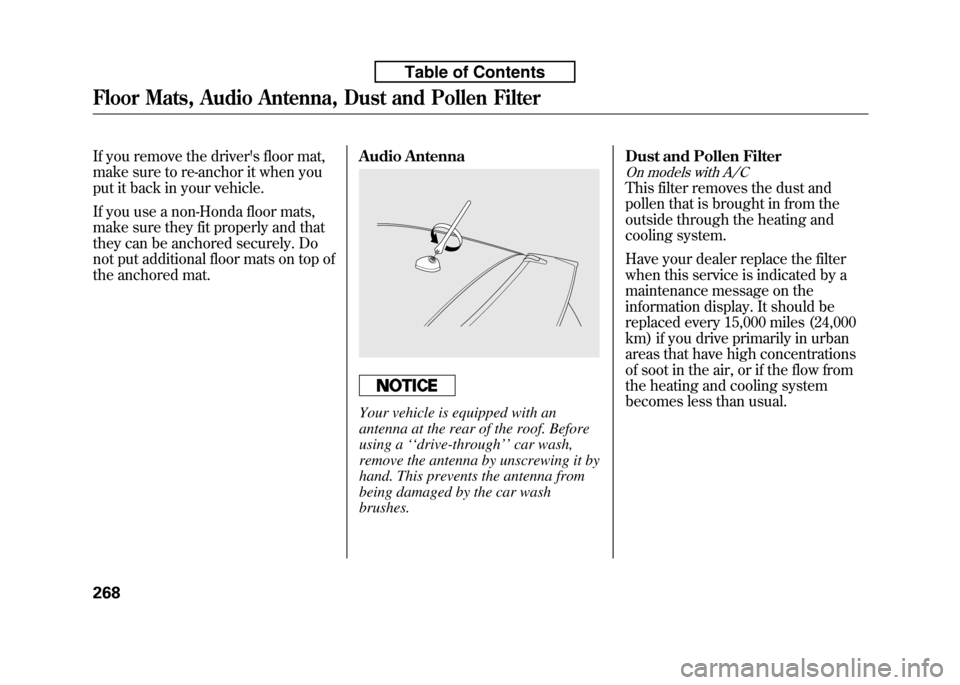
the anchored mat.Audio Antenna
Your vehicle is equipped with an
antenna at the rear of the roof. Before
using a
‘‘drive-through ’’car wash,
remove the antenna by unscrewing it by
hand. This prevents the antenna from
being damaged by the car wash brushes. Dust and Pollen Filter
On models with A/C
This filter removes the dust and
pollen that is brought in from the
outside through the heating and
cooling system.
Have your dealer replace the filter
when this service is indicated by a
maintenance message on the
information display. It should be
replaced every 15,000 miles (24,000
km) if you drive primarily in urban
areas that have high concentrations
of soot in the air, or if the flow from
the heating and cooling system
becomes less than usual.
Floor Mats, Audio Antenna, Dust and Pollen Filter
268
Table of Contents