navigation system HONDA FIT 2010 2.G User Guide
[x] Cancel search | Manufacturer: HONDA, Model Year: 2010, Model line: FIT, Model: HONDA FIT 2010 2.GPages: 351, PDF Size: 5.67 MB
Page 133 of 351
Radio Data System (RDS)
On the FM band, you can select a
favorite station and display the
program service name according to
the information provided by the radio
data system (RDS).
Program Service (PS) Name Display
The program service name display
function shows the name of the
station you are listening to. With the
audio system on and the FM band
selected, you can turn this function
on or off.
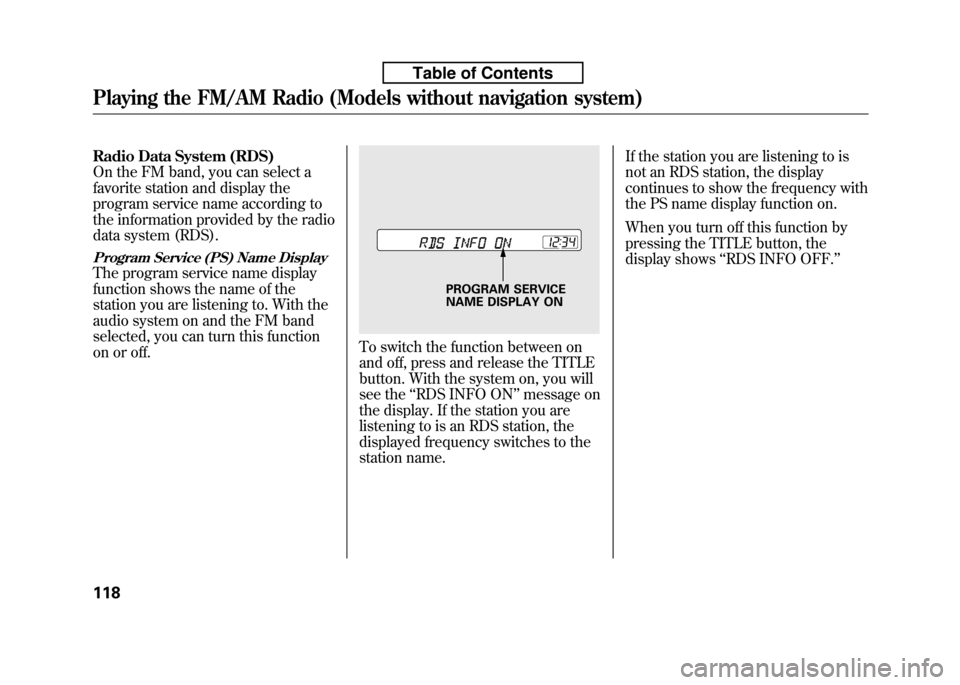
To switch the function between on
and off, press and release the TITLE
button. With the system on, you will
see the‘‘RDS INFO ON ’’message on
the display. If the station you are
listening to is an RDS station, the
displayed frequency switches to the
station name. If the station you are listening to is
not an RDS station, the display
continues to show the frequency with
the PS name display function on.
When you turn off this function by
pressing the TITLE button, the
display shows
‘‘RDS INFO OFF. ’’
PROGRAM SERVICE
NAME DISPLAY ON
Playing the FM/AM Radio (Models without navigation system)
118
Table of Contents
Page 134 of 351
Radio Data System (RDS) Category
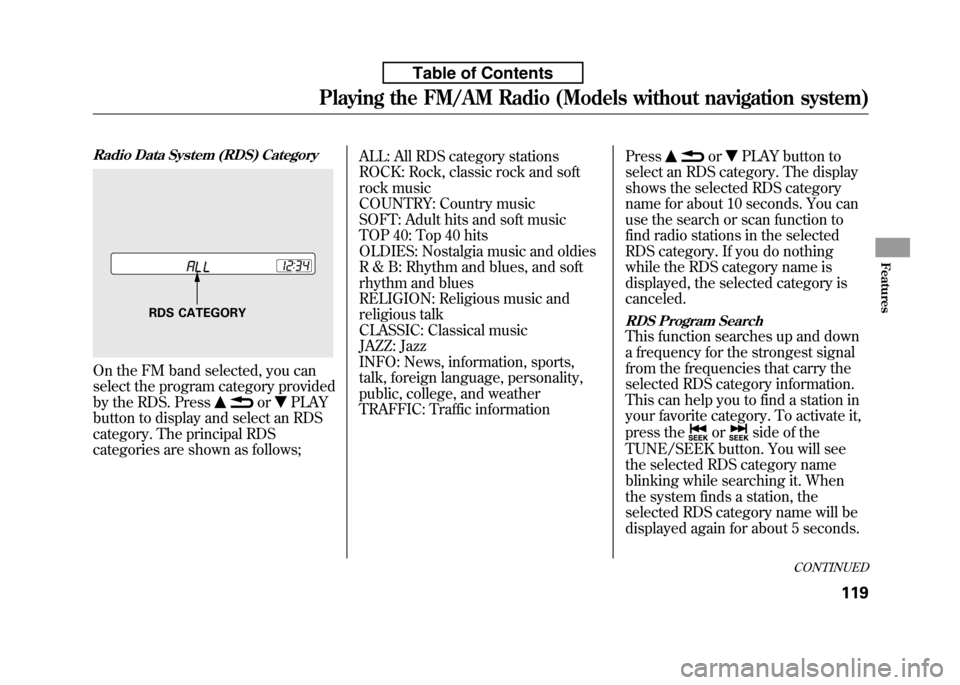
On the FM band selected, you can
select the program category provided
by the RDS. Press
orPLAY
button to display and select an RDS
category. The principal RDS
categories are shown as follows; ALL: All RDS category stations
ROCK: Rock, classic rock and soft
rock music
COUNTRY: Country music
SOFT: Adult hits and soft music
TOP 40: Top 40 hits
OLDIES: Nostalgia music and oldies
R & B: Rhythm and blues, and soft
rhythm and blues
RELIGION: Religious music and
religious talk
CLASSIC: Classical music
JAZZ: Jazz
INFO: News, information, sports,
talk, foreign language, personality,
public, college, and weather
TRAFFIC: Traffic information
Press
orPLAY button to
select an RDS category. The display
shows the selected RDS category
name for about 10 seconds. You can
use the search or scan function to
find radio stations in the selected
RDS category. If you do nothing
while the RDS category name is
displayed, the selected category iscanceled.
RDS Program Search
This function searches up and down
a frequency for the strongest signal
from the frequencies that carry the
selected RDS category information.
This can help you to find a station in
your favorite category. To activate it,
press the
orside of the
TUNE/SEEK button. You will see
the selected RDS category name
blinking while searching it. When
the system finds a station, the
selected RDS category name will be
displayed again for about 5 seconds.
RDS CATEGORY
CONTINUED
Playing the FM/AM Radio (Models without navigation system)
119
Features
Table of Contents
Page 135 of 351

If the system does not find a station, ‘‘NOTHING ’’will be blinking for
about 5 seconds, then the system
goes back to the last selected station.RDS Program SCAN
The scan function samples all
stations with strong signals on the
selected RDS category. To activate it,
press the SCAN button. You will see‘‘ SCAN ’’in the display. The system
will scan for a station with a strong
signal in the selected RDS category.
You will also see the selected RDS
category name blinking while
searching it. When it finds one, it will
stop and play that station for about 10seconds.
If you do nothing, the system will
scan for the next strong station and
play it for 10 seconds. When it plays
a station that you want to listen to,
press the SCAN button again.
If the system does not find a station, ‘‘ NOTHING ’’will be blinking for
about 5 seconds, then the system
goes back to the last selected station. You can use the RDS program search
or scan function even if the PS name
display function is off. In this case,
the display shows a frequency in
place of a PS name.
Playing the FM/AM Radio (Models without navigation system)
120
Table of Contents
Page 136 of 351
Adjusting the Sound
Press the SOUND (
) button to
select an appropriate setting: bass,
treble, fader, balance, and SVC
(speed-sensitive volume
compensation). Turn the VOL/
SELECT knob to adjust the setting. BASS -Adjusts the bass.
TREBLE -Adjusts the treble.
FADER -Adjusts the front-to-back
strength of the sound.BALANCE -Adjusts the side-to-
side strength of the sound.
Each mode is shown in the display as
it changes. Turn the VOL/SELECT
knob to adjust the setting to your
liking. When the level reaches the
center, you will see ‘‘C ’’in the
display. SVC
-Adjusts the volume level
based on the vehicle speed.
The system will return to the audio
display about 10 seconds after you
stop adjusting a mode.
Speed-sensitive Volume Compensation (SVC)
The SVC mode controls the volume
based on vehicle speed. The faster
you go, the louder the audio volume
becomes. As you slow down, the
audio volume decreases.
The SVC has four modes; SVC OFF,
SVC LOW, SVC MID, and SVC
HIGH. Turn the VOL/SELECT knob
to adjust the setting to your liking. If
you feel the sound is too loud,
choose low. If you feel the sound is
too quiet, choose high.
This function is set to MID as the
default setting when the vehicle
leaves the factory. Audio System Lighting
You can use the instrument panel
brightness control knob to adjust the
illumination of the audio system (see
page 76). The audio system
illuminates when the parking lights
are on, even if the system is turnedoff.
Playing the FM/AM Radio (Models without navigation system)
121
Features
Table of Contents
Page 137 of 351
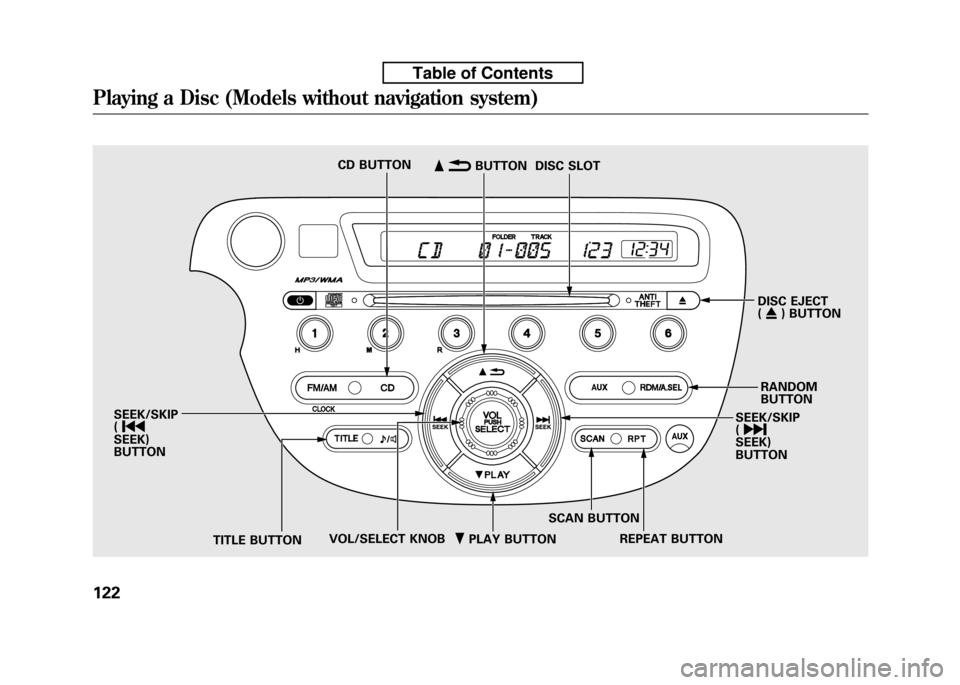
ꂺPLAY BUTTON
CD BUTTON
DISC EJECT (ꁎ ) BUTTON
RANDOM BUTTON
SEEK/SKIP( ꀽ
SEEK)BUTTON
TITLE BUTTON SCAN BUTTON
DISC SLOT
ꂹꂾ BUTTON
VOL/SELECT KNOB REPEAT BUTTON
SEEK/SKIP (
ꀾ
SEEK)BUTTON
Playing a Disc (Models without navigation system)
122
Table of Contents
Page 138 of 351
To Play a Disc
To load or play discs, the ignition
switch must be in the ACCESSORY
(I) or ON (II) position.
You operate the in-dash disc player
with the same controls used for the
radio. To select the disc player, press
the CD button. You will see‘‘CD ’’in
the display. The folder or track
numbers are shown in the display.
You can also select the displayed
information with the TITLE button
(see page 123). The system will
continuously play a disc until you
change modes.
Do not use discs with adhesive labels.
The label can curl up and cause the
disc to jam in the unit. The in-dash disc player can also play
CD-Rs and CD-RWs compressed in
CD-TEXT, MP3, and WMA formats.
When playing a disc in MP3 or
WMA, you will see
‘‘MP3 ’’or ‘‘WMA ’’
in the display. You can see up to 99
folders, and select up to 999 tracks/files. NOTE: If a file on an MP3 or WMA
disc is protected by digital rights
management (DRM), the audio unit
displays UNSUPPORTED, and then
skips to the next file.
If you have a disc that is a
combination of CD-DA tracks and
MP3/WMA files, you can choose the
format to listen by pressing the CDbutton.
Video CDs and DVDs will not work
in this unit.
A disc compressed in AAC format
cannot be played in this audiosystem.
CONTINUED
Playing a Disc (Models without navigation system)
123
Features
Table of Contents
Page 139 of 351

The specifications of the compatible
MP3 file are:
Sampling frequency:
32/44.1/48 kHz (MPEG1), 24/
22.05/16 kHz (MPEG2)
Bit rate:
32/40/48/56/64/80/96/112/128/
160/192/224/256/320 kbps(MPEG1),
8/16/24/32/40/48/56/64/80/96/
112/128/160 kbps (MPEG2)
Compatible with variable bit rate andmulti-session.
Maximum layers (including ROOT):
8 layers
The specifications of the compatible
WMA file are:
Sampling frequency:
32/44.1/48 kHz
Bit rate:
48/64/80/96/128/160/192 kbps
Compatible with variable bit rate andmulti-session.
Maximum layers (including ROOT):
8 layersTo Load a Disc
Insert a disc about halfway into the
disc slot. The drive will pull the disc
in the rest of the way to play it. You
operate the disc player with the same
controls used for the radio. The
number of the current track is shown
in the display. When playing a disc in
MP3 or WMA, the numbers of the
current folder and file are shown.
The system will continuously play a
disc until you change modes.
You cannot load and play 3-inch
(8-cm) discs in this unit.
For information on how to handle
and protect compact discs, see page186.
Text Data Display Function
Each time you press the TITLE
button, the display shows you the
text data on a disc, if the disc was
recorded with text data.You can see the album, artist, and
track name in the display. If a disc is
recorded in MP3 or WMA, you can
see the folder and file name, and the
artist, album, and track tag.
With the folder name, you will see
the FOLDER indicator in the display.
The TRACK indicator is shown with
the file or track name.
When you press the TITLE button
while a disc without text data is
playing, you will see
‘‘NO INFO ’’on
the display.
The display shows up to about 16
characters of selected text data (the
folder name, file name, etc.).
If the text data has more than 16
characters, you will see the first 15
characters and theindicator on the
display. Press and hold the TITLE
button until the next 16 characters
are shown. You can see up to about
31 characters of the text data.
Playing a Disc (Models without navigation system)
124
Table of Contents
Page 140 of 351

If you press and hold the TITLE
button again, the display shows the
first 15 characters again.
If any letter is not available, it is
replaced with‘‘.’’ (dot) in the
display. When the disc has no text
data, you will see ‘‘NO INFO ’’on the
display.
You will also see some text data
under these conditions:
● When a new folder, file, or track isselected.
● When you change the audio mode
to play a disc with text data or in
MP3 or WMA.
● When you insert a disc, and the
system begins to play.
When playing a CD-DA with text
data, the album and track name are
shown in the display. With a disc in
MP3 or WMA, the display shows the
folder and file name. When you turn on the audio system
next time, the system keeps your
selection with the TITLE button.
To Change or Select Tracks/Files
You can use the SEEK/SKIP button
while a disc is playing to select
passages and change tracks (files in
MP3/WMA mode).
In MP3/WMA mode, use the
orPLAY button to select folders in
the disc, and use the SEEK/SKIP
button to change files. SEEK/SKIP
-Each time you press
the
button, the player skips
forward to the beginning of the next
track (files in MP3/WMA mode).
Press the
button to skip
backward to the beginning of the
current track. Press it again to skip to
the beginning of the previous track.
To move rapidly within a track, press
and hold the
orbutton.
You can also operate the track
selection by using the VOL/SELECT
knob. Press the VOL/SELECT knob
and you will see ‘‘SEL ’’in the display.
Turn the knob to switch the track
number. Press the VOL/SELECT
knob or
PLAY button to set your
selection. To turn it off, press the
button.
CONTINUED
Playing a Disc (Models without navigation system)
125
Features
Table of Contents
Page 141 of 351

In MP3/WMA mode
FOLDER SELECTION-To select
a different folder, press the
or
PLAY button. Press the
button to skip to the next folder, and the
PLAY button to skip to the
previous folder.
You can also operate the folder and
file selection by using the VOL/
SELECT knob. Press the VOL/
SELECT knob and you will see‘‘ SEL ’’in the display. Turn the knob
to switch the folder number and
press the knob to set your selection.
Turn the knob to switch the file
number and press the knob to your
selection. To turn it off, press the
button repeatedly.
REPEAT (TRACK/FILE REPEAT) - To continuously replay a track
(file in MP3/WMA mode), press the
RPT button. You will see ‘‘RPT ’’in
the display. Press and hold the RPT
button to turn it off.
In MP3/WMA mode
FOLDER-REPEAT -This feature,
when activated, replays all the files
on the selected folder in the order
they are compressed in MP3/WMA.
To activate folder repeat mode, press
the RPT button repeatedly until yousee ‘‘F-RPT ’’in the display. The
system continuously replays the
current folder. Press and hold the
RPT button to turn it off.
Each time you press the RPT button,
the mode changes from file repeat to
folder repeat, then to normal playing.
RANDOM (Random within a disc) - This feature plays the tracks
within a disc in random order. In
MP3/WMA mode, all files in all
folders are played in random order.
To activate random mode, press the
RDM button repeatedly until you see‘‘ RDM ’’in the display. Press and hold
the RDM button to turn it off.
In MP3/WMA mode
FOLDER-RANDOM -This
feature, when activated, plays the
files in the current folder in random
order, rather than in the order they
are compressed in MP3/WMA. To
activate folder random play, press the
RDM button. You will see ‘‘F-RDM ’’
in the display. The system will then
select and play files randomly. This
continues until you deactivate folder
random play by pressing and holding
the RDM button.
Each time you press the RDM
button, the mode changes from
folder random play, to within a disc
random play, then to normal play.
Playing a Disc (Models without navigation system)
126
Table of Contents
Page 142 of 351

SCAN-The scan function samples
all the tracks on the disc in the order
they are recorded on the disc (all
files in the selected folder in MP3 or
WMA mode). To activate the scan
feature, press the SCAN button. You
will see ‘‘SCAN ’’in the display. You
will get a 10 second sampling of each
track/file in the disc/folder. Press
and hold the SCAN button to get out
of scan mode and play the last tracksampled.In MP3/WMA mode
FOLDER-SCAN -This feature,
when activated, samples the first file
in each folder on the disc in the
order they are recorded. To activate
the folder scan feature, press the
SCAN button repeatedly. You willsee ‘‘F-SCAN ’’in the display. The
system will then play the first file in
the main folders for about 10
seconds. If you do nothing, the
system will then play the following
first files for 10 seconds each. When
the system samples the first file of all
folders, F-SCAN is cancelled, and the
system plays normally.
Each time you press the SCAN
button, the mode changes from
track/file scan to folder scan, then to
normal playing. To Stop Playing a Disc
Press the eject button ()to
remove the disc. If you eject the disc,
but do not remove it from the slot,
the system will automatically reload
it after 10 seconds and put it in pause
mode. To begin playing, press the
CD button.
Press the FM/AM button to switch
to the radio while a disc is playing.
Press the CD button to play the disc.
If you turn the system off while a disc
is playing, either with the power (
)
button or by turning off the ignition
switch, the disc will stay in the drive.
When you turn the system back on,
the disc will begin playing where it
left off.
Protecting Discs
For information on how to handle
and protect compact discs, see page186.
Playing a Disc (Models without navigation system)
127
Features
Table of Contents