warning HONDA FIT 2010 2.G User Guide
[x] Cancel search | Manufacturer: HONDA, Model Year: 2010, Model line: FIT, Model: HONDA FIT 2010 2.GPages: 351, PDF Size: 5.67 MB
Page 73 of 351
This section gives information about
the controls and displays that
contribute to the daily operation of
your vehicle. All the essential
controls are within easy reach.Control Locations..........................
58
Instrument Panel ..........................
59
Instrument Panel Indicators ..........
60
Gauges ..........................................
68
Trip Meter ................................
69
Instant Fuel Economy ...............
70
Average Fuel Economy .............
70
Odometer ..................................
70
Fuel Gauge ...............................
70
Check Fuel Cap Indicator .........
70
Maintenance Minder ................
71
Controls Near the Steering
Wheel .......................................
72
Windshield Wipers and Washers ................................
73
Windshield Wipers ...................
73
Rear Window Wiper and
Washer .................................
73
Turn Signal and Headlights ..........
74
Headlights ....................................
75
Instrument Panel Brightness ........
76
Hazard Warning Button ................
76
Rear Window Defogger .................
76
Steering Wheel Adjustments .........
77Keys and Locks
............................. 78
Immobilizer System ......................
79
Ignition Switch ..............................
80
Door Locks ...................................
81
Power Door Locks ....................
81
Childproof Door Locks ..............
82
Auto Door Locking/ Unlocking .............................
83
Auto Door Locking ...................
83
Auto Door Unlocking ................
85
Tailgate .........................................
88
Remote Transmitter ......................
90
Seats .............................................
93
Power Windows ..........................
100
Mirrors .......................................
101
Parking Brake .............................
102
Interior Convenience Items .........
104
Lower Glove Box ....................
105
Upper Glove Box .....................
105
Beverage Holders ...................
106
Seat Under Box .......................
106
Accessory Power Socket .........
106
Sun Visor ................................
106
Interior Lights .............................
107
Instruments and Controls
57
Instruments and Controls
Page 79 of 351

High Temperature Indicator
This indicator monitors the
temperature of the engine coolant. It
normally comes on when you turn the
ignition switch to the ON (II) position
and goes off after a few seconds. In
normal driving conditions, this
indicator should not blink or stay on. In
severe driving conditions, such as very
hot weather or a long period of uphill
driving, this indicator may blink. This
means the engine coolant temperature
is high. If the indicator begins to blink
while you are driving, be sure to slow
down to prevent overheating. If the
indicator stays on, pull safely to the
side of the road and turn off the engine.
See page 301 for instructions and
precautions on checking the engine's
cooling system.
Do not drive the vehicle while the
indicator is on or the engine may bedamaged.Low Temperature Indicator
This indicator monitors the
temperature of the engine coolant. If
there is no problem, this indicator
comes on when the engine is cold. If
it comes on when the engine is warm
(normal operating temperature),
have the vehicle inspected by your
dealer as soon as possible.Turn Signal and
Hazard WarningIndicators
The left or right turn signal indicator
blinks when you signal a lane change
or turn. If an indicator does not blink
or blinks rapidly, it usually means
one of the turn signal bulbs is burned
out (see page 264). Replace the bulb
as soon as possible, since other
drivers cannot see that you aresignaling.
When you press the hazard warning
button, both turn signal indicators
and all turn signals on the outside of
the vehicle flash.
CONTINUED
Instrument Panel Indicators
63
Instruments and Controls
Table of Contents
Page 86 of 351
Instant Fuel Economy
This shows your instant fuel
economy in mpg (U.S.) or l/100 km(Canada).
Average Fuel Economy
This shows your vehicle's average
fuel economy in mpg (U.S.) or 1/100
km (Canada) since you last reset the
trip meter.
When you reset a trip meter, the
average fuel economiy for that trip
meter also resets.Odometer
The odometer shows the total
distance your vehicle has been
driven. It measures miles in U.S.
models and kilometers in Canadian
models. It is illegal under U.S.
federal law and Canadian provincial/
territorial regulations to disconnect,
reset, or alter the odometer with the
intent to change the number of miles
or kilometers indicated.
Fuel Gauge
This shows how much fuel you have.
It may show slightly more or less
than the actual amount. The needle
returns to the bottom after you turn
off the ignition.
Avoid driving with an extremely low
fuel level. Running out of fuel could
cause the engine to misfire, damaging
the catalytic converter.Check Fuel Cap Indicator
If the fuel fill cap is loose or missing,a
‘‘CHECK FUEL CAP ’’message
appears on the information display
after you start the engine. The
message changes from CHECK, to
FUEL, to CAP repeatedly.
Turn the engine off and confirm the
fuel fill cap is installed. If it is, loosen
the cap, then retighten it until it
clicks at least once. You can cycle the
message off of the display by
pressing the select/reset knob
repeatedly, but this message will be
displayed each time the engine is
started. It will take several days of
normal driving for the vehicle to turn
the warning off.
Gauges
70
Table of Contents
Page 88 of 351
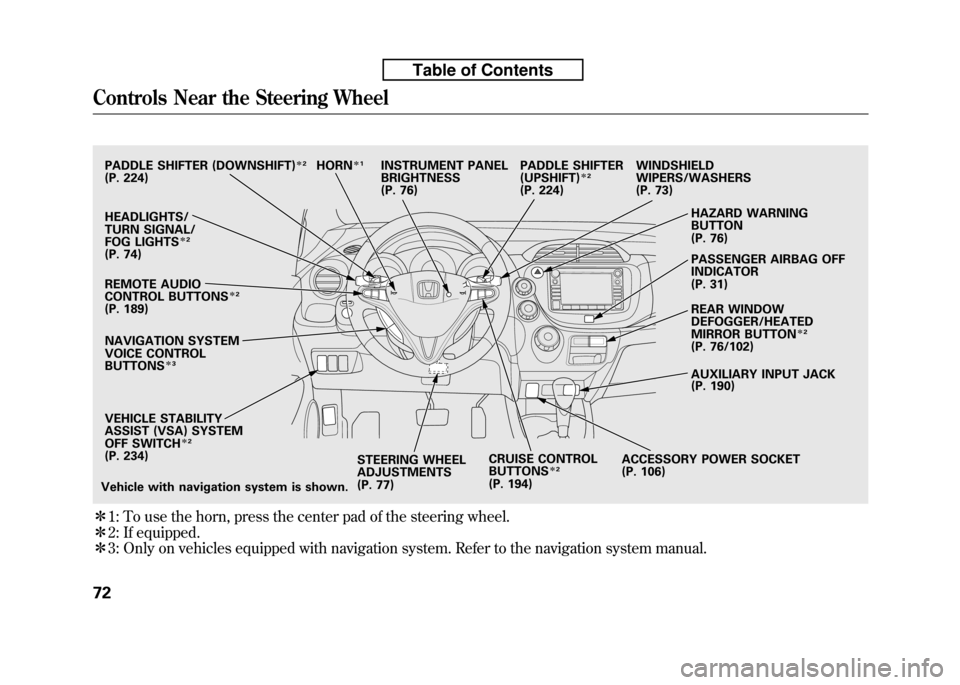
ꭧ1: To use the horn, press the center pad of the steering wheel.
ꭧ 2: If equipped.
ꭧ 3: Only on vehicles equipped with navigation system. Refer to the navigation system manual.
PADDLE SHIFTER (DOWNSHIFT)ꭧ2
(P. 224)
HEADLIGHTS/
TURN SIGNAL/
FOG LIGHTS
ꭧ2
(P. 74)
NAVIGATION SYSTEM
VOICE CONTROL BUTTONS
ꭧ3
STEERING WHEEL
ADJUSTMENTS
(P. 77) CRUISE CONTROLBUTTONSꭧ
2
(P. 194) AUXILIARY INPUT JACK
(P. 190)
ACCESSORY POWER SOCKET
(P. 106) PASSENGER AIRBAG OFFINDICATOR
(P. 31)
REAR WINDOW
DEFOGGER/HEATED
MIRROR BUTTON
ꭧ
2
(P. 76/102)
WINDSHIELD
WIPERS/WASHERS
(P. 73)
HAZARD WARNING BUTTON
(P. 76)
PADDLE SHIFTER (UPSHIFT)
ꭧ
2
(P. 224)
INSTRUMENT PANEL
BRIGHTNESS
(P. 76)
REMOTE AUDIO
CONTROL BUTTONS
ꭧ 2
(P. 189)
VEHICLE STABILITY
ASSIST (VSA) SYSTEM
OFF SWITCH
ꭧ 2
(P. 234)
Vehicle with navigation system is shown. HORN
ꭧ
1
Controls Near the Steering Wheel
72
Table of Contents
Page 92 of 351
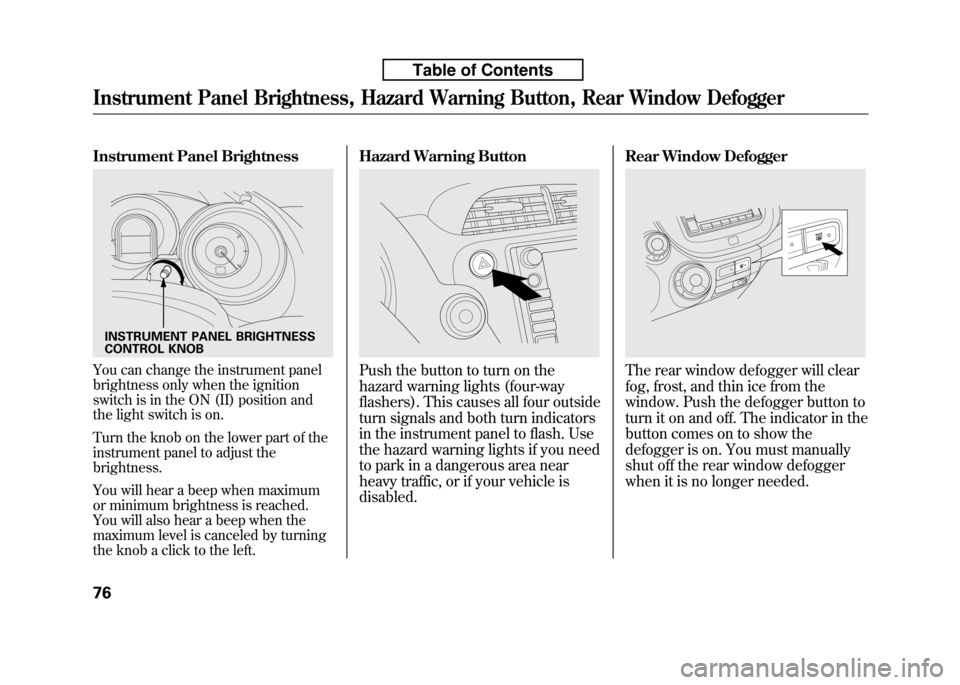
Instrument Panel Brightness
You can change the instrument panel
brightness only when the ignition
switch is in the ON (II) position and
the light switch is on.
Turn the knob on the lower part of the
instrument panel to adjust thebrightness.
You will hear a beep when maximum
or minimum brightness is reached.
You will also hear a beep when the
maximum level is canceled by turning
the knob a click to the left.Hazard Warning ButtonPush the button to turn on the
hazard warning lights (four-way
flashers). This causes all four outside
turn signals and both turn indicators
in the instrument panel to flash. Use
the hazard warning lights if you need
to park in a dangerous area near
heavy traffic, or if your vehicle isdisabled.
Rear Window DefoggerThe rear window defogger will clear
fog, frost, and thin ice from the
window. Push the defogger button to
turn it on and off. The indicator in the
button comes on to show the
defogger is on. You must manually
shut off the rear window defogger
when it is no longer needed.
INSTRUMENT PANEL BRIGHTNESS
CONTROL KNOB
Instrument Panel Brightness, Hazard Warning Button, Rear Window Defogger
76
Table of Contents
Page 109 of 351

Front Seat Adjustments
See pages 11-12 for important safety
information and warnings about how to properly position the seats and seat-
backs.
Make all seat adjustments before you
start driving.
To adjust the seat forward or
backward, pull up on the bar under
the seat cushion's front edge. Move
the seat to the desired position, and
release the bar. Try to move the seat
to make sure it is locked in position.To change the seat-back angle, pull
up the lever on the outside of the
seat bottom.
Once a seat is adjusted correctly,
rock it back and forth to make sure it
is locked in position.
CONTINUED
Seats
93
Instruments and Controls
Table of Contents
Page 110 of 351
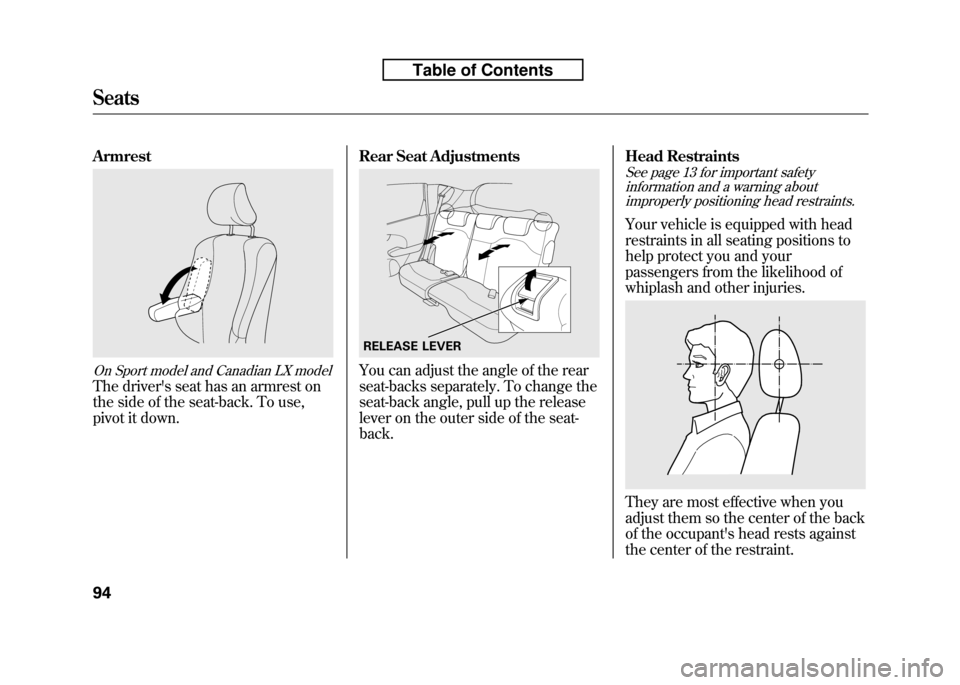
Armrest
On Sport model and Canadian LX model
The driver's seat has an armrest on
the side of the seat-back. To use,
pivot it down.Rear Seat Adjustments
You can adjust the angle of the rear
seat-backs separately. To change the
seat-back angle, pull up the release
lever on the outer side of the seat-back.Head Restraints
See page 13 for important safety
information and a warning aboutimproperly positioning head restraints.
Your vehicle is equipped with head
restraints in all seating positions to
help protect you and your
passengers from the likelihood of
whiplash and other injuries.
They are most effective when you
adjust them so the center of the back
of the occupant's head rests against
the center of the restraint.
RELEASE LEVER
Seats
94
Table of Contents
Page 295 of 351
WARNING:Battery posts,
terminals, and related accessories
contain lead and lead compounds.
Wash your hands after handling.
If you need to connect the battery to
a charger, disconnect both cables to
prevent damaging your vehicle's
electrical system. Always disconnect
the negative ( -) cable first, and
reconnect it last.
On vehicles without navigation system
If your vehicle's battery is
disconnected, or goes dead, the time
setting is lost. To reset the time, see
page 192.
If your vehicle's battery is
disconnected, or goes dead, the
audio system may disable itself. The
next time you turn on the radio, you
will see ‘‘ENTER CODE ’’in the
frequency display. Use the preset
buttons to enter the code (see page191).
The battery gives off explosive
hydrogen gas during normaloperation.
A spark or flame can cause the
battery to explode with enough
force to kill or seriously hurtyou.
Wear protective clothing and a
face shield, or have a skilled
technician do the batterymaintenance.
On vehicles with navigation system
The navigation system will also
disable itself. The next time you turn
on the ignition switch, the system
will require you to enter ‘‘ENTER
CODE ’’before it can be used. Refer
to the navigation system manual.
Checking the Battery
280
Table of Contents
Page 300 of 351
Except all Canadian models withautomatic transmission
If you have a flat tire while driving,
stop in a safe place to change it.
Drive slowly along the shoulder until
you get to an exit or an area to stop
that is far away from the traffic lanes.The vehicle can easily roll off
the jack, seriously injuring
anyone underneath.
Follow the directions for
changing a tire exactly, and
never get under the vehicle
when it is supported only by thejack.
1. Park the vehicle on firm, level, and non-slippery ground. Put the
transmission in Park (automatic)
or reverse (manual). Apply the
parking brake.
2. Turn on the hazard warning lights, and turn the ignition switch to the
LOCK (0) position. Have all
passengers get out of the vehicle
while you change the tire.
3. Lift the rear center head restraint.
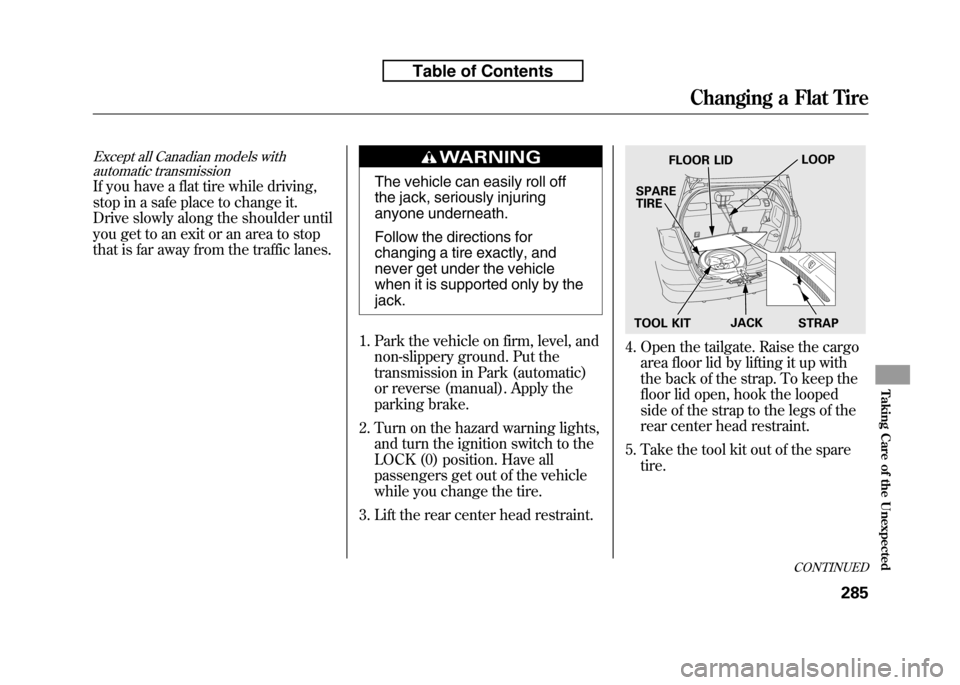
4. Open the tailgate. Raise the cargo area floor lid by lifting it up with
the back of the strap. To keep the
floor lid open, hook the looped
side of the strap to the legs of the
rear center head restraint.
5. Take the tool kit out of the spare tire.
FLOOR LID LOOP
SPARE TIRE
TOOL KIT JACK
STRAP
CONTINUED
Changing a Flat Tire
285
Taking Care of the Unexpected
Table of Contents
Page 316 of 351
The high temperature indicator
should be off under most conditions.
If the engine coolant temperature
gets higher than normal, the
indicator will blink. If it stays on, you
should determine the reason (hot
day, driving up a steep hill, etc.).
If the vehicle overheats, you should
take immediate action. The only
indication may be the high
temperature indicator blinking or
remaining on. Or you may see steam
or spray coming from under thehood.
Driving with the high temperature
indicator on can cause serious damage
to your engine.
Steam and spray from an
overheated engine can
seriously scald you.
Do not open the hood if steam
is coming out.
1. Safely pull to the side of the road. Put the transmission in neutral
(manual) or Park (automatic), and
set the parking brake. Turn off all
accessories, and turn on the
hazard warning lights.
2. If you see steam and/or spray coming from under the hood, turn
off the engine. Wait until you see
no more signs of steam or spray,
then open the hood. 3. If you do not see steam or spray,
leave the engine running, and
check the high temperature
indicator. If the high heat is due to
overloading, the engine should
start to cool down almost
immediately. If it does, wait until
the high temperature indicator
goes off, then continue driving.
4. If the high temperature indicator stays on, turn off the engine.
CONTINUED
If the Engine Overheats
301
Taking Care of the Unexpected
Table of Contents