lock HONDA FIT 2010 2.G Owner's Manual
[x] Cancel search | Manufacturer: HONDA, Model Year: 2010, Model line: FIT, Model: HONDA FIT 2010 2.GPages: 351, PDF Size: 5.67 MB
Page 75 of 351
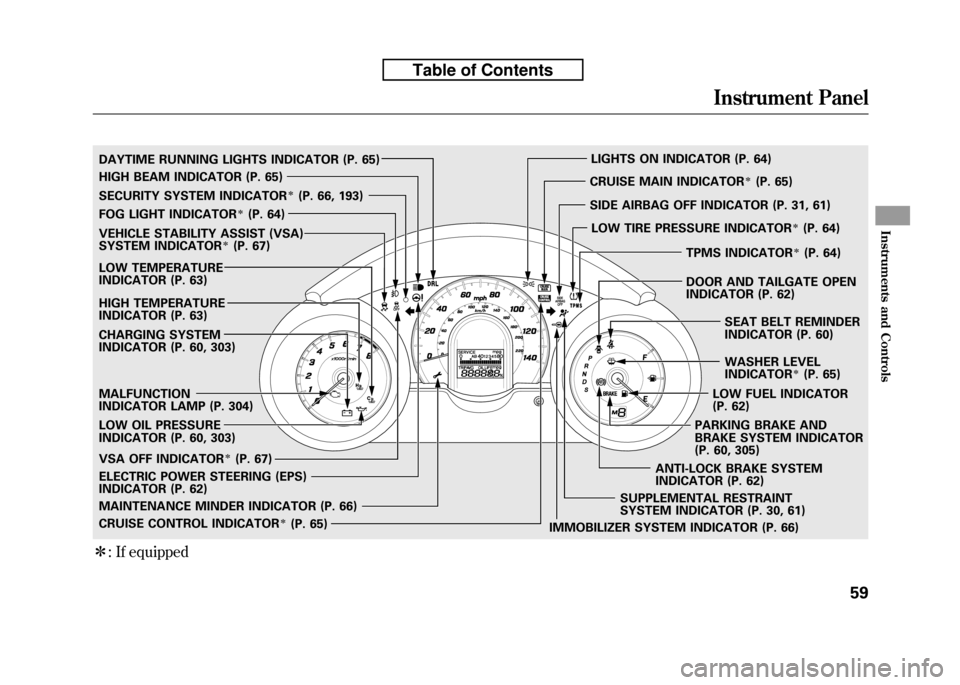
ꭧ: If equipped
SECURITY SYSTEM INDICATORꭧ(P. 66, 193)
WASHER LEVEL
INDICATOR
ꭧ(P. 65)
MALFUNCTION
INDICATOR LAMP (P. 304)
CHARGING SYSTEM
INDICATOR (P. 60, 303)
LOW OIL PRESSURE
INDICATOR (P. 60, 303)
IMMOBILIZER SYSTEM INDICATOR (P. 66)
FOG LIGHT INDICATOR
ꭧ(P. 64)
LIGHTS ON INDICATOR (P. 64)
SUPPLEMENTAL RESTRAINT
SYSTEM INDICATOR (P. 30, 61)
MAINTENANCE MINDER INDICATOR (P. 66) CRUISE MAIN INDICATOR
ꭧ(P. 65)
CRUISE CONTROL INDICATOR
ꭧ(P. 65)
LOW TEMPERATURE
INDICATOR (P. 63)
ELECTRIC POWER STEERING (EPS)
INDICATOR (P. 62)
HIGH BEAM INDICATOR (P. 65)
LOW FUEL INDICATOR
(P. 62)
TPMS INDICATOR
ꭧ(P. 64)
SEAT BELT REMINDER
INDICATOR (P. 60)
PARKING BRAKE AND
BRAKE SYSTEM INDICATOR
(P. 60, 305)
DAYTIME RUNNING LIGHTS INDICATOR (P. 65)
HIGH TEMPERATURE
INDICATOR (P. 63)
VEHICLE STABILITY ASSIST (VSA)
SYSTEM INDICATORꭧ(P. 67)
VSA OFF INDICATOR
ꭧ(P. 67) SIDE AIRBAG OFF INDICATOR (P. 31, 61)
LOW TIRE PRESSURE INDICATOR
ꭧ(P. 64)
ANTI-LOCK BRAKE SYSTEM
INDICATOR (P. 62) DOOR AND TAILGATE OPEN
INDICATOR (P. 62)
Instrument Panel
59
Instruments and Controls
Table of Contents
Page 78 of 351

Anti-lock Brake System
(ABS) Indicator
This indicator normally comes on for
a few seconds when you turn the
ignition switch to the ON (II)
position, and when the ignition
switch is turned to the START (III)
position. If it comes on at any other
time, there is a problem with the
ABS. If this happens, have your
vehicle checked at a dealer. With this
indicator on, your vehicle still has
normal braking ability but no anti-
lock function. For more information,
see page 231.Electric Power Steering
(EPS) Indicator
This indicator normally comes on when
you turn the ignition switch to the ON
(II) position and goes off after the
engine starts. If it comes on at any
other time, there is a problem in the
electric power steering system. If this
happens, stop the vehicle in a safe
place and turn off the engine. Reset the
system by restarting the engine. The
indicator will not turn off immediately.
If it does not go off after driving a short
distance, or comes back on again while
driving, take the vehicle to your dealer
to have it checked. With the indicator
on, the EPS may be turned off, making
the vehicle harder to steer.
If you turn the steering wheel to the
full left or right position repeatedly
while stopping or driving at very low
speed, you may feel slightly harder
steering in order to prevent damage to
the steering box caused by overheating.Low Fuel Indicator
This indicator comes on as a
reminder that you must refuel soon.
When the indicator comes on, there
is about 1.64 US gal (6.2 L) of fuel
remaining in the tank before the
needle reaches E. There is a small
reserve of fuel remaining in the tank
when the needle does reach E.
Door and Tailgate Open Indicator
This indicator comes on if any door
or the tailgate is not closed tightly.
Instrument Panel Indicators
62
Table of Contents
Page 80 of 351

Low Tire Pressure Indicator
U.S. models only
This indicator normally comes on for
a few seconds when you turn the
ignition switch to the ON (II)
position. If it comes on while driving,
it indicates that one or more of your
vehicle's tires are significantly low onpressure.
If this happens, pull to the side of the
road when it is safe, check which tire
has lost the pressure, and determine
the cause. If it is because of a flat tire,
replace the flat tire with the compact
spare (see page 284), and have the
flat tire repaired as soon as possible.
If two or more tires are underinflated,
call a professional towing service
(see page 311). For more
information, see page 235.
Tire Pressure Monitoring
System (TPMS) Indicator
U.S. models only
This indicator normally comes on for
a few seconds when you turn the
ignition switch to the ON (II)position.
If this indicator comes on and stays
on at any other time, or if it does not
come on when you turn the ignition
switch to the ON (II) position, there
is a problem with the TPMS. With
this indicator on, the low tire
pressure indicator will not come on
when a tire loses pressure. Take the
vehicle to your dealer to have the
system checked.
Lights On Indicator
This indicator reminds you that the
exterior lights are on. It comes on
when the light switch is in either the
orposition. If you turn the
ignition switch to the ACCESSORY
(I) or LOCK (0) position without
turning off the light switch, this
indicator will stay on. A reminder
chime will also sound when you open
the driver's door.
Fog Light Indicator
On Sport model
This indicator comes on when you
turn on the fog lights. For more
information, see page 75.
Instrument Panel Indicators
64
Table of Contents
Page 89 of 351
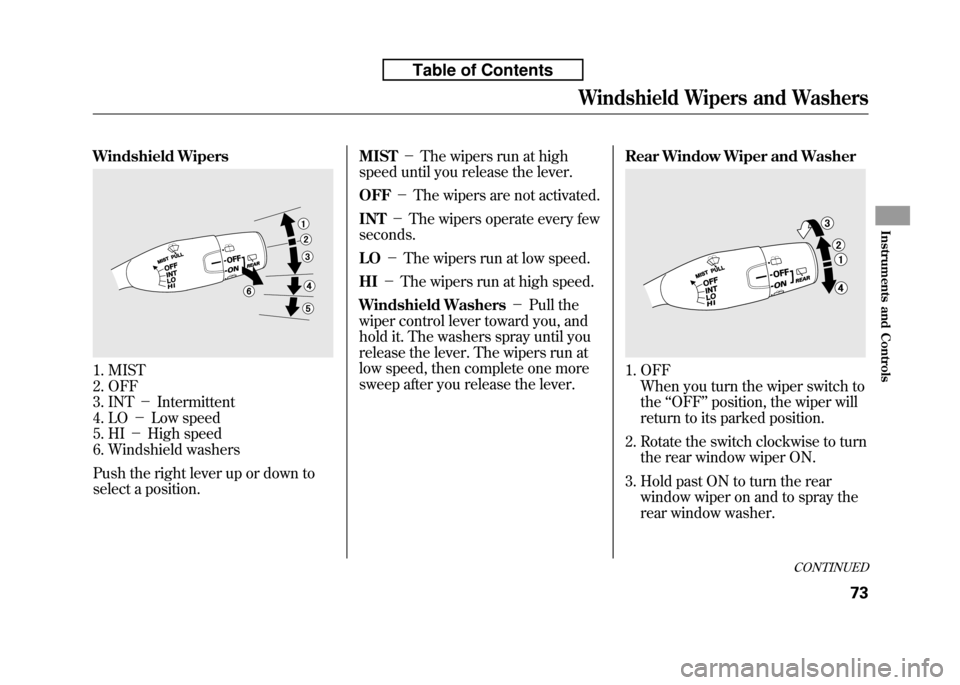
Windshield Wipers
1. MIST
2. OFF
3. INT-Intermittent
4. LO -Low speed
5. HI -High speed
6. Windshield washers
Push the right lever up or down to
select a position. MIST
-The wipers run at high
speed until you release the lever. OFF -The wipers are not activated.
INT -The wipers operate every few
seconds. LO -The wipers run at low speed.
HI -The wipers run at high speed.
Windshield Washers -Pull the
wiper control lever toward you, and
hold it. The washers spray until you
release the lever. The wipers run at
low speed, then complete one more
sweep after you release the lever. Rear Window Wiper and Washer1. OFF
When you turn the wiper switch to the ‘‘OFF ’’position, the wiper will
return to its parked position.
2. Rotate the switch clockwise to turn the rear window wiper ON.
3. Hold past ON to turn the rear window wiper on and to spray the
rear window washer.
CONTINUED
Windshield Wipers and Washers
73
Instruments and Controls
Table of Contents
Page 91 of 351

Headlights-Turning the switch to
the ‘‘
’’position turns on the
parking lights, taillights, instrument
panel lights, side-marker lights, and
rear license plate lights.
Turning the switch to the ‘‘
’’
position turns on the headlights.
When the light switch is in the ‘‘
’’ or ‘‘’’position, the lights
on indicator comes on as a reminder.
This indicator stays on if you leave
the light switch on and turn the
ignition switch to the ACCESSORY
(I) or the LOCK (0) position.
If you leave the lights on with the key
removed from the ignition switch,
you will hear a reminder chime when
you open the driver's door. High Beams
-Push the lever
forward and the high beam indicator
will come on (see page 65). Pull it
back to return to low beams.
To flash the high beams, pull the
lever back lightly, then release it.
The high beams will stay on as long
as you hold the lever back.
Fog Lights
On Sport model
Turn the fog lights on and off by
turning the switch next to the
headlight switch.
You can use the fog lights only when
the headlights are on low beam.
They will go off when the headlights
are turned off. Daytime Running Lights
With the headlight switch off or inthe
position, the high beam
headlights and the high beam
indicator come on with reduced
brightness when you turn the
ignition switch to the ON (II)
position and release the parking
brake. They remain on until you turn
the ignition switch off, even if you set
the parking brake.
The headlights revert to normal
operation when you turn them on
with the switch.
Headlights
75
Instruments and Controls
Table of Contents
Page 93 of 351
Make sure the rear window is clear
and you have good visibility before
starting to drive.
The defogger wires on the inside of
the rear window can be accidentally
damaged. When cleaning the glass,
always wipe side-to-side.
If equipped
Pushing this button also turns the
mirror heaters on or off. For more
information, see page 102.Steering Wheel Adjustments
Make any steering wheel adjustment
before you start driving.
Adjusting the steering wheel
position while driving may
cause you to lose control of the
vehicle and be seriously injured
in a crash.
Adjust the steering wheel only
when the vehicle is stopped.
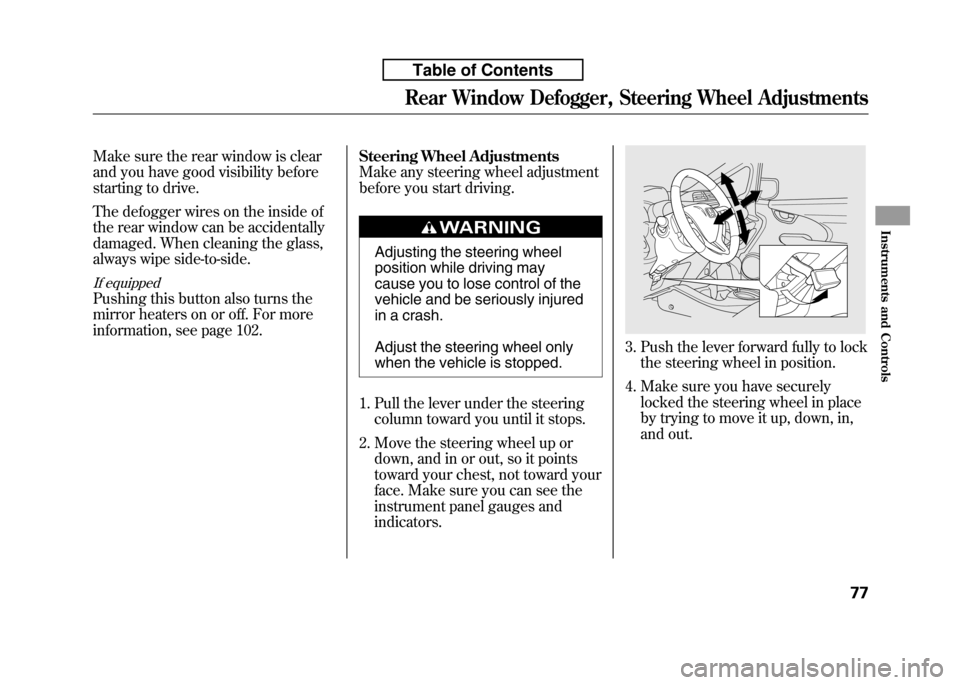
1. Pull the lever under the steering column toward you until it stops.
2. Move the steering wheel up or down, and in or out, so it points
toward your chest, not toward your
face. Make sure you can see the
instrument panel gauges andindicators.
3. Push the lever forward fully to lockthe steering wheel in position.
4. Make sure you have securely locked the steering wheel in place
by trying to move it up, down, in,
and out.
Rear Window Defogger, Steering Wheel Adjustments
77
Instruments and Controls
Table of Contents
Page 94 of 351
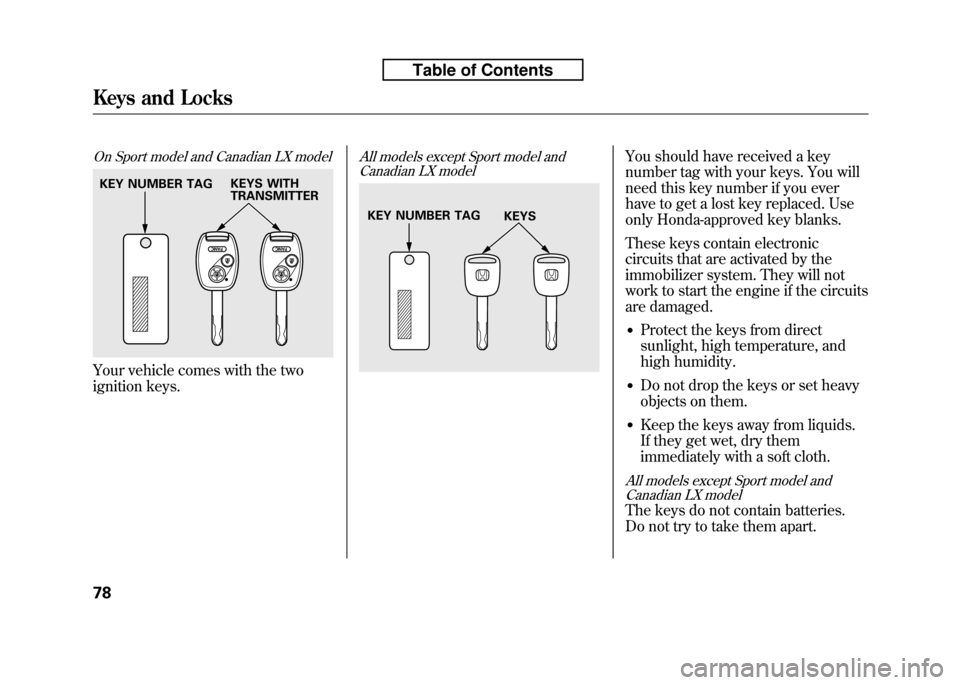
On Sport model and Canadian LX model
Your vehicle comes with the two
ignition keys.
All models except Sport model andCanadian LX modelYou should have received a key
number tag with your keys. You will
need this key number if you ever
have to get a lost key replaced. Use
only Honda-approved key blanks.
These keys contain electronic
circuits that are activated by the
immobilizer system. They will not
work to start the engine if the circuits
are damaged.
● Protect the keys from direct
sunlight, high temperature, and
high humidity.
● Do not drop the keys or set heavy
objects on them.
● Keep the keys away from liquids.
If they get wet, dry them
immediately with a soft cloth.
All models except Sport model and
Canadian LX model
The keys do not contain batteries.
Do not try to take them apart.
KEY NUMBER TAG KEYS WITH TRANSMITTER
KEY NUMBER TAG
KEYS
Keys and Locks
78
Table of Contents
Page 95 of 351

The immobilizer system protects
your vehicle from theft. If an
improperly coded key (or other
device) is used, the engine's fuel
system is disabled.
When you turn the ignition switch to
the ON (II) position, the immobilizer
system indicator should come on
briefly, then go off. If the indicator
starts to blink, it means the system
does not recognize the coding of the
key. Turn the ignition switch to the
LOCK (0) position, remove the key,
reinsert it, and turn the ignition
switch to the ON (II) position again.
The system may not recognize your
key's coding if another immobilizer
key or other metal object (i.e. key
chain) is near the ignition switch
when you insert the key.If the system repeatedly does not
recognize the coding of your key,
contact your dealer.
Do not attempt to alter this system or
add other devices to it. Electrical
problems could result that may make
your vehicle inoperable.
If you have lost your key and cannot
start the engine, contact your dealer.
Always take the ignition key with you
whenever you leave the vehicle alone.
As required by the FCC:
This device complies with Part 15 of the
FCC rules. Operation is subject to thefollowing two conditions: (1) This devicemay not cause harmful interference, and(2) this device must accept any
interference received, including interference that may cause undesiredoperation.
Changes or modifications not expresslyapproved by the party responsible forcompliance could void the user's
authority to operate the equipment.
This device complies with IndustryCanada Standard RSS-210. Operation is subject to the following two conditions:(1) this device may not cause
interference, and (2) this device mustaccept any interference that may cause undesired operation of the device.
Immobilizer System
79
Instruments and Controls
Table of Contents
Page 96 of 351
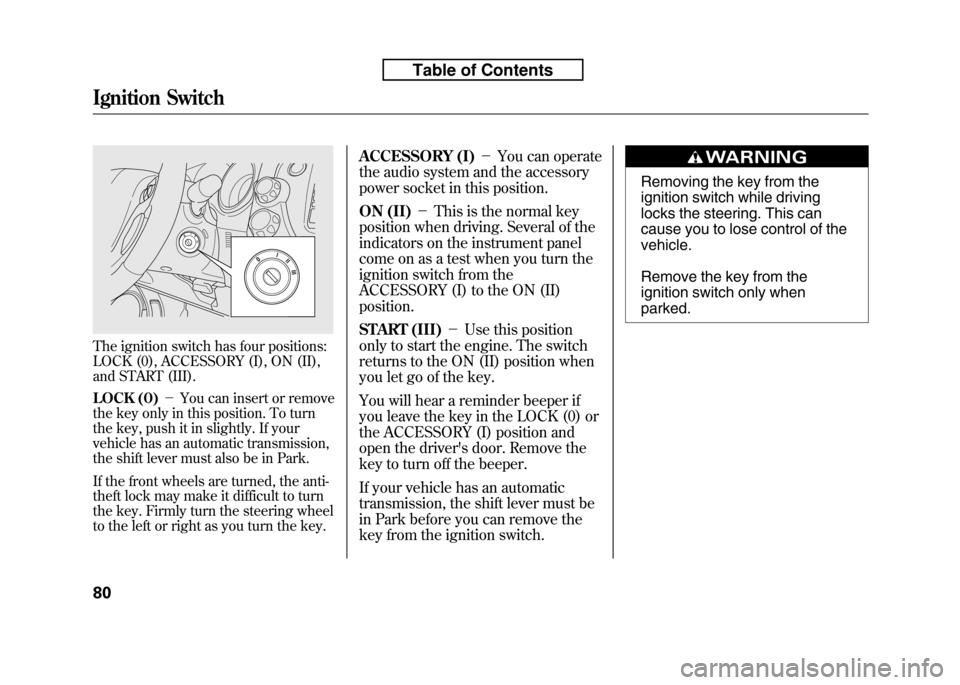
The ignition switch has four positions:
LOCK (0), ACCESSORY (I), ON (II),
and START (III).
LOCK (0)-You can insert or remove
the key only in this position. To turn
the key, push it in slightly. If your
vehicle has an automatic transmission,
the shift lever must also be in Park.
If the front wheels are turned, the anti-
theft lock may make it difficult to turn
the key. Firmly turn the steering wheel
to the left or right as you turn the key. ACCESSORY (I)
-You can operate
the audio system and the accessory
power socket in this position.
ON (II) -This is the normal key
position when driving. Several of the
indicators on the instrument panel
come on as a test when you turn the
ignition switch from the
ACCESSORY (I) to the ON (II)position.
START (III) -Use this position
only to start the engine. The switch
returns to the ON (II) position when
you let go of the key.
You will hear a reminder beeper if
you leave the key in the LOCK (0) or
the ACCESSORY (I) position and
open the driver's door. Remove the
key to turn off the beeper.
If your vehicle has an automatic
transmission, the shift lever must be
in Park before you can remove the
key from the ignition switch.
Removing the key from the
ignition switch while driving
locks the steering. This can
cause you to lose control of thevehicle.
Remove the key from the
ignition switch only whenparked.
Ignition Switch
80
Table of Contents
Page 97 of 351
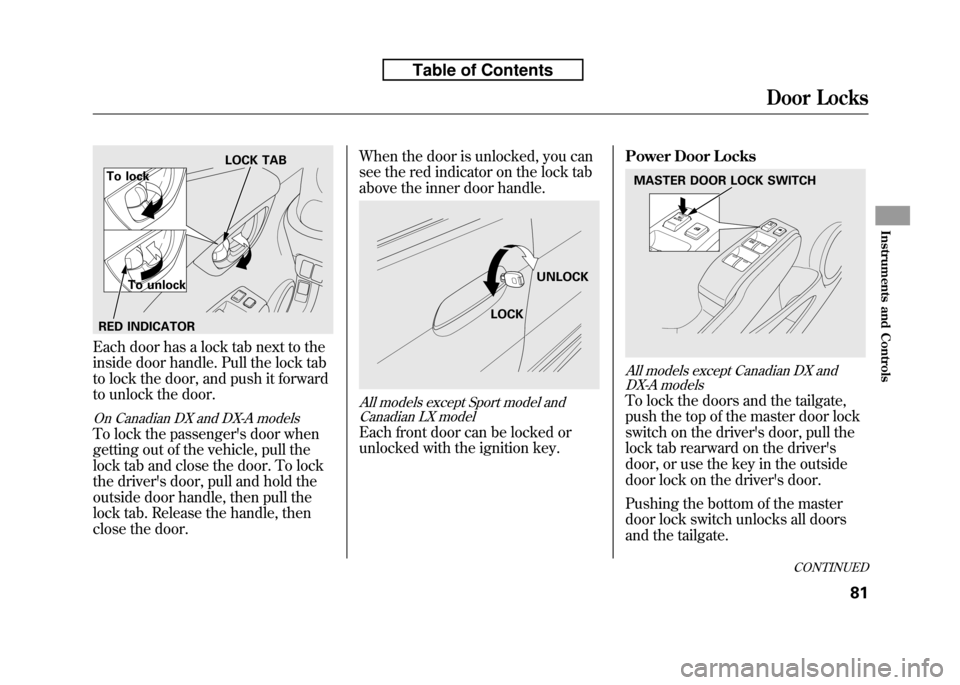
Each door has a lock tab next to the
inside door handle. Pull the lock tab
to lock the door, and push it forward
to unlock the door.
On Canadian DX and DX-A models
To lock the passenger's door when
getting out of the vehicle, pull the
lock tab and close the door. To lock
the driver's door, pull and hold the
outside door handle, then pull the
lock tab. Release the handle, then
close the door.When the door is unlocked, you can
see the red indicator on the lock tab
above the inner door handle.
All models except Sport model and
Canadian LX model
Each front door can be locked or
unlocked with the ignition key. Power Door Locks
All models except Canadian DX and
DX-A models
To lock the doors and the tailgate,
push the top of the master door lock
switch on the driver's door, pull the
lock tab rearward on the driver's
door, or use the key in the outside
door lock on the driver's door.
Pushing the bottom of the master
door lock switch unlocks all doors
and the tailgate.
LOCK TAB
To lock
To unlock
RED INDICATOR
LOCK UNLOCK
MASTER DOOR LOCK SWITCH
CONTINUED
Door Locks
81
Instruments and Controls
Table of Contents