wheel HONDA FIT 2010 2.G Owner's Guide
[x] Cancel search | Manufacturer: HONDA, Model Year: 2010, Model line: FIT, Model: HONDA FIT 2010 2.GPages: 351, PDF Size: 5.67 MB
Page 291 of 351
Tire Maintenance
In addition to proper inflation, correct
wheel alignment helps to decrease
tire wear. If you find a tire is worn
unevenly, have your dealer check the
wheel alignment.
Have your dealer check the tires if
you feel a consistent vibration while
driving. A tire should always be
rebalanced if it is removed from the
wheel. When you have new tires
installed, make sure they are
balanced. This increases riding
comfort and tire life. For best results,
have the installer perform a dynamicbalance.
On vehicles with aluminum wheels,
improper wheel weights can damage
your vehicle's aluminum wheels. Use
only Honda wheel weights forbalancing.Tire Rotation
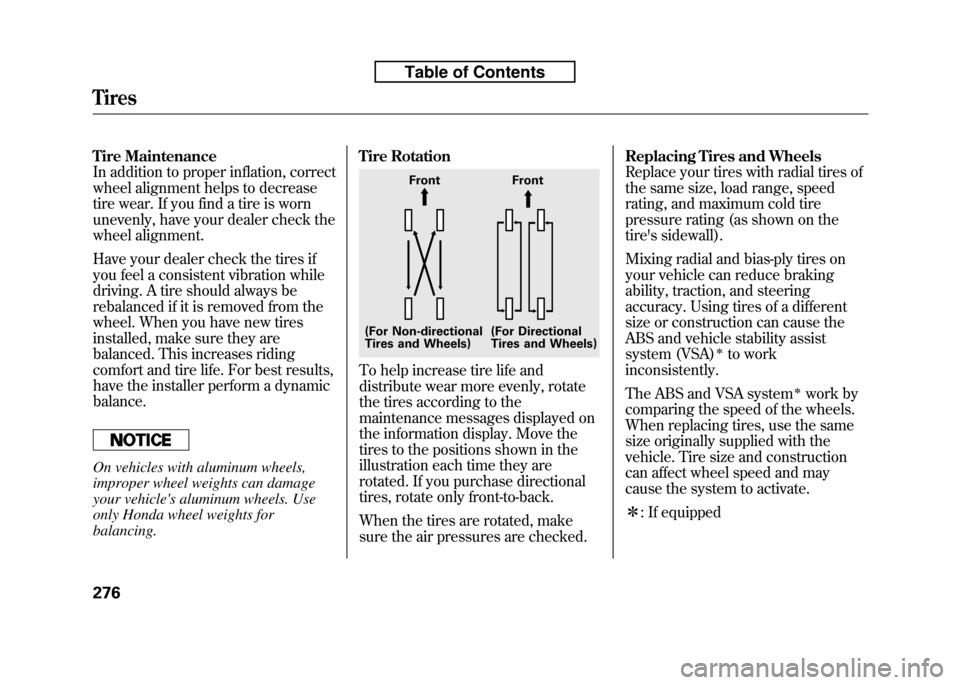
To help increase tire life and
distribute wear more evenly, rotate
the tires according to the
maintenance messages displayed on
the information display. Move the
tires to the positions shown in the
illustration each time they are
rotated. If you purchase directional
tires, rotate only front-to-back.
When the tires are rotated, make
sure the air pressures are checked.Replacing Tires and Wheels
Replace your tires with radial tires of
the same size, load range, speed
rating, and maximum cold tire
pressure rating (as shown on the
tire's sidewall).
Mixing radial and bias-ply tires on
your vehicle can reduce braking
ability, traction, and steering
accuracy. Using tires of a different
size or construction can cause the
ABS and vehicle stability assist
system (VSA)
ꭧto work
inconsistently.
The ABS and VSA system
ꭧwork by
comparing the speed of the wheels.
When replacing tires, use the same
size originally supplied with the
vehicle. Tire size and construction
can affect wheel speed and may
cause the system to activate. ꭧ : If equipped
Front Front
(For Non-directional
Tires and Wheels) (For Directional
Tires and Wheels)
Tires
276
Table of Contents
Page 292 of 351

It is best to replace all four tires at
the same time. If that is not possible
or necessary, replace the two front
tires or two rear tires as a pair.
Replacing just one tire can seriously
affect your vehicle's handling.
If you ever replace a wheel, make
sure that the wheel's specifications
match those of the original wheels.
Also be sure you use only TPMS
specific wheels (if equipped). If you
do not, the tire pressure monitoring
system will not work.
Replacement wheels are available at
your dealer.
Installing improper tires on your
vehicle can affect handling and
stability. This can cause a crash
in which you can be seriously
hurt or killed.
Always use the size and type of
tires recommended in this
owner's manual.Wheel and Tire SpecificationsWheels:All models except Sport
15 x 5 1/2J
Sport model
16 x 6J
Tires:
All models except Sport
175/65R15 84S
Sport model
185/55R16 83H
See page 321 for DOT tire quality
grading information, and page 323
for tire size and labeling information.
CONTINUED
Tires
277
Maintenance
Table of Contents
Page 293 of 351
Winter Driving
Tires marked‘‘M + S’’ or ‘‘All
Season ’’on the sidewall have an all-
weather tread design suitable for
most winter driving conditions.
For the best performance in snowy
or icy conditions, you should install
snow tires or tire chains. They may
be required by local laws under
certain conditions.
Snow Tires
If you mount snow tires on your
vehicle, make sure they are radial
tires of the same size and load range
as the original tires. Mount snow
tires on all four wheels. The traction
provided by snow tires on dry roads
may be lower than your original tires.
Check with the tire dealer for
maximum speed recommendations.
Tire Chains
Mount tire chains on your tires when
required by driving conditions or
local laws. Install them only on the
front tires.
Because your vehicle has limited tire
clearance, Honda strongly
recommends using the chains listed
below, made by Security Chain
Company (SCC).
All models except Sport
SC1026
Sport model
SC1030
When installing cables, follow the
manufacturer's instructions, and
mount them as tight as you can.
Make sure they are not contacting
the brake lines or suspension. Drive
slowly with them installed. If you
hear them coming into contact with
the body or chassis, stop and
investigate. Remove them as soon as
you begin driving on cleared roads.
Traction devices that are the wrong size
or improperly installed can damage
your vehicle's brake lines, suspension,
body, and wheels. Stop driving if they
are hitting any part of the vehicle.
Using the wrong chains, or not
properly installing chains, can
damage the brake lines and
cause a crash in which you can
be seriously injured or killed.
Follow all instructions in this
owner's manual regarding the
selection and use of tire chains.
Tires
278
Table of Contents
Page 294 of 351
Wheels
Clean the wheels as you would the
rest of the exterior. Wash them with
the same solution, and rinse themthoroughly.
If equipped
Aluminum alloy wheels have a
protective clear-coat that keeps the
aluminum from corroding and
tarnishing. Cleaning the wheels with
harsh chemicals (including some
commercial wheel cleaners) or a stiff
brush can damage the clear-coat. To
clean the wheels, use a mild
detergent and a soft brush or sponge.Checking the Battery
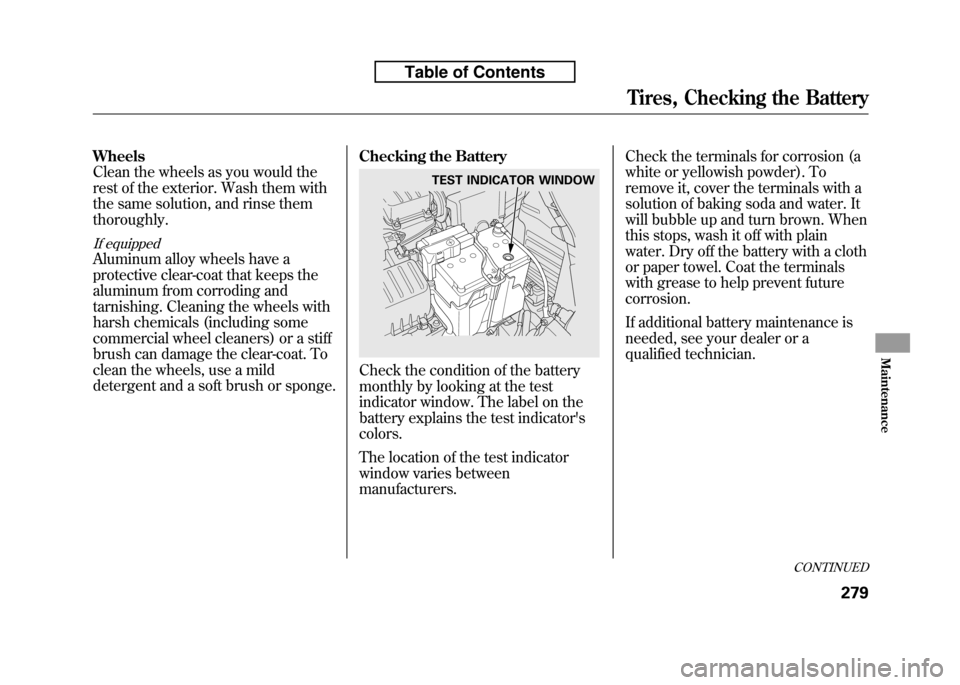
Check the condition of the battery
monthly by looking at the test
indicator window. The label on the
battery explains the test indicator'scolors.
The location of the test indicator
window varies between
manufacturers.Check the terminals for corrosion (a
white or yellowish powder). To
remove it, cover the terminals with a
solution of baking soda and water. It
will bubble up and turn brown. When
this stops, wash it off with plain
water. Dry off the battery with a cloth
or paper towel. Coat the terminals
with grease to help prevent futurecorrosion.
If additional battery maintenance is
needed, see your dealer or a
qualified technician.
TEST INDICATOR WINDOW
CONTINUED
Tires, Checking the Battery
279
Maintenance
Table of Contents
Page 296 of 351

If you need to park your vehicle for
an extended period (more than 1
month), there are several things you
should do to prepare it for storage.
Proper preparation helps prevent
deterioration and makes it easier to
get your vehicle back on the road. If
possible, store your vehicle indoors.● Fill the fuel tank.
● Wash and dry the exteriorcompletely.
● Clean the interior. Make sure the
carpeting, floor mats, etc., are
completely dry.
● Leave the parking brake off. Put
the transmission in reverse
(manual) or Park (automatic).
● Block the rear wheels. ●
If the vehicle is to be stored for a
longer period, it should be
supported on jackstands so the
tires are off the ground.
● Leave one window open slightly (if
the vehicle is being storedindoors).
● Disconnect the battery.
● Support the front and rear wiper
blade arms with a folded towel or
rag so they do not touch thewindshield.
● To minimize sticking, apply a
silicone spray lubricant to all door
and tailgate seals. Also, apply a
vehicle body wax to the painted
surfaces that mate with the door
and tailgate seals. ●
Cover the vehicle with a‘‘breathable ’’cover, one made from
a porous material such as cotton.
Non-porous materials, such as
plastic sheeting, trap moisture,
which can damage the paint.
● If possible, periodically run the
engine until it reaches full
operating temperature (the cooling
fans cycle on and off twice).
Preferably, do this once a month.
Vehicle Storage
281
Maintenance
Table of Contents
Page 299 of 351
Except all Canadian models withautomatic transmission
Use the compact spare tire as a
temporary replacement only. Get
your regular tire repaired or
replaced, and put it back on your
vehicle as soon as you can.
Check the inflation pressure of the
compact spare tire every time you
check the other tires. It should be
inflated to:
60 psi (420 kPa, 4.2 kgf/cm
2) Follow these precautions:
● Never exceed 50 mph (80 km/h).
● This tire gives a harsher ride and
less traction on some road
surfaces. Use greater caution while driving.
● Do not mount tire chains on the
compact spare tire.
● Do not use your compact spare tire
on another vehicle unless it is the
same make and model.
● On vehicles with the TPMS
system, the low tire pressure
indicator comes on and stays on
after you replace the flat tire with
the compact spare tire. After
several miles (kilometers) driving
with the compact spare tire, the
TPMS indicator comes on and the
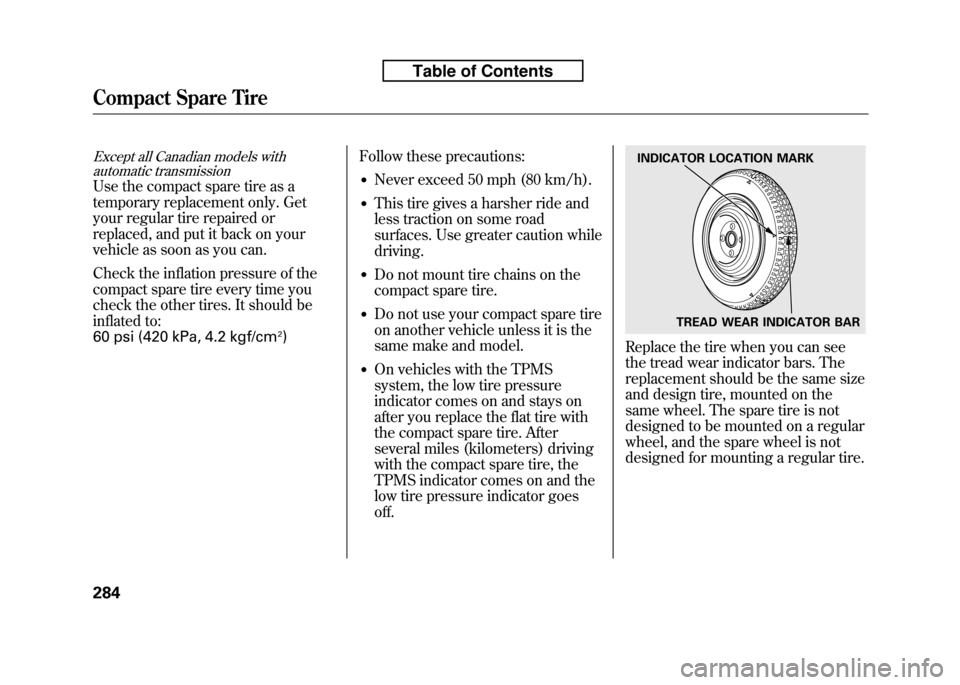
low tire pressure indicator goesoff.Replace the tire when you can see
the tread wear indicator bars. The
replacement should be the same size
and design tire, mounted on the
same wheel. The spare tire is not
designed to be mounted on a regular
wheel, and the spare wheel is not
designed for mounting a regular tire.
INDICATOR LOCATION MARK
TREAD WEAR INDICATOR BAR
Compact Spare Tire
284
Table of Contents
Page 301 of 351
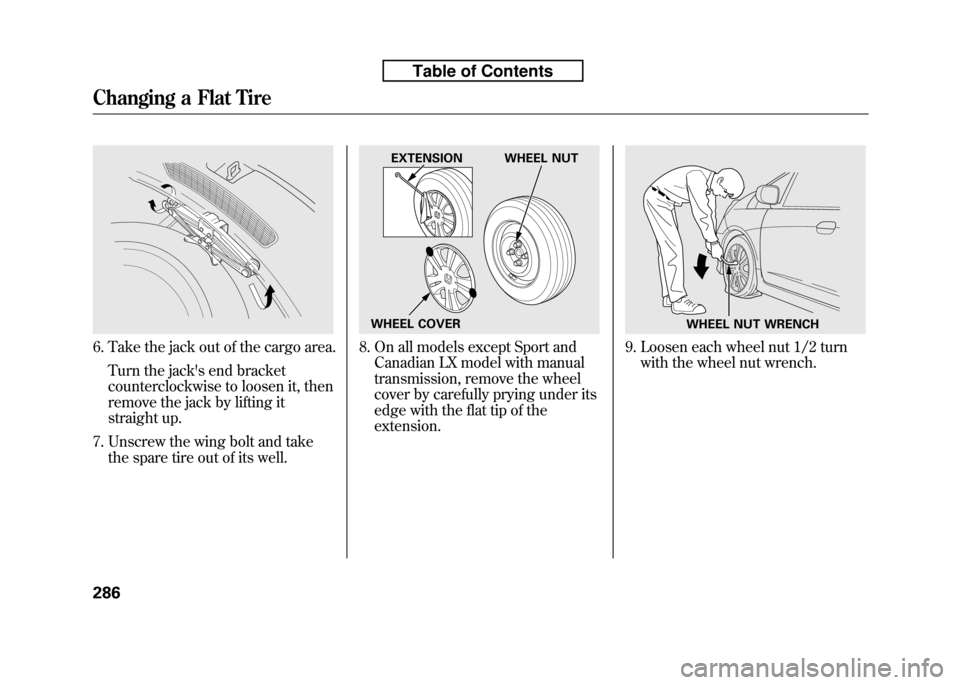
6. Take the jack out of the cargo area.Turn the jack's end bracket
counterclockwise to loosen it, then
remove the jack by lifting it
straight up.
7. Unscrew the wing bolt and take the spare tire out of its well.8. On all models except Sport andCanadian LX model with manual
transmission, remove the wheel
cover by carefully prying under its
edge with the flat tip of theextension.9. Loosen each wheel nut 1/2 turnwith the wheel nut wrench.
EXTENSION WHEEL NUT
WHEEL COVER
WHEEL NUT WRENCH
Changing a Flat Tire
286
Table of Contents
Page 302 of 351
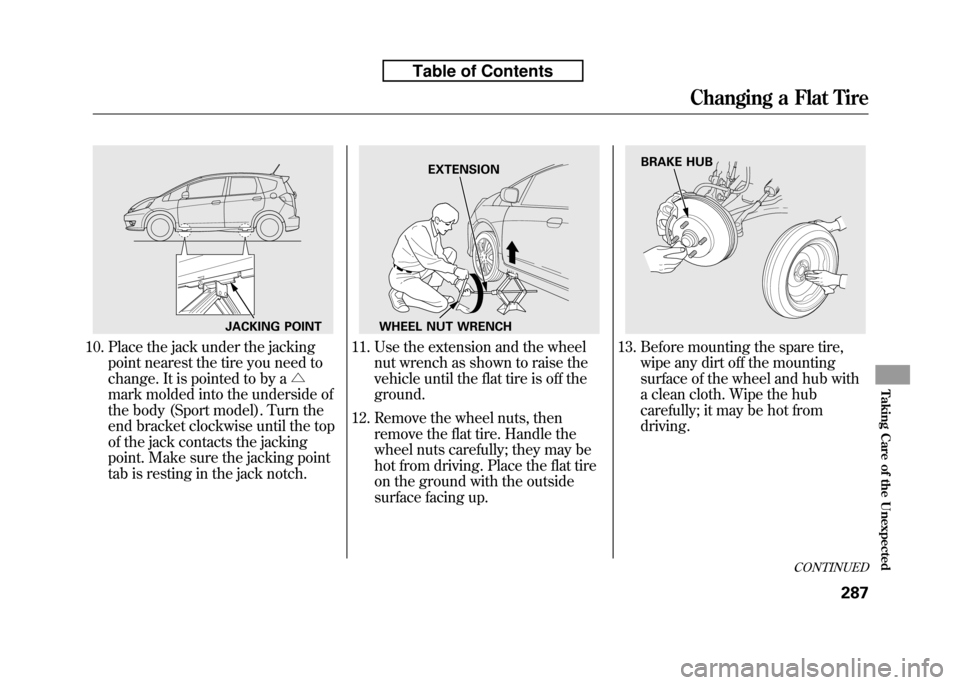
10. Place the jack under the jackingpoint nearest the tire you need to
change. It is pointed to by a △
mark molded into the underside of
the body (Sport model). Turn the
end bracket clockwise until the top
of the jack contacts the jacking
point. Make sure the jacking point
tab is resting in the jack notch.11. Use the extension and the wheel nut wrench as shown to raise the
vehicle until the flat tire is off theground.
12. Remove the wheel nuts, then remove the flat tire. Handle the
wheel nuts carefully; they may be
hot from driving. Place the flat tire
on the ground with the outside
surface facing up.13. Before mounting the spare tire,wipe any dirt off the mounting
surface of the wheel and hub with
a clean cloth. Wipe the hub
carefully; it may be hot fromdriving.
JACKING POINT
EXTENSION
WHEEL NUT WRENCHBRAKE HUB
CONTINUED
Changing a Flat Tire
287
Taking Care of the Unexpected
Table of Contents
Page 303 of 351
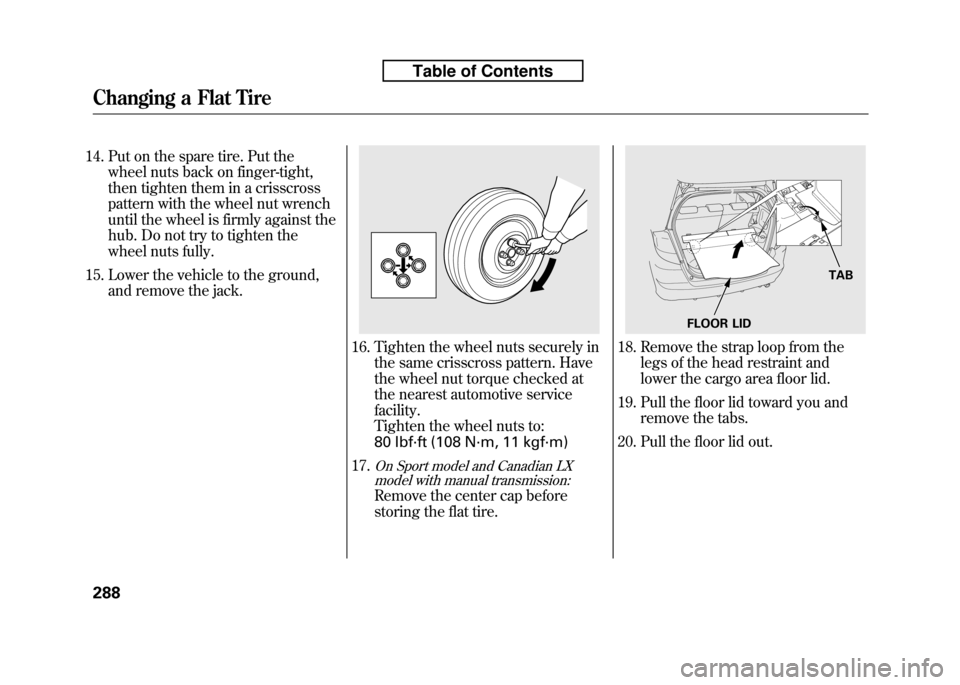
14. Put on the spare tire. Put thewheel nuts back on finger-tight,
then tighten them in a crisscross
pattern with the wheel nut wrench
until the wheel is firmly against the
hub. Do not try to tighten the
wheel nuts fully.
15. Lower the vehicle to the ground, and remove the jack.
16. Tighten the wheel nuts securely in the same crisscross pattern. Have
the wheel nut torque checked at
the nearest automotive servicefacility.
Tighten the wheel nuts to:
80 lbf·ft (108 N·m, 11 kgf·m)
17.
On Sport model and Canadian LX model with manual transmission:
Remove the center cap before
storing the flat tire.
18. Remove the strap loop from the
legs of the head restraint and
lower the cargo area floor lid.
19. Pull the floor lid toward you and remove the tabs.
20. Pull the floor lid out.
TAB
FLOOR LID
Changing a Flat Tire
288
Table of Contents
Page 304 of 351
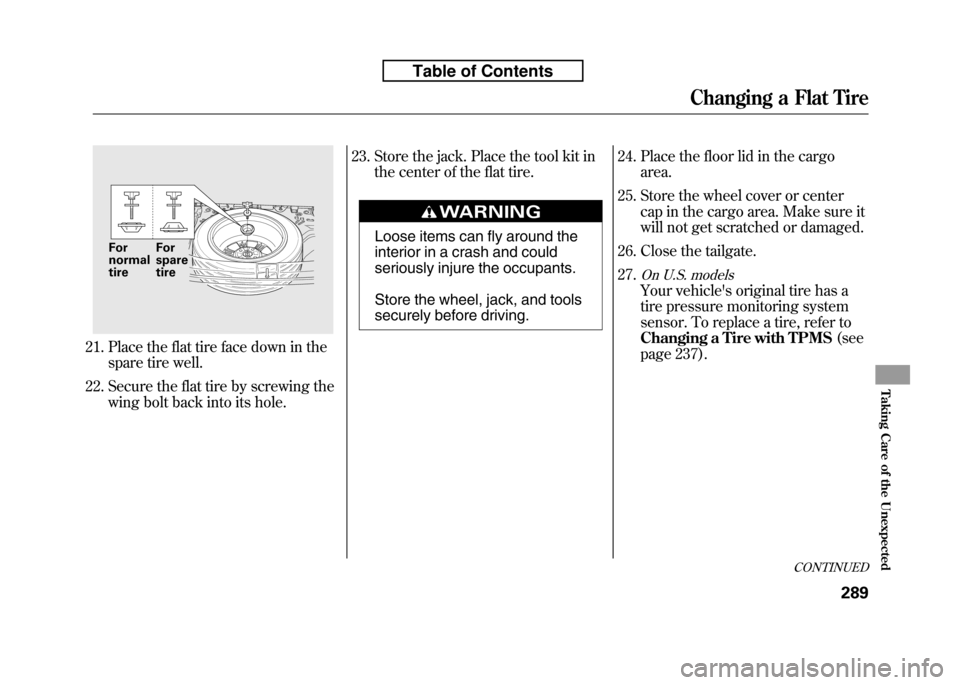
21. Place the flat tire face down in thespare tire well.
22. Secure the flat tire by screwing the wing bolt back into its hole. 23. Store the jack. Place the tool kit in
the center of the flat tire.
Loose items can fly around the
interior in a crash and could
seriously injure the occupants.
Store the wheel, jack, and tools
securely before driving. 24. Place the floor lid in the cargo
area.
25. Store the wheel cover or center cap in the cargo area. Make sure it
will not get scratched or damaged.
26. Close the tailgate. 27.
On U.S. models
Your vehicle's original tire has a
tire pressure monitoring system
sensor. To replace a tire, refer to
Changing a Tire with TPMS (see
page 237).
For normal tire For spare tire
CONTINUED
Changing a Flat Tire
289
Taking Care of the Unexpected
Table of Contents