ignition HONDA FIT 2010 2.G Workshop Manual
[x] Cancel search | Manufacturer: HONDA, Model Year: 2010, Model line: FIT, Model: HONDA FIT 2010 2.GPages: 351, PDF Size: 5.67 MB
Page 184 of 351
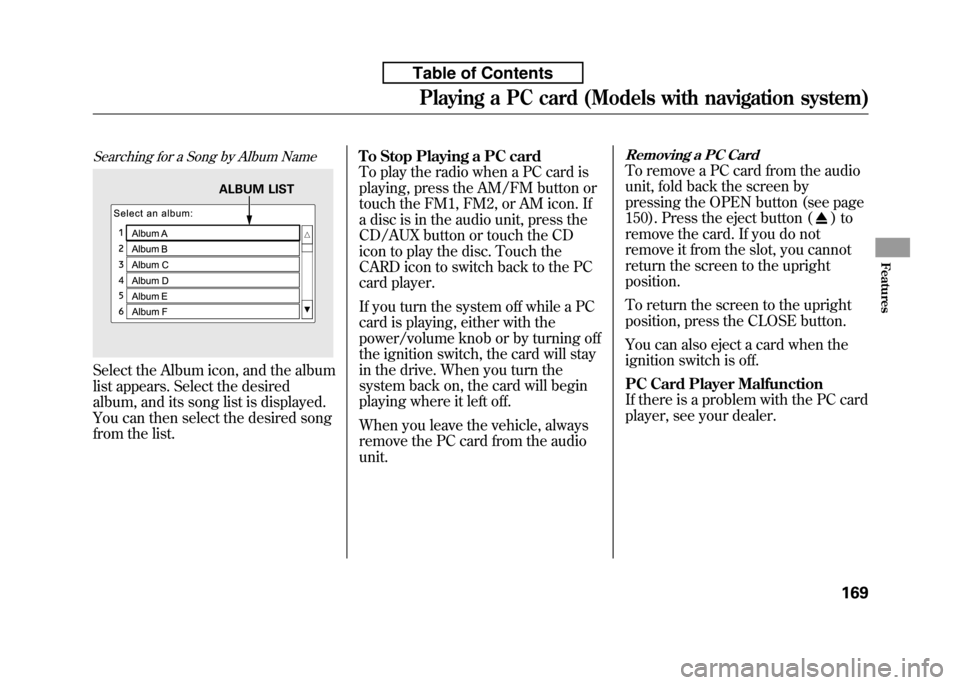
Searching for a Song by Album Name
Select the Album icon, and the album
list appears. Select the desired
album, and its song list is displayed.
You can then select the desired song
from the list.To Stop Playing a PC card
To play the radio when a PC card is
playing, press the AM/FM button or
touch the FM1, FM2, or AM icon. If
a disc is in the audio unit, press the
CD/AUX button or touch the CD
icon to play the disc. Touch the
CARD icon to switch back to the PC
card player.
If you turn the system off while a PC
card is playing, either with the
power/volume knob or by turning off
the ignition switch, the card will stay
in the drive. When you turn the
system back on, the card will begin
playing where it left off.
When you leave the vehicle, always
remove the PC card from the audiounit.
Removing a PC Card
To remove a PC card from the audio
unit, fold back the screen by
pressing the OPEN button (see page
150). Press the eject button (
)to
remove the card. If you do not
remove it from the slot, you cannot
return the screen to the uprightposition.
To return the screen to the upright
position, press the CLOSE button.
You can also eject a card when the
ignition switch is off.
PC Card Player Malfunction
If there is a problem with the PC card
player, see your dealer.
ALBUM LIST
Playing a PC card (Models with navigation system)
169
Features
Table of Contents
Page 186 of 351

To Play an iPodꭂ
This audio system can operate the
audio files on the iPodꭂwith the
same controls used for the in-dash
disc player. To play an iPod, connect
it to the USB adapter cable in the
upper glove box by using your dock
connector, then press the CD/AUX
button. The ignition switch must be
in the ACCESSORY (I) or ON (II)
position. The iPod will also be
recharged with the ignition switch in
these positions.
The audio system reads and plays
sound files to be playable on the
iPod. The system cannot operate an
iPod as a mass storage device. The
system will only play songs stored on
the iPod with iTunes.
iPod and iTunes are registered
trademarks owned by Apple Inc.
Voice Control System
You can select the AUX mode by
using the navigation system voice
control buttons, but cannot operate
the play mode functions.
iPods compatible with your audio
system using the USB adapter cableare:
Model Software
iPod classic Ver. 1.0 or more
iPod with video
(iPod 5th generation) Ver. 1.2 or more
iPod nano Ver. 1.2 or more
iPod nano 2nd generation Ver. 1.1.2 or more
iPod nano 3rdgeneration Ver. 1.0 or more
iPod touch Ver. 1.1.1 or more
Use only compatible iPods with the
latest software. iPods that are not
compatible will not work in this audiounit. NOTE:
● Do not connect your iPod using aHUB.
● Do not keep the iPod in the
vehicle. Direct sunlight and high
heat will damage it.
● Do not use an extension cable
between the USB adapter cable
equipped with your vehicle and
your dock connector.
● We recommend backing up your
data before playing it.
In AAC format, DRM (digital rights
management) files cannot be played.
If the system finds a DRM file, the
audio unit displays UNPLAYABLE,
and then skips to the next file.
CONTINUED
Playing an iPod®(Models with navigation system)
171
Features
Table of Contents
Page 193 of 351

To Play a USB Flash Memory Device
This audio system can operate the
audio files on a USB flash memory
device with the same controls used
for the in-dash disc player. To play a
USB flash memory device, connect it
to the USB adapter cable in the
upper glove box, then press the CD/
AUX button. The ignition switch
must be in the ACCESSORY (I) or
ON (II) position.
The audio system reads and plays
the audio files on the USB flash
memory device in MP3, WMA orAAC
ꭧformats. Depending on the
format, the display shows MP3,
WMA or AAC when a USB flash
memory device is playing. The USB
flash memory device limit is up to
700 folders or up to 65535 files. ꭧ : Only AAC format files recorded
with iTunes are playable on this
audio unit. The recommended USB flash
memory devices are 256 Mbyte or
higher, and formatted with the FAT
file system. Some digital audio
players may be compatible as well.
Some USB flash memory device
(such as devices with security
lockout features, etc.) will not work
in this audio unit. NOTE:
● Do not use a device such as a card
reader or hard drive as the device
or your files may be damaged.
● Do not connect your USB flash
memory device using a HUB.
● Do not use an extension cable to
the USB adapter cable equipped
with your vehicle.
● Do not keep the USB flash
memory device in the vehicle.
Direct sunlight and high heat will
damage it. ●
We recommend backing up your
data before playing a USB flash
memory device.
● Depending on the type and
number of files, it may take some
time before they begin to play.
● Depending on the software the
files were made with, it may not be
possible to play some files, or
display some text data.
Voice Control System
You can select the AUX mode by
using the navigation system voice
control buttons, but cannot operate
the play mode functions.
The specifications for compatible
MP3 files are:
– Sampling frequency:
32/44.1/48 kHz (MPEG1)
16/22.05/24 kHz (MPEG2)
Playing a USB Flash Memory Device (Models with navigation system)
178
Table of Contents
Page 208 of 351
On Sport model
The security system helps to protect
your vehicle and valuables from
theft. The horn sounds and a
combination of headlights, parking/
side marker lights and taillights
flashes if someone attempts to break
into your vehicle or remove the audio
unit. This alarm continues for 2
minutes, then the system resets. To
reset an activated system before the
2 minutes have elapsed, unlock the
driver's door with the key or the
remote transmitter.
The security system automatically
sets 15 seconds after you lock the
doors, hood, and the tailgate. For the
system to activate, you must lock the
doors and the tailgate from the
outside with the key, driver's lock
tab, door lock master switch, or
remote transmitter. The security
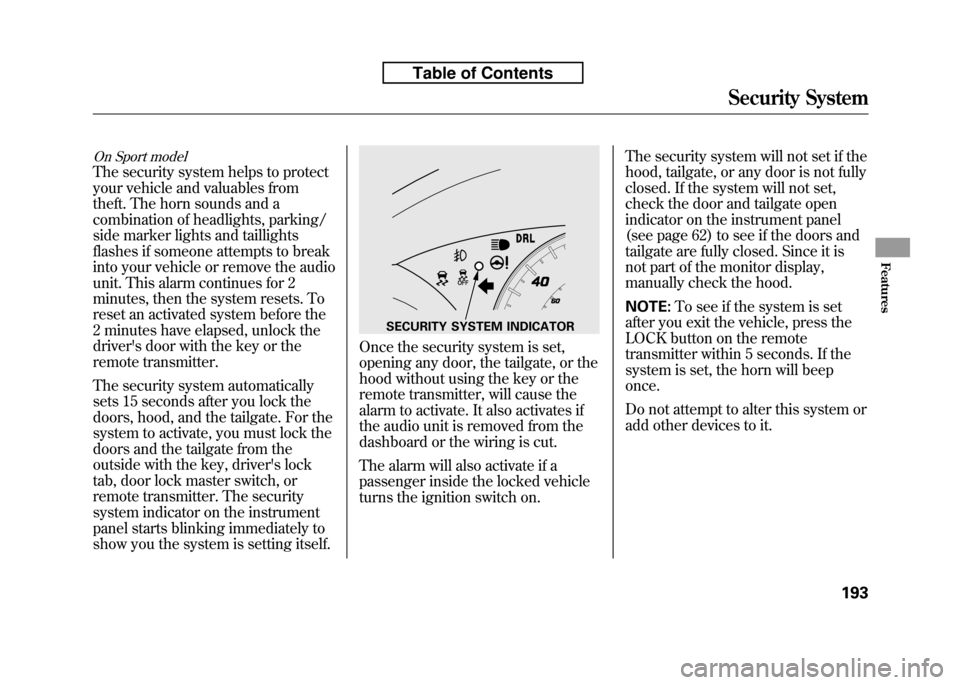
system indicator on the instrument
panel starts blinking immediately to
show you the system is setting itself.
Once the security system is set,
opening any door, the tailgate, or the
hood without using the key or the
remote transmitter, will cause the
alarm to activate. It also activates if
the audio unit is removed from the
dashboard or the wiring is cut.
The alarm will also activate if a
passenger inside the locked vehicle
turns the ignition switch on.The security system will not set if the
hood, tailgate, or any door is not fully
closed. If the system will not set,
check the door and tailgate open
indicator on the instrument panel
(see page 62) to see if the doors and
tailgate are fully closed. Since it is
not part of the monitor display,
manually check the hood. NOTE:
To see if the system is set
after you exit the vehicle, press the
LOCK button on the remote
transmitter within 5 seconds. If the
system is set, the horn will beeponce.
Do not attempt to alter this system or
add other devices to it.
SECURITY SYSTEM INDICATOR
Security System
193
Features
Table of Contents
Page 231 of 351
1. Apply the parking brake.
2. In cold weather, turn off allelectrical accessories to reduce the
drain on the battery.
3.
Manual transmission:
Press the clutch pedal down all the
way. The START (III) position
does not function unless the clutch
pedal is pressed.
Automatic transmission:
Make sure the shift lever is in
Park. Press on the brake pedal. 4. Without touching the accelerator
pedal, turn the ignition key to the
START (III) position. Do not hold
the key in the START (III) position
for more than 15 seconds at a time.
If the engine does not start right
away, pause for at least 10 seconds
before trying again.The immobilizer system protects your
vehicle from theft. If an improperly-
coded key (or other device) is used, the
engine's fuel system is disabled. For
more information, see page 79.
5. If the engine does not start within
15 seconds, or starts but stalls
right away, repeat step 4 with the
accelerator pedal pressed halfway
down. If the engine starts, release
pressure on the accelerator pedal
so the engine does not race. 6. If the engine fails to start, press
the accelerator pedal all the way
down, and hold it there while
starting to clear flooding. If the
engine still does not start, return to
step 5.
The engine is harder to start in cold
weather. Also, the thinner air found at
altitudes above 8,000 feet (2,400
meters) adds to this problem.
Starting the Engine
216
Table of Contents
Page 234 of 351
Shift Lever Position Indicators
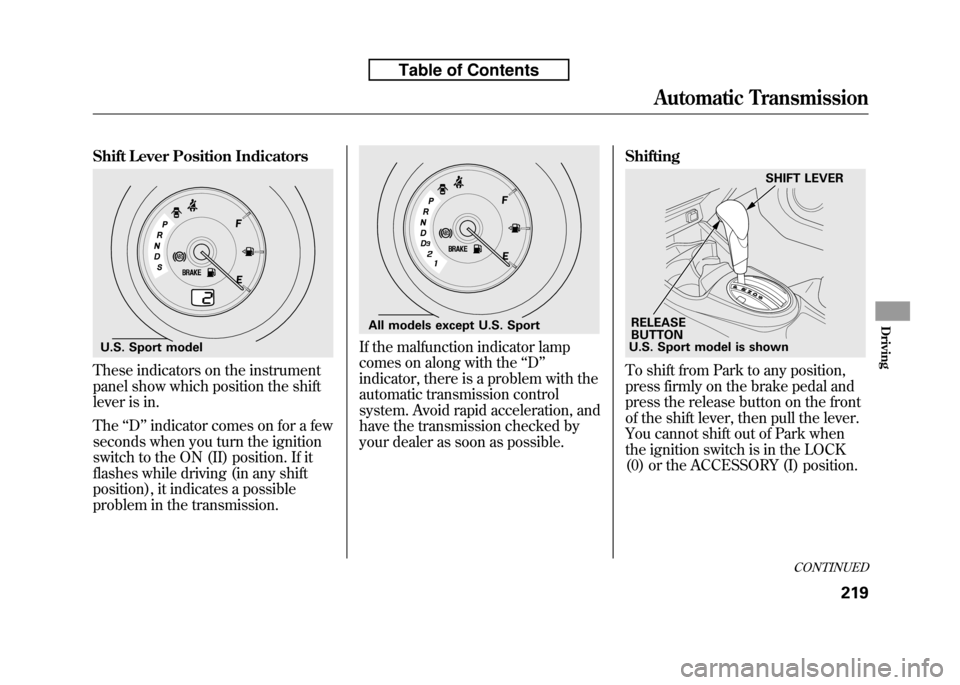
These indicators on the instrument
panel show which position the shift
lever is in. The‘‘D ’’indicator comes on for a few
seconds when you turn the ignition
switch to the ON (II) position. If it
flashes while driving (in any shift
position), it indicates a possible
problem in the transmission.
If the malfunction indicator lamp
comes on along with the ‘‘D ’’
indicator, there is a problem with the
automatic transmission control
system. Avoid rapid acceleration, and
have the transmission checked by
your dealer as soon as possible. Shifting
To shift from Park to any position,
press firmly on the brake pedal and
press the release button on the front
of the shift lever, then pull the lever.
You cannot shift out of Park when
the ignition switch is in the LOCK
(0) or the ACCESSORY (I) position.
U.S. Sport model
All models except U.S. Sport
U.S. Sport model is shown
RELEASE
BUTTON SHIFT LEVER
CONTINUED
Automatic Transmission
219
Driving
Table of Contents
Page 235 of 351

All models except U.S. Sport
To shift from: Do this:PtoR Press the brake pedal, and
press the shift lever releasebutton.
RtoP
NtoR
D 3to 2
2to1 Press the shift lever releasebutton.
1to2
2toD 3
D 3to D
DtoN
DtoD 3
NtoD
RtoN Move the shift lever.
U.S. Sport model
To shift from: Do this:
PtoR Press the brake pedal, and
press the shift lever releasebutton.
RtoP
NtoR
DtoS Press the shift lever releasebutton.
StoD
DtoN
NtoD RtoN Move the shift lever. Park (P)
-This position
mechanically locks the transmission.
Use Park whenever you are turning
off or starting the engine. To shift out
of Park, you must press on the brake
pedal and have your foot off the
accelerator pedal. Press the release
button on the front of the shift lever
to move it.
If you have done all of the above and
still cannot move the lever out of
Park, see Shift Lock Release on
page 223.
To avoid transmission damage, come
to a complete stop before shifting
into Park. You must also press the
release button to shift into Park. The
shift lever must be in Park before
you can remove the key from the
ignition switch.
Automatic Transmission
220
Table of Contents
Page 238 of 351
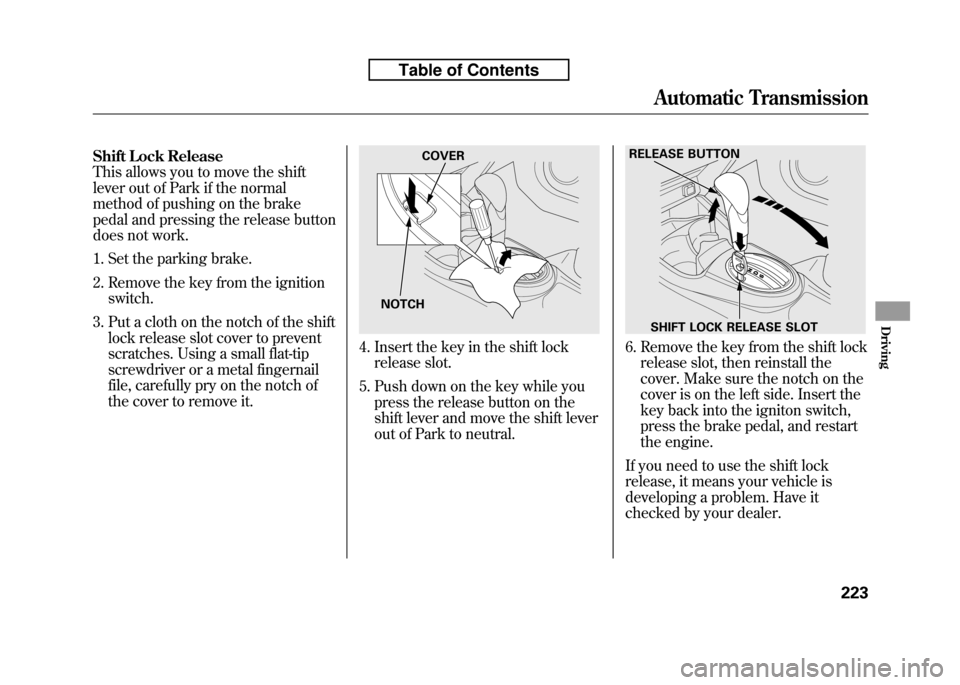
Shift Lock Release
This allows you to move the shift
lever out of Park if the normal
method of pushing on the brake
pedal and pressing the release button
does not work.
1. Set the parking brake.
2. Remove the key from the ignitionswitch.
3. Put a cloth on the notch of the shift lock release slot cover to prevent
scratches. Using a small flat-tip
screwdriver or a metal fingernail
file, carefully pry on the notch of
the cover to remove it.
4. Insert the key in the shift lockrelease slot.
5. Push down on the key while you press the release button on the
shift lever and move the shift lever
out of Park to neutral.6. Remove the key from the shift lockrelease slot, then reinstall the
cover. Make sure the notch on the
cover is on the left side. Insert the
key back into the igniton switch,
press the brake pedal, and restart
the engine.
If you need to use the shift lock
release, it means your vehicle is
developing a problem. Have it
checked by your dealer.
NOTCH COVER
RELEASE BUTTON
SHIFT LOCK RELEASE SLOT
Automatic Transmission
223
Driving
Table of Contents
Page 248 of 351
If equipped
The vehicle stability assist (VSA)
system helps to stabilize the vehicle
during cornering if the vehicle turns
more or less than desired. It also
assists you in maintaining traction
while accelerating on loose or
slippery road surfaces. It does this by
regulating the engine's output and by
selectively applying the brakes.
When VSA activates, you may notice
that the engine does not respond to
the accelerator in the same way it
does at other times. There may also
be some noise from the VSA
hydraulic system. You will also see
the VSA system indicator blink.
The VSA system cannot enhance the
vehicle's driving stability in all
situations and does not control your
vehicle's entire braking system. It is
still your responsibility to drive and
corner at reasonable speeds and to
leave a sufficient margin of safety.
VSA Off Indicator
When VSA is off, the VSA off
indicator comes on as a reminder.
Vehicle Stability Assist
(VSA) System Indicator
When VSA activates, you will see the
VSA system indicator blink.
If this indicator comes on while
driving, pull to the side of the road
when it is safe, and turn off the
engine. Reset the system by
restarting the engine. If the VSA
system indicator stays on or comes
back on while driving, have the VSA
system inspected by your dealer. NOTE: The main function of the VSA
system is generally known as
Electronic Stability Control (ESC).
The system also includes a traction
control function. If the indicator does not come on
when the ignition switch is turned to
the ON (II) position, there may be a
problem with the VSA system. Have
your dealer inspect your vehicle as
soon as possible.
If the low tire pressure indicator or
TPMS indicator comes on, the VSA
system automatically turns on even if
the VSA system is turned off by
pressing the VSA OFF switch (see
page 234). If this happens, you
cannot turn the VSA system off by
pressing the VSA OFF switch again.
Without VSA, your vehicle will have
normal braking and cornering ability,
but it will not have VSA traction and
stability enhancement.
CONTINUED
Vehicle Stability Assist (VSA®), aka Electronic Stability Control (ESC), System
233
Driving
Table of Contents
Page 253 of 351
Towing a Trailer
Your vehicle is not designed to tow a
trailer. Attempting to do so can void
your warranties.Towing Your Vehicle Behind aMotorhome
Your vehicle can be towed behind a
motorhome at legal highway speeds
up to 65 mph (100 km/h). Do not
exceed 65 mph (100 km/h).
Otherwise, severe transmission
damage will occur.
When purchasing a tow bar, make
sure you select a reputable
manufacturer and installer. Follow
the manufacturer's attachment
instructions carefully.
The steering system can be damaged if
the steering wheel is locked. Leave the
ignition switch in the ACCESSORY (I)
position, and make sure the steering
wheel turns freely before you begintowing.
Automatic transmission:
Perform the following procedure
every day immediately before you
begin towing. Otherwise severe
automatic transmission damage willoccur.
1. Check the transmission fluid level
(see page 259).
Do not overfill.
2. Start the engine.
3. Press on the brake pedal. Move
the shift lever through all its positions.
4. Shift to the D position and hold for 5 seconds, then to N. Let the
engine run for 3 minutes, then turn
it off.
Severe transmission damage will occur
if the vehicle is shifted from reverse to
neutral and then towed with the drive
wheels on the ground.
Towing a Trailer, Towing Your Vehicle Behind a Motorhome
238
Table of Contents