glove box HONDA FIT 2010 2.G Owners Manual
[x] Cancel search | Manufacturer: HONDA, Model Year: 2010, Model line: FIT, Model: HONDA FIT 2010 2.GPages: 351, PDF Size: 5.67 MB
Page 5 of 351

Manual Transmission..............217
Glove Box .................................. 105
Gross Vehicle Weight Rating (GVWR) ................................. 210
H
Halogen Headlight Bulbs ...........262
Hazard Warning Flashers ............76
Headlights ............................. 74, 75
Aiming .................................... 262
Daytime Running Lights (Canada only) ..................................... 75
High Beam Indicator ................65
High Beams, Turning on ..........74
Lights On Indicator ..................64
Low Beams, Turning on ...........74
Reminder Chime .................74, 75
Replacing Halogen Bulbs ........262
Turning on ............................... 74
Head Restraints ............................ 94
Heated Mirror ............................ 102
Heating and Cooling ..................110
High Altitude, Starting at ............216
High Beam Lever .........................75High-Low Beam Switch
................74
Hood, Opening and Closing
the .......................................... 200
Horn ........................................ 4, 72
Hydraulic Clutch ........................261
I
Identification Number, Vehicle ................................... 316
Ignition Keys ......................................... 78
Switch ...................................... 80
Timing Control System ...........327
Immobilizer System .....................79
Important Safety Precautions .........6
Indicators, Instrument Panel ........59
ABS (Anti-lock Brake) .......62, 231
Brake (Parking and Brake
System) ......................... 60, 305
Charging System ..............60, 303
Check Fuel Cap .......................70
Cruise Control .......................... 65
Cruise Main ............................. 65
Door and Tailgate Open ...........62DRL (Daytime Running
Lights) ..................................
65
Electric Power Steering ............62
Fog Lights ................................ 64
High Beam ............................... 65
High Temperature ...................63
Key (Immobilizer System) .......66
Lights On ................................. 64
Low Fuel .................................. 62
Low Oil Pressure ..............60, 303
Low Temperature .....................63
Low Tire Pressure .............64, 235
Maintenance Minder .........66, 245
Malfunction Indicator Lamp ............................. 60, 304
Passenger Airbag Off ...............31
Seat Belt Reminder .............18, 60
Security System .......................66
Side Airbag Off ....................31, 61
SRS ..................................... 30, 61
TPMS ................................ 64, 236
Turn Signal and Hazard
Warning ............................... 63
VSA Off .................................... 67
VSA System ............................. 67
CONTINUED
Index
V
INDEX
Page 6 of 351

Washer Level........................... 65
Infant Restraint ............................
39
Infant Seats ..................................
39
Tether Anchorage Point ...........
47
Inflation, Proper Tire ..................
273
Recommended Pressures .......
274
Inside Mirror .............................
101
Inspection, Tire ..........................
275
Installing a Child Seat ..................
42
Instant Fuel Economy ..................
70
Instrument Panel ..........................
59
Instrument Panel Brightness .......
76
Instruments and Controls .............
57
Interior Lights ............................
107
Ceiling Light ...........................
107
Introduction ...................................
i
iPod
®................................... 129, 170
iPod®Error Messages .........135, 176
J
Jacking up the Vehicle ...............285
Jack, Tire ...................................
285
Jump Starting .............................
299K
Keys
............................................. 78
L
Label, Certification .....................316
Lane Change, Signaling ...............
74
Lap/Shoulder Belt .................
14, 19
LATCH Anchorage System ..........
43
Lights Bulb Replacement ...................
262
Indicator ...................................
59
Interior ....................................
107
Parking ....................................
74
Turn Signal ..............................
74
Load Limit ..................................
209
LOCK (Ignition Key Position) ......
80
Locks
Anti-theft Steering Column .......
80
Childproof Door .......................
82
Fuel Fill Door ..........................
199
Lockout Prevention ..................
82
Power Door ..............................
81
Tailgate ....................................
88Low Coolant Level
......................
202
Lower Anchors .............................
43
Lower Glove Box ........................
105
Low Fuel Indicator .......................
62
Low Oil Pressure Indicator ...........................
60, 303
Lubricant Specifications Chart ...
319
Luggage, Storing (cargo) ...........
208
M
Maintenance .............................. 243
Main Items and Sub Items ......
248
Minder ....................................
245
Minder Indicator ......................
66
Owner's Maintenance
Checks ................................
250
Safety ......................................
244
Schedule .................................
251
Malfunction Indicator Lamp ................................
60, 304
Manual Transmission .................
217
Checking Fluid Level ..............
260
Shifting ...................................
217
Manual Transmission Fluid .......
260
Index
VI
Page 10 of 351

Technical DescriptionsDOT Tire Quality Grading (U.S.
Vehicles) ............................. 321
Emissions Control Systems .....326
Three Way Catalytic Converter ............................ 328
Tire Labeling ........................... 323
Tire Pressure Monitoring System (TPMS) -Required Federal
Explanation ...................... 324
Temperature Indicator .................63
Temporarily Repairing a Flat
Tire ........................................ 291
Tensioners, Seat Belts ..................20
Tether Anchorage Points .............47
Theft Protection, Radio ..............191
Three Way Catalytic Converter ............................... 328
Tilt/Telescopic Steering Wheel ...77
Time, Setting the ........................192
Tire Chains ................................ 278
Tire, How to Change a Flat ........285
Tire Information .........................323
Tire Labeling .............................. 323
Tire Pressure Monitoring System (TPMS) ........................... 235, 324Tires
.......................................... 273
Air Pressure ............................ 274
Chains ..................................... 278
Checking Wear .......................275
Compact Spare ........................284
DOT Tire Quality Grading (U.S. Vehicles) ............................. 321
Inflation ................................... 273
Inspection ............................... 275
Labeling .................................. 323
Low Tire Pressure
Indicator ........................ 64, 235
Maintenance ........................... 276
Pressure Monitoring System ...235
Replacing ................................ 276
Rotating .................................. 276
Snow ....................................... 278
Specifications .......................... 320
Tools, Tire Changing .................285
Towing
A Trailer .................................. 238
Emergency Wrecker ...............311
TPMS (Tire Pressure Monitoring
System) .............................. 235
Indicator ............................ 64, 236Required Federal
Explanation ......................... 324
Transmission Checking Fluid Level, Automatic ............................ 259
Checking Fluid Level, Manual ................................ 260
Fluid Selection ................259, 260
Identification Number .............316
Shifting the Automatic .............219
Shifting the Manual .................217
Treadwear .................................. 321
Trip Meter ................................... 69
Turn Signals ................................. 63
U
Unexpected, Taking Care of the .......................................... 283
Uniform Tire Quality Grading
(U.S. only) .............................. 321
Unleaded Gasoline .....................198
Upper Glove Box ........................105
USB Flash Memory Device Error Messages ........................ 142, 183
Index
X
Page 73 of 351
This section gives information about
the controls and displays that
contribute to the daily operation of
your vehicle. All the essential
controls are within easy reach.Control Locations..........................
58
Instrument Panel ..........................
59
Instrument Panel Indicators ..........
60
Gauges ..........................................
68
Trip Meter ................................
69
Instant Fuel Economy ...............
70
Average Fuel Economy .............
70
Odometer ..................................
70
Fuel Gauge ...............................
70
Check Fuel Cap Indicator .........
70
Maintenance Minder ................
71
Controls Near the Steering
Wheel .......................................
72
Windshield Wipers and Washers ................................
73
Windshield Wipers ...................
73
Rear Window Wiper and
Washer .................................
73
Turn Signal and Headlights ..........
74
Headlights ....................................
75
Instrument Panel Brightness ........
76
Hazard Warning Button ................
76
Rear Window Defogger .................
76
Steering Wheel Adjustments .........
77Keys and Locks
............................. 78
Immobilizer System ......................
79
Ignition Switch ..............................
80
Door Locks ...................................
81
Power Door Locks ....................
81
Childproof Door Locks ..............
82
Auto Door Locking/ Unlocking .............................
83
Auto Door Locking ...................
83
Auto Door Unlocking ................
85
Tailgate .........................................
88
Remote Transmitter ......................
90
Seats .............................................
93
Power Windows ..........................
100
Mirrors .......................................
101
Parking Brake .............................
102
Interior Convenience Items .........
104
Lower Glove Box ....................
105
Upper Glove Box .....................
105
Beverage Holders ...................
106
Seat Under Box .......................
106
Accessory Power Socket .........
106
Sun Visor ................................
106
Interior Lights .............................
107
Instruments and Controls
57
Instruments and Controls
Page 120 of 351
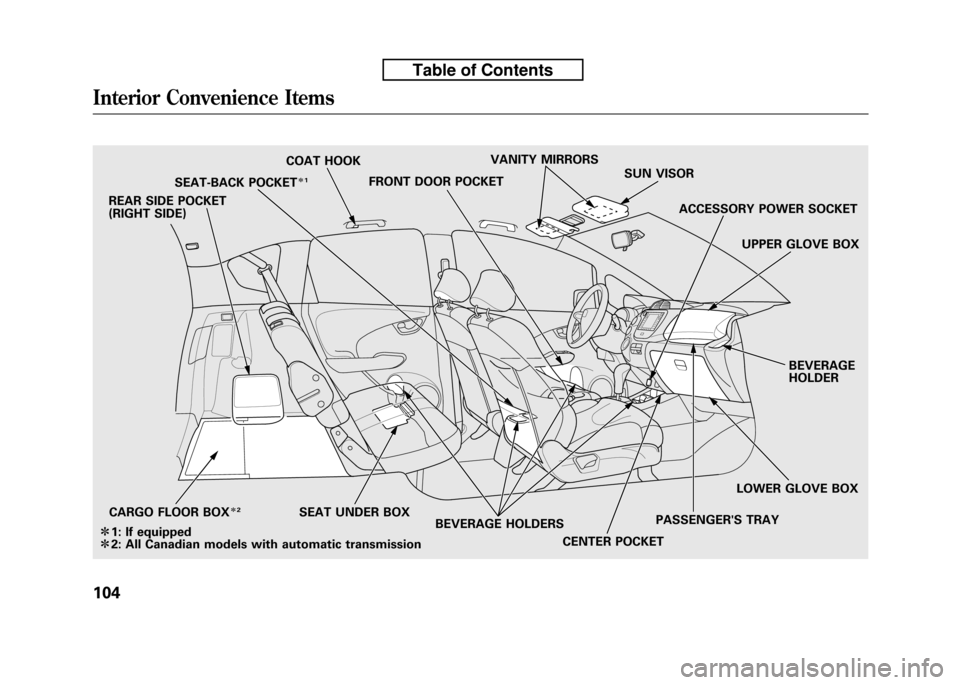
SEAT-BACK POCKETꭧ1
COAT HOOK
FRONT DOOR POCKET VANITY MIRRORS
SUN VISOR
SEAT UNDER BOX CENTER POCKETPASSENGER'S TRAYUPPER GLOVE BOX
ACCESSORY POWER SOCKET
BEVERAGE HOLDER
REAR SIDE POCKET
(RIGHT SIDE)
LOWER GLOVE BOX
BEVERAGE HOLDERS
CARGO FLOOR BOX
ꭧ
2
ꭧ 1: If equipped
ꭧ 2: All Canadian models with automatic transmission
Interior Convenience Items
104
Table of Contents
Page 121 of 351
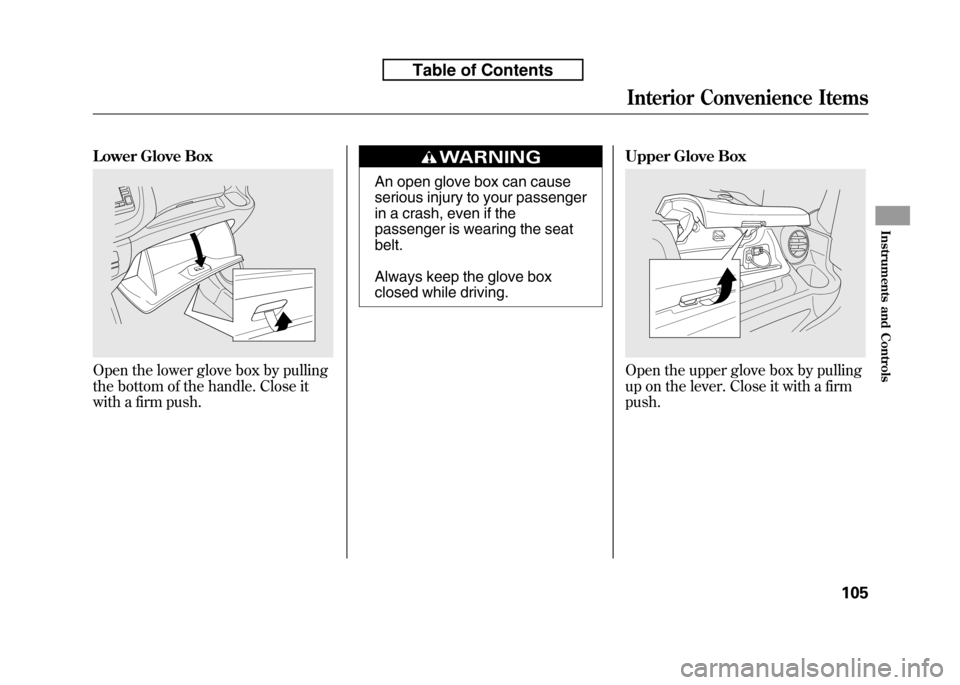
Lower Glove Box
Open the lower glove box by pulling
the bottom of the handle. Close it
with a firm push.
An open glove box can cause
serious injury to your passenger
in a crash, even if the
passenger is wearing the seatbelt.
Always keep the glove box
closed while driving.Upper Glove Box
Open the upper glove box by pulling
up on the lever. Close it with a firmpush.
Interior Convenience Items
105
Instruments and Controls
Table of Contents
Page 145 of 351

To Play an iPodꭂ
This audio system can operate the
audio files on the iPodꭂwith the
same controls used for the in-dash
disc player. To play an iPod, connect
it to the USB adapter cable in the
upper glove box by using your dock
connector, then press the AUX
button. The ignition switch must be
in the ACCESSORY (I) or ON (II)
position. The iPod will also be
recharged with the ignition switch in
these positions.
The audio system reads and plays
sound files to be playable on the
iPod. The system cannot operate an
iPod as a mass storage device. The
system will only play songs stored on
the iPod with iTunes.
iPod and iTunes are registered
trademarks owned by Apple Inc.
iPods compatible with your audio
system using the USB adapter cable are: Model Software
iPod classic Ver. 1.0 or more
iPod with video
(iPod 5th generation) Ver. 1.2 or more
iPod nano Ver. 1.2 or more
iPod nano 2nd generation Ver. 1.1.2 or more
iPod nano 3rdgeneration Ver. 1.0 or more
iPod touch Ver. 1.1.1 or more
Use only compatible iPods with the
latest software. iPods that are not
compatible will not work in this audiounit. NOTE: ● Do not connect your iPod using a HUB.
● Do not keep the iPod in the
vehicle. Direct sunlight and high
heat will damage it. ●
Do not use an extension cable
between the USB adapter cable
equipped with your vehicle and
your dock connector.
● We recommend backing up your
data before playing it.
In AAC format, DRM (digital rights
management) files cannot be played.
If the system finds a DRM file, the
audio unit displays UNPLAYABLE,
and then skips to the next file.
Playing an iPod®(Models without navigation system)
130
Table of Contents
Page 146 of 351
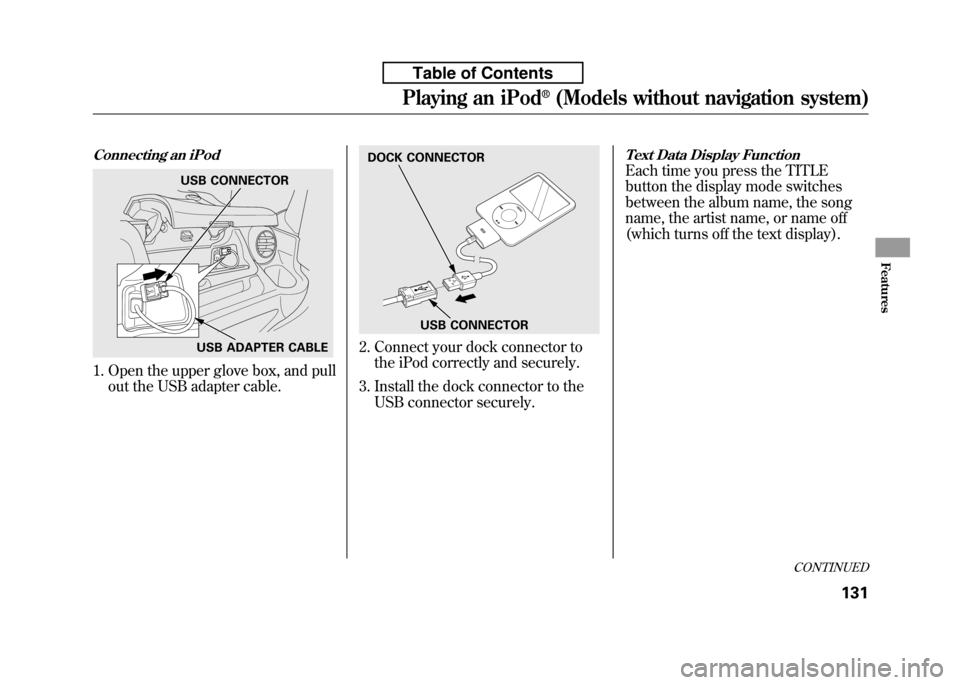
Connecting an iPod
1. Open the upper glove box, and pullout the USB adapter cable.
2. Connect your dock connector tothe iPod correctly and securely.
3. Install the dock connector to the USB connector securely.
Text Data Display Function
Each time you press the TITLE
button the display mode switches
between the album name, the song
name, the artist name, or name off
(which turns off the text display).USB CONNECTOR
USB ADAPTER CABLE
DOCK CONNECTOR
USB CONNECTOR
CONTINUED
Playing an iPod®(Models without navigation system)
131
Features
Table of Contents
Page 152 of 351

To Play a USB Flash Memory Device
This audio system can operate the
audio files on a USB flash memory
device with the same controls used
for the in-dash disc player. To play a
USB flash memory device, connect it
to the USB adapter cable in the
upper glove box, then press the AUX
button. The ignition switch must be
in the ACCESSORY (I) or ON (II)position.
The audio system reads and plays
the audio files on the USB flash
memory device in MP3, WMA orAAC
ꭧformats. Depending on the
format, the display shows MP3,
WMA or AAC when a USB flash
memory device is playing. The USB
flash memory device limit is up to
700 folders or up to 65535 files. ꭧ : Only AAC format files recorded
with iTunes are playable on this
audio unit. The recommended USB flash
memory devices are 256 Mbyte or
higher, and formatted with the FAT
file system. Some digital audio
players may be compatible as well.
Some USB flash memory device
(such as devices with security
lockout features, etc.) will not work
in this audio unit. NOTE:
● Do not use a device such as a card
reader or hard drive as the device
or your files may be damaged.
● Do not connect your USB flash
memory device using a HUB.
● Do not use an extension cable to
the USB adapter cable equipped
with your vehicle.
● Do not keep the USB flash
memory device in the vehicle.
Direct sunlight and high heat will
damage it. ●
We recommend backing up your
data before playing a USB flash
memory device.
● Depending on the type and
number of files, it may take some
time before they begin to play.
● Depending on the software the
files were made with, it may not be
possible to play some files, or
display some text data.
The specifications for compatible
MP3 files are: – Sampling frequency:
32/44.1/48 kHz (MPEG1)
16/22.05/24 kHz (MPEG2)
– Bit rate:
32/40/48/56/64/80/96/112/128/
160/192/224/256/320/VBR kbps(MPEG1)
8/16/24/32/40/48/56/64/80/96/
112/128/144/160/VBR kbps(MPEG2)
CONTINUED
Playing a USB Flash Memory Device (Models without navigation system)
137
Features
Table of Contents
Page 153 of 351
–Supported standards:
MPEG1 Audio Layer3
MPEG2 Audio LSF Layer3
– Partition: Top partition only
– Maximum layers: 8
The specifications for compatible
WMA files are: – Sampling frequency:
32/44.1/48 kHz
– Bit rate:48 -320/VBR kbps (Max 384)
– Supported standards:
WMA version 7/8/9
– Partition: Top partition only
– Maximum layers: 8
The specifications for compatible
AAC files are: – Sampling frequency:
8/11.025/12/16/22.05/24/32/
44.1/48 kHz –
Bit rate:8- 320 kbps
– Supported standards:
MPEG4/AAC LC
MPEG2/AAC LC
– Partition: Top partition only
– Maximum layers: 8
Even if recorded in MP3, WMA or
AAC format, a file with unsupported
version cannot be played. If the
system finds it, the audio unit
displays UNSUPPORTED, and then
skips to the next file.
In WMA or AAC format, DRM
(digital rights management) files
cannot be played. If the system finds
a DRM file, the audio unit displays
UNPLAYABLE FILE, and then skips
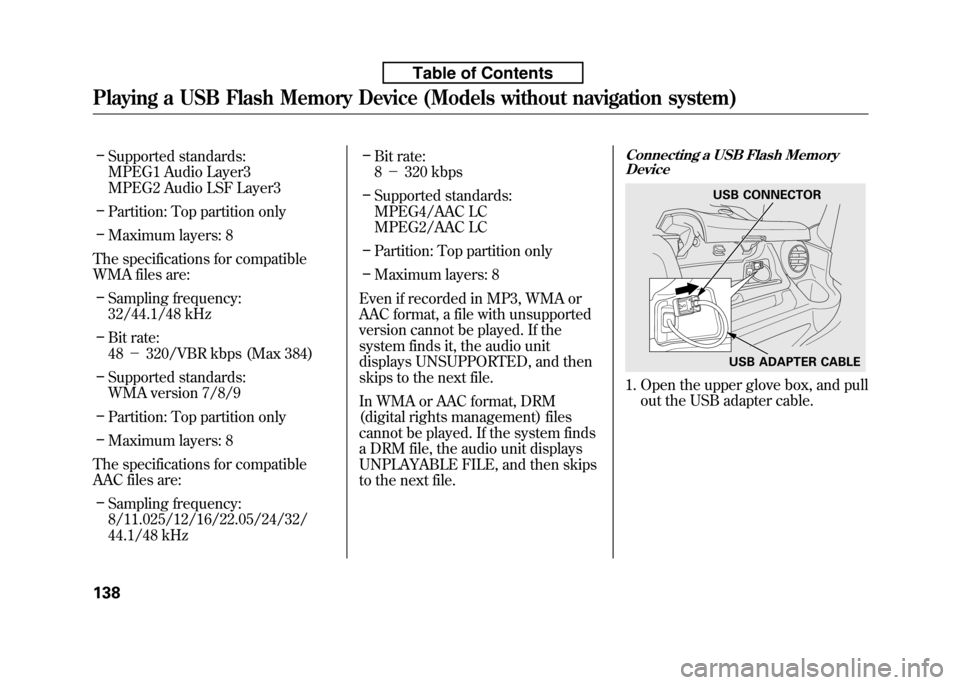
to the next file.Connecting a USB Flash Memory Device
1. Open the upper glove box, and pull
out the USB adapter cable.
USB CONNECTOR
USB ADAPTER CABLE
Playing a USB Flash Memory Device (Models without navigation system)
138
Table of Contents