change HONDA FIT 2012 2.G User Guide
[x] Cancel search | Manufacturer: HONDA, Model Year: 2012, Model line: FIT, Model: HONDA FIT 2012 2.GPages: 286, PDF Size: 9.92 MB
Page 109 of 286
108
uuAdjusting the SeatsuRear Seats
Controls
Rear Seats
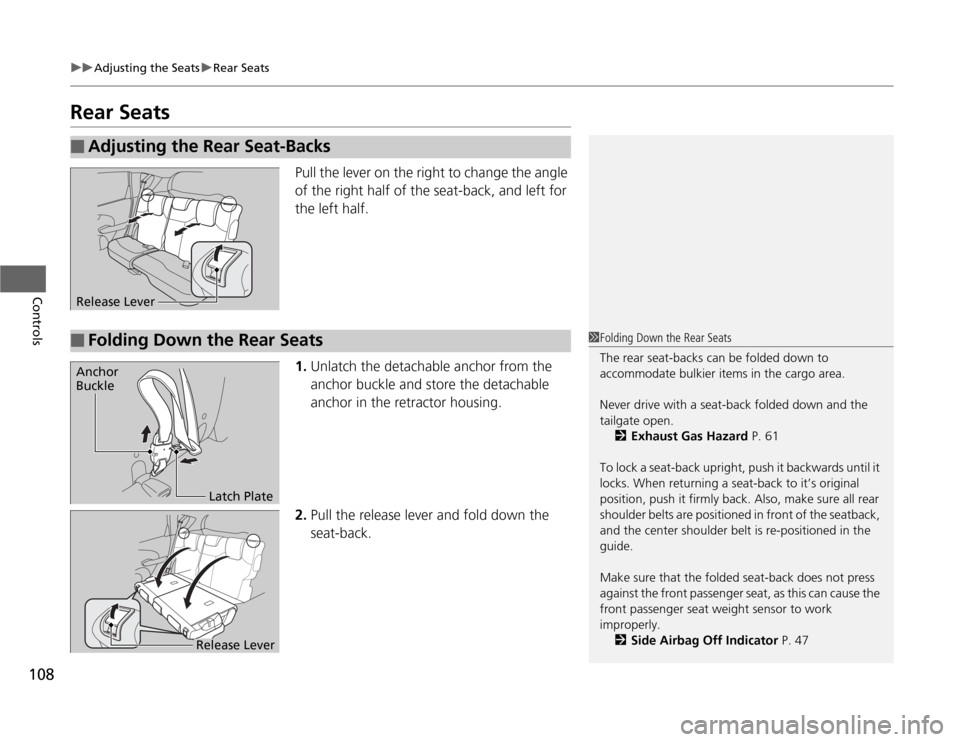
Pull the lever on the right to change the angle
of the right half of the seat-back, and left for
the left half.
1.Unlatch the detachable anchor from the
anchor buckle and store the detachable
anchor in the retractor housing.
2.Pull the release lever and fold down the
seat-back.
■
Adjusting the Rear Seat-BacksRelease Lever■
Folding Down the Rear Seats
1Folding Down the Rear Seats
The rear seat-backs can be folded down to
accommodate bulkier items in the cargo area.
Never drive with a seat-back folded down and the
tailgate open.
2Exhaust Gas Hazard P. 61
To lock a seat-back upright, push it backwards until it
locks. When returning a seat-back to it’s original
position, push it firmly back. Also, make sure all rear
shoulder belts are positioned in front of the seatback,
and the center shoulder belt is re-positioned in the
guide.
Make sure that the folded seat-back does not press
against the front passenger seat, as this can cause the
front passenger seat weight sensor to work
improperly.
2Side Airbag Off Indicator P. 47
Anchor
Buckle
Latch Plate
Release Lever
Page 119 of 286
118Controls
Heating and Cooling
*
Using Vents, Heating and A/C
*
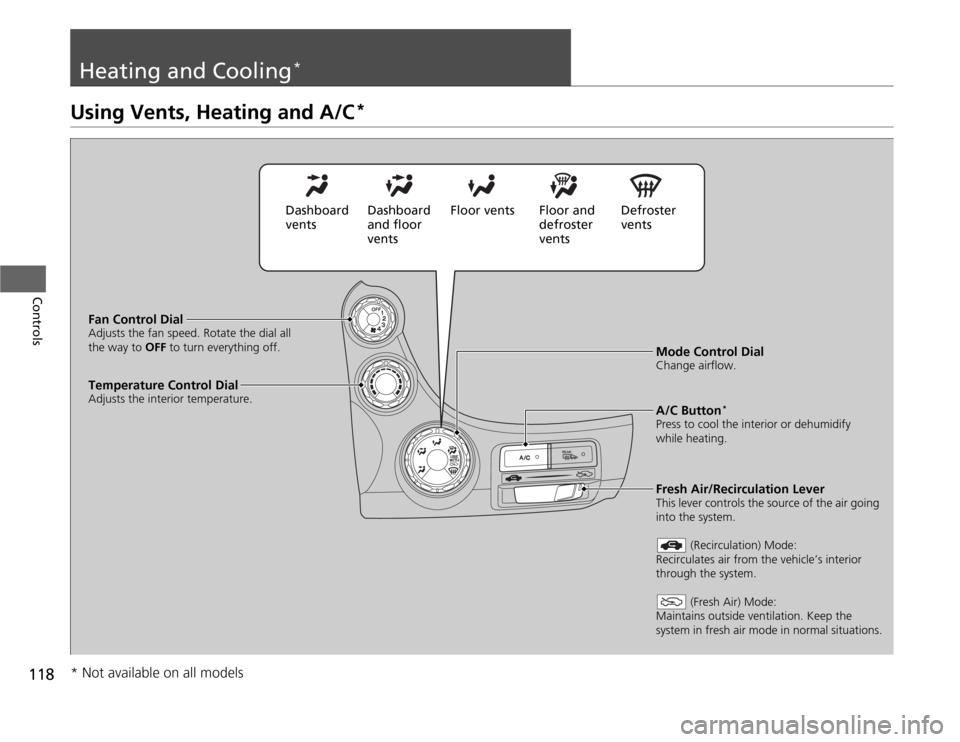
Mode Control DialChange airflow.
Fan Control DialAdjusts the fan speed. Rotate the dial all
the way to OFF to turn everything off.
A/C Button
*
Press to cool the interior or dehumidify
while heating.
Temperature Control DialAdjusts the interior temperature.
Fresh Air/Recirculation LeverThis lever controls the source of the air going
into the system.
(Recirculation) Mode:
Recirculates air from the vehicle’s interior
through the system.
(Fresh Air) Mode:
Maintains outside ventilation. Keep the
system in fresh air mode in normal situations.
Dashboard
ventsDashboard
and floor
ventsFloor vents Floor and
defroster
ventsDefroster
vents
* Not available on all models
Page 120 of 286
Continued
119
uuHeating and Cooling
*uUsing Vents, Heating and A/C
*
Controls
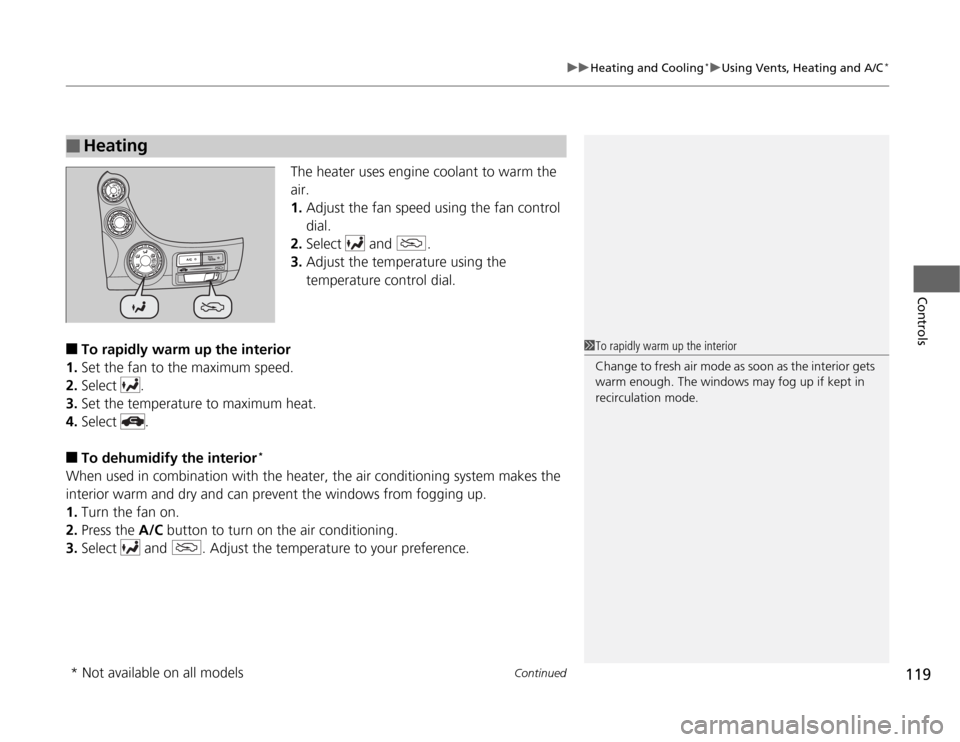
The heater uses engine coolant to warm the
air.
1.Adjust the fan speed using the fan control
dial.
2.Select and .
3.Adjust the temperature using the
temperature control dial.
■
To rapidly warm up the interior
1.Set the fan to the maximum speed.
2.Select .
3.Set the temperature to maximum heat.
4.Select .
■
To dehumidify the interior
*
When used in combination with the heater, the air conditioning system makes the
interior warm and dry and can prevent the windows from fogging up.
1.Turn the fan on.
2.Press the A/C button to turn on the air conditioning.
3.Select and . Adjust the temperature to your preference.■
Heating
1To rapidly warm up the interior
Change to fresh air mode as soon as the interior gets
warm enough. The windows may fog up if kept in
recirculation mode.
* Not available on all models
Page 128 of 286
127
uuAudio System Basic OperationuPlaying the FM/AM Radio
Continued
Features
Playing the FM/AM Radio
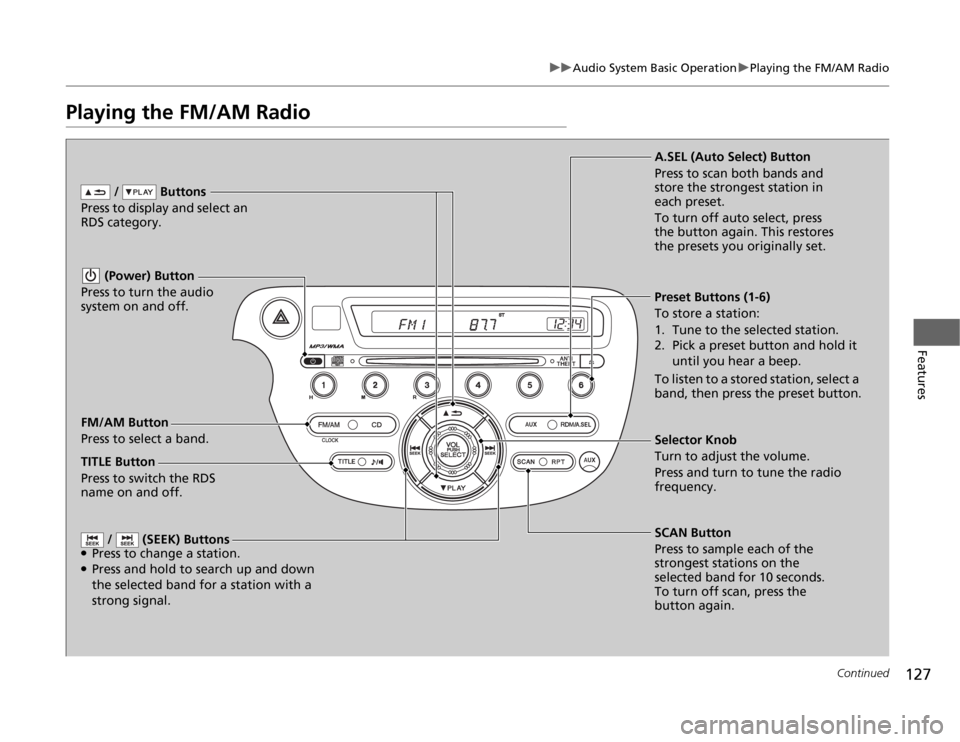
FM/AM Button
Press to select a band. / Buttons
Press to display and select an
RDS category.
SCAN Button
Press to sample each of the
strongest stations on the
selected band for 10 seconds.
To turn off scan, press the
button again. (Power) Button
Press to turn the audio
system on and off.Preset Buttons (1-6)
To store a station:
1. Tune to the selected station.
2. Pick a preset button and hold it
until you hear a beep.
To listen to a stored station, select a
band, then press the preset button.
/ (SEEK) Buttons
●Press to change a station.●Press and hold to search up and down
the selected band for a station with a
strong signal.
Selector Knob
Turn to adjust the volume.
Press and turn to tune the radio
frequency. A.SEL (Auto Select) Button
Press to scan both bands and
store the strongest station in
each preset.
To turn off auto select, press
the button again. This restores
the presets you originally set.
TITLE Button
Press to switch the RDS
name on and off.
Page 130 of 286
129
uuAudio System Basic OperationuPlaying a CD
Continued
Features
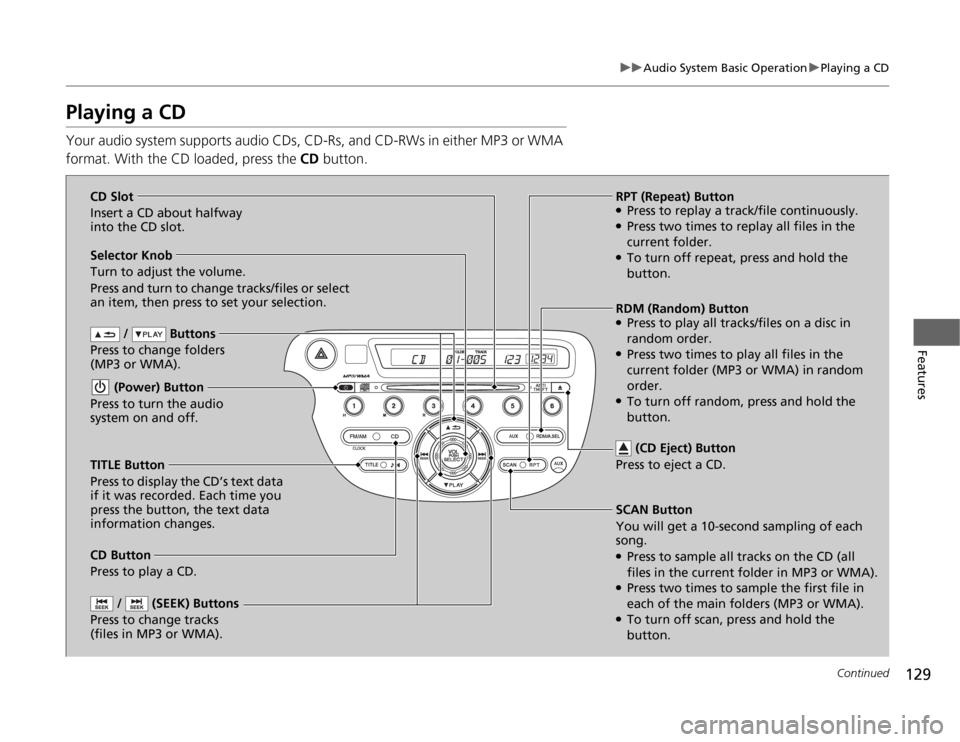
Playing a CDYour audio system supports audio CDs, CD-Rs, and CD-RWs in either MP3 or WMA
format. With the CD loaded, press the CD button.
/ Buttons
Press to change folders
(MP3 or WMA).
SCAN Button
You will get a 10-second sampling of each
song.●Press to sample all tracks on the CD (all
files in the current folder in MP3 or WMA).●Press two times to sample the first file in
each of the main folders (MP3 or WMA).●To turn off scan, press and hold the
button. (Power) Button
Press to turn the audio
system on and off.
/ (SEEK) Buttons
Press to change tracks
(files in MP3 or WMA).
RPT (Repeat) Button●Press to replay a track/file continuously.●Press two times to replay all files in the
current folder.●To turn off repeat, press and hold the
button. Selector Knob
Turn to adjust the volume.
Press and turn to change tracks/files or select
an item, then press to set your selection.
CD Button
Press to play a CD. (CD Eject) Button
Press to eject a CD.
TITLE Button
Press to display the CD’s text data
if it was recorded. Each time you
press the button, the text data
information changes.RDM (Random) Button
●Press to play all tracks/files on a disc in
random order.●Press two times to play all files in the
current folder (MP3 or WMA) in random
order.●To turn off random, press and hold the
button. CD Slot
Insert a CD about halfway
into the CD slot.
Page 131 of 286

uuAudio System Basic OperationuPlaying a CD
130Features
1.Press to switch the display to a folder list.
2.Rotate to select a folder.
3.Press to change the display to a list of
files in that folder.
4.Rotate to select a file, then press .
■
How to Select a File from a Folder with the Selector Knob
(MP3/WMA)
1Playing a CD
NOTICEDo not use CDs with adhesive labels. The label can
cause the CD to jam in the unit.
WMA files protected by digital rights management
(DRM) cannot be played.
The audio system displays UNSUPPORTED, then
skips to the next file.
Text data appears on the display under the following
circumstances:•When you select a new folder, file, or track.•When you change the audio mode to CD.•When you insert a CD.
The display shows up to 31 characters of text data.
Press and hold the TITLE button to see additional
characters. indicates that the text data continues.
The display goes back to the previous screen if you
press and hold the button again.
If you eject the CD but do not remove it from the slot,
the system reloads the CD automatically after several
seconds.
Track Selection Folder Selection
Page 132 of 286
131
uuAudio System Basic OperationuPlaying an iPod®
*
Continued
Features
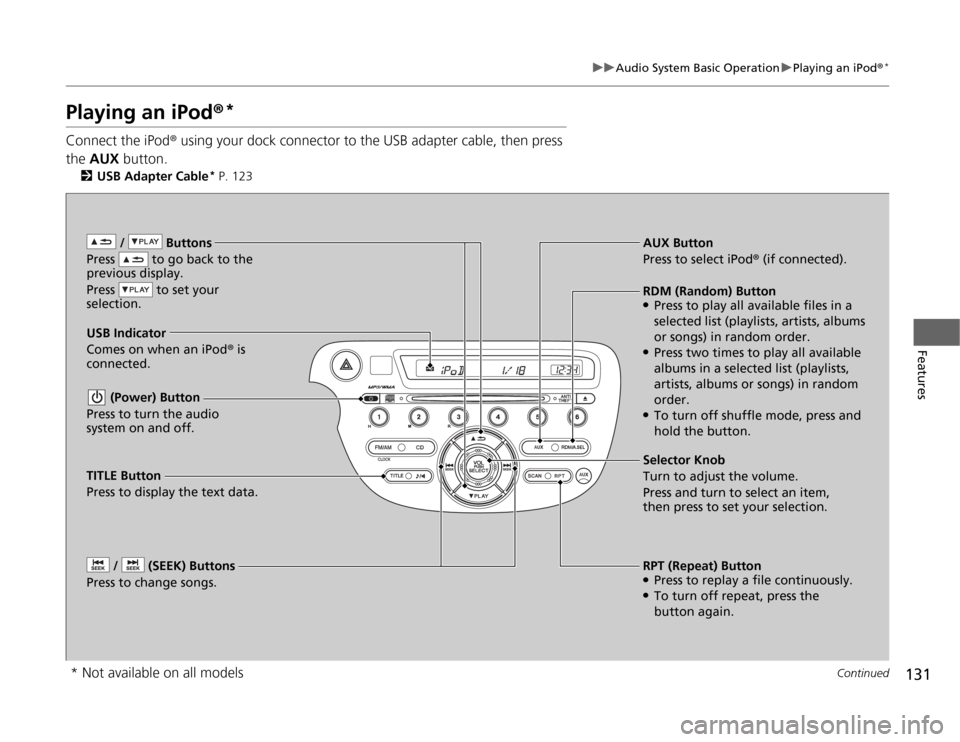
Playing an iPod®
*
Connect the iPod® using your dock connector to the USB adapter cable, then press
the AUX button.
2USB Adapter Cable
* P. 123
/ Buttons
Press to go back to the
previous display.
Press to set your
selection. (Power) Button
Press to turn the audio
system on and off. / (SEEK) Buttons
Press to change songs.
RPT (Repeat) Button●Press to replay a file continuously.●To turn off repeat, press the
button again. Selector Knob
Turn to adjust the volume.
Press and turn to select an item,
then press to set your selection. AUX Button
Press to select iPod® (if connected).
USB Indicator
Comes on when an iPod® is
connected.RDM (Random) Button●Press to play all available files in a
selected list (playlists, artists, albums
or songs) in random order.●Press two times to play all available
albums in a selected list (playlists,
artists, albums or songs) in random
order.●To turn off shuffle mode, press and
hold the button.
TITLE Button
Press to display the text data.
* Not available on all models
Page 134 of 286
133
uuAudio System Basic OperationuPlaying a USB Flash Drive
*
Continued
Features
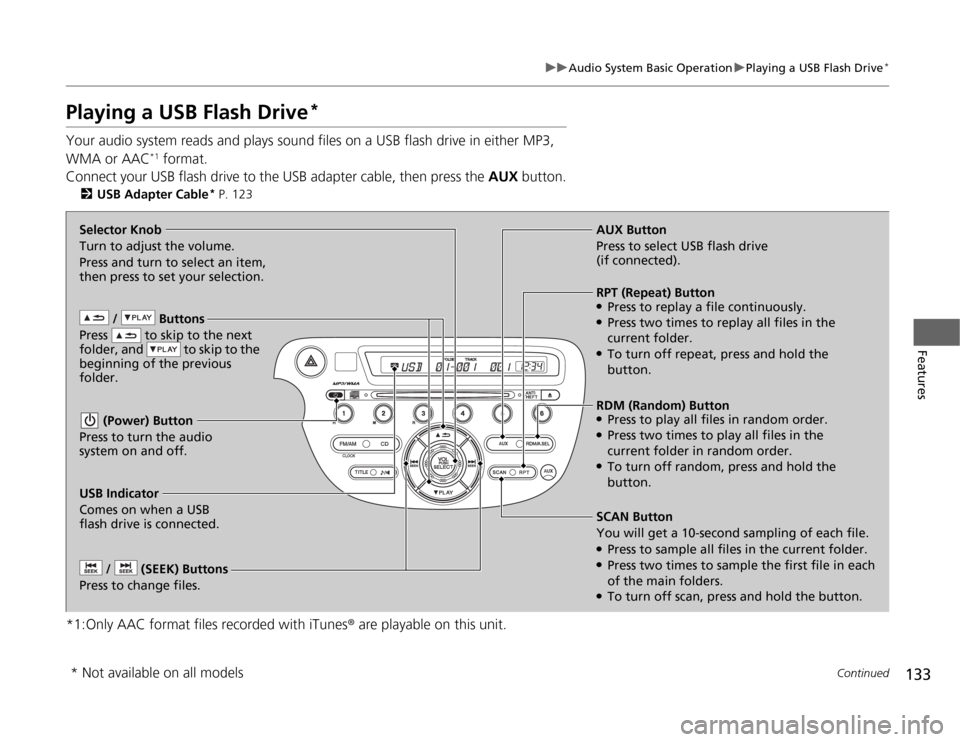
Playing a USB Flash Drive
*
Your audio system reads and plays sound files on a USB flash drive in either MP3,
WMA or AAC
*1 format.
Connect your USB flash drive to the USB adapter cable, then press the AUX button.
2USB Adapter Cable
* P. 123
*1:Only AAC format files recorded with iTunes® are playable on this unit.
/ Buttons
Press to skip to the next
folder, and to skip to the
beginning of the previous
folder. (Power) Button
Press to turn the audio
system on and off. / (SEEK) Buttons
Press to change files.
RDM (Random) Button●Press to play all files in random order.●Press two times to play all files in the
current folder in random order.●To turn off random, press and hold the
button. Selector Knob
Turn to adjust the volume.
Press and turn to select an item,
then press to set your selection.AUX Button
Press to select USB flash drive
(if connected).
USB Indicator
Comes on when a USB
flash drive is connected.SCAN Button
You will get a 10-second sampling of each file.●Press to sample all files in the current folder.●Press two times to sample the first file in each
of the main folders.●To turn off scan, press and hold the button.RPT (Repeat) Button●Press to replay a file continuously.●Press two times to replay all files in the
current folder.●To turn off repeat, press and hold the
button.
* Not available on all models
Page 135 of 286
uuAudio System Basic OperationuPlaying a USB Flash Drive
*
134Features
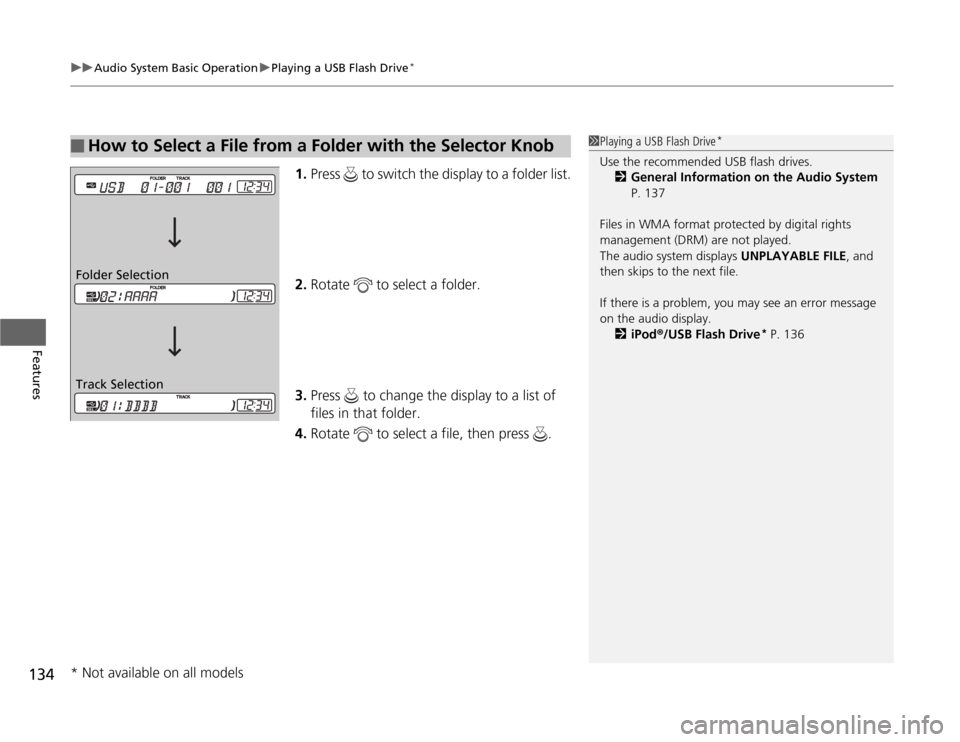
1.Press to switch the display to a folder list.
2.Rotate to select a folder.
3.Press to change the display to a list of
files in that folder.
4.Rotate to select a file, then press .
■
How to Select a File from a Folder with the Selector Knob
1Playing a USB Flash Drive
*
Use the recommended USB flash drives.
2General Information on the Audio System
P. 137
Files in WMA format protected by digital rights
management (DRM) are not played.
The audio system displays UNPLAYABLE FILE, and
then skips to the next file.
If there is a problem, you may see an error message
on the audio display.
2iPod®/USB Flash Drive
* P. 136
Track Selection Folder Selection* Not available on all models
Page 141 of 286
140Features
Bluetooth® HandsFreeLink®
*
For models with the navigation system, see Navigation System Manual for how to
operate the Bluetooth® HandsFreeLink®.
Bluetooth® HandsFreeLink® (HFL) allows you to place and receive phone calls using
your vehicle’s audio system, without handling your cell phone.Using HFL
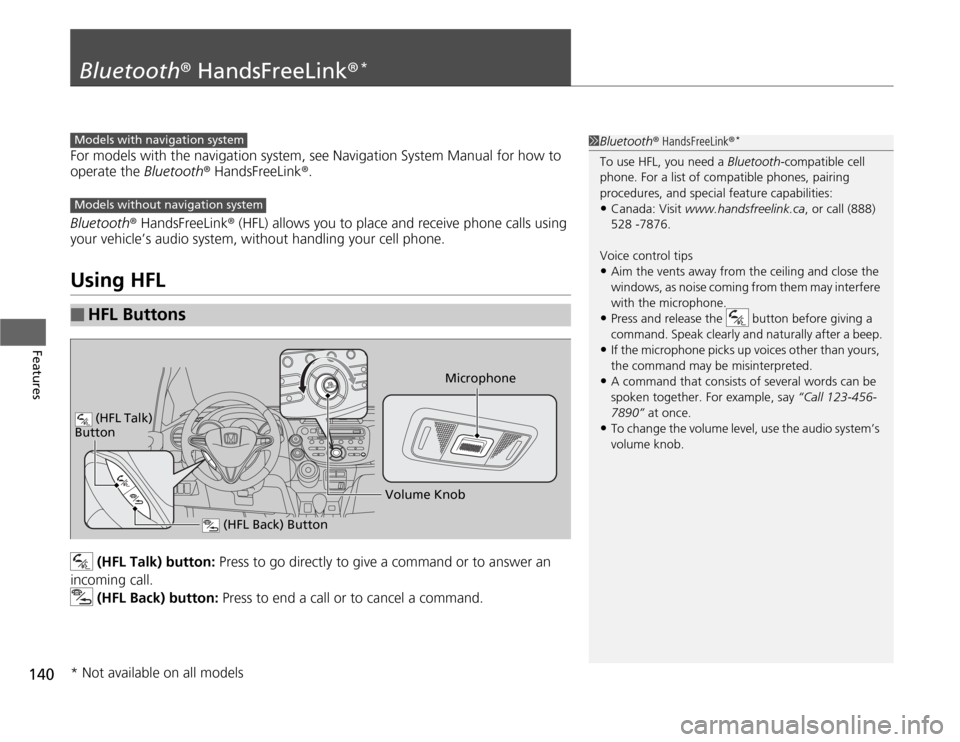
(HFL Talk) button: Press to go directly to give a command or to answer an
incoming call.
(HFL Back) button: Press to end a call or to cancel a command.
■
HFL Buttons
1Bluetooth® HandsFreeLink®
*
To use HFL, you need a Bluetooth-compatible cell
phone. For a list of compatible phones, pairing
procedures, and special feature capabilities:•Canada: Visit www.handsfreelink.ca, or call (888)
528 -7876.
Voice control tips•Aim the vents away from the ceiling and close the
windows, as noise coming from them may interfere
with the microphone.•Press and release the button before giving a
command. Speak clearly and naturally after a beep.•If the microphone picks up voices other than yours,
the command may be misinterpreted.•A command that consists of several words can be
spoken together. For example, say “Call 123-456-
7890” at once.•To change the volume level, use the audio system’s
volume knob.
Models with navigation systemModels without navigation system
Microphone
(HFL Back) Button
(HFL Talk)
Button
Volume Knob
* Not available on all models