change HONDA FIT 2012 2.G Owner's Manual
[x] Cancel search | Manufacturer: HONDA, Model Year: 2012, Model line: FIT, Model: HONDA FIT 2012 2.GPages: 286, PDF Size: 9.92 MB
Page 144 of 286

143
uuBluetooth® HandsFreeLink®
*uHFL Menus
Continued
Features
“Change passcode”
Store a phonebook entry.
Edit the number of an existing phonebook entry.
Delete a phonebook entry.
Hear a list of all stored phonebook entries.
Transfer contacts from your phone to HFL.
Apply a security passcode to the system that must be input at each key
cycle to access the system.
Change your security passcode.
Set how you want to be notified of an incoming call.
Set to automatically transfer calls from your phone to HFL when you
enter the vehicle.
Switch the system language between English and French.
Hear a tutorial for general rules on using the system.
Hear a list of available commands and additional information describing each command.“Store”
“Edit”“Delete”“List”“Receive contact”
*
“Security”“Call notification”“Auto transfer”
“Phonebook”“System setup”“Change language”“Tutorial”“Hands-free help”
Clear the system of all paired phones, phonebook entries, and security
passcode. “Clear”
* Not available on all models
Page 145 of 286
uuBluetooth® HandsFreeLink®
*uHFL Menus
144Features
■
To pair a cell phone
1.If no phone has been paired to the system before, HFL gives you information
about how to pair the first phone.
If a phone has already been paired: say “Phone Setup” and “Pair” after the HFL
prompts.
2.Follow the HFL prompts and put your phone in discovery or search mode.
uHFL gives you a four-digit code and begins searching for your phone.
3.When your phone finds a Bluetooth® device, select HFL from the options and
enter the four-digit code.
4.Follow the HFL prompts and name the newly paired phone.
■
To rename a paired phone
1.Say “Phone Setup.”
2.Say “Edit” after the prompts.
3.Follow the HFL prompts and rename the phone.
uIf there is more than one phone paired to the system, HFL will ask you which
phone’s name you want to change.
■
To delete a paired phone
1.Say “Phone Setup.”
2.Say “Delete” after the prompts.
3.Follow the HFL prompts.
uHFL will ask you which phone you want to delete.
■
Phone Setup
1Phone Setup
Press the button and wait for a beep before
giving a command.
Your Bluetooth-compatible phone must be paired to
HFL before you can make and receive hands-free
calls.
Phone Pairing Tips:•You cannot pair your phone while the vehicle is
moving.•Your phone must be in the discovery or search
mode when pairing the phone. Refer to your
phone’s manual.•Up to six phones can be paired.•Your phone’s battery may drain faster when it is
paired to HFL.•If your phone is not ready for pairing or not found
by the system within three minutes, the system will
time out and returns to idle.
Page 146 of 286
Continued
145
uuBluetooth® HandsFreeLink®
*uHFL Menus
Features
■
To hear the name of all paired phones
1.Say “Phone Setup.”
2.Say “List” after the prompts.
3.HFL reads out all the paired phones’ names.
■
To hear which paired phone is currently linked
1.Say “Phone Setup.”
2.Say “Status” after the prompts.
3.HFL will tell you which phone is linked with the system.
■
To change the currently linked phone
1.Say “Phone Setup.”
2.Say “Next Phone” after the prompts.
3.HFL disconnects the current phone, and searches for another paired phone.
4.Once another phone is found, it is connected to the system. HFL will inform you
which phone is now linked.
■
To change the pairing code setting
1.Say “Phone Setup.”
2.Say “Set Pairing Code” after the prompts.
3.If you want HFL to create a random code each time you pair a phone, say
“Random.” If you want to create your own four-digit code, say “Fixed.”
4.Follow the HFL prompts.
1Phone Setup
If no other phones are found or paired when trying to
switch to another phone, HFL will inform you that the
original phone is linked again.
The “Status” and “Next Phone” commands use:
Only one paired phone at a time can be linked to HFL.
When there are two or more paired phones in the
vehicle, the first paired phone that the system finds is
linked.
Page 151 of 286
uuBluetooth® HandsFreeLink®
*uHFL Menus
150Features
This command group allows you to change or customize HFL basic settings.■
To set a four-digit passcode to lock the HFL system for security
1.Say “System Setup.”
2.Say “Security.”
3.Follow the HFL prompts and say the four-digit number of your choice.
4.Follow the HFL prompts and confirm the number.
■
To change the security passcode
1.Say “System Setup.”
2.Say “Change Passcode” after the prompts.
3.Say the new four-digit passcode after the HFL prompts.
4.Follow the HFL prompts.
■
To select a ring tone or a prompt as the incoming call notification
1.Say “System Setup.”
2.Say “Call Notification” after the prompts.
3.Say “Ring Tone” or “Prompt” after the prompts. For no audible notification, say
“Off.”
■
System Setup
1System Setup
Press the button before a command.
Once a passcode is set, you are required to enter the
passcode with every new key cycle to use HFL.
If you forget the code, go to your dealer to have the
passcode reset. You can also cancel the passcode by
clearing all the data stored in the HFL system.
2To clear the system P. 151
The default setting of the incoming notification is a
ring tone.
Page 152 of 286
151
uuBluetooth® HandsFreeLink®
*uHFL Menus
Features
■
To activate or deactivate the auto transfer function
The call on your cell phone can be automatically transferred to HFL when you get
into the vehicle and turn on the ignition switch.
1.Say “System Setup.”
2.Say “Auto Transfer” after the prompts. HFL lets you know the current status.
3.Follow the HFL prompts to change the setting.
■
To clear the system
Paired phones, all stored or imported phonebook data, and any passcodes are
erased.
1.Say “System Setup.”
2.Say “Clear” after the prompts.
3.Follow the HFL prompts.
You can set the system language to French or English.
1.Say “Change Language.”
2.Follow the HFL prompts.
If you have not named your paired phone in the selected language, HFL will ask you
to name it in that language.
■
Change Language
1System Setup
Press the button before a command.
You can clear the system when you have forgotten
the passcode and cannot access HFL.
When HFL asks you for the passcode, say “System
Clear.”1Change Language
Press the button before a command.
Page 160 of 286
159
Continued
Driving
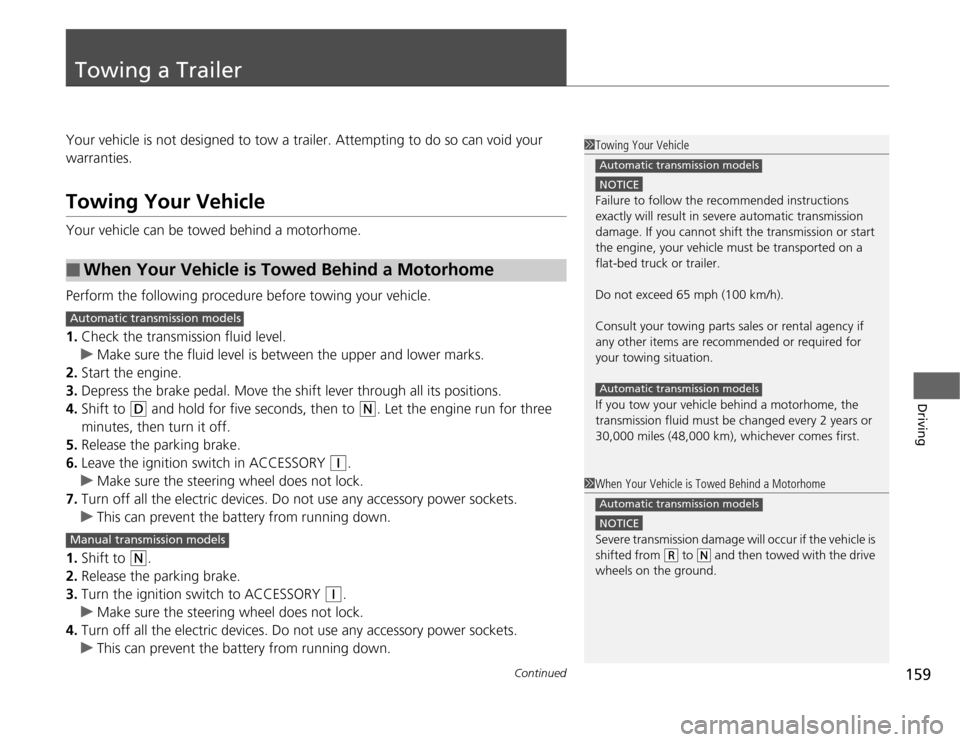
Towing a TrailerYour vehicle is not designed to tow a trailer. Attempting to do so can void your
warranties.Towing Your VehicleYour vehicle can be towed behind a motorhome.
Perform the following procedure before towing your vehicle.
1.Check the transmission fluid level.
uMake sure the fluid level is between the upper and lower marks.
2.Start the engine.
3.Depress the brake pedal. Move the shift lever through all its positions.
4.Shift to
(D
and hold for five seconds, then to
(N
. Let the engine run for three
minutes, then turn it off.
5.Release the parking brake.
6.Leave the ignition switch in ACCESSORY
(q
.
uMake sure the steering wheel does not lock.
7.Turn off all the electric devices. Do not use any accessory power sockets.
uThis can prevent the battery from running down.
1.Shift to
(N
.
2.Release the parking brake.
3.Turn the ignition switch to ACCESSORY
(q
.
uMake sure the steering wheel does not lock.
4.Turn off all the electric devices. Do not use any accessory power sockets.
uThis can prevent the battery from running down.
■
When Your Vehicle is Towed Behind a Motorhome
1Towing Your Vehicle
NOTICEFailure to follow the recommended instructions
exactly will result in severe automatic transmission
damage. If you cannot shift the transmission or start
the engine, your vehicle must be transported on a
flat-bed truck or trailer.
Do not exceed 65 mph (100 km/h).
Consult your towing parts sales or rental agency if
any other items are recommended or required for
your towing situation.
If you tow your vehicle behind a motorhome, the
transmission fluid must be changed every 2 years or
30,000 miles (48,000 km), whichever comes first.Automatic transmission modelsAutomatic transmission models
1When Your Vehicle is Towed Behind a Motorhome
NOTICESevere transmission damage will occur if the vehicle is
shifted from
(R
to
(N
and then towed with the drive
wheels on the ground.
Automatic transmission models
Automatic transmission modelsManual transmission models
Page 166 of 286
165
uuWhen DrivinguShifting
Continued
Driving
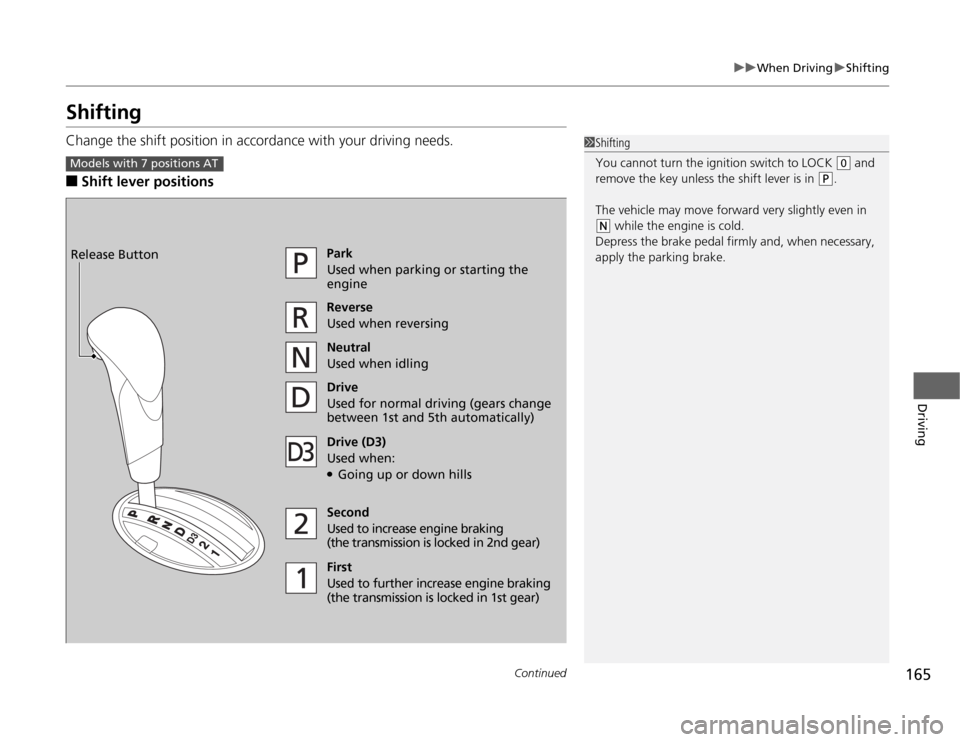
ShiftingChange the shift position in accordance with your driving needs.■
Shift lever positions
1Shifting
You cannot turn the ignition switch to LOCK
(0
and
remove the key unless the shift lever is in
(P
.
The vehicle may move forward very slightly even in
(N
while the engine is cold.
Depress the brake pedal firmly and, when necessary,
apply the parking brake.
Models with 7 positions AT
Park
Used when parking or starting the
engine
Reverse
Used when reversing
Neutral
Used when idling
Drive
Used for normal driving (gears change
between 1st and 5th automatically)
Drive (D3)
Used when:●Going up or down hills
Second
Used to increase engine braking
(the transmission is locked in 2nd gear)
First
Used to further increase engine braking
(the transmission is locked in 1st gear) Release Button
Page 167 of 286
uuWhen DrivinguShifting
166Driving
■
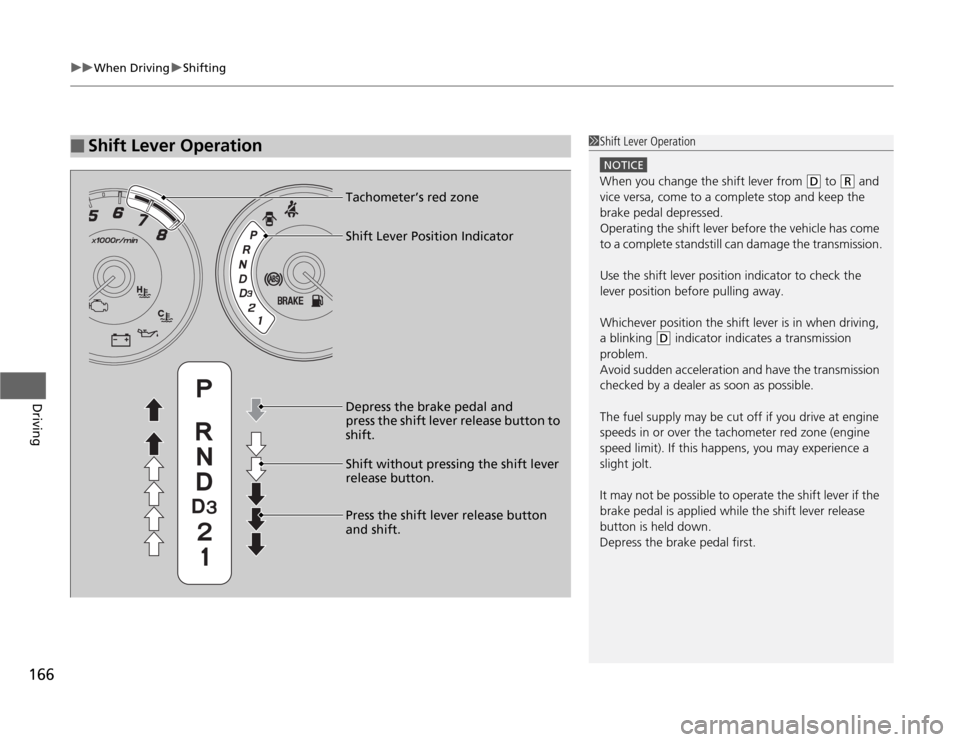
Shift Lever Operation
1Shift Lever Operation
NOTICEWhen you change the shift lever from
(D
to
(R
and
vice versa, come to a complete stop and keep the
brake pedal depressed.
Operating the shift lever before the vehicle has come
to a complete standstill can damage the transmission.
Use the shift lever position indicator to check the
lever position before pulling away.
Whichever position the shift lever is in when driving,
a blinking
(D
indicator indicates a transmission
problem.
Avoid sudden acceleration and have the transmission
checked by a dealer as soon as possible.
The fuel supply may be cut off if you drive at engine
speeds in or over the tachometer red zone (engine
speed limit). If this happens, you may experience a
slight jolt.
It may not be possible to operate the shift lever if the
brake pedal is applied while the shift lever release
button is held down.
Depress the brake pedal first.
Shift Lever Position Indicator Tachometer’s red zone
Depress the brake pedal and
press the shift lever release button to
shift.
Shift without pressing the shift lever
release button.
Press the shift lever release button
and shift.
Page 168 of 286
167
uuWhen DrivinguShifting
Continued
Driving
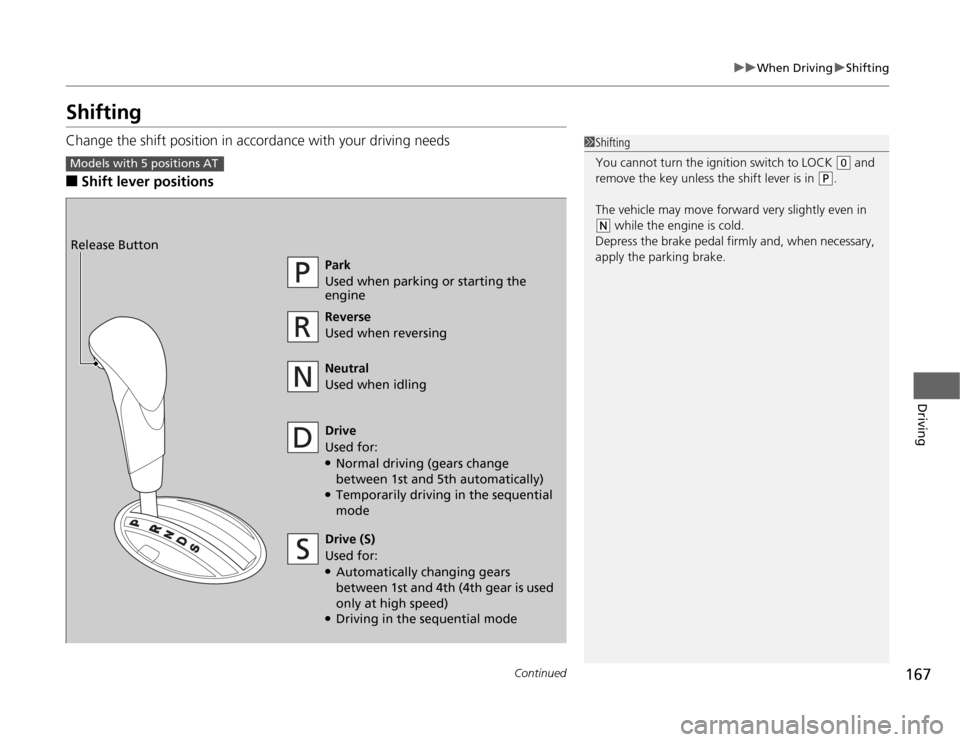
ShiftingChange the shift position in accordance with your driving needs■
Shift lever positions
1Shifting
You cannot turn the ignition switch to LOCK
(0
and
remove the key unless the shift lever is in
(P
.
The vehicle may move forward very slightly even in
(N
while the engine is cold.
Depress the brake pedal firmly and, when necessary,
apply the parking brake.
Models with 5 positions AT
Park
Used when parking or starting the
engine
Reverse
Used when reversing
Neutral
Used when idling
Drive
Used for:●Normal driving (gears change
between 1st and 5th automatically)●Temporarily driving in the sequential
mode Release Button
Drive (S)
Used for:●Automatically changing gears
between 1st and 4th (4th gear is used
only at high speed)●Driving in the sequential mode
Page 169 of 286
uuWhen DrivinguShifting
168Driving
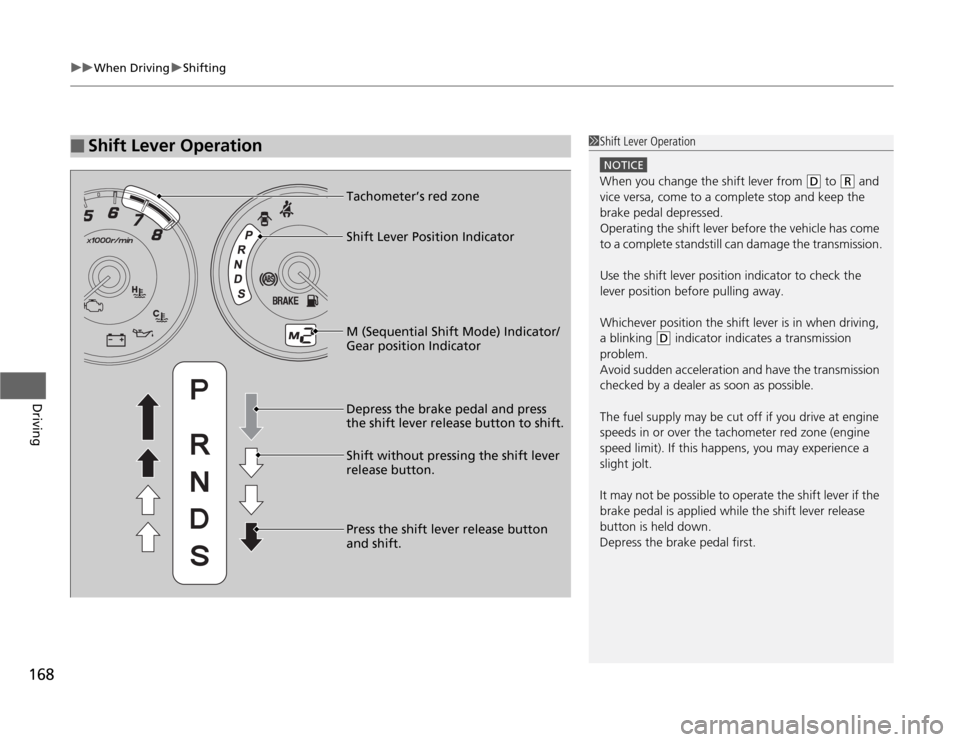
■
Shift Lever Operation
1Shift Lever Operation
NOTICEWhen you change the shift lever from
(D
to
(R
and
vice versa, come to a complete stop and keep the
brake pedal depressed.
Operating the shift lever before the vehicle has come
to a complete standstill can damage the transmission.
Use the shift lever position indicator to check the
lever position before pulling away.
Whichever position the shift lever is in when driving,
a blinking
(D
indicator indicates a transmission
problem.
Avoid sudden acceleration and have the transmission
checked by a dealer as soon as possible.
The fuel supply may be cut off if you drive at engine
speeds in or over the tachometer red zone (engine
speed limit). If this happens, you may experience a
slight jolt.
It may not be possible to operate the shift lever if the
brake pedal is applied while the shift lever release
button is held down.
Depress the brake pedal first.
M (Sequential Shift Mode) Indicator/
Gear position Indicator Tachometer’s red zone
Depress the brake pedal and press
the shift lever release button to shift.
Shift without pressing the shift lever
release button.
Press the shift lever release button
and shift. Shift Lever Position Indicator