Transmission HONDA FIT 2015 3.G User Guide
[x] Cancel search | Manufacturer: HONDA, Model Year: 2015, Model line: FIT, Model: HONDA FIT 2015 3.GPages: 453, PDF Size: 21.19 MB
Page 112 of 453
Continued111
uuSecurity System uSecurity System Alarm*
Controls
■To deactivate the security system alarm
Unlock the vehicle using the remote transmi tter or smart entry remote, or turn the
ignition switch to ON
(w*1. The system, along with the horn and flashing lights, is
deactivated.
■Setting the security system alarm
The security system alarm automatically sets when the following conditions have
been met:
• The ignition switch is in LOCK
(0*1, and the key has been removed from the
ignition switch.
• The hood is closed.
• All doors and the tailgate are locked from outside with the key, remote
transmitter, or smart entry system.
■When the security system alarm sets
The security system alarm indicator in the instrument panel blinks. When the
blinking interval changes after about 15 se conds, the security system alarm is set.
■To cancel the security system alarm
The security system alarm is canceled when the vehicle is unlocked using the remote
transmitter or smart entry system, or th e ignition switch is turned to ON
(w*1. The
security system alarm indicato r goes off at the same time.
*1 : Models with the smart entry system have an ENGINE START/STOP button instead of an ignition switch.
1Security System Alarm*
Do not set the security system alarm when someone
is in the vehicle or a window is open. The system can
accidentally activate when:
•Unlocking the door with the lock tab.•Opening the hood with the hood release handle.
•Moving the shift lever out of ( P.
If the battery goes dead after you have set the
security system alarm, the security alarm may go off
once the battery is re charged or replaced.
If this occurs, deactivate the security system alarm by
unlocking a door using the ke y, remote transmitter,
or smart entry system.
Do not attempt to alter th is system or add another
device to it.
Automatic transmission (CVT) models
* Not available on all models
15 US FIT-31T5A6000.book 111 ページ 2014年3月6日 木曜日 午後7時5分
Page 117 of 453
116
Controls
Operating the Switches Around the Steering Wheel
Ignition Switch
Models without smart entry system
1Ignition Switch
You cannot take the key out unless the shift lever is
in
( P.
If you open the driver’s door when the key is in LOCK
( 0 or ACCESSORY ( q, a warning buzzer will sound
to remind you to take the key out.
If the key won’t turn from LOCK
( 0 to ACCESSORY (q, turn the key while moving the steering wheel left
and right. The steering wh eel will unlock, allowing
the key to turn.
3WARNING
Removing the key from the ignition switch
while driving locks the steering. This can
cause you to lose control of the vehicle.
Remove the key from the ignition switch
only when parked.
Manual transmission models
Automatic transmission (CVT) models
All models
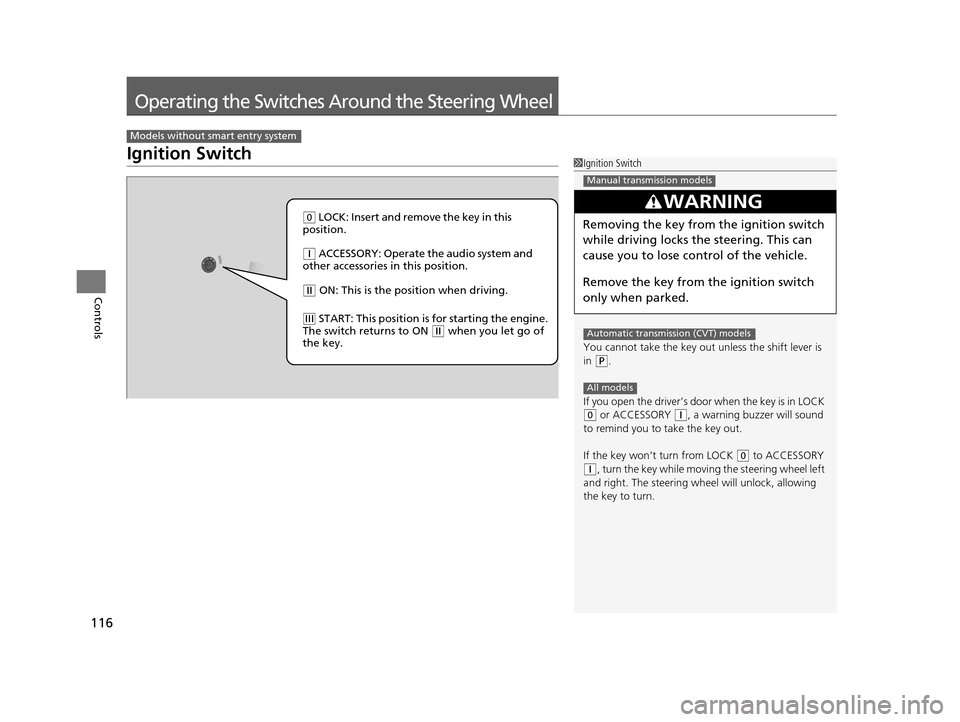
( 0 LOCK: Insert and remove the key in this
position.
( q ACCESSORY: Operate the audio system and
other accessories in this position.
( w ON: This is the position when driving.
(e START: This position is for starting the engine.
The switch returns to ON ( w when you let go of
the key.
15 US FIT-31T5A6000.book 116 ページ 2014年3月6日 木曜日 午後7時5分
Page 118 of 453
117
uuOperating the Switches Around the Steering Wheel uENGINE START/STOP Button
Continued
Controls
ENGINE START/STOP Button
*1 : Except U.S. models with automatic transmission (CVT)
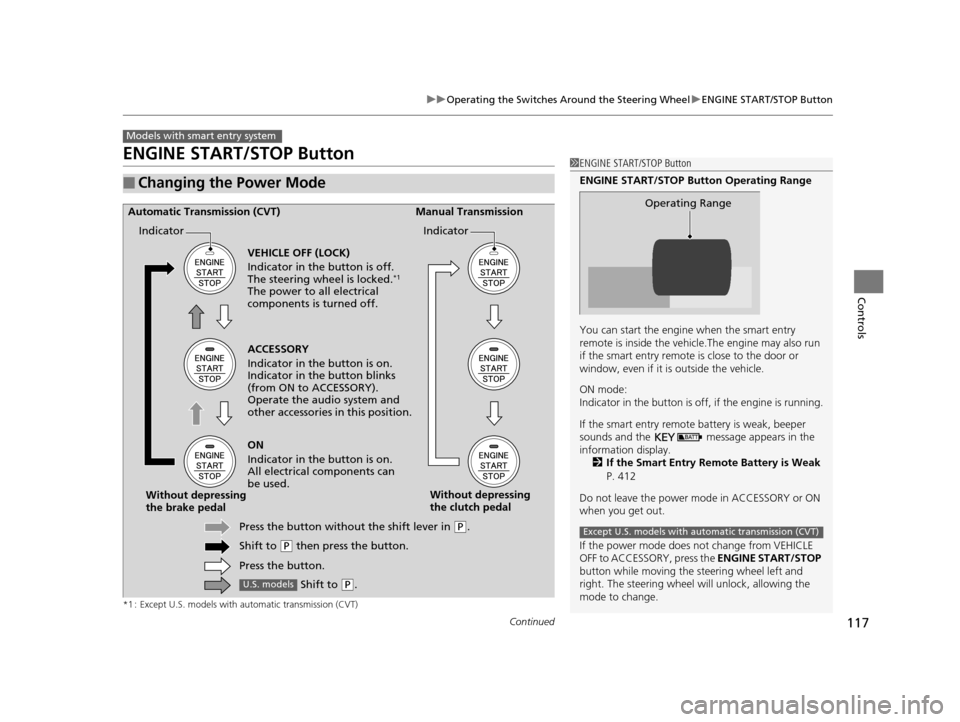
■Changing the Power Mode
Models with smart entry system
1ENGINE START/STOP Button
ENGINE START/STOP Button Operating Range
You can start the engine when the smart entry
remote is inside the vehicl e.The engine may also run
if the smart entry remote is close to the door or
window, even if it is outside the vehicle.
ON mode:
Indicator in the button is of f, if the engine is running.
If the smart entry remote battery is weak, beeper
sounds and the message appears in the
information display. 2 If the Smart Entry Remote Battery is Weak
P. 412
Do not leave the power mode in ACCESSORY or ON
when you get out.
If the power mode does not change from VEHICLE
OFF to ACCESSORY, press the ENGINE START/STOP
button while moving the st eering wheel left and
right. The steering wheel will unlock, allowing the
mode to change.
Operating Range
Except U.S. models with automatic transmission (CVT)
ACCESSORY
Indicator in the button is on.
Indicator in th e button blinks
(from ON to ACCESSORY).
Operate the audio system and
other accessories in this position.
Automatic Transmission (CVT) Manual Transmission
VEHICLE OFF (LOCK)
Indicator in the button is off.
The steering wheel is locked.
*1
The power to all electrical
components is turned off.
ON
Indicator in the button is on.
All electrical components can
be used.
Press the button withou t the shift lever in
(P.
Shift to
( P then press the button.
Press the button.
Without depressing
the brake pedal
Without depressing
the clutch pedal
Indicator Indicator
Shift to (
P.U.S. models
15 US FIT-31T5A6000.book 117 ページ 2014年3月6日 木曜日 午後7時5分
Page 119 of 453
118
uuOperating the Switches Around the Steering Wheel uENGINE START/STOP Button
Controls
If you leave the vehicle for 30 to 60 minutes with the shift lever in (P*1 and the
power mode in ACCESSORY, the vehicle automa tically goes into the mode similar to
VEHICLE OFF (LOCK) to avoid the battery drain.
When in this mode:
The steering wheel does not lock.
You cannot lock or unlock doors with th e remote transmitter or the smart entry
system.
Press the ENGINE START/STOP button three times to swit ch the mode to VEHICLE
OFF (LOCK).
*1 : Automatic transmission (CVT) models
■Automatic Power Off
Except U.S. models with automatic transmission (CVT)
15 US FIT-31T5A6000.book 118 ページ 2014年3月6日 木曜日 午後7時5分
Page 121 of 453
120
uuOperating the Switches Around the Steering Wheel uIgnition Switch and Power Mode Comparison
Controls
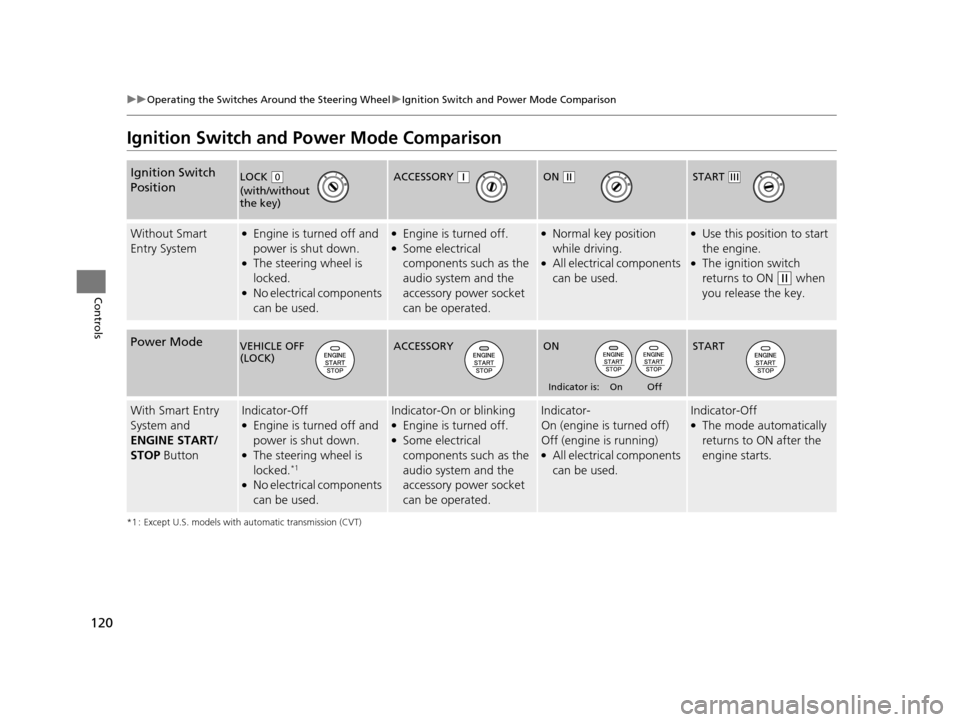
Ignition Switch and Power Mode Comparison
*1 : Except U.S. models with automatic transmission (CVT)
Ignition Switch
Position
Without Smart
Entry System●Engine is turned off and
power is shut down.
●The steering wheel is
locked.
●No electrical components
can be used.
●Engine is turned off.●Some electrical
components such as the
audio system and the
accessory power socket
can be operated.
●Normal key position
while driving.
●All electrical components
can be used.
●Use this position to start
the engine.
●The ignition switch
returns to ON
(w when
you release the key.
Power Mode
With Smart Entry
System and
ENGINE START/
STOP ButtonIndicator-Off●Engine is turned off and
power is shut down.
●The steering wheel is
locked.*1
●No electrical components
can be used.
Indicator-On or blinking●Engine is turned off.●Some electrical
components such as the
audio system and the
accessory power socket
can be operated.
Indicator-
On (engine is turned off)
Off (engine is running)
●All electrical components
can be used.
Indicator-Off●The mode automatically
returns to ON after the
engine starts.
LOCK ( 0
(with/without
the key)
ACCESSORY (qON (wSTART (e
VEHICLE OFF
(LOCK)ACCESSORY ON
Indicator is: On Off
START
15 US FIT-31T5A6000.book 120 ページ 2014年3月6日 木曜日 午後7時5分
Page 128 of 453
127
uuOperating the Switches Around the Steering Wheel uWipers and Washers
Controls
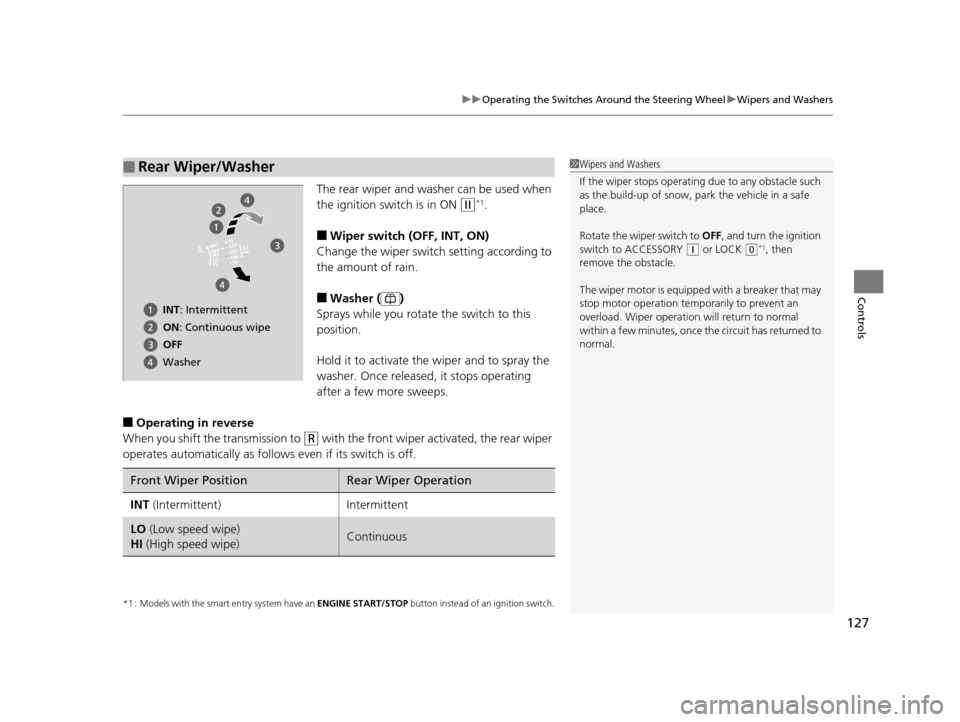
The rear wiper and washer can be used when
the ignition switch is in ON
(w*1.
■Wiper switch (OFF, INT, ON)
Change the wiper switch setting according to
the amount of rain.
■Washer ( )
Sprays while you rotate the switch to this
position.
Hold it to activate th e wiper and to spray the
washer. Once released, it stops operating
after a few more sweeps.
■Operating in reverse
When you shift the transmission to
(R with the front wiper activated, the rear wiper
operates automatically as follows even if its switch is off.
*1 : Models with the smart entry system have an ENGINE START/STOP button instead of an ignition switch.
■Rear Wiper/Washer1Wipers and Washers
If the wiper stops operating due to any obstacle such
as the build-up of snow, pa rk the vehicle in a safe
place.
Rotate the wiper switch to OFF, and turn the ignition
switch to ACCESSORY
( q or LOCK (0*1, then
remove the obstacle.
The wiper motor is equipped with a breaker that may
stop motor operation temp orarily to prevent an
overload. Wiper operation will return to normal
within a few minutes, once the circuit has returned to
normal.
INT: Intermittent
ON : Continuous wipe
OFF
Washer
Front Wiper PositionRear Wiper Operation
INT (Intermittent)Intermittent
LO (Low speed wipe)
HI (High speed wipe)Continuous
15 US FIT-31T5A6000.book 127 ページ 2014年3月6日 木曜日 午後7時5分
Page 157 of 453
uuHeating and Cooling System*uUsing Vents, Heating and A/C*
156
Controls
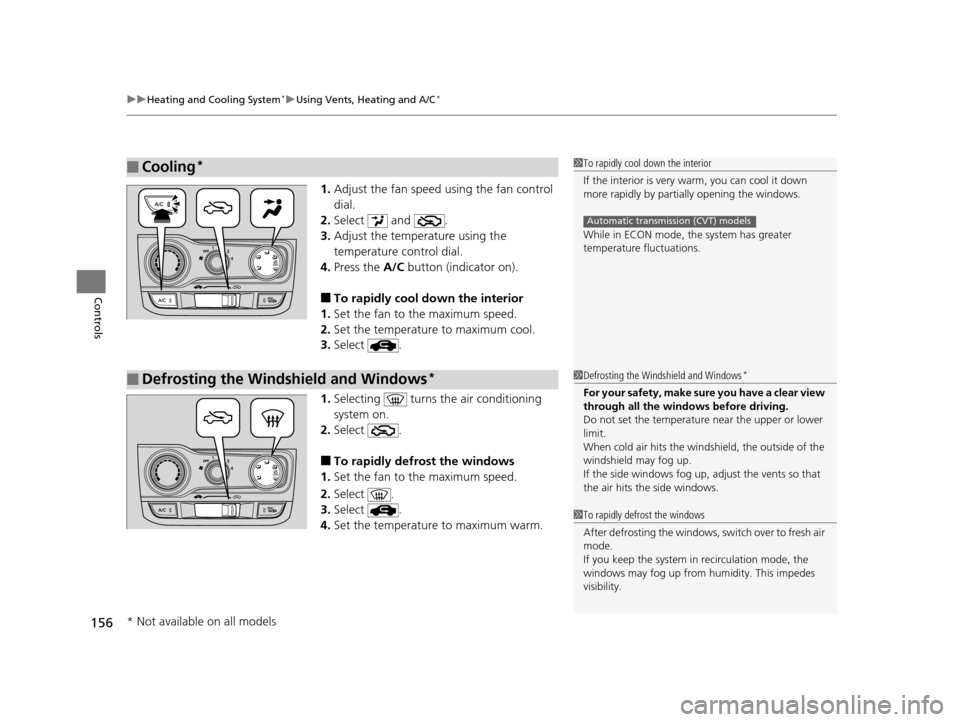
1. Adjust the fan speed using the fan control
dial.
2. Select and .
3. Adjust the temperature using the
temperature control dial.
4. Press the A/C button (indicator on).
■To rapidly cool down the interior
1. Set the fan to the maximum speed.
2. Set the temperature to maximum cool.
3. Select .
1. Selecting turns th e air conditioning
system on.
2. Select .
■To rapidly defrost the windows
1. Set the fan to the maximum speed.
2. Select .
3. Select .
4. Set the temperature to maximum warm.
■Cooling*1To rapidly cool down the interior
If the interior is very warm, you can cool it down
more rapidly by parti ally opening the windows.
While in ECON mode, the system has greater
temperature fluctuations.
Automatic transmission (CVT) models
■Defrosting the Windshield and Windows*1 Defrosting the Windshield and Windows*
For your safety, make sure you have a clear view
through all the windows before driving.
Do not set the temperatur e near the upper or lower
limit.
When cold air hits the windshield, the outside of the
windshield may fog up.
If the side windows fog up, adjust the vents so that
the air hits th e side windows.
1To rapidly defrost the windows
After defrosting the windows, switch over to fresh air
mode.
If you keep the system in recirculation mode, the
windows may fog up from humidity. This impedes
visibility.
* Not available on all models
15 US FIT-31T5A6000.book 156 ページ 2014年3月6日 木曜日 午後7時5分
Page 159 of 453
uuClimate Control System*uUsing Automatic Climate Control
158
Controls
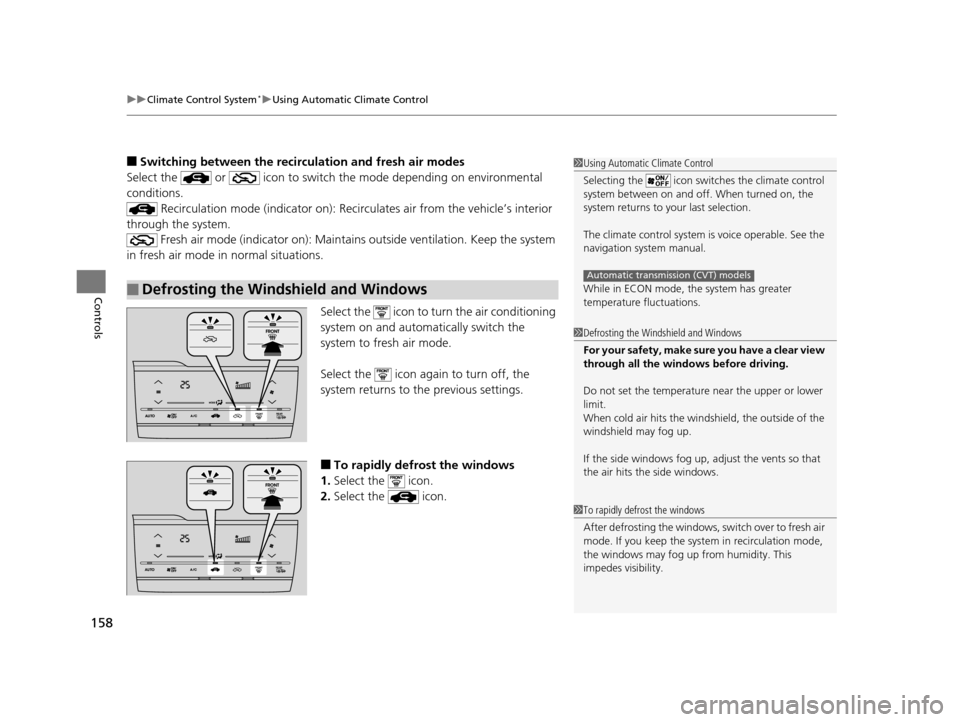
■Switching between the recirculation and fresh air modes
Select the or icon to switch the mode depending on environmental
conditions.
Recirculation mode (indicator on): Reci rculates air from the vehicle’s interior
through the system. Fresh air mode (indicator on): Maintain s outside ventilation. Keep the system
in fresh air mode in normal situations.
Select the icon to turn the air conditioning
system on and automa tically switch the
system to fresh air mode.
Select the icon again to turn off, the
system returns to the previous settings.
■To rapidly defrost the windows
1. Select the icon.
2. Select the icon.
■Defrosting the Windshield and Windows
1Using Automatic Climate Control
Selecting the icon switches the climate control
system between on and off. When turned on, the
system returns to your last selection.
The climate control system is voice operable. See the
navigation sy stem manual.
While in ECON mode, the system has greater
temperature fluctuations.
Automatic transmission (CVT) models
1 Defrosting the Windshield and Windows
For your safety, make sure you have a clear view
through all the windows before driving.
Do not set the temperatur e near the upper or lower
limit.
When cold air hits the windshield, the outside of the
windshield may fog up.
If the side windows fog up, adjust the vents so that
the air hits th e side windows.
1To rapidly defrost the windows
After defrosting the windows, switch over to fresh air
mode. If you keep the syst em in recirculation mode,
the windows may fog up from humidity. This
impedes visibility.
15 US FIT-31T5A6000.book 158 ページ 2014年3月6日 木曜日 午後7時5分
Page 227 of 453
226
Features
Customized Features
Use the audio/information screen to customize certain features.
See the navigation system ma nual for information of the customized features.
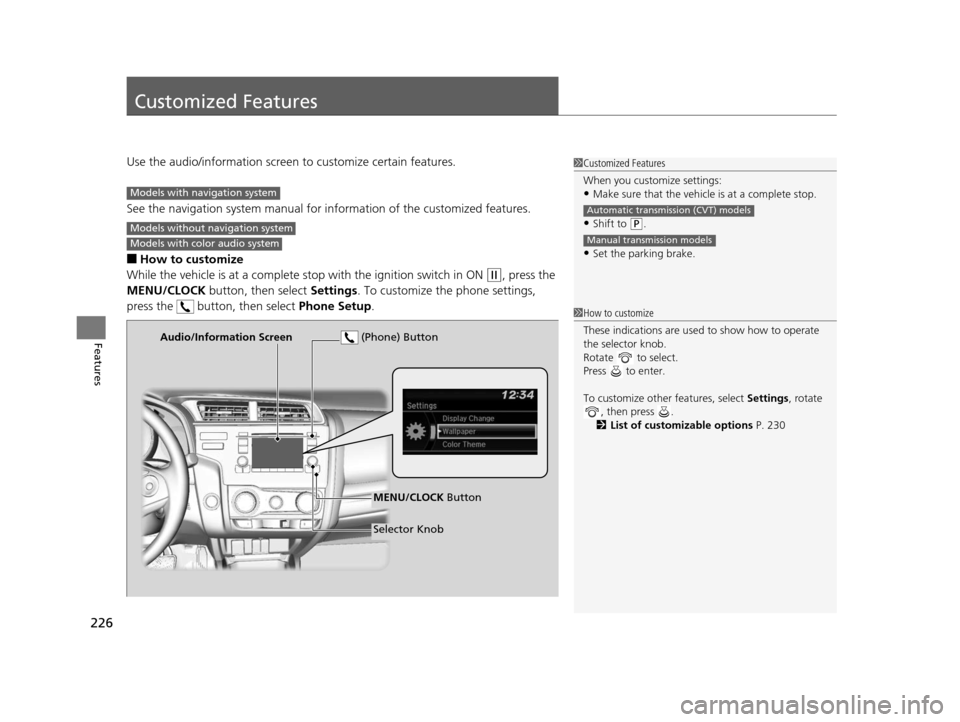
■How to customize
While the vehicle is at a complete stop with the igniti on switch in ON
(w, press the
MENU/CLOCK button, then select Settings. To customize the phone settings,
press the button, then select Phone Setup.
1Customized Features
When you customize settings:
•Make sure that the vehicle is at a complete stop.
•Shift to (P.
•Set the parking brake.
Automatic transmission (CVT) models
Manual transmission models
Models with navigation system
Models without navigation system
Models with color audio system
1 How to customize
These indications are used to show how to operate
the selector knob.
Rotate to select.
Press to enter.
To customize other features, select Settings, rotate
, then press .
2 List of customizable options P. 230
Audio/Information Screen
MENU/CLOCK Button
Selector Knob
(Phone) Button
15 US FIT-31T5A6000.book 226 ページ 2014年3月6日 木曜日 午後7時5分
Page 234 of 453
Continued233
uuCustomized Features u
Features
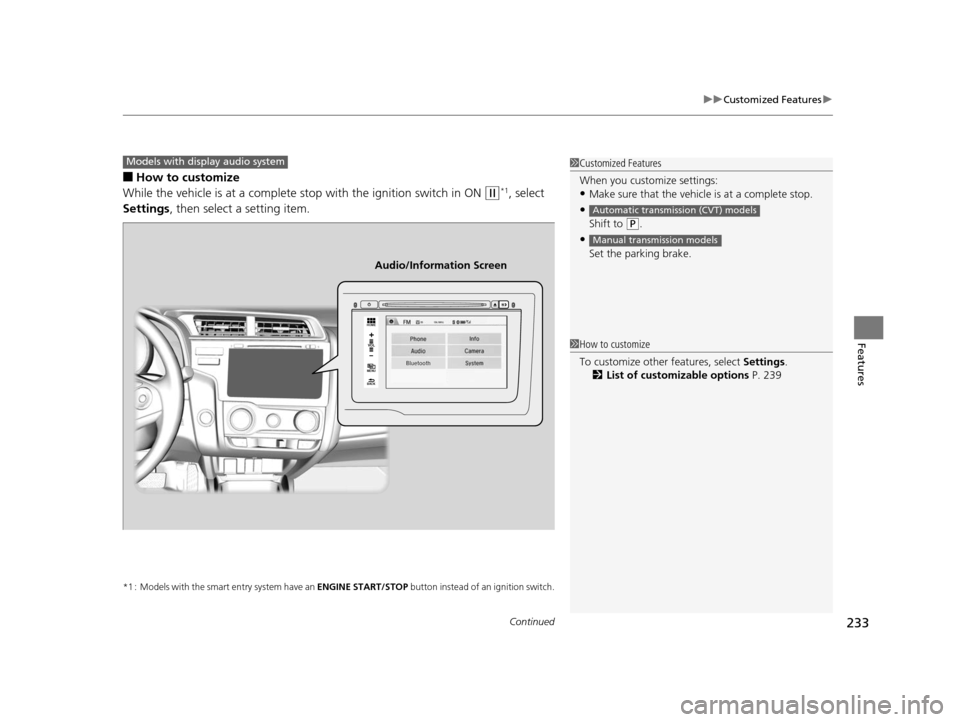
■How to customize
While the vehicle is at a complete st op with the ignition switch in ON
(w*1, select
Settings , then select a setting item.
*1 : Models with the smart entry system have an ENGINE START/STOP button instead of an ignition switch.
1Customized Features
When you customize settings:
•Make sure that the vehicle is at a complete stop.
•
Shift to (P.
•
Set the parking brake.
Automatic transmission (CVT) models
Manual transmission models
Models with display audio system
VOL
HOME
MENU
BACK
Audio/Information Screen
1 How to customize
To customize other features, select Settings.
2 List of customizable options P. 239
15 US FIT-31T5A6000.book 233 ページ 2014年3月6日 木曜日 午後7時5分