set clock HONDA FIT 2015 3.G Owner's Manual
[x] Cancel search | Manufacturer: HONDA, Model Year: 2015, Model line: FIT, Model: HONDA FIT 2015 3.GPages: 453, PDF Size: 21.19 MB
Page 227 of 453
226
Features
Customized Features
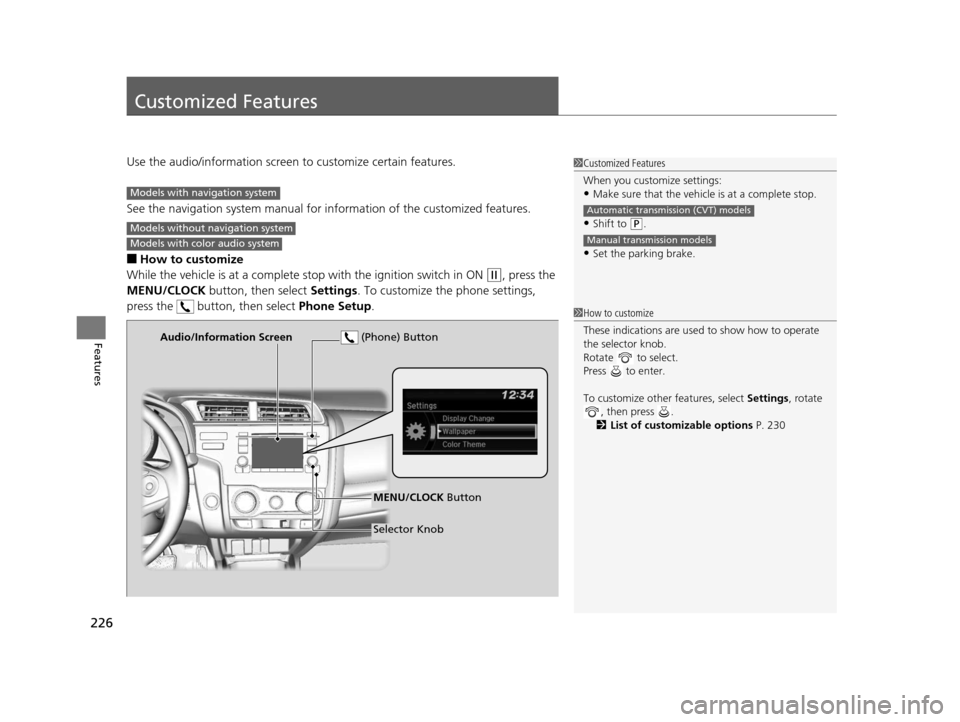
Use the audio/information screen to customize certain features.
See the navigation system ma nual for information of the customized features.
■How to customize
While the vehicle is at a complete stop with the igniti on switch in ON
(w, press the
MENU/CLOCK button, then select Settings. To customize the phone settings,
press the button, then select Phone Setup.
1Customized Features
When you customize settings:
•Make sure that the vehicle is at a complete stop.
•Shift to (P.
•Set the parking brake.
Automatic transmission (CVT) models
Manual transmission models
Models with navigation system
Models without navigation system
Models with color audio system
1 How to customize
These indications are used to show how to operate
the selector knob.
Rotate to select.
Press to enter.
To customize other features, select Settings, rotate
, then press .
2 List of customizable options P. 230
Audio/Information Screen
MENU/CLOCK Button
Selector Knob
(Phone) Button
15 US FIT-31T5A6000.book 226 ページ 2014年3月6日 木曜日 午後7時5分
Page 228 of 453
227
uuCustomized Features u
Continued
Features
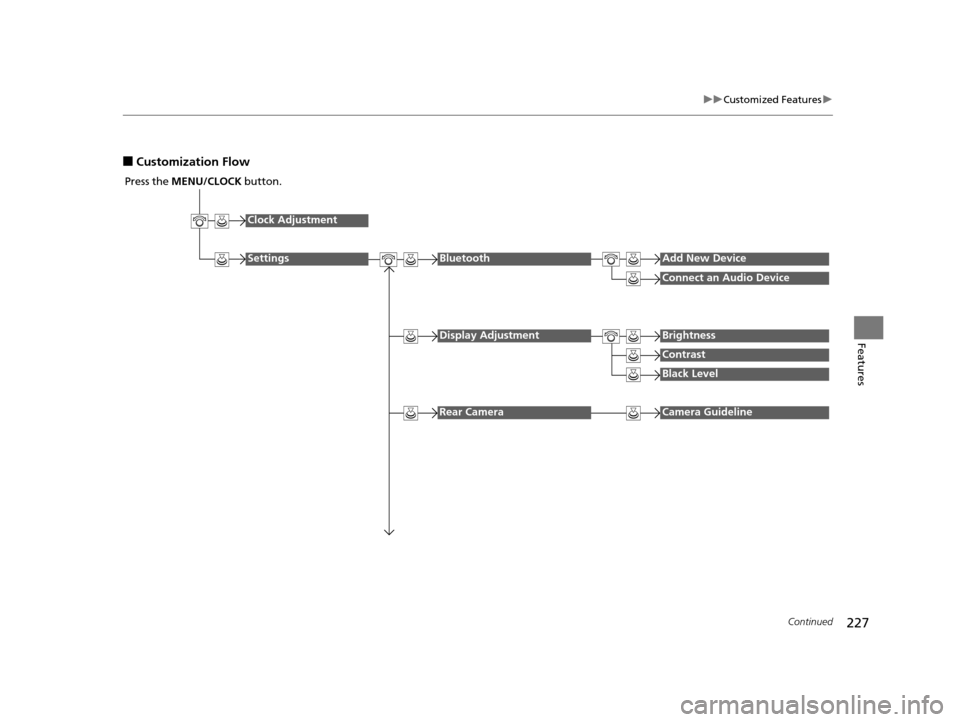
■Customization Flow
Press the MENU/CLOCK button.
Clock Adjustment
SettingsBluetoothAdd New Device
Connect an Audio Device
Display AdjustmentBrightness
Contrast
Black Level
Rear CameraCamera Guideline
15 US FIT-31T5A6000.book 227 ページ 2014年3月6日 木曜日 午後7時5分
Page 231 of 453
230
uuCustomized Features u
Features
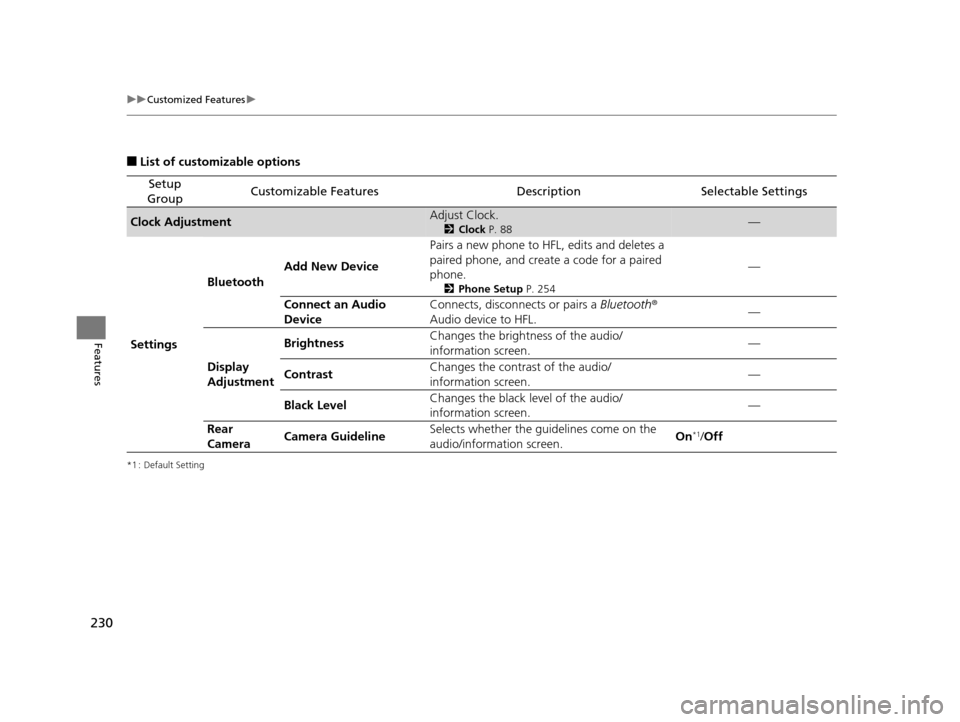
■List of customizable options
*1 : Default Setting
Setup
GroupCustomizable FeaturesDescriptionSelectable Settings
Clock AdjustmentAdjust Clock.
2 Clock P. 88—
Settings Bluetooth
Add New Device Pairs a new phone to HFL, edits and deletes a
paired phone, and create a code for a paired
phone.
2
Phone Setup P. 254
—
Connect an Audio
Device Connects, disconnects or pairs a
Bluetooth®
Audio device to HFL. —
Display
Adjustment Brightness
Changes the brightness of the audio/
information screen.
—
Contrast Changes the contrast of the audio/
information screen. —
Black Level Changes the black level of the audio/
information screen. —
Rear
Camera Camera Guideline Selects whether the guidelines come on the
audio/information screen.
On
*1/
Off
15 US FIT-31T5A6000.book 230 ページ 2014年3月6日 木曜日 午後7時5分
Page 232 of 453
231
uuCustomized Features u
Continued
Features
*1 : Default Setting
Setup
GroupCustomizable FeaturesDescriptionSelectable Settings
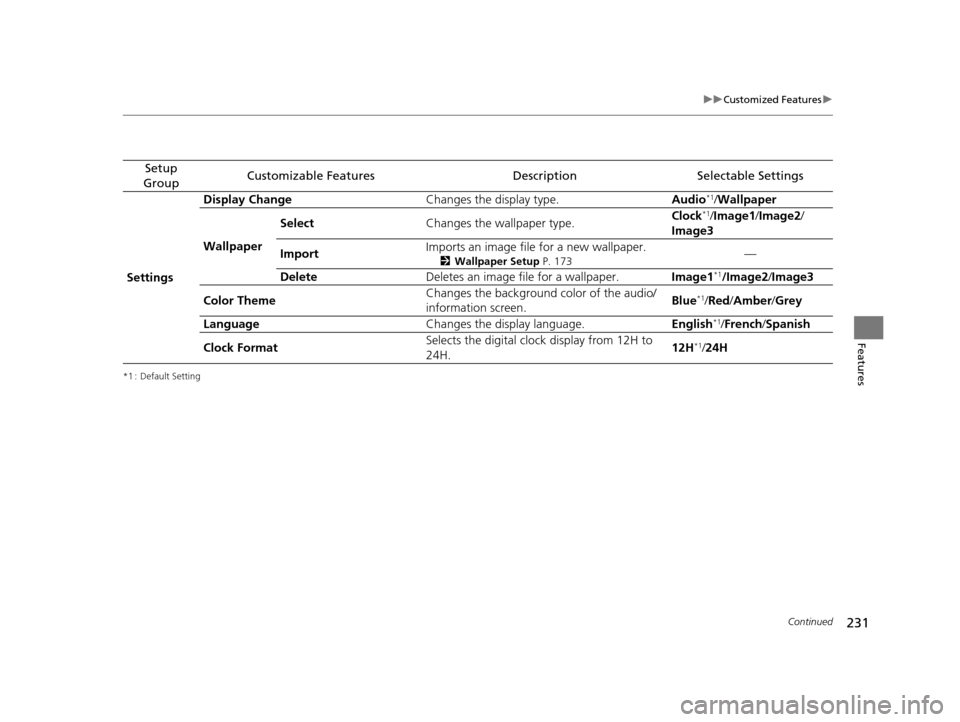
Settings Display Change
Changes the display type. Audio
*1/Wallpaper
Wallpaper Select
Changes the wallpaper type. Clock*1/
Image1 /Image2/
Image3
Import Imports an image file for a new wallpaper.
2
Wallpaper Setup P. 173—
Delete Deletes an image file for a wallpaper. Image1
*1/Image2/Image3
Color Theme Changes the background color of the audio/
information screen.
Blue
*1/
Red /Amber /Grey
Language Changes the display language. English
*1/French /Spanish
Clock Format Selects the digital clock display from 12H to
24H. 12H
*1/
24H
15 US FIT-31T5A6000.book 231 ページ 2014年3月6日 木曜日 午後7時5分
Page 235 of 453
234
uuCustomized Features u
Features
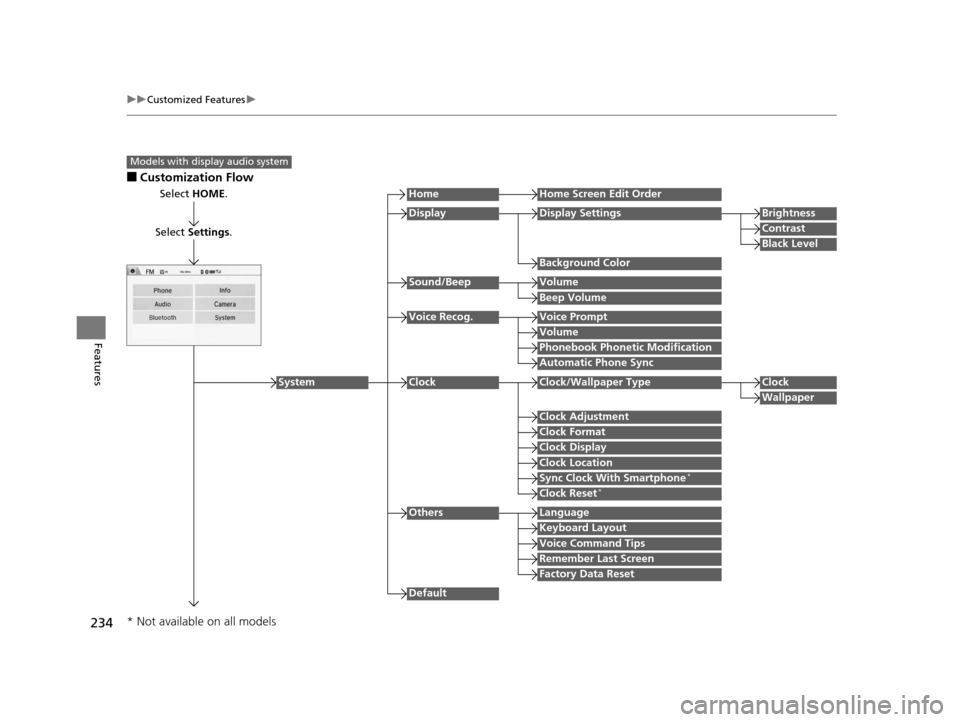
■Customization Flow
Models with display audio system
Select HOME.
Select Settings .
HomeHome Screen Edit Order
Background Color
DisplayDisplay SettingsBrightness
Contrast
Black Level
Beep Volume
Sound/BeepVolume
Volume
Voice Recog.Voice Prompt
Automatic Phone Sync
Phonebook Phonetic Modification
Default
Factory Data Reset
Clock Format
ClockClock/Wallpaper TypeClock
Wallpaper
Clock Adjustment
Clock Display
Clock Location
Sync Clock With Smartphone*
Clock Reset*
Keyboard Layout
OthersLanguage
Remember Last Screen
Voice Command Tips
System
* Not available on all models
15 US FIT-31T5A6000.book 234 ページ 2014年3月6日 木曜日 午後7時5分
Page 237 of 453
236
uuCustomized Features u
Features
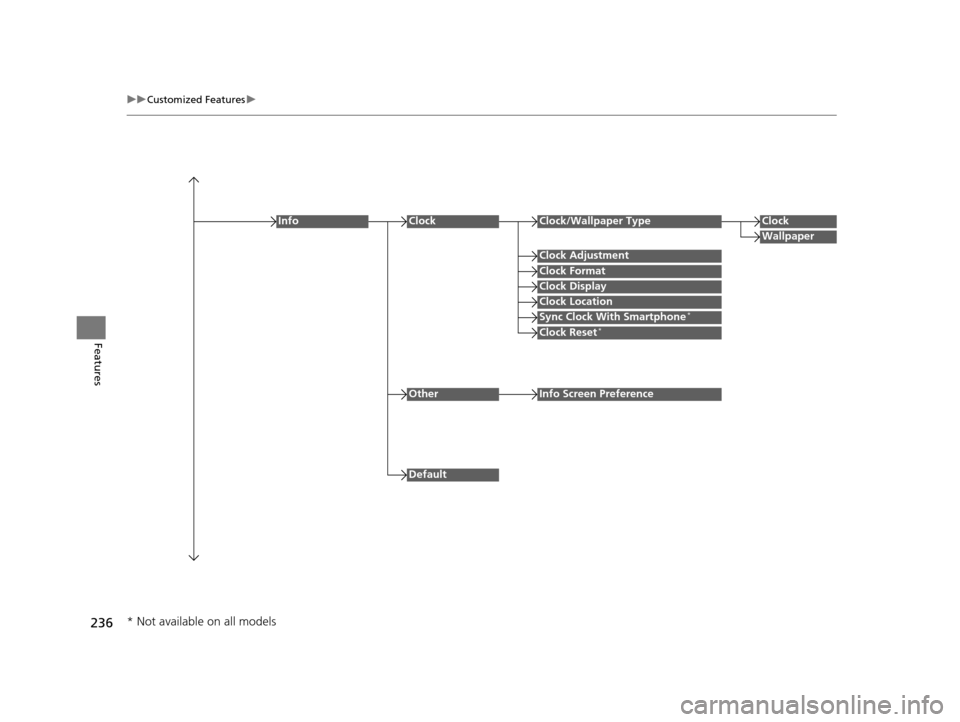
Clock Format
ClockClock/Wallpaper TypeClock
Wallpaper
Clock Adjustment
Clock Display
Clock Location
Sync Clock With Smartphone*
Clock Reset*
Info
Default
OtherInfo Screen Preference
* Not available on all models
15 US FIT-31T5A6000.book 236 ページ 2014年3月6日 木曜日 午後7時5分
Page 241 of 453
240
uuCustomized Features u
Features
*1 : Default Setting
Setup
GroupCustomizable FeaturesDescriptionSelectable Settings
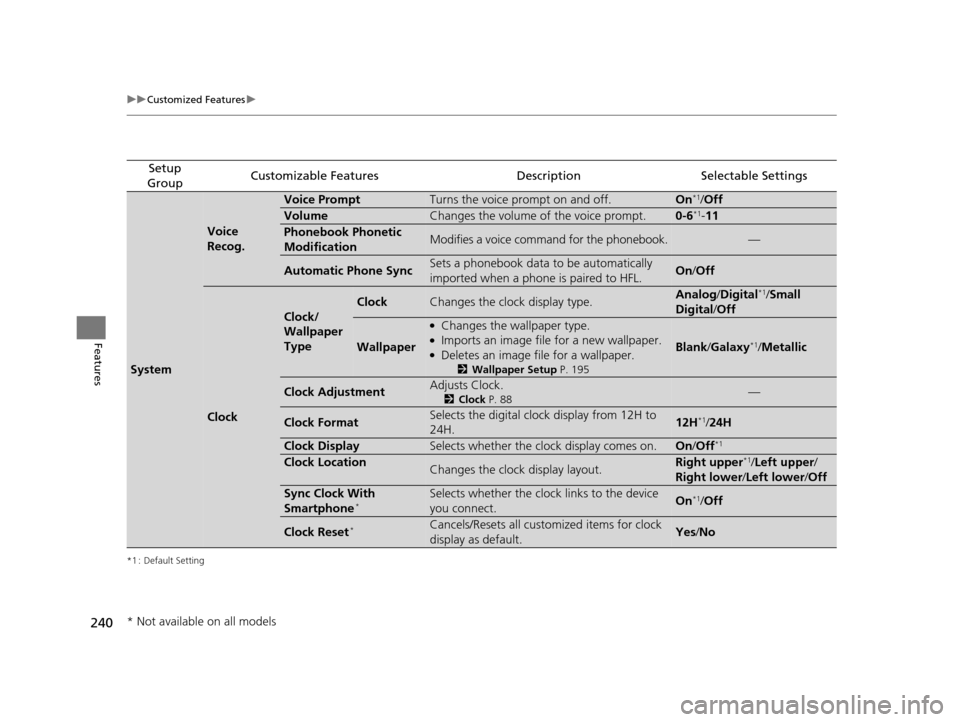
System
Voice
Recog.
Voice PromptTurns the voice prompt on and off.On*1/ Off
VolumeChanges the volume of the voice prompt.0-6*1- 11
Phonebook Phonetic
ModificationModifies a voice command for the phonebook.—
Automatic Phone SyncSets a phonebook data to be automatically
imported when a phone is paired to HFL.On /Off
Clock
Clock/
Wallpaper
Type
ClockChanges the clock display type.Analog /Digital*1/Small
Digital /Off
Wallpaper
●Changes the wallpaper type.●Imports an image file for a new wallpaper.●Deletes an image file for a wallpaper.
2 Wallpaper Setup P. 195
Blank/Galaxy*1/ Metallic
Clock AdjustmentAdjusts Clock.
2 Clock P. 88—
Clock FormatSelects the digital clock display from 12H to
24H.12H*1/24H
Clock DisplaySelects whether the clock display comes on.On /Off*1
Clock LocationChanges the clock display layout.Right upper*1/Left upper /
Right lower /Left lower /Off
Sync Clock With
Smartphone*Selects whether the clock links to the device
you connect. On*1/Off
Clock Reset*Cancels/Resets all customized items for clock
display as default.Yes /No
* Not available on all models
15 US FIT-31T5A6000.book 240 ページ 2014年3月6日 木曜日 午後7時5分
Page 244 of 453
243
uuCustomized Features u
Continued
Features
*1 : Default Setting
Setup
GroupCustomizable FeaturesDescriptionSelectable Settings
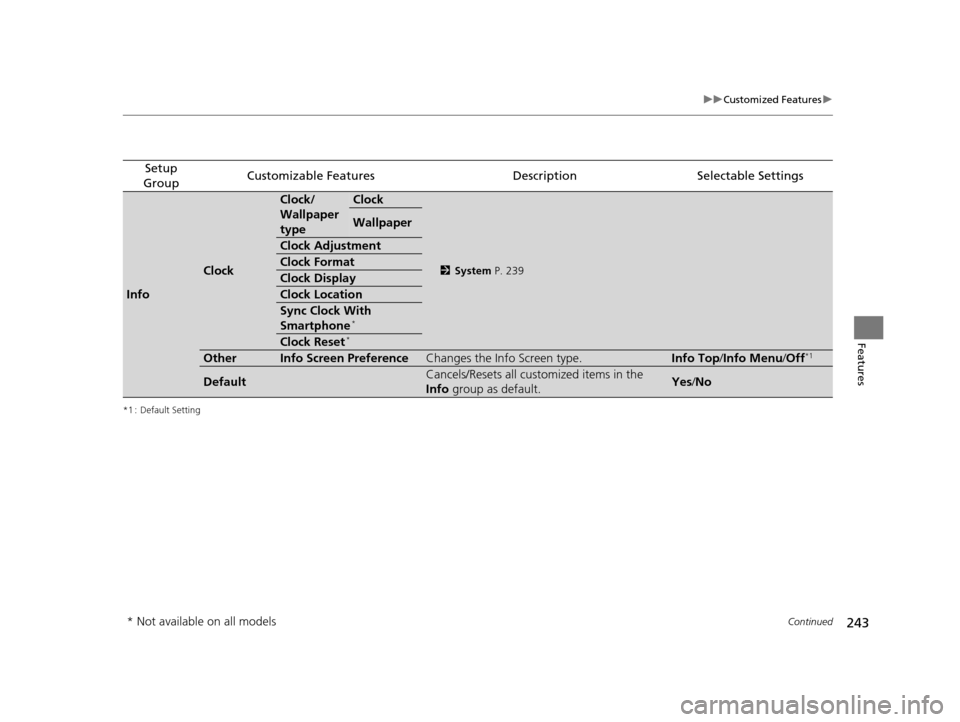
Info
Clock
Clock/
Wallpaper
typeClock
2 System P. 239
Wallpaper
Clock Adjustment
Clock Format
Clock Display
Clock Location
Sync Clock With
Smartphone*
Clock Reset*
OtherInfo Screen PreferenceChanges the Info Screen type.Info Top /Info Menu/ Off*1
DefaultCancels/Resets all customized items in the
Info group as default.Yes/No
* Not available on all models
15 US FIT-31T5A6000.book 243 ページ 2014年3月6日 木曜日 午後7時5分
Page 394 of 453
393
Maintenance
Battery
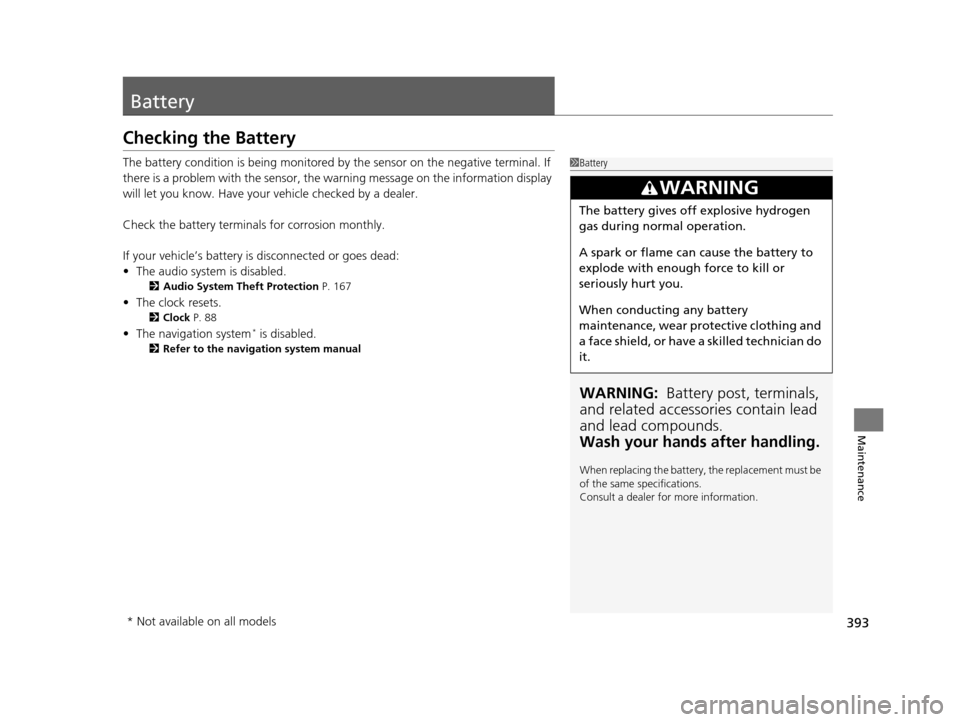
Checking the Battery
The battery condition is being monitored by the sensor on the negative terminal. If
there is a problem with the sensor, the warning message on the information display
will let you know. Have your vehicle checked by a dealer.
Check the battery terminals for corrosion monthly.
If your vehicle’s battery is disconnected or goes dead:
• The audio system is disabled.
2 Audio System Theft Protection P. 167
•The clock resets.
2 Clock P. 88
•The navigation system* is disabled.
2 Refer to the navigation system manual
1Battery
WARNING: Battery post, terminals,
and related accessories contain lead
and lead compounds.
Wash your hands after handling.
When replacing the battery, the replacement must be
of the same specifications.
Consult a dealer for more information.
3WARNING
The battery gives off explosive hydrogen
gas during normal operation.
A spark or flame can cause the battery to
explode with enough force to kill or
seriously hurt you.
When conducting any battery
maintenance, wear prot ective clothing and
a face shield, or have a skilled technician do
it.
* Not available on all models
15 US FIT-31T5A6000.book 393 ページ 2014年3月6日 木曜日 午後7時5分
Page 447 of 453
446
Index
Indicator ............................................ 70, 421
Parking Brake .......................................... 340
Brake System Indicator ............................... 70
Brightness Control (Instrument Panel) .... 128
Bulb Replacement ..................................... 373
Back-Up Light and Rear Turn Signal
Lights..................................................... 377
Brake/Tail/Rear Side Marker Lights ........... 378
Fog Lights ................................................ 375
Headlights ............................................... 373
High-Mount Brake Light .......................... 378
Rear License Plate Light............................ 379
Side Turn Signal, Emergency Indicator Lights..................................................... 376
Bulb Specifications .................................... 432
C
Carbon Monoxide Gas ................................ 66
Cargo Area Cover ..................................... 152
Cargo Floor Box ........................................ 148
Carrying Cargo .................................. 303, 305
CD Player ................................................... 179
Certification Label .................................... 434
Changing Bulbs ......................................... 373
Charging System Indicator ................. 71, 419
Child Safety ................................................. 54
Childproof Door Locks ............................. 102
Child Seat .................................................... 54
Booster Seats ............................................. 65
Child Seat for Infants ................................. 56 Child Seat for Small Children ..................... 57
Installing a Child Seat with a Lap/Shoulder
Seat Belt .................................................. 61
Larger Children ......................................... 64
Rear-facing Child Seat ............................... 56
Selecting a Child Seat ................................ 58
Childproof Door Locks ............................. 102
Cleaning the Exterior ............................... 400
Cleaning the Interior ................................ 398
Climate Control System ............................ 157
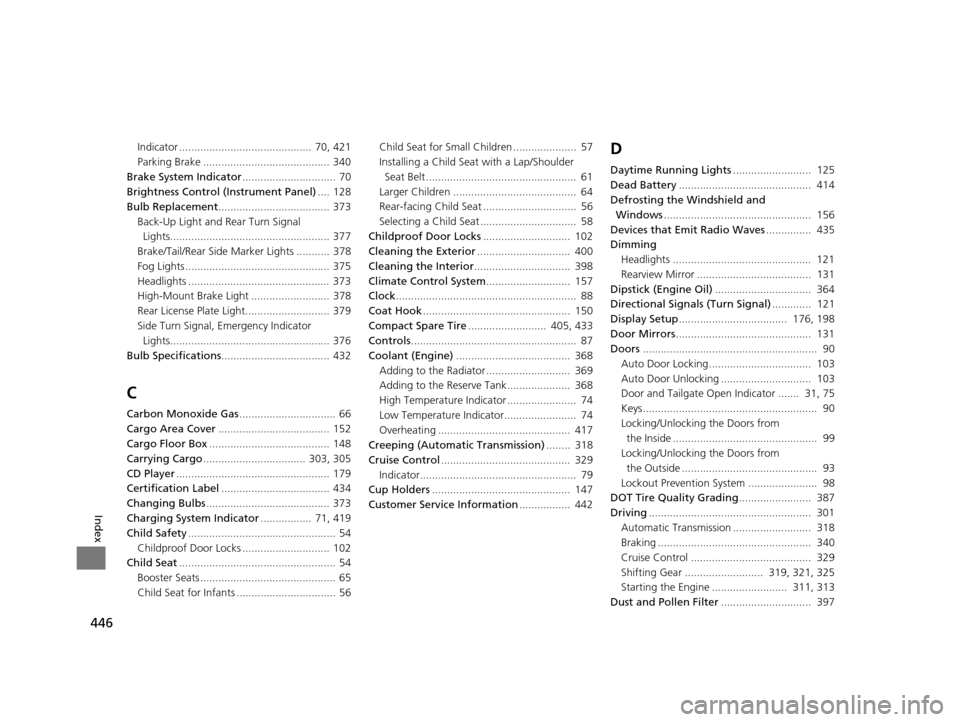
Clock ............................................................ 88
Coat Hook ................................................. 150
Compact Spare Tire .......................... 405, 433
Controls ....................................................... 87
Coolant (Engine) ...................................... 368
Adding to the Radiator ............................ 369
Adding to the Reserve Tank..................... 368
High Temperature Indicator ....................... 74
Low Temperature Indicator........................ 74
Overheating ............................................ 417
Creeping (Automatic Transmission) ........ 318
Cruise Control ........................................... 329
Indicator.................................................... 79
Cup Holders .............................................. 147
Customer Service Information ................. 442
D
Daytime Running Lights.......................... 125
Dead Battery ............................................ 414
Defrosting the Windshield and Windows ................................................. 156
Devices that Emit Radio Waves ............... 435
Dimming Headlights .............................................. 121
Rearview Mirror ...................................... 131
Dipstick (Engine Oil) ................................ 364
Directional Signals (Turn Signal) ............. 121
Display Setup .................................... 176, 198
Door Mirrors ............................................. 131
Doors .......................................................... 90
Auto Door Locking.................................. 103
Auto Door Unlocking .............................. 103
Door and Tailgate Open Indicator ....... 31, 75
Keys.......................................................... 90
Locking/Unlocking the Doors from the Inside ................................................ 99
Locking/Unlocking the Doors from the Outside ............................................. 93
Lockout Prevention System ....................... 98
DOT Tire Quality Grading ........................ 387
Driving ...................................................... 301
Automatic Transmission .......................... 318
Braking ................................................... 340
Cruise Control ........................................ 329
Shifting Gear .......................... 319, 321, 325
Starting the Engine ......................... 311, 313
Dust and Pollen Filter .............................. 397
15 US FIT-31T5A6000.book 446 ページ 2014年3月6日 木曜日 午後7時5分