eco HONDA FIT 2015 3.G Manual Online
[x] Cancel search | Manufacturer: HONDA, Model Year: 2015, Model line: FIT, Model: HONDA FIT 2015 3.GPages: 453, PDF Size: 21.19 MB
Page 235 of 453
234
uuCustomized Features u
Features
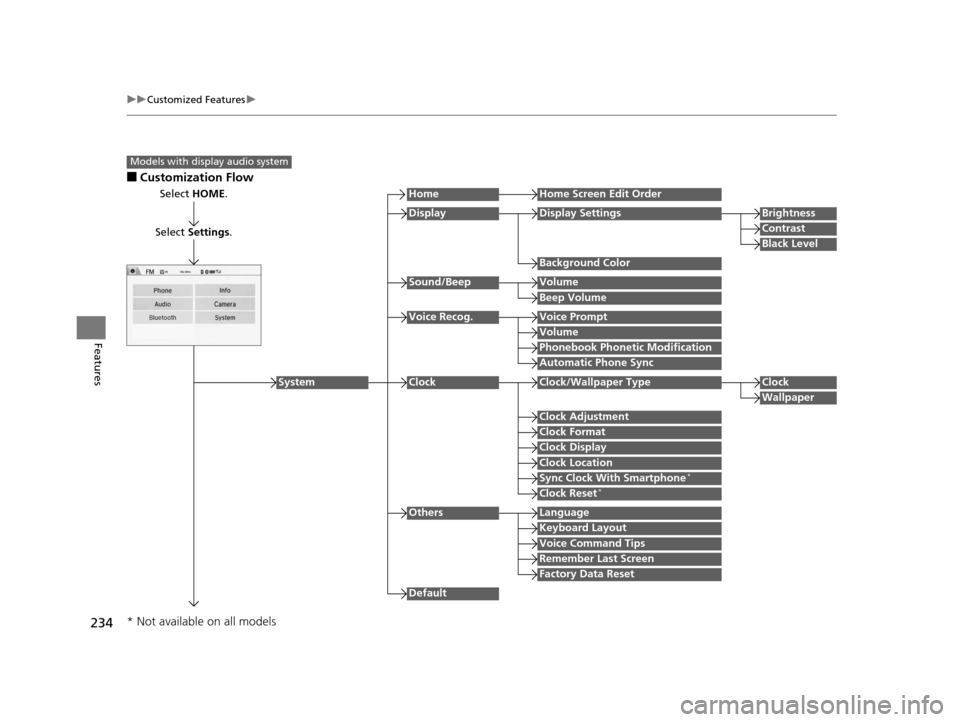
■Customization Flow
Models with display audio system
Select HOME.
Select Settings .
HomeHome Screen Edit Order
Background Color
DisplayDisplay SettingsBrightness
Contrast
Black Level
Beep Volume
Sound/BeepVolume
Volume
Voice Recog.Voice Prompt
Automatic Phone Sync
Phonebook Phonetic Modification
Default
Factory Data Reset
Clock Format
ClockClock/Wallpaper TypeClock
Wallpaper
Clock Adjustment
Clock Display
Clock Location
Sync Clock With Smartphone*
Clock Reset*
Keyboard Layout
OthersLanguage
Remember Last Screen
Voice Command Tips
System
* Not available on all models
15 US FIT-31T5A6000.book 234 ページ 2014年3月6日 木曜日 午後7時5分
Page 238 of 453
237
uuCustomized Features u
Continued
Features
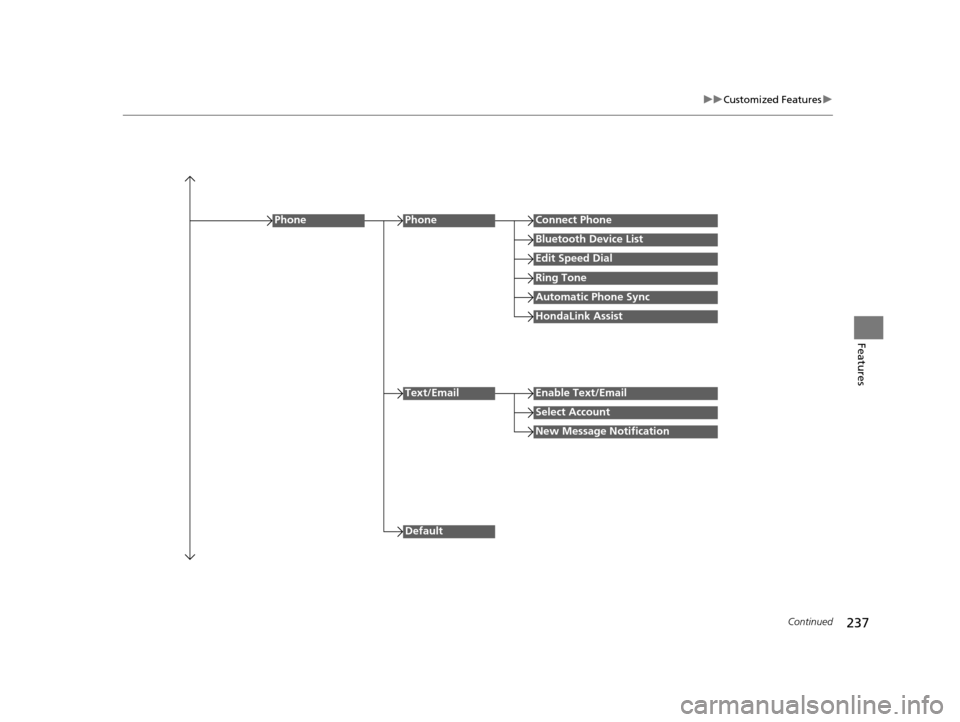
Edit Speed Dial
PhoneConnect Phone
Bluetooth Device List
Ring Tone
Automatic Phone Sync
HondaLink Assist
Phone
Default
Text/EmailEnable Text/Email
Select Account
New Message Notification
15 US FIT-31T5A6000.book 237 ページ 2014年3月6日 木曜日 午後7時5分
Page 241 of 453
240
uuCustomized Features u
Features
*1 : Default Setting
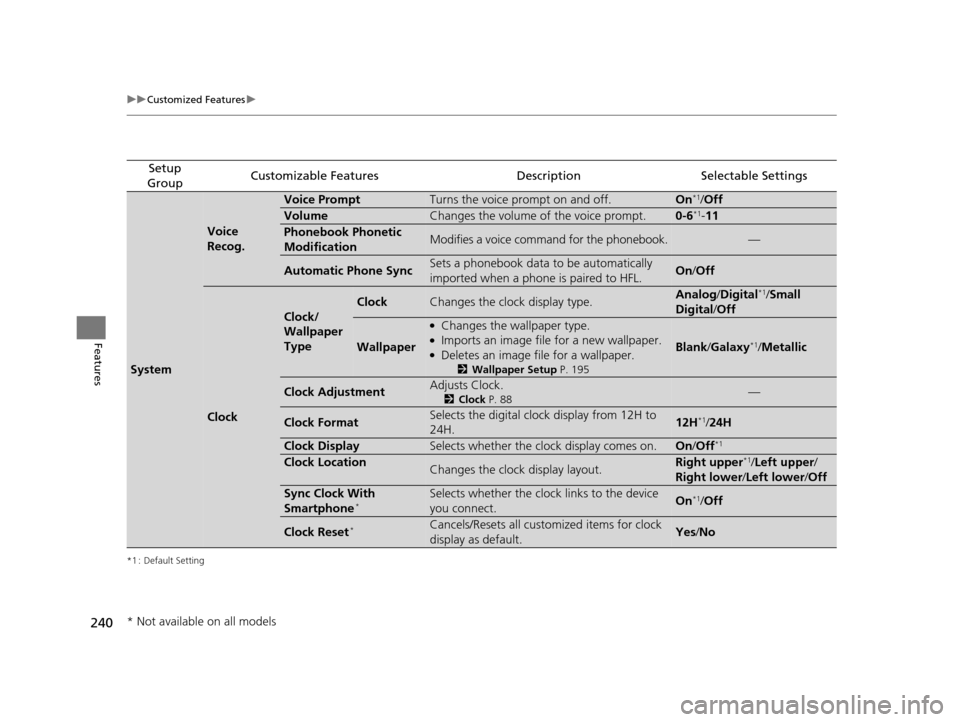
Setup
GroupCustomizable FeaturesDescriptionSelectable Settings
System
Voice
Recog.
Voice PromptTurns the voice prompt on and off.On*1/ Off
VolumeChanges the volume of the voice prompt.0-6*1- 11
Phonebook Phonetic
ModificationModifies a voice command for the phonebook.—
Automatic Phone SyncSets a phonebook data to be automatically
imported when a phone is paired to HFL.On /Off
Clock
Clock/
Wallpaper
Type
ClockChanges the clock display type.Analog /Digital*1/Small
Digital /Off
Wallpaper
●Changes the wallpaper type.●Imports an image file for a new wallpaper.●Deletes an image file for a wallpaper.
2 Wallpaper Setup P. 195
Blank/Galaxy*1/ Metallic
Clock AdjustmentAdjusts Clock.
2 Clock P. 88—
Clock FormatSelects the digital clock display from 12H to
24H.12H*1/24H
Clock DisplaySelects whether the clock display comes on.On /Off*1
Clock LocationChanges the clock display layout.Right upper*1/Left upper /
Right lower /Left lower /Off
Sync Clock With
Smartphone*Selects whether the clock links to the device
you connect. On*1/Off
Clock Reset*Cancels/Resets all customized items for clock
display as default.Yes /No
* Not available on all models
15 US FIT-31T5A6000.book 240 ページ 2014年3月6日 木曜日 午後7時5分
Page 245 of 453
244
uuCustomized Features u
Features
*1 : Default Setting
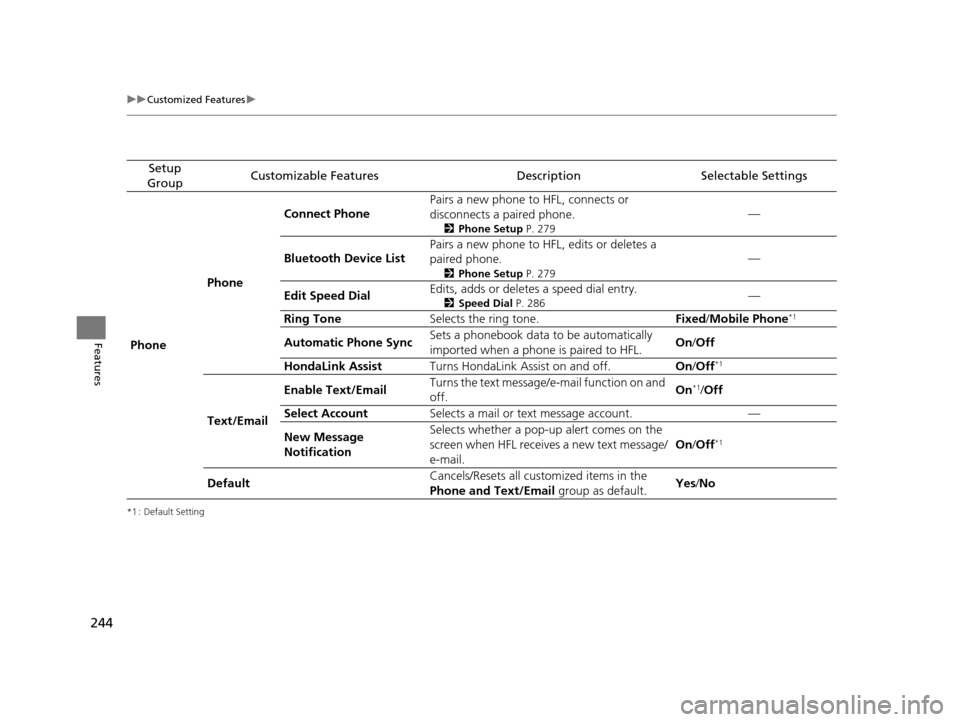
Setup
GroupCustomizable FeaturesDescriptionSelectable Settings
Phone PhoneConnect Phone
Pairs a new phone to HFL, connects or
disconnects a paired phone.
2
Phone Setup P. 279
—
Bluetooth Device List Pairs a new phone to HFL, edits or deletes a
paired phone.
2
Phone Setup P. 279
—
Edit Speed Dial Edits, adds or deletes a speed dial entry.
2
Speed Dial P. 286—
Ring Tone Selects the ring tone. Fixed/Mobile Phone
*1
Automatic Phone Sync Sets a phonebook data to be automatically
imported when a phone is paired to HFL. On
/Off
HondaLink Assist Turns HondaLink Assist on and off. On/Off
*1
Text/Email Enable Text/Email
Turns the text message/
e-mail function on and
off. On
*1/
Off
Select Account Selects a mail or text message account. —
New Message
Notification Selects whether a pop-up
alert comes on the
screen when HFL receives a new text message/
e-mail. On
/Off
*1
Default Cancels/Resets all customized items in the
Phone and Text/Email
group as default.Yes
/No
15 US FIT-31T5A6000.book 244 ページ 2014年3月6日 木曜日 午後7時5分
Page 246 of 453
245
uuCustomized Features u
Continued
Features
*1 : Default Setting
Setup
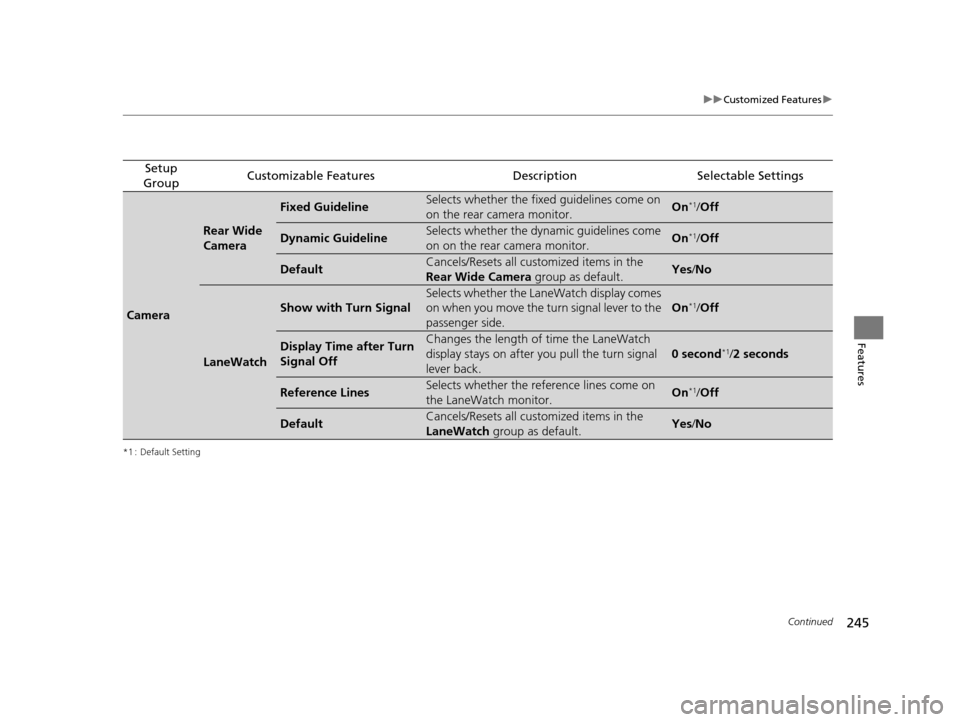
GroupCustomizable FeaturesDescriptionSelectable Settings
Camera
Rear Wide
Camera
Fixed GuidelineSelects whether the fixed guidelines come on
on the rear camera monitor.On*1/ Off
Dynamic GuidelineSelects whether the dyna mic guidelines come
on on the rear camera monitor.On*1/ Off
DefaultCancels/Resets all customized items in the
Rear Wide Camera group as default.Yes/No
LaneWatch
Show with Turn Signal
Selects whether the LaneWatch display comes
on when you move the turn signal lever to the
passenger side.
On*1/ Off
Display Time after Turn
Signal OffChanges the length of time the LaneWatch
display stays on after you pull the turn signal
lever back.
0 second*1/2 seconds
Reference LinesSelects whether the reference lines come on
the LaneWatch monitor.On*1/ Off
DefaultCancels/Resets all customized items in the
LaneWatch group as default.Yes/No
15 US FIT-31T5A6000.book 245 ページ 2014年3月6日 木曜日 午後7時5分
Page 275 of 453
274
uuBluetooth ® HandsFreeLink ®u HFL Menus
Features
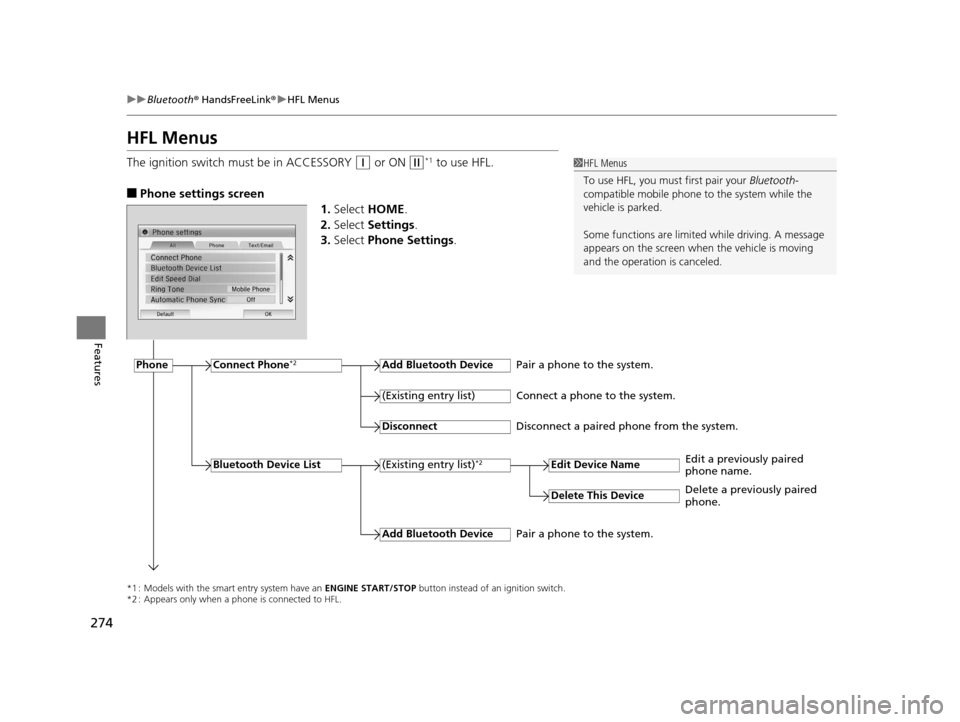
HFL Menus
The ignition switch must be in ACCESSORY (q or ON (w*1 to use HFL.
■Phone settings screen
1.Select HOME .
2. Select Settings .
3. Select Phone Settings.
1HFL Menus
To use HFL, you must first pair your Bluetooth-
compatible mobile phone to the system while the
vehicle is parked.
Some functions are limited while driving. A message
appears on the screen when the vehicle is moving
and the operation is canceled.
*1 : Models with the smart entry system have an ENGINE START/STOP button instead of an ignition switch.
*2 : Appears only when a phone is connected to HFL.
PhoneConnect Phone*2Add Bluetooth Device
(Existing entry list)*2
(Existing entry list)
Disconnect
Edit Device Name
Add Bluetooth Device
Bluetooth Device List
Delete This Device
Pair a phone to the system.
Connect a phone to the system.
Disconnect a paired phone from the system.
Edit a previously paired
phone name.
Pair a phone to the system. Delete a previously paired
phone.
15 US FIT-31T5A6000.book 274 ページ 2014年3月6日 木曜日 午後7時5分
Page 287 of 453
uuBluetooth ® HandsFreeLink ®u HFL Menus
286
Features
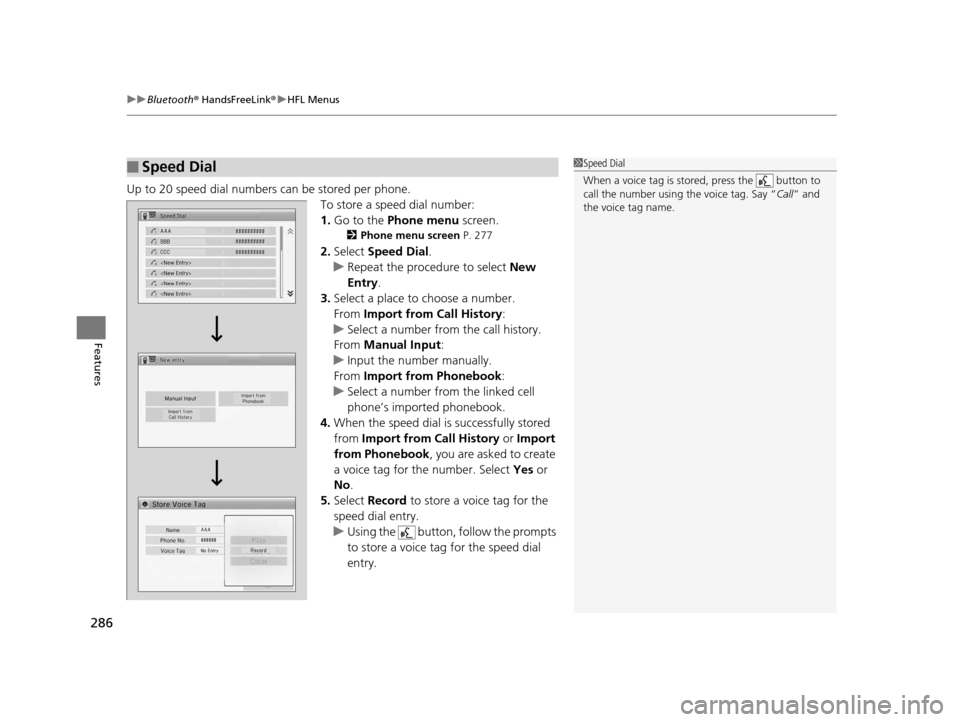
Up to 20 speed dial numbers can be stored per phone.
To store a speed dial number:
1.Go to the Phone menu screen.
2Phone menu screen P. 277
2.Select Speed Dial .
u Repeat the procedure to select New
Entry .
3. Select a place to choose a number.
From Import from Call History:
u Select a number from the call history.
From Manual Input :
u Input the number manually.
From Import from Phonebook :
u Select a number from the linked cell
phone’s imported phonebook.
4. When the speed dial is successfully stored
from Import from Call History or Import
from Phonebook , you are asked to create
a voice tag for the number. Select Yes or
No .
5. Select Record to store a voice tag for the
speed dial entry.
u Using the button, follow the prompts
to store a voice tag for the speed dial
entry.
■Speed Dial1 Speed Dial
When a voice tag is stored, press the button to
call the number using the voice tag. Say “ Call” and
the voice tag name.
15 US FIT-31T5A6000.book 286 ページ 2014年3月6日 木曜日 午後7時5分
Page 288 of 453
Continued287
uuBluetooth ® HandsFreeLink ®u HFL Menus
Features
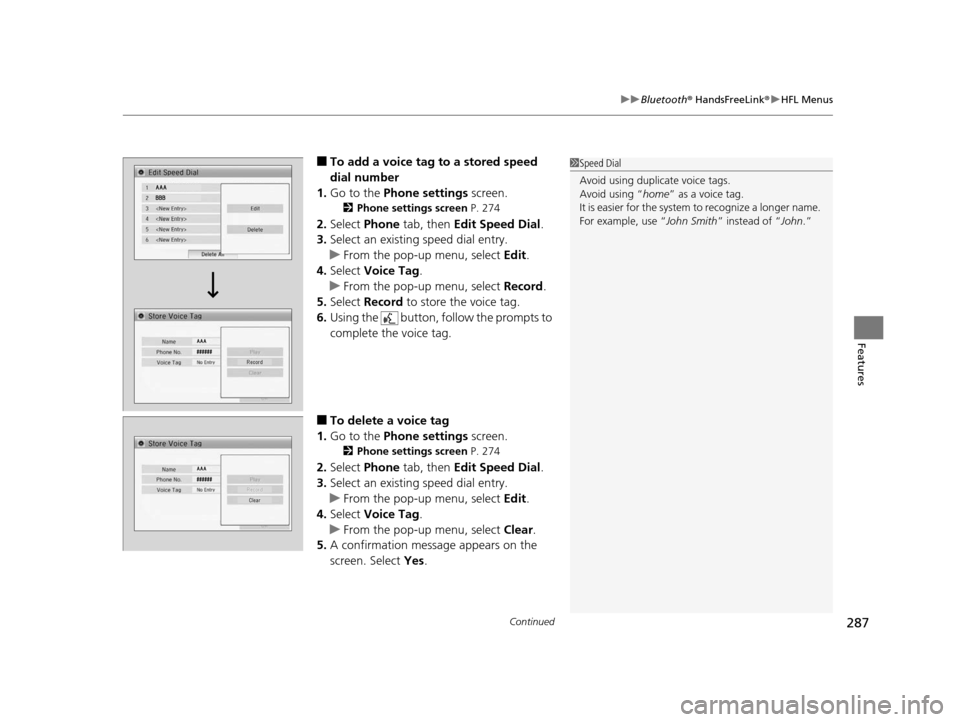
■To add a voice tag to a stored speed
dial number
1. Go to the Phone settings screen.
2Phone settings screen P. 274
2.Select Phone tab, then Edit Speed Dial.
3. Select an existing speed dial entry.
u From the pop-up menu, select Edit.
4. Select Voice Tag .
u From the pop-up menu, select Record.
5. Select Record to store the voice tag.
6. Using the button, follow the prompts to
complete the voice tag.
■To delete a voice tag
1. Go to the Phone settings screen.
2Phone settings screen P. 274
2.Select Phone tab, then Edit Speed Dial.
3. Select an existing speed dial entry.
u From the pop-up menu, select Edit.
4. Select Voice Tag .
u From the pop-up menu, select Clear.
5. A confirmation message appears on the
screen. Select Yes.
1Speed Dial
Avoid using duplicate voice tags.
Avoid using “home ” as a voice tag.
It is easier for the system to recognize a longer name.
For example, use “ John Smith” instead of “John.”
15 US FIT-31T5A6000.book 287 ページ 2014年3月6日 木曜日 午後7時5分
Page 302 of 453
301
Driving
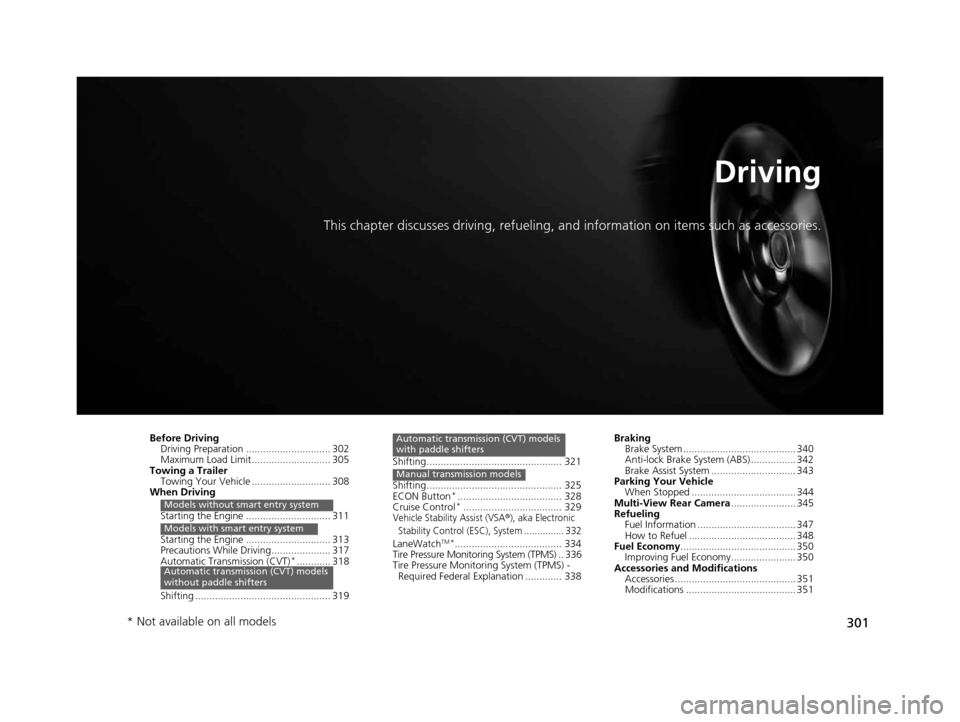
This chapter discusses driving, refueling, and information on items such as accessories.
Before Driving
Driving Preparation .............................. 302
Maximum Load Limit............................ 305
Towing a Trailer Towing Your Vehicle ............................ 308
When Driving
Starting the Engine .............................. 311
Starting the Engine .............................. 313
Precautions While Driving..................... 317
Automatic Transmission (CVT)
*............ 318
Shifting ................................................ 319
Models without smart entry system
Models with smart entry system
Automatic transmission (CVT) models
without paddle shifters
Shifting................................................ 321
Shifting................................................ 325
ECON Button
*..................................... 328
Cruise Control*................................... 329Vehicle Stability Assist (VSA®), aka Electronic
Stability Control (ESC), System ............... 332
LaneWatchTM*...................................... 334
Tire Pressure Monitoring System (TPMS) .. 336
Tire Pressure Monitoring System (TPMS) -
Required Federal Explanation ............. 338
Automatic transmission (CVT) models
with paddle shifters
Manual transmission models
Braking Brake System ........................................ 340
Anti-lock Brake System (ABS) ................ 342
Brake Assist System .............................. 343
Parking Your Vehicle When Stopped ..................................... 344
Multi-View Rear Camera ....................... 345
Refueling Fuel Information ................................... 347
How to Refuel ...................................... 348
Fuel Economy ......................................... 350
Improving Fuel Economy....................... 350
Accessories and Modifications Accessories ........................................... 351
Modifications ....................................... 351
* Not available on all models
15 US FIT-31T5A6000.book 301 ページ 2014年3月6日 木曜日 午後7時5分
Page 309 of 453
308
uuTowing a Trailer uTowing Your Vehicle
Driving
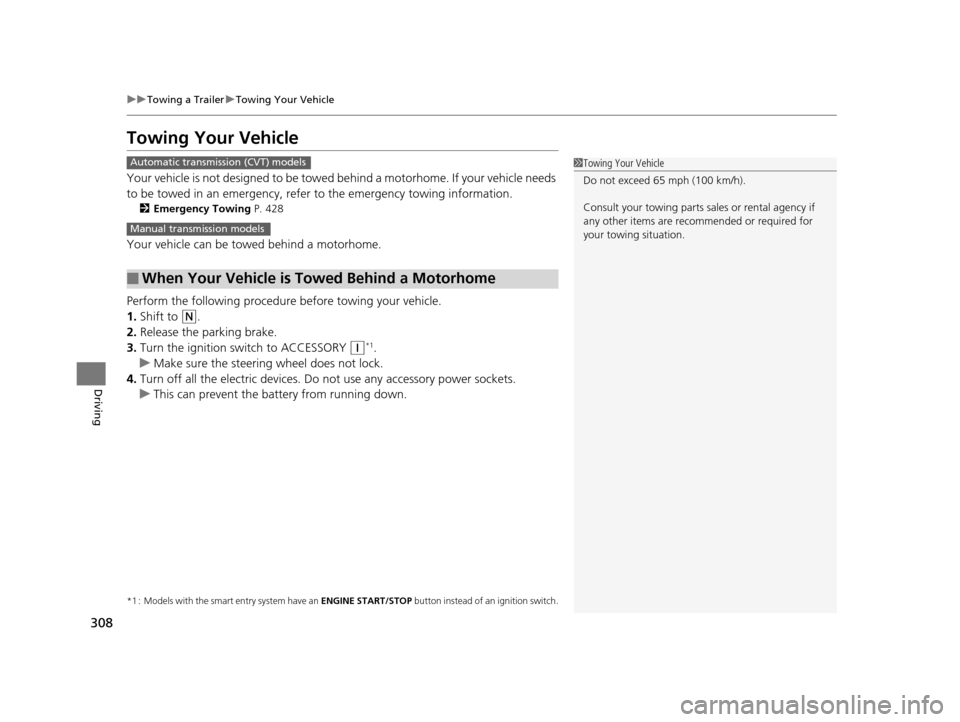
Towing Your Vehicle
Your vehicle is not designed to be towed be hind a motorhome. If your vehicle needs
to be towed in an emergency, refe r to the emergency towing information.
2Emergency Towing P. 428
Your vehicle can be towed behind a motorhome.
Perform the following procedure before towing your vehicle.
1. Shift to
(N.
2. Release the parking brake.
3. Turn the ignition switch to ACCESSORY
(q*1.
u Make sure the steering wheel does not lock.
4. Turn off all the electric devices. Do not use any accessory power sockets.
u This can prevent the battery from running down.
*1 : Models with the smart entry system have an ENGINE START/STOP button instead of an ignition switch.
■When Your Vehicle is Towed Behind a Motorhome
1Towing Your Vehicle
Do not exceed 65 mph (100 km/h).
Consult your towing parts sa les or rental agency if
any other items are recommended or required for
your towing situation.Automatic transmission (CVT) models
Manual transmission models
15 US FIT-31T5A6000.book 308 ページ 2014年3月6日 木曜日 午後7時5分