ECO mode HONDA FIT 2016 3.G Quick Guide
[x] Cancel search | Manufacturer: HONDA, Model Year: 2016, Model line: FIT, Model: HONDA FIT 2016 3.GPages: 75, PDF Size: 5.39 MB
Page 50 of 75
92 || 93
DRIVING
DRIVING
Vehicle Stability Assist (VSA ®
), aka Electronic Stability Control
(ESC) System
Helps to stabilize the vehicle during cornering if the vehicle turns more or less
than what was intended. It assists in maintaining traction on slippery surfaces by regulating engine output and selectively applying the brakes.
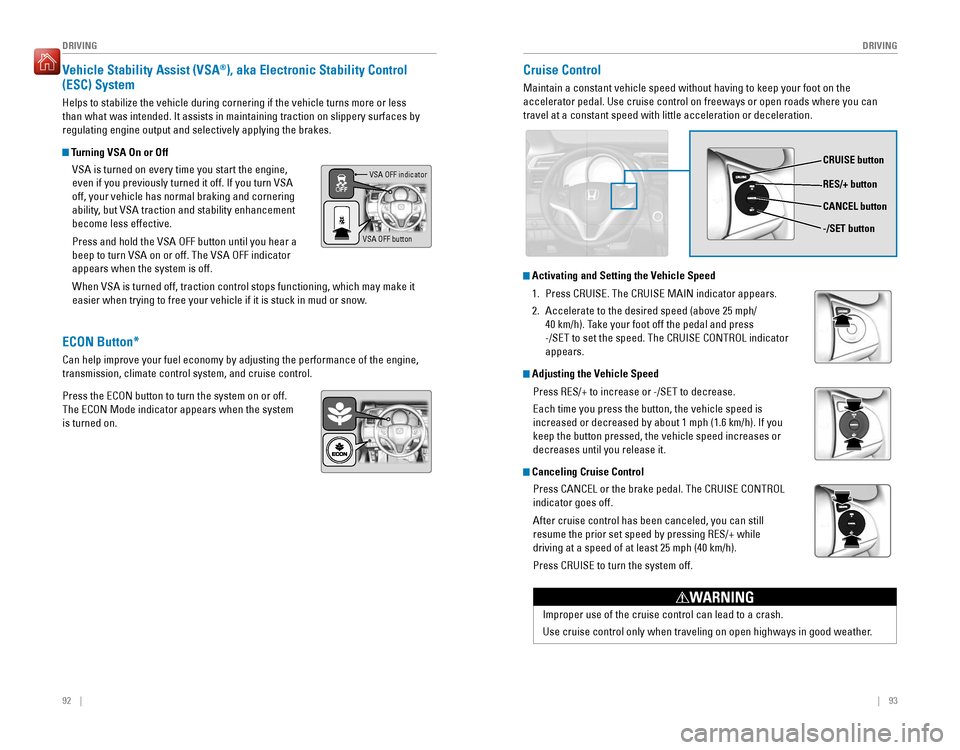
Turning VSA On or Off
VSA is turned on every time you start the engine,
even if you previously turned it off. If you turn VSA off, your vehicle has normal braking and cornering
ability, but VSA traction and stability enhancement become less effective. Press and hold the VSA OFF button until you hear a beep to turn VSA on or off. The VSA OFF indicator appears when the system is off. When VSA is turned off, traction control stops functioning, which may make it
easier when trying to free your vehicle if it is stuck in mud or snow.VSA OFF indicator
VSA OFF button
Cruise Control
Maintain a constant vehicle speed without having to keep your foot on the accelerator pedal. Use cruise control on freeways or open roads where you can travel at a constant speed with little acceleration or deceleration.
CRUISE button RES/+ button -/SET button
CANCEL button
Improper use of the cruise control can lead to a crash.
Use cruise control only when traveling on open highways in good weather.
WARNING
Activating and Setting the Vehicle Speed
1.
Press CRUISE. The CRUISE MAIN indicator appears.
2. Accelerate to the desired speed (above 25 mph/
40 km/h). Take your foot off the pedal and press
-/SET to set the speed. The CRUISE CONTROL indicator appears.
Adjusting the Vehicle Speed
Press RES/+ to increase or -/SET to decrease. Each time you press the button, the vehicle speed is increased or decreased by about 1 mph (1.6 km/h). If you keep the button pressed, the vehicle speed increases or decreases until you release it.
Canceling Cruise Control
Press CANCEL or the brake pedal. The CRUISE CONTROL indicator goes off. After cruise control has been canceled, you can still resume the prior set speed by pressing RES/+ while driving at a speed of at least 25 mph (40 km/h). Press CRUISE to turn the system off.
ECON Button*
Can help improve your fuel economy by adjusting the performance of the engine, transmission, climate control system, and cruise control. Press the ECON button to turn the system on or off. The ECON Mode indicator appears when the system is turned on.
Page 52 of 75
96 || 97
DRIVING
DRIVING
The rear camera view is restricted. You cannot see the corner ends of the bumper or what is
underneath the bumper. Its unique lens also makes objects appear closer or farther than they actually are.
Visually conirm that it is safe to drive before backing up. Certain conditions (such as weather,
lighting, and high temperatures) may also restrict the rear view. Do not rely on the rearview display, which does not give you all information about conditions at the rear of your vehicle.
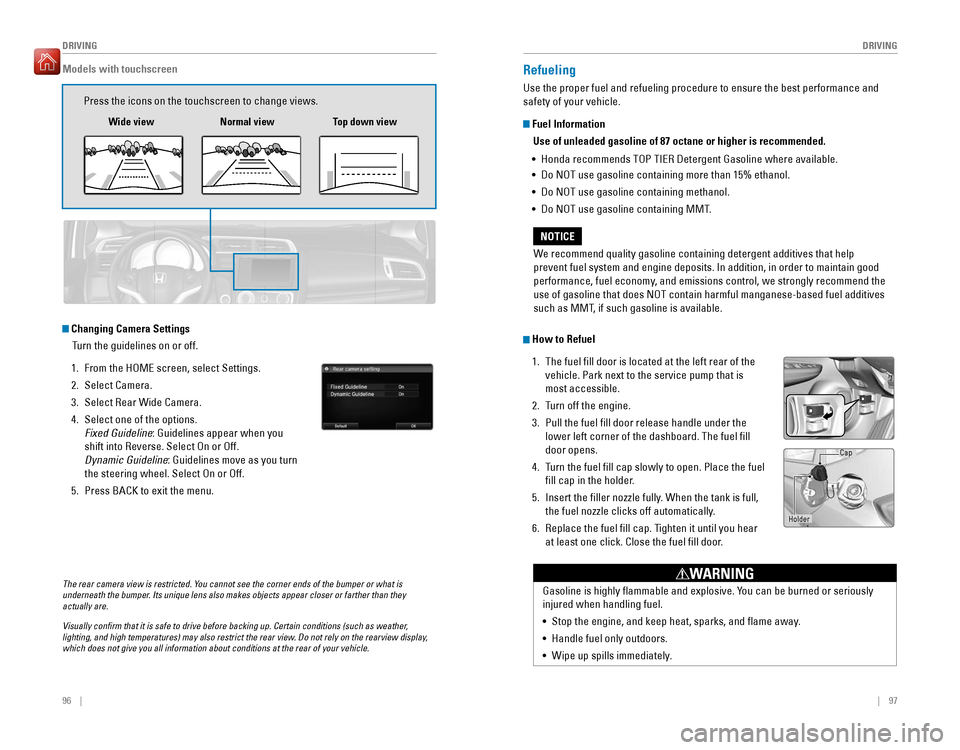
Changing Camera Settings
Turn the guidelines on or off.
1. From the HOME screen, select Settings.
2. Select Camera.
3. Select Rear Wide Camera.
4. Select one of the options. Fixed Guideline : Guidelines appear when you
shift into Reverse. Select On or Off.
Dynamic Guideline : Guidelines move as you turn
the steering wheel. Select On or Off.
5. Press BACK to exit the menu.
Models with touchscreen
Press the icons on the touchscreen to change views.
Wide view Normal view Top down view
Refueling
Use the proper fuel and refueling procedure to ensure the best performance and safety of your vehicle.
Fuel Information
Use of unleaded gasoline of 87 octane or higher is recommended.
• Honda recommends TOP TIER Detergent Gasoline where available.
• Do NOT use gasoline containing more than 15% ethanol.
• Do NOT use gasoline containing methanol.
• Do NOT use gasoline containing MMT.
How to Refuel
1. The fuel ll door is located at the left rear of the vehicle. Park next to the service pump that is most accessible.
2. Turn off the engine.
3. Pull the fuel ll door release handle under the lower left corner of the dashboard. The fuel ill door opens.
4. Turn the fuel ll cap slowly to open. Place the fuel
ll cap in the holder.
5. Insert the iller nozzle fully. When the tank is full,
the fuel nozzle clicks off automatically.
6. Replace the fuel ll cap. Tighten it until you hear at least one click. Close the fuel ll door.
We recommend quality gasoline containing detergent additives that help
prevent fuel system and engine deposits. In addition, in order to maintain good
performance, fuel economy, and emissions control, we strongly recommend the use of gasoline that does NOT contain harmful manganese-based fuel additives
such as MMT, if such gasoline is available.
NOTICE
Gasoline is highly lammable and explosive. You can be burned or seriously injured when handling fuel. •
Stop the engine, and keep heat, sparks, and ame away.
• Handle fuel only outdoors.
• Wipe up spills immediately.
WARNING
Holder Cap
Page 54 of 75
100 || 101
HANDLING THE UNEXPECTED
HANDLING THE UNEXPECTED
Overheating
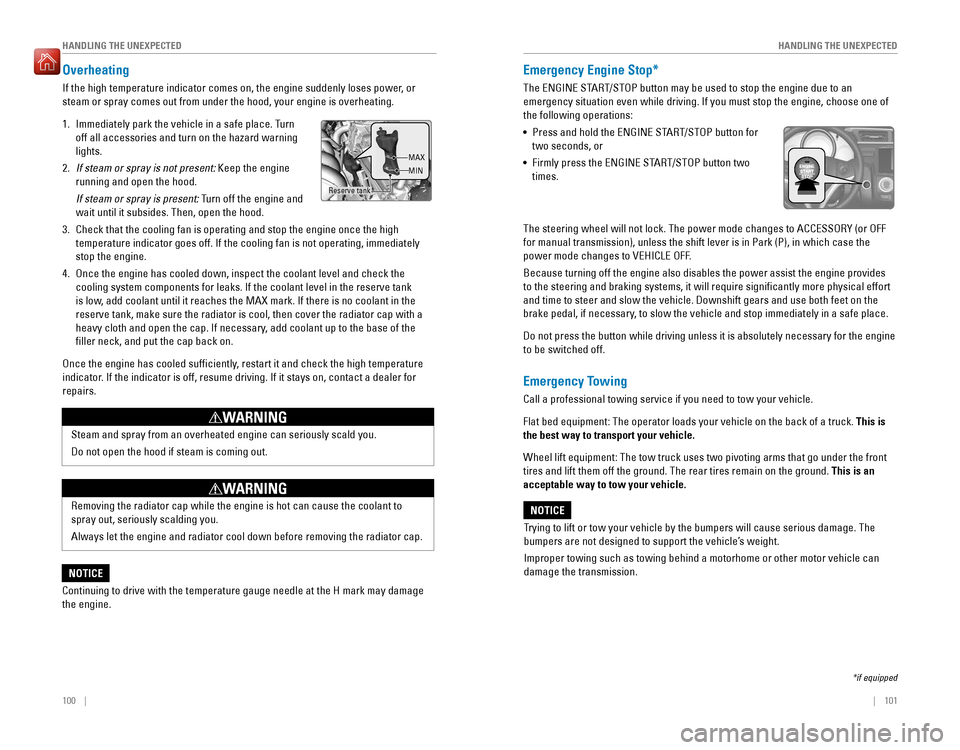
If the high temperature indicator comes on, the engine suddenly loses power, or steam or spray comes out from under the hood, your engine is overheating. 1. Immediately park the vehicle in a safe place. Turn off all accessories and turn on the hazard warning lights.
2. If steam or spray is not present: Keep the engine
running and open the hood.
If steam or spray is present: Turn off the engine and
wait until it subsides. Then, open the hood.
3. Check that the cooling fan is operating and stop the engine once the high temperature indicator goes off. If the cooling fan is not operating, immediately stop the engine.
4. Once the engine has cooled down, inspect the coolant level and check the cooling system components for leaks. If the coolant level in the reserve tank
is low, add coolant until it reaches the MAX mark. If there is no coolant in the
reserve tank, make sure the radiator is cool, then cover the radiator cap with a
heavy cloth and open the cap. If necessary, add coolant up to the base of the iller neck, and put the cap back on.
Once the engine has cooled sufciently, restart it and check the high temperature
indicator. If the indicator is off, resume driving. If it stays on, contact a dealer for repairs.
Steam and spray from an overheated engine can seriously scald you. Do not open the hood if steam is coming out.
WARNING
Removing the radiator cap while the engine is hot can cause the coolant to spray out, seriously scalding you. Always let the engine and radiator cool down before removing the radiator cap.
WARNING
Continuing to drive with the temperature gauge needle at the H mark may damage the engine.
NOTICE
Emergency Engine Stop*
The ENGINE START/STOP button may be used to stop the engine due to an
emergency situation even while driving. If you must stop the engine, choose one of the following operations: • Press and hold the ENGINE START/STOP button for
two seconds, or
• Firmly press the ENGINE START/STOP button two
times.
The steering wheel will not lock. The power mode changes to ACCESSORY (or OFF
for manual transmission), unless the shift lever is in Park (P), in which case the
power mode changes to VEHICLE OFF. Because turning off the engine also disables the power assist the engine provides
to the steering and braking systems, it will require signiicantly more physical effort and time to steer and slow the vehicle. Downshift gears and use both feet on the
brake pedal, if necessary, to slow the vehicle and stop immediately in a safe place.
Do not press the button while driving unless it is absolutely necessary for the engine to be switched off.
Emergency Towing
Call a professional towing service if you need to tow your vehicle. Flat bed equipment: The operator loads your vehicle on the back of a truck. This is
the best way to transport your vehicle.
Wheel lift equipment: The tow truck uses two pivoting arms that go under the front tires and lift them off the ground. The rear tires remain on the ground. This is an
acceptable way to tow your vehicle.
Trying to lift or tow your vehicle by the bumpers will cause serious damage. The
bumpers are not designed to support the vehicle’s weight.
Improper towing such as towing behind a motorhome or other motor vehicle can damage the transmission.
NOTICE
*if equipped
Reserve tank MAX MIN
Page 55 of 75

102 || 103
HANDLING THE UNEXPECTED
HANDLING THE UNEXPECTED
Tire Pressure Monitoring System (TPMS)
Monitors the tire pressure while you are driving. Available on U.S. models only.
If your vehicle’s tire pressure becomes signiicantly
low, the low tire pressure indicator comes on. Stop your vehicle in a safe place. Check the tire pressure and adjust the pressure to the specied level. The speciied tire pressure is on a label on the
driver’s doorjamb.
TPMS Calibration
Any time you inate, change, or rotate one of more
of the tires, you need to recalibrate the system. Press and hold the TPMS button. The TPMS indicator blinks, and calibration begins. The calibration process requires approximately 30 minutes of cumulative driving at speeds between 30–60 mph (48–97 km/h). The process inishes
automatically.
Driving on an extremely underinlated tire can cause it to overheat. An overheated tire can fail. Always inate your tires to the specied pressure.
NOTICE
TPMS button
Low tire
pressure indicator
Tire Pressure Monitoring System (TPMS)—Required Federal Explanation
U.S. models only
Each tire, including the spare (if provided), should be checked monthly when cold and inlated to the inlation pressure recommended by the vehicle manufacturer on the vehicle placard or tire ination pressure label. (If your vehicle has tires of a different size than the size indicated on the vehicle placard or tire inlation pressure label, you should determine the proper tire ination pressure for those tires.) As an added safety feature, your vehicle has been equipped with a tire pressure monitoring system (TPMS) that illuminates a low tire pressure telltale when one or more of your tires is
signicantly under-inated.
Accordingly, when the low tire pressure telltale illuminates, you should
stop and check your tires as soon as possible, and inlate them to the proper pressure.
Driving on a signiicantly under-inlated tire causes the tire to overheat
and can lead to tire failure. Under-ination also reduces fuel efciency
and tire tread life, and may affect the vehicle’s handling and stopping
ability. Please note that the TPMS is not a substitute for proper tire maintenance,
and it is the driver’s responsibility to maintain correct tire pressure, even
if under-ination has not reached the level to trigger illumination of the TPMS low tire pressure telltale.
Your vehicle has also been equipped with a TPMS malfunction indicator
to indicate when the system is not operating properly. The TPMS malfunction indicator is combined with the low tire pressure telltale. When the system detects a malfunction, the telltale will ash for approximately one minute and then remain continuously illuminated. This sequence will continue upon subsequent vehicle start-ups as long as the malfunction exists. When the malfunction indicator is illuminated, the system may not be able to detect or signal low tire pressure as intended. TPMS malfunctions may occur for a variety of reasons, including the installation of replacement or alternate tires or wheels on the vehicle that
prevent the TPMS from functioning properly. Always check the TPMS malfunction telltale after replacing one or more tires or wheels on your vehicle to ensure that the replacement or alternate tires and wheels allow the TPMS to continue to function
properly.
Page 60 of 75
112 || 113
MAINTENANCE
MAINTENANCE
Safety Precautions
Some of the most important safety precautions are listed below; however, we cannot warn you of every conceivable hazard that can arise in performing maintenance. Only you can decide whether or not you should perform a given task.
Maintenance Safety
•
To reduce the possibility of ire or explosion, keep cigarettes, sparks, and lames
away from the battery and all fuel-related parts.
• Never leave rags, towels, or other lammable objects under the hood.
• To clean parts, use a commercially available degreaser or parts cleaner, not gasoline.
• Wear eye protection and protective clothing when working with the battery or
compressed air.
• Do not run the engine in conined spaces where carbon monoxide gas can
accumulate.
Vehicle Safety
• The vehicle must be stationary, and parked on level ground with the parking
brake set and the engine off.
• Be aware that hot parts can burn you. • Be aware that moving parts can injure you.
Improperly maintaining this vehicle or failing to correct a problem before driving can cause a crash in which you can be seriously hurt or killed. Always follow the inspection and maintenance recommendations according to the schedules in this guide.
WARNING
Failure to properly follow maintenance instructions and precautions can cause you to be seriously hurt or killed. Always follow the procedures and precautions in this guide.
WARNING
Learn about basic maintenance that you can perform on the vehicle yourself, as well as information about how to best maintain the vehicle.
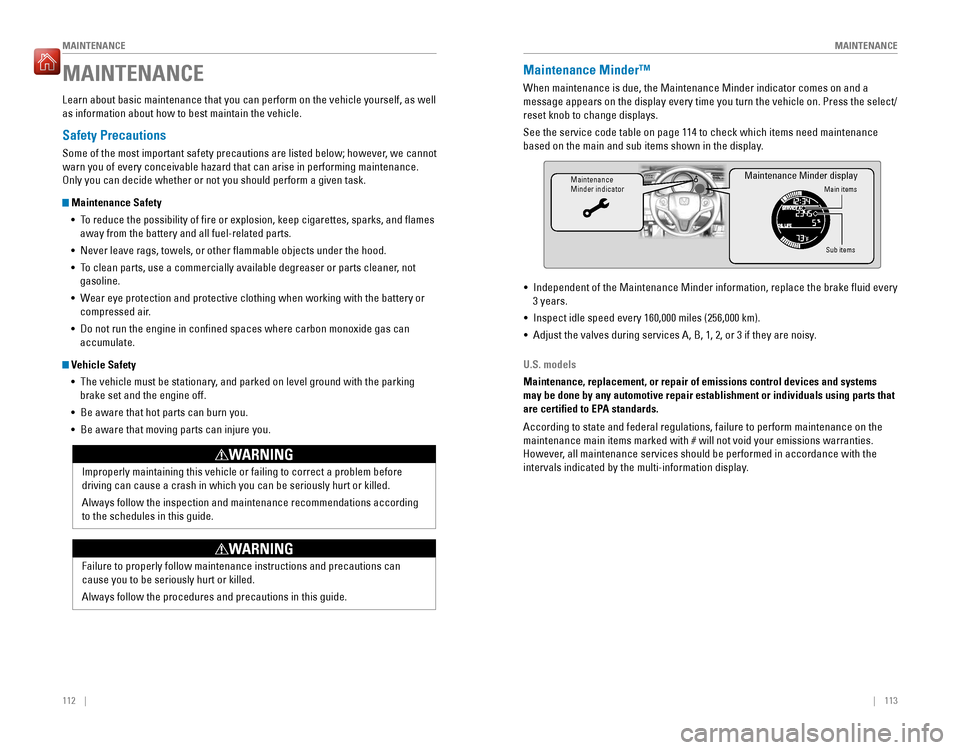
MAINTENANCEMaintenance Minder™
When maintenance is due, the Maintenance Minder indicator comes on and a
message appears on the display every time you turn the vehicle on. Press the select/reset knob to change displays. See the service code table on page 114 to check which items need maintenance
based on the main and sub items shown in the display.
Maintenance Minder indicatorMain items
Sub items
Maintenance Minder display
• Independent of the Maintenance Minder information, replace the brake luid every 3 years.
• Inspect idle speed every 160,000 miles (256,000 km).
• Adjust the valves during services A, B, 1, 2, or 3 if they are noisy.
U.S. models
Maintenance, replacement, or repair of emissions control devices and systems may be done by any automotive repair establishment or individuals using parts that
are certied to EPA standards. According to state and federal regulations, failure to perform maintenance on the
maintenance main items marked with # will not void your emissions warranties.
However, all maintenance services should be performed in accordance with the
intervals indicated by the multi-information display.
Page 63 of 75
118 || 119
MAINTENANCE
MAINTENANCE
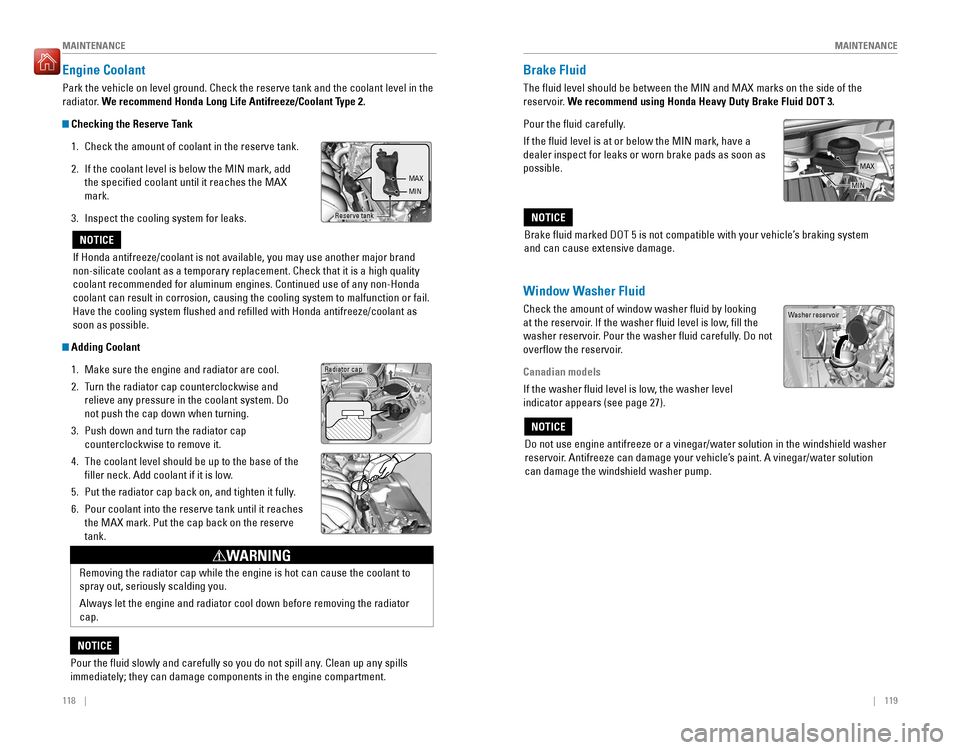
Engine Coolant
Park the vehicle on level ground. Check the reserve tank and the coolant level in the
radiator. We recommend Honda Long Life Antifreeze/Coolant Type 2.
Checking the Reserve Tank
1. Check the amount of coolant in the reserve tank. 2. If the coolant level is below the MIN mark, add the specied coolant until it reaches the MAX mark.
3. Inspect the cooling system for leaks.
Adding Coolant
1. Make sure the engine and radiator are cool.
2. Turn the radiator cap counterclockwise and
relieve any pressure in the coolant system. Do not push the cap down when turning.
3. Push down and turn the radiator cap counterclockwise to remove it.
4. The coolant level should be up to the base of the
ller neck. Add coolant if it is low.
5. Put the radiator cap back on, and tighten it fully.
6. Pour coolant into the reserve tank until it reaches the MAX mark. Put the cap back on the reserve tank.
If Honda antifreeze/coolant is not available, you may use another major brand
non-silicate coolant as a temporary replacement. Check that it is a high quality coolant recommended for aluminum engines. Continued use of any non-Honda
coolant can result in corrosion, causing the cooling system to malfunction or fail. Have the cooling system lushed and reilled with Honda antifreeze/coolant as soon as possible.
NOTICE
Reserve tank
MAX MIN
Radiator cap
Removing the radiator cap while the engine is hot can cause the coolant to spray out, seriously scalding you. Always let the engine and radiator cool down before removing the radiator cap.
WARNING
Pour the uid slowly and carefully so you do not spill any. Clean up any spills immediately; they can damage components in the engine compartment.
NOTICE
Brake Fluid
The luid level should be between the MIN and MAX marks on the side of the
reservoir. We recommend using Honda Heavy Duty Brake Fluid DOT 3.
Pour the uid carefully. If the luid level is at or below the MIN mark, have a dealer inspect for leaks or worn brake pads as soon as possible.
Window Washer Fluid
Check the amount of window washer luid by looking
at the reservoir. If the washer luid level is low, ill the
washer reservoir. Pour the washer luid carefully. Do not
overow the reservoir.
Canadian models
If the washer luid level is low, the washer level indicator appears (see page 27).
Do not use engine antifreeze or a vinegar/water solution in the windshield washer
reservoir. Antifreeze can damage your vehicle’s paint. A vinegar/water solution can damage the windshield washer pump.
NOTICE
Washer reservoir
Brake luid marked DOT 5 is not compatible with your vehicle’s braking system and can cause extensive damage.
NOTICE
MAX
MIN
Page 69 of 75
130 || 131
SPECIFICATIONS
SPECIFICATIONS
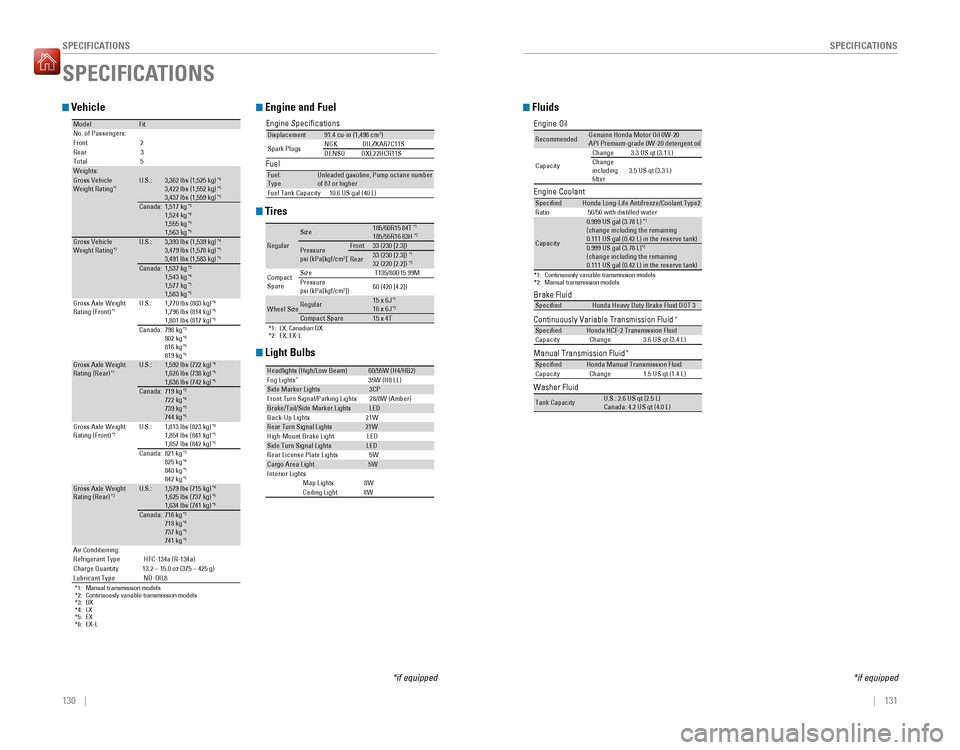
Vehicle
ModelFitNo. of Passengers: Fron t2
Rear 3
Tota l5
Weights:Gross Vehicle
Weight Rating *1U.S.:3,362 lbs (1,525 kg
)*4
3,422 lbs (1,552 kg )*5
3,437 lbs (1,559 kg )*6
Canada
:1,517 kg *3
1,524 kg *4
1,555 kg *5
1,563 kg *6
Gross Vehicle
Weight Rating *2U.S.:3,393 lbs (1,539 kg
)*4
3,479 lbs (1,578 kg )*5
3,491 lbs (1,583 kg )*6
Canada
:1,537 kg *3
1,543 kg *4
1,577 kg *5
1,583 kg *6
Gross Axle Weight Rating (Front)
*1U.S.:1,770 lbs (803 kg
)*4
1,796 lbs (814 kg )*5
1,801 lbs (817 kg )*6
Canada
:798 kg*3
802 kg *4
816 kg *5
819 kg *6
Gross Axle Weight Rating (Rear) *1U.S.:1,592 lbs (722 kg
)*4
1,626 lbs (738 kg )*5
1,636 lbs (742 kg )*6
Canada
:719 kg*3
722 kg *4
739 kg *5
744 kg *6
*1: Manual transmission models
*2: Continuously variable transmission models*3
:D X
*4 :L X
*5 :E X
*6:E X-L
Gross Axle Weight Rating (Front) *2U.S.:1,813 lbs (823 kg
)*4
1,854 lbs (841 kg )*5
1,857 lbs (842 kg )*6
Canada:821 kg *3
825 kg *4
840 kg *5
842 kg *6
Gross Axle Weight Rating (Rear
)*2U.S.:1,579 lbs (715 kg
)*4
1,625 lbs (737 kg )*5
1,634 lbs (741 kg )*6
Canada:716 kg
*3
718 kg *4
737 kg *5
741 kg *6
Air Conditioning: Refrigerant Type HFC-134a (R-134a)
Charge Quantity 13.2 – 15.0 oz (375 – 425 g)Lubricant Type ND-OIL8
Engine and Fuel
Engine Specications FuelDisplacement91.4 cu-in (1,498 cm 3
)
Spark Plug sNG
KD ILZKAR7C11 S
DENSODXE22HCR11S
Fuel:
Typ eUnleaded gasoline, Pump octane number of 87 or higher
Fuel Tank Capacity 10.6 US gal (40 L)
Tires
*1: LX, Canadian DX*2: EX, EX-L
Regula r
Size185/60R15 84 T*1
185/55R16 83 H*2
Pressure psi (kPa[kgf/cm
2
])Front33 (230 [2.3])
Rear33 (230 [2.3]) *1
32 (220 [2.2]) *2
Compact Spar e Size
T135/80D15 99M
Pressure psi (kPa[kgf/cm 2
]) 60 (420 [4.2])
Wheel SizeRegular15 x 6J
*1
16 x 6J *2
Co
mpact Spar e15 x 4T
SPECIFICATIONS
*if equipped
Light Bulbs
Headlights (High/Low Beam)60/55W (H4/HB2)
Fog Lights *
35W (H8 LL)
Side Marker Lights3CP
Front Turn Signal/Parking Lights 28/8W (Amber )
Brake/Tail/Side Marker LightsLED
Back-Up Lights 21W
Rear Turn Signal Lights21W
High-M ount Brake Ligh tLED
Side Turn Signal Light sLED
Rear License Plate Light s5W
Cargo Area Ligh t5W
In teri or Lights
Map Light s8WCeiling Light 8W
Fluids
Brake Fluid
Continuously Variable Transmission Fluid *
Manual Transmission Fluid*
SpeciedHonda Heavy Duty Brake Fluid DOT
3
SpeciedHonda HCF-2 Transmission Fluid
Capacity Change 3.6 US qt (3.4 L)
SpeciedHonda Manual Transmission Fluid
Capacity Change 1.5 US qt (1.4 L)
Engine Oil
Engine Coolan
t
*1:Continuously variable transmission models*2:Manual transmission model s
Recommended·Genuine Honda Motor Oil 0W-2 0
·API Premium-grade 0W-20 detergent oi l
Capacity Change
3.3 US qt (3.1 L)
Change including lter 3.5 US qt (3.3 L)
Specie
dHonda Long-Life Anti freeze/Coolant Type 2
Ratio 50/50 with distilled wate r
Capacity
0.999 US gal (3.78 L) *1
(change including the remaining 0.111 US gal (0.42 L) in the reserve tank )
0.999 US gal (3.78 L)*2
(change including the remaining 0.111 US gal (0.42 L) in the reserve tank )
Washer Fluid
Tank CapacityU.S.: 2.6 US qt (2.5 L) Canada: 4.2 US qt (4.0 L)
*if equipped
Page 70 of 75
132 || 133
CUSTOMER INFORMATION
CUSTOMER INFORMATION
Learn about information speciic to you as a Honda customer and how to get help.
Frequently Asked Questions/Troubleshooting
Below are some frequently asked questions and troubleshooting items that you may have about the vehicle. Q: How do I set the vehicle clock?
A: For vehicles without navigation, see page 45. For vehicles with navigation, the
time is automatically set using GPS signals.Q: Why doesn’t the vehicle start when I press the ENGINE START/STOP button?*
A: The brake pedal must be pressed to start the engine.
Q: What is the AUTO* setting on my headlight lever?
A: When in the AUTO position, the vehicle’s exterior lights will automatically turn
on or off depending on the ambient lighting.Q: Why won’t the driver’s door unlock when I grab the door handle, even though
the keyless access remote is within range?* A: If you pull the handle too quickly, the system may not have time to conirm the
door is unlocked. Wait to hear a beep to conirm the door is unlocked. If you are
wearing gloves, the system may be slow to respond. Q: After my battery was disconnected or went dead, the audio system is asking for
a code. Where do I ind this? A: In most cases, you do not need to enter a code. Turn on the vehicle and the
audio system, and press and hold the power button until the system reactivates. Q: Why can’t I operate Pandora ®
through the audio system?
A: Audio may be streaming through Bluetooth®
Audio. Make sure Pandora mode
is selected and the phone cable is properly connected to the USB adapter.
Some phones may prompt you to “Allow” a connection.Q: Is my phone compatible with Bluetooth features?
A: Visit handsfreelink.com (U.S.) or handsfreelink.ca (Canada) to check phone
compatibility for Bluetooth®
Audio, Bluetooth ®
HandsFreeLink ®
, and SMS text
messaging.Q: Every time I press the Talk button, the system gives me voice prompts. Can I turn
these off?* A: From the Home screen, select Settings. Select the Voice Recog tab, then select
Voice Prompt. Select Off.
CUSTOMER INFORMATION
*if equipped
Contact Us
Honda dealer personnel are trained professionals. They should be able to answer all your questions. If you encounter a problem that your dealership does not solve
to your satisfaction, please discuss it with the dealership’s service manager or
general manager. If you are dissatisied with the decision made by the dealership’s management, contact Honda Automobile Customer Service.
U.S. owners
American Honda Motor Co., Inc. Honda Automobile Customer Service
1919 Torrance Blvd.Mail Stop 500-2N-7A
Torrance, CA 90501-2746
Tel: (800) 999-1009
In Puerto Rico and the U.S. Virgin Islands
Bella International
P.O. Box 190816San Juan, PR 00919-0816
Tel: (787) 620-7546
When you call or write, please give us the following information: • Vehicle Identiication Number
• Date of purchase • Odometer reading of your vehicle
• Your name, address, and telephone number
• A detailed description of the problem• Name of the dealer who sold the vehicle to you
Q:
Why can’t I select an item using the selector knob or touchscreen*?
A: To prevent driver distraction, certain items are limited or inoperable while the
vehicle is moving. Use voice commands or pull over to select the items. Q: Where can I ind the vehicle identiication number (VIN)?
A: Check the label on the driver’s doorjamb.
*if equipped
Canadian owners
Honda Canada, Inc. Customer Relations180 Honda Blvd.Markham, ONL6C 0H9
Tel: (888) 946-6329Fax: (877) 939-0909e-mail: [email protected]
Page 74 of 75
140 || 141
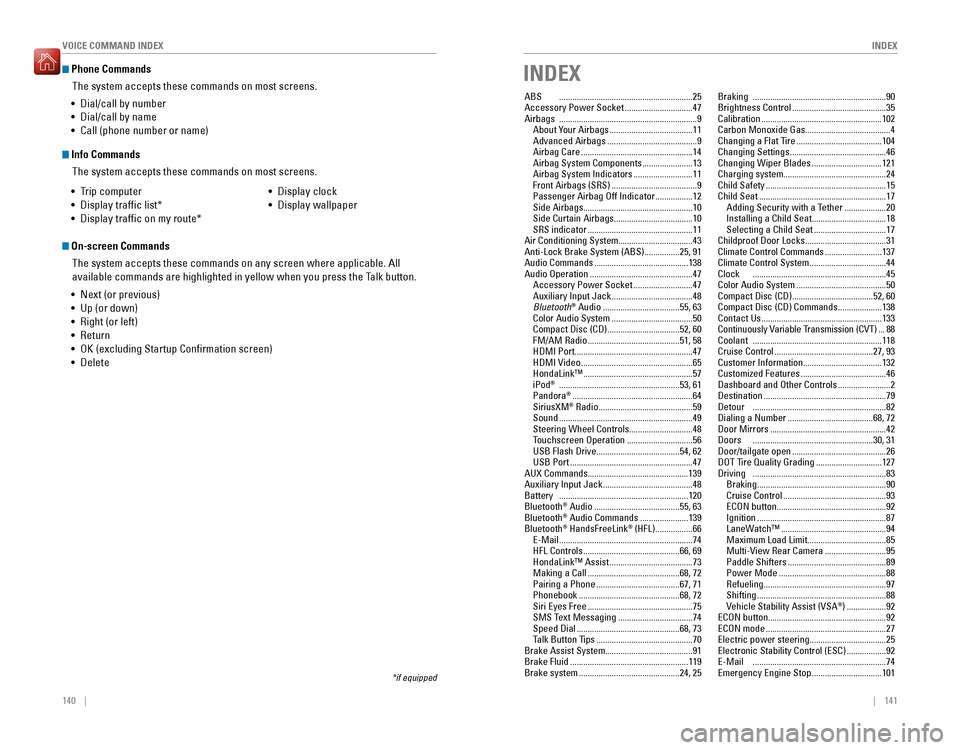
INDEX
VOICE COMMAND INDEX
Phone Commands
The system accepts these commands on most screens.
Info Commands
The system accepts these commands on most screens.
• Trip computer
• Display trafic list*
• Display trafic on my route* • Display clock
• Display wallpaper
On-screen Commands
The system accepts these commands on any screen where applicable. All
available commands are highlighted in yellow when you press the Talk button.
• Next (or previous)
• Up (or down)
• Right (or left)
• Return
• OK (excluding Startup Conrmation screen)
• Delete
*if equipped
• Dial/call by number
• Dial/call by name
• Call (phone number or name)
INDEX
ABS
............................................................. 25
Accessory Power Socket ...............................47
Airbags ............................................................... 9
About Your Airbags ...................................... 11
Advanced Airbags ......................................... 9
Airbag Care ................................................... 14
Airbag System Components .......................13
Airbag System Indicators ...........................11
Front Airbags (SRS) ....................................... 9
Passenger Airbag Off Indicator .................12
Side Airbags .................................................. 10
Side Curtain Airbags ....................................10
SRS indicator ................................................ 11
Air Conditioning System..................................43 Anti-Lock Brake System (ABS) ................25, 91
Audio Commands ........................................... 138
Audio Operation ............................................... 47
Accessory Power Socket ...........................47
Auxiliary Input Jack ..................................... 48
Bluetooth ®
Audio ................................... 55, 63
Color Audio System ..................................... 50
Compact Disc (CD) .................................52, 60
FM/AM Radio .......................................... 51, 58
HDMI Port ...................................................... 47
HDMI Video ................................................... 65
HondaLink™ .................................................. 57
iPod ®
....................................................... 53, 61
Pandora ®
....................................................... 64
SiriusXM ®
Radio ........................................... 59
Sound ............................................................. 49
Steering Wheel Controls .............................48
Touchscreen Operation ..............................56
USB Flash Drive ...................................... 54, 62
USB Port ........................................................ 47
AUX Commands..............................................139Auxiliary Input Jack ......................................... 48
Battery ........................................................... 120
Bluetooth ®
Audio ....................................... 55, 63
Bluetooth ®
Audio Commands ......................139
Bluetooth ®
HandsFreeLink ®
(HFL) ................. 66
E-Mail ............................................................. 74
HFL Controls ............................................ 66, 69
HondaLink™ Assist ...................................... 73
Making a Call .......................................... 68, 72
Pairing a Phone ...................................... 67, 71
Phonebook .............................................. 68, 72
Siri Eyes Free ................................................ 75
SMS Text Messaging ..................................74
Speed Dial ............................................... 68, 73
Talk Button Tips ............................................ 70
Brake Assist System........................................91Brake Fluid ...................................................... 119
Brake system .............................................. 24, 25Braking
............................................................. 90
Brightness Control ........................................... 35
Calibration ....................................................... 102
Carbon Monoxide Gas .......................................4
Changing a Flat Tire ....................................... 104
Changing Settings ............................................ 46
Changing Wiper Blades ................................121
Charging system...............................................24Child Safety ....................................................... 15
Child Seat .......................................................... 17
Adding Security with a Tether ...................20
Installing a Child Seat ..................................18
Selecting a Child Seat .................................17
Childproof Door Locks .....................................31
Climate Control Commands ..........................137
Climate Control System ...................................44
Clock ............................................................. 45
Color Audio System ......................................... 50
Compact Disc (CD) ..................................... 52, 60
Compact Disc (CD) Commands ....................138
Contact Us ....................................................... 133
Continuously Variable Transmission (CVT) ...88
Coolant ........................................................... 118
Cruise Control ............................................. 27, 93
Customer Information ....................................132
Customized Features ....................................... 46
Dashboard and Other Controls ........................2
Destination ........................................................ 79
Detour ............................................................. 82
Dialing a Number ....................................... 68, 72
Door Mirrors ..................................................... 42
Doors ....................................................... 30, 31
Door/tailgate open ........................................... 26
DOT Tire Quality Grading ..............................127
Driving ............................................................. 83
Braking ........................................................... 90
Cruise Control ............................................... 93
ECON button .................................................. 92
Ignition ........................................................... 87
LaneWatch™ ................................................ 94
Maximum Load Limit ....................................85
Multi-View Rear Camera ............................95
Paddle Shifters ............................................. 89
Power Mode ................................................. 88
Refueling ........................................................ 97
Shifting ........................................................... 88
Vehicle Stability Assist (VSA ®
) .................. 92
ECON button ......................................................92
ECON mode ....................................................... 27
Electric power steering ...................................25
Electronic Stability Control (ESC) ..................92
E-Mail ............................................................. 74
Emergency Engine Stop ................................101