fuel HONDA FIT 2016 3.G Quick Guide
[x] Cancel search | Manufacturer: HONDA, Model Year: 2016, Model line: FIT, Model: HONDA FIT 2016 3.GPages: 75, PDF Size: 5.39 MB
Page 4 of 75
| 1
VISUAL INDEX
Quickly locate items in the vehicle’s interior.
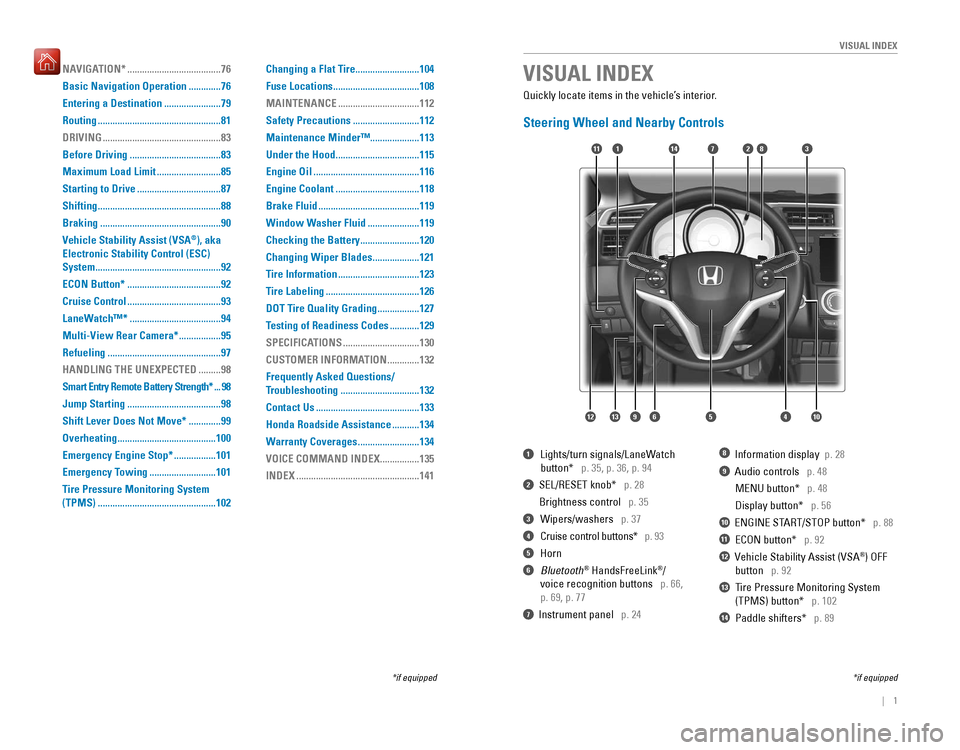
Steering Wheel and Nearby Controls
1 Lights/turn signals/LaneWatch
button*
p. 35, p. 36, p. 94
2 SEL/RESET knob* p. 28
Brightness control p. 35
3 Wipers/washers p. 37
4 Cruise control buttons* p. 93
5 Horn
6 Bluetooth ®
HandsFreeLink ®
/
voice recognition buttons
p. 66,
p. 69, p. 77
7 Instrument panel p. 24
8 Information display p. 28
9 Audio controls p. 48
MENU button* p. 48
Display button* p. 56
10 ENGINE START/STOP button* p. 88
11 ECON button* p. 92
12 Vehicle Stability Assist (VSA ®
) OFF
button
p. 92
Tire Pressure Monitoring System
(TPMS) button*
p. 102
Paddle shifters* p. 89
VISUAL INDEX
*if equipped
*if equipped
7
125641013
14111283
13
14
9
NAVIGATION* ...................................... 76
Basic Navigation Operation
.............76
Entering a Destination .......................79
Routing .................................................. 81
DRIVING
................................................ 83
Before Driving
..................................... 83
Maximum Load Limit ..........................85
Starting to Drive .................................. 87
Shifting .................................................. 88
Braking ................................................. 90
Vehicle Stability Assist (VSA ®
), aka
Electronic Stability Control (ESC) System ................................................... 92
ECON Button* ...................................... 92
Cruise Control ...................................... 93
LaneWatch™* ..................................... 94
Multi-View Rear Camera* .................95
Refueling .............................................. 97
HANDLING THE UNEXPECTED
.........98
Smart Entry Remote Battery Strength*
...98
Jump Starting ...................................... 98
Shift Lever Does Not Move* .............99
Overheating ........................................ 100
Emergency Engine Stop* .................101
Emergency Towing ...........................101
Tire Pressure Monitoring System (TPMS) ................................................ 102Changing a Flat Tire
..........................104
Fuse Locations ................................... 108
MAINTENANCE
................................. 112
Safety Precautions
...........................112
Maintenance Minder™....................113 Under the Hood .................................. 115
Engine Oil ........................................... 116
Engine Coolant .................................. 118
Brake Fluid ......................................... 119
Window Washer Fluid .....................119
Checking the Battery ........................120
Changing Wiper Blades ...................121
Tire Information ................................. 123
Tire Labeling ...................................... 126
DOT Tire Quality Grading .................127
Testing of Readiness Codes ............129
SPECIFICATIONS
............................... 130
CUSTOMER INFORMATION .............132
Frequently Asked Questions/
Troubleshooting
................................ 132
Contact Us .......................................... 133
Honda Roadside Assistance ...........134
Warranty Coverages .........................134
VOICE COMMAND INDEX
................135
INDEX .................................................. 141
Page 5 of 75
2 || 3
S
AFETY
VISUAL INDEX
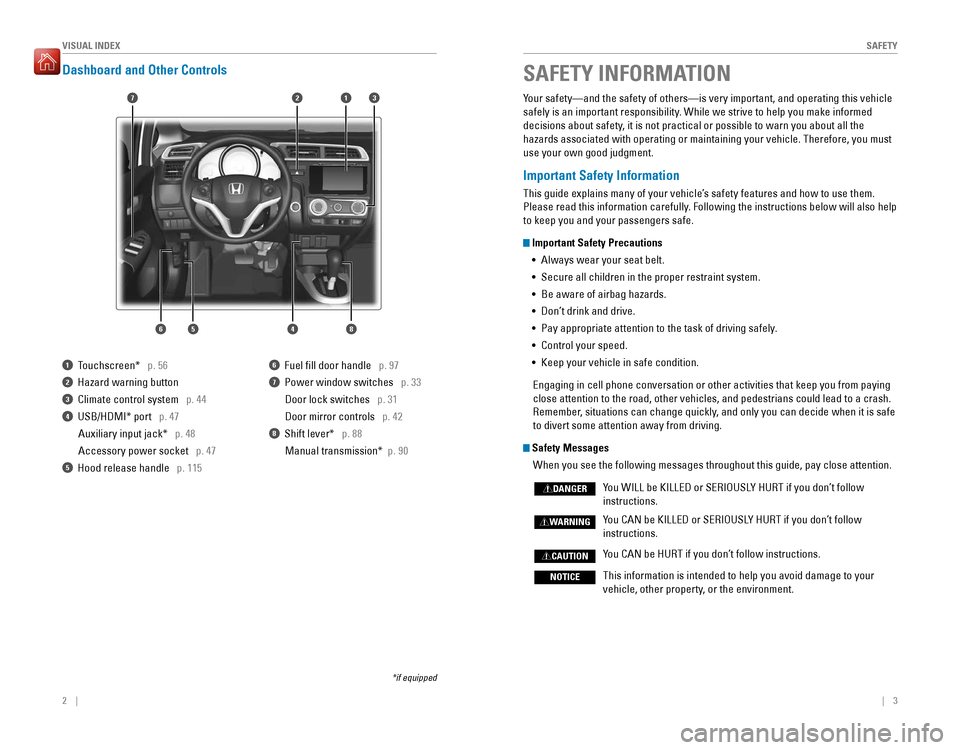
Dashboard and Other Controls
1 Touchscreen* p. 56
2 Hazard warning button
3 Climate control system p. 44
4 USB/HDMI* port p. 47
Auxiliary input jack* p. 48
Accessory power socket p. 47
5 Hood release handle p. 115
6 Fuel ll door handle p. 97
7 Power window switches p. 33
Door lock switches p. 31
Door mirror controls p. 42
8 Shift lever* p. 88
Manual transmission* p. 90
*if equipped Your safety—and the safety of others—is very important, and operating this vehicle
safely is an important responsibility. While we strive to help you make informed
decisions about safety, it is not practical or possible to warn you about all the hazards associated with operating or maintaining your vehicle. Therefore, you must use your own good judgment.
Important Safety Information
This guide explains many of your vehicle’s safety features and how to use them.
Please read this information carefully. Following the instructions below will also help to keep you and your passengers safe.
Important Safety Precautions
•
Always wear your seat belt.
• Secure all children in the proper restraint system.
• Be aware of airbag hazards.
• Don’t drink and drive. • Pay appropriate attention to the task of driving safely.
• Control your speed.
• Keep your vehicle in safe condition.
Engaging in cell phone conversation or other activities that keep you from paying close attention to the road, other vehicles, and pedestrians could lead to a crash.
Remember, situations can change quickly, and only you can decide when it is safe to divert some attention away from driving.
Safety Messages
When you see the following messages throughout this guide, pay close attention.
You WILL be KILLED or SERIOUSLY HURT if you don’t follow
instructions. You CAN be KILLED or SERIOUSLY HURT if you don’t follow
instructions. You CAN be HURT if you don’t follow instructions.
This information is intended to help you avoid damage to your
vehicle, other property, or the environment.
DANGER
WARNING
CAUTION
NOTICE
SAFETY INFORMATION
17
64
3
5
2
8
Page 16 of 75
24 || 25
I
NSTRUMENT PANEL
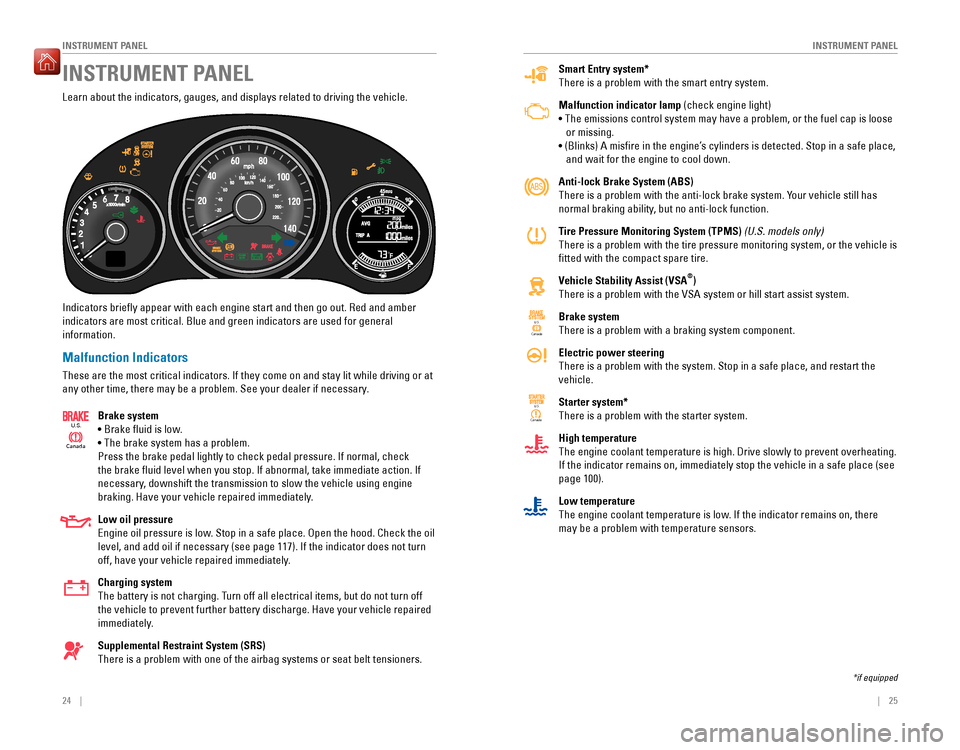
INSTRUMENT PANEL
Smart Entry system* There is a problem with the smart entry system. Malfunction indicator lamp (check engine light)
• The emissions control system may have a problem, or the fuel cap is loose or missing.
• (Blinks) A misire in the engine’s cylinders is detected. Stop in a safe place,
and wait for the engine to cool down. Anti-lock Brake System (ABS)
There is a problem with the anti-lock brake system. Your vehicle still has
normal braking ability, but no anti-lock function.
Tire Pressure Monitoring System (TPMS) (U.S. models only)
There is a problem with the tire pressure monitoring system, or the vehicle is tted with the compact spare tire.
Vehicle Stability Assist (VSA ®
)
There is a problem with the VSA system or hill start assist system. Brake system There is a problem with a braking system component. Electric power steering There is a problem with the system. Stop in a safe place, and restart the vehicle. Starter system* There is a problem with the starter system. High temperature The engine coolant temperature is high. Drive slowly to prevent overheating. If the indicator remains on, immediately stop the vehicle in a safe place (see page 100). Low temperature
The engine coolant temperature is low. If the indicator remains on, there may be a problem with temperature sensors.
Canada U.S.
U.S.
Canada
Learn about the indicators, gauges, and displays related to driving the vehicle. Indicators briely appear with each engine start and then go out. Red and amber
indicators are most critical. Blue and green indicators are used for general information.
Malfunction Indicators
These are the most critical indicators. If they come on and stay lit while driving or at
any other time, there may be a problem. See your dealer if necessary.
Brake system
• Brake luid is low.• The brake system has a problem.Press the brake pedal lightly to check pedal pressure. If normal, check
the brake luid level when you stop. If abnormal, take immediate action. If
necessary, downshift the transmission to slow the vehicle using engine
braking. Have your vehicle repaired immediately. Low oil pressure
Engine oil pressure is low. Stop in a safe place. Open the hood. Check the oil
level, and add oil if necessary (see page 117). If the indicator does not turn
off, have your vehicle repaired immediately. Charging system
The battery is not charging. Turn off all electrical items, but do not turn off the vehicle to prevent further battery discharge. Have your vehicle repaired
immediately. Supplemental Restraint System (SRS)
There is a problem with one of the airbag systems or seat belt tensioners.
Canada
U.S.
INSTRUMENT PANEL
*if equipped
Page 17 of 75
26 || 27
I
NSTRUMENT PANEL
INSTRUMENT PANEL
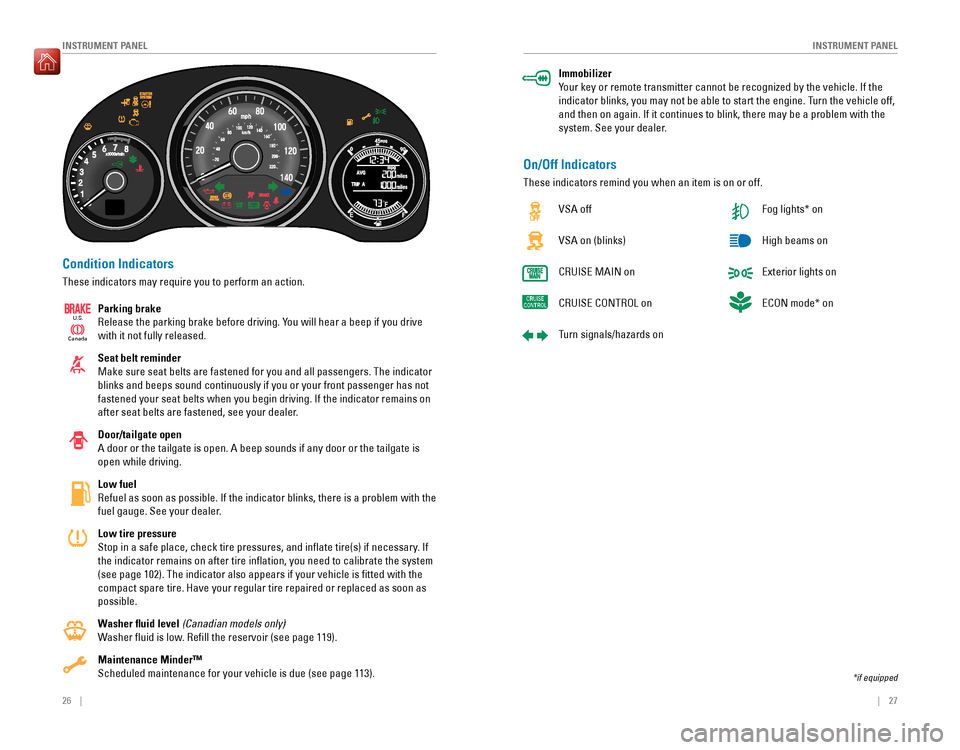
Condition Indicators
These indicators may require you to perform an action.
Parking brake
Release the parking brake before driving. You will hear a beep if you drive with it not fully released. Seat belt reminder Make sure seat belts are fastened for you and all passengers. The indicator blinks and beeps sound continuously if you or your front passenger has not fastened your seat belts when you begin driving. If the indicator remains on
after seat belts are fastened, see your dealer. Door/tailgate open
A door or the tailgate is open. A beep sounds if any door or the tailgate is open while driving. Low fuel
Refuel as soon as possible. If the indicator blinks, there is a problem with the
fuel gauge. See your dealer. Low tire pressure
Stop in a safe place, check tire pressures, and inlate tire(s) if necessary. If the indicator remains on after tire inlation, you need to calibrate the system (see page 102). The indicator also appears if your vehicle is tted with the
compact spare tire. Have your regular tire repaired or replaced as soon as possible.
Washer uid level (Canadian models only)
Washer uid is low. Rell the reservoir (see page 119).Maintenance Minder™ Scheduled maintenance for your vehicle is due (see page 113).
Ca nada
U.S.
Immobilizer
Your key or remote transmitter cannot be recognized by the vehicle. If the
indicator blinks, you may not be able to start the engine. Turn the vehicle off, and then on again. If it continues to blink, there may be a problem with the
system. See your dealer.
On/Off Indicators
These indicators remind you when an item is on or off.
VSA off VSA on (blinks)
CRUISE MAIN onCRUISE CONTROL on
Turn signals/hazards on Fog lights* onHigh beams onExterior lights onECON mode* on
*if equipped
Page 18 of 75
28 || 29
V
EHICLE CONTROLS
INSTRUMENT PANEL
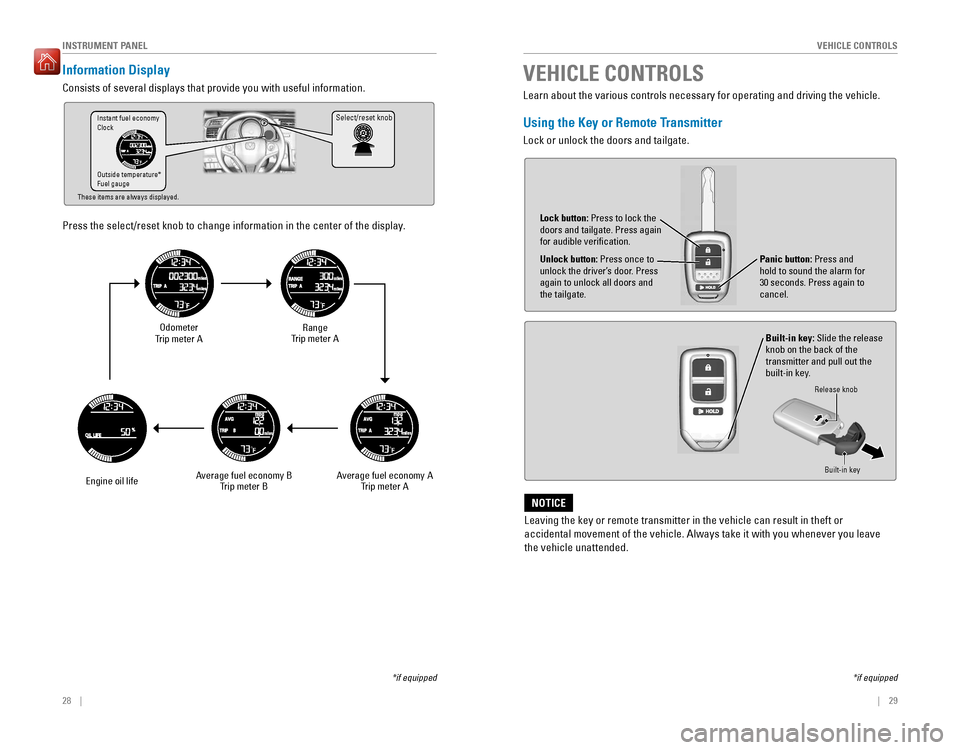
Information Display
Consists of several displays that provide you with useful information.
Press the select/reset knob to change information in the center of the display.
Select/reset knob
Odometer
Trip meter A
Engine oil life Range
Trip meter A
Average fuel economy A Trip meter A
Average fuel economy B
Trip meter B
Instant fuel economy Clock Outside temperature* Fuel gauge
These items are always displayed.
*if equipped Learn about the various controls necessary for operating and driving the vehicle.
Using the Key or Remote Transmitter
Lock or unlock the doors and tailgate.
Unlock button:
Press once to
unlock the driver’s door. Press again to unlock all doors and the tailgate.
Built-in key: Slide the release
knob on the back of the transmitter and pull out the
built-in key.
Lock button:
Press to lock the
doors and tailgate. Press again for audible veriication.
Panic button: Press and
hold to sound the alarm for 30 seconds. Press again to cancel.
VEHICLE CONTROLS
Release knob
Built-in key
*if equipped
Leaving the key or remote transmitter in the vehicle can result in theft or
accidental movement of the vehicle. Always take it with you whenever you leave the vehicle unattended.
NOTICE
Page 50 of 75
92 || 93
DRIVING
DRIVING
Vehicle Stability Assist (VSA ®
), aka Electronic Stability Control
(ESC) System
Helps to stabilize the vehicle during cornering if the vehicle turns more or less
than what was intended. It assists in maintaining traction on slippery surfaces by regulating engine output and selectively applying the brakes.
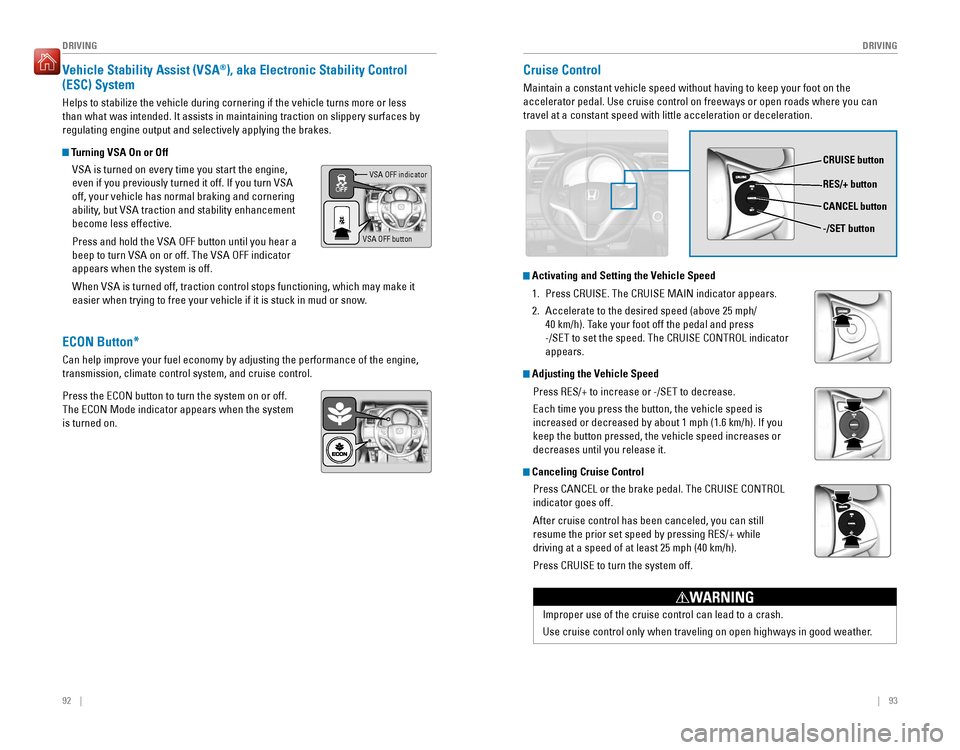
Turning VSA On or Off
VSA is turned on every time you start the engine,
even if you previously turned it off. If you turn VSA off, your vehicle has normal braking and cornering
ability, but VSA traction and stability enhancement become less effective. Press and hold the VSA OFF button until you hear a beep to turn VSA on or off. The VSA OFF indicator appears when the system is off. When VSA is turned off, traction control stops functioning, which may make it
easier when trying to free your vehicle if it is stuck in mud or snow.VSA OFF indicator
VSA OFF button
Cruise Control
Maintain a constant vehicle speed without having to keep your foot on the accelerator pedal. Use cruise control on freeways or open roads where you can travel at a constant speed with little acceleration or deceleration.
CRUISE button RES/+ button -/SET button
CANCEL button
Improper use of the cruise control can lead to a crash.
Use cruise control only when traveling on open highways in good weather.
WARNING
Activating and Setting the Vehicle Speed
1.
Press CRUISE. The CRUISE MAIN indicator appears.
2. Accelerate to the desired speed (above 25 mph/
40 km/h). Take your foot off the pedal and press
-/SET to set the speed. The CRUISE CONTROL indicator appears.
Adjusting the Vehicle Speed
Press RES/+ to increase or -/SET to decrease. Each time you press the button, the vehicle speed is increased or decreased by about 1 mph (1.6 km/h). If you keep the button pressed, the vehicle speed increases or decreases until you release it.
Canceling Cruise Control
Press CANCEL or the brake pedal. The CRUISE CONTROL indicator goes off. After cruise control has been canceled, you can still resume the prior set speed by pressing RES/+ while driving at a speed of at least 25 mph (40 km/h). Press CRUISE to turn the system off.
ECON Button*
Can help improve your fuel economy by adjusting the performance of the engine, transmission, climate control system, and cruise control. Press the ECON button to turn the system on or off. The ECON Mode indicator appears when the system is turned on.
Page 52 of 75
96 || 97
DRIVING
DRIVING
The rear camera view is restricted. You cannot see the corner ends of the bumper or what is
underneath the bumper. Its unique lens also makes objects appear closer or farther than they actually are.
Visually conirm that it is safe to drive before backing up. Certain conditions (such as weather,
lighting, and high temperatures) may also restrict the rear view. Do not rely on the rearview display, which does not give you all information about conditions at the rear of your vehicle.
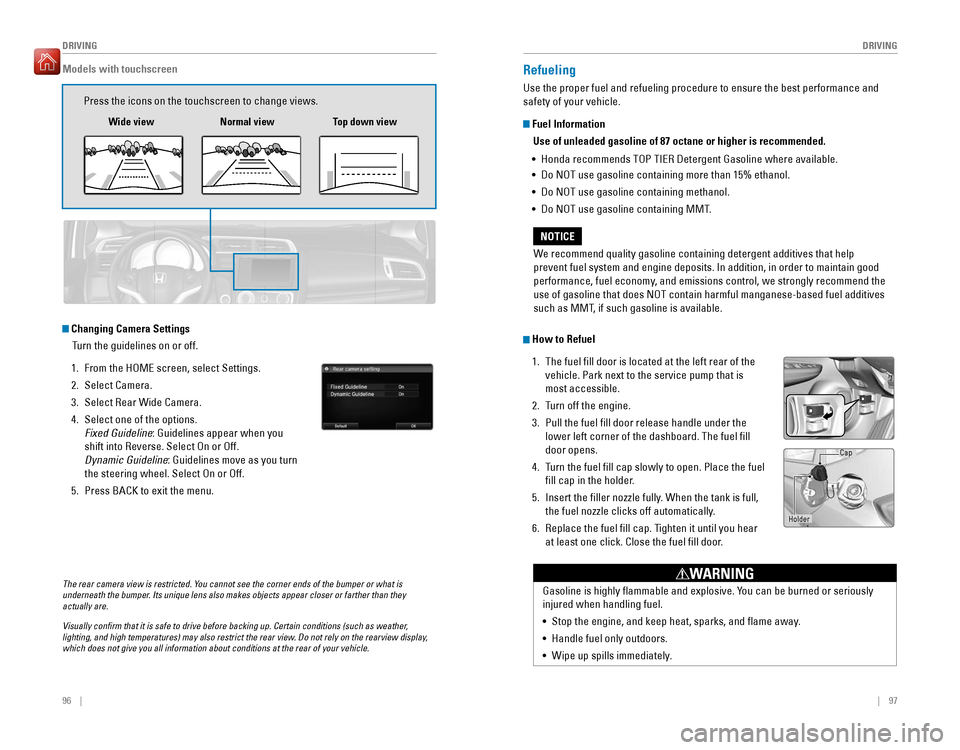
Changing Camera Settings
Turn the guidelines on or off.
1. From the HOME screen, select Settings.
2. Select Camera.
3. Select Rear Wide Camera.
4. Select one of the options. Fixed Guideline : Guidelines appear when you
shift into Reverse. Select On or Off.
Dynamic Guideline : Guidelines move as you turn
the steering wheel. Select On or Off.
5. Press BACK to exit the menu.
Models with touchscreen
Press the icons on the touchscreen to change views.
Wide view Normal view Top down view
Refueling
Use the proper fuel and refueling procedure to ensure the best performance and safety of your vehicle.
Fuel Information
Use of unleaded gasoline of 87 octane or higher is recommended.
• Honda recommends TOP TIER Detergent Gasoline where available.
• Do NOT use gasoline containing more than 15% ethanol.
• Do NOT use gasoline containing methanol.
• Do NOT use gasoline containing MMT.
How to Refuel
1. The fuel ll door is located at the left rear of the vehicle. Park next to the service pump that is most accessible.
2. Turn off the engine.
3. Pull the fuel ll door release handle under the lower left corner of the dashboard. The fuel ill door opens.
4. Turn the fuel ll cap slowly to open. Place the fuel
ll cap in the holder.
5. Insert the iller nozzle fully. When the tank is full,
the fuel nozzle clicks off automatically.
6. Replace the fuel ll cap. Tighten it until you hear at least one click. Close the fuel ll door.
We recommend quality gasoline containing detergent additives that help
prevent fuel system and engine deposits. In addition, in order to maintain good
performance, fuel economy, and emissions control, we strongly recommend the use of gasoline that does NOT contain harmful manganese-based fuel additives
such as MMT, if such gasoline is available.
NOTICE
Gasoline is highly lammable and explosive. You can be burned or seriously injured when handling fuel. •
Stop the engine, and keep heat, sparks, and ame away.
• Handle fuel only outdoors.
• Wipe up spills immediately.
WARNING
Holder Cap
Page 55 of 75

102 || 103
HANDLING THE UNEXPECTED
HANDLING THE UNEXPECTED
Tire Pressure Monitoring System (TPMS)
Monitors the tire pressure while you are driving. Available on U.S. models only.
If your vehicle’s tire pressure becomes signiicantly
low, the low tire pressure indicator comes on. Stop your vehicle in a safe place. Check the tire pressure and adjust the pressure to the specied level. The speciied tire pressure is on a label on the
driver’s doorjamb.
TPMS Calibration
Any time you inate, change, or rotate one of more
of the tires, you need to recalibrate the system. Press and hold the TPMS button. The TPMS indicator blinks, and calibration begins. The calibration process requires approximately 30 minutes of cumulative driving at speeds between 30–60 mph (48–97 km/h). The process inishes
automatically.
Driving on an extremely underinlated tire can cause it to overheat. An overheated tire can fail. Always inate your tires to the specied pressure.
NOTICE
TPMS button
Low tire
pressure indicator
Tire Pressure Monitoring System (TPMS)—Required Federal Explanation
U.S. models only
Each tire, including the spare (if provided), should be checked monthly when cold and inlated to the inlation pressure recommended by the vehicle manufacturer on the vehicle placard or tire ination pressure label. (If your vehicle has tires of a different size than the size indicated on the vehicle placard or tire inlation pressure label, you should determine the proper tire ination pressure for those tires.) As an added safety feature, your vehicle has been equipped with a tire pressure monitoring system (TPMS) that illuminates a low tire pressure telltale when one or more of your tires is
signicantly under-inated.
Accordingly, when the low tire pressure telltale illuminates, you should
stop and check your tires as soon as possible, and inlate them to the proper pressure.
Driving on a signiicantly under-inlated tire causes the tire to overheat
and can lead to tire failure. Under-ination also reduces fuel efciency
and tire tread life, and may affect the vehicle’s handling and stopping
ability. Please note that the TPMS is not a substitute for proper tire maintenance,
and it is the driver’s responsibility to maintain correct tire pressure, even
if under-ination has not reached the level to trigger illumination of the TPMS low tire pressure telltale.
Your vehicle has also been equipped with a TPMS malfunction indicator
to indicate when the system is not operating properly. The TPMS malfunction indicator is combined with the low tire pressure telltale. When the system detects a malfunction, the telltale will ash for approximately one minute and then remain continuously illuminated. This sequence will continue upon subsequent vehicle start-ups as long as the malfunction exists. When the malfunction indicator is illuminated, the system may not be able to detect or signal low tire pressure as intended. TPMS malfunctions may occur for a variety of reasons, including the installation of replacement or alternate tires or wheels on the vehicle that
prevent the TPMS from functioning properly. Always check the TPMS malfunction telltale after replacing one or more tires or wheels on your vehicle to ensure that the replacement or alternate tires and wheels allow the TPMS to continue to function
properly.
Page 58 of 75

108 || 109
HANDLING THE UNEXPECTED
HANDLING THE UNEXPECTED
Fuse Locations
If any electrical devices are not working, turn the vehicle off and check to see if any
applicable fuse is blown. Fuse locations are shown on the fuse box cover. Locate the
fuse in question by the fuse number and box cover number.
Engine Compartment Fuse Box
Located under the hood near the brake luid reservoir. Push the tabs to open the box.
Circuit ProtectedAmps1Headlight Low Beam Main20 A2CDC *(30 A)3Hazard10
A4DBW15 A5Wiper(30 A)6Stop10 A7IGP15 A8IG Coi l15A9ECP *(10 A)10INJ(20 A)11––12Main Fa
n30A
*if equipped
Ta b
13Starter SW(30 A)14MG Clutch7.5A15Battery Senso r(7.5A )16––17Daytime Running Lights(7.5A )18Horn10A19Fog Ligh t*(15 A)20––
Circuit Protecte
dAmps
21Back Up Main15A22Interior Lights7.5 A23Sub Fa n(30A )24––25Smart Entry Auto Start *(7.5 A)26ST MG(7.5
A)27––28––29Back Up(10A )30IGP LAF(10A )31IGPS(7.5 A)32Right Headlight Low Beam10A33Left Headlight Low Beam10A
Circuit Protecte dAmps1Door Lock(20 A)2––3Smart*(10 A)4Driver Side Door Unlock15
A5Passenger Side Door Unlock15 A6Driver Door Unlock(10 A)7Driver Door Lock(10 A)8Driver’s Power Window20A9Passenger’s Power Window20A10Rear Left Power Window20A11Rear Right Power Window20A12Driver Side Door Lock15A13Passenger Side Door Lock15A14––15Right Headlight High Beam10A16STS *(7.
5A )
Interior Fuse Boxes
Fuse box A
Located behind the dashboard next to the steering wheel.
*if equipped
Fuse label
17ACC Socket (Console*
)(20 A)18Moonroof *(20 A)19Front Seat Heater *(20 A)20––
Circuit Protecte
dAmps
21––22Washer15A23Rear Wiper(10A )24A/C7.5A25Daytime Running Lights7.5 A26Starter Cut7.5A27ABS/VSA7.5 A28SRS10 A29Left Headlight High Beam10A30ACG10A31Power Window10 A32Fuel Pump15 A33SRS7.5A34Mete r7.5A35Mission SOL7.5A36Front ACC Socket20 A37ACC7.5A38ACC Key Lock7.5A39Option(1 0A )40Rear Wiper10 A4142
Page 60 of 75
112 || 113
MAINTENANCE
MAINTENANCE
Safety Precautions
Some of the most important safety precautions are listed below; however, we cannot warn you of every conceivable hazard that can arise in performing maintenance. Only you can decide whether or not you should perform a given task.
Maintenance Safety
•
To reduce the possibility of ire or explosion, keep cigarettes, sparks, and lames
away from the battery and all fuel-related parts.
• Never leave rags, towels, or other lammable objects under the hood.
• To clean parts, use a commercially available degreaser or parts cleaner, not gasoline.
• Wear eye protection and protective clothing when working with the battery or
compressed air.
• Do not run the engine in conined spaces where carbon monoxide gas can
accumulate.
Vehicle Safety
• The vehicle must be stationary, and parked on level ground with the parking
brake set and the engine off.
• Be aware that hot parts can burn you. • Be aware that moving parts can injure you.
Improperly maintaining this vehicle or failing to correct a problem before driving can cause a crash in which you can be seriously hurt or killed. Always follow the inspection and maintenance recommendations according to the schedules in this guide.
WARNING
Failure to properly follow maintenance instructions and precautions can cause you to be seriously hurt or killed. Always follow the procedures and precautions in this guide.
WARNING
Learn about basic maintenance that you can perform on the vehicle yourself, as well as information about how to best maintain the vehicle.
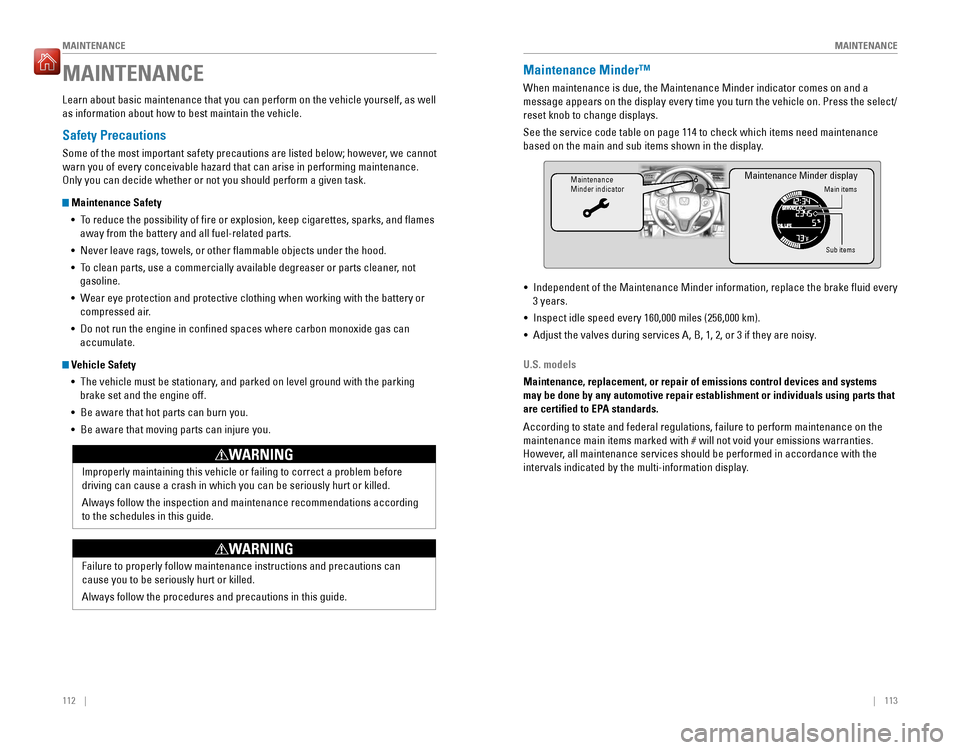
MAINTENANCEMaintenance Minder™
When maintenance is due, the Maintenance Minder indicator comes on and a
message appears on the display every time you turn the vehicle on. Press the select/reset knob to change displays. See the service code table on page 114 to check which items need maintenance
based on the main and sub items shown in the display.
Maintenance Minder indicatorMain items
Sub items
Maintenance Minder display
• Independent of the Maintenance Minder information, replace the brake luid every 3 years.
• Inspect idle speed every 160,000 miles (256,000 km).
• Adjust the valves during services A, B, 1, 2, or 3 if they are noisy.
U.S. models
Maintenance, replacement, or repair of emissions control devices and systems may be done by any automotive repair establishment or individuals using parts that
are certied to EPA standards. According to state and federal regulations, failure to perform maintenance on the
maintenance main items marked with # will not void your emissions warranties.
However, all maintenance services should be performed in accordance with the
intervals indicated by the multi-information display.