ESP HONDA FIT 2017 3.G User Guide
[x] Cancel search | Manufacturer: HONDA, Model Year: 2017, Model line: FIT, Model: HONDA FIT 2017 3.GPages: 465, PDF Size: 26.52 MB
Page 221 of 465
220
uuAudio System Basic Operation uSmartphone Apps
Features
Smartphone Apps
You can connect a compatible smartphone to the system to enable integration
between the smartphone’s approved apps and the vehicle. This allows you to
control the phone through the vehicle display. To check smart phone compatibility,
download the HondaLink app, and view connection instructions, visit
handsfreelink.honda.com . For the latest apps and feature details, check
hondalink.com .1Smartphone Apps
Park in a safe place be fore connecting your phone
and while operating the displayed apps.
Not all phones and apps ar e compatible with the
system. The system does not display all the available
apps on smartphone, and so me apps need to be
preinstalled. Ask a dealer for details.
You need to switch the Bluetooth connection to your
smartphone if another electr onic device is connected.
2 Changing the currently paired phone
P. 285
The following may vary by phone type:
•Connection methods.
•How to connect a smartphone to the system.•Apps that can be operated on the screen.
•Display response ti me/update time.
We do not support every app operation on the
display audio.
Ask the app provider for an y questions on the app’s
features.VOL
HOME
MENU
BACK
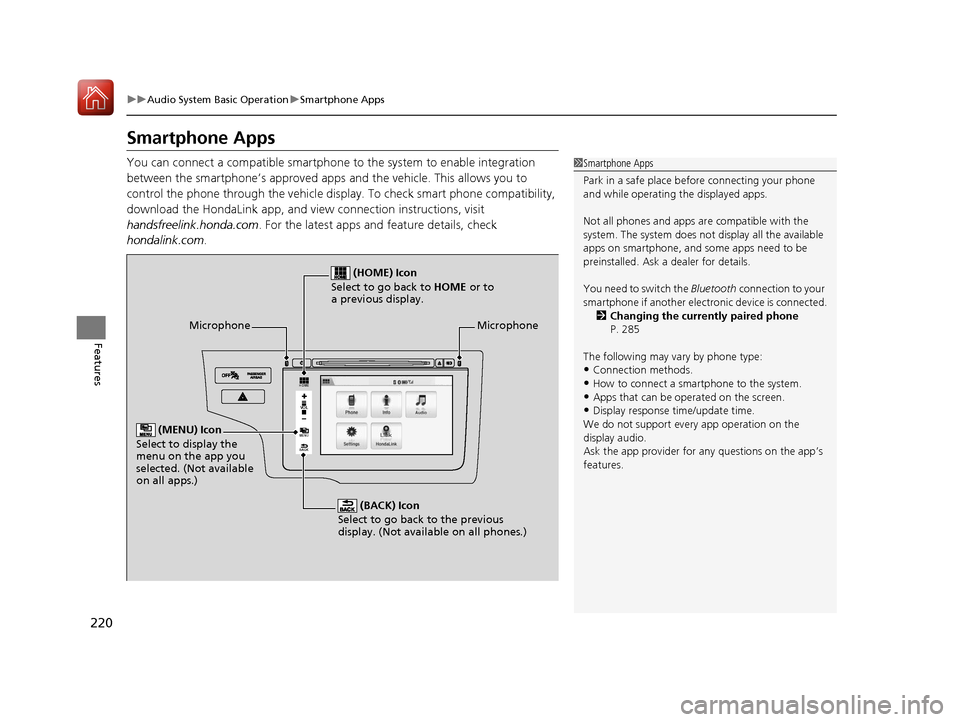
Microphone
(BACK) Icon
Select to go back to the previous
display. (Not available on all phones.)
(HOME) Icon
Select to go back to HOME or to
a previous display.
(MENU) Icon
Select to display the
menu on the app you
selected. (Not available
on all apps.)
Microphone
17 FIT -31T5A6200.book 220 ページ 2016年5月27日 金曜日 午後6時33分
Page 253 of 465
uuBluetooth ® HandsFreeLink ®u Using HFL
252
Features
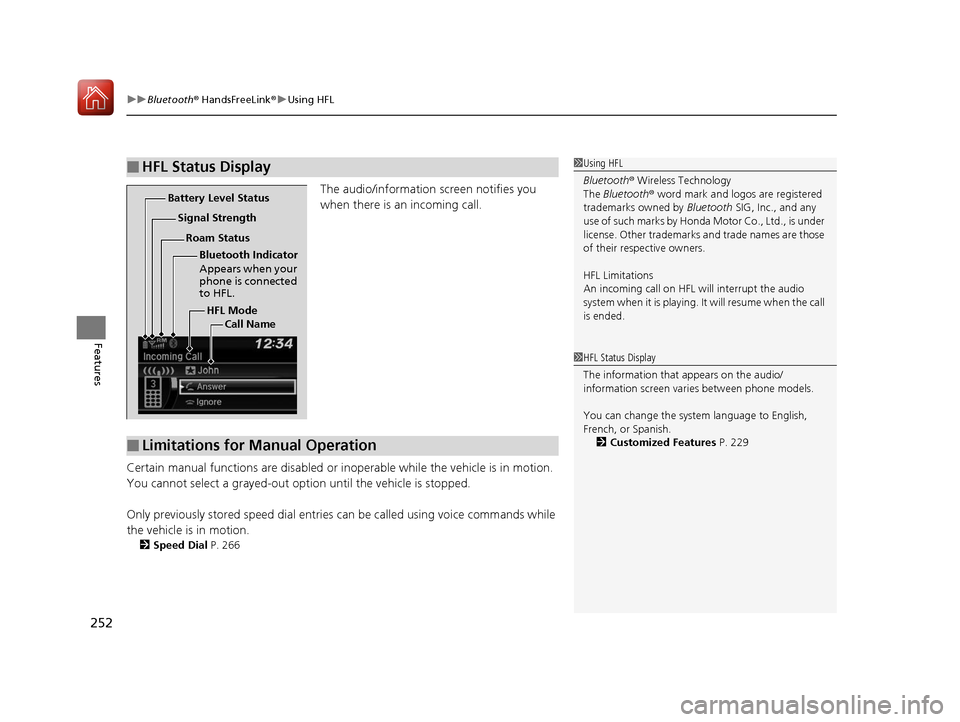
The audio/information screen notifies you
when there is an incoming call.
Certain manual functions are disabled or i noperable while the vehicle is in motion.
You cannot select a grayed-out option until the vehicle is stopped.
Only previously stored speed dial entries can be called using voice commands while
the vehicle is in motion.
2 Speed Dial P. 266
■HFL Status Display1Using HFL
Bluetooth ® Wireless Technology
The Bluetooth ® word mark and logos are registered
trademarks owned by Bluetooth SIG, Inc., and any
use of such marks by Honda Motor Co., Ltd., is under
license. Other trademarks and trade names are those
of their respective owners.
HFL Limitations
An incoming call on HFL will interrupt the audio
system when it is playing. It will resume when the call
is ended.
HFL Mode
Battery Level Status
Signal Strength
Bluetooth Indicator
Appears when your
phone is connected
to HFL.
Roam Status
Call Name
■Limitations for Manual Operation
1HFL Status Display
The information that appears on the audio/
information screen vari es between phone models.
You can change the system language to English,
French, or Spanish. 2 Customized Features P. 229
17 FIT -31T5A6200.book 252 ページ 2016年5月27日 金曜日 午後6時33分
Page 254 of 465
253
uuBluetooth ® HandsFreeLink ®u HFL Menus
Continued
Features
HFL Menus
The ignition switch mu st be in ACCESSORY (q or ON (w to use HFL.1HFL Menus
To use HFL, you must fi rst pair your Bluetooth-
compatible cell phone to th e system while the vehicle
is parked.
Some functions are limited while driving. A message
appears on the screen when the vehicle is moving
and the operation is canceled.
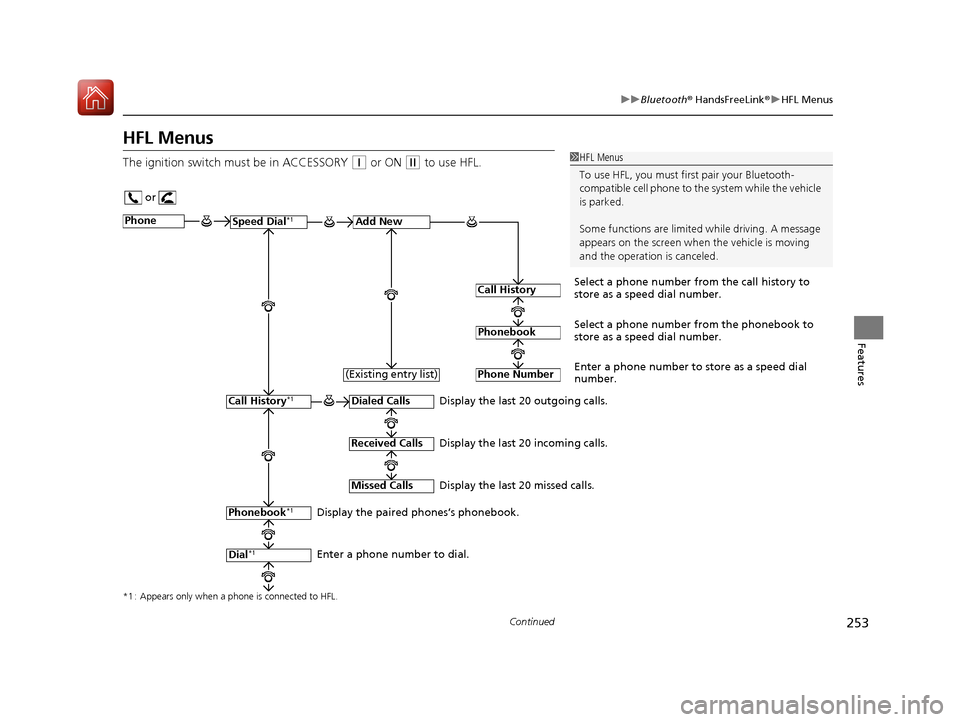
or
Display the last 20 outgoing calls.
Display the last 20 incoming calls.
Display the last 20 missed calls.
*1 : Appears only when a phone is connected to HFL.
PhoneSpeed Dial*1Add New
Select a phone number from the call history to
store as a speed dial number.
Call History
PhonebookSelect a phone number from the phonebook to
store as a speed dial number.
Phone Number
Enter a phone number to store as a speed dial
number.
Dialed Calls
Received Calls
Missed Calls
Phonebook*1
Dial*1
Call History*1
Display the paired phones’s phonebook.
Enter a phone number to dial. (Existing entry list)
17 FIT -31T5A6200.book 253 ページ 2016年5月27日 金曜日 午後6時33分
Page 267 of 465
uuBluetooth ® HandsFreeLink ®u HFL Menus
266
Features
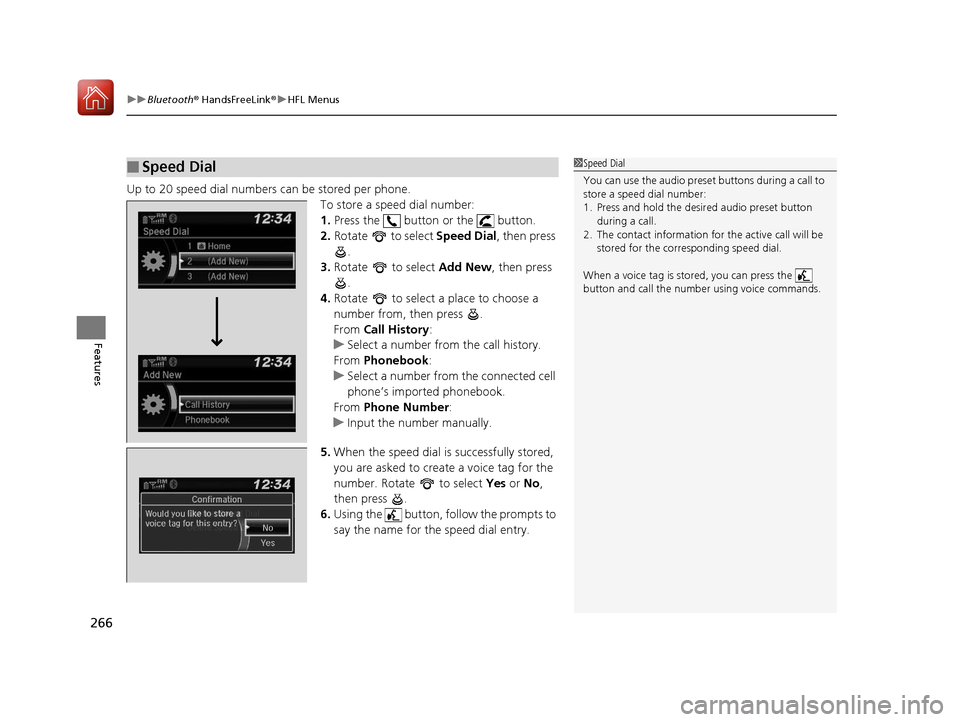
Up to 20 speed dial numbers can be stored per phone.
To store a speed dial number:
1.Press the button or the button.
2. Rotate to select Speed Dial, then press
.
3. Rotate to select Add New, then press
.
4. Rotate to select a place to choose a
number from, then press .
From Call History :
u Select a number from the call history.
From Phonebook :
u Select a number from the connected cell
phone’s imported phonebook.
From Phone Number :
u Input the number manually.
5. When the speed dial is successfully stored,
you are asked to create a voice tag for the
number. Rotate to select Yes or No ,
then press .
6. Using the button, follow the prompts to
say the name for the speed dial entry.
■Speed Dial1Speed Dial
You can use the audio preset buttons during a call to
store a speed dial number:
1. Press and hold the desired audio preset button
during a call.
2. The contact information for the active call will be
stored for the corresponding speed dial.
When a voice tag is stored, you can press the
button and call the numbe r using voice commands.
Change Speed Dial
Delete Speed DialChaChaChaChahaChangengengengegenge Sp SpSpSpSpSpeedeedeedeedeedeed Dial
DelDelDelDleteeteetet SpSpSpSeedeedeedd DiDiDiDiDiDiDiDiDiDiiDiDiiDiilalaaaaalaa
17 FIT -31T5A6200.book 266 ページ 2016年5月27日 金曜日 午後6時33分
Page 274 of 465
Continued273
uuBluetooth ® HandsFreeLink ®u HFL Menus
Features
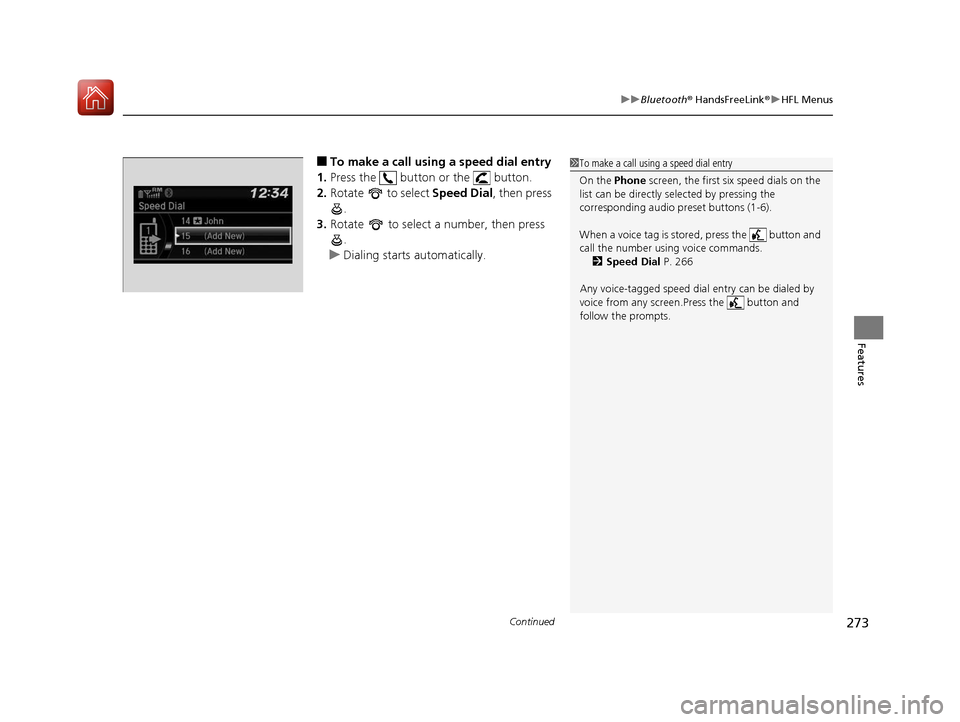
■To make a call using a speed dial entry
1. Press the button or the button.
2. Rotate to select Speed Dial, then press
.
3. Rotate to select a number, then press
.
u Dialing starts automatically.1To make a call using a speed dial entry
On the Phone screen, the first six speed dials on the
list can be directly selected by pressing the
corresponding audio preset buttons (1-6).
When a voice tag is stored, press the button and
call the number using voice commands.
2 Speed Dial P. 266
Any voice-tagged speed dial entry can be dialed by
voice from any screen.Press the button and
follow the prompts.
17 FIT -31T5A6200.book 273 ページ 2016年5月27日 金曜日 午後6時33分
Page 278 of 465
Continued277
uuBluetooth ® HandsFreeLink ®u Using HFL
Features
button: Press to display Speed Dial, Call History , or Redial on the Phone
screen. / button: Press to select an item displayed on the Phone screen.
SOURCE button: Press to call a number listed in the selected item on the Phone
screen.
To go to the Phone menu screen:
1. Select HOME .
2. Select Phone to switch the display to the Phone screen.
3. Select MENU .1Using HFL
Up to six speed dial entrie s can be displayed among a
total of 20 that can be entered. If there is no entries
in the system, Speed Dial is disabled.
2 Speed Dial P. 291
Bluetooth ® Wireless Technology
The Bluetooth ® word mark and logos are registered
trademarks owned by Blue tooth SIG, Inc., and any
use of such marks by Honda Motor Co., Ltd., is under
license. Other trademarks and trade names are those
of their respective owners.
HFL Limitations
An incoming call on HFL will interrupt the audio
system when it is playing. It will resume when the call
is ended.
17 FIT -31T5A6200.book 277 ページ 2016年5月27日 金曜日 午後6時33分
Page 323 of 465
uuWhen Driving uContinuously Variable Transmission*
322
Driving
If there is a strong impact with something under the vehicle, stop in a safe location.
Check the underside of the vehicle for damage or any fluid leaks.
Continuously Variable Transmission*
The engine runs at a higher id le speed and creeping increases.
Keep the brake pedal firmly depressed when stopped.
Quickly depressing the accelerator pedal while driving uphill may cause the
transmission to drop to a lower gear, unexpectedly increasing vehicle speed. Depress
the accelerator pedal carefully, especi ally on slippery roads and curves.
■Other Precautions
■Creeping
■Kickdown
1Precautions While Driving
NOTICE
The following can dama ge the under spoiler:•Parking the vehicle by a parking block
•Parallel parking along the road shoulder
•Driving towards the bottom of a hill•Driving up or down to a different surface level
(such as a road shoulder)
•Driving on a rutted or bumpy road•Driving on a road with potholes.
* Not available on all models
17 FIT -31T5A6200.book 322 ページ 2016年5月27日 金曜日 午後6時33分
Page 328 of 465
Continued327
uuWhen Driving uShifting
Driving
Use the paddle shifters to change between 1st and 7th speeds without removing
your hands from the steering wheel. The transmission switches to the 7-speed
manual shift mode when you pull a paddle shifter while driving. This mode is useful
when engine braking is needed.
■When the shift lever is in (D:
The shift mode goes into the 7-speed ma nual shift mode temporarily, and the
number is displayed in the shift indicator.
The 7-speed manual shift mode is canceled automatically if you drive at constant
speed or accelerate, and the number in the shift indicator goes off.
You can cancel this mode by pulling the paddle shifter for a few seconds.
The 7-speed manual shift mode is especial ly useful when reducing the vehicle speed
temporarily before making a turn.
■When the shift lever is in (S:
The shift mode goes into the 7-speed manual shift mode. The M indicator and the
speed number are displayed in the shift indicator. As the vehicle speed slows down,
the transmission automatically shifts down accordingly. When the vehicle comes to
a stop, it automatically shifts down into 1st.
If the vehicle speed increases and the engi ne speed reaches near the tachometer’s
red zone, the transmission automatically shifts up.
You can only pull away in 1st speed.
When canceling the 7-speed manual shift mode, move the shift lever from
(S to
(D. When the 7-speed manual sh ift mode is canceled, the M indicator and shift
indicator go off.
■7-Speed Manual Shift Mode1 7-Speed Manual Shift Mode
To improve fuel economy, the transmission may shift
up to a higher speed than the seventh under certain
circumstances. In this case, the number in the shift
indicator remains as 7.
In the 7-speed manual shif t mode, the transmission
shifts up or down by opera ting either paddle shifter
under the following conditions:
Shift Up: The engine sp eed reaches the lowest
threshold of the higher speed position.
Shift Down: The engine sp eed reaches the highest
threshold of the lower speed position.
When the engine speed reaches near the
tachometer’s red zone, the transmission shifts up
automatically.
When the engine speed reaches the lowest threshold
of the selected speed positi on, the transmission shifts
down automatically.
Operating the paddle shifte rs on slippery surfaces
may cause the tires to lock up. In this case, the 7-
speed manual shift mode is canceled and goes back
to the normal D driving mode.
17 FIT -31T5A6200.book 327 ページ 2016年5月27日 金曜日 午後6時33分
Page 337 of 465
336
uuWhen Driving uForward Collision Warning (FCW)*
Driving
Forward Collision Warning (FCW)*
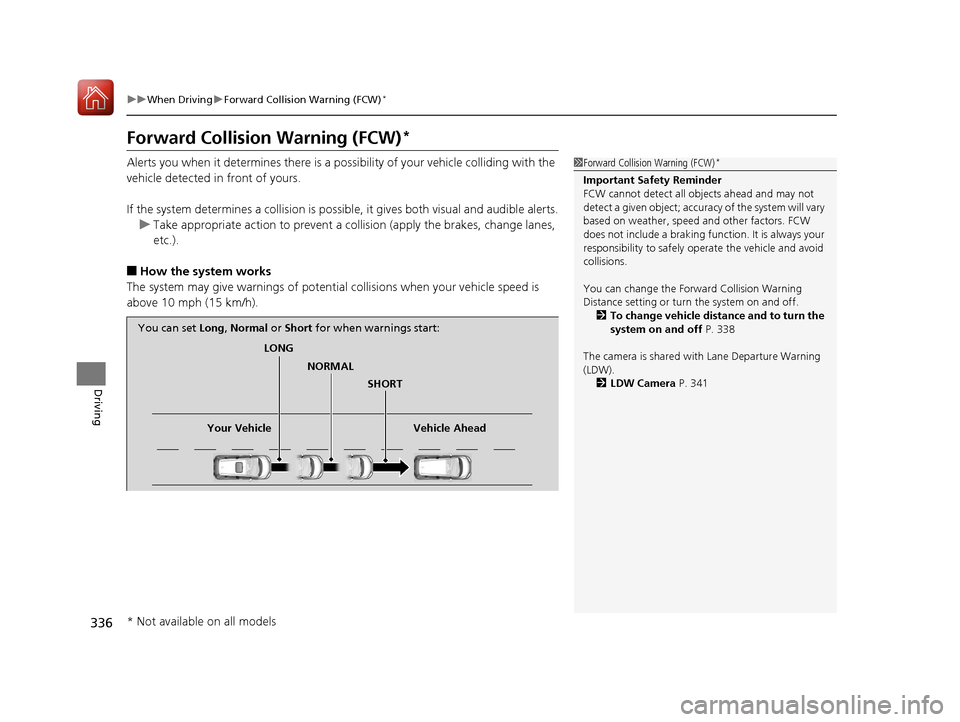
Alerts you when it determines there is a possibility of your vehicle colliding with the
vehicle detected in front of yours.
If the system determines a collision is possible, it gives both visual and audible alerts.
u Take appropriate action to prevent a col lision (apply the brakes, change lanes,
etc.).
■How the system works
The system may give warnings of potential collisions when your vehicle speed is
above 10 mph (15 km/h).
1 Forward Collision Warning (FCW)*
Important Safety Reminder
FCW cannot detect all ob jects ahead and may not
detect a given object; accura cy of the system will vary
based on weather, speed and other factors. FCW
does not include a braking func tion. It is always your
responsibility to sa fely operate the vehicle and avoid
collisions.
You can change the Forward Collision Warning
Distance setting or turn the system on and off. 2 To change vehicle distance and to turn the
system on and off P. 338
The camera is shared with Lane Departure Warning
(LDW). 2 LDW Camera P. 341
LONG
NORMAL SHORT
Your Vehicle Vehicle Ahead
You can set
Long, Normal or Short for when warnings start:
* Not available on all models
17 FIT -31T5A6200.book 336 ページ 2016年5月27日 金曜日 午後6時33分
Page 341 of 465
340
uuWhen Driving uLane Departure Warning (LDW)*
Driving
Lane Departure Warning (LDW)*
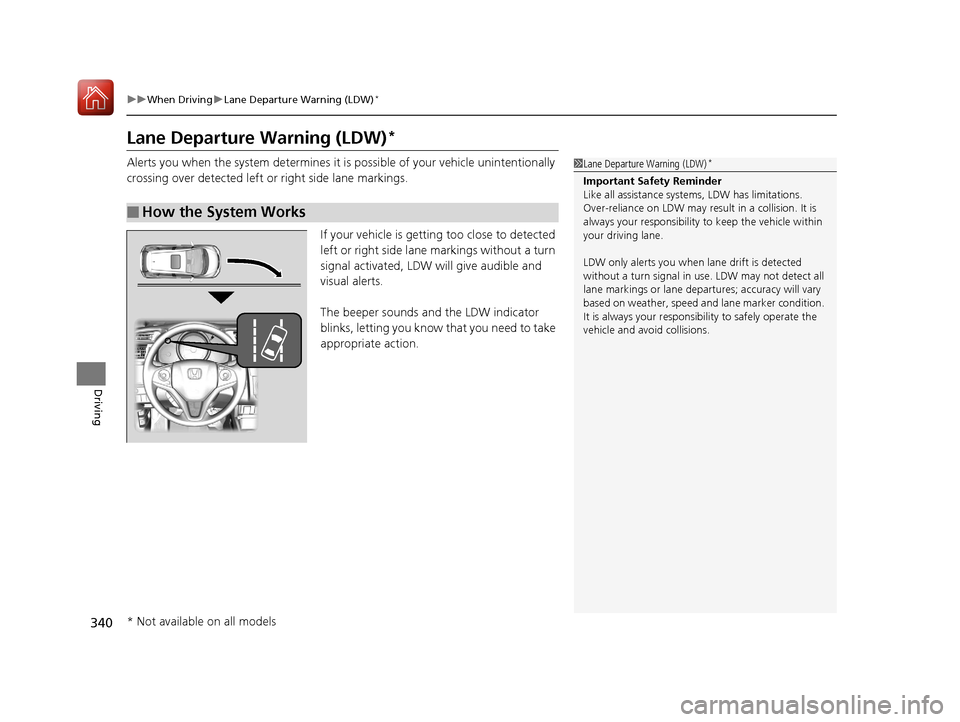
Alerts you when the system determines it is possible of your vehicle unintentionally
crossing over detected left or right side lane markings.
If your vehicle is getting too close to detected
left or right side lane markings without a turn
signal activated, LDW will give audible and
visual alerts.
The beeper sounds and the LDW indicator
blinks, letting you know that you need to take
appropriate action.
■How the System Works
1 Lane Departure Warning (LDW)*
Important Safety Reminder
Like all assistance systems, LDW has limitations.
Over-reliance on LDW may result in a collision. It is
always your responsibility to keep th e vehicle within
your driving lane.
LDW only alerts you when lane drift is detected
without a turn signal in us e. LDW may not detect all
lane markings or lane departures; a ccuracy will vary
based on weather, speed and lane marker condition.
It is always your responsibility to safely operate the
vehicle and avoid collisions.
* Not available on all models
17 FIT -31T5A6200.book 340 ページ 2016年5月27日 金曜日 午後6時33分