vent HONDA FIT 2017 3.G User Guide
[x] Cancel search | Manufacturer: HONDA, Model Year: 2017, Model line: FIT, Model: HONDA FIT 2017 3.GPages: 465, PDF Size: 26.52 MB
Page 71 of 465
70
Instrument Panel
Indicators
*1:Models with the smart entry system have an ENGINE START/STOP button instead of an ignition switch.
IndicatorNameOn/BlinkingExplanation
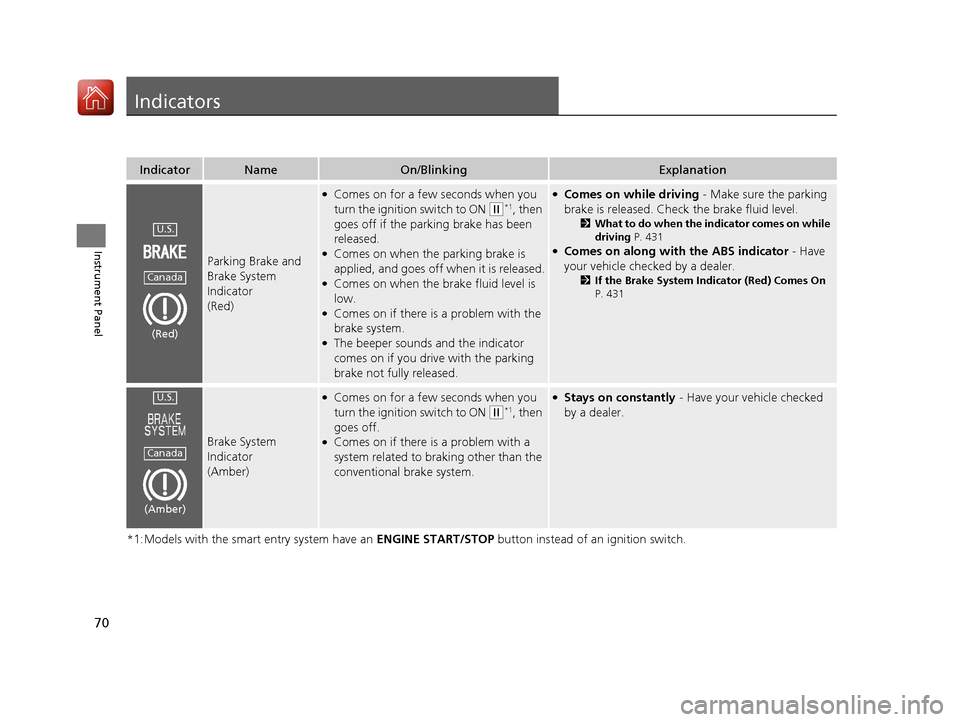
Parking Brake and
Brake System
Indicator
(Red)
●Comes on for a few seconds when you
turn the ignition switch to ON
(w*1, then
goes off if the parking brake has been
released.
●Comes on when the parking brake is
applied, and goes off when it is released.
●Comes on when the brake fluid level is
low.
●Comes on if there is a problem with the
brake system.
●The beeper sounds and the indicator
comes on if you drive with the parking
brake not fully released.
●Comes on while driving - Make sure the parking
brake is released. Check the brake fluid level.
2 What to do when the indicator comes on while
driving P. 431
●Comes on along with the ABS indicator - Have
your vehicle checked by a dealer.
2 If the Brake System Indicator (Red) Comes On
P. 431
Brake System
Indicator
(Amber)
●Comes on for a few seconds when you
turn the ignition switch to ON
(w*1, then
goes off.
●Comes on if there is a problem with a
system related to braking other than the
conventional brake system.
●Stays on constantly - Have your vehicle checked
by a dealer.
U.S.
Canada
(Red)
U.S.
Canada
(Amber)
17 FIT -31T5A6200.book 70 ページ 2016年5月27日 金曜日 午後6時33分
Page 75 of 465
74
uuIndicators u
Instrument Panel
*1:Models with the smart entry system have an ENGINE START/STOP button instead of an ignition switch.
IndicatorNameOn/BlinkingExplanation
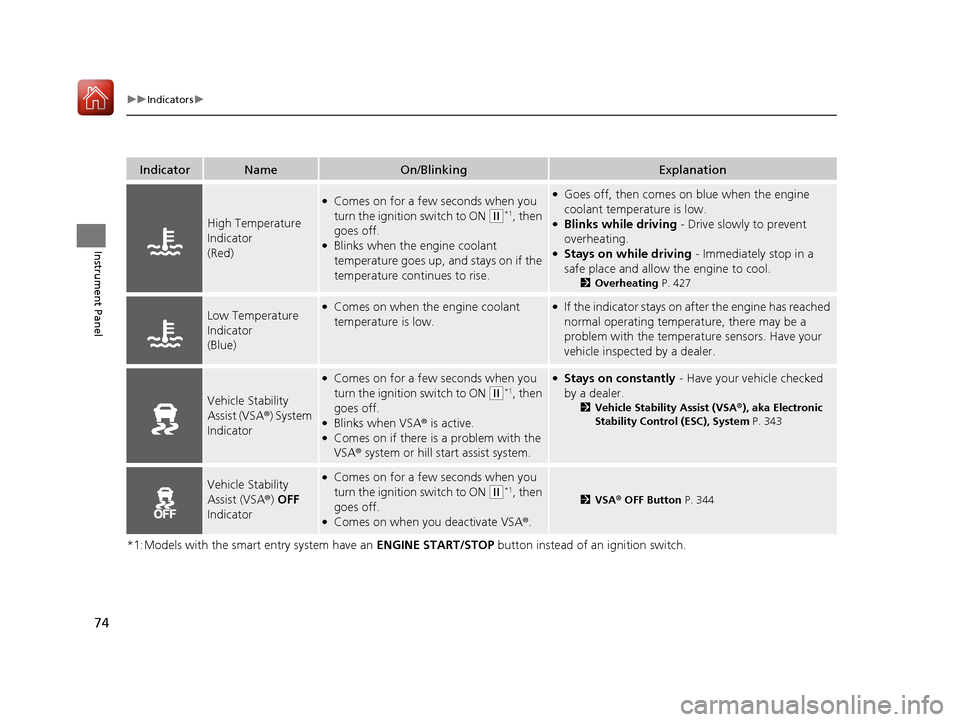
High Temperature
Indicator
(Red)
●Comes on for a few seconds when you
turn the ignition switch to ON
(w*1, then
goes off.
●Blinks when the engine coolant
temperature goes up, and stays on if the
temperature continues to rise.
●Goes off, then comes on blue when the engine
coolant temperature is low.
●Blinks while driving - Drive slowly to prevent
overheating.
●Stays on while driving - Immediately stop in a
safe place and allow the engine to cool.
2 Overheating P. 427
Low Temperature
Indicator
(Blue)●Comes on when the engine coolant
temperature is low.●If the indicator stays on after the engine has reached
normal operating temperature, there may be a
problem with the temperature sensors. Have your
vehicle inspected by a dealer.
Vehicle Stability
Assist (VSA®) System
Indicator
●Comes on for a few seconds when you
turn the ignition switch to ON
(w*1, then
goes off.
●Blinks when VSA ® is active.●Comes on if there is a problem with the
VSA® system or hill start assist system.
●Stays on constantly - Have your vehicle checked
by a dealer.
2 Vehicle Stability Assist (VSA® ), aka Electronic
Stability Control (ESC), System P. 343
Vehicle Stability
Assist (VSA ®) OFF
Indicator●Comes on for a few seconds when you
turn the ignition switch to ON
(w*1, then
goes off.
●Comes on when you deactivate VSA ®.
2VSA ® OFF Button P. 344
17 FIT -31T5A6200.book 74 ページ 2016年5月27日 金曜日 午後6時33分
Page 79 of 465
78
uuIndicators u
Instrument Panel
IndicatorNameOn/BlinkingExplanationMessage
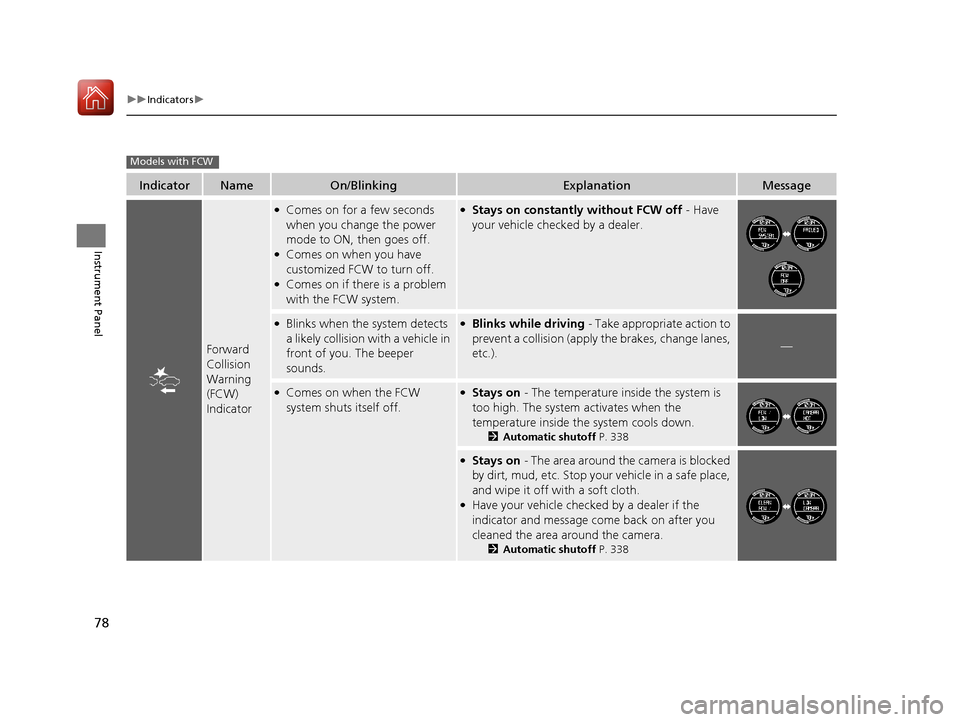
Forward
Collision
Warning
(FCW)
Indicator
●Comes on for a few seconds
when you change the power
mode to ON, then goes off.
●Comes on when you have
customized FCW to turn off.
●Comes on if there is a problem
with the FCW system.
●Stays on constantly without FCW off - Have
your vehicle checked by a dealer.
●Blinks when the system detects
a likely collision with a vehicle in
front of you. The beeper
sounds.●Blinks while driving - Take appropriate action to
prevent a collision (apply the brakes, change lanes,
etc.).
—
●Comes on when the FCW
system shuts itself off.●Stays on - The temperature inside the system is
too high. The system activates when the
temperature inside the system cools down.
2 Automatic shutoff P. 338
●Stays on - The area around the camera is blocked
by dirt, mud, etc. Stop your vehicle in a safe place,
and wipe it off with a soft cloth.
●Have your vehicle checked by a dealer if the
indicator and message come back on after you
cleaned the area around the camera.
2 Automatic shutoff P. 338
Models with FCW
17 FIT -31T5A6200.book 78 ページ 2016年5月27日 金曜日 午後6時33分
Page 90 of 465
89
Controls
This chapter explains how to operate the various controls necessary for driving.
Clock.............................................................. 90
Locking and Unlocking the Doors Key Types and Functions ............................. 92
Low Smart Entry Remote Signal Strength*.......94Locking/Unlocking the Doors from the Outside ....95
Locking/Unlocking the Doors from the Inside .....101
Childproof Door Locks .............................. 104
Auto Door Locking/Unlocking*................. 105
Opening and Closing the Tailgate ............ 109
Security System .......................................... 112
Immobilizer System ......... ..................... ..... 112
Security System Alarm ............................... 112
Opening and Closing the Windows .......... 115
Opening and Closing the Moonroof
*....... 117 Operating the Switches Around the Steering
Wheel
Ignition Switch.......................................... 118
ENGINE START/STOP Button ..................... 119
Ignition Switch and Power Mode Comparison ... 122Turn Signals .............................................. 123
Light Switches .......................................... 123
Fog Lights
*............................................... 126
Daytime Running Lights ............................ 127
Wipers and Washers ................................. 128
Brightness Control .................................... 130
Rear Defogger/Heated Door Mirror* Button ...... 131Adjusting the Steering Wheel ................... 132
Models without smart entry system
Models with smart entry system
Adjusting the Mirrors .................................133
Interior Rearview Mirror .............................133
Power Door Mirrors ...................................133
Adjusting the Seats .................................... 135
Front Seats ................................................135
Rear Seats .................................................139
Interior Lights/Interior Convenience Items....... 147Interior Lights ............................................147
Interior Convenience Items ........................149
Heating and Cooling System
*....................157
Using Vents, Heating and A/C*.................157
Climate Control System*............................160
Using Automatic Climate Control ..............160
Automatic Climate Control Sensors ...........163
* Not available on all models
17 FIT -31T5A6200.book 89 ページ 2016年5月27日 金曜日 午後6時33分
Page 93 of 465
92
Controls
Locking and Unlocking the Doors
Key Types and Functions
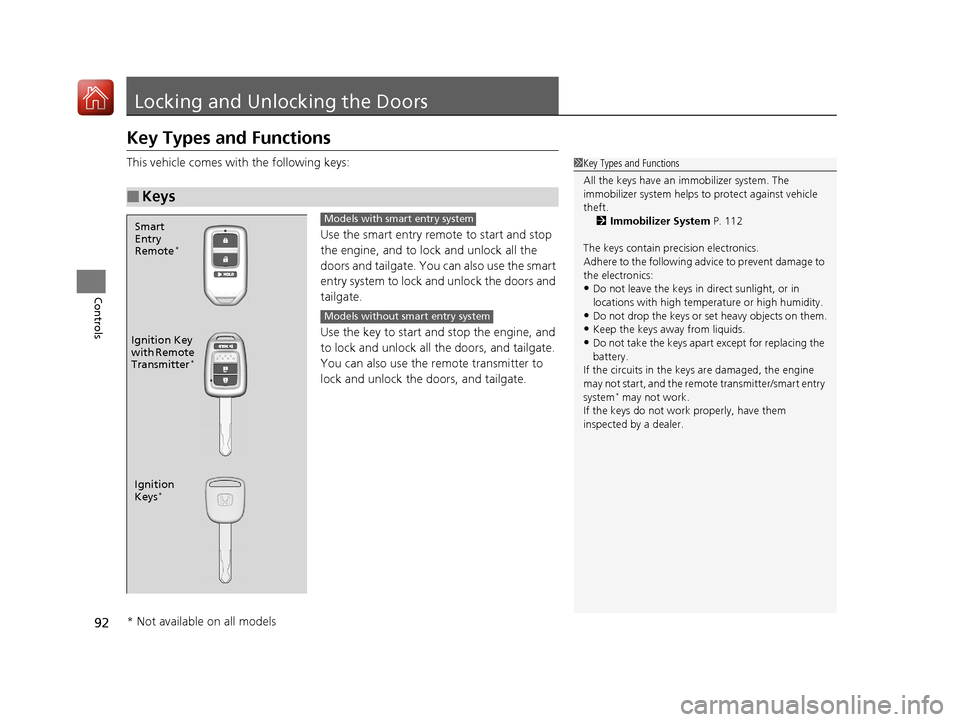
This vehicle comes with the following keys:Use the smart entry remote to start and stop
the engine, and to lock and unlock all the
doors and tailgate. You can also use the smart
entry system to lock and unlock the doors and
tailgate.
Use the key to start and stop the engine, and
to lock and unlock all the doors, and tailgate.
You can also use the re mote transmitter to
lock and unlock the doors, and tailgate.
■Keys
1 Key Types and Functions
All the keys have an immobilizer system. The
immobilizer system helps to protect against vehicle
theft. 2 Immobilizer System P. 112
The keys contain precision electronics.
Adhere to the following advi ce to prevent damage to
the electronics:
•Do not leave the keys in direct sunlight, or in
locations with high temperature or high humidity.
•Do not drop the keys or set heavy objects on them.
•Keep the keys away from liquids.
•Do not take the keys apart except for replacing the
battery.
If the circuits in the keys are damaged, the engine
may not start, and the remote transmitter/smart entry
system
* may not work.
If the keys do not work properly, have them
inspected by a dealer.
Ignition
Keys*
Ignition Key
with Remote
Transmitter
*
Smart
Entry
Remote
*
Models with smart entry system
Models without smart entry system
* Not available on all models
17 FIT -31T5A6200.book 92 ページ 2016年5月27日 金曜日 午後6時33分
Page 101 of 465
uuLocking and Unlocking the Doors uLocking/Unlocking the Doors from the Outside
100
Controls
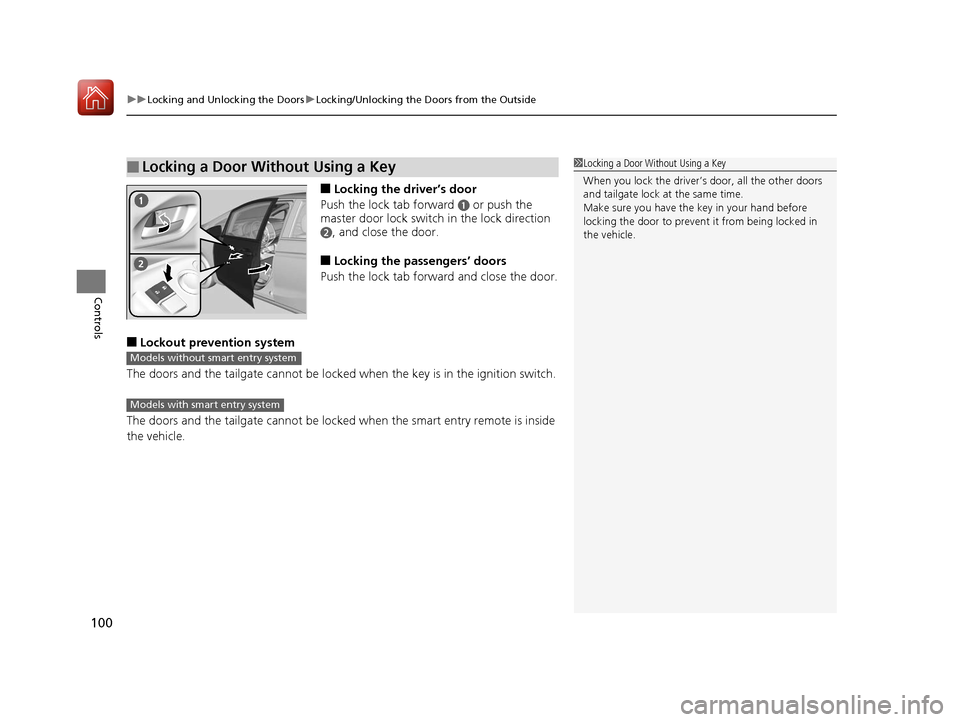
■Locking the driver’s door
Push the lock tab forward
a or push the
master door lock switch in the lock direction
b, and close the door.
■Locking the passengers’ doors
Push the lock tab forward and close the door.
■Lockout prevention system
The doors and the tailgate can not be locked when the key is in the ignition switch.
The doors and the tailgate cannot be locked when the smart entry remote is inside
the vehicle.
■Locking a Door Without Using a Key1 Locking a Door Without Using a Key
When you lock the driver’s door, all the other doors
and tailgate lock at the same time.
Make sure you have the key in your hand before
locking the door to prevent it from being locked in
the vehicle.
Models without smart entry system
Models with smart entry system
17 FIT -31T5A6200.book 100 ページ 2016年5月27日 金曜日 午後6時33分
Page 103 of 465
uuLocking and Unlocking the Doors uLocking/Unlocking the Doors from the Inside
102
Controls
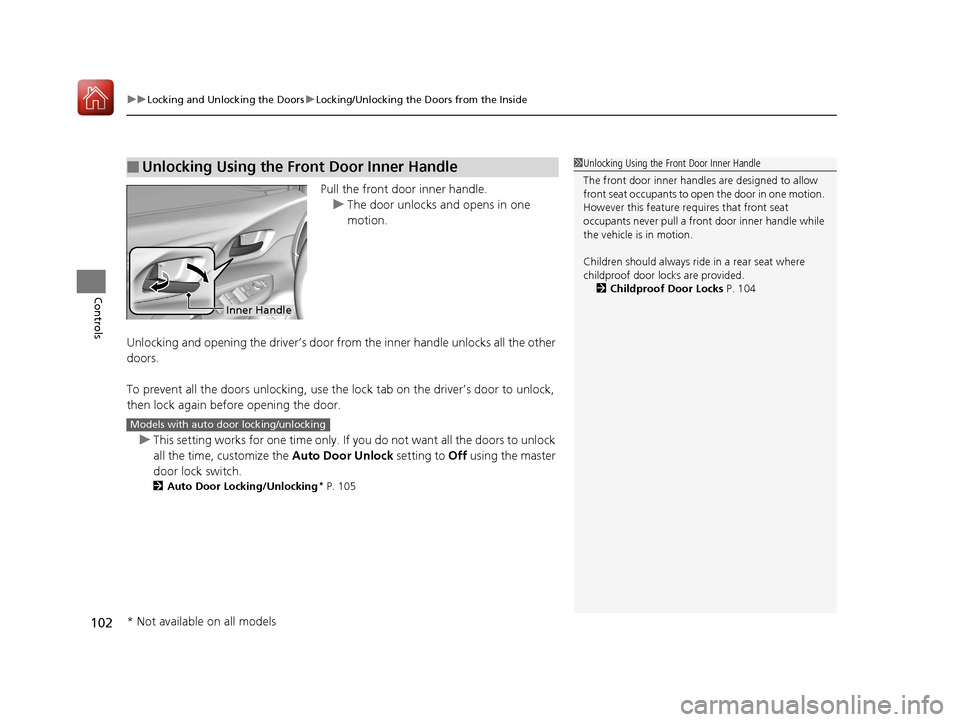
Pull the front door inner handle.
u The door unlocks and opens in one
motion.
Unlocking and opening the driver’s door from the inner handle unlocks all the other
doors.
To prevent all the doors unlock ing, use the lock tab on the driver’s door to unlock,
then lock again before opening the door.
u This setting works for one time only. If you do not want all the doors to unlock
all the time, customize the Auto Door Unlock setting to Off using the master
door lock switch.
2 Auto Door Locking/Unlocking* P. 105
■Unlocking Using the Front Door Inner Handle1Unlocking Using the Front Door Inner Handle
The front door inne r handles are designed to allow
front seat occupants to open the door in one motion.
However this feature requires that front seat
occupants never pull a front door inner handle while
the vehicle is in motion.
Children should always ride in a rear seat where
childproof door locks are provided.
2 Childproof Door Locks P. 104
Inner Handle
Models with auto door locking/unlocking
* Not available on all models
17 FIT -31T5A6200.book 102 ページ 2016年5月27日 金曜日 午後6時33分
Page 105 of 465
104
uuLocking and Unlocking the Doors uChildproof Door Locks
Controls
Childproof Door Locks
The childproof door locks prevent the rear doors from being opened from the inside
regardless of the position of the lock tab.
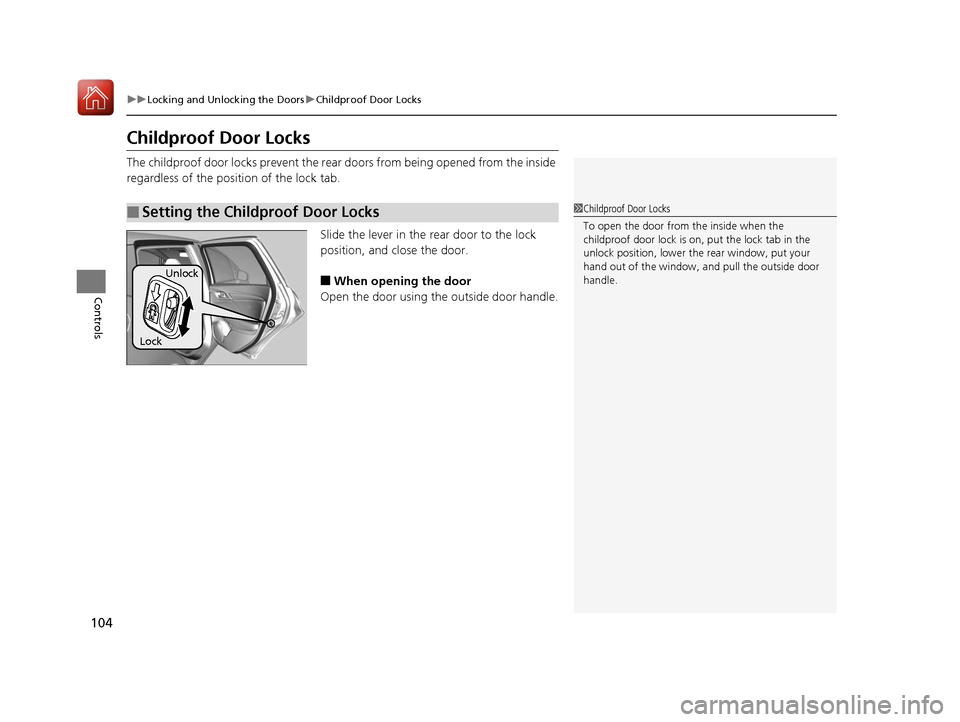
Slide the lever in the rear door to the lock
position, and close the door.
■When opening the door
Open the door using the outside door handle.
■Setting the Childproof Door Locks1 Childproof Door Locks
To open the door from the inside when the
childproof door lock is on, put the lock tab in the
unlock position, lower the rear window, put your
hand out of the window, and pull the outside door
handle.
Lock Unlock
17 FIT -31T5A6200.book 104 ページ 2016年5月27日 金曜日 午後6時33分
Page 110 of 465
109
Controls
Opening and Closing the Tailgate
Precautions for Opening/Closing the Tailgate
Always make sure individuals and objects are clear of the tailgate before opening or
closing it.
■Opening the tailgate
• Open the tailgate all the way.
u If it is not fully opened, the tailgate may come down accidentally by its own
weight.
• Be careful when it is windy. The wi nd may cause the tailgate to close.
■Closing the tailgate
Keep the tailgate closed while driving to: u Avoid possible damage.
u Prevent exhaust gas from leaking into the vehicle.
2 Carbon Monoxide Gas P. 66
1Precautions for Opening/Closing the Tailgate
Be careful not to hit your head on the tailgate or to
put your hands between th e tailgate and the cargo
area when closing the tailgate.
When you are storing or pi cking up luggage from the
cargo area while the engine is idling, do not stand in
front of the exhaust pipe. You may get burned.
Do not allow any passenger in the cargo space. They
may get hurt during hard braking, sudden
acceleration, or a crash.
17 FIT -31T5A6200.book 109 ページ 2016年5月27日 金曜日 午後6時33分
Page 113 of 465
112
Controls
Security System
Immobilizer System
The immobilizer system prevents a key that has not been pre-registered from
starting the engine. Each key contains el ectronic transmitters that use electronic
signals to verify the key.
Pay attention to the following when inserti ng the key into the ignition switch or
pressing the ENGINE START/STOP button:
• Do not allow objects that emit strong radio waves near the ignition switch or the
ENGINE START/STOP button.
• Make sure the key is not covered by or touching a metal object.
• Do not bring a key from anot her vehicle’s immobilizer system near the ignition
switch.
Security System Alarm
The security system alarm activates when the tailgate, hood or doors are forcibly
opened. The alarm does not go off if the tailgate or doors are opened with the key,
remote transmitter or smart entry system.
However, the alarm goes off when a door is opened with the key, then the shift
lever is moved out of
(P (continuously variable transmission models) or the hood is
opened before the ignition switch is turned to ON
(w*1.
■When the security system alarm activates
The horn sounds intermittently and all of the exterior lights flash.
*1 : Models with the smart entry system have an ENGINE START/STOP button instead of an ignition switch.
1Immobilizer System
NOTICE
Leaving the ignition key in the vehicle can result in
theft or accidental move ment of the vehicle.
Always take the ignition key with you whenever you
leave the vehicle unattended.
Do not alter the system or add other devices to it.
Doing so may damage the system and make your
vehicle inoperable.
1 Security System Alarm
The security alarm continues for a maximum of two
minutes until the security system deactivates.
17 FIT -31T5A6200.book 112 ページ 2016年5月27日 金曜日 午後6時33分