vent HONDA FIT 2017 3.G Owner's Manual
[x] Cancel search | Manufacturer: HONDA, Model Year: 2017, Model line: FIT, Model: HONDA FIT 2017 3.GPages: 465, PDF Size: 26.52 MB
Page 122 of 465
121
uuOperating the Switches Around the Steering Wheel uENGINE START/STOP Button
Controls
If you open the driver’s door when the power mode is set to ACCESSORY, a warning
buzzer sounds.
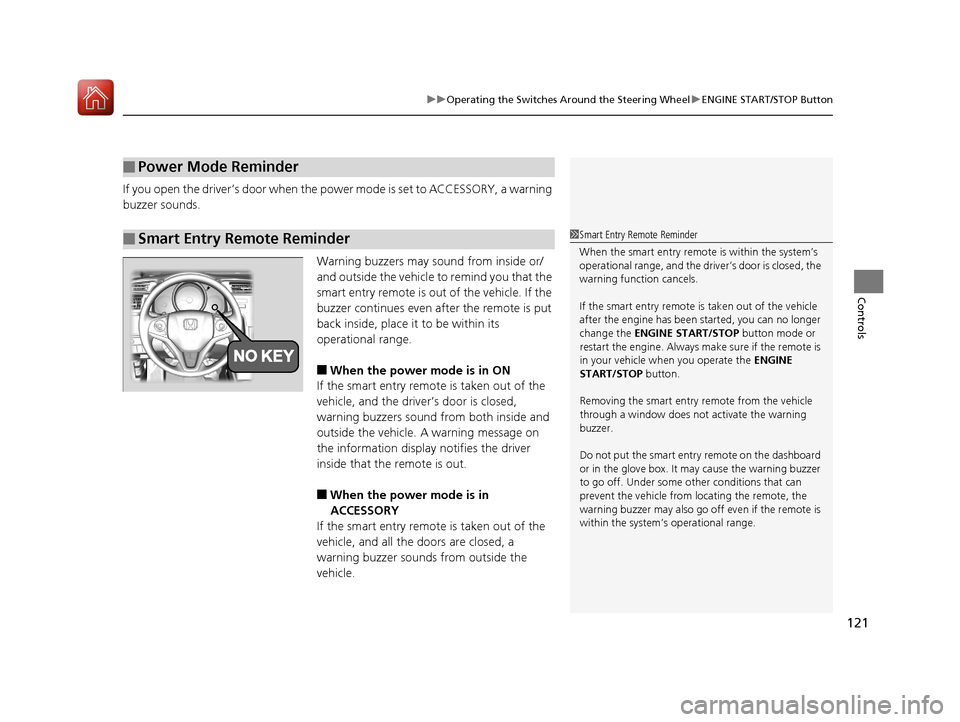
Warning buzzers may sound from inside or/
and outside the vehicle to remind you that the
smart entry remote is out of the vehicle. If the
buzzer continues even after the remote is put
back inside, place it to be within its
operational range.
■When the power mode is in ON
If the smart entry remote is taken out of the
vehicle, and the driver’s door is closed,
warning buzzers sound from both inside and
outside the vehicle. A warning message on
the information display notifies the driver
inside that the remote is out.
■When the power mode is in
ACCESSORY
If the smart entry remote is taken out of the
vehicle, and all the doors are closed, a
warning buzzer sounds from outside the
vehicle.
■Power Mode Reminder
■Smart Entry Remote Reminder1 Smart Entry Remote Reminder
When the smart entry remote is within the system’s
operational range, and the driv er’s door is closed, the
warning function cancels.
If the smart entry remote is taken out of the vehicle
after the engine has been started, you can no longer
change the ENGINE START/STOP button mode or
restart the engine. Always make sure if the remote is
in your vehicle when you operate the ENGINE
START/STOP button.
Removing the smart entry remote from the vehicle
through a window does not activate the warning
buzzer.
Do not put the smart entr y remote on the dashboard
or in the glove box. It may cause the warning buzzer
to go off. Under some other conditions that can
prevent the vehicle from locating the remote, the
warning buzzer may al so go off even if the remote is
within the system’s operational range.
17 FIT -31T5A6200.book 121 ページ 2016年5月27日 金曜日 午後6時33分
Page 130 of 465
129
uuOperating the Switches Around the Steering Wheel uWipers and Washers
Controls
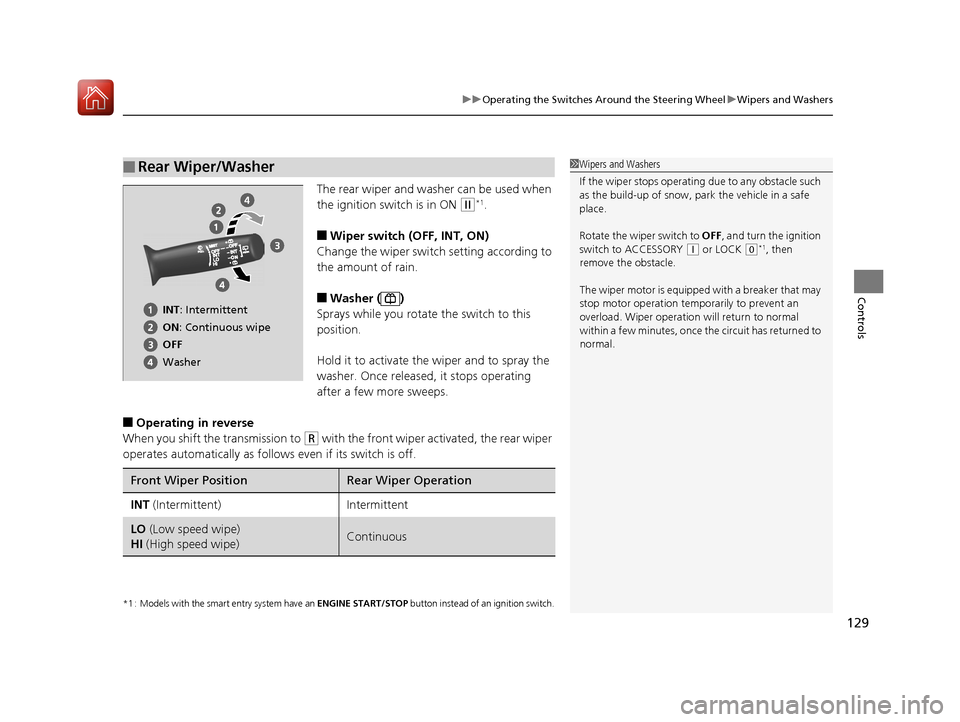
The rear wiper and washer can be used when
the ignition switch is in ON
(w*1.
■Wiper switch (OFF, INT, ON)
Change the wiper switch setting according to
the amount of rain.
■Washer ( )
Sprays while you rotate the switch to this
position.
Hold it to activate th e wiper and to spray the
washer. Once released, it stops operating
after a few more sweeps.
■Operating in reverse
When you shift the transmission to
(R with the front wiper activated, the rear wiper
operates automatically as follows even if its switch is off.
*1 : Models with the smart entry system have an ENGINE START/STOP button instead of an ignition switch.
■Rear Wiper/Washer1Wipers and Washers
If the wiper stops operating due to any obstacle such
as the build-up of snow, pa rk the vehicle in a safe
place.
Rotate the wiper switch to OFF, and turn the ignition
switch to ACCESSORY
( q or LOCK (0*1, then
remove the obstacle.
The wiper motor is equipped with a breaker that may
stop motor operation temp orarily to prevent an
overload. Wiper operation will return to normal
within a few minutes, once the circuit has returned to
normal.
INT: Intermittent
ON : Continuous wipe
OFF
Washer
Front Wiper PositionRear Wiper Operation
INT (Intermittent)Intermittent
LO (Low speed wipe)
HI (High speed wipe)Continuous
17 FIT -31T5A6200.book 129 ページ 2016年5月27日 金曜日 午後6時33分
Page 153 of 465
uuInterior Lights/Interior Convenience Items uInterior Convenience Items
152
Controls
The accessory power socket can be used wh en the ignition switch is in ACCESSORY
(q or ON (w*1.
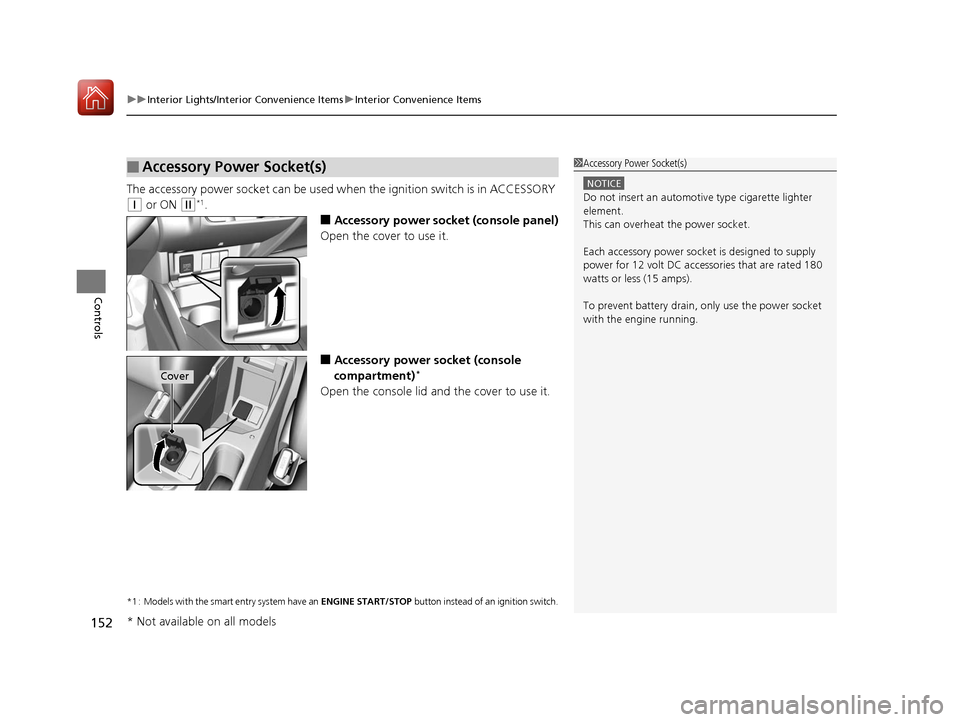
■Accessory power socket (console panel)
Open the cover to use it.
■Accessory power socket (console
compartment)*
Open the console lid and the cover to use it.
*1 : Models with the smart entry system have an ENGINE START/STOP button instead of an ignition switch.
■Accessory Power Socket(s)1Accessory Power Socket(s)
NOTICE
Do not insert an automotive type cigarette lighter
element.
This can overheat the power socket.
Each accessory power soc ket is designed to supply
power for 12 volt DC access ories that are rated 180
watts or less (15 amps).
To prevent battery drain, only use the power socket
with the engine running.
Cover
* Not available on all models
17 FIT -31T5A6200.book 152 ページ 2016年5月27日 金曜日 午後6時33分
Page 158 of 465
157Continued
Controls
Heating and Cooling System*
Using Vents, Heating and A/C*
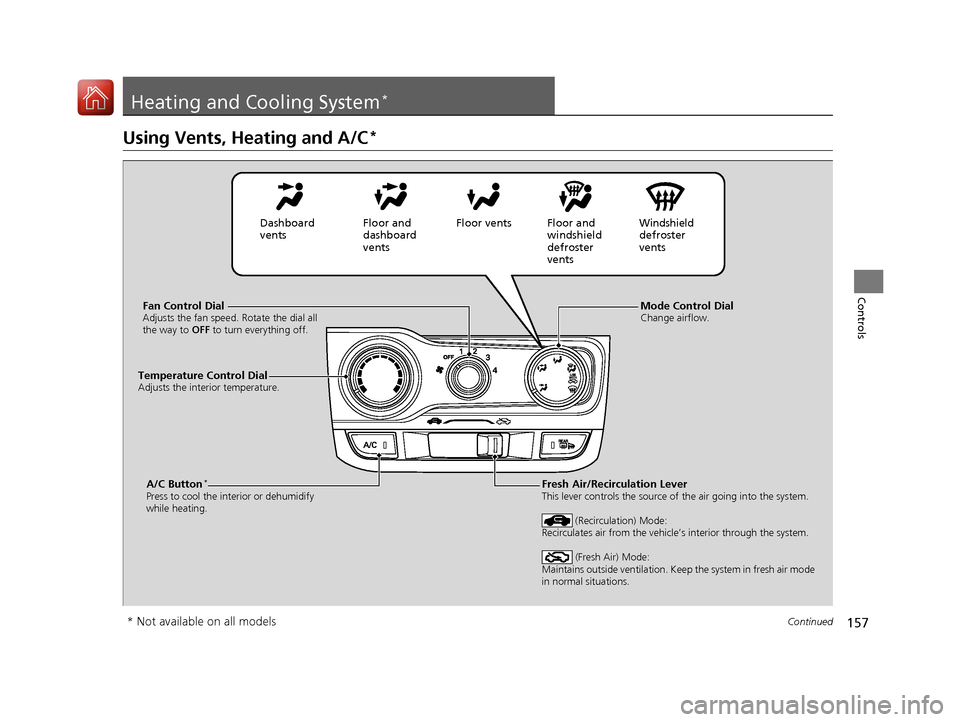
Mode Control DialChange airflow.Fan Control DialAdjusts the fan speed. Rotate the dial all
the way to OFF to turn everything off.
A/C Button*
Press to cool the interior or dehumidify
while heating.
Temperature Control DialAdjusts the interior temperature.
Fresh Air/Recirculation LeverThis lever controls the source of the air going into the system.
(Recirculation) Mode:
Recirculates air from the vehicle’s interior through the system.
(Fresh Air) Mode:
Maintains outside ventilation. Keep the system in fresh air mode
in normal situations.
Dashboard
vents Floor and
dashboard
ventsFloor vents Floor and
windshield
defroster
vents Windshield
defroster
vents
* Not available on all models
17 FIT -31T5A6200.book 157 ページ 2016年5月27日 金曜日 午後6時33分
Page 159 of 465
uuHeating and Cooling System*uUsing Vents, Heating and A/C*
158
Controls
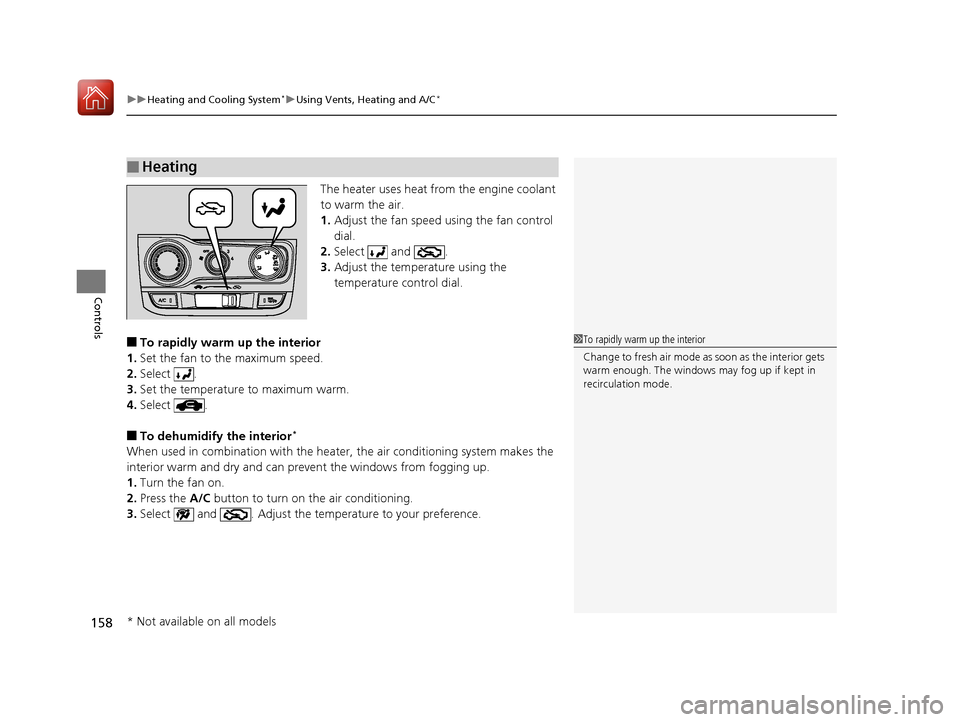
The heater uses heat from the engine coolant
to warm the air.
1. Adjust the fan speed using the fan control
dial.
2. Select and .
3. Adjust the temperature using the
temperature control dial.
■To rapidly warm up the interior
1. Set the fan to the maximum speed.
2. Select .
3. Set the temperature to maximum warm.
4. Select .
■To dehumidify the interior*
When used in combination with the heater , the air conditioning system makes the
interior warm and dry and can prevent the windows from fogging up.
1. Turn the fan on.
2. Press the A/C button to turn on the air conditioning.
3. Select and . Adjust the temp erature to your preference.
■Heating
1To rapidly warm up the interior
Change to fresh air mode as soon as the interior gets
warm enough. The windows may fog up if kept in
recirculation mode.
* Not available on all models
17 FIT -31T5A6200.book 158 ページ 2016年5月27日 金曜日 午後6時33分
Page 160 of 465
159
uuHeating and Cooling System*uUsing Vents, Heating and A/C*
Controls
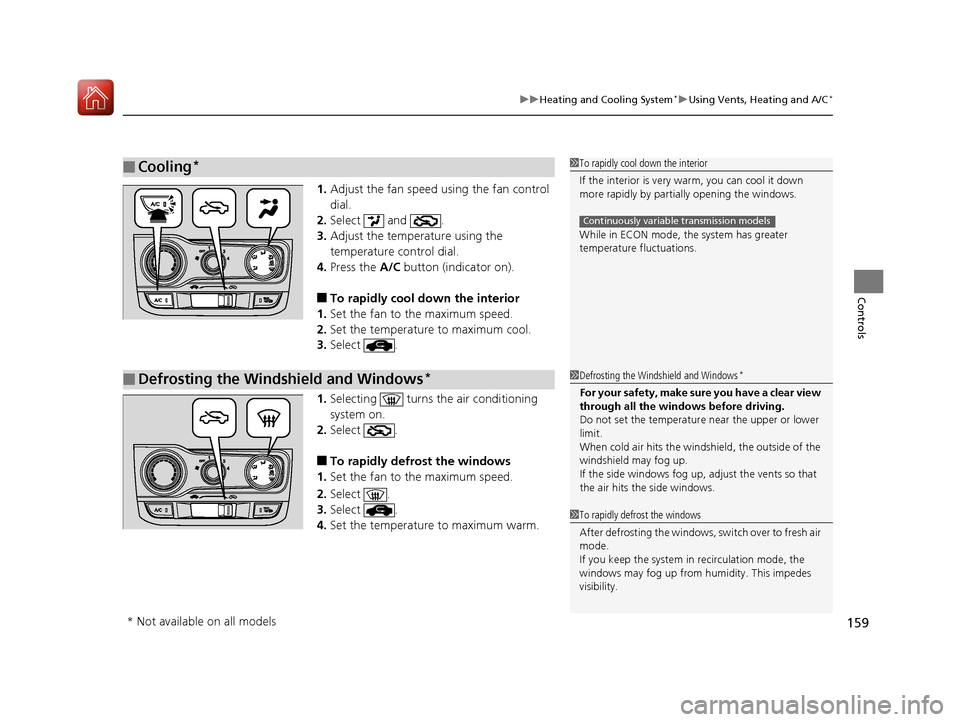
1. Adjust the fan speed using the fan control
dial.
2. Select and .
3. Adjust the temperature using the
temperature control dial.
4. Press the A/C button (indicator on).
■To rapidly cool down the interior
1. Set the fan to the maximum speed.
2. Set the temperature to maximum cool.
3. Select .
1. Selecting turns the air conditioning
system on.
2. Select .
■To rapidly defrost the windows
1. Set the fan to the maximum speed.
2. Select .
3. Select .
4. Set the temperature to maximum warm.
■Cooling*1To rapidly cool down the interior
If the interior is very warm, you can cool it down
more rapidly by parti ally opening the windows.
While in ECON mode, the system has greater
temperature fluctuations.
Continuously variable transmission models
■Defrosting the Windshield and Windows*1 Defrosting the Windshield and Windows*
For your safety, make sure you have a clear view
through all the windows before driving.
Do not set the temperatur e near the upper or lower
limit.
When cold air hits the windshield, the outside of the
windshield may fog up.
If the side windows fog up, adjust the vents so that
the air hits th e side windows.
1To rapidly defrost the windows
After defrosting the windows, switch over to fresh air
mode.
If you keep the system in recirculation mode, the
windows may fog up from humidity. This impedes
visibility.
* Not available on all models
17 FIT -31T5A6200.book 159 ページ 2016年5月27日 金曜日 午後6時33分
Page 161 of 465
160
Controls
Climate Control System*
Using Automatic Climate Control
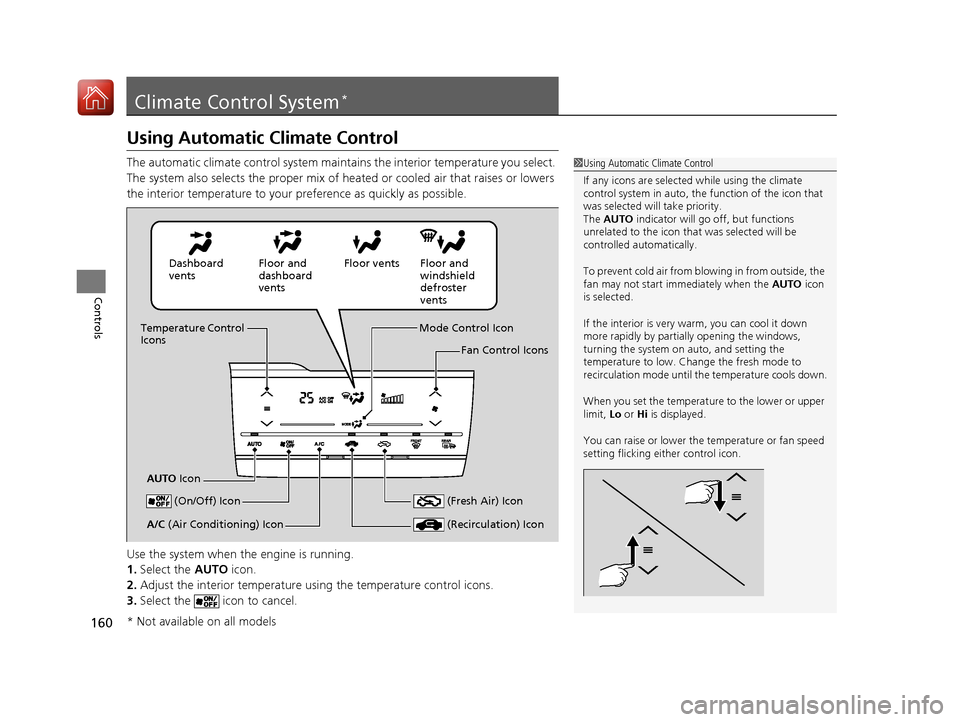
The automatic climate control system maintains the interior temperature you select.
The system also selects the proper mix of heated or cooled air that raises or lowers
the interior temperature to your preference as quickly as possible.
Use the system when the engine is running.
1. Select the AUTO icon.
2. Adjust the interior temperature us ing the temperature control icons.
3. Select the icon to cancel.1Using Automatic Climate Control
If any icons are selected while using the climate
control system in auto, the function of the icon that
was selected will take priority.
The AUTO indicator will go off, but functions
unrelated to the icon that was selected will be
controlled automatically.
To prevent cold air from bl owing in from outside, the
fan may not start i mmediately when the AUTO icon
is selected.
If the interior is very warm, you can cool it down
more rapidly by partial ly opening the windows,
turning the system on auto, and setting the
temperature to low. Change the fresh mode to
recirculation mode until the temperature cools down.
When you set the temperat ure to the lower or upper
limit, Lo or Hi is displayed.
You can raise or lower the temperature or fan speed
setting flicking either control icon.
Dashboard
vents Floor and
dashboard
ventsFloor vents Floor and
windshield
defroster
vents
Temperature Control
Icons
AUTO Icon Mode Control Icon
Fan Control Icons
(On/Off) Icon
(Recirculation) IconA/C (Air Conditioning) Icon (Fresh Air) Icon
* Not available on all models
17 FIT -31T5A6200.book 160 ページ 2016年5月27日 金曜日 午後6時33分
Page 162 of 465
Continued161
uuClimate Control System*uUsing Automatic Climate Control
Controls
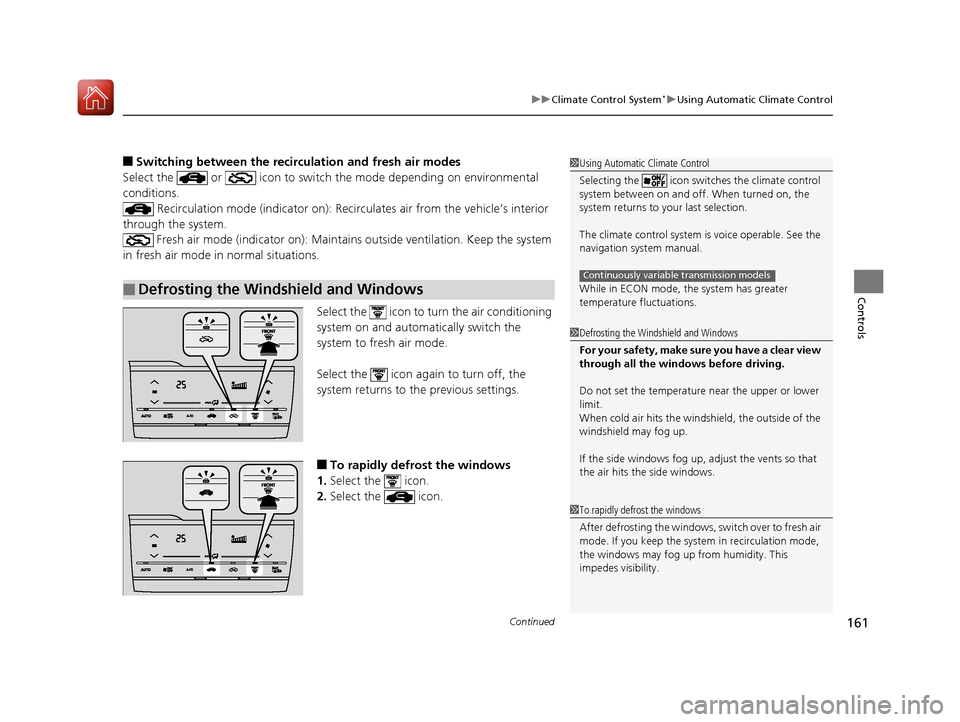
■Switching between the recirc ulation and fresh air modes
Select the or icon to switch the mode depending on environmental
conditions. Recirculation mode (indicator on): Reci rculates air from the vehicle’s interior
through the system. Fresh air mode (indicator on): Maintain s outside ventilation. Keep the system
in fresh air mode in normal situations.
Select the icon to turn the air conditioning
system on and automatically switch the
system to fresh air mode.
Select the icon again to turn off, the
system returns to the previous settings.
■To rapidly defrost the windows
1. Select the icon.
2. Select the icon.
■Defrosting the Windshield and Windows
1Using Automatic Climate Control
Selecting the icon switches the climate control
system between on and off. When turned on, the
system returns to your last selection.
The climate control system is voice operable. See the
navigation sy stem manual.
While in ECON mode, the system has greater
temperature fluctuations.
Continuously variable transmission models
1 Defrosting the Windshield and Windows
For your safety, make sure you have a clear view
through all the windows before driving.
Do not set the temperatur e near the upper or lower
limit.
When cold air hits the windshield, the outside of the
windshield may fog up.
If the side windows fog up, adjust the vents so that
the air hits th e side windows.
1To rapidly defrost the windows
After defrosting the windows, switch over to fresh air
mode. If you keep the syst em in recirculation mode,
the windows may fog up from humidity. This
impedes visibility.
17 FIT -31T5A6200.book 161 ページ 2016年5月27日 金曜日 午後6時33分
Page 170 of 465
169
uuAudio System uAudio Antenna
Features
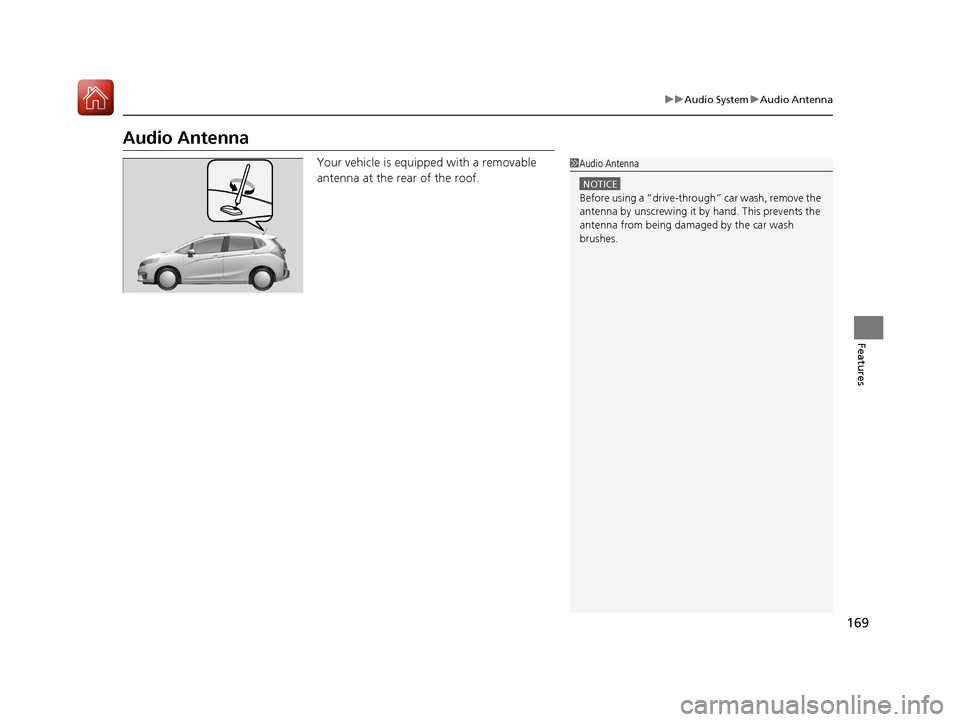
Audio Antenna
Your vehicle is equipped with a removable
antenna at the rear of the roof.1Audio Antenna
NOTICE
Before using a “dr ive-through” car wash, remove the
antenna by unscrewing it by hand. This prevents the
antenna from being dama ged by the car wash
brushes.
17 FIT -31T5A6200.book 169 ページ 2016年5月27日 金曜日 午後6時33分
Page 245 of 465
244
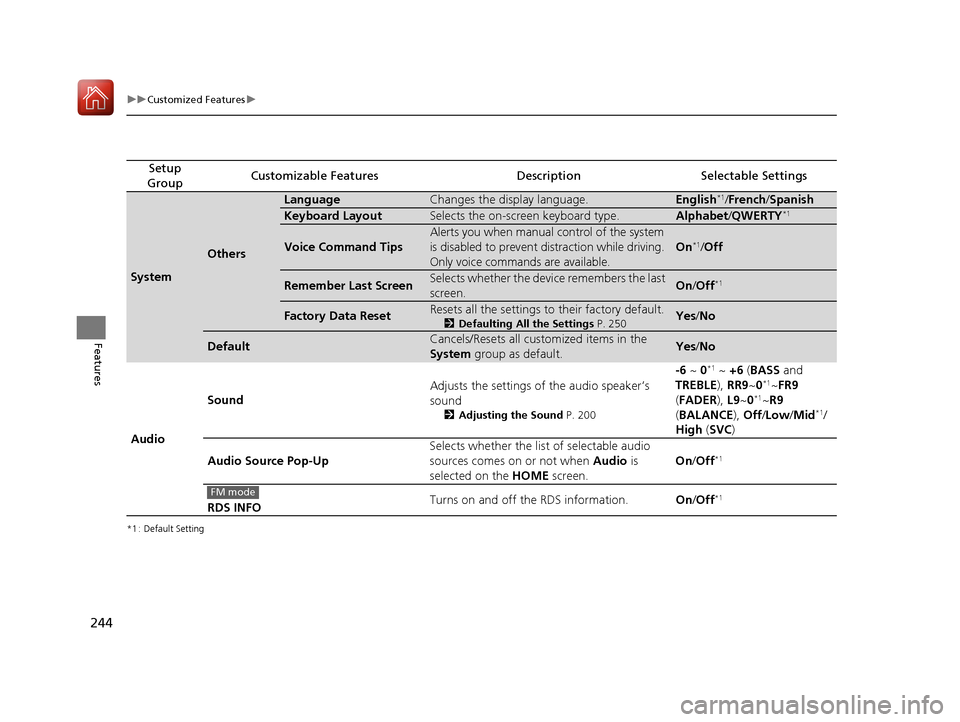
uuCustomized Features u
Features
*1 : Default Setting
Setup
GroupCustomizable FeaturesDescriptionSelectable Settings
System
Others
LanguageChanges the display language.English*1/ French /Spanish
Keyboard LayoutSelects the on-screen keyboard type.Alphabet /QWERTY*1
Voice Command Tips
Alerts you when manual control of the system
is disabled to prevent distraction while driving.
Only voice commands are available.
On*1/ Off
Remember Last ScreenSelects whether the device remembers the last
screen.On /Off*1
Factory Data ResetResets all the settings to their factory default.
2 Defaulting All the Settings P. 250Yes/No
DefaultCancels/Resets all customized items in the
System group as default.Yes/No
Audio Sound
Adjusts the settings of the audio speaker’s
sound
2
Adjusting the Sound P. 200
-6 ~ 0*1 ~ +6 (BASS and
TREBLE ), RR9~0*1~FR9
( FADER ), L9~0*1~R9
( BALANCE ), Off /Low /Mid*1/
High (SVC )
Audio Source Pop-Up Selects whether the list of selectable audio
sources comes on or not when
Audio is
selected on the HOME screen. On
/Off
*1
RDS INFO Turns on and off the RDS information.
On/Off*1FM mode
17 FIT -31T5A6200.book 244 ページ 2016年5月27日 金曜日 午後6時33分