bluetooth HONDA FIT 2017 3.G Repair Manual
[x] Cancel search | Manufacturer: HONDA, Model Year: 2017, Model line: FIT, Model: HONDA FIT 2017 3.GPages: 465, PDF Size: 26.52 MB
Page 282 of 465
281
uuBluetooth ® HandsFreeLink ®u HFL Menus
Continued
Features
*1 : Appears only when a phone is connected to HFL.
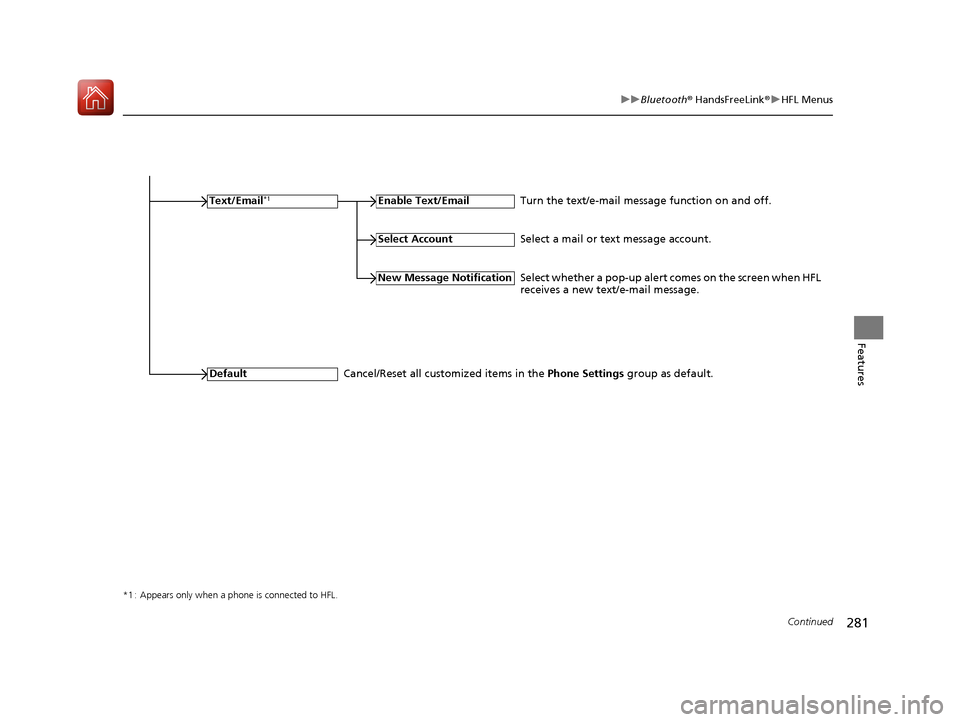
Text/Email*1Enable Text/Email
New Message Notification
Default
Turn the text/e-mail message function on and off.
Select a mail or text message account.
Select Account
Select whether a pop-up alert comes on the screen when HFL
receives a new text/e-mail message.
Cancel/Reset all customized items in the Phone Settings group as default.
17 FIT -31T5A6200.book 281 ページ 2016年5月27日 金曜日 午後6時33分
Page 283 of 465
282
uuBluetooth ® HandsFreeLink ®u HFL Menus
Features
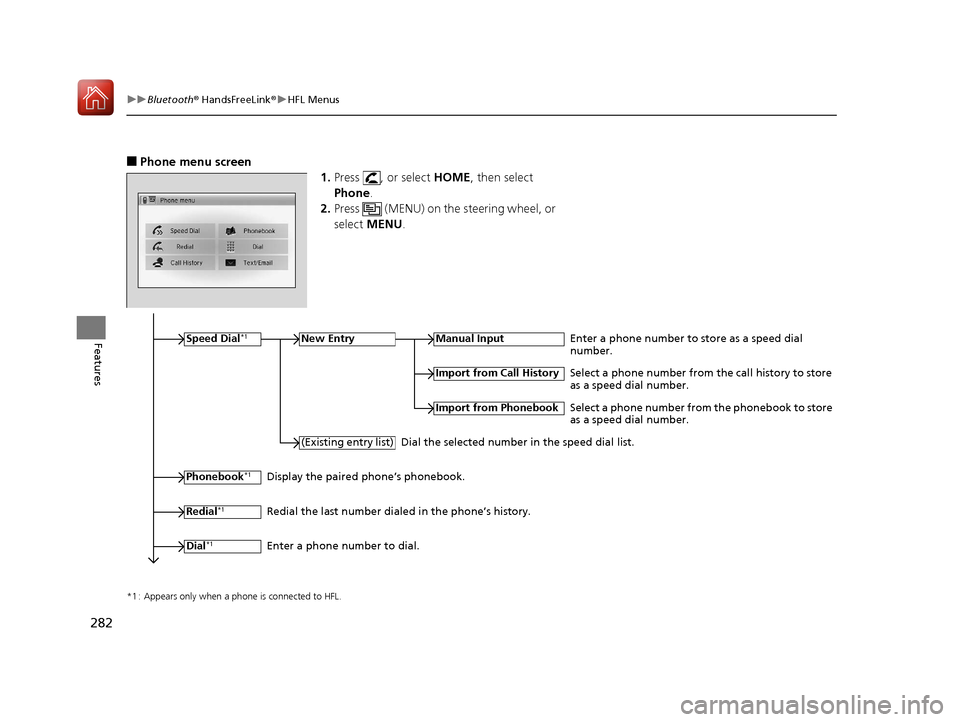
■Phone menu screen
1.Press , or select HOME, then select
Phone .
2. Press (MENU) on the steering wheel, or
select MENU .
*1 : Appears only when a phone is connected to HFL.
Speed Dial*1New EntryManual InputEnter a phone number to store as a speed dial
number.
Phonebook*1
(Existing entry list)
Import from Call History
Import from Phonebook
Select a phone number from the call history to store
as a speed dial number.
Select a phone number from the phonebook to store
as a speed dial number.
Dial the selected number in the speed dial list.
Display the paired phone’s phonebook.
Redial
*1Redial the last number dialed in the phone’s history.
Dial
*1Enter a phone number to dial.
17 FIT -31T5A6200.book 282 ページ 2016年5月27日 金曜日 午後6時33分
Page 284 of 465
283
uuBluetooth ® HandsFreeLink ®u HFL Menus
Continued
Features
*1 : Appears only when a phone is connected to HFL.
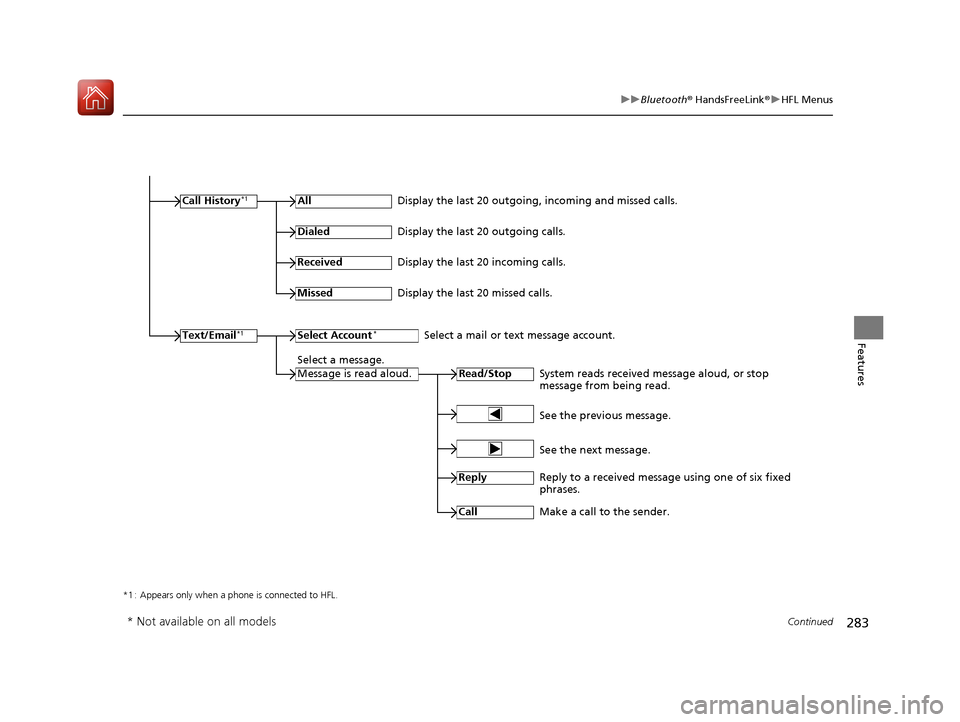
Call History*1All
Read/StopSystem reads received message aloud, or stop
message from being read.
Text/Email*1
Display the last 20 outgoing, incoming and missed calls.
Dialed
Display the last 20 outgoing calls.
Received
Display the last 20 incoming calls.
Missed
Display the last 20 missed calls.
Select Account*Select a mail or text message account.
Select a message.
Message is read aloud.
See the previous message.
See the next message.
Reply
Reply to a received message using one of six fixed
phrases.
Call
Make a call to the sender.
* Not available on all models
17 FIT -31T5A6200.book 283 ページ 2016年5月27日 金曜日 午後6時33分
Page 285 of 465
uuBluetooth ® HandsFreeLink ®u HFL Menus
284
Features
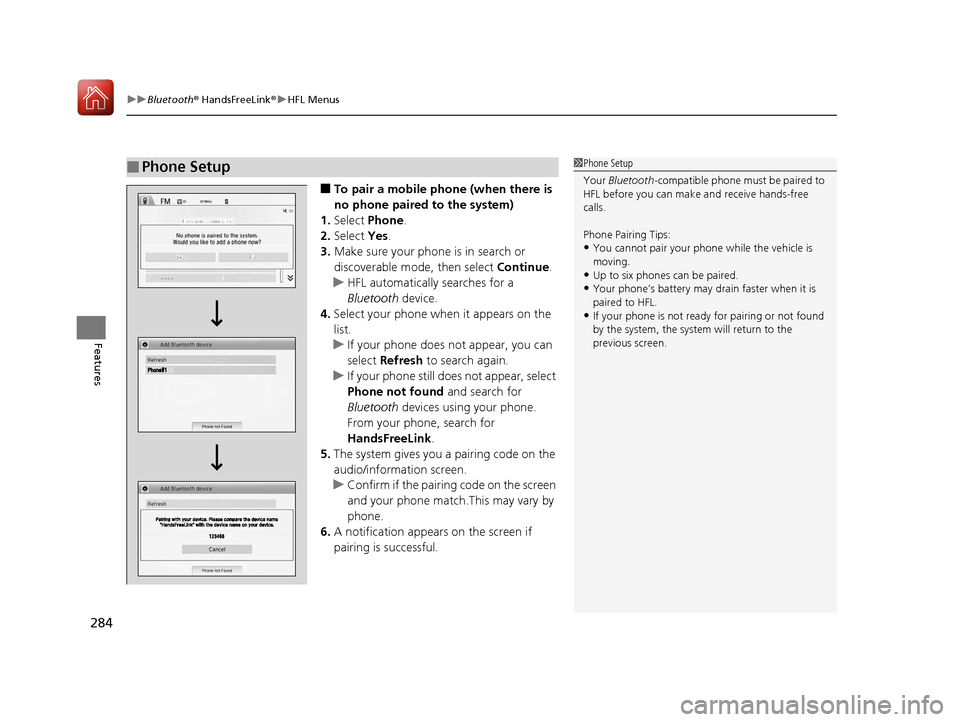
■To pair a mobile phone (when there is
no phone paired to the system)
1. Select Phone .
2. Select Yes.
3. Make sure your phone is in search or
discoverable mode, then select Continue.
u HFL automatically searches for a
Bluetooth device.
4. Select your phone when it appears on the
list.
u If your phone does not appear, you can
select Refresh to search again.
u If your phone still does not appear, select
Phone not found and search for
Bluetooth devices using your phone.
From your phone, search for
HandsFreeLink .
5. The system gives you a pairing code on the
audio/information screen.
u Confirm if the pairing code on the screen
and your phone match.This may vary by
phone.
6. A notification appears on the screen if
pairing is successful.
■Phone Setup1 Phone Setup
Your Bluetooth -compatible phone must be paired to
HFL before you can make and receive hands-free
calls.
Phone Pairing Tips:
•You cannot pair your phone while the vehicle is
moving.
•Up to six phones can be paired.
•Your phone’s battery may dr ain faster when it is
paired to HFL.
•If your phone is not ready for pairing or not found
by the system, the system will return to the
previous screen.
17 FIT -31T5A6200.book 284 ページ 2016年5月27日 金曜日 午後6時33分
Page 286 of 465
Continued285
uuBluetooth ® HandsFreeLink ®u HFL Menus
Features
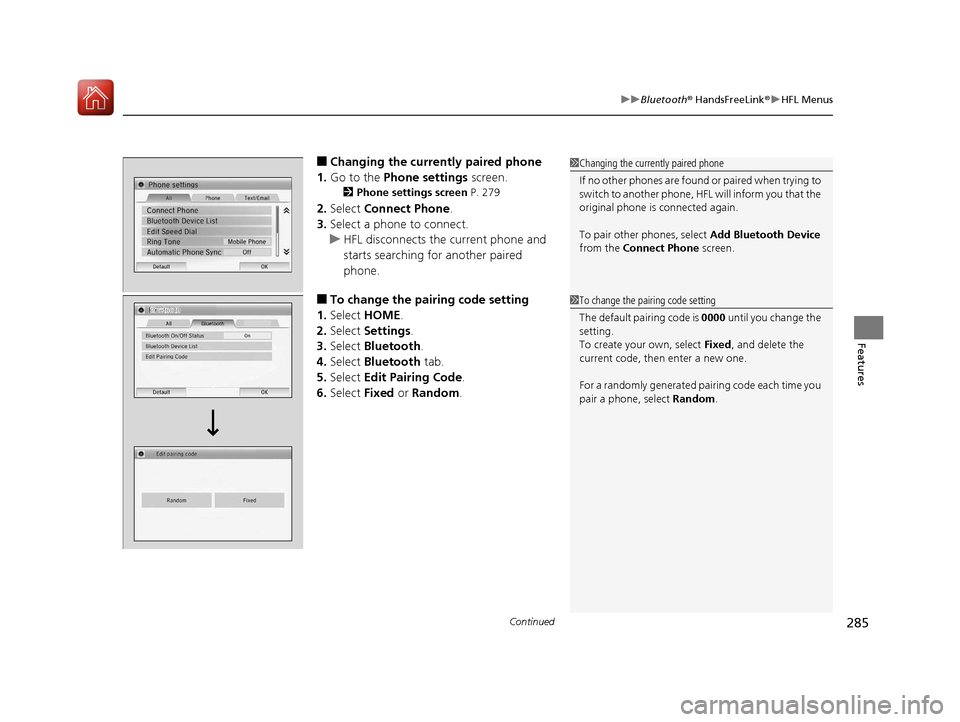
■Changing the curren tly paired phone
1. Go to the Phone settings screen.
2Phone settings screen P. 279
2.Select Connect Phone .
3. Select a phone to connect.
u HFL disconnects the current phone and
starts searching for another paired
phone.
■To change the pairing code setting
1. Select HOME .
2. Select Settings .
3. Select Bluetooth .
4. Select Bluetooth tab.
5. Select Edit Pairing Code .
6. Select Fixed or Random .
1Changing the currently paired phone
If no other phones are found or paired when trying to
switch to another phone, HFL will inform you that the
original phone is connected again.
To pair other phones, select Add Bluetooth Device
from the Connect Phone screen.
1To change the pairing code setting
The default pair ing code is 0000 until you change the
setting.
To create your own, select Fixed, and delete the
current code, then enter a new one.
For a randomly generated pa iring code each time you
pair a phone, select Random .
17 FIT -31T5A6200.book 285 ページ 2016年5月27日 金曜日 午後6時33分
Page 287 of 465
286
uuBluetooth ® HandsFreeLink ®u HFL Menus
Features
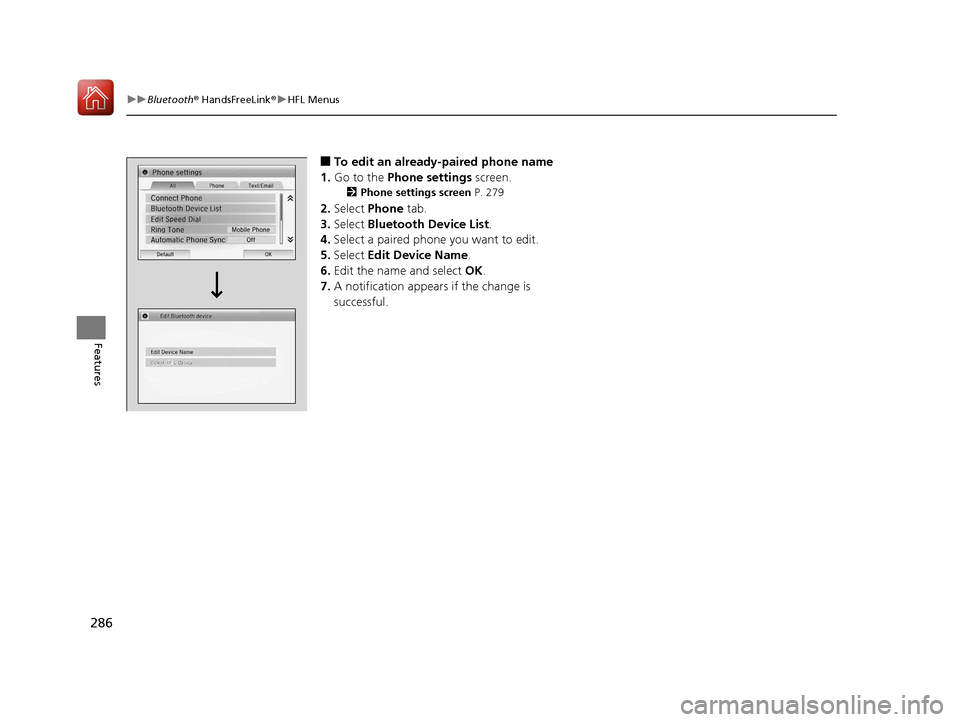
■To edit an already-paired phone name
1. Go to the Phone settings screen.
2Phone settings screen P. 279
2.Select Phone tab.
3. Select Bluetooth Device List .
4. Select a paired phone you want to edit.
5. Select Edit Device Name .
6. Edit the name and select OK.
7. A notification appears if the change is
successful.
17 FIT -31T5A6200.book 286 ページ 2016年5月27日 金曜日 午後6時33分
Page 288 of 465
287
uuBluetooth ® HandsFreeLink ®u HFL Menus
Continued
Features
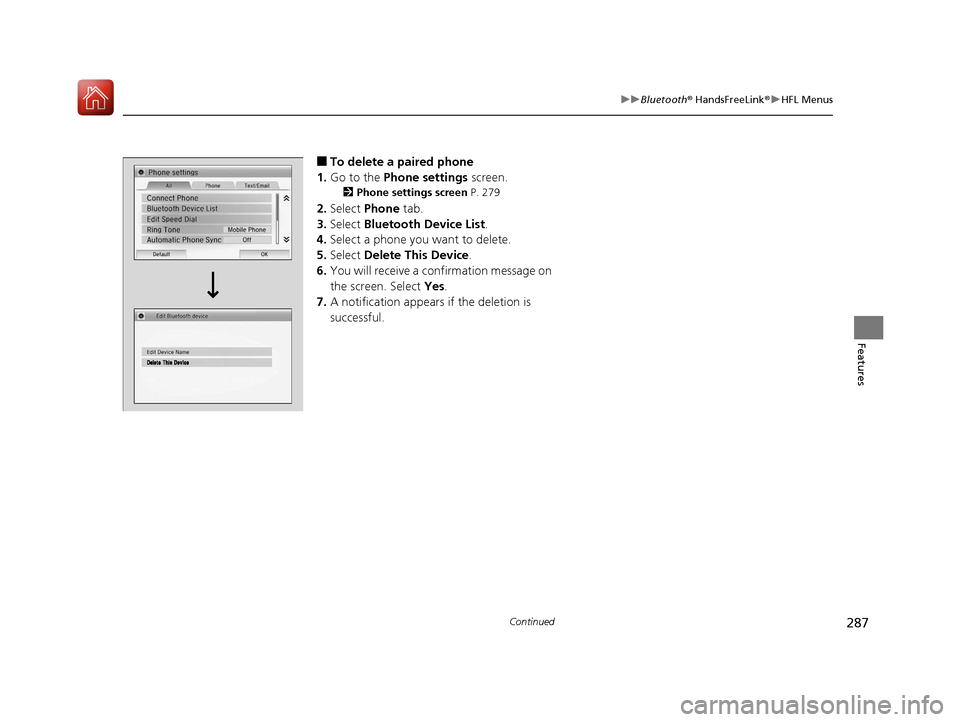
■To delete a paired phone
1. Go to the Phone settings screen.
2Phone settings screen P. 279
2.Select Phone tab.
3. Select Bluetooth Device List .
4. Select a phone you want to delete.
5. Select Delete This Device .
6. You will receive a confirmation message on
the screen. Select Yes.
7. A notification appears if the deletion is
successful.
17 FIT -31T5A6200.book 287 ページ 2016年5月27日 金曜日 午後6時33分
Page 289 of 465
uuBluetooth ® HandsFreeLink ®u HFL Menus
288
Features
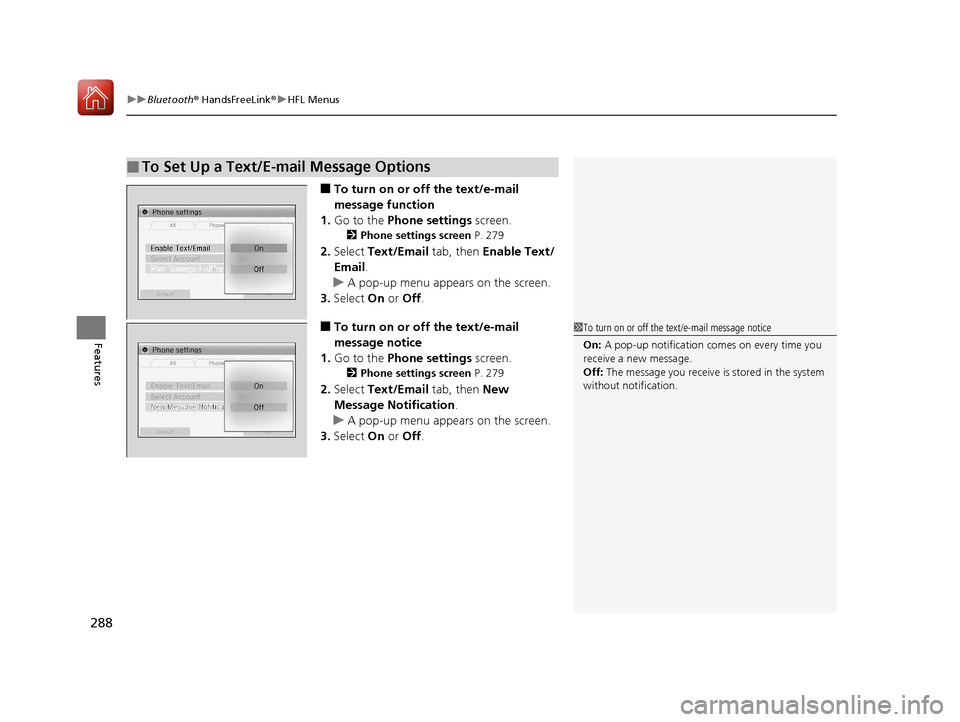
■To turn on or off the text/e-mail
message function
1. Go to the Phone settings screen.
2Phone settings screen P. 279
2.Select Text/Email tab, then Enable Text/
Email .
u A pop-up menu appears on the screen.
3. Select On or Off .
■To turn on or off the text/e-mail
message notice
1. Go to the Phone settings screen.
2Phone settings screen P. 279
2.Select Text/Email tab, then New
Message Notification .
u A pop-up menu appears on the screen.
3. Select On or Off .
■To Set Up a Text/E-mail Message Options
1To turn on or off the text/e-mail message notice
On: A pop-up notification comes on every time you
receive a new message.
Off: The message you receive is stored in the system
without not ification.
17 FIT -31T5A6200.book 288 ページ 2016年5月27日 金曜日 午後6時33分
Page 290 of 465
Continued289
uuBluetooth ® HandsFreeLink ®u HFL Menus
Features
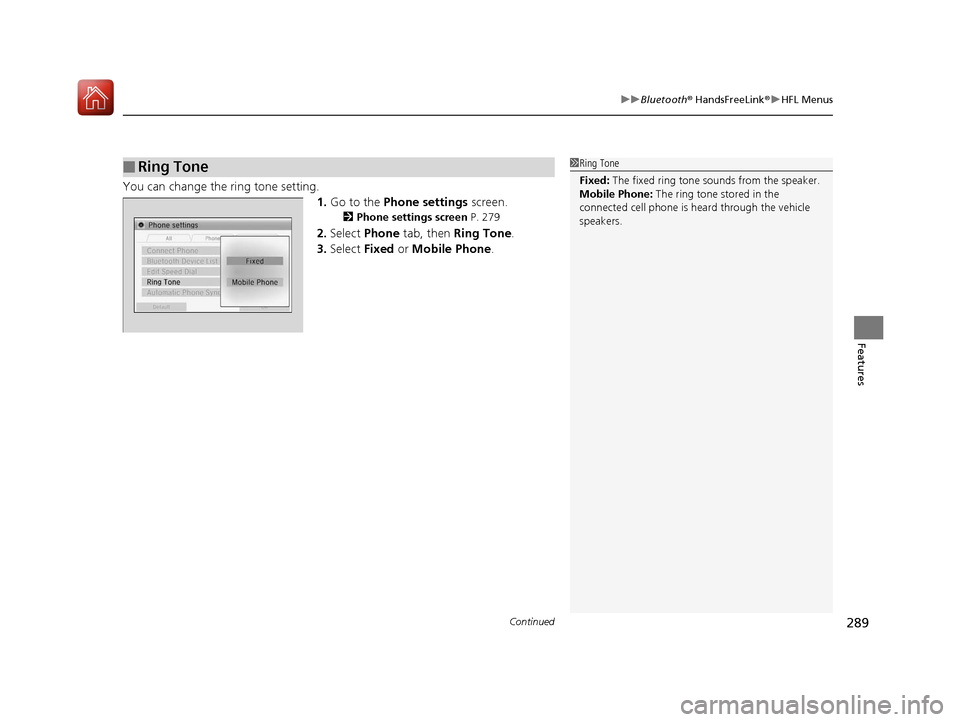
You can change the ring tone setting.
1.Go to the Phone settings screen.
2Phone settings screen P. 279
2.Select Phone tab, then Ring Tone .
3. Select Fixed or Mobile Phone .
■Ring Tone1Ring Tone
Fixed: The fixed ring tone sounds from the speaker.
Mobile Phone: The ring tone stored in the
connected cell phone is heard through the vehicle
speakers.
17 FIT -31T5A6200.book 289 ページ 2016年5月27日 金曜日 午後6時33分
Page 291 of 465
uuBluetooth ® HandsFreeLink ®u HFL Menus
290
Features
■When Automatic Phon e Sync is set to
On:
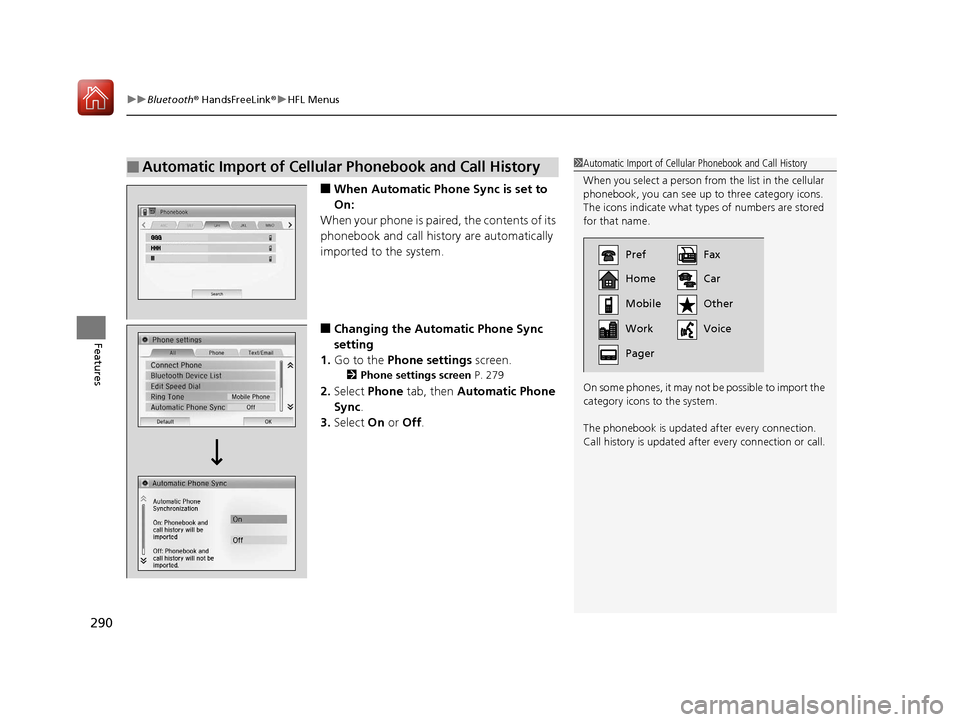
When your phone is paired, the contents of its
phonebook and call history are automatically
imported to the system.
■Changing the Automatic Phone Sync
setting
1. Go to the Phone settings screen.
2Phone settings screen P. 279
2.Select Phone tab, then Automatic Phone
Sync .
3. Select On or Off .
■Automatic Import of Cellular Phonebook and Call History1Automatic Import of Cellular Phonebook and Call History
When you select a person from the list in the cellular
phonebook, you can see up to three category icons.
The icons indicate what types of numbers are stored
for that name.
On some phones, it may not be possible to import the
category icons to the system.
The phonebook is updated af ter every connection.
Call history is updated after every connection or call.
Pref
Home
Mobile
Work
PagerFax
Car
Other
Voice
17 FIT -31T5A6200.book 290 ページ 2016年5月27日 金曜日 午後6時33分