warning HONDA FIT 2017 3.G Quick Guide
[x] Cancel search | Manufacturer: HONDA, Model Year: 2017, Model line: FIT, Model: HONDA FIT 2017 3.GPages: 76, PDF Size: 8.56 MB
Page 21 of 76

34 || 35
V
EHICLE CONTROLSVEHICLE CONTROLS
Power Moonroof Operation*
The moonroof can be opened and closed when the vehicle is on by using th\
e switch
on the ceiling.
Automatic Operation
To open: Push the switch back firmly to the
second detent, then release.
To close: Push the switch forward firmly to the
second detent, then release.
The moonroof opens or closes completely. To
stop the moonroof at any time, push the switch
briefly.
Manual OperationTo open: Push and hold the switch back to the first detent until the desired p\
osition
is reached.
To close: Push and hold the switch forward to the first detent until the desire\
d
position is reached.
Moonroof TiltTo tilt: Push the center of the switch.
To close: Push the switch forward firmly, then release.
Opening the moonroof in below freezing temperatures or when it is covere\
d
with snow or ice can damage the moonroof panel or motor.
NOTICE
Closing the moonroof on someone’s hands or fingers can cause serious injury.
Make sure your passengers are away from the moonroof before closing it.
WARNING
*if equipped
Close Open
Tilt
Interior and Exterior Lights
Operate interior and exterior lights when the vehicle is on or off.
Brightness Control Adjust instrument panel brightness when the
vehicle is on.
To brighten: Turn the knob to the right.
To dim: Turn the knob to the left.
A beep sounds when the brightness reaches
minimum or maximum.
Interior LightsChange the interior light settings using the switches
on the ceiling.
ON position (rear only): Interior lights remain on.
Door-activated position: Interior lights come on
when any of the doors are opened, the driver’s door
is unlocked, or the vehicle is turned off.
OFF position: Interior lights remain off.
Map LightsPress the front map lights to turn on or off.
Off
Door-activated position Front
Off
Rear
Door-activated position
On
Select/reset knob
Model with moonroof shown
Page 23 of 76

38 || 39
V
EHICLE CONTROLSVEHICLE CONTROLS
Reclining the seat-back too far can result in serious injury or death in\
a crash.
Adjust the seat-back to an upright position, and sit well back in the se\
at.
WARNING
Adjusting the Seats
Make seat adjustments before driving to ensure the best comfort and safe\
ty.
Adjusting the Front Seats
Adjust the driver’s seat as far back as possible while
allowing you to maintain full control of the vehicle.
You should be able to sit upright and well back in the
seat, adequately press the pedals without leaning
forward, and grip the steering wheel comfortably.
The passenger’s seat should be adjusted so that it
is as far back from the front airbag in the dashboard
as possible.
The National Highway Traffic Safety Administration and Transport Canada
recommend that drivers allow at least 10 inches (25 cm) between the ce\
nter of the
steering wheel and the chest.
Move back and allow sufficient space.
Height adjustment (Driver’s seat only)
Pull up or push down the lever to raise or
lower the seat. Seat-back angle
adjustment
Pull up the lever to
change the angle.
Horizontal position adjustment
Pull up on the bar to move the
seat, then release the bar.
Sitting improperly or out of position can result in serious injury or de\
ath in a
crash.
Always sit upright, well back in the seat, with your feet on the floor\
.
WARNING
Floor Mats*
Position the front seat floor mats properly, and
anchor them. If they are not properly positioned,
the floor mats can interfere with the front seat
functions.
Do not put additional floor mats on top of the
anchored mats.
Unlock
Lock
Sitting too close to a front airbag can result in serious injury or deat\
h if the
front airbags inflate.
Always sit as far back from the front airbags as possible while maintain\
ing
control of the vehicle.
WARNING
Reclining the Front SeatsYou can recline the seat-backs of the front seats so they are level with \
the rear
seat cushions to make a large cushioned area.
1.
Remove the front head restraints (see page 40).
Store the head restraints in the cargo area.
2.
Adjust the front seats forward as far as possible.
3.
Pivot the seat-back backward with the seat-back
angle adjustment lever to be level with the rear
seat cushion.
4.
Move the front seat backward until it touches the rear seat.
5.
Unlatch the detachable anchor from the anchor buckle, and store the rear\
center seat belt (see page 8).
6.
Adjust the rear seat-back to the desired position.
To return the front seats to their original positions, reverse this proce\
dure. When you return the seat-back to its upright position, hold the seat-back to \
keep it from
going up too quickly
.
*if equipped
Page 24 of 76
40 || 41
V
EHICLE CONTROLSVEHICLE CONTROLS
Improperly positioning head restraints reduces their effectiveness and
increases the likelihood of serious injury in a crash.
Make sure head restraints are in place and positioned properly before dr\
iving.
WARNING
Failure to reinstall, or correctly reinstall, the head restraints can re\
sult in
severe injury during a crash.
Always replace the head restraints before driving.
WARNING
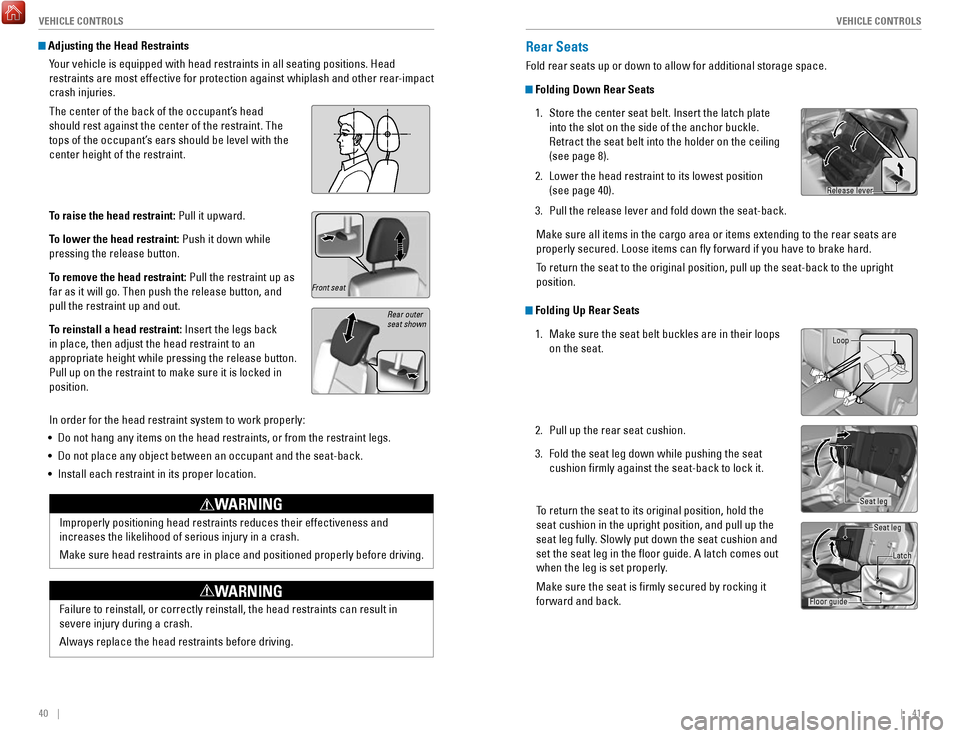
Adjusting the Head Restraints
Your vehicle is equipped with head restraints in all seating positions. H\
ead
restraints are most effective for protection against whiplash and other \
rear-impact
crash injuries.
The center of the back of the occupant’s head
should rest against the center of the restraint. The
tops of the occupant’s ears should be level with the
center height of the restraint.
To raise the head restraint: Pull it upward.
To lower the head restraint: Push it down while
pressing the release button.
To remove the head restraint: Pull the restraint up as
far as it will go. Then push the release button, and
pull the restraint up and out.
To reinstall a head restraint: Insert the legs back
in place, then adjust the head restraint to an
appropriate height while pressing the release button.
Pull up on the restraint to make sure it is locked in
position.
In order for the head restraint system to work properly:
•
Do not hang any items on the head restraints, or from the restraint legs\
.
•
Do not place any object between an occupant and the seat-back.
•
Install each restraint in its proper location.
Rear outer
seat shown
Rear Seats
Fold rear seats up or down to allow for additional storage space.
Folding Down Rear Seats
1.
Store the center seat belt. Insert the latch plate
into the slot on the side of the anchor buckle.
Retract the seat belt into the holder on the ceiling
(see page 8).
2.
Lower the head restraint to its lowest position
(see page 40).
3.
Pull the release lever and fold down the seat-back.
Make sure all items in the cargo area or items extending to the rear sea\
ts are
properly secured. Loose items can fly forward if you have to brake har\
d.
To return the seat to the original position, pull up the seat-back to the\
upright
position.
Folding Up Rear Seats 1.
Make sure the seat belt buckles are in their loops
on the seat.
2.
Pull up the rear seat cushion.
3.
Fold the seat leg down while pushing the seat
cushion firmly against the seat-back to lock it.
To return the seat to its original position, hold the
seat cushion in the upright position, and pull up the
seat leg fully. Slowly put down the seat cushion and
set the seat leg in the floor guide. A latch comes out
when the leg is set properly
.
Make sure the seat is firmly secured by rocking it
forward and back.
Release lever
Loop
Seat leg
Seat leg
Latch
Floor guide
Front seat
Page 25 of 76

42 || 43
V
EHICLE CONTROLSVEHICLE CONTROLS
Adjusting the Mirrors
Adjust the angle of the mirrors for the best visibility when you are sit\
ting in the
correct driving position.
Rearview Mirror with Day/Night Positions
Manually adjust the position to reduce headlight
glare from vehicles behind you. Flip the tab to switch
between day and night positions.
Power Door MirrorsAdjust the power door mirrors when the vehicle is on.
L/R selector switch: Select the left or right mirror.
After adjusting the mirror, return the switch to the
center position.
Mirror position adjustment switch: Press the switch
left, right, up, or down to move the mirror.
Adjustment switch Selector switch
Adjusting the Rear Seats
Pull the release lever on the left or right side to
change the angle of the seat-back.
Release lever
Adjusting the Steering Wheel
The steering wheel height and distance from your body can be adjusted so\
that you
can comfortably grip the steering wheel in an appropriate driving postur\
e.
1.
Pull up the steering wheel adjustment lever.
2.
Move the steering wheel up or down, and in or out.
3.
Push down the steering wheel adjustment lever to
lock the steering wheel in position.
Adjusting the steering wheel position while driving may cause you to los\
e
control of the vehicle and be seriously injured in a crash.
Adjust the steering wheel only when the vehicle is stopped.
WARNING
To adjust To lock
Night
position Ta b
Day
positionHeating and Cooling System*
Manually control the front heating and cooling in your vehicle’s interior using the
buttons and dials on the dashboard.
Fan control/
OFF dial
A/C
button* Temperature
control dial
Fresh air/recirculation lever:
Recirculation mode (left side):
Recirculates air from the vehicle’s interior.
Fresh air mode (right side): Maintains
outside ventilation. Rear defogger/
heated door
mirror button*Mode control dial
*if equipped
Page 26 of 76

44 || 45
V
EHICLE CONTROLSVEHICLE CONTROLS
Climate Control System*
The automatic climate control system can maintain your preferred interio\
r
temperature by selecting the proper mix of heated or cooled air and fan \
speed.
Touch the icons on the dashboard to control the system.
*if equipped
AUTO: Select to
maintain a set
temperature. Use
the temperature
control to set
the preferred
temperature.
ON/OFFA/C
Recirculation
mode Rear
defogger/
heated door
mirrors
Windshield
defroster Fan control
Mode control:
Change airflow
location.Temperature
control
Fresh air
mode
Seat Heaters*
Quickly warm the front seats when the vehicle is on.
Press the switch next to the parking brake to select
the HI or LO setting. The indicator for the selected
setting appears on the switch.
In the HI setting, the seat heater cycles on and off.
In the LO setting, the seat heater runs continuously
and does not automatically turn off.
Heat-induced burns are possible when using seat heaters.
Persons with a diminished ability to sense temperature (e.g., persons w\
ith
diabetes, lower-limb nerve damage, or paralysis) or with sensitive skin should
not use the seat heaters.
WARNING
Setting the Clock
Adjust the time using the steps described for your system type.
Using the Color Audio System*
Use this method for vehicles with color audio system. Use the selector k\
nob to
make and enter selections.
1.
Press and hold the MENU/CLOCK button.
2.
Select the hour and adjust as necessary.
3.
Select the minutes and adjust as necessary.
4.
Select Set when complete.
5.
Press the Back button to exit the menu.
Using the Settings Menu* Use this method for vehicles with touchscreen. Touch items to make selections.
1.
From the HOME screen, select Settings.
2.
Select Clock/Info.
3.
Select Clock Adjustment.
4.
Adjust the hour and minute values.
5.
Select OK when complete.
On vehicles with navigation, the time is automatically set using GPS sig\
nals.
*if equipped
VO LHOME
MENU
BA CK
Page 42 of 76
76 || 77
NAVIGATION
NAVIGATION
Learn how to enter a destination and operate the navigation system.
Basic Navigation Operation
A real-time navigation system uses GPS and a map database to show your current
location and help guide you to a desired destination. You can operate the system
using voice commands or the touchscreen.
To reduce the potential for driver distraction, certain manual functions \
may be
inoperable or grayed out while the vehicle is moving. Voice commands are always
available.
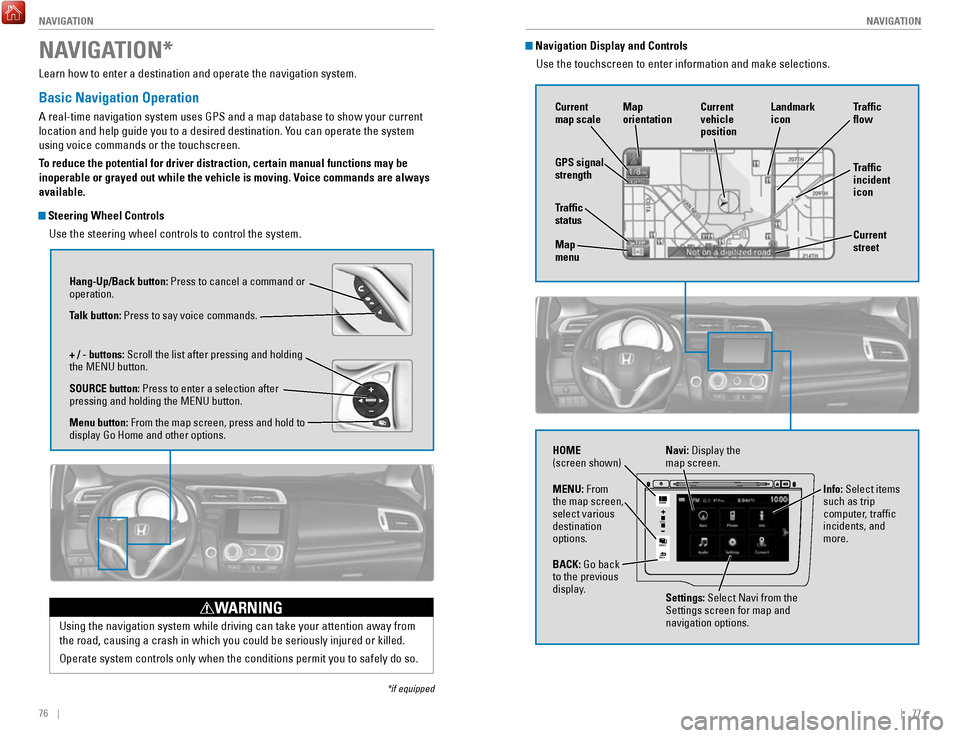
Steering Wheel Controls
Use the steering wheel controls to control the system.
NAVIGATION*
*if equipped
Using the navigation system while driving can take your attention away f\
rom
the road, causing a crash in which you could be seriously injured or kil\
led.
Operate system controls only when the conditions permit you to safely do\
so.
WARNING
Hang-Up/Back button: Press to cancel a command or
operation.
Talk button: Press to say voice commands.
+ / - buttons: Scroll the list after pressing and holding
the MENU button.
SOURCE button: Press to enter a selection after
pressing and holding the MENU button.
Menu button: From the map screen, press and hold to
display Go Home and other options.
Navigation Display and ControlsUse the touchscreen to enter information and make selections.
VO L
MENU
BACK
HOME
Navi: Display the
map screen.
HOME
(screen shown)
Info: Select items
such as trip
computer, traffic
incidents, and
more.
BACK: Go back
to the previous
display. Settings: Select Navi from the
Settings screen for map and
navigation options.
MENU: From
the map screen,
select various
destination
options.
GPS signal
strength
Traffic
incident
icon Traffic
flow
Current
map scale Current
vehicle
position
Map
orientation
Current
street
Traffic
status
Map
menu Landmark
icon
Page 46 of 76
84 || 85
DRIVING
DRIVING
Improper accessories or modifications can affect your vehicle’s handling, and
stability, and performance, and cause a crash in which you can be seriously hurt
or killed.
Follow all instructions in the vehicle owner’s guide regarding accessories and
modifications.
WARNING
In addition:
•
During the first 600 miles (1,000 km) of operation, avoid sudden acc\
eleration or
full throttle operation so as not to damage the engine or powertrain.
•
Avoid hard braking for the first 200 miles (300 km). You should also follow this
when the brake pads are replaced.
Maximum Load Limit
Carrying too much cargo or improperly storing it can affect your vehicle\
’s handling,
stability, stopping distance, and tires, and make it unsafe.
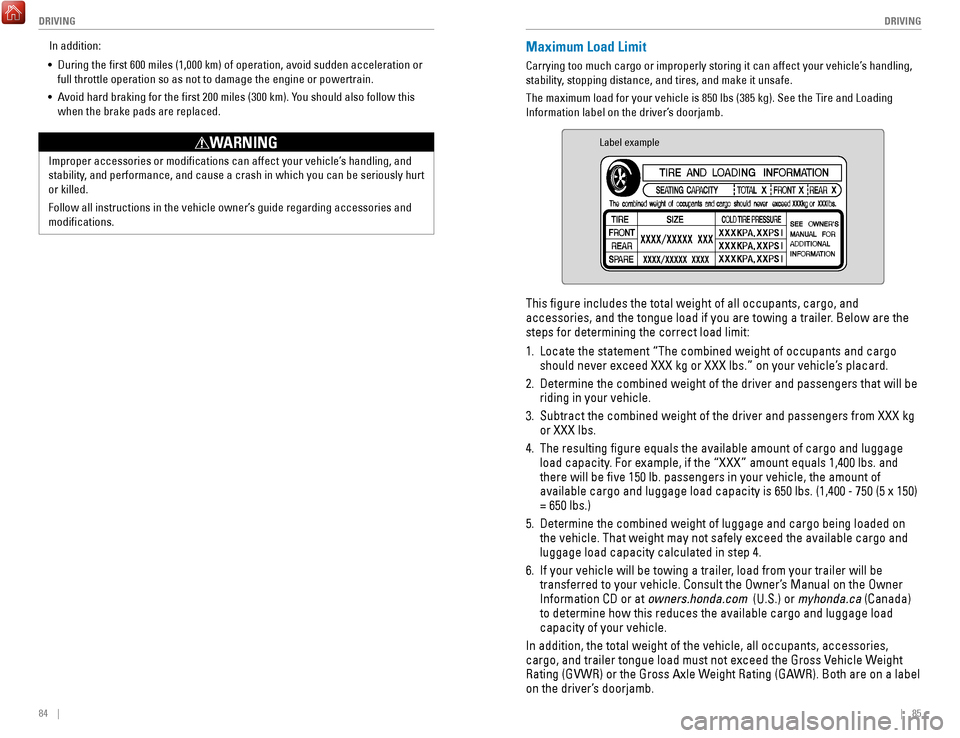
The maximum load for your vehicle is 850 lbs (385 kg). See the Tire and Loading
Information label on the driver’s doorjamb.
Label example
This figure includes the total weight of all occupants, cargo, and
accessories, and the tongue load if you are towing a trailer. Below are the
steps for determining the correct load limit:
1.
Locate the statement “The combined weight of occupants and cargo
should never exceed XXX kg or XXX lbs.” on your vehicle’s placard.
2.
Determine the combined weight of the driver and passengers that will be \
riding in your vehicle.
3.
Subtract the combined weight of the driver and passengers from XXX kg
or XXX lbs.
4.
The resulting figure equals the available amount of cargo and luggage \
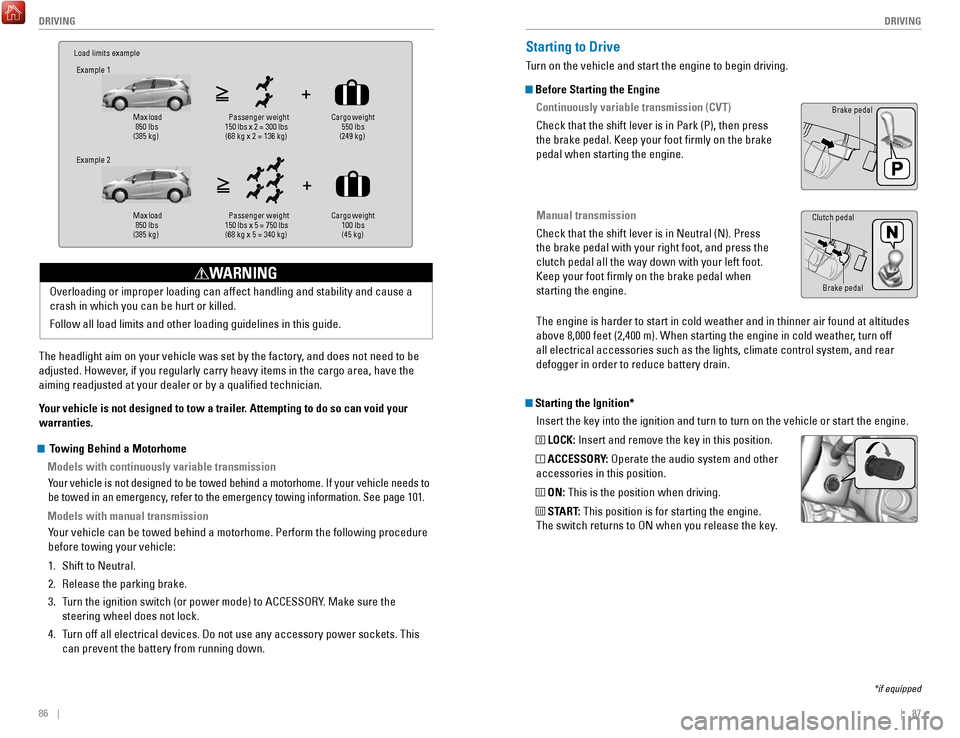
load capacity. For example, if the “XXX” amount equals 1,400 lbs. and
there will be five 150 lb. passengers in your vehicle, the amount of
available cargo and luggage load capacity is 650 lbs. (1,400 - 750 (5 \
x 150)
= 650 lbs.)
5.
Determine the combined weight of luggage and cargo being loaded on
the vehicle. That weight may not safely exceed the available cargo and
luggage load capacity calculated in step 4.
6.
If your vehicle will be towing a trailer, load from your trailer will be
transferred to your vehicle. Consult the Owner’s Manual on the Owner
Information CD or at
owners.honda.com (U.S.) or myhonda.ca (Canada)
to determine how this reduces the available cargo and luggage load
capacity of your vehicle.
In addition, the total weight of the vehicle, all occupants, accessories\
,
cargo, and trailer tongue load must not exceed the Gross Vehicle Weight
Rating (GVWR) or the Gross Axle Weight Rating (GAWR). Both are on a label
on the driver’s doorjamb.
Page 47 of 76
86 || 87
DRIVING
DRIVING
Load limits example
Example 1
Max load
850 lbs
(385 kg) Pass
enger weight
150 lbs x 2 = 300 lbs (68 kg x 2 = 136 kg) Cargo weight
550 lbs
(249 kg)
Example 2
Max load
850 lbs
(385 kg) Pa
ssenger w eight
150 lbs x 5 = 750 lbs (68 kg x 5 = 340 kg) Cargo weight
100 lbs
(45 kg)
The headlight aim on your vehicle was set by the factory, and does not need to be
adjusted. However, if you regularly carry heavy items in the cargo area, have the
aiming readjusted at your dealer or by a qualified technician.
Your vehicle is not designed to tow a trailer. Attempting to do so can void your
warranties. Overloading or improper loading can affect handling and stability and ca\
use a
crash in which you can be hurt or killed.
Follow all load limits and other loading guidelines in this guide.
WARNING
Starting the Ignition*
Insert the key into the ignition and turn to turn on the vehicle or star\
t the engine.
0 LOCK: Insert and remove the key in this position.
I ACCESSORY: Operate the audio system and other
accessories in this position.
II ON: This is the position when driving.
III START: This position is for starting the engine.
The switch returns to ON when you release the key.
Starting to Drive
Turn on the vehicle and start the engine to begin driving.
Before Starting the Engine
Continuously variable transmission (CVT)
Check that the shift lever is in Park (P), then press
the brake pedal. Keep your foot firmly on the brake
pedal when starting the engine.
Manual transmission
Check that the shift lever is in Neutral (N). Press
the brake pedal with your right foot, and press the
clutch pedal all the way down with your left foot.
Keep your foot firmly on the brake pedal when
starting the engine.
Brake pedal
The engine is harder to start in cold weather and in thinner air found a\
t altitudes
above 8,000 feet (2,400 m). When starting the engine in cold weather, turn off
all electrical accessories such as the lights, climate control system, a\
nd rear
defogger in order to reduce battery drain.
*if equipped
Brake pedal
Clutch pedal
Towing Behind a Motorhome
Models with continuously variable transmission
Your vehicle is not designed to be towed behind a motorhome. If your vehi\
cle needs to
be towed in an emergency, refer to the emergency towing information. See page 101.
Models with manual transmissionYour vehicle can be towed behind a motorhome. Perform the following proce\
dure
before towing your vehicle:
1.
Shift to Neutral.
2.
Release the parking brake.
3.
Turn the ignition switch (or power mode) to ACCESSORY. Make sure the
steering wheel does not lock.
4.
Turn off all electrical devices. Do not use any accessory power sockets. This
can prevent the battery from running down.
Page 50 of 76

Also known as Electronic Stability Control (ESC), VSA helps to stabili\
ze the vehicle
during cornering if the vehicle turns mor")
92 || 93
DRIVING
DRIVING
Vehicle Stability Assist (VSA®)
Also known as Electronic Stability Control (ESC), VSA helps to stabili\
ze the vehicle
during cornering if the vehicle turns more or less than what was intende\
d. It
assists in maintaining traction on slippery surfaces by regulating engin\
e output and
selectively applying the brakes.
Turning VSA On or Off
VSA is turned on every time you start the engine,
even if you previously turned it off. If you turn VSA
off, your vehicle has normal braking and cornering
ability, but VSA traction and stability enhancement
become less effective.
Press and hold the VSA OFF button until you hear a
beep to turn VSA on or off. The VSA OFF indicator
appears when the system is off.
When VSA is turned off, traction control stops functioning, which may ma\
ke it
easier when trying to free your vehicle if it is stuck in mud or snow.
VSA OFF indicator
VSA OFF button
Cruise Control*
Maintain a constant vehicle speed without having to keep your foot on th\
e
accelerator pedal. Use cruise control on freeways or open roads where yo\
u can
travel at a constant speed with little acceleration or deceleration.
CRUISE button
RES/+ button
-/SET button CANCEL button
Improper use of the cruise control can lead to a crash.
Use cruise control only when traveling on open highways in good weather.
WARNING
Activating and Setting the Vehicle Speed 1.
Press CRUISE. The CRUISE MAIN indicator appears.
2.
Accelerate to the desired speed (above 25 mph/
40 km/h). Take your foot off the pedal and press
-/SET to set the speed. The CRUISE CONTROL indicator
appears.
Adjusting the Vehicle Speed
Press RES/+ to increase or -/SET to decrease.
Each time you press the button, the vehicle speed is
increased or decreased by about 1 mph (1.6 km/h). If you
keep the button pressed, the vehicle speed increases or
decreases until you release it.
Canceling Cruise ControlPress CANCEL or the brake pedal. The CRUISE CONTROL
indicator goes off.
After cruise control has been canceled, you can still
resume the prior set speed by pressing RES/+ while
driving at a speed of at least 25 mph (40 km/h).
Press CRUISE to turn the system off.
ECON Button*
Can help improve your fuel economy by adjusting the performance of the e\
ngine,
transmission, air conditioning, and cruise control*.
Press the ECON button to turn the system on or off.
The ECON Mode indicator appears when the system
is turned on.
*if equipped
Page 51 of 76
94 || 95
DRIVING
DRIVING
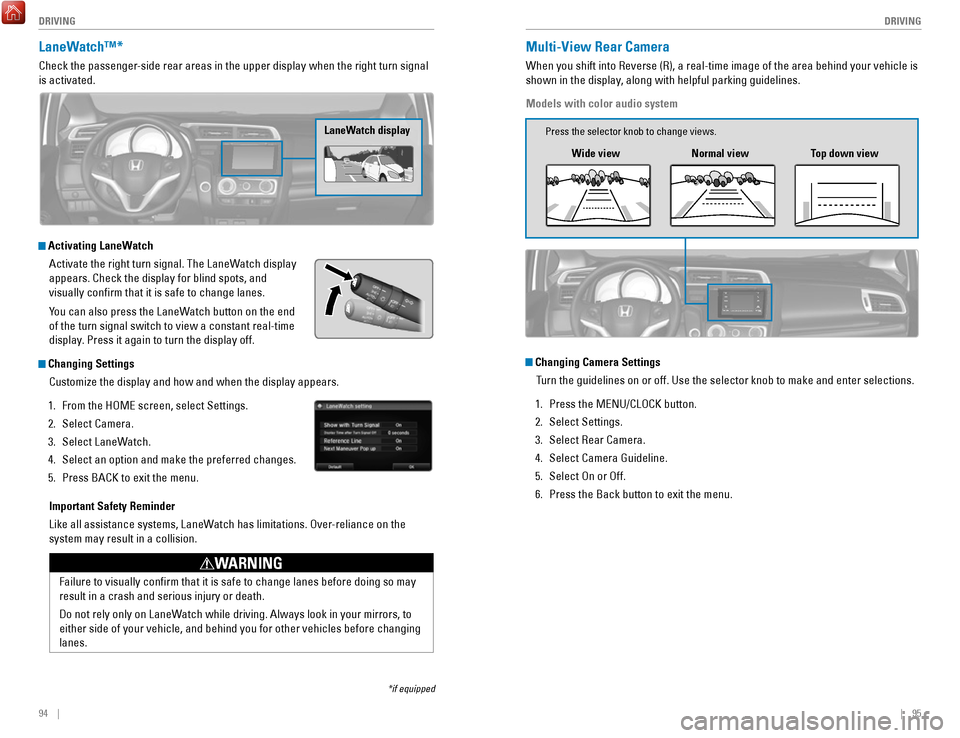
LaneWatch™*
Check the passenger-side rear areas in the upper display when the right turn signal
is activated.
LaneWatch display
Activating LaneWatch
Activate the right turn signal. The LaneWatch display
appears. Check the display for blind spots, and
visually confirm that it is safe to change lanes.
You can also press the LaneWatch button on the end
of the turn signal switch to view a constant real-time
display. Press it again to turn the display off.
Changing SettingsCustomize the display and how and when the display appears.
1.
From the HOME screen, select Settings.
2.
Select Camera.
3.
Select LaneWatch.
4.
Select an option and make the preferred changes.
5.
Press BACK to exit the menu.
Important Safety Reminder
Like all assistance systems, LaneWatch has limitations. Over-reliance on the
system may result in a collision.
Failure to visually confirm that it is safe to change lanes before doi\
ng so may
result in a crash and serious injury or death.
Do not rely only on LaneWatch while driving. Always look in your mirrors, to
either side of your vehicle, and behind you for other vehicles before ch\
anging
lanes.
WARNING
*if equipped
Multi-View Rear Camera
When you shift into Reverse (R), a real-time image of the area behind \
your vehicle is
shown in the display, along with helpful parking guidelines.
Models with color audio system
Wide view Normal viewTop down view
Changing Camera Settings
Turn the guidelines on or off. Use the selector knob to make and enter se\
lections.
1.
Press the MENU/CLOCK button.
2.
Select Settings.
3.
Select Rear Camera.
4.
Select Camera Guideline.
5.
Select On or Off.
6.
Press the Back button to exit the menu.
Press the selector knob to change views.