change time HONDA FIT 2018 Owner's Manual (in English)
[x] Cancel search | Manufacturer: HONDA, Model Year: 2018, Model line: FIT, Model: HONDA FIT 2018Pages: 599, PDF Size: 42.24 MB
Page 4 of 599
Contents
This owner’s manual should be considered a permanent part of the
vehicle and should remain with the vehicle when it is sold.
This owner’s manual covers all models of your vehicle. You may find
descriptions of equipment and features that are not on your
particular model.
Images throughout this owner’s manual (including the front cover)
represent features and equipment that are available on some, but
not all, models. Your particular mo del may not have some of these
features.
This owner’s manual is for vehicles sold in the United States and
Canada.
The information and specifications in cluded in this publication were
in effect at the time of approval for printing. Honda Motor Co., Ltd.
reserves the right, however, to discontinue or change specifications
or design at any time without notice and without incurring any
obligation.2 Safe Driving P. 31
For Safe Driving P. 32 Seat Belts P. 36 Airbags P. 46
2Instrument Panel P. 75
Indicators P. 76 Gauges and Displays P. 103
2Controls P. 121
Clock P. 122 Locking and Unlocking the Doors P. 124
Opening and Closing the Windows P. 151
Operating the Switches Around the Steering Wheel P. 154
Interior Lights/Interior Convenience Items P. 182
2 Features P. 201
Audio System P. 202 Audio System Basic Operation P. 208, 229
Customized Features P. 318, 325 Bluetooth® HandsFreeLink ® P. 340, 365
2 Driving P. 399
Before Driving P. 400 Towing a Trailer P. 405
Multi-View Rear Camera P. 481
2Maintenance P. 487
Before Performing Maintenance P. 488 Maintenance MinderTM P. 491
Checking and Maintaining Wiper Blades P. 518
Heating and Cooling System
*/Climate Control System* Maintenance P. 535
2 Handling the Unexpected P. 543
Tools P. 544 If a Tire Goes Flat P. 545
Overheating P. 558 Indicator, Coming On/Blinking P. 560 Fuses P. 564
2 Information P. 573
Specifications P. 574 Identification Numbers P. 576
Emissions Testing P. 580 Warranty Coverages P. 582
18 FIT JAZZ-31T5A6300.book 2 ページ 2018年6月29日 金曜日 午後4時11分
Page 24 of 599
22
Quick Reference Guide
VSA® On and Off (P460)
● The vehicle stability assist (VSA® ) system
helps stabilize the vehicle during
cornering, and helps maintain traction
while accelerating on loose or slippery
road surfaces.
● VSA ® comes on automatically every time
you start the engine.
● To partially disable VSA functionality/
features, press and hold button until you
hear a beep.
Cruise Control* (P428)
● Cruise control allows you to maintain a
set speed without keeping your foot on
the accelerator pedal.
● To use cruise control, press the CRUISE
button, then press the -/ SET button once
you have achieved the desired speed
(above 25 mph or 40 km/h).
CMBSTM On and Off*
(P475)
● When a possible collision is likely
unavoidable, the CMBS
TM can help you to
reduce the vehicle speed and the severity
of the collision.
● To turn the CMBS
TM on or off, press and
hold the button until you hear a beep.
Tire Pressure Monitoring
System (TPMS)
(P463)
● Detects a change in tire conditions and
overall dimensions due to decrease in tire
pressures.
● TPMS is turned on automatically every
time you start the engine.
● A calibration procedure must be
performed when certain conditions arise.
U.S. models only
18 FIT JAZZ-31T5A6300.book 22 ページ 2018年6月29日 金曜日 午後4時11分
Page 86 of 599
84
uuIndicators u
Instrument Panel
*1:Models with the smart entry system have an ENGINE START/STOP button instead of an ignition switch.
IndicatorNameOn/BlinkingExplanationMessage*
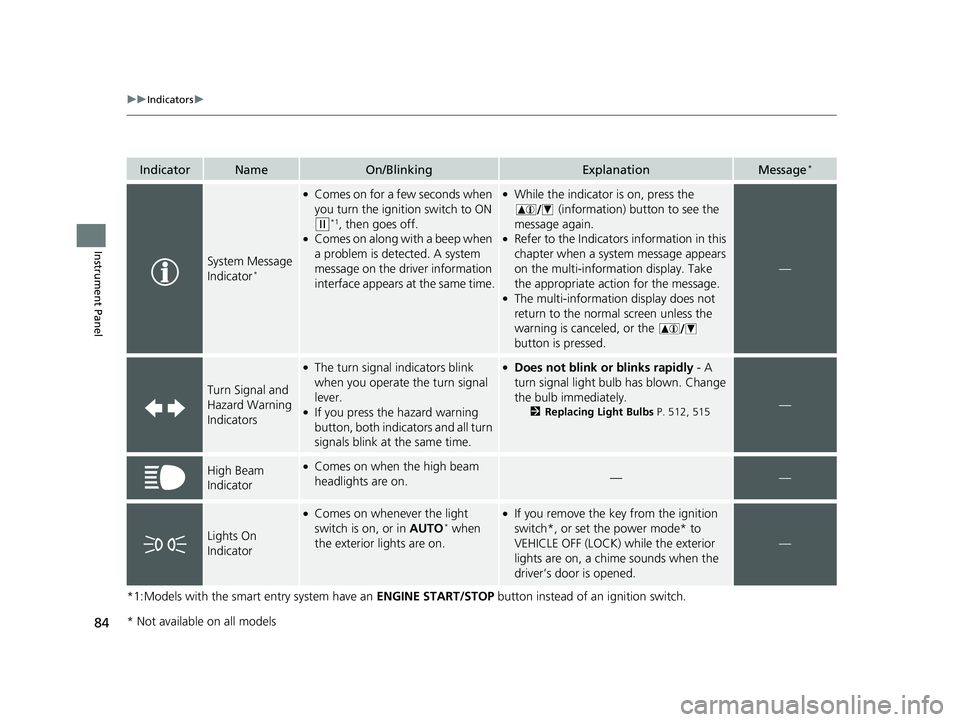
System Message
Indicator*
●Comes on for a few seconds when
you turn the ignition switch to ON
(w*1, then goes off.●Comes on along with a beep when
a problem is detected. A system
message on the driver information
interface appears at the same time.
●While the indicator is on, press the
(information) button to see the
message again.
●Refer to the Indicators information in this
chapter when a system message appears
on the multi-information display. Take
the appropriate action for the message.
●The multi-information display does not
return to the normal screen unless the
warning is canceled, or the
button is pressed.
—
Turn Signal and
Hazard Warning
Indicators
●The turn signal indicators blink
when you operate the turn signal
lever.
●If you press the hazard warning
button, both indicators and all turn
signals blink at the same time.
●Does not blink or blinks rapidly - A
turn signal light bulb has blown. Change
the bulb immediately.
2 Replacing Light Bulbs P. 512, 515—
High Beam
Indicator●Comes on when the high beam
headlights are on.——
Lights On
Indicator
●Comes on whenever the light
switch is on, or in AUTO* when
the exterior lights are on.
●If you remove the key from the ignition
switch*, or set the power mode* to
VEHICLE OFF (LOCK) while the exterior
lights are on, a chime sounds when the
driver’s door is opened.
—
* Not available on all models
18 FIT JAZZ-31T5A6300.book 84 ページ 2018年6月29日 金曜日 午後4時11分
Page 98 of 599
96
uuIndicators uMulti-Information Display Warn ing and Information Messages*
Instrument Panel
MessageConditionExplanation
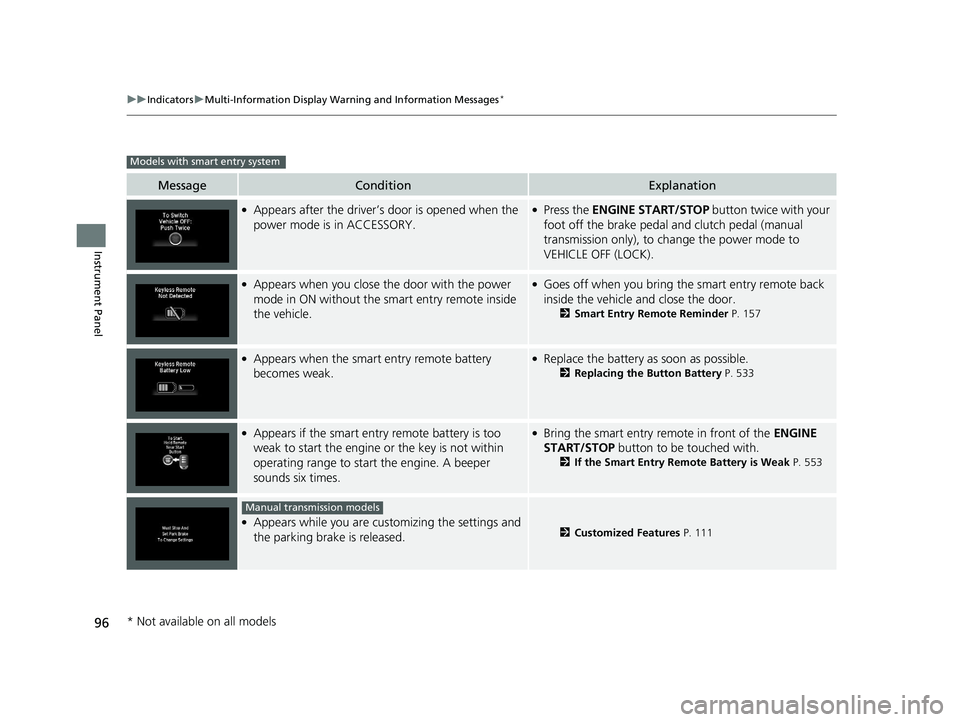
●Appears after the driver’s door is opened when the
power mode is in ACCESSORY.●Press the ENGINE START/STOP button twice with your
foot off the brake pedal and clutch pedal (manual
transmission only), to change the power mode to
VEHICLE OFF (LOCK).
●Appears when you close the door with the power
mode in ON without the smart entry remote inside
the vehicle.●Goes off when you bring the smart entry remote back
inside the vehicle and close the door.
2 Smart Entry Remote Reminder P. 157
●Appears when the smart entry remote battery
becomes weak.●Replace the battery as soon as possible.
2Replacing the Button Battery P. 533
●Appears if the smart entry remote battery is too
weak to start the engine or the key is not within
operating range to start the engine. A beeper
sounds six times.●Bring the smart entry remote in front of the ENGINE
START/STOP button to be touched with.
2If the Smart Entry Remote Battery is Weak P. 553
●Appears while you are customizing the settings and
the parking brake is released.2Customized Features P. 111
Models with smart entry system
Manual transmission models
* Not available on all models
18 FIT JAZZ-31T5A6300.book 96 ページ 2018年6月29日 金曜日 午後4時11分
Page 109 of 599
107
uuGauges and Displays uMulti-Information Display*
Continued
Instrument Panel
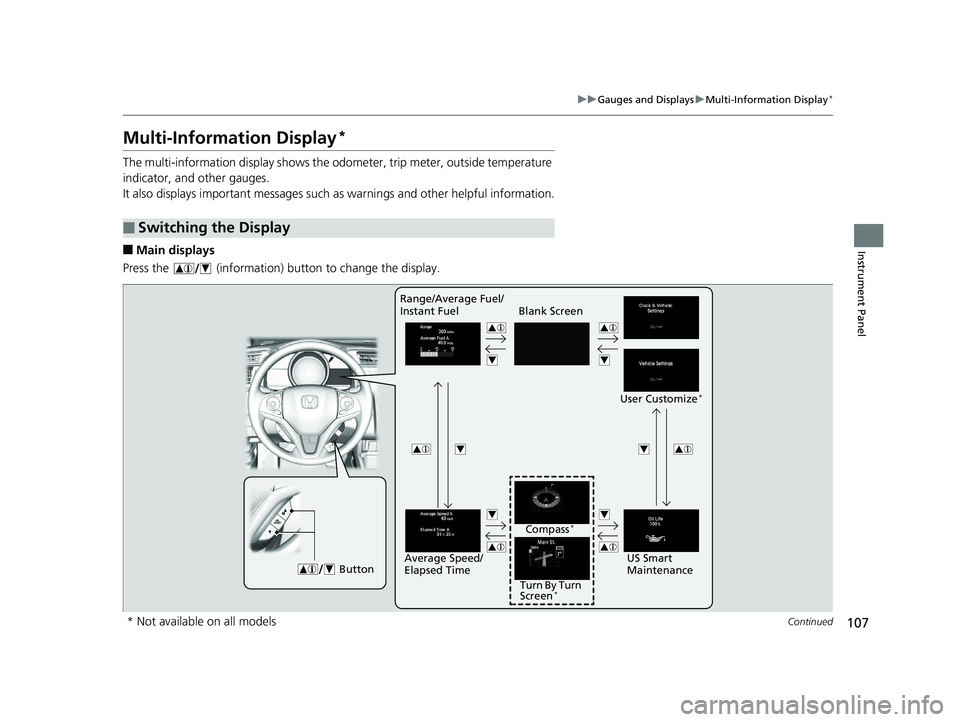
Multi-Information Display*
The multi-information display shows the odometer, trip meter, outside temperature
indicator, and other gauges.
It also displays important messages such as warnings and other helpful information.
■Main displays
Press the (information) button to change the display.
■Switching the Display
Blank Screen
User Customize
*
ButtonUS Smart
Maintenance
Range/Average Fuel/
Instant Fuel
Turn By Turn
Screen
*
Compass*
Average Speed/
Elapsed Time
* Not available on all models
18 FIT JAZZ-31T5A6300.book 107 ページ 2018年6月29日 金曜日 午後4時11分
Page 111 of 599
Continued109
uuGauges and Displays uMulti-Information Display*
Instrument Panel
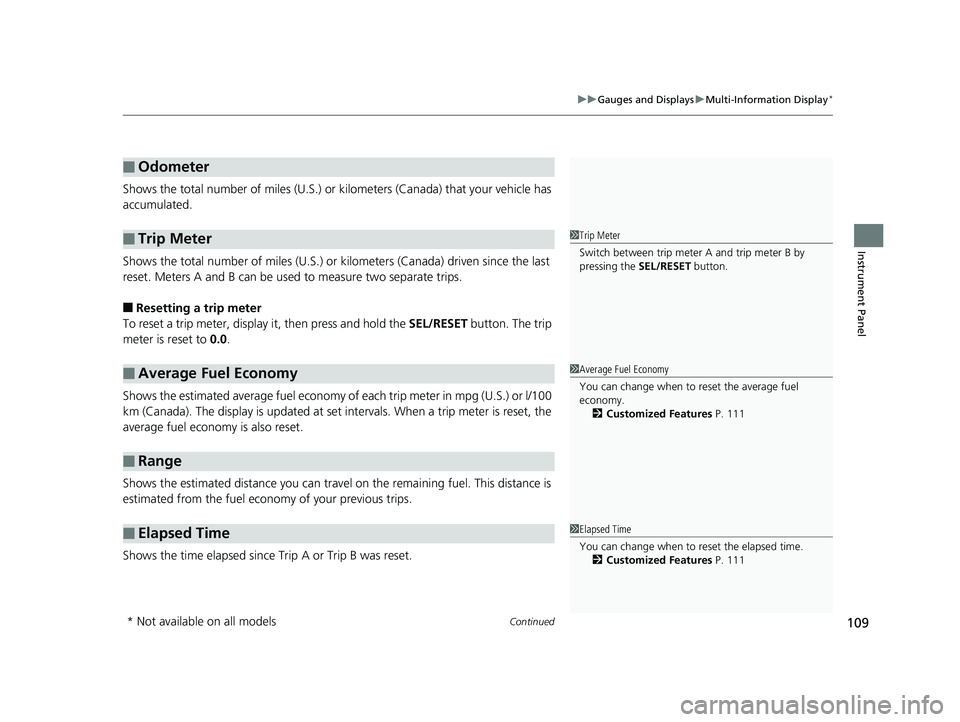
Shows the total number of miles (U.S.) or kilometers (Canada) that your vehicle has
accumulated.
Shows the total number of miles (U.S.) or k ilometers (Canada) driven since the last
reset. Meters A and B can be used to measure two separate trips.
■Resetting a trip meter
To reset a trip meter, display it, then press and hold the SEL/RESET button. The trip
meter is reset to 0.0.
Shows the estimated average fuel economy of each trip meter in mpg (U.S.) or l/100
km (Canada). The display is updated at set intervals. When a trip meter is reset, the
average fuel economy is also reset.
Shows the estimated distance you can travel on the remaining fuel. This distance is
estimated from the fuel economy of your previous trips.
Shows the time elapsed since Trip A or Trip B was reset.
■Odometer
■Trip Meter
■Average Fuel Economy
■Range
■Elapsed Time
1 Trip Meter
Switch between trip meter A and trip meter B by
pressing the SEL/RESET button.
1Average Fuel Economy
You can change when to reset the average fuel
economy.
2 Customized Features P. 111
1Elapsed Time
You can change when to reset the elapsed time.
2 Customized Features P. 111
* Not available on all models
18 FIT JAZZ-31T5A6300.book 109 ページ 2018年6月29日 金曜日 午後4時11分
Page 117 of 599
115
uuGauges and Displays uMulti-Information Display*
Continued
Instrument Panel
*1 : Default Setting
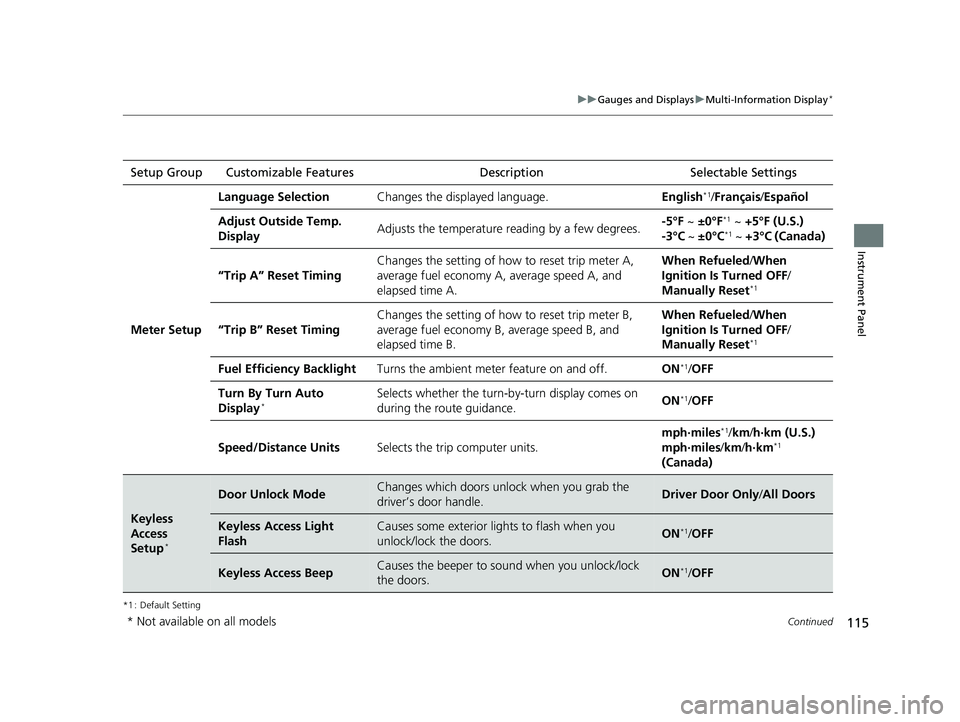
Setup Group Customizable Features Description Selectable Settings
Meter Setup
Language SelectionChanges the displayed language.English*1/Français /Español
Adjust Outside Temp.
DisplayAdjusts the temperature r eading by a few degrees.-5°F ~ ±0°F*1 ~ +5°F (U.S.)
-3°C ~ ±0°C*1 ~ +3°C (Canada)
“Trip A” Reset Timing
Changes the setting of how to reset trip meter A,
average fuel economy A, average speed A, and
elapsed time A.When Refueled /When
Ignition Is Turned OFF /
Manually Reset
*1
“Trip B” Reset Timing
Changes the setting of ho w to reset trip meter B,
average fuel economy B, average speed B, and
elapsed time B.When Refueled /When
Ignition Is Turned OFF /
Manually Reset
*1
Fuel Efficiency BacklightTurns the ambient meter feature on and off.ON*1/ OFF
Turn By Turn Auto
Display*Selects whether the turn-b y-turn display comes on
during the route guidance.ON*1/ OFF
Speed/Distance UnitsSelects the trip computer units.
mph∙miles*1/ km/ h∙km (U.S.)
mph∙miles /km/ h∙km*1
(Canada)
Keyless
Access
Setup
*
Door Unlock ModeChanges which doors unlock when you grab the
driver’s door handle.Driver Door Only /All Doors
Keyless Access Light
FlashCauses some exterior li ghts to flash when you
unlock/lock the doors.ON*1/ OFF
Keyless Access BeepCauses the beeper to sound when you unlock/lock
the doors.ON*1/OFF
* Not available on all models
18 FIT JAZZ-31T5A6300.book 115 ページ 2018年6月29日 金曜日 午後4時11分
Page 118 of 599
116
uuGauges and Displays uMulti-Information Display*
Instrument Panel
*1 : Default Setting
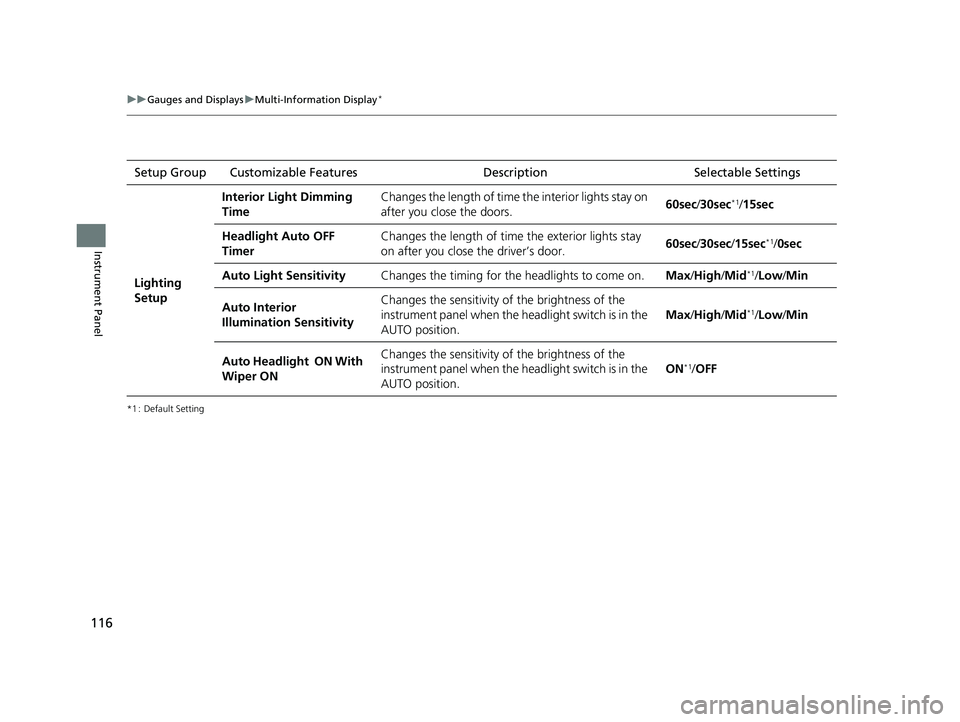
Setup Group Customizable Features DescriptionSelectable Settings
Lighting
Setup
Interior Light Dimming
TimeChanges the length of time the interior lights stay on
after you close the doors.60sec/30sec*1/15sec
Headlight Auto OFF
TimerChanges the length of time the exterior lights stay
on after you close the driver’s door.60sec /30sec /15sec*1/ 0sec
Auto Light SensitivityChanges the timing for the headlights to come on.Max/High /Mid*1/Low/ Min
Auto Interior
Illumination SensitivityChanges the sensitivity of the brightness of the
instrument panel when the headlight switch is in the
AUTO position.
Max/High /Mid*1/Low/ Min
Auto Headlight ON With
Wiper ONChanges the sensitivity of the brightness of the
instrument panel when the headlight switch is in the
AUTO position.
ON*1/OFF
18 FIT JAZZ-31T5A6300.book 116 ページ 2018年6月29日 金曜日 午後4時11分
Page 119 of 599
117
uuGauges and Displays uMulti-Information Display*
Continued
Instrument Panel
*1 : Default Setting
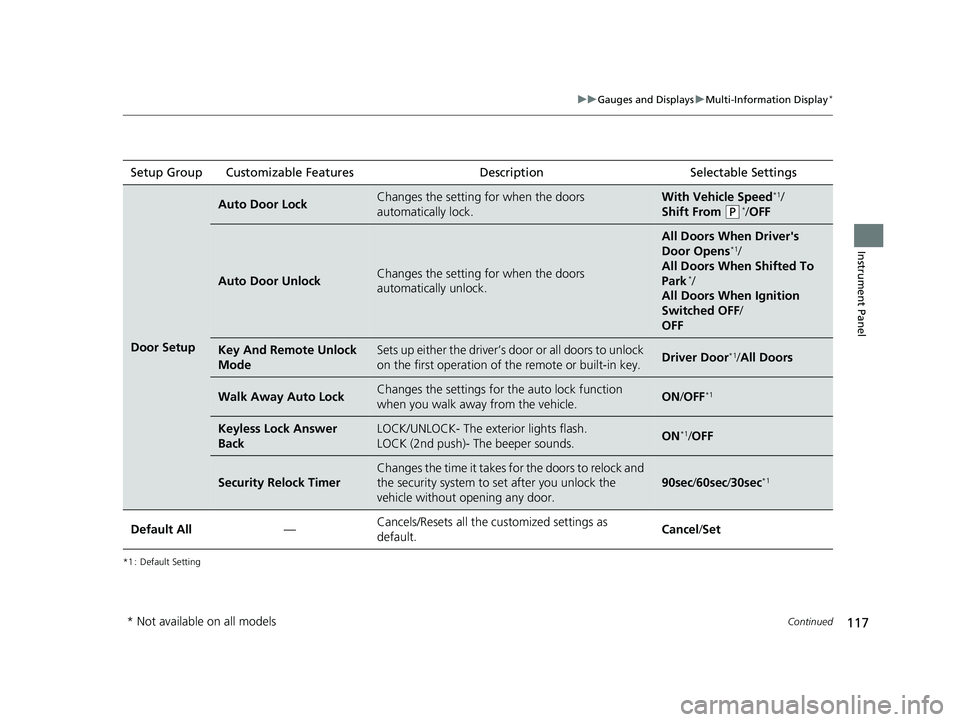
Setup Group Customizable Features Description Selectable Settings
Door Setup
Auto Door LockChanges the setting for when the doors
automatically lock.With Vehicle Speed*1/
Shift From
(P*/ OFF
Auto Door UnlockChanges the setting for when the doors
automatically unlock.
All Doors When Driver's
Door Opens*1/
All Doors When Shifted To
Park
*/
All Doors When Ignition
Switched OFF /
OFF
Key And Remote Unlock
ModeSets up either the driver’s door or all doors to unlock
on the first operation of the remote or built-in key.Driver Door*1/ All Doors
Walk Away Auto LockChanges the settings for the auto lock function
when you walk away from the vehicle.ON /OFF*1
Keyless Lock Answer
BackLOCK/UNLOCK- The exterior lights flash.
LOCK (2nd push)- The beeper sounds.ON*1/OFF
Security Relock Timer
Changes the time it takes for the doors to relock and
the security system to set after you unlock the
vehicle without opening any door.
90sec /60sec /30sec*1
Default All—Cancels/Resets all the customized settings as
default.Cancel /Set
* Not available on all models
18 FIT JAZZ-31T5A6300.book 117 ページ 2018年6月29日 金曜日 午後4時11分
Page 151 of 599
Continued149
uuSecurity System uSecurity System Alarm
Controls
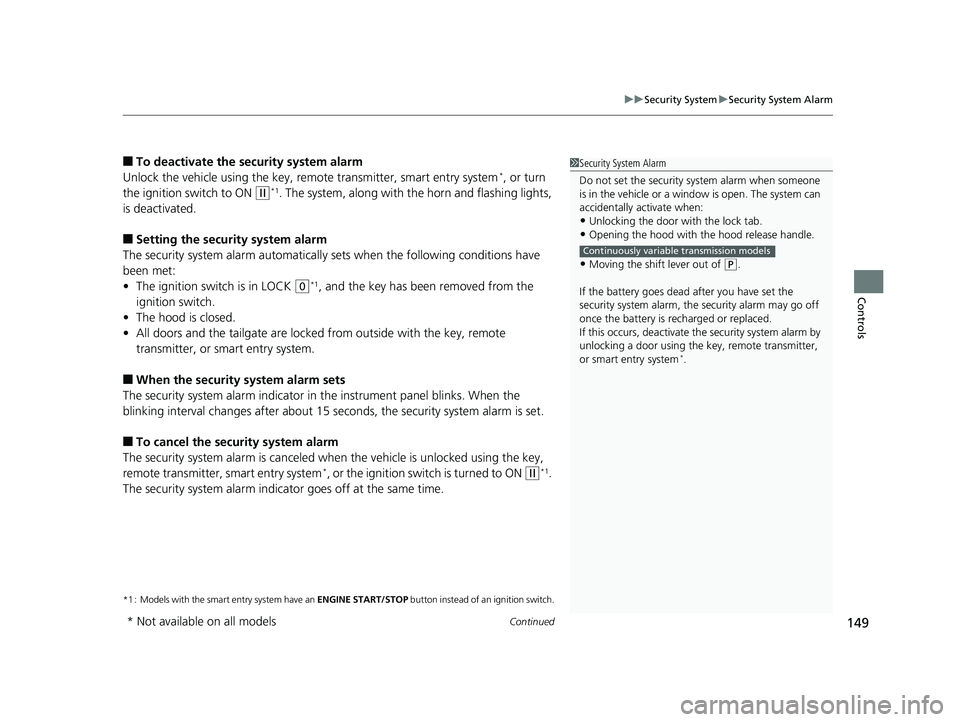
■To deactivate the security system alarm
Unlock the vehicle using the key, remote transmitter, smart entry system*, or turn
the ignition switch to ON
(w*1. The system, along with the horn and flashing lights,
is deactivated.
■Setting the security system alarm
The security system alarm automatically sets when the following conditions have
been met:
• The ignition switch is in LOCK
(0*1, and the key has been removed from the
ignition switch.
• The hood is closed.
• All doors and the tailgate are locked from outside with the key, remote
transmitter, or smart entry system.
■When the security system alarm sets
The security system alarm indicator in the instrument panel blinks. When the
blinking interval changes after about 15 se conds, the security system alarm is set.
■To cancel the security system alarm
The security system alarm is canceled wh en the vehicle is unlocked using the key,
remote transmitter, smart entry system
*, or the ignition switch is turned to ON (w*1.
The security system alarm indica tor goes off at the same time.
*1 : Models with the smart entry system have an ENGINE START/STOP button instead of an ignition switch.
1Security System Alarm
Do not set the security system alarm when someone
is in the vehicle or a window is open. The system can
accidentally activate when:
•Unlocking the door with the lock tab.•Opening the hood with the hood release handle.
•Moving the shift lever out of ( P.
If the battery goes dead after you have set the
security system alarm, the security alarm may go off
once the battery is re charged or replaced.
If this occurs, deactivate the security system alarm by
unlocking a door using the ke y, remote transmitter,
or smart entry system
*.
Continuously variable transmission models
* Not available on all models
18 FIT JAZZ-31T5A6300.book 149 ページ 2018年6月29日 金曜日 午後4時11分